
If you encrypt PHI but handle keys by hand, your risk stays high. I’d boil this article down to one point: good PHI encryption depends on how keys are created, stored, rotated, recovered, logged, and destroyed.
Here’s the short version:
- I need keys stored away from PHI, not on the same system
- I should use HSMs or cloud KMS for key storage and control
- I want automatic rotation, often on a 90- to 365-day schedule for DEKs
- I need envelope encryption with DEKs for data and KEKs for wrapping DEKs
- I should lock key access with RBAC, MFA, separation of duties, and M-of-N approvals
- I need tamper-resistant audit logs for creation, use, rotation, recovery, revocation, and destruction
- I should test backup, restore, and break-glass access instead of just writing runbooks
- I need records, approvals, logs, and test results kept for at least six years under HIPAA record rules
A few facts stand out. The article points to AES-256 as only part of the answer, notes that DEK cryptoperiods are often 90 to 365 days, and says breach risk often comes from key lifecycle gaps, not weak algorithms.
In plain English: automation turns key management from a checklist into a policy-driven system. That helps me protect EHRs, backups, medical devices, APIs, SaaS tools, and cloud workloads without relying on spreadsheets or memory. This automation is a critical component of a broader enterprise risk strategy.
| Area | What matters most |
|---|---|
| Key storage | Keep keys separate from encrypted PHI |
| Rotation | Let KMS enforce schedules and re-wrap DEKs after KEK changes |
| Access | Use RBAC, MFA, and approval controls |
| Logging | Record every key event with time, actor, and outcome |
| Recovery | Use tested restore and break-glass workflows |
| Compliance | Align controls to HIPAA, NIST SP 800-57, and FIPS 140-2/140-3 |
If I were setting this up, I’d start with the systems that store or send ePHI, automate the riskiest key tasks first, and make sure every control has a clear owner and written proof.
Encryption Key Management Explained Simply
sbb-itb-535baee
How Automated Key Management Systems Work
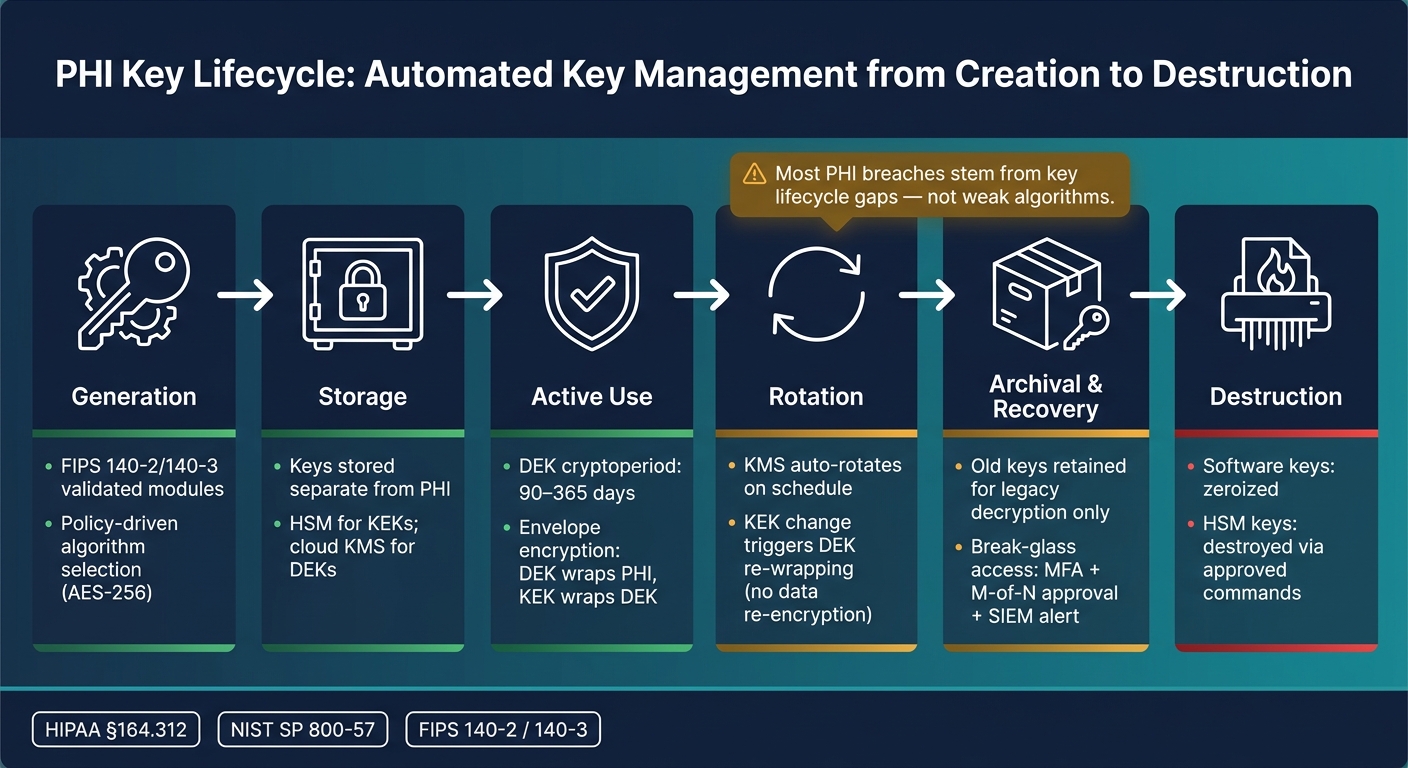
PHI Key Lifecycle: Automated Key Management from Creation to Destruction
An automated key management system puts the whole key process in one place: key generation, storage, rotation, access control, and logging. The big idea is simple. Policy runs the system. That policy layer is what makes key management work at scale instead of turning into a mess of manual steps. A central key service applies access rules and also handles certificate-based keys for secure application and network access.
The Key Lifecycle: From Creation to Destruction
Every cryptographic key used to protect PHI follows a defined lifecycle that lines up with NIST SP 800-57 guidance. In practice, the stages that matter most for automation are active use, rotation, archival, recovery, and destruction.
The active-use period, also called the cryptoperiod, sets the schedule for rotation. For DEKs protecting ePHI, healthcare groups often use cryptoperiods of 90 to 365 days, with the KMS enforcing rotation automatically when each period ends.[2][4] If there’s a compromise, a privileged staff member leaves, or there’s a major configuration change, rekey right away.
One of the trickier parts is keeping access to older patient records after a key changes. You don’t want old keys encrypting new data, but you still need them to decrypt legacy records like EHR records, clinical imaging, and long-term research archives. So the old keys are retired from new encryption and kept in archive for decryption only. Every recovery event needs authorization and logging. When a key reaches the end of its life, software keys should be zeroized, and HSM keys should be destroyed with approved commands so no residual material remains.
Core Architecture: DEKs, KEKs, HSMs, and KMS
These lifecycle rules are enforced with envelope encryption. A data encryption key, or DEK, encrypts the PHI itself, whether that data sits in a database table, storage bucket, or message queue. A key encryption key, or KEK, then encrypts the DEK, so the raw key material stays protected.
In cloud KMS workflows, a data key is often returned in two versions:
- Plaintext for immediate use
- A wrapped version that can be stored safely with the data
The envelope stored with the data includes the ciphertext, the wrapped DEK, algorithm identifiers, encryption context, and other metadata. That setup makes decryption auditable and tied back to policy.[5]
This layered setup is what makes automation possible at large scale. A health system may need to handle millions of DEKs across EHR databases, imaging systems, and billing platforms, while only a small set of KEKs lives inside high-assurance modules. That matters because rotating a KEK does not mean re-encrypting all the data underneath it. You just re-wrap the DEKs. In most cases, health systems keep core KEKs in HSMs and rely on cloud KMS for cloud workloads and APIs.
Access Controls and Audit Trails for Key Use
After the key hierarchy is in place, access controls decide who can use each layer. Role-based access control sets clear roles, such as Key Administrator, Security Officer, and application service accounts. Any human administrator using the key console or handling sensitive operations should use multifactor authentication.
For the highest-risk actions, like KEK export, root key changes, or emergency recovery, dual control or M-of-N approvals makes sure one person can’t act alone. Separation of duties matters too. The people who define policy, approve changes, and enforce those changes should not all be the same people.
Every key event should be logged: creation, use, rotation, recovery, revocation, and destruction. Those records should include timestamps, actor identity, source IP or service, and outcome status. The logs also need to be tamper-resistant, append-only, and stored apart from day-to-day operational systems.
Why does that matter? Because unusual key activity can be an early warning sign. Monitoring against a baseline of normal key use can spot issues like a sudden spike in decryption for a PHI data store or access from an unexpected location. When those logs are fed into a SIEM, teams can get real-time alerts when policy violations happen, which supports fast incident response under HIPAA's Security Rule. Those same logs also support compliance review and incident response.
Compliance and Risk Requirements for PHI Key Management
Once key workflows are automated, the next step is proving those controls meet HIPAA and NIST.
HIPAA and NIST Requirements That Shape Key Policies
HIPAA makes key management a compliance issue, not just a security task. Under §164.312, covered entities and business associates must address access control, audit controls, integrity, person or entity authentication, and transmission security for any system that creates, receives, maintains, or transmits ePHI.[9][12] In plain terms, the controls discussed earlier - rotation schedules, access logs, and recovery workflows - become the proof you can show for each of those areas.
HIPAA also treats encryption as addressable. That doesn't mean optional in practice. It means organizations need to document risk-based decisions about whether to encrypt ePHI, how to do it, and why that choice makes sense based on risk analysis.[11][14]
NIST SP 800-57 looks at key management as a lifecycle process, from start to finish: pre-operational, operational, post-operational, and destroyed. That includes key generation, storage, recovery, revocation, and destruction.[6][7][1][3] If a key is lost, rotated the wrong way, or destroyed too soon, ePHI can become impossible to recover. That's why lifecycle automation matters so much. It cuts security risk and helps avoid day-to-day operational problems.
FIPS 140-2 and FIPS 140-3 validated modules add another requirement. Secret and private keys must be handled by validated cryptographic modules, and keys set up through automated methods must enter and leave those modules in encrypted form.[8] That rule has a direct effect on how healthcare teams set up their KMS and HSM environments.
Retain policies, approvals, test results, exceptions, and key-event logs for at least six years.[9][12]
Where Healthcare Organizations Face the Highest Operational Risk
These rules hit hardest where key failures can cause the most damage to operations.
Most PHI encryption failures come from gaps in the key lifecycle, not from weak algorithms.
HHS's Annual Report to Congress on Breaches of Unsecured PHI shows that portable media, laptops, and network servers with unsecured PHI are among the most common breach vectors.[10] That points to a familiar problem: uneven encryption coverage across endpoints, servers, and backup systems.
| Lifecycle Phase | Operational Risk | Control Approach | Automation Benefit |
|---|---|---|---|
| Generation | Weak keys from manual provisioning; inconsistent algorithm selection | Policy-driven creation using FIPS-validated modules | Enforces approved algorithms every time |
| Rotation | Missed schedules; inconsistent manual rotation | Cryptoperiod-based rotation enforced by KMS | Eliminates scheduling errors |
| Recovery | Manual access to backup keys without logging | Audited break-glass workflows with approval controls | Creates a full audit trail |
| Destruction | Informal deletion leaving residual key material | Logged zeroization for software keys; approved HSM destruction commands | Ensures key material is removed on schedule |
Break-glass access has to work fast, but each event still needs logging and review.[13] Automation helps on both sides. Teams get the speed they need during an incident, while the audit trail stays intact.
Another common problem is uneven KMS settings across regions or accounts. Unencrypted backups outside KMS control can create PHI protection gaps too. Encrypt every storage and transmission path that can carry ePHI, and document any exception with compensating controls.[13][12]
That is why implementation should start with the systems that store or transmit ePHI.
Implementing Automated Key Management Across Healthcare Systems
Put policy into practice in four moves: inventory ePHI systems, automate the highest-risk workflows, and document every control. That inventory becomes the basis for deciding what to automate first.
Prioritize Systems That Store or Transmit ePHI
Start by inventorying every system that stores or moves ePHI, then map who controls its keys. That includes EHR databases, PACS and imaging archives, clinical data warehouses, APIs, backup repositories, SaaS applications, and connected clinical systems. For each one, document where the data sits, how it travels, and who holds key control.
Next, sort data flows by sensitivity and exposure. Tackle the systems with the biggest ePHI footprint first, then move through the rest of the environment in a steady order. The goal is simple: use one key hierarchy across both on-premises and cloud systems.
Once those high-risk systems are mapped, automate rotation and recovery there first.
Automate Rotation, Recovery, and Break-Glass Workflows
Set key rotation schedules based on data sensitivity and policy rules. If a KEK changes, the KMS should automatically re-wrap any dependent DEKs.
Keep backup keys separate from backup media, and use M-of-N split knowledge[13]. Just writing down restore steps isn't enough. Test them. Then retain drill results, restore logs, and admin change records for six years[15].
Break-glass access needs its own path. It should be fast, protected by MFA, tied to SIEM alerts, and reviewed soon after use. Run drills for this too, so clinical teams and security staff know exactly what happens when urgent access to encrypted PHI is needed.
After these workflows run on their own, send their logs and approvals into a single governance record.
Use Governance Workflows to Document Evidence and Accountability
Keep evidence and ownership in one governance workflow. Censinet RiskOps™ can support that process. Healthcare delivery organizations can build PHI encryption and key management controls straight into enterprise and third-party risk assessments. That can cover EHR vendors, cloud providers, imaging system suppliers, and other business associates that handle ePHI.
The table below turns technical controls into clear evidence, ownership, and remediation tasks.
| Key Management Control Area | Evidence Collection | Assessment Workflows | Remediation Tracking |
|---|---|---|---|
| Key Generation & Storage | HSM/KMS configuration exports; key hierarchy diagrams; FIPS docs | Review against NIST/HIPAA requirements for PHI keys | Tasks to move keys from app code to HSM/KMS |
| Automated Rotation Policies | Rotation schedules; key versioning records; change logs | Assess cadence vs. sensitivity and policy commitments | Tickets to implement or tighten auto-rotation |
| Backup & Recovery | DR runbooks; backup locations; restore drill results | Evaluate resilience and RTO/RPO impacts on care | Actions to fix restore failures or missing drills |
| Break-Glass Emergency Access | Policy documents; drill logs; SIEM alerts for break-glass events | Review for least privilege and strong MFA | Track changes to roles, time limits, and audit depth |
Route each remediation task to a named owner.
Conclusion: What Good Automated Key Management Looks Like
Good automated key management keeps encrypted PHI protected, available to authorized users, and easy to access for the people who need it during clinical care.
That means covering the full key lifecycle: generation, storage, rotation, revocation, and destruction, with as little manual work as possible. Use NIST-aligned policy and FIPS-validated modules to automate key rotation and cut the risk tied to expired or compromised keys. Without that layer, even strong encryption can fall apart if the keys behind it are weak, old, or exposed.
Automation brings consistency to those controls. Rotation happens on schedule. Audit logs stay structured and timestamped. Recovery follows a tested runbook instead of last-minute guesswork. When incidents happen, automated key management helps teams recover faster and leaves a cleaner audit trail than manual processes.
Governance is what ties the whole thing together. Internal controls matter, but vendors that handle ePHI matter too. EHR providers, cloud platforms, imaging system suppliers, and other business associates should meet the same encryption and key management standards your organization expects inside its own walls. For organizations using Censinet RiskOps™, that oversight can also extend to third-party and enterprise risk assessments for vendor controls, tracking, and documentation.
The mark of a mature program isn't just that keys rotate on time. It's that clinical operations keep moving without interruption, break-glass access is rare and fully auditable, and every key control has a named owner with documented evidence. When those three conditions are in place, the program is mature.
FAQs
What is envelope encryption?
Envelope encryption uses a layered approach to protect Protected Health Information. A Data Encryption Key (DEK) encrypts the PHI, and a Key Encryption Key (KEK) protects the DEK.
That setup limits the risk tied to any one key. It also supports granular access control and lets organizations rotate or rewrap DEKs without re-encrypting entire datasets.
How often should PHI keys be rotated?
It depends on the key type and how sensitive the data is.
For high-sensitivity PHI or high-risk systems, rotate keys at least every 90 days. NIST SP 800-57 also suggests rotation after 10,000 operations.
A simple rule of thumb looks like this:
- Data Encryption Keys: every 90–180 days
- Key Encryption Keys: every 6–12 months
- Master Root Keys: every 12–24 months
If there's any suspected breach or a known vulnerability, rotate keys right away.
How do we test break-glass access?
Test break-glass access by checking that you can revoke an encryption key and immediately make the related PHI unreadable, including to the cloud provider. Auditors want proof that this revocation works as intended.
Regular recovery and revocation tests help confirm that your systems respond the way you expect when a key is lost or exposed. They also show that your procedures still work for compliance.
