
Medical device access control is not one tool. It’s a stack. If you want to protect connected devices in hospitals, I’d focus on seven tool types: risk review, device discovery, identity, privileged access, network control, shared-workstation sign-in, and Conditional Access.
Here’s the short version:
- Censinet RiskOps™ helps me track device, vendor, and access risk
- Armis Centrix shows me what medical devices are on the network
- Okta Identity Cloud handles staff sign-in, SSO, and MFA
- CyberArk PAM controls admin and vendor accounts
- Cisco ISE decides which devices can join the network and where they can go
- Imprivata OneSign helps clinicians sign in at shared workstations
- Microsoft Entra ID applies identity policy across Microsoft-based apps and remote access
Why does this matter? Because healthcare teams are dealing with hard numbers like 99% of U.S. hospitals managing IoMT devices with known exploited flaws, 53% of medical devices having at least one critical flaw, and 21% using weak or default passwords. That means access control often does most of the security work.
The main takeaway: don’t pick one product and expect it to fix everything. I’d use these tools in layers:
- Identity: Okta or Entra ID
- Bedside sign-in: Imprivata OneSign
- Admin control: CyberArk
- Network rules: Cisco ISE
- Device visibility: Armis
- Governance and review: Censinet RiskOps™
How Hospitals Discover and Secure Connected Medical Devices | Armis Centrix

Quick Comparison
| Tool | Main job | Best fit |
|---|---|---|
| Censinet RiskOps™ | Risk review and exception tracking | Hospitals that need structured review for device and vendor access |
| Armis Centrix | Agentless device discovery and classification | Teams that need to see all connected medical devices before setting policy |
| Okta Identity Cloud | SSO, MFA, and user access control | Hospitals with many cloud and mixed-app sign-in needs |
| CyberArk PAM | Admin credential vaulting and session control | Teams managing IT, biomed, and vendor admin access |
| Cisco ISE | Network admission and segmentation | Large hospitals with segmented clinical networks |
| Imprivata OneSign | Badge-based sign-in for shared workstations | EDs, ICUs, ORs, and other shared-clinical-device areas |
| Microsoft Entra ID | Identity policy and Conditional Access | Health systems built around Microsoft 365 and Azure |
If I were building a program from scratch, I’d start with identity and shared-workstation access first, then lock down admin sessions, then add network segmentation and device visibility, and finally tie it together with risk review and access exception tracking.
Why Access Control Matters for Healthcare Devices
53% of medical devices have at least one critical vulnerability, 21% use weak or default credentials, and only 13% support endpoint security agents.[16] That leaves a big gap. In many hospitals, you can't just roll out standard endpoint tools across every device, so access control ends up doing most of the heavy lifting.
The risk isn't abstract. It shows up in day-to-day clinical work. Shared credentials, too much admin access, unmanaged vendor connections, and flat networks create the main weak spots.
Shared credentials are one of the biggest issues: one login passed around an entire nursing unit.[6][8][9] If several people use the same password, accountability disappears. No one can clearly tell who changed a dosage setting or turned off an alarm.
Excessive admin permissions make things worse. Biomedical engineers or IT staff with local admin rights can accidentally alter device settings or leave remote access routes open for attackers to use.[1][2][3][7][10]
Unmanaged vendor access is another long-running gap. In some cases, device makers keep always-on VPN accounts with no time limits, little monitoring, and no task-based approval.[12][14][15]
Then there's the network problem. Flat network architectures place medical devices and EHR systems on the same segments, which means one compromised device can help ransomware move across the hospital network.[11][13][17]
This is exactly the kind of risk that HIPAA and FDA guidance aim to reduce. Both point toward unique identity, least privilege, MFA, and automatic session termination.[4][5][6][9] FDA guidance also supports deny-by-default network access.[1][2][3][10]
In healthcare, usability isn't a nice extra. It's part of security. If a control slows down bedside care, staff will work around it. That's why strong access control programs combine policy-based controls - role-based permissions, privileged access management, and network segmentation - with fast sign-in methods like badge tap or SSO. Clinicians get in fast, and the hospital still keeps accountability in place.
The tools below help support those controls by putting identity, privilege, and session management in one place. Static controls alone won't catch stolen credentials, insider misuse, or small configuration changes after the fact. Teams also need visibility into access logs, privileged sessions, failed login attempts, and odd device behavior so they can spot trouble early - before a compromised account turns into a patient safety event.
What the Best Healthcare Device Access Control Tools Have in Common
The best tools below share four core capabilities: device discovery, identity and privilege control, Zero Trust enforcement, and audit-ready logging. The seven tools below line up with these layers in different ways.
Real-time visibility into connected medical devices comes first. You can't control devices you can't see. The best tools keep finding and classifying every networked device by manufacturer, model, firmware version, clinical location, and communication behavior. When Main Line Health ran a proof-of-value with Armis Centrix, they found 2x more devices than previously estimated, in the low six figures, including thousands of biomedical devices.[18]
Granular identity and privilege controls turn visibility into accountability. Role-based access tied to clinical function helps make sure nurses operating bedside devices, biomedical engineers updating firmware, and IT admins managing network policy only get the access their work calls for. In healthcare, these controls also need to move at the speed of care. Just-in-time privilege escalation, MFA for high-risk actions, and break-glass workflows for emergencies all matter. According to Okta's State of Zero Trust Security 2022 survey, 98% of healthcare respondents said identity plays a meaningful role in their Zero Trust strategy, with 72% calling identity business-critical.[20]
Zero Trust and network-based enforcement add another layer. They segment medical devices by type, risk level, and clinical function, then keep checking both the user and the device before access is granted. That limits how far an attacker can move if something is compromised. As of the latest available data, 58% of healthcare organizations have a Zero Trust initiative underway, up from 37% the prior year.[22] Tools like Cisco ISE apply these policies at the network level, while identity platforms use context-aware rules based on device posture, location, and user role.
Audit trails and risk workflows round out the control layer. Detailed, tamper-resistant logs for every access attempt, configuration change, and privileged session are key for HIPAA compliance and Joint Commission documentation. But logs by themselves don't do much. Teams also need those records to flow into workflows that help them sort remediation work and track risk over time. Risk-management platforms like Censinet RiskOps™ turn device, vendor, and application risk data into structured assessments and remediation priorities. The tools that follow show how each layer works in practice.
1. Censinet RiskOps
Censinet RiskOps™ helps healthcare teams review access-related risk across medical devices, clinical apps, and vendor systems. It gives teams a way to document and sort identity, vendor, and device access risks. That matters when you're trying to track who should have access, when an exception makes sense, and where vendor access may add more risk.
Risk Assessment Across the Device Lifecycle
In day-to-day use, this means looking at access risk at each point in deployment and support. Censinet RiskOps supports reviews of privileged access, vendor access, and device access exceptions across the device lifecycle, using a large healthcare vendor and product network [25].
HIPAA and HICP Alignment
For U.S. healthcare organizations, Censinet RiskOps for HICP helps automate HICP-aligned workflows for access, vendor, and device risk reviews [23].
AI-Assisted Risk Prioritization
Censinet AI™ automates evidence checks, summarizes vendor documentation, pulls out integration details and fourth-party risk exposure, and drafts risk summaries [24]. The American Hospital Association lists Censinet as a Preferred Cybersecurity & Risk Provider [25].
If a team needs tighter control over identity and permissions, the next tools focus more directly on authentication and privileged access.
2. Armis Centrix for Medical Device Security
If Censinet helps teams check access risk, Armis Centrix helps them figure out which devices should have tighter access rules in the first place. That matters a lot in hospitals, where many medical devices can't run software agents without creating problems.
Agentless Device Discovery
Armis Centrix uses passive, agentless monitoring, which means teams don't need to install agents on clinical devices [26]. That's a big deal for care settings, because many devices are sensitive, locked down by the vendor, or just not built for extra software.
The platform identifies connected assets across IoMT, IoT, and OT. It also adds context like the device manufacturer, model, operating system, and FDA classification.
Asset Visibility and Network Segmentation
Armis Centrix maps connected devices so security teams can segment them and apply access rules based on device type and risk. In plain English: once a hospital knows what's on the network, it can stop treating every device the same.
It tracks connected devices through asset identifiers and device context. From there, teams can support Zero Trust and micro-segmentation to limit access more tightly [26].
Where It Fits in Access Control
In access control programs, Armis Centrix sends device inventory data into Zero Trust and micro-segmentation policies [26]. Once devices are visible and grouped the right way, identity tools can decide who gets access to them.
3. Okta Identity Cloud

Okta Identity Cloud puts authentication and access in one place for clinical apps, EHRs, patient portals, and admin tools across cloud and on-premises setups. In plain English, Okta manages the identity layer: who signs in, when extra verification kicks in, and when access should stop.
SSO and MFA for Clinical Workflows
Okta lets clinicians sign in once and move across EHRs, scheduling tools, and collaboration platforms without typing credentials again and again.[28][31][32] That matters in care settings where every extra step can slow people down.
For higher-risk actions, like e-prescribing controlled substances or opening sensitive records, Okta can ask for another factor before the user continues.[30][28] So Okta becomes the checkpoint for clinician authentication before access reaches the app or device.
Okta also supports adaptive MFA with mobile push, one-time passwords, and FIDO2 passkeys, based on location, device, or action risk.[35][36] Okta FastPass adds passwordless sign-in by using device and user context.[35]
Lifecycle Management and Least Privilege
Staffing in healthcare changes all the time, and access has to keep up. Okta automates provisioning, role changes, and deprovisioning.[28][29][33] One healthcare organization said this automation saved two full-time roles.[29]
There’s a security upside too. When someone leaves, automation helps cut off access so former employees don’t keep access to PHI after they’re gone.
HIPAA Alignment and Audit Logging
Okta supports HIPAA-regulated use with encryption, dedicated hardware, BAAs, and authentication logs.[27][30][34]
Healthcare-Specific Considerations
Okta is focused on identity and access. It does not handle device configuration or patching.[28][31] That line matters. Okta can decide who gets in, but it doesn’t set up or maintain the endpoint itself.
MFA settings and session timeouts need careful tuning because too many prompts can get in the way of bedside care. For shared workstations, Okta supports fast clinician authentication without weakening session security.[28]
Okta controls user identity. Network tools then decide which devices and segments that identity can reach.
sbb-itb-535baee
4. CyberArk Privileged Access Manager
When you're dealing with admin-level access, basic sign-in controls aren't enough. Privilege control is where the real work happens. CyberArk Privileged Access Manager puts privileged credentials for medical device workstations and servers in one place.
Securing Administrative Access
CyberArk PAM rotates passwords and SSH keys. That cuts down on standing admin access for biomedical engineers, IT admins, and vendor maintenance accounts. In plain terms, it shrinks the time a credential can be reused and makes unsupervised changes to clinical device settings much harder.
Enforcing Zero Trust for Admin Sessions
CyberArk applies MFA and RBAC to privileged sessions, so only approved users can change device settings. It's a strong fit for biomedical, IT, and vendor admins who need elevated access to shared clinical workstations and servers.
For network-level enforcement across devices and segments, the next tool shifts the focus from privileged accounts to access at the infrastructure layer.
5. Cisco Identity Services Engine (ISE)
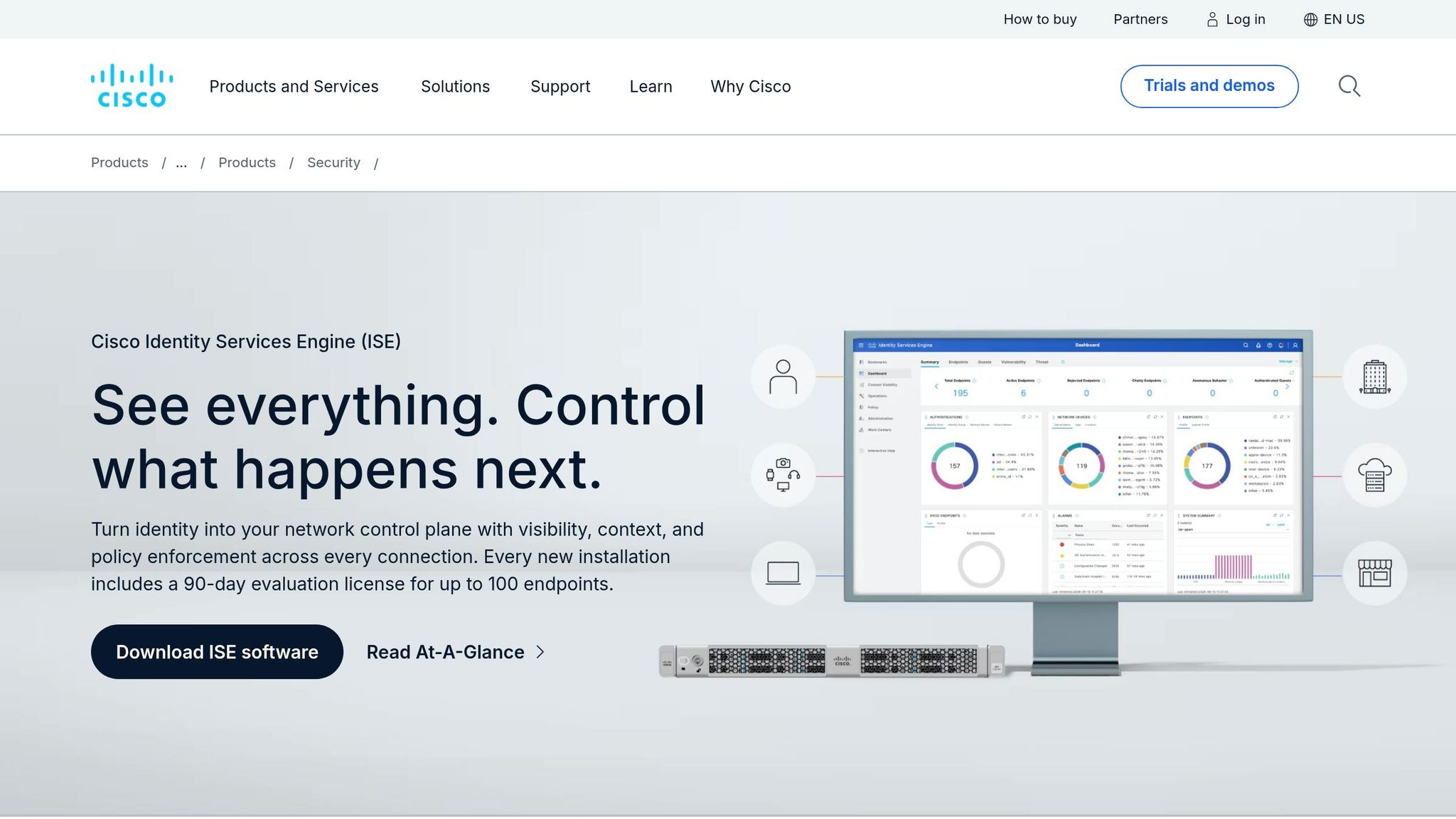
Cisco ISE controls network admission and segmentation for connected medical devices. While identity tools handle user logins, Cisco ISE decides which devices can connect and where they’re allowed to go on the network.
Automated Device Discovery and Profiling
Cisco ISE identifies devices as soon as they connect and applies access rules based on each device profile. It detects connected medical devices, including IoMT assets, and records details like IP addresses and software versions. After a device is identified, ISE keeps it in the right network segment during day-to-day use.
Network Micro-Segmentation
ISE plays a central role in micro-segmenting clinical systems. It separates medical devices into distinct network segments and enforces access rules right at the point of connection. The process is simple: identify, classify, restrict.
Once network access is under control, the next tool focuses on user identity and sign-in.
6. Imprivata OneSign

Once network access is segmented, clinicians still need fast, secure sign-in at the workstation. Imprivata OneSign handles sign-in for clinicians using shared workstations and bedside systems connected to medical devices.
Enterprise Single Sign-On (SSO)
OneSign uses badge-based Tap-and-Go SSO, so clinicians can sign in once and move between systems with less friction. Biometric sign-in can cut delays too, but badge-based access is often the faster option when clinical work moves fast and every second counts.
Securing Shared Workstations
Clinical workstations are used by different people across shifts and job functions. OneSign locks a session when a clinician steps away, then lets the next user sign in to their own profile without wasting time. That helps get rid of shared passwords and reduces the risk of idle sessions staying open.
Role-Based Access and PPE Limitations
OneSign applies RBAC so nurses, physicians, and technicians can only access the systems tied to their roles, whether that means patient records or device settings. Gloves, masks, and other PPE can make biometrics less dependable, which is why fallback sign-in methods matter. Standardized authentication settings help reduce misconfiguration and make support easier. OneSign also logs who accessed what and when for auditability [26].
That puts OneSign at the bedside as the authentication layer before broader enterprise identity controls.
7. Microsoft Entra ID

Microsoft Entra ID, formerly Azure Active Directory, brings authentication, access policy, and identity governance into one place for clinical apps, device portals, and remote access.[37][38][41] Put simply, it acts as the identity control layer across clinical apps, device portals, and remote sessions, rather than just handling sign-ins at the bedside.
Single Sign-On and MFA for Clinical Workflows
Entra supports SSO across both on-premises and cloud-based clinical apps, along with phishing-resistant MFA and tap-and-go SSO with Imprivata OneSign for shared workstations.[43][45][46][48][50][51][52] In busy care settings, that matters. The Imprivata OneSign tie-in has been cited as saving care providers around 45 minutes per shift by cutting out repeated credential entry.[51]
Conditional Access adds another layer by limiting which devices and sessions can use that identity.
Conditional Access for Device and Application Security
Conditional Access policies can limit access to device management portals and PHI systems to Intune-compliant, Entra-joined devices, while blocking unmanaged or risky endpoints.[40][44][19] For example, a biomedical engineering team can be restricted to compliant workstations on the hospital network, with MFA required for remote sessions.[44][19]
Admins set these policies by targeting things like:
- User groups
- Apps
- Locations
- Device health
- Grant controls such as MFA or compliant-device rules[44][19]
That gives Entra a job beyond user login. It can also control access to medical device portals.
HIPAA Alignment and Identity Governance
Microsoft provides HIPAA-focused setup guidance that covers unique user identification, inactivity timeouts, emergency access accounts, and audit logging.[41][47][21] Healthcare groups should also make sure their Entra deployment falls under Microsoft's Business Associate Agreement and send sign-in logs to a SIEM for continued monitoring.[39][42]
Automated deprovisioning helps remove access fast when staff leave or move into new roles.[38][19]
The free tier includes SaaS SSO. On-premises SSO and advanced Conditional Access need P1, which costs about $6 per user per month.[49]
Side-by-Side Comparison of All 7 Tools
Each tool covers a different part of access control. The table below shows where each one fits most directly.
| Tool | What It Adds | Control Model | Best-Fit Deployment Scenario |
|---|---|---|---|
| Censinet RiskOps™ | Risk review for device, vendor, and access exceptions | Risk-based assessment and workflow | HDOs needing structured device risk review and vendor access oversight |
| Armis Centrix | Connected-device inventory for segmentation and policy | Agentless discovery and classification | Hospitals that need continuous visibility into clinical devices before applying access rules |
| Okta Identity Cloud | User authentication for clinical apps | SSO, MFA, and adaptive policies | Environments with many cloud-based clinical applications |
| CyberArk Privileged Access Manager | Privileged access for admins and vendors | Vaulted credentials and session control | Organizations managing high-risk third-party and admin access |
| Cisco Identity Services Engine (ISE) | Network admission and segmentation for medical devices | Network-based policy enforcement | Large hospitals with complex, segmented clinical networks |
| Imprivata OneSign | Fast sign-in for shared workstations | Tap-and-go SSO and session lock | High-traffic clinical areas with shared workstations |
| Microsoft Entra ID | Cloud identity and Conditional Access for Microsoft environments | Role-based access control and Conditional Access | Organizations heavily invested in the Microsoft/Azure ecosystem |
No single tool handles every access control job. Censinet RiskOps™ and Armis Centrix stand out when the goal is risk visibility and device inventory. CyberArk and Cisco ISE focus more on privileged access and network enforcement.
On the identity side, Okta, Microsoft Entra ID, and Imprivata solve different problems. The right fit depends on what matters most: cloud apps, role-based access, or shared-workstation sign-ins. In many hospitals, especially those dealing with legacy devices, network controls are often the most practical way to apply access rules.
Think of this matrix as a way to stack controls in layers, not as a pick-one shortlist.
How to Build a Layered Access Control Program for Healthcare Devices
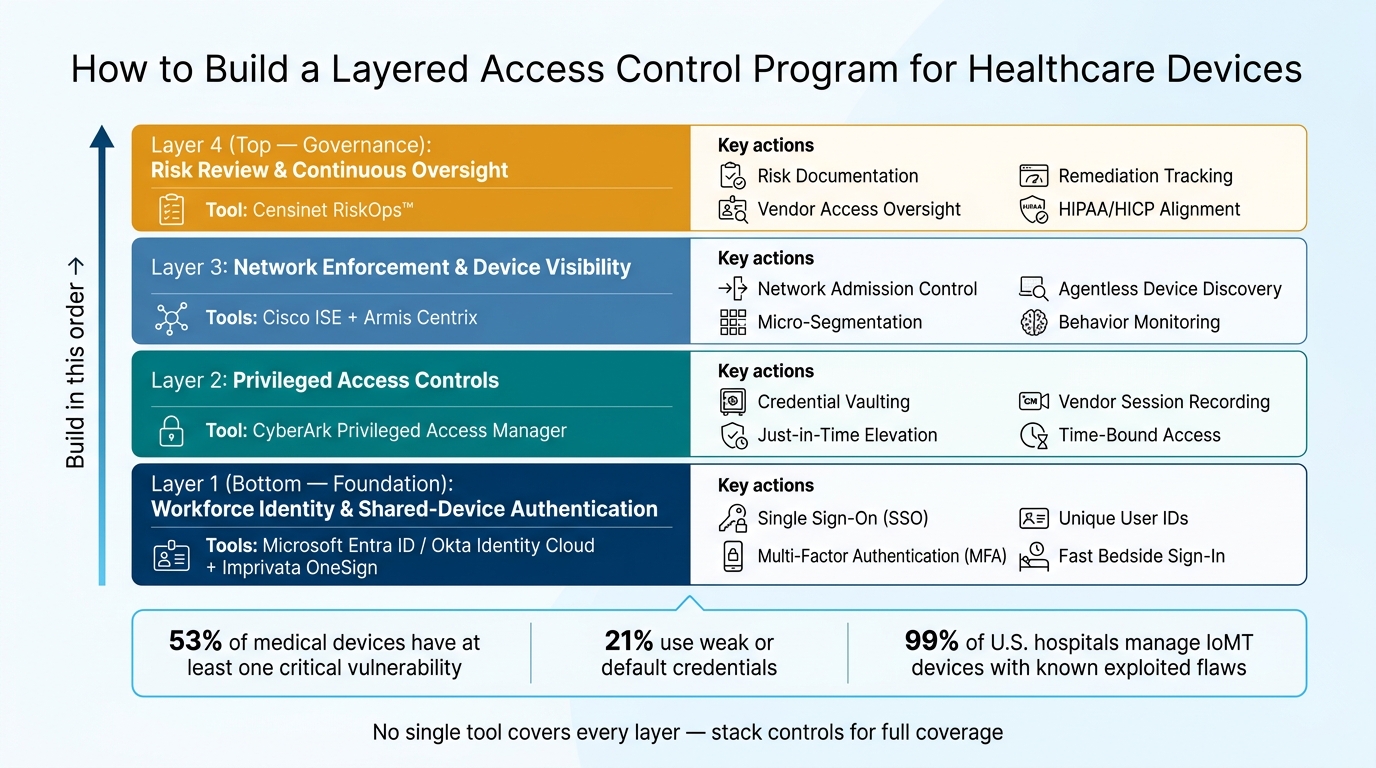
Layered Access Control Stack for Healthcare Devices
In practice, these tools work best as a sequence, not a simple shortlist. Build the stack in four layers: identity, privilege, network, and governance.
Start with workforce identity and shared-device authentication. Use Microsoft Entra ID or Okta as the main identity provider for clinicians and staff. Connect it to your EHR, clinical apps, and device management systems to support single sign-on and multi-factor authentication. Then pair it with Imprivata OneSign in high-traffic areas like the ED, ICU, and OR. That keeps bedside sign-in fast while still maintaining unique user IDs. From there, tighten privileged access.
Add privileged access controls next. Bring in CyberArk Privileged Access Manager to vault admin credentials and enforce just-in-time elevation for biomedical engineers, IT staff, and third-party vendors who need access to device management servers, PACS, and EHR infrastructure. Route vendor access through time-bound, recorded privileged sessions. Once that layer is under control, move to the network.
Then enforce network-level policies and build connected-device visibility. Use Cisco ISE to roll out NAC and segmentation, starting in monitor-only mode so you can map device traffic before enforcing policies by unit or device group. Set up dedicated segments for infusion pumps, imaging modalities, and lab devices with default-deny rules. After ISE is in place, deploy Armis Centrix to continuously discover and classify connected medical devices. Feed its behavior and risk data back into ISE so policies can shift based on what devices are doing. Then use governance to track exceptions and remediation.
Use Censinet RiskOps™ as the governance layer that ties the stack together. RiskOps gives teams structured workflows to document which controls are active, what residual risks remain, and which remediation tasks are assigned and verified across the full device lifecycle.
With these layers in place, hospitals can balance access speed with control and accountability.
Conclusion
No single tool handles every access control job across devices, identities, and privileged accounts. The seven tools covered here each solve a different piece of that puzzle.
That’s why workflow fit ends up being the deciding factor. In healthcare, usability and security have to work side by side. Clinician-friendly authentication can save individual clinicians 30–45 minutes per day and cut down on workarounds.[53][54] When access controls get in the way of care, people bypass them.
Identity on its own isn’t enough. Devices also need policy tied to risk. Clinical devices don’t carry the same risk as staff endpoints, so the right controls depend on device type, location, and risk level. The best programs bring together governance, identity, device visibility, and policy that matches how care teams actually work.
Because devices, users, and vendors keep changing, access control needs regular review. That means continuous monitoring, reassessment, and recurring access reviews. Censinet RiskOps™ supports that governance layer across devices, applications, and vendors.
For any tool on this list, ask:
- Does it fit clinical workflows?
- Does it enforce device-aware policy?
- Does it support continuous oversight?
FAQs
Which access control layer should a hospital implement first?
Start with the procurement phase. Set clear security requirements for medical devices before they enter your environment. That should include unique user IDs, configurable role-based access control, strong authentication, and centralized logging.
Then put those requirements into vendor contracts and Business Associate Agreements. That way, security is part of the device lifecycle from the moment you buy the device - not something you try to bolt on later.
How do these tools improve security without slowing clinicians down?
They improve security without slowing care by using contextual, risk-based access policies. In day-to-day work, fast sign-ins like badge tap-and-go, biometrics, and proximity sensors cut down on repeated logins.
For more sensitive tasks, step-up multi-factor authentication adds another check only when it’s needed. Features like session roaming, short re-authentication grace periods, and automated role-based permissions also help clinicians move from task to task with less friction while keeping access secure.
How can hospitals handle legacy devices that do not support agents?
Hospitals should use a layered security strategy for legacy medical devices that don’t support agents or modern sign-in methods.
That usually means putting compensating controls around the device instead of relying on the device itself to do the heavy lifting. Think of it like putting extra locks, cameras, and a gate around an older house that can’t support a new alarm system.
A practical setup often includes:
- Network segmentation and micro-segmentation to isolate devices in dedicated VLANs
- Authentication proxies, secure gateways, or jump hosts to handle authentication
- Zero Trust Architecture, virtual patching, and continuous monitoring for unusual activity until replacement
This kind of setup helps hospitals limit exposure, control access more tightly, and keep a closer eye on older equipment that can’t meet current security standards on its own.
