
If a vendor can access your systems, you should be able to see exactly what they did, when they did it, where they connected from, and what they changed. In healthcare, that record helps with HIPAA reviews, breach response, and patient care when a vendor session affects a clinical system.
I’d boil the article down to four steps:
- Set scope first: list every vendor, system, access path, and account type as part of third-party vendor risk management tied to ePHI or clinical infrastructure
- Log the right events: record logins, session times, source IPs, ePHI views/changes, admin actions, exports, and device updates
- Protect the logs: use synced time, append-only or WORM storage, and controls that show if records were changed
- Review in one place: send vendor activity into one SIEM or log platform, alert on odd vendor behavior, and define log-delivery SLAs in contracts
A few facts stand out. In 2024, 725 large healthcare breaches exposed 275 million+ records, and 81% of large OCR-reported breaches involved hacking or IT events. The article also notes that 54.3% of third-party breaches in healthcare involved too much privileged access, while 52.7% involved misuse of sensitive data.
What matters most is simple: named vendor accounts, clear audit scope, tamper-resistant logs, and review rules tied to vendor risk. Without those pieces, it gets much harder to investigate a breach, confirm PHI impact, or trace actions on clinical systems.
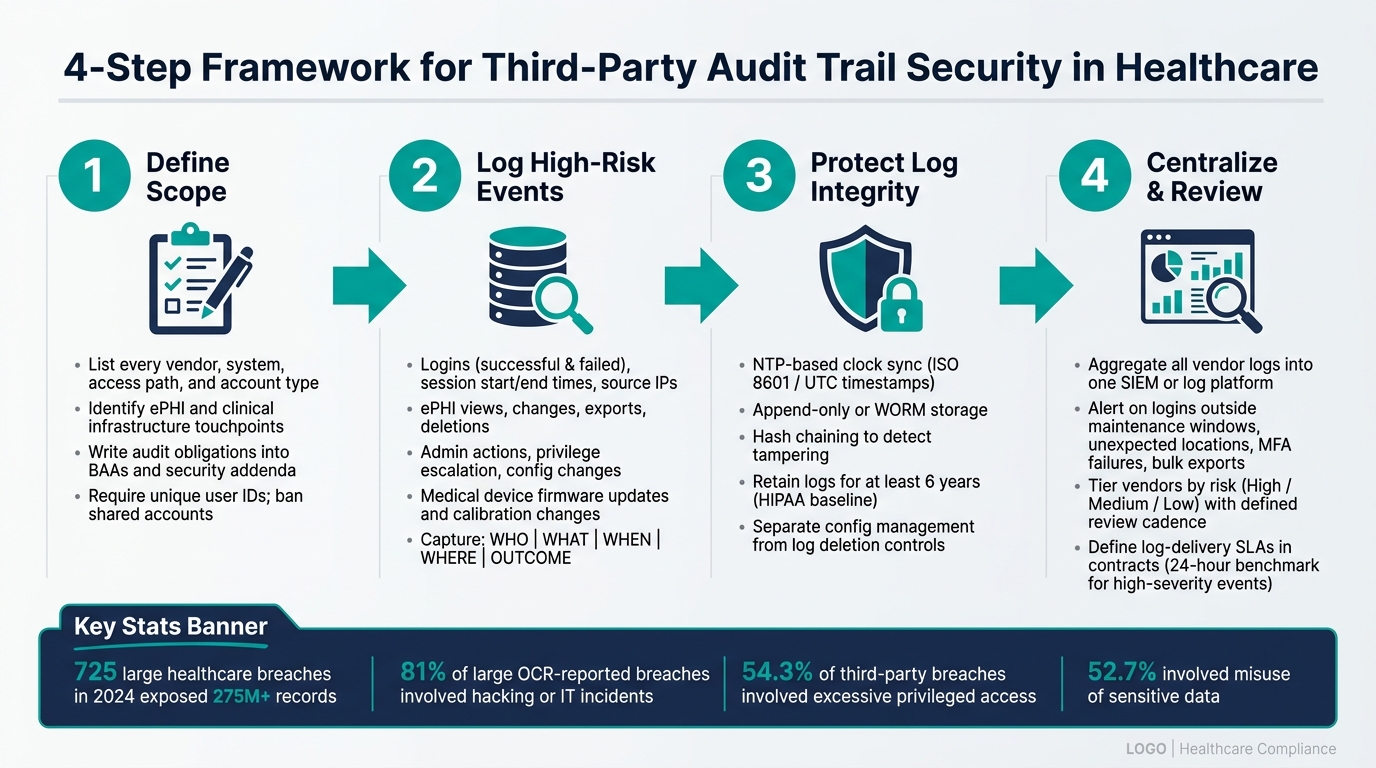
4-Step Framework for Third-Party Audit Trail Security in Healthcare
Audit Logs & Data Protection - Garrett Galow, WorkOS | Enterprise Ready Conf 2024
sbb-itb-535baee
1. Define Regulatory, Contract, and Scope Requirements First
Start with scope. Decide what needs to be logged, which vendors fall inside that boundary, and what your contracts already require.
Map HIPAA Audit Control Requirements to Third-Party Access
HIPAA's Audit Controls standard, 45 C.F.R. § 164.312(b), requires mechanisms that record and examine activity in information systems containing ePHI[3][5][1]. That applies to vendor users, service accounts, and vendor-hosted systems too.
In plain terms, you need logs for:
- Successful and failed logins
- Session start and end times
- Source locations
- Any ePHI access or change, including viewing, exporting, deleting, or modifying records
- Security events like privilege escalation, vendor account creation, configuration changes, and attempts to disable or get around audit controls
Minimum necessary access matters here too. Vendor access should match the job and nothing more. Your audit logs should connect to role-based access controls so you can spot accounts that drift beyond approved access and send them for review.
Without that baseline, piecing together vendor activity during a breach or downtime event becomes guesswork.
Build a Third-Party Audit Trail Scope Inventory
A scope inventory is a structured list of each vendor, the systems they touch, and the kind of access they have.
For each vendor, document the systems they access, host, or connect with. Note whether they store, process, or transmit ePHI. Then spell out the access type, such as user-level access, API access, VPN, remote desktop, or a privileged session. It also helps to mark whether access is persistent or time-bound, and privileged or non-privileged, because those details shape how much logging you need.
Some areas deserve attention first. High-risk targets include clinical apps, e-prescribing and ordering systems, connected medical devices, imaging platforms, identity providers, and remote administration tools. Start with privileged access. That's where audit risk tends to be highest.
Not every system belongs in scope. If something sits outside it, like a marketing tool or a de-identified sandbox, write that down and include the reason.
Use this inventory to decide how strong each contract needs to be and which vendors need the closest review.
Write Audit Trail Obligations into BAAs and Security Addenda
Your BAAs and security addenda should do more than mention logging in passing. They should spell out the rules.
At a minimum, require unique user IDs for all vendor personnel. Shared accounts should be banned unless they are tightly controlled and auditable. Require logging for all ePHI access and all admin actions, including configuration changes and account changes. Time also matters more than many teams think, so require NTP-based time synchronization and document the time zones in use. Retention should align with HIPAA's six-year documentation standard[3]. Log storage should be tamper-evident through WORM storage, hashing, or append-only logs, and it should be protected from unauthorized access or deletion.
Your agreements should also include right-to-audit language and a log-delivery SLA. If an incident happens, you don't want a vendor taking days to find basic records. The contract should require relevant logs within a set investigation window. For high-severity events, 24 hours is a reasonable benchmark[6][7][8].
These terms give you the floor for logging design and monitoring.
2. Design Audit Trails That Log and Protect High-Risk Vendor Activity
Once your contracts spell out what vendors have to log, the next step is making those logs useful. That means deciding what each entry needs to show and how you’ll keep the record from being altered later. Start with the fields that let you rebuild a session from start to finish. Then focus on the events that carry the most clinical and security risk.
Capture the Core Fields Needed to Reconstruct Vendor Sessions
Every vendor log entry should answer five plain questions: who, what, when, where, and outcome.
In day-to-day terms, that means logging the individual vendor user’s unique identity, the source IP address or device identifier, a timestamp in UTC with the local offset, the target resource, and the action taken: read, write, modify, delete, or export.
Those fields need to show up the same way across every system a vendor touches. If a vendor moves through the identity provider, API gateway, EHR, and remote support platform, you should be able to follow that path through a shared user ID and synced timestamps. If the IDs don’t line up or the clocks drift, the trail falls apart fast.
Once you’ve got a consistent base record, shift attention to the events that can impact ePHI, devices, or privileged access.
Prioritize High-Value Events in Healthcare Environments
Not all vendor activity carries the same level of risk. A 2025 study found that 54.3% of third-party breaches in healthcare involved excessive privileged access, and 52.7% involved misuse of sensitive or confidential information.[2]
For medical devices, the logs should record the device identifier, session start and end times, the authenticated user, and the exact actions taken, such as firmware updates, configuration changes, and calibration adjustments. That’s not just an IT issue. A device set up the wrong way, or a changed clinical decision support rule, can turn into a patient safety problem.
In healthcare, the highest-value events usually include:
- ePHI access and modifications
- Changes to prescribing or medication management systems
- Bulk exports or unusually large queries
- New API connections or interface changes
- Any remote support activity on clinical systems or medical devices
Named vendor accounts matter here. Shared logins make it much harder to tell who did what. Effective third-party risk assessments and quarterly reviews help confirm that each account still belongs to an authorized person and hasn’t quietly outlived its purpose.
Protect Time Accuracy and Log Integrity
Require NTP-based clock synchronization across all in-scope systems, including medical devices and vendor-hosted platforms. Timestamps should use ISO 8601 with UTC and the local offset.
Use append-only storage and hash chaining so that if someone tampers with the records, the log chain breaks right away.[10][9] Keep configuration management separate from log retention and deletion control. And if anyone changes logging controls, that change should be logged through formal change management in a separate audit trail.
3. Centralize Monitoring and Alerting for Third-Party Activity
If vendor logs live in separate systems, it's hard to piece together what happened in a session. That slows investigations and leaves room for mistakes.
Aggregate Logs Across Internal and Vendor-Connected Systems
Send vendor-facing logs from every in-scope system to one SIEM or log platform. That includes EHRs, VPNs, SSO/MFA providers, remote access tools, and medical devices. The goal is simple: trace a single vendor session from start to finish without jumping between tools.
Each source should send events over encrypted channels and map them to one shared schema. Use the same field names and event categories across systems for:
- Authentication
- Authorization
- Data access
- Configuration change
- File transfer
In 2024, 725 large healthcare data breaches exposed more than 275 million records, and 81% of large OCR-reported breaches involved hacking and IT incidents.[11][12] When logs stay siloed, teams have a much harder time spotting or containing those events fast. Centralized correlation turns scattered records into something your team can actually investigate.
Once the logs are in one place, you can build alerts that fit vendor behavior instead of treating vendors like employees.
Tune Alerts for Third-Party Behavior, Not Just Employee Behavior
Vendor thresholds should usually be tighter than employee thresholds. Why? Vendor access is often narrower, time-bound, and easier to predict.
Build detections around third-party patterns such as logins outside maintenance windows, access from unexpected locations, repeated MFA failures, and unusual export or query volume in PHI systems. Use past vendor activity to set behavioral baselines, then alert on meaningful changes instead of relying only on fixed counts.
High-risk vendors, especially those with production EHR or medical device access, need stricter thresholds and faster escalation than lower-risk relationships. It also helps to enrich alerts with context like the vendor's risk tier, approved access scope, and scheduled maintenance windows. That cuts down on false positives without weakening threat detection.
Those rules work much better when the evidence and response timing are already spelled out.
Set Incident Response Requirements for Vendor Logs in Advance
Don't wait for an incident to decide what a vendor needs to provide. Put it in writing now as part of your incident response playbook.
Spell out what vendors must deliver: the relevant logs and supporting records, in structured and time-synchronized formats, with consistent identifiers. Set turnaround times too. In many cases, 4 to 24 hours is a reasonable window, depending on severity.
During an incident, centralized audit trails can show when activity began, which systems were touched, what data moved, and whether changes stayed in place after logout. That detail supports breach scope assessment, regulatory reporting, and patient notification decisions. Censinet RiskOps™ can help maintain vendor risk profiles and logging-control assessments for faster alert prioritization and remediation tracking.[13]
Use what comes out of those incidents to shape later vendor reviews and remediation.
4. Govern Audit Trails Through Vendor Risk Management and Ongoing Review
Logging controls don’t stay useful on their own. Once logs are centralized, governance is what keeps them current instead of stale. That means clear policies by risk tier, checks across the vendor lifecycle, and repeat evidence reviews.
Set Policy, Retention, and Review Standards by Risk Tier
Not every vendor should get the same level of scrutiny. A cloud EHR vendor with direct ePHI access brings far more risk than a non-clinical shredding vendor. Your policy should spell that out in plain terms.
For each risk tier, document the minimum logging requirements, retention rules, review cadence, and who owns what. Set retention by risk tier, with at least six years as the baseline, and extend that when contracts or investigations call for it.
HIPAA requires regular review of information system activity, so Security, Compliance, Privacy, IT, and vendor management need clear review and escalation roles.[4]
| Vendor Risk Tier | Review Cadence | Retention | Accountable Roles |
|---|---|---|---|
| High (ePHI, clinical systems, admin access) | Frequent and after any incident | Baseline plus contract- or investigation-driven extensions | Security, Compliance, Privacy, IT, and vendor management |
| Medium (indirect ePHI, limited access) | Periodic review | Baseline plus legal hold or contract extensions | Security and IT, with Compliance and Privacy oversight |
| Low (no ePHI, non-clinical) | Less frequent review | Baseline unless a legal hold applies | IT, with Security and Compliance review |
The policy should also define investigation triggers, exception approval, and how evidence is captured.
Those tiers should shape vendor due diligence, contracting, and post-go-live review.
Embed Logging Requirements into the Vendor Lifecycle
Audit trail governance should begin before onboarding, not during the first reassessment. During due diligence, ask whether the vendor logs authentication events, privileged actions, configuration changes, data exports, and access to sensitive records. Also ask how long logs are retained, whether timestamps are synchronized, and whether logs are tamper-evident.
It helps to request sample evidence, such as:
- Redacted log excerpts
- Screenshots of log management settings
- SIEM integration diagrams
Put logging, retention, incident-notification, log-delivery, and investigation-support duties into the BAA or security addendum. After go-live, review logging any time scope, architecture, or privilege changes. If you wait until the next annual cycle after a major architecture change, that’s when blind spots start to show up.
At renewal, revalidate the evidence and confirm that prior remediation is complete. If a vendor moved from a narrow API integration to full administrative access to clinical systems, their risk tier - and your logging expectations - should shift with it.
That evidence should feed the next reassessment cycle and remediation tracking.
Use Censinet to Track Third-Party Logging Controls and Remediation
Censinet RiskOps™ helps track vendor logging gaps, owners, and remediation status across the vendor lifecycle.
Conclusion: A Practical Model for Secure Third-Party Audit Trails
Securing third-party audit trails in healthcare isn't a one-time setup. It's a control you keep working at. The model is straightforward: define scope, design logs, centralize monitoring, and govern reviews.
Each step builds on the last. If even one is weak, your organization will struggle to detect unauthorized PHI access fast, support clinical incident investigations with reliable evidence, or document due diligence for regulators.
This is a patient safety issue. When a vendor touches a clinical system, audit trails are often the clearest way to see whether a vendor action played a part in a clinical error or data exposure. Detailed, tamper-evident logs tied to individual vendor accounts - not shared credentials - give security and clinical teams the visibility they need to act fast and make sound decisions.
Build this model into policy, onboarding, BAAs, and reassessments. Censinet RiskOps™ can track logging controls, findings, and remediation in one place, supporting the governance model across every vendor assessment and renewal cycle.
The goal is a control set that gets better with every assessment, renewal, and incident review.
FAQs
How do we decide which vendors need the strictest audit trails?
Classify vendors based on PHI exposure, privilege level, and possible impact on patient safety.
Vendors with direct PHI access, EHR access, or administrative rights are high-risk. They need the strictest monitoring, including monthly audits.
Vendors with incidental PHI access or no PHI access may fall into moderate-risk or low-risk groups. These vendors can be reviewed quarterly or semiannually.
For each vendor, map:
- The purpose of access
- How often access is used
- Which systems are involved
Then apply safeguards that match the least privilege principle. In plain terms, give each vendor only the access they need to do the job - and nothing more.
What should we do if a vendor cannot provide tamper-evident logs?
Put contractual and technical controls first when you're protecting the audit trail.
Your Business Associate Agreement should require the vendor to provide:
- Full session logging
- Time-synced records
- An inventory of log sources
That gives you a clear paper trail from the start.
On the technical side, bring vendor logs into your own secure, tamper-proof SIEM. Then add controls that make log changes hard to hide and easier to spot:
- WORM storage
- Cryptographic hashing
- Digital signatures
- Strict access controls
- Real-time monitoring for truncation or unauthorized changes
The goal is simple: keep the audit trail intact, readable, and hard to alter without detection.
How often should third-party audit logs be reviewed?
Review frequency should line up with each vendor’s risk level.
- High-risk vendors: review at least monthly
- Moderate-risk vendors: review quarterly
- Low-risk vendors: review every six months or once a year
You should also run out-of-cycle reviews when something changes or looks off. Common triggers include:
- a security incident
- a contract change
- an organizational restructure
- the discovery of suspicious credentials
This way, reviews don’t just happen on a fixed schedule. They also happen when the situation calls for a closer look.
