
A software bug - not an attack - helped knock out more than 8 million Windows systems on July 19, 2024, and hospitals felt it at the bedside. My main takeaway is simple: if clinicians can’t use their devices, care can slow or stop even when the EHR server is still up.
Here’s the short version:
- Not every care disruption starts with cybercrime, highlighting the need for robust third-party vendor risk management. A bad vendor update can cause the same bedside pain as ransomware.
- Endpoint failure is a patient-care issue. If workstations, VDI, remote access, or sign-in tools fail, staff may lose EHR, MAR, lab, and imaging access.
- Shared dependencies are a weak spot. One agent, one cloud region, or one identity service can affect many workflows at once.
- Downtime plans need named owners and paper fallbacks. That includes paper MARs, lab slips, printed contacts, manual ID bands, and post-outage data entry steps.
- Testing has to include non-malicious outages. If I only drill for ransomware, I miss vendor bugs and supplier chain failures.
A few facts stand out. The July 19, 2024 CrowdStrike update caused Windows crashes after a field mismatch in a Falcon sensor update, and U.S. agencies said the event was not malicious and not exploitable by a threat actor. Even so, hospitals reported delayed, diverted, or canceled procedures, plus trouble with medical devices, communications, outside providers, and emergency call centers.
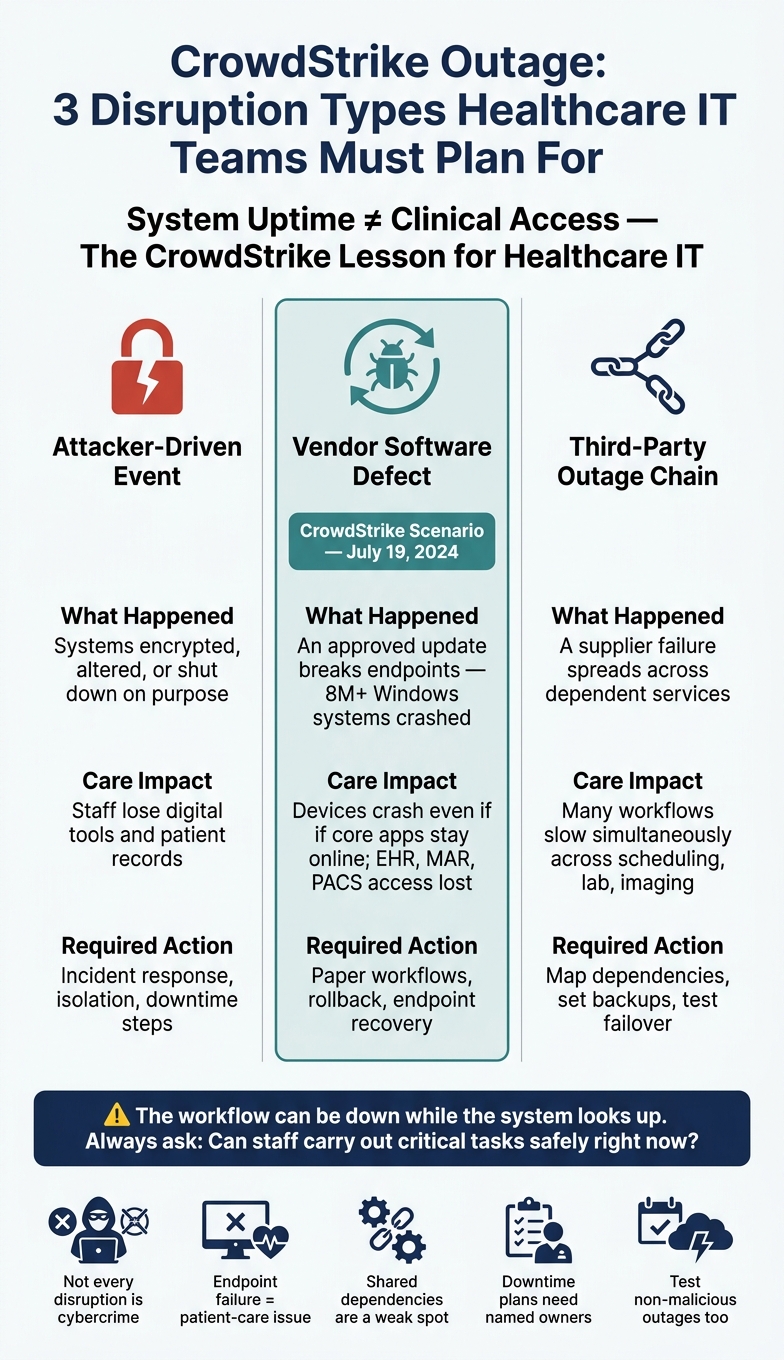
CrowdStrike Outage: 3 Disruption Types Healthcare IT Teams Must Plan For
From Change Healthcare to Crowdstrike: Managing Systemic Risk to Prevent the Unthinkable
sbb-itb-535baee
Quick Comparison
| Issue | What happened | What it means for care | What teams should do |
|---|---|---|---|
| Attacker-driven event | Systems are encrypted, altered, or shut down on purpose | Staff lose digital tools and records | Incident response, isolation, downtime steps |
| Vendor software defect | An approved update breaks endpoints | Devices crash even if core apps stay online | Paper workflows, rollback, endpoint recovery |
| Third-party outage chain | A supplier failure spreads across dependent services | Many workflows slow at the same time | Manage third-party risk, map dependencies, set backups, and test failover |
What I’d keep front and center is this: system uptime is not the same as clinical access. The lesson from CrowdStrike is less about one vendor and more about a hard truth in healthcare IT - the workflow can be down while the system looks up. That’s why outage planning should start with the question: Can staff carry out critical tasks safely right now?
What the Outage Revealed About Endpoint and Vendor Dependency
The CrowdStrike event exposed a gap healthcare often misses: systems in the data center can stay up while clinicians still lose access at the device level. That split matters. If endpoints fail, care teams can get locked out even when core systems are still healthy.
How Endpoint Failures Block Clinical Workflows
Endpoint security tools sit deep inside Windows. So when an update goes bad, devices may fail to boot, and hundreds or even thousands of workstations can drop offline at the same time. In this case, one bad update turned a third-party healthcare vendor problem into a hospital-wide access problem.
The effect on care was immediate. Clinicians lost access to EHR, MAR, PACS, and lab systems. That pushed teams onto paper workflows and manual charting. And when staff have to switch gears like that, care slows down and the risk of mistakes goes up.
This same pattern doesn’t stop at bedside systems. It spills into the rest of hospital operations too.
How Operational Outages Create Patient-Safety Risk
Scheduling, communication, referrals, and staffing systems keep care moving from one step to the next. When those tools fail, coordination slows. Then the delays start stacking up across discharge, transfers, and scheduling. After a few hours, that friction can turn into patient-safety risk. [1] Mitigating these risks requires asking the right third-party risk assessment questions during vendor onboarding and review.
Table: Outage Effects by Dependency and Fallback Process
The table below separates each dependency from the fallback process teams need when that layer fails.
| Failure Type | Affected Dependency | Likely Clinical Consequence | Required Downtime Fallback |
|---|---|---|---|
| Endpoint crash | Windows workstations, VDI sessions | No clinical workstation access | Paper MAR and manual charting |
| Workstation access loss | Application connectivity, remote access tools | Delayed orders, documentation backlog, reduced patient visibility | Downtime forms and manual documentation |
| Imaging or lab system unavailability | PACS workstations, lab result interfaces | Delayed diagnosis, deferred procedures | Phone-based result reporting and manual logs |
| Patient access disruption | Scheduling, portals, referral platforms | Appointment backlogs, delayed authorizations, patient communication gaps | Manual scheduling and referral processing |
| Operational workflow failure | Staffing tools, communications, call centers | Slowed coordination, delayed transfers, increased manual labor | Paper staffing boards and direct phone coordination |
How to Assess Concentration Risk and Third-Party Outage Exposure
CrowdStrike showed how one software defect can trigger downtime across an entire organization when too many workflows depend on the same endpoint agent, cloud region, or identity layer. That’s concentration risk. And in many cases, you don’t see it until a failure hits.
Where to Look for Shared Dependencies in Healthcare
Start with your most important clinical workflows, not your vendor list. Trace each one back through the bedside device, workstation, operating system, security agent, identity provider, and network path.
As you do that, watch for common denominators. If one shared service goes down, clinicians can lose access right at the bedside. Those shared points of failure are the scenarios you need to test and the downtime gaps you need to fix.
Track fourth-party risk and services too, such as DNS and managed databases. A failure inside a cloud provider can knock out several vendor applications at the same time.
Treat concentration risk as a patient-safety issue, not just something for procurement to review.
Third-Party Risk Criteria for Outage Resilience
Once you know where your concentrations sit, check whether your vendors are set up to contain the damage when things go wrong. Ask whether they use phased deployments, where updates go first to a small subset of systems before a broader release. Find out whether their software runs at the kernel level and how they limit the blast radius of a bad update. Require vendors to disclose where their services are hosted and which fourth-party dependencies support them. Use RTOs and SLAs only if they reflect clinical downtime, not generic uptime.
Use these criteria to rank each concentration by likely outage path and impact on care.
Table: Concentration Risks by Likelihood, Care Impact, and Mitigation Priority
| Concentration Risk | Likely Disruption Path | Potential Patient-Care Impact | Mitigation Priority |
|---|---|---|---|
| Vendor Concentration | Single vendor failure (e.g., EHR provider outage) | Total loss of digital charting, orders, and patient history | Critical |
| Endpoint Dependency | Faulty software update (e.g., CrowdStrike-style) disables all workstations | Blue-screened devices in ERs, ICUs, and nursing stations | Critical |
| Cloud Region Monoculture | Failure of a primary region (e.g., AWS US-EAST-1) affects multiple SaaS tools simultaneously | Simultaneous loss of scheduling, telehealth, and lab systems | Critical |
| Fourth-Party Dependency | Failure of a core cloud subsystem (e.g., DNS or database service) causes cascading vendor timeouts | Slowed or blocked lab results and imaging | High |
| Integration Dependency | Outage in a shared data exchange or identity platform prevents cross-system communication | Inability to sync patient records or verify insurance | Medium |
How to Build Vendor Outage Scenarios and Downtime Procedures
After you've mapped concentration risk, the next step is simple in theory and messy in practice: decide what people will do when a critical vendor goes down.
That means turning each high-impact dependency into a named outage scenario. For every scenario, spell out the trigger, the owner, and the manual fallback. If a vendor fails, teams shouldn't be left guessing.
Scenario Planning for High-Impact Vendor Failures
Start with the concentration risks that would hurt the most and build a failure story around each one. Keep it grounded. For instance, a bad endpoint security update can take clinical workstations offline across the system. And when you define the scenario, focus on the clinical work being blocked, not just the tool that failed.
Each scenario should have three things set in advance:
- an activation threshold
- a clear escalation path
- named authority
A practical activation threshold might be this: if a critical system is unresponsive for more than 15–30 minutes, clinical teams start moving to paper workflows. Authority should be explicit. Name who can declare a system-wide downtime, and name who can approve the move back to digital systems once recovery is complete.
You also need to plan for failures that spread. An identity management outage may lock clinicians out of PACS, lab systems, and the EHR at the same time, even when those systems are still up. That's the kind of issue that looks like one outage but hits like five. Build that chain reaction into the scenario narrative so teams know what may happen next. Once the trigger is met, document the first workflow that kicks in.
Downtime Procedures for Critical Care and Operational Workflows
A scenario only matters if it points to a clear manual process. Every high-impact scenario needs a matching procedure that is approved, kept on-site, and tested.
At the center of that plan is the physical downtime kit stored in each clinical unit. Each kit should include pre-printed paper Medication Administration Records (MARs) based on the last known patient state, paper registration forms, downtime lab requisition slips, manual ID bands, and a printed offline contact directory for pharmacy, lab, blood bank, and radiology.
Two pieces often get missed.
First, use read-only shadow workstations that keep a locally cached snapshot of the EHR, updated every few minutes. That gives clinical and operations teams access to recent patient data when the main system is unavailable.
Second, set up out-of-band communication. Secure messaging, phones, paging, or couriers let IT and clinical leadership coordinate without depending on the primary network or single sign-on. If the main path is down, you need another lane open.
Post-recovery reconciliation is mandatory. Every paper form completed during an outage must be scanned or manually entered back into the EHR so the longitudinal patient record stays intact and billing gaps don't appear. Give this step a specific owner for each workflow. If it belongs to "everyone", it often belongs to no one.
Table: Workflow Fallback Owners, Materials, and Reconciliation Steps
Use the table below to assign owners, materials, and reconciliation steps before an outage begins.
| Clinical Workflow | Manual Fallback Method | Accountable Owner | Required Downtime Materials | Reconciliation Step |
|---|---|---|---|---|
| Patient Registration | Paper logs and ID bands | Patient Access Manager | Paper registration packets, carbon-copy forms | Back-entry of patient data into EHR ADT module once system is live |
| Medication Administration | Paper MAR | Nursing Unit Manager | Printed MARs from last known state, downtime binders | Pharmacy verification and manual entry of all doses administered |
| Lab & Imaging Orders | Paper requisition slips and runners | Department Lead | Pre-printed order forms, physical courier process | Manual result entry into LIS/PACS |
| Clinical Documentation | Handwritten notes on standardized templates | Attending Physician | Pre-approved paper clinical note templates | Scanning completed notes into the patient's digital chart |
| Bed Tracking | Physical whiteboards and paper census sheets | Charge Nurse | Dry-erase markers, paper census forms | Update digital bed-management system after restoration |
How to Test Resilience and Manage This Risk on an Ongoing Basis
Downtime plans only work if teams have actually used them in conditions that feel real. Once those plans are written, the next step is simple: test them during the kind of outage that would shut systems down in practice. The CrowdStrike case made one thing painfully clear: a vendor issue doesn't have to be malicious to disrupt bedside care.
Resilience Testing for Non-Malicious Outage Scenarios
Incident playbooks need to cover both ransomware and non-malicious outages, including cloud failure. Tabletop exercises should happen on a regular basis, and they should simulate cloud failures in a way that forces teams to switch to paper workflows and manual lab work. That includes paper orders, manual documentation, and delayed lab access.
Testing should also confirm whether teams can spot trouble early and respond under pressure. Check for:
- backlog alerts
- degradation visibility
- failover
- throttling for critical clinical workloads
For the highest-priority systems, use multi-region replication.
Then use what the tests show to update owners, thresholds, and fallback steps. If a handoff breaks, fix it. If an alert comes too late, change it. If a paper process slows care more than expected, that needs attention too.
Metrics and Workflows for Continuous Risk Management
Continuous risk management should connect vendor risk, asset dependencies, outage scenarios, mitigation tasks, and executive reporting in one place. That gives leaders a clear view of where downtime starts turning into a patient-safety problem. Track the results in a single review cycle so teams can see patterns instead of isolated events.
Useful measures include:
| Metric | What It Tells You |
|---|---|
| Shared region dependencies mapped in the current inventory | Where vendor concentration or region monoculture exists |
| Mission-critical workloads with multi-region replication | Whether critical clinical systems have built-in resilience |
| Non-malicious downtime scenarios covered in tabletop exercises | Whether playbooks go beyond ransomware |
| Vendors that disclose hosting regions and failover paths | Whether outage planning is supported contractually |
| Configuration drift findings detected through cloud security posture management (CSPM) | Whether cloud settings are drifting into risk |
| Backlog growth or degraded service alerts | Whether impact is visible early enough to act |
| Failover and throttling strategies tested | Whether recovery paths work under load |
These metrics help teams decide what to fix first and what needs to be tested again. Continuous CSPM, dependency inventories, and observability tools make hidden relationships easier to see and act on. That visibility helps teams spot shared dependencies, check continuity plans, and reduce clinical harm from outages that start far away. [1]
FAQs
Why did a non-malicious outage disrupt patient care so severely?
Because healthcare runs on tightly connected digital systems, one outage can send shockwaves through both clinical care and day-to-day operations. If EHRs, imaging platforms, or lab systems go down, clinicians can lose access to key patient data on the spot. That forces teams back to slower manual steps, which can lead to delays and a higher chance of mistakes.
The fallout gets worse when a lot of organizations depend on the same third-party vendors or cloud infrastructure. A single technical problem can hit multiple facilities at the same time. That risk grows even more when manual workarounds are weak or recovery plans are limited.
How can hospitals identify hidden shared dependencies before an outage?
Hospitals need to move past simple vendor lists and map risk around how work actually gets done. Start with each critical clinical and operational service, then trace it back through the systems, interfaces, data feeds, and third-party providers that keep it running.
That kind of mapping can bring fourth-party risk into view. For example, several vendors may depend on the same cloud region, identity provider, or clearinghouse. On paper, those vendors can look separate. In practice, they may all fail at the same choke point.
To spot those weak links, review API logs and outbound traffic, require vendors to disclose major subprocessors, and use automated risk mapping to find shared dependencies before they turn into a bigger outage.
What should be in a healthcare downtime kit?
A healthcare downtime kit should help care teams keep working by hand when systems go down, and it needs to be available offline at every care location.
That means each kit should include the paper tools and backup instructions staff need to keep patient care moving without guesswork. At a minimum, include standardized paper order forms, medication administration records, lab and imaging requisitions, patient tracking sheets, backup communication tools, service summaries, escalation contact lists, and clear procedures for manual patient identification, emergency registration, and charge capture.
