
If your hospital runs old EHRs, PACS, lab systems, or medical devices, your disaster recovery plan has to be built around their limits. In healthcare, 96% of hospitals run end-of-life software or operating systems, 374 ransomware attacks hit care delivery groups from 2016 to 2021, and downtime can cost up to $900,000 per day.
Here’s the short version: I’d treat legacy healthcare disaster recovery as a mix of compliance, restore testing, clinical downtime planning, device isolation, and vendor gap control. Old systems often don’t restore cleanly, may not support modern backup tools, and can fail in ways that break care, billing, imaging, medication workflows, and audit trails.
If I had to boil the article down, I’d focus on these points:
- Start with HIPAA rules first, especially 45 CFR §164.308(a)(7) for backup, disaster recovery, emergency mode, testing, and criticality review
- Inventory every system and dependency, including EHRs, PACS, LIS, interface engines, archived apps, and connected devices
- Set RTO and RPO after dependency mapping, not before
- Use backup methods that fit old systems, not just snapshots
- Keep backups away from production risk with immutable, offline, or isolated recovery copies
- Write paper-based and manual downtime workflows that staff can use under stress
- Test restores and reconciliations often, because a system that boots is not the same as a system that is safe to use
- Check vendor support gaps early, since third parties often slow recovery
- Reduce attack surface by archiving and retiring old apps when possible
A few numbers make the risk plain:
- 41% of healthcare groups run unsupported software
- 36% run unsupported Windows operating systems
- Hospital downtime averages about $7,500 per minute
- 46% of EHR downtime safety events involved missing or ignored downtime procedures
- 35.5% of healthcare breaches start with third parties
- 69%–72% of cyber incidents in healthcare disrupt patient care
Bottom line: I wouldn’t judge a legacy DR plan by what it says on paper. I’d judge it by whether teams can restore data, validate interfaces, run patient care on downtime tools, and get vendor help fast enough when an outage hits.
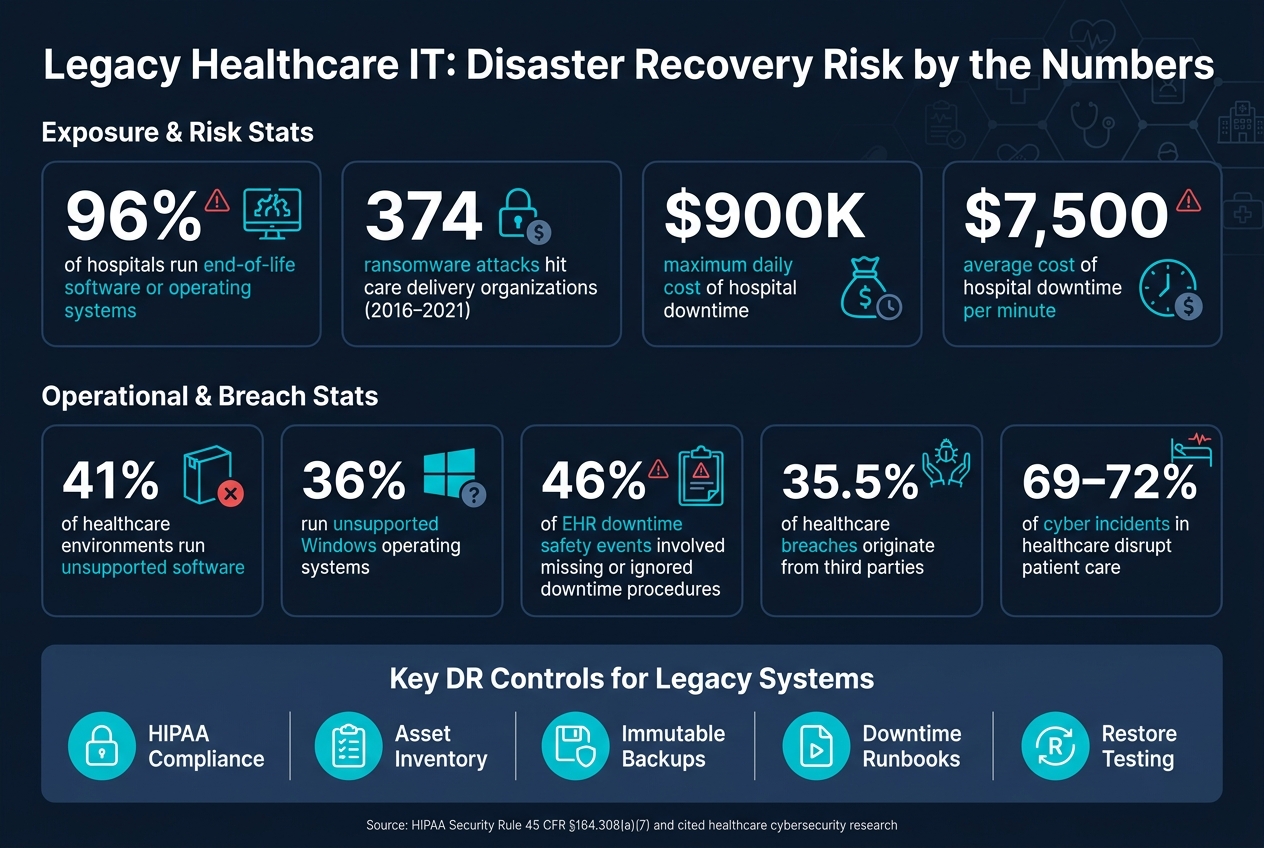
Legacy Healthcare IT: Disaster Recovery Risk Stats at a Glance
1. Understand regulatory requirements and legacy system risk
The HIPAA Security Rule at 45 CFR §164.308(a)(7) sets the contingency plan standard for systems that create, receive, maintain, or transmit ePHI, including legacy servers and clinical applications.[5][7][1]
That standard includes five implementation specifications:
- Data Backup Plan
- Disaster Recovery Plan
- Emergency Mode Operation Plan
- Testing and Revision Procedures
- Applications and Data Criticality Analysis
The first three are required. The last two are addressable, but they still need to be put in place when reasonable and appropriate.[5][7][1][8][14][15]
On paper, that may sound straightforward. In a legacy setting, it usually isn't. Older systems tend to restore more slowly, and they often fail in ways that are harder to predict. That makes backup, recovery, and downtime planning much tougher.
What counts as a legacy healthcare system
Legacy healthcare systems can include end-of-life operating systems, unsupported applications, aging servers and storage, obsolete interface engines, and integration middleware. All of that adds time to recovery and makes testing harder.[6]
Some legacy medical devices also can't be patched or securely updated.[9][10][12][13] That's a major problem in healthcare, where devices often stay in use long after software support ends. The result is a long stretch of clinical use with higher cyber risk.[10][11]
The numbers make the issue hard to ignore: 41% of healthcare environments run unsupported software, and 36% run unsupported Windows operating systems.[2][11] Before a team can plan recovery well, it needs a clear inventory and a way to rank which systems need to come back first.
sbb-itb-535baee
2. Inventory assets and set recovery priorities
Start with a full inventory of your systems, interfaces, and vendor limits. Put the EHR, PACS, LIS, billing, and interface layers in one place so the team can see the whole picture.
That matters more than it might seem at first. Hospital downtime costs average about $7,500 per minute[16]. So this isn’t just a documentation exercise. It affects daily operations and the bottom line before an outage turns into a scramble. In older environments, recovery order usually follows dependency chains, not a simple asset list.
Map dependencies before assigning RTO and RPO
Recovery Time Objective (RTO) is the amount of time a system can stay down before the impact becomes unacceptable. Recovery Point Objective (RPO) is the amount of data loss you can tolerate, measured in time. Those targets should match how a hospital gets care back online in practice, not just how a plan looks in a spreadsheet.
Dependency mapping needs to happen first. Trace the integration backbone, including HL7 v2, FHIR, and SFTP, along with the validation steps that must work before clinical data can be restored or exchanged with confidence. A system may be “up,” but if feeds are delayed or records fail checks, staff still can’t trust it.
Use measures like:
- Interface latency
- Data-quality checks
These help confirm that the restored environment is ready for clinical use.
Classify systems by clinical criticality
Not every system should go to the front of the line. Score each one based on clinical impact, data criticality, support limits, and restore readiness.
Bring back patient-chart, safety, coding, and claims workflows before administrative systems. That order lines up better with how care and revenue cycle work under pressure.
Document recovery owners and source records
A recovery plan only works if people know who does what. For each system in the inventory, record the system owner, the technical custodian, on-call coverage, vendor support contacts, and the method used to confirm a successful restore.
Backup ownership deserves extra attention. More than one person should know how to restore the system. If that knowledge sits with a single admin, you’ve got a weak spot. Store all of this in an outage-ready format so teams can use it when systems are down, not just when everything is working.
Use this inventory to decide backup methods and restore order.
3. Design backup, archival, and recovery architecture for legacy environments
Once you know what you have - and the order it needs to come back - the next step is protection. Use your criticality ranking to decide which systems need fast local recovery, which need immutable copies, and which can live in archive-only storage.
A good baseline is the 3-2-1-1-0 rule: three copies, two media types, one offsite, one immutable or air-gapped, and zero unverified backups.[26][27][28][29][32] That last part only means something if you test restores. Otherwise, “zero unverified backups” is just a slogan.
Backup repositories are also a common ransomware target. When attackers hit them, recovery gets slower and more expensive.[23]
Back up legacy applications without relying on snapshots alone
Don’t lean on VM snapshots alone for older EHR, PACS, and lab systems. A snapshot saves disk state at a moment in time, but it may miss in-flight transactions or the full application state.
For legacy clinical databases, transaction-aware, application-consistent backups are the safer route. In plain English, that means using log shipping, point-in-time recovery, and tested database restores instead of depending only on hypervisor-level captures.[18][26][31] The target isn’t just a server that boots. It’s a database that comes back in a known-good, clinically usable state.
That should be paired with checksum verification and regular restore tests in a non-production environment. Those tests confirm data completeness and show how long recovery takes in practice - not on paper.[24][30][32] A practical starting point is daily incremental backups, weekly full backups, and monthly restoration tests.[30]
Plan for legacy medical devices and archived systems
Legacy medical devices often run old operating systems and come with thin vendor support. For those systems, the main job is configuration backups: device profiles, network settings, calibration data, and firmware versions stored in a secure, versioned repository.[18][20]
Since patching these devices is often hard or not possible, network segmentation becomes a main control. Put them in isolated VLANs or firewalled zones so ransomware has a harder time moving sideways through the network.[18][20][33][34]
Retired clinical applications are a different case. If they still need to stay available for treatment questions, audits, or litigation, move the records into a secure, read-only, auditable archive and then decommission the old application.[17][19][21][22] That cuts unpatched servers off the network, reduces the number of systems holding PHI, and makes DR simpler by swapping a pile of scattered legacy apps for one defined, protected workload.
The cost angle matters too. Decommissioning a legacy EHR can save $200,000 or more per year in licensing costs, while archival storage usually runs about $40,000 per year.[17][19][21]
Keep recovery copies separate from production risk
If ransomware can reach your backups through the same network it already broke into, your recovery plan has one weak spot doing too much work. Immutable storage helps fix that. With WORM (Write Once, Read Many) or object-lock settings, backup data can’t be changed or deleted - even by admins.[25][26][32]
Offline media, like tape or air-gapped disk, adds distance from network-based attacks. Sometimes the oldest play in the book is still the one that keeps you in the game.
Isolated recovery environments (IREs) add another layer. These are logically or physically separate DR environments with pre-staged clinical systems, so hospitals can keep operating during a ransomware event without leaning on compromised production systems.[34][35] Access should be locked down tightly.
| Option | Typical RTO/RPO Fit | Legacy compatibility | Ransomware Resilience | Operational Complexity |
|---|---|---|---|---|
| On-prem backup (disk/tape appliances) | Good for moderate RTOs measured in hours; daily RPO can be tuned for critical systems | Strong - works with older operating systems, local protocols, and no cloud dependency | Vulnerable if it stays on the same domain; resilience improves with offline tape and separate admin accounts | Medium - requires local hardware, capacity planning, and onsite staff |
| Cloud backup | Better for offsite resilience than for very fast restores | Limited for systems that cannot reach the cloud or rely on legacy protocols | Strong when immutable storage is used and access is tightly controlled | Lower hardware burden, but bandwidth and vendor management still matter |
| Hybrid DR (local + cloud replication) | Well suited to clinical workloads that need fast local recovery and offsite resilience | Moderate - local tier handles legacy protocols; cloud tier supports geographic redundancy | Strong when local copies are immutable and the offsite tier is separated from production risk | Higher - two environments must be managed and tested |
| Clinical archival platforms (for decommissioned systems) | Designed for long-term read-only access, not rapid operational recovery | Purpose-built for legacy record formats and longitudinal clinical data | High - removes legacy apps from the network and reduces attack surface | Low ongoing complexity once migration is complete; initial migration effort is significant |
Once the architecture is in place, rehearse restores, downtime workflows, and data validation.
4. Put downtime procedures, testing, and restoration into practice
Recovery plans break down fast if staff can’t carry them out during an outage. One review of more than 80,000 patient safety event reports found that 46% of EHR downtime-related safety events involved missing or ignored downtime procedures.[36][3][37] That’s the warning sign. Teams need written downtime workflows, regular drills, and strict restore checks so care can continue safely when systems go offline.
Build runbooks that reflect real hospital workflows
Every critical legacy system should have its own runbook. It needs to be written in plain English so frontline staff can use it when the pressure is on. Each one should spell out the system owner, recovery prerequisites, manual workarounds, notification steps, validation checks, and the rules for partial and full recovery.[38][40][44][47]
A partial return means limited use after safety checks pass, like read-only access to historical records. Full return is a higher bar. It requires stable interfaces, verified data integrity, and sign-off from clinical leadership, compliance, and IT.[38][40][44][47]
Roles should be clear from the start:
- IT handles containment and restoration
- Clinical leadership approves workflow sign-off
- Compliance and privacy manage documentation
- Biomedical engineering handles device checks and vendor calls
Units should also have downtime kits ready to go, not buried in a closet no one can find. These kits should include printed patient summaries, blank MARs, lab and imaging forms, consent forms, and reconciliation instructions.[41][42][45][46] Every form should mirror EHR data fields so post-recovery reconciliation is faster and less error-prone.
Runbooks on paper don’t mean much unless drills show staff can use them when things get messy.
Test often enough to find legacy-specific failure points
Use three levels of testing: quarterly tabletop exercises, quarterly restore or failover drills where safe, and annual end-to-end outage tests. Each test should confirm that staff can restore and use legacy systems during outage conditions, including cases like ransomware hitting a legacy PACS or a network outage affecting ICU devices.[38][39][40]
| Legacy System / Scenario | Test Type | Frequency | Success Criteria | Evidence Collected | Owner |
|---|---|---|---|---|---|
| Legacy PACS / database corruption | Technical restore drill | Quarterly | Restore from backup; imaging studies appear in the correct patient chart; imaging workflow confirmed by clinical lead | Restore logs, verification screenshot, sign-off form | Imaging IT lead |
| Lab middleware / network isolation | Tabletop exercise | Quarterly | Paper requisition workflow completed correctly; results communicated via phone protocol; staff reconciliation documented | Drill report, completed paper forms, participant sign-in | Lab systems manager |
| Legacy EHR / ransomware scenario | End-to-end integrated test | Annually | Full recovery within documented RTO; orders reconciled; no high-severity interface errors; clinical leadership sign-off obtained | Incident command notes, interface error logs, reconciliation audit sample | Business continuity director |
| Anesthesia record system / failover | Failover drill | Quarterly | System fails over to secondary; active case records accessible; no data loss beyond target RPO; OR workflow validated | Failover logs, case record comparison report | OR IT lead / Biomedical engineering |
| Legacy cardiology system / backup restore | Technical restore drill | Quarterly | Restore from backup; user logins functional; waveform data intact; cardiology staff confirm usability | Restore time log, login verification screenshot, waveform sample review | Cardiology IT analyst |
| Billing/claims system / interface failure | Tabletop exercise | Semiannual | Manual charge capture workflow executed; no claims lost; reconciliation plan documented and reviewed | Drill report, manual charge capture forms | Revenue cycle manager |
A system starting up is not enough. Every drill should end with data validation too.
Validate restored data before resuming normal operations
Start with database consistency and file integrity checks. After that, compare samples of patient records, orders, and results against pre-outage backups to make sure nothing is missing or changed. Audit logs should show continuous, chronological entries with no unexplained gaps during the recovery window.[44][46][47]
Next, check HL7 and FHIR queues for stuck, duplicate, or failed messages. Then work through backlogs in a controlled sequence while watching for unexpected updates to patient charts or billing accounts.
Medication records need extra care. Compare paper MARs used during downtime against restored electronic MARs, with close attention to high-alert and controlled medications.[41][43]
Time also matters more than people think. All restored servers and clinical devices should be checked for synchronization. Timestamps on orders, results, MAR entries, and clinical notes must line up across systems. If the EHR, anesthesia systems, and monitoring devices show different times, that can create problems in claims processing and legal proceedings.[44][46][47] The system should return to normal use only after IT and clinical leadership sign off.
5. Govern cyber and third-party risk as part of disaster recovery
After restoration testing, governance is what shows whether recovery will stand up under cyber pressure and vendor constraints. Inventory work, backup design, and downtime procedures only go so far if vendor relationships and access controls are weak. Across U.S. healthcare organizations hit by ransomware, cloud compromise, supply-chain attacks, or business email compromise, 69%–72% reported disruptions to patient care.[49][4][50] On top of that, 35.5% of healthcare breaches now start with third parties.[48] So a vendor incident can set your DR plan in motion fast.
Address vendor and support dependencies before an outage
Document vendor support status, SLA response times, and RTO alignment for every legacy system that needs vendor help during recovery. If support can't meet the RTO, record the gap and the fix before an outage happens.
Source code escrow agreements can matter a lot when a vendor gets acquired, goes out of business, or stops supporting an older version. Escrow gives you access to source code, deployment scripts, and configuration documentation needed to maintain or migrate the system. In plain terms, vendor SLAs, remote access terms, and escrow arrangements decide whether the recovery plan can actually be carried out, not just whether it looks good on paper.
Third-party remote access also needs governance, not just VPN access. Many legacy systems can't run modern security agents, so compensating controls are a must:
- Network segmentation
- Jump servers
- MFA at the gateway
- Time-bound access profiles
Log every vendor session. Then spell out runbook steps for opening and closing access during an incident.
Those documented gaps should feed straight into risk assessments and remediation tracking.
Use risk assessments to improve recoverability
Use assessments to find backup gaps, unsupported components, excess access, and undocumented dependencies. A well-built assessment should produce a prioritized remediation list tied directly to DR controls. That helps improve RTO/RPO realism, restore order, and downtime readiness.
Use Censinet RiskOps™ to standardize assessments across vendors, applications, devices, and supply-chain partners, then feed the findings into DR runbooks and governance reviews.
Use the table below to translate each legacy risk into a control action:
| Legacy Risk Category | Assessment Workflows | Segmentation Controls | Backup Design | Downtime Procedures | Recovery Runbooks |
|---|---|---|---|---|---|
| Unsupported OS | Identify end-of-life OS instances; document support status and patchability | Isolate in dedicated zones; restrict inbound/outbound traffic | Agentless backups; full system images and configs; offsite copies | Manual workflows for affected areas; alternative systems documented | OS rebuild steps, image restore sequences, validation checks |
| Unpatched clinical apps | Review patch levels; correlate vulnerabilities with PHI exposure | Limit access to necessary users; enforce strict firewall rules | Application-aware backups capturing databases and config files | Paper or alternate electronic workflows; data entry catch-up steps | Restore order, interface reconnection, data integrity validation |
| Legacy medical devices | Inventory devices, firmware, and supported configs; evaluate patient safety risk | Segmented VLANs; restricted external connectivity | Workstation images, configs, and calibration data; tested restores | Contingency use of alternative devices; manual documentation of readings | Re-imaging steps, device reconnection, output testing |
| Vendor dependence | Catalog systems requiring vendor support; assess SLAs, escrow, and remote access | Controlled remote access gateways; time-bound vendor VPN profiles | Vendor participation in backup/recovery design; compatibility validated | Communication plans with vendors; clarified roles during downtime | Vendor contact trees, escalation paths; joint rehearsal |
| Limited visibility / unknown dependencies | Asset and dependency discovery; validated with clinical and IT staff | Micro-segmentation to reduce lateral movement; monitor inter-system traffic | Backup scopes updated to include newly discovered systems and interfaces | Downtime procedures expanded for upstream/downstream impacts | Runbooks updated with accurate dependency maps and restore sequence |
Track remediation, retest the affected controls, and report residual gaps to governance.
Conclusion: Core steps for legacy healthcare disaster recovery
Legacy healthcare disaster recovery is a continuous process, not a one-time project.
That means teams need to do the basics well, and do them again: inventory systems, rank clinical criticality, back up data in restore-ready formats, test downtime workflows, and govern third-party risk. If even one of those controls fails, recovery can slow down or stop.
In older healthcare environments, three failure points tend to cause the most trouble: restore reliability, downtime workflows, and vendor dependency. Each one can become a bottleneck on its own. Together, they can break recovery when teams are under pressure.
The job, then, is pretty clear: address all three, track the gaps, and retest.
FAQs
How do we set RTO and RPO for legacy systems?
Start with a Business Impact Analysis (BIA) and an application criticality review. The goal is simple: rank each system by its effect on patient safety, clinical operations, and regulatory risk.
From there, place systems into tiers and assign recovery targets to each one. For example, Tier 0 life-safety systems may need an RTO of 1 hour or less and an RPO of 15 minutes or less. Lower-tier administrative systems, on the other hand, may be fine with recovery windows of 24 to 72 hours.
What should we test after restoring a legacy clinical system?
Before cutover, test the restored legacy clinical system end to end in an isolated validation environment. Run malware scans. Verify the backup chain of custody and timestamps. Confirm data integrity with checksums or hashes, database consistency checks, and transaction log continuity.
Then reconcile HL7/FHIR interfaces and have clinicians spot-check key records. Also verify security settings such as encryption, access controls, and logging. Document all evidence and any exceptions.
How can hospitals protect backups from ransomware?
Healthcare organizations should follow the 3-2-1-1-0 backup rule. That means keeping three copies of data on two media types, with one offsite copy, one immutable or offline copy, and zero unverified backups.
In plain English, the goal is simple: if one backup fails, gets encrypted, or can't be reached, you still have other clean copies to fall back on.
Use immutable storage such as WORM object locks so backup data can't be changed or deleted before its set retention period ends. Keep backup administration separate from day-to-day systems with dedicated environments, and protect access with MFA and separate credentials.
Just as important, check that backups actually work. Verify backup integrity with checksums and run restore testing on a regular basis. A backup that hasn't been tested is a bit like a fire extinguisher you never inspected - you don't want to find out it's broken during an emergency.
