
If your EHR vendor fails, care, billing, and compliance can all break at once. I’d plan for three cases first: a long outage, a cyber event that blocks trusted recovery, and a partial failure where the EHR is up but key interfaces are down.
Here’s the short version:
- Model by workflow, not by app list. Start with medication administration, ED registration, lab results, imaging, claims, and discharge.
- Set time targets that fit patient care. A system being “up” does not help if meds, allergies, lab results, or identity tools are still unavailable.
- Treat partial failures like full incidents. A dead lab, pharmacy, ADT, or claims interface can create care risk and billing delays even when the chart still opens.
- Plan for weak vendor updates. A long outage gets worse fast when leaders do not know what is affected or when service may return.
- Test downtime and recovery end to end. Paper forms, offline access, printers, call trees, reconciliation steps, and restored-data checks all need drills.
- Put vendor duties in writing. I’d lock down notification timing, RTO/RPO terms, testing rights, export rights, and proof requirements before an incident.
A few numbers show why this matters: one review found 76 patient-safety events tied to EHR downtime, the Change Healthcare attack was linked to a $6.3 billion drop in submitted claims across a large client base, and 37% of healthcare groups in one 2024 report needed more than one month to fully recover from ransomware.
EHR Downtime Resilience for MEDITECH Hospitals
sbb-itb-535baee
Quick Comparison
| Scenario | What fails | Main risk | What I’d check first |
|---|---|---|---|
| Prolonged outage | Hosted EHR or core modules | Delayed care, paper backlog, missed documentation | Read-only access, meds/allergies, downtime activation, vendor update cadence |
| Breach or ransomware | Access, trust in data, or recovery path | Unsafe cutover, PHI review, stale or incomplete restore | Backup integrity, forensic hold, identity/order/result validation |
| Partial integration loss | Lab, pharmacy, ADT, imaging, claims, HIE | Missed results, med risk, billing slowdowns | Interface queues, manual routing, per-interface recovery targets |
| Vendor miss or exit | Recovery promise or service continuity | Data loss, migration risk, contract dispute | Export test, clause enforcement, alternate platform plan |
My takeaway: I wouldn’t wait for a live outage to find out which workflows fail first, which downtime steps break, or whether the vendor can meet its promises.
EHR Vendor Failure Scenarios Every CIO Should Model
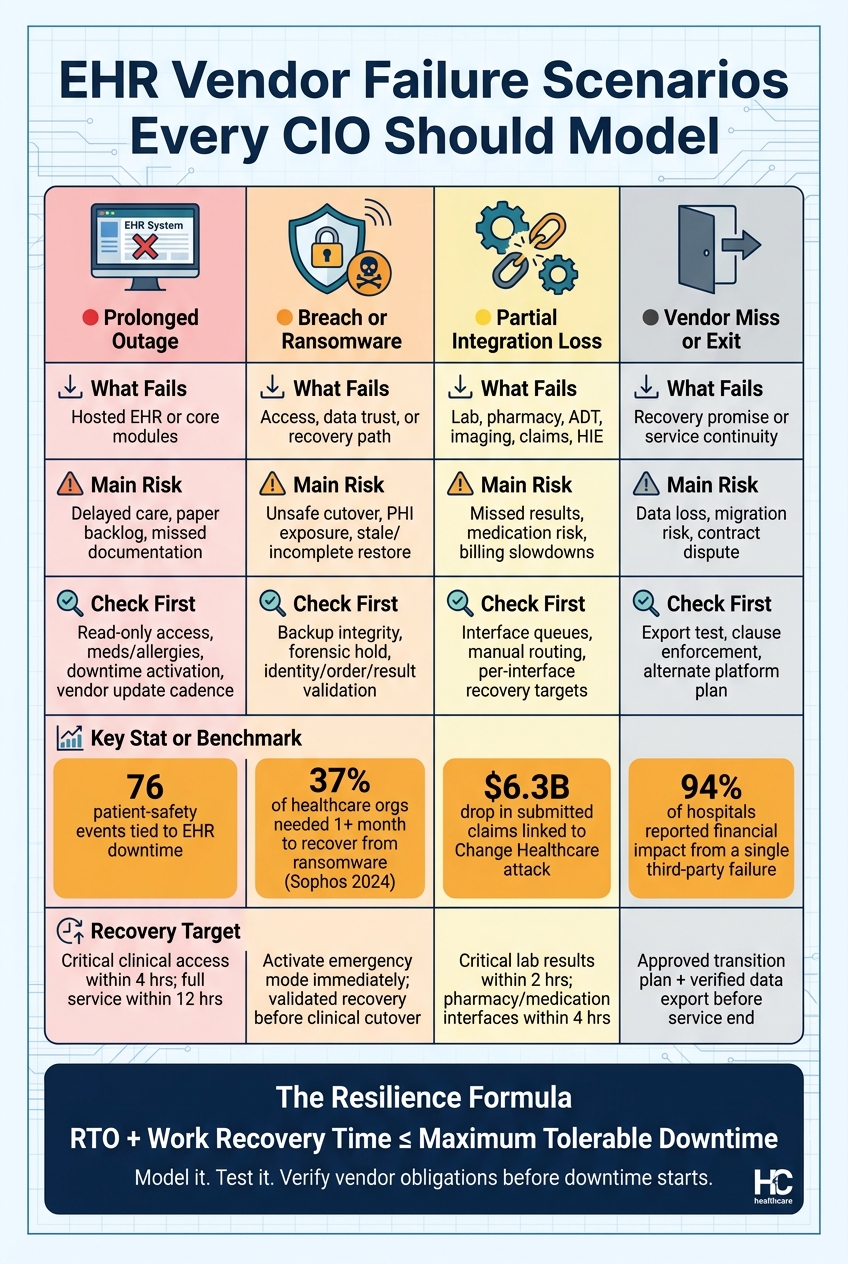
EHR Vendor Failure Scenarios: What Breaks, What's at Risk, and How to Respond
CIOs should model three failure types: full outage, breach or ransomware, and partial integration loss. They may all look like “the EHR is down” from a distance, but they do not break care in the same way. Each one hits patient safety, revenue cycle flow, compliance, and business continuity from a different angle. A 4-hour outage, a ransomware event, and a failed lab interface create very different operational risks.
Prolonged Outage and Vendor Communication Failure
A 4-hour outage with limited read-only access can usually be managed with short-term workarounds. A 12-hour outage that blocks ordering, documentation, and medication administration is a much harder operational problem. A 72-hour outage with no credible restoration timeline from the vendor is an enterprise crisis.[4][1]
What often turns a bad outage into a worse one is poor communication. If vendor updates come every 4 hours but don't include an affected-module list or any restoration estimate, clinical and operational leaders are left making calls in the dark. That’s when documentation backlogs pile up, staff fatigue grows, and manual workarounds start adding reconciliation risk. Maximum tolerable downtime should be set by workflow. Medication administration, allergy access, and emergency registration may need restored or alternate access within hours, while some administrative functions can withstand a longer interruption.[4][1]
Breach, Ransomware, or Compromised Recovery
A cyber event changes the issue from uptime to trust. Teams should model three states at the same time: access unavailable, data presumed intact; read-only access restored while forensic investigation continues; and restored from backups that may be incomplete or stale. Each state brings its own clinical and compliance risks.
Sophos reported that 37% of healthcare organizations required more than one month to fully recover from ransomware incidents in 2024.[9]
That’s not a brief disruption. It’s a long operational hit. The response also has to preserve forensic evidence, assess PHI exposure under the HIPAA Breach Notification Rule, coordinate with the vendor as a business associate, and pull in privacy, legal, and compliance leaders before any restoration decision is made.[6][5] Restored access does not mean recovery has been confirmed. Before clinicians go back into a recovered EHR, the organization needs proof that patient identities, medications, allergies, orders, results, audit trails, and downtime-entered data are complete and accurate.
Integration Loss, Missed Recovery Commitments, and Vendor Exit
Partial failures are easy to miss because the chart still opens. But that can be misleading. If the lab interface stops sending results, the pharmacy connection drops, or the claims feed goes quiet, workflows across lab, pharmacy, results review, and claims submission can become unsafe or badly impaired even while the EHR itself looks available. Each critical interface should be treated as its own failure domain, with its own recovery target. For example, 2 hours for critical laboratory results and 4 hours for medication and pharmacy interfaces.[7][2]
Missed recovery commitments need the same level of attention. Don’t treat contractual RTO and RPO as guaranteed outcomes. Build a stress case where the vendor misses the RTO, the effective RPO is older than promised, or the backup cannot be restored. The NIH Clinical Center faced this exact kind of stacked failure on May 13, 2010, when hardware failure corrupted both the primary and backup databases at the same time, causing sudden loss of access to clinical information for all patients.[8] Vendor exit scenarios - insolvency, acquisition, or product retirement - also need testing. Can the organization get complete, usable records? Can another platform ingest the data before service ends?
Use these scenarios to assign owners, triggers, and recovery expectations.
| Failure Condition | Affected Workflows | Patient-Safety Consequence | Revenue or Compliance Consequence | Detection Signal | Recovery Target | Accountable Owner |
|---|---|---|---|---|---|---|
| Hosted EHR unavailable for 12 hours | Orders, documentation, results, medication reconciliation | Delayed treatment, transcription errors, duplicate testing | Claim delays and incomplete records | Monitoring alert plus user reports | Critical clinical access within 4 hours; full service within 12 hours | CIO with chief medical and nursing officers |
| Suspected ransomware containment | All hosted clinical modules and interfaces | Loss of medication, allergy, and historical-record access | Breach assessment, notification, reporting, and possible contractual penalties | Vendor security notification, abnormal authentication, endpoint alerts | Activate emergency mode immediately; validated recovery before clinical cutover | CISO and privacy officer |
| Laboratory interface fails while EHR remains available | Orders, specimen tracking, results review | Missed or delayed critical results | Manual billing and compliance-record gaps | Interface queue growth and failed-message alerts | Restore critical results flow within 2 hours | Laboratory and applications leaders |
| RTO/RPO miss | Clinical records, orders, charges, interfaces | Missing or stale data during recovery | Data-integrity findings and contractual remedies | Recovery milestone breach and reconciliation exceptions | Escalate under contract; validate restored data before use | CIO, vendor manager, and legal counsel |
| Vendor exit | EHR, integrations, reporting, revenue cycle | Unsafe migration or loss of historical context | Records-retention, interoperability, and claims risk | Financial distress, support-ticket decline, termination notice | Maintain an approved transition plan and verified export before service end | CIO, procurement, HIM, and legal |
Map EHR Dependencies and Set Recovery Targets by Workflow
Those failure scenarios only mean something if you know what fails first. The smartest way to figure that out is to map dependencies by workflow, not by a long list of apps. Once you can see those links clearly, CIOs can set recovery targets that line up with how care is actually delivered.
Build the EHR Dependency Map
Begin with the workflows that matter day to day: medication administration, emergency care, registration, laboratory results, imaging, scheduling, eligibility verification, coding, billing, and claims submission. For each one, trace every dependency required to keep it running: the EHR module, identity and access services, network services, connected systems, devices, power, and vendor-controlled layers.
The point is to surface single points of failure. That could be an identity provider, interface engine, network carrier, or clearinghouse. It also means checking whether each workflow has a manual fallback that staff can use when systems go down.
Validate the map with clinical, revenue-cycle, security, infrastructure, and vendor teams. On paper, architecture diagrams and contracts may look fine. In practice, they often leave out the things people scramble for during an outage, like badge access, local printers, or manual result-routing steps.
That map should then drive recovery targets directly.
Define RTO, RPO, and Maximum Tolerable Downtime
Three measures shape recovery planning. Recovery time objective (RTO) is the maximum acceptable time before a workflow is restored. Recovery point objective (RPO) is the maximum acceptable age of recovered data - an RPO of 15 minutes means up to 15 minutes of transactions may need to be recreated. Maximum tolerable downtime (MTD) is the absolute limit before the impact becomes unacceptable.[10]
A plan also needs to account for work recovery time: reconciliation, validation, and backlog clearing after restoration. That is the real budget teams have to work with:
RTO + work recovery time ≤ maximum tolerable downtime [12]
If a medication workflow has a 2-hour MTD, but the vendor’s tested restoration takes 6 hours, that’s a clear resilience gap. It is not a usable recovery target. Set targets by clinical priority. Emergency care, medication administration, patient identification, and critical results need tighter targets than scheduling, coding, or historical archives.
And here’s the catch: a platform may be technically “up,” but if a key interface or identity service is still down, the workflow is not restored.
Document those targets in a dependency register so teams can test them and track them over time.
Create a Dependency Register as a Planning Deliverable
Turn the map and the targets into one planning artifact. Each row should include the workflow, priority, dependencies, owner, vendor, fallback, security controls, RTO/RPO/MTD, validation steps, escalation contacts, test date, and remediation owner.[11]
The register should be version-controlled and tied to the business continuity plan, disaster recovery plan, downtime playbook, contracts, and audit evidence. Downtime procedures should also be stored in an offline-accessible format at every care location. If the communication path depends on the outage, it is not a fallback.[3]
This register is the working input for downtime playbooks and drills. It is not paperwork for its own sake. After each drill or live incident, update it with actual restoration times, reconciliation findings, and corrective actions. If a high-risk issue is still unresolved, retest it. Finishing the drill alone does not prove resilience.
Build and Test Downtime Workflows That Keep Care Moving
Turn the dependency register into workflow-specific downtime actions before an outage hits.
Write the Downtime Playbook for Clinical and Business Operations
A downtime playbook needs a clear command structure and a practical set of steps people can use under stress. That means naming an incident commander, setting activation criteria, mapping escalation paths, keeping approved communication templates ready, listing vendor contacts, and maintaining a single outage status log. It also needs step-by-step procedures for patient ID, emergency registration, medication administration, orders, labs, imaging, documentation, results routing, and locked storage with tracked transport of paper records. [14]
The playbook should separate four outage states:
- brief outage
- extended outage
- isolated cyber incident
- partial integration failure, such as pharmacy, lab, or identity interfaces going down
Those states are not the same. Each one changes what staff can access, how they document care by hand, and when diversion decisions come into play. [14]
The business side matters too. When a vendor goes down, registration, charge capture, and claims flow can break with it. So the playbook should cover emergency registration, temporary identifiers, duplicate-record prevention, manual charge-capture forms, and eligibility verification. It should also spell out which transactions can wait, which need manual submission, and which deadlines cannot move. [14]
Validate Contingency Workflows Before an Incident
Once the playbook is on paper, test it with the people who will have to use it. Run through scenarios tied to a vendor outage, ransomware isolation, or an interface failure. Use cases people will recognize right away: a new emergency department patient, an inpatient getting medications, a patient transfer between facilities, a critical lab result that needs immediate escalation, and a discharge during a 24-hour outage. [14]
During validation, check the basics that often trip teams up at the worst possible time. Make sure current forms are physically available on every needed unit. Confirm downtime printers and scanners still work. Verify that offline medication and allergy data can be reached. And make sure escalation contacts can be reached through non-EHR channels. Every gap should be logged with an owner, a due date, and proof that the fix is done. Warm-site activation should be defined before the 2-hour mark. [14][15]
Test with Drills, Interface-Failure Exercises, and Recovery Walkthroughs
After validation, move into repeatable exercises. The goal is simple: prove the hospital can keep care moving if the EHR vendor fails. A tabletop exercise checks decision-making, authority, and communications without touching production. A functional exercise shows whether departments can actually carry out forms, patient identification, orders, medication administration, results handling, and secure record storage. An interface-failure exercise takes down one dependency at a time - like laboratory, pharmacy, radiology, health-information exchange, identity management, or claims connectivity - while the rest of the EHR stays up. A recovery walkthrough checks restoration order, reconciliation, duplicate prevention, and validation of critical data. [13][3]
These exercises should pull in the people who own the work, not just IT. That includes clinical leaders, nursing, pharmacy, laboratory, radiology, health information management, revenue cycle, compliance, legal, communications, IT, emergency management, and vendor-management teams. After each exercise, run a structured after-action review within 10 business days. Sort findings into patient-safety, workflow, technology, vendor, compliance, training, or capacity issues. Assign owners, set remediation deadlines, and require proof of closure. Then test the affected workflow again after the fix. Finishing a drill once doesn't show the process will hold up next time. [14][3]
The matrix below turns downtime policy into something you can measure and manage. It helps teams track test frequency, spot gaps, and assign ownership across the workflows that matter most.
| Critical workflow | Normal process | Downtime process | Responsible role | Required forms or data | Safety check | Restoration step | Test frequency |
|---|---|---|---|---|---|---|---|
| Patient registration | EHR registration and identity verification | Downtime registration form and temporary encounter control | Registration supervisor | Two identifiers, demographics, payer data | Duplicate-record and identity check | Enter or merge encounter | Quarterly |
| Medication administration | Electronic MAR and barcode verification | Paper or offline MAR with independent verification | Nurse and pharmacist | Medication list, allergies, orders, administration times | High-alert and allergy check | Reconcile administrations and active orders | Quarterly |
| Provider orders | CPOE and decision support | Approved paper or offline order forms | Ordering clinician and nurse | Order, indication, priority, identifiers | Read-back and completeness check | Enter, review, and cancel superseded orders | Semiannually |
| Laboratory and imaging | Electronic order and interface routing | Manual requisition and result callback process | Ordering unit and laboratory or radiology | Patient identifiers, specimen details, urgency | Specimen and result verification | Match results and close pending orders | Semiannually |
| Discharge | EHR instructions, prescriptions, and coding | Printed or approved manual instructions and charge record | Care team and case management | Medication list, follow-up, diagnosis, charges | Teach-back and medication reconciliation | Enter discharge record and reconcile billing | Annually |
| Critical results | Automated inbox or alert | Direct telephone escalation with read-back | Laboratory or radiology and responsible clinician | Result, time, recipient, acknowledgment | Documented acknowledgment | Record acknowledgment and action | Quarterly |
The matrix should also track the last exercise date, test owner, deficiencies, corrective-action deadline, and evidence location. [14][3]
Strengthen Vendor Accountability and Governance Before the EHR Goes Dark
Drills and playbooks matter only if the vendor can meet its recovery promises. That means getting those promises into the contract, then checking that the vendor can back them up.
Use the dependency register to turn recovery assumptions into vendor duties you can enforce.
Put Recovery, Notification, and Data Portability Obligations in Writing
Generic contract language falls apart when the EHR goes dark. Every EHR agreement should spell out workflow-level RTOs, RPOs, maximum tolerable downtime, backup frequency, restoration priority, update cadence, and escalation ownership. It should also require tested disaster recovery and business continuity plans, annual recovery testing with customer participation in at least a tabletop, restoration walkthrough, or interface-failure exercise, and advance notice of material changes to hosting, architecture, or recovery capacity.
Those terms should tie straight to the failure scenarios you already modeled: prolonged outage, breach or ransomware, integration loss, and vendor exit. Each one calls for a different duty. Outages need restoration timelines. Breaches need forensic coordination. Integration failures need per-interface recovery targets. Vendor exit needs clear data-return terms.
Notification language needs the same level of detail. HIPAA allows up to 60 days for breach notification, but that timeline does not work for hospital operations. Require initial notice within 1 hour of confirming a material outage or compromise, updates every 2 hours during clinical impact, and a written incident report within 5 to 10 business days. The notice should say whether the event is a suspected incident, confirmed breach, service outage, data-integrity issue, or recovery failure. It should also include affected products and interfaces, current availability and integrity status, required customer actions, and the time of the next update.[17][18]
If recovery breaks down, the next issue is simple: can the hospital get its data out and use it somewhere else? Define the exact export set, format, delivery method, timeline, and migration support for clinical, operational, audit, and configuration data. Then test portability with a sample export into a controlled environment. Confirm that the records are complete, attributable, searchable, and clinically usable. Secure deletion terms should cover production systems, backups, test environments, and subcontractor platforms.
Track Evidence, Deficiencies, and Remediation Owners
An unverified contract duty is just a promise on paper. Track each one the way you would track a clinical control: one owner, one test date, one path to fix it.
The table below shows the minimum fields a vendor accountability scorecard should include.
| Scorecard field | What to capture |
|---|---|
| Obligation | Exact contractual or policy requirement |
| Critical service/workflow | EHR capability and downstream dependencies |
| Contract clause | Specific clause or control reference |
| Vendor owner | Named vendor accountable contact |
| Internal lead | Internal accountable person |
| Required evidence | Report, attestation, test result, log, certificate, or other artifact |
| Evidence status/date | Artifact received, reviewed, and date confirmed |
| Last test date | Date of the most recent validation |
| Test scope | Systems, interfaces, and data covered |
| Stated RTO/RPO | Contracted recovery targets |
| Actual result | Pass, partial pass, fail, or not tested |
| Open deficiency | Specific gap and patient-care or business impact |
| Risk rating | Operational or security risk level |
| Corrective-action plan | Interim control and remediation steps |
| Remediation owner | Named vendor and internal accountable person |
| Due date | Agreed completion date |
| Risk decision | Risk acceptance, compensating control, or escalation status |
| Next review date | Date of follow-up validation |
| Closure evidence | Proof that remediation was completed and retested |
Expired evidence and failed recovery tests count as deficiencies. Remediation is not done when someone says it is done. It ends when the organization gets the evidence and validates the control.
Escalation thresholds should be set before anything fails. If a missed recovery target affects medication administration or emergency care, that should trigger immediate executive escalation and a time-bound remediation plan. Repeated missed deadlines, failed recovery tests, or refusal to provide evidence should trigger procurement, legal, and compliance review. If the remaining risk is material, it may also need board-level attention.
Use Governance Tooling to Maintain Ongoing Oversight
Trying to track vendor duties, evidence, deficiencies, and remediation deadlines for a complex EHR ecosystem in spreadsheets is a good way to miss something. Censinet RiskOps™ can centralize vendor obligations, evidence, remediation tasks, and accountability records. Censinet Connect™ can track integration risk, and Censinet AI™ can help with evidence review and follow-up.
That matters because governance records should not sit off to the side as a compliance file. They should connect to the dependency map and the downtime playbook, so a vendor deficiency turns into an operational response.
Use the governance record to drive contract review, deficiency follow-up, and recurring testing. Review critical EHR vendors quarterly, high-risk open deficiencies monthly, and event-triggered risks after material incidents, architecture changes, renewals, or new clinical dependencies.
Conclusion: Model EHR Failure Now, Before Downtime Starts
EHR resilience begins with planning for vendor failure. That’s the right place to start because a third-party outage, breach, or interface loss can hit patient care, cash flow, and compliance all at once. And the record on this is plain: EHR and third-party failures happen often, last longer than many teams expect, and cause serious disruption. The 2024 Change Healthcare attack made that painfully clear. A failure in a connected third-party platform left 94% of hospitals with financial impact, 74% with direct patient-care effects, and 60% needing two weeks to three months to get back to normal operations.[19]
So CIOs can’t treat downtime planning like a box-checking task. They need to model failure, map dependencies, set recovery targets at the workflow level, test downtime procedures, and confirm what vendors are actually required to do.
The gap between having a plan and being ready is bigger than it looks. The HHS Office of Inspector General found that although nearly all hospitals said they had written EHR contingency plans, only about two-thirds covered all four reviewed HIPAA contingency-plan elements. On top of that, about one-quarter of hospitals that went through an unplanned disruption said it led to patient-care delays.[16] That matters. A plan that hasn’t been tested against day-to-day workflows won’t protect medication administration, registration, or claims when systems go down.
Vendor accountability helps keep those recovery assumptions tied to reality. Resilience needs to be treated as part of day-to-day governance: refresh dependency maps, retest workflows, and review vendor terms as systems change. Model it, test it, and verify vendor obligations before downtime starts.
FAQs
How do I prioritize EHR workflows for downtime planning?
Start by mapping vendor dependencies so you can see which systems support critical clinical and business functions. That gives you a clear picture of what would hurt most if a vendor went down.
Next, use a clinical impact matrix to score each system based on:
- patient safety
- risk of care delays
- whether manual workarounds are possible
From there, group systems into Tier 1, Tier 2, and Tier 3. Assign RTOs to each tier so teams know how fast each system needs to come back online.
Then pressure-test those priorities with tabletop exercises and live drills involving clinical, pharmacy, and IT teams. On paper, a recovery plan can look solid. In practice, drills show where the gaps are.
What should I verify before trusting a restored EHR after ransomware?
Before you trust a restored EHR after ransomware, make sure any backup you're considering has been scanned for malware. If you skip that step, you could bring the infection right back into the environment.
After restoration, the system should clear three checks:
- Integrity checks to confirm the data and system state are intact
- Functional checks to make sure the EHR works as expected
- Security checks to verify it’s safe to use
And one more thing matters: formal sign-off. Clinical leaders or department owners should approve the restored system before it’s opened up for broad use.
Which vendor contract terms matter most before an outage?
Prioritize terms that set clear RTOs and RPOs, incident notification timelines, and duties for disaster recovery and business continuity.
Also include cybersecurity accountability clauses, uptime guarantees of at least 99.9%, audit rights, and regular compliance attestations to keep vendors accountable.
