
If a cloud vendor can’t answer four basic HIPAA questions with proof, I would not let them touch PHI.
Here’s the short version: before I move any healthcare data into the cloud, I want clear answers on the BAA, security controls, data location, and incident/risk support after go-live. That matters because cloud compliance is a form of third-party risk that is shared, and OCR has already shown that missing basics can get expensive - including a $2.7 million settlement tied to cloud ePHI and no BAA.
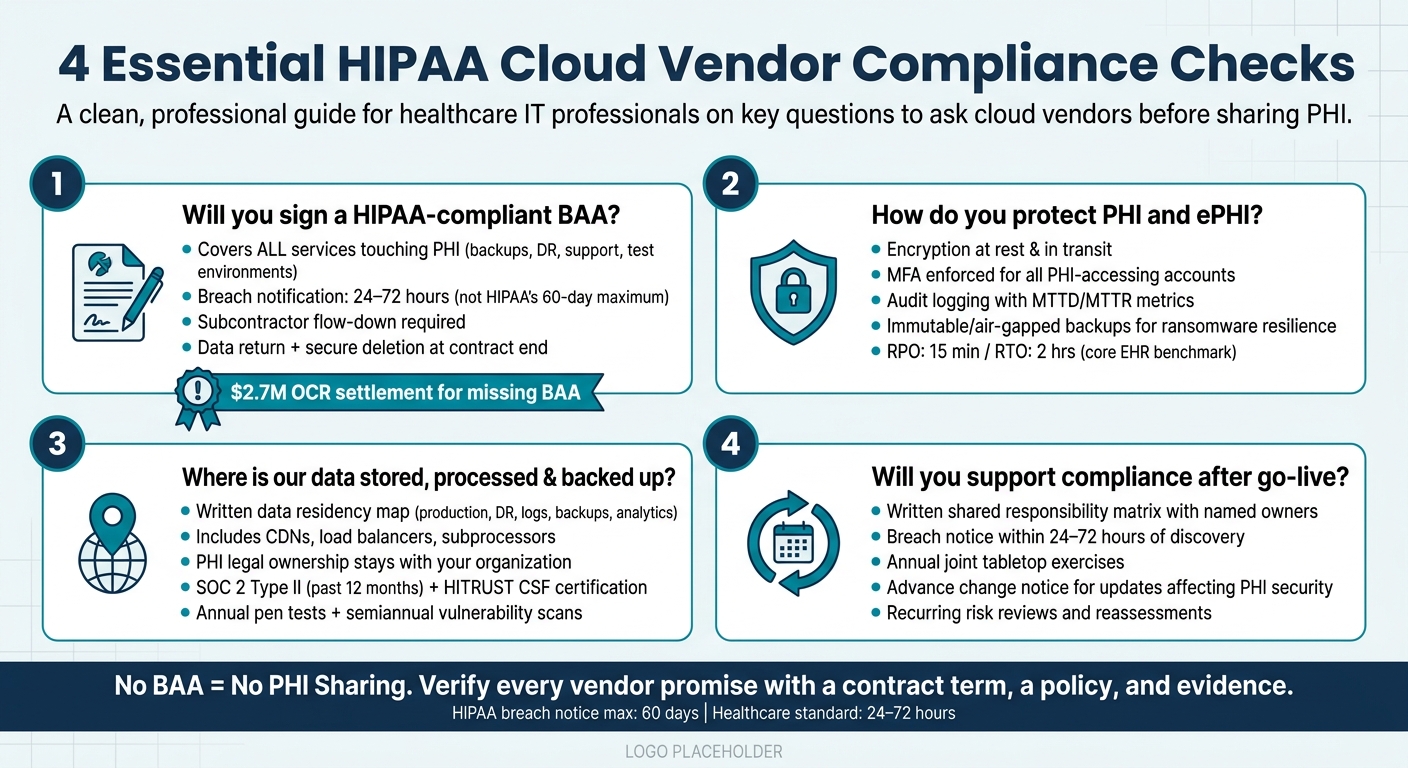
If I were reviewing a vendor, I’d start with these four checks:
-
Will they sign a HIPAA-compliant BAA?
If the answer is no, that’s a stop sign. -
Can they prove how they protect PHI and ePHI?
I’d ask for evidence of encryption, MFA, logging, backup, recovery testing, and incident response. To speed up this review, teams often use tools to automatically answer security questionnaires based on existing documentation. -
Can they show where data is stored, processed, and backed up?
I’d want a written map for production, logs, backups, DR, and any non-production use. -
Will they support compliance after launch?
I’d ask for a shared responsibility matrix, notice timelines for security events, change notice rules, and joint testing.
A few points stand out:
- HIPAA allows up to 60 days for breach notice in some cases, but many healthcare teams push vendors for 24 to 72 hours
- Audit reports matter, but I’d still check the scope, date, and systems covered
- Backups are not enough on their own; I’d want proof of RPO/RTO targets and recent recovery test results
- Data location is not just about production systems - logs, replicas, support tools, and test copies count too
So the core idea is simple: don’t rely on claims. I’d match each vendor promise to a contract term, a policy, and a piece of evidence before go-live.
That’s the lens I’d use for the rest of the article.
4 HIPAA Cloud Vendor Compliance Checks Before Sharing PHI
Is the Cloud REALLY HIPAA Compliant? - 10 Critical Questions Answered!
sbb-itb-535baee
Question 1: Will you sign and honor a HIPAA-compliant Business Associate Agreement?
Before any PHI moves to the cloud, establish HIPAA-compliant vendor risk management and get a signed BAA in place. No signed BAA, no PHI sharing. That line should be firm.[1][7][8]
What to verify in the vendor's BAA language
Make sure the BAA covers every service that touches PHI, not just the main production system. That includes backups, logging, disaster recovery, support, and test environments.[1][5][8]
There are six areas worth checking closely:
- Permitted uses and disclosures: The BAA should limit use and disclosure of PHI to the specific services being provided. It should also put tight limits on de-identification, analytics, and re-identification.[4][6]
- Safeguard obligations: The agreement should require administrative, physical, and technical safeguards that line up with the HIPAA Security Rule. That includes audit logging, plus physical and facility controls for data centers.[1][2][4]
- Subcontractor flow-down: Any subcontractor that creates, receives, maintains, or transmits PHI must be held to the same HIPAA duties through its own BAA. The vendor should also keep a current subcontractor inventory and tell you when that list changes.[6][8][9]
- Breach notification timelines: Don’t settle for HIPAA’s outer limit of 60 days. Many teams push for first notice within 24 to 72 hours.[6][12]
- Audit rights: The BAA should give you access to policies, risk assessments, and third-party audit evidence on a set schedule.[4][6][9]
- Data return and deletion: When the contract ends, the vendor should return PHI in a usable format and then securely destroy what remains, including backups and test copies, with written attestation.[6][8][9][10]
How to compare BAA terms against vendor commitments
A signed contract is only part of the job. You also need to line up each BAA clause with the vendor’s policies, controls, and SLAs. If the legal language says one thing but the operating documents say another, that’s a red flag. Recent enforcement activity makes the point clear: paper compliance by itself does not cut it.[11][13]
| BAA Clause | Vendor Commitment Document | Evidence Reference | Gap / Issue |
|---|---|---|---|
| Breach notification within 48 hours | Incident Response Policy | SLA or runbook | SLA says 5 business days, which conflicts with the BAA |
| Subcontractor BAAs required | Vendor Subprocessor Policy | Subprocessor list | One or more hosting or support partners are not listed |
| Security risk assessment | Risk Management Program | Independent audit report | Production is covered, but backup or DR environments are excluded |
| PHI deletion at termination | Data Lifecycle Policy | Written attestation template | No attestation process is defined for test environments |
| Audit rights on request | Security Assurance Policy | SOC 2 Type II or HITRUST report | Report scope excludes disaster recovery systems |
If a gap stays unresolved, treat it as a contract blocker.[1][4][6][9]
Once the BAA is settled, move on to the controls that protect PHI and ePHI in day-to-day use.
Question 2: How do you protect PHI and ePHI across your cloud environment?
After the BAA is signed, the next step is simple: check the controls that turn contract language into day-to-day practice.
A vendor saying it's HIPAA compliant doesn't tell you much on its own. You need to verify the controls, settings, and proof that protect PHI and ePHI across the cloud environment. The HIPAA Security Rule calls for administrative, physical, and technical safeguards. That still applies to cloud vendors, even when they can't decrypt the data. Use a shared responsibility model to draw a clear line between what the vendor manages and what your team still owns.[1][15]
Security controls that should be validated with evidence
Start with encryption. Confirm encryption at rest and in transit, then ask for a key management diagram that shows where keys are stored, who can access them, how often they rotate, and what gets logged.[16][18][19] You should also request encryption settings for each service that stores or processes PHI.
For identity and access management, dig into how the vendor applies least privilege across every account that can reach PHI workloads. Ask for IAM role definitions, sample access review reports, and proof that MFA is enforced for administrative accounts and any account that can access PHI. For privileged access, ask whether the vendor uses just-in-time elevation, session recording, and PAM for administrators, support engineers, and subcontractors.[19]
Audit logging and monitoring often look fine on paper but fall apart under pressure. Require logging for PHI access, configuration changes, and authentication events, along with retention settings and alert thresholds.[14][17][18] Ask for MTTD and MTTR metrics. Then confirm, through a SOC 2 Type II report or penetration test results, that alerts lead to timely action. From there, check whether the vendor can recover fast and preserve evidence after an incident.
How to assess backup, recovery, and incident readiness
Ask for documented recovery point objectives (RPOs) and recovery time objectives (RTOs) tied to specific systems, such as EHR databases, imaging, lab systems, and patient portals. A common benchmark for core EHR databases is an RPO of 15 minutes and an RTO of 2 hours, but your organization's clinical workflows should set the target.[20][21]
Ransomware resilience needs its own review. Ask whether backup storage is immutable or air-gapped, and whether production and backup environments are kept separate. These controls matter because a failed recovery can turn into a compliance problem fast if PHI becomes unavailable, exposed, or unrecoverable. Request results from recent disaster recovery tests or tabletop exercises, including whether RPO and RTO targets were met in practice and what the vendor changed when they missed them. You want proof that the backup design can stand up to ransomware.
Security control review table for PHI protection
Use this table to track what the vendor has provided, not just what they've said. Fill the evidence column only with items you can verify, like policies, architecture diagrams, and test reports, not sales copy. Assign a review owner for each area so legal, privacy, security, and operations all have eyes on it. Use the gaps column to flag anything that still needs follow-up before go-live.
| Control Domain | Vendor Evidence to Request | Review Owner | Identified Gaps |
|---|---|---|---|
| Encryption (at rest & in transit) | Encryption config summaries, TLS settings, FIPS validation documentation | Security Architect | Backups and logging not confirmed in encryption coverage |
| Key Management | Key management architecture diagram, rotation schedule, access logs | Security Architect | Key revocation process unclear |
| Identity & Access Management | IAM role definitions, MFA enforcement policy, access review samples | Privacy Officer / IT Security | MFA not confirmed for all PHI-accessing accounts |
| Privileged Access Controls | PAM tool documentation, just-in-time access policy, session recording evidence | IT Security | Session recording during maintenance windows not confirmed |
| Audit Logging & Monitoring | Logging architecture diagram, retention settings, MTTD/MTTR metrics | Security Operations | Retention period not confirmed for investigations and audits |
| Vulnerability Management | Scan reports, patching SLOs, penetration test summaries | Security Architect | Critical vulnerability remediation timelines not confirmed |
| Backup & Disaster Recovery | Backup policy, RPO/RTO documentation, disaster recovery test results | IT DR Specialist / Clinical Ops | Recovery targets not confirmed for core systems |
| Incident Response | IR playbooks, breach escalation procedures, anonymized past incident reports | Privacy Officer / Legal | Playbook coverage for misconfigured cloud storage and ransomware not confirmed |
Any gap that remains open after follow-up should be logged as a risk item. It isn't something to wave through and fix later.
Next, verify where the data lives, how long it stays there, and what proof supports those claims.
Question 3: Where is our data stored, processed, and backed up - and what proof can you provide?
After backup and recovery, the next thing to pin down is where every copy of PHI actually sits. A vendor can say it's HIPAA-compliant all day long, but that still doesn't tell you where your PHI lives. You need a written map that shows where PHI, ePHI, logs, and backups are stored and processed.
Data location, ownership, and lifecycle questions
Start by asking for a data residency map. This should be a written document or diagram that names every region and data center where PHI, ePHI, audit logs, backups, and analytics data are stored or processed.[29][31] It should include production systems, DR replicas, and any secondary stores used for support or analytics. Also ask whether any data - including metadata and logs - is replicated or processed outside the U.S. through CDNs, load balancers, or subprocessors.[29][31] HHS guidance says overseas storage of ePHI is possible, but it can create jurisdiction and foreign-government access risks that need close review.[3]
But location is only part of the story. Ownership and export rights tell you who stays in control. Confirm that legal ownership of all PHI remains with your organization, and that the vendor is acting only as a business associate. Your contract should keep your right to access, export, and delete data.[29][30] Ask which export formats are supported, such as CSV, JSON, HL7, or FHIR APIs, and make sure you know whether bulk exports come with extra fees or long lead times.[29][30]
You should also ask what happens in non-production environments. If PHI shows up in test, development, or analytics sandboxes, what de-identification controls are in place? Then look at the end of the contract. Find out whether you get a defined post-termination access window - for example, 90 days - and how the vendor verifies secure deletion across primary systems, backups, and logs.[29][30]
Independent audit and assurance evidence to request
Once the vendor maps the locations, ask for proof. Request a SOC 2 audit documentation checklist and current Type II reports, HITRUST CSF certification, penetration test summaries, and remediation tracking.[28][22][27][32] Ask for the full SOC 2 Type II report, not a summary, because the scope section shows which systems and controls were actually tested.[32] The report should be from the past 12 months and should cover the infrastructure that hosts your PHI.
HITRUST certification is widely recognized in U.S. healthcare and maps to HIPAA, NIST, and other standards.[22][27] For penetration testing, ask for summaries from independent security firms that cover the production environment, APIs, network segmentation, and access control paths. Those summaries should include scope, methodology, key findings, and remediation status.[23][26] You should also request annual penetration tests and semiannual vulnerability scans, along with remediation timelines and proof that fixes were verified.[23][26][24][25]
One more contract point matters here: make sure the vendor includes customer audit rights. That gives your team, or a designated auditor, the ability to review controls on a set schedule. It should also spell out which artifacts the vendor must provide, such as updated SOC 2 reports, HITRUST status, and policy changes that affect PHI handling.
Evidence inventory table for audits and reviews
Use the table below to track only artifacts you've actually verified. Assign a review owner to each item, and log any follow-up work before you close out the vendor assessment.
| Evidence Type | Scope | Date Issued or Last Updated | Review Status | Follow-Up Actions |
|---|---|---|---|---|
| SOC 2 Type II Report | Production environment, backups, logging infrastructure | Within past 12 months | Pending review | Confirm scope includes PHI storage regions and sub-processors |
| HITRUST CSF Certificate | Cloud platform and healthcare services | Current | Pending review | Verify certificate covers services in scope for PHI |
| Data Residency Map | PHI, ePHI, logs, backups, analytics data | Current | Not received | Request written diagram with named regions and data centers |
| Sub-Processor Disclosure | All third-party services touching PHI or metadata | Current | Not received | Confirm BAAs or equivalent agreements are in place |
| Penetration Test Summary | Production environment, APIs, network segmentation | Within past 12 months | Pending review | Confirm critical findings are remediated and verified |
| Vulnerability Management Metrics | Scanning frequency, patching timelines, remediation tracking | Current | Not received | Request patching timelines for critical and high findings |
| Data Lifecycle Policy | Retention schedules, secure deletion, non-production PHI handling | Current | Not received | Confirm deletion verification process post-termination |
| Customer Audit Rights Clause | Contract terms for periodic review and evidence sharing | Per contract | Legal review pending | Define audit frequency and required artifact list |
Any row that stays in "Not received" after follow-up should be logged as an open risk item.
Question 4: How will you support compliance, incident coordination, and risk management over time?
Signing a BAA and checking audit reports can get you to go-live. Keeping compliance in place after that takes more than paperwork. It takes a vendor that stays involved as services change, incidents happen, and annual reviews come around. This question gets at a simple issue: does the vendor treat compliance like an ongoing working relationship, or just a box to tick once? After you've checked controls and data locations, this is the next test.
Shared responsibility and incident coordination after go-live
Ask the vendor for a written shared responsibility matrix. It should map each control, such as access management, encryption, logging, backup, patch cadence, and disaster recovery, to a clear owner: the vendor or your organization. That document shouldn't sit untouched after the contract is signed. It needs review any time services, integrations, or data flows change. It should also list escalation contacts and spell out response timelines for security events that affect PHI, clinical apps, or connected medical devices.
For breach notification, your contract should require the vendor to notify your organization within 24 to 72 hours of discovery. That notice should include the incident summary, the PHI involved, the record count, and the mitigation steps already taken.[33][35]
If an incident touches clinical workflows or medical devices, go a step further. Ask whether the vendor has documented downtime procedures and failover options that keep core services running safely. Then ask if they'll join joint tabletop exercises at least once a year. It's much better to test escalation paths after go-live in a drill than during a live event.
Change management matters just as much. Require advance notice, ideally through a formal change notice or customer portal, for any update that could affect PHI security, data center locations, or encryption protocols. For critical systems, push for longer notice windows and coordinated maintenance schedules so updates don't interfere with patient care.
How Censinet supports continuous cloud vendor oversight
Doing this by hand across many vendors can turn into a mess fast. Censinet RiskOps™ puts BAAs, audit reports, reassessments, and remediation tracking in one place. Censinet AI™ summarizes vendor responses, pulls out key controls, and flags gaps for human review, while keeping people involved in the review process.
Conclusion: The vendor questions that matter most for cloud compliance
Four questions sit at the center of a serious cloud vendor review. First, confirm that the vendor will sign and follow a HIPAA-compliant BAA with terms that match how your data is used. Second, check that safeguards like encryption, access controls, logging, backup, and incident response are supported by current, verifiable evidence. Third, verify exactly where PHI is stored, processed, and backed up, and make sure data ownership and lifecycle terms are written into the contract. Fourth, put a clear model in place for ongoing compliance and incident response, including change management, breach notification timelines, recurring risk reviews, and a shared responsibility matrix with named owners.
This kind of vendor review isn't just about compliance on paper. The Oregon Health & Science University case, a $2.7 million OCR settlement tied to storing ePHI on a cloud server without a BAA, shows what can happen when these basics are missed.[34] Getting clear answers before and after go-live helps cut regulatory risk and, just as important, helps protect patient data and care delivery.
