
If you handle ePHI, DLP can help cut data leaks, but it will not make you HIPAA-compliant by itself.
I’d sum it up like this: HIPAA asks you to protect electronic patient data based on risk, and DLP helps by finding, watching, and controlling where that data goes. It can scan email, endpoints, cloud apps, web uploads, EHR exports, and removable media. It can also log events for reviews, audits, and incident work.
Here’s the short version:
- HIPAA is risk-based. You need to match controls to your size, systems, and data risks.
- DLP fits best with technical safeguards. That includes access controls, audit controls, integrity, and transmission security.
- DLP helps with common leak paths. Think email, USB drives, cloud sharing, web uploads, and bulk EHR exports.
- DLP is only one control. You still need risk analysis, written policies, staff training, access rules, and incident response.
- Good rollout matters. I’d start with data flows, use monitor mode first, then add warnings and blocking after tuning.
- Logs matter. DLP records can support breach review and help show what happened, when, and where.
A few facts stand out. HIPAA breach notification can require notice within 60 calendar days. And many healthcare incidents still come from hacking or data disclosure through normal work channels, not just rare edge cases.
If I were putting this into practice, I’d focus first on the highest-risk paths: outbound email, endpoint copying, cloud sharing, and large EHR exports. Then I’d tie each DLP rule to a written risk finding so the control has a clear reason behind it.
Bottom line: DLP helps reduce patient-data exposure and gives you audit records, but it only works well when it’s tied to risk analysis, staff behavior, and response steps.
HIPAA Compliance Simplified: Protect Patient Data
sbb-itb-535baee
What HIPAA requires to protect ePHI
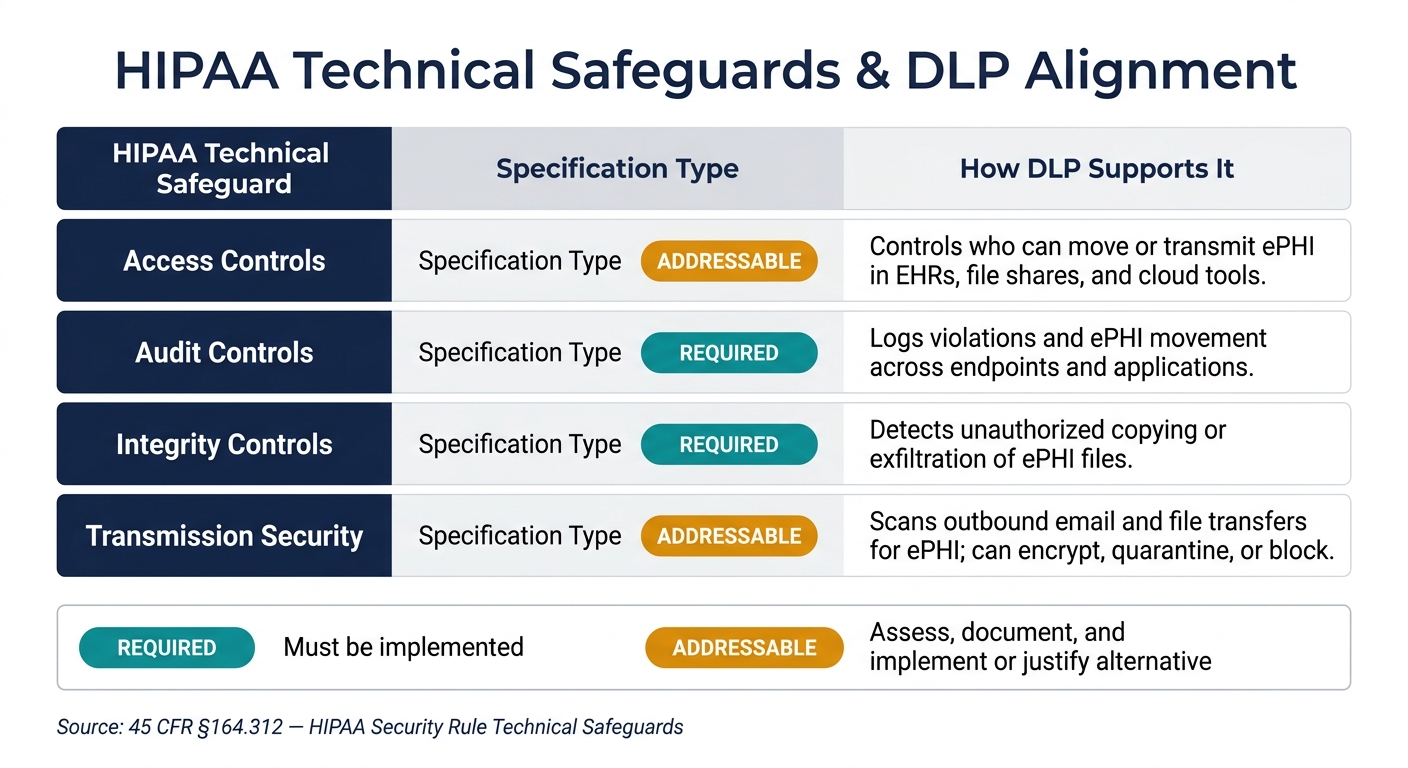
HIPAA Technical Safeguards: How DLP Controls Map to Compliance Requirements
HIPAA doesn't give you a one-size-fits-all checklist. It uses a risk-based standard, which means each organization has to document safeguards that match its size, complexity, and level of ePHI risk.
A small physician practice and a large health system are both on the hook for compliance. But they won't put the exact same controls in place. The key is to document the risk-based reason behind each safeguard. That's the lens for deciding where DLP belongs.
Administrative, physical, and technical safeguards all play a role. But DLP lines up most closely with the technical side.
Technical safeguards that align with DLP
Under 45 CFR §164.312, four technical safeguard standards line up closely with DLP:
| HIPAA Technical Safeguard | Specification Type | How DLP Supports It |
|---|---|---|
| Access Controls | Required standard; implementation specifications are addressable. | Controls who can move or transmit ePHI in EHRs, file shares, and cloud tools. |
| Audit Controls | Required | Logs violations and ePHI movement across endpoints and applications. |
| Integrity Controls | Required | Detects unauthorized copying or exfiltration of ePHI files. |
| Transmission Security | Required standard; implementation specifications are addressable. | Scans outbound email and file transfers for ePHI and can encrypt, quarantine, or block them. |
It's worth drawing a clear line between required and addressable specifications.
- Required means you must implement it.
- Addressable means you need to assess and document whether it's reasonable and appropriate for your setup, then either implement it or explain why you didn't and what equivalent measure you're using instead.
Risk analysis and documentation expectations
HIPAA's risk analysis requirement (§164.308(a)(1)) sits at the center of all this. It isn't a one-and-done task. OCR guidance makes it clear that risk analysis has to be an ongoing process, updated as technology, threats, and operations shift.
For DLP, that means risk analysis should tell you where to start. First, map where ePHI is created, stored, processed, and sent: EHR systems, billing platforms, email gateways, cloud storage, and third-party vendor portals. Then look at the exposure points at each step.
DLP policy choices should come after those findings, not before them. If your risk analysis flags bulk EHR exports and unencrypted email as top risks, those are the flows your DLP setup should handle first. And each control should have written rationale that ties it back to a specific finding.
Keep records of:
- each DLP control
- the HIPAA requirement it supports
- its deployment date
- any updates when workflows or third-party risk profiles change
Those mappings show how DLP supports HIPAA in day-to-day use.
How DLP supports HIPAA compliance in practice
Core DLP capabilities for PHI protection
Once a risk analysis shows where PHI is most exposed, DLP puts controls in place. It ties discovery, monitoring, and enforcement together to cut down on unauthorized PHI destinations.
Data discovery and classification scan file shares, endpoints, email systems, cloud repositories, and other systems to find where ePHI actually lives. These tools look for markers like Social Security numbers, MRNs, and clinical terms, then label data by sensitivity, such as high-risk PHI or de-identified data. For example, a health system might run a discovery scan and find large volumes of unencrypted discharge summaries sitting on an open shared network drive. From there, the files can be classified and moved to a secure document management system with tighter access controls.
Content inspection scans PHI in motion and at rest across email, web uploads, file transfers, servers, endpoints, and cloud storage. When PHI is detected, policy controls can block, encrypt, quarantine, warn, or alert. Justification workflows add another layer of control. If an action is allowed, the user can be prompted to give a reason, and that reason is logged. A clinician exporting a large EHR report, for instance, may need to explain the business purpose, which gives privacy and compliance teams an auditable record.
Mapping DLP controls to HIPAA safeguard areas
Each DLP capability should tie back to a specific HIPAA safeguard and a documented risk. That same mapping should show up in your risk documentation. Blocking and transfer limits align with confidentiality. Logs and user actions support audit controls. Quarantine helps protect integrity. Encryption supports transmission security.
Healthcare use cases where DLP matters most
These controls matter most at the places where PHI is most likely to leave core systems. The main PHI exit points are:
- Outbound email
- USB and endpoint copying
- EHR exports
- Web uploads
- APIs
- Cloud collaboration tools
For outbound email, DLP rules can detect PHI in message bodies or attachments and then automatically encrypt, quarantine, or block delivery to personal domains. At the same time, they can still allow transmission to approved business associates over secure channels.
For USB and endpoint copying, endpoint DLP can block PHI from being copied to removable media, unapproved external drives, or local folders on unmanaged devices. That cuts the risk that a lost or stolen device exposes patient records.
EHR exports need close attention. DLP can flag high-volume queries, require justification for bulk data pulls, and alert security teams when large PHI report runs are sent to spreadsheets or external storage.
Cloud collaboration tools bring a different set of risks. DLP policies can stop PHI folders from being shared broadly or with external guests unless that access is explicitly approved. That helps support minimum necessary access across the workforce.
How to implement and govern DLP in a HIPAA-aligned program
Once DLP controls are set, the next job is to match them to how data actually moves through the organization and who handles it day to day.
Start with data flows, data inventory, and policy scope
Begin with a risk-based inventory by system and user role. Then map data flows across EHRs, email, endpoints, shared drives, cloud apps, medical devices, and vendor connections. That map sets the policy scope, helps tune rules, and gives teams a clear way to handle exceptions.
Set policy scope by data type and channel. Start with PHI, ePHI, clinical notes, lab results, patient identifiers, and billing data, especially in higher-risk paths like email, web uploads, unmanaged endpoints, and external sharing.
Focus first on the workflows that show the most risk in the data-flow analysis. A phased rollout tends to work best:
- Start in monitor-only mode
- Move to user coaching
- Block only when the risk is clear
That approach gives teams room to tune policies before they disrupt normal work.
A specialty clinic bringing on a new referral partner, for example, may need a short-term exception while secure exchange controls are being put in place. Every exception should include a business reason, approval, an expiration date, and a compensating control.
After the policy scope is set, each alert needs a clear response path.
Integrate DLP with incident response and workforce training
A DLP alert matters only if it leads to action. Each alert should make it clear what data was involved, who received it, whether it left an approved channel or went to an approved recipient, and whether it was contained. Those details support HIPAA breach analysis and, when needed, help notify affected individuals without unreasonable delay and within 60 calendar days.[4][5]
Connect DLP alerts to ticketing, SIEM/SOAR, and privacy review workflows. Preapproved response playbooks and severity-based routing can cut investigation time and lower the odds of missing a reportable event.
Staff also need to know what sets off DLP, why the control is there, and what to do when they see a warning or a block. Use role-based guidance for clinical, billing, and administrative users. In-workflow coaching helps reinforce the right habits without getting in the way of legitimate work.
Once those response workflows are live, the next step is to check whether the controls are lowering risk in practice.
Use risk management to maintain oversight at scale
Track alert volume, true-positive and false-positive rates, time to triage, time to containment, repeat violations, and approved exceptions. These metrics show whether DLP is cutting risk or just making noise.
Periodic governance reviews should bring together privacy, security, compliance, IT, and operational stakeholders. The goal is simple: check whether policies still match current data flows and whether new applications or vendor connections have opened paths that no one is watching.
For large healthcare organizations, centralized risk oversight can help keep DLP in step with changing vendors and workflows. Censinet RiskOps™ can help centralize enterprise and third-party risk assessments, document DLP coverage, and coordinate remediation across teams and vendors.
Conclusion: What healthcare leaders should take away
Once you map controls to risk, the next step is using DLP the right way. Not as a standalone fix. HIPAA does not require any one DLP product. It requires reasonable, documented controls based on where ePHI lives, how it moves, and the risks around it. [2][1]
When DLP is set up around actual risk findings, it gives teams a clearer view of where PHI is stored, how it travels, and which paths carry the most risk. That kind of visibility supports ongoing risk analysis and risk management. [1][6]
This matters because hacking/IT incidents and unauthorized access or disclosure still rank among the most common causes of healthcare breaches. [9][10][7] If data movement isn't monitored and controlled, PHI can slip out through everyday channels. DLP helps cut down unauthorized disclosures by applying rules to common risk points like outbound email, cloud uploads, removable media, and file sharing. It also creates audit trails that support HIPAA documentation and response. [3][6]
But the tool alone won't do the job. Governance matters just as much. DLP works best when it's backed by clear governance, workforce training, and incident response processes that turn alerts into action. Leaders should view DLP as one part of a broader HIPAA-aligned security program, with regular reviews and cross-functional oversight to keep policies lined up with day-to-day workflows.
In practice, the payoff shows up in a few plain ways: fewer exposures, faster response, and cleaner audit evidence. The bigger aim is fewer breaches, stronger trust, and an audit-ready compliance record that shows the organization is actively managing PHI risk. Censinet RiskOps™ can support that by helping healthcare delivery organizations centralize risk oversight, benchmark controls, and coordinate collaborative risk management. [8]
FAQs
Can DLP make us HIPAA compliant?
No. DLP is an important safeguard for achieving and maintaining HIPAA compliance, but it can't make you compliant on its own.
HIPAA calls for a broader, layered approach. That includes encryption for data in transit and at rest, multi-factor authentication, access management, and Business Associate Agreements with third-party vendors.
Where should we deploy DLP first?
Start by mapping every place ePHI is created, received, stored, or sent. That includes servers, cloud services, mobile devices, email, and backups.
Put email systems at the top of the list. Email is often where mistakes happen fast.
With DLP, you can scan messages for PHI identifiers and then take action right away. For example, the system can trigger encryption on its own or send the message through a secure portal instead. That helps stop PHI from going out over unencrypted connections.
How do we reduce DLP false positives?
Reduce DLP false positives by reviewing and tuning security alerts on a regular basis. Put clear, documented steps in place for log reviews, including how often reviews happen and which escalation actions to follow.
When teams watch alerts closely and adjust the rules to better reflect normal activity, they cut down on noise and make detection more accurate.
