
Telehealth devices are HIPAA-covered the moment they create, store, send, or show ePHI. If I had to boil this down, I’d say the job comes down to four things: track every device, map where ePHI goes, fix the highest-risk gaps, and keep records for 6 years.
Here’s the short version:
- HIPAA rules for telehealth are the same as in-person care.
- Clinician laptops, tablets, phones, carts, and RPM tools can all be in scope, but they often carry critical medical device security risks that must be addressed.
- BYOD devices count too if they’re approved for care use.
- BAAs are required when a vendor handles ePHI for you.
- Risk review must cover all ePHI across devices, apps, networks, and vendor systems.
- Core controls usually include encryption, MFA, access limits, session timeouts, logs, patching, and remote wipe.
- Monitoring and record retention matter just as much as setup.
A few numbers show why this matters: 25% of Medicare fee-for-service users had at least one telehealth service in 2024, and 80.5% of office-based physicians used video telemedicine in 2021, up from 16.0% in 2019. That’s a lot of devices, a lot of data, and a lot of risk if controls are weak.
If I were starting from scratch, I’d use this checklist:
- List every telemedicine device
- Trace ePHI across visits, apps, storage, and vendors
- Rank risk by confidentiality, integrity, and availability
- Apply device, user, and remote-work controls
- Review logs, vendors, and BAAs on a set schedule
- Keep proof of all reviews, fixes, and policies
This article is, at its core, a plain guide to getting telemedicine devices ready for audits without missing the basics.
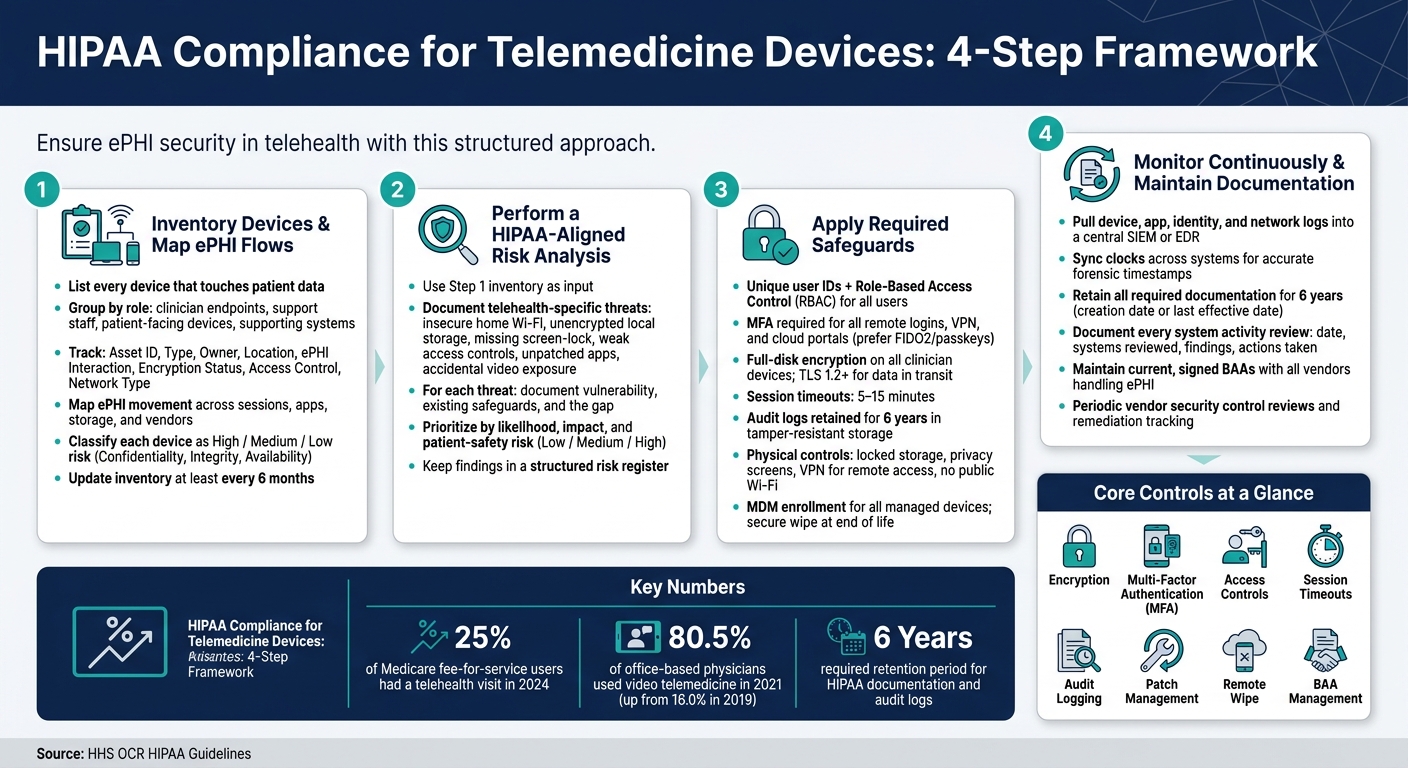
HIPAA Compliance for Telemedicine Devices: 4-Step Framework
HIPAA at Home | Securing ePHI in a Remote and Telehealth World | Webinar on HIPAA Compliance
sbb-itb-535baee
Step 1: Inventory Devices and Map ePHI Flows
Start by listing every device that touches patient data and every place that data goes. HHS OCR says a risk analysis must cover all ePHI, wherever it is stored or transmitted. That includes devices in patient homes, mobile networks, and cloud platforms.[7][8]
Build a Telemedicine Device Inventory by Role and Use Case
A simple way to do this is to group devices by how they're used:
- Clinician endpoints: laptops, tablets, and smartphones used for virtual visits
- Support staff endpoints: scheduling, billing, and care coordination workstations
- Patient-facing devices: patient smartphones, home monitoring kits, connected blood pressure cuffs, and glucometers
- Supporting systems: telehealth carts, VPN gateways, firewalls, and cloud-hosted telehealth platforms
For each device, note if it is organization-managed, personally enabled under a BYOD policy, or deployed in a patient's home. That detail matters. Ownership and location shape which safeguards make sense. A shared telehealth cart in a clinic does not carry the same risk as a clinician's personal smartphone used for video visits.
At a minimum, your inventory should track: Asset ID, Asset Type, Owner/Custodian, Physical Location, ePHI Interaction (create, receive, store, or transmit), Encryption Status, Access Control Method, and Network Connection type. Update it at least every six months.[5][9]
Trace ePHI Across Sessions, Apps, and Storage Locations
A device list is only half the job. Next, map how ePHI moves through each telemedicine workflow. For live video visits, secure messaging, store-and-forward image sharing, and remote monitoring, document where ePHI is captured, moved, stored, and retained.[2][3][6]
This is where hidden trouble often shows up.
A browser-based telehealth platform may cache session data in temporary local storage. A mobile app may sync chat logs or images to a consumer cloud backup service outside your control. Remote monitoring devices often send biometric readings to a vendor cloud before the data ever reaches the EHR. Those are all HIPAA exposure points that a basic spreadsheet of devices can miss.
Talk to clinicians, too. Ask about screenshots, downloads, saved files, and other workarounds people use when they're busy. Those informal habits can create extra copies of ePHI without anyone meaning to.
Classify Devices by Risk to Confidentiality, Integrity, and Availability
Once you know where ePHI travels, sort devices by impact. Assign each one a high, medium, or low risk tier based on confidentiality, integrity, and availability.[3][4]
| Risk Factor | High-Risk Indicators |
|---|---|
| Confidentiality | Stores ePHI locally, connects over home/public Wi-Fi, lacks full-disk encryption, uses shared accounts |
| Integrity | Runs outdated OS or firmware, uses unapproved apps or plug-ins, used for personal browsing or unapproved apps |
| Availability | Critical to care delivery (e.g., tele-ICU cart), single point of failure, limited or unreliable connectivity |
Keep the model simple. A tele-ICU cart with spotty connectivity and no backup path deserves more attention than a locked-down scheduling workstation with tight controls. That's the kind of distinction that helps you set remediation priorities in the next steps.[3][6]
A central inventory and ePHI flow map also helps surface vendor relationships that may need a BAA. It gives you a clean starting point for vendor risk reviews as well. Censinet RiskOps™ can use this inventory and data-flow map to streamline third-party assessments, track remediation, and keep risk, IT, and compliance aligned.[2] Use this inventory and data-flow map as the input to your HIPAA risk analysis.
Step 2: Perform a HIPAA-Aligned Risk Analysis for Telemedicine Endpoints
Use the Step 1 inventory and ePHI flow map to review every in-scope device, app, network, and vendor that touches ePHI.[8][16] Start where exposure is most likely: endpoints and vendors with the highest chance of putting ePHI at risk.
Document Telehealth-Specific Threats and Control Gaps
Telehealth expands your attack surface in ways a clinic usually doesn't. A clinician working from home might connect through a network you don't manage. A patient may join from a personal phone or laptop that was never set up with security in mind. And during a video visit, privacy can break down in simple, human ways - someone sees a screen over a shoulder, or hears audio from across the room.[17][18]
When you document threats, stay focused on reasonably anticipated remote-care risks.[8][16] Common findings include:
- insecure home Wi‑Fi
- unencrypted local storage on personal laptops
- missing screen-lock policies on mobile devices
- weak access controls, such as reused passwords, shared accounts, or too much access
- unpatched apps or firmware
- weak session controls
- accidental exposure during video visits
For each threat, document the vulnerability it uses, the safeguards already in place, and the gap between the two.[8][11] That means noting controls like encryption, access controls, session timeouts, audit logging, patch management, device lock policies, and remote wipe capability. This gap analysis gives you a clear view of what needs attention first.
Prioritize Remediation Using the Reasonable and Appropriate Standard
Rank findings by likelihood, impact, and patient-safety risk. A simple low / medium / high scale is often enough to sort which issues pose the biggest threat to patient safety and ePHI exposure.[10][15]
Some problems should move to the front of the line right away. Missing encryption, absent multi-factor authentication, unmanaged lost devices, and critical patch gaps all belong at the top of the remediation queue.[8][1] Lower-risk items can go into a documented risk management plan with clear owners and target dates. If you accept a risk instead of fixing it now, put that decision in writing and assign a review date.[7][12]
Centralize Findings, Vendor Evidence, and Remediation Tracking
A risk analysis means little if the findings sit in a file and go nowhere. Keep everything in a structured risk register that connects each endpoint, vendor, and workflow to its threats, control gaps, remediation decisions, and current status.[7][13] That single record makes it much easier to compare risk across devices, show progress during audits, and reassess after a change - like rolling out a new telehealth app, switching vendors, or installing a software update.[19]
Censinet RiskOps™ can help by centralizing third-party and enterprise risk assessments and tracking findings across the full telehealth environment.[14] Use that record to guide safeguard work and follow-up. It also feeds directly into Step 3 safeguards and incident response.
Step 3: Apply Required Safeguards to Devices, Users, and Environments
With the risk analysis done and your findings on record, the next move is simple: put controls in place. Apply them to the devices, users, and workflows you flagged in Steps 1 and 2. Start with the items ranked highest risk in Step 2.
Apply Technical Safeguards to Telemedicine Devices
Every clinician and staff member who uses a telehealth platform needs a unique user ID. No shared accounts. Add role-based access control (RBAC) and require MFA for any remote login, VPN connection, or cloud-based telehealth portal. When possible, use phishing-resistant MFA like FIDO2 hardware keys or passkeys.
Use full-disk encryption on all clinician devices and TLS 1.2+ for data in transit. Full-disk encryption, MFA, and TLS 1.2+ lower breach risk and tighten remote-access security.
Set inactive-session timeouts to 5–15 minutes.[22][23][25] Audit logs should track logins, file access, sharing, recordings, failed attempts, and configuration changes. Keep those logs for at least six years in tamper-resistant storage.[20][21][25]
Even strong technical controls can fall apart if users expose ePHI in the room or at home.
Enforce Physical Safeguards and Remote-Use Policies
Clinician laptops should stay in locked offices or lockers when not in use. Privacy screens are a simple fix in any semi-public clinical space. Telehealth carts should stay in designated rooms, have their wheels locked when idle, and be tracked at checkout and return.
Remote-use policies need to be plain and specific. Clinicians should close doors during sessions and keep screens out of view from household traffic. VPN or equivalent secure remote access is required for any remote connection to internal systems or telehealth platforms that handle ePHI. Public Wi‑Fi should be off-limits for telehealth sessions unless a secure tunnel is active and policy allows it.[24][26][27]
| Safeguard | Clinician Laptop | Telehealth Cart | Patient Home Device |
|---|---|---|---|
| Full-disk encryption | Required (enforced via MDM) | Required | Advisory (patient education) |
| Screen privacy / lock | Required | Required | Advisory |
| VPN for remote access | Required | N/A (clinic network) | Not applicable |
| MDM enrollment | Required | Required | Not applicable |
| Public Wi-Fi prohibition | Required | N/A | Advisory |
| Secure storage when idle | Required (locked office/locker) | Required (locked, designated room) | Advisory |
Once a device is in use, lifecycle controls help keep that baseline in place.
Manage the Device Lifecycle and Incident Response Process
Every telemedicine device should have a defined lifecycle. That means provisioning through approved channels, enrolling in MDM, and applying secure baselines during setup: encryption, endpoint protection, MFA settings, and standardized telehealth apps. Device ownership and role assignments should also be documented.[23][24]
When a device is reassigned, update prior user accounts and access rights, and remove any local ePHI before the next person uses it. At end of life, perform a secure wipe before disposal and keep disposal records.
Lost or compromised devices should follow the same governance path as reassignment and disposal. Trigger a remote lock or wipe through MDM right away, revoke related credentials, and watch for suspicious access. Then run a breach risk assessment. Was the device encrypted? What type of ePHI was on it? Is there any sign of access or misuse? If the incident meets the threshold for a reportable breach, the Breach Notification Rule timelines apply. Document each step - containment, assessment, corrective actions, and retraining - and tie it back to the related device and vendor records.
Step 4: Monitor Continuously and Maintain HIPAA Documentation
Putting controls in place is only half the work. The other half is making sure they still work - and being able to prove it when an auditor asks.
Monitor Device Posture, Logs, and Security Events
Use the inventory, risk findings, and controls from Steps 1–3 as your starting point for regular review. Monitor the telemedicine devices, apps, identities, and vendors you identified earlier by pulling device, application, identity, and network logs into a central SIEM or EDR, then matching that data with endpoint and cloud activity. Keep clocks synced across systems so timestamps stay accurate for forensic review, store required logs in tamper-evident storage, and limit who can change them.[32][35]
Keep required documentation for six years from the date it was created or the last effective date, whichever comes later.[28][29][37] OCR may ask for six years of records during an investigation, and missing records can become findings on their own.[33][36][37]
Document every system activity review: the date, the systems reviewed, what you found, and what action you took. A policy that sits in a folder but has no proof of actual review creates a compliance gap.[36]
Govern Telemedicine Vendors and Maintain BAAs
Apply that same review process to each vendor that handles ePHI. Vendor setups drift over time. New integrations get added, data flows shift, and BAAs can expire. Any vendor that creates, receives, maintains, or transmits ePHI on your behalf needs a current, signed BAA, plus periodic review of security controls and follow-up on open remediation items.[34][37]
It helps to keep this in one place:
- A current BAA
- Updated security evidence
- Open vendor remediation items and status
Conclusion: A Practical Checklist for HIPAA-Ready Telemedicine Devices
The short version is simple: keep monitoring turned on, keep your logs and records in order, and keep BAAs current.
- Monitor continuously - device security posture, logs, access events, and review cycles - and document each review so you can show compliance is active, not just written in policy.[36]
- Retain required documentation for six years from creation or last effective date, and keep logs available in tamper-evident storage with synced timestamps.[28][29][30][31][33][35][37]
- Maintain current BAAs with all vendors handling ePHI and keep documented oversight of vendor controls and remediation items.[34][37]
FAQs
Which telemedicine devices are in scope for HIPAA?
Telemedicine devices fall under HIPAA when they create, receive, maintain, or transmit ePHI.
That covers more than just a video visit setup. It can include RPM kits, clinic workstations, telehealth carts, mobile phones, tablets, home computers, IoT medical devices, imaging systems, and bedside monitors - if they handle patient data.
A simple rule of thumb: if a device touches sensitive patient information, it belongs on your HIPAA radar.
Because of that, organizations should keep a complete asset inventory of every device that interacts with patient data. That way, nothing slips through the cracks.
When does a telehealth vendor need a signed BAA?
A telehealth vendor needs a signed Business Associate Agreement (BAA) any time it creates, receives, maintains, or transmits PHI for a healthcare provider.
That covers vendors with persistent access to PHI, even when the data is encrypted. In plain terms, if a platform touches patient information on the provider’s behalf, a BAA needs to be in place first.
Healthcare providers should have a signed BAA before they use platforms for:
- video visits
- scheduling
- remote patient monitoring
- data analytics that handle PHI
How often should telemedicine device risks and logs be reviewed?
Telemedicine device risks and activity logs should be reviewed on a regular basis, not just once a year. Risk assessments should be updated at least once every 12 months and right after major changes, like new vendor integrations, system upgrades, or security incidents.
HIPAA requires system activity reviews, and the best approach is continuous monitoring of logs and unusual activity. High-risk vendors and systems may also need reviews every quarter.
