
A medical device does not have to fail to show risk. It often starts by acting differently. I look for five early signs: new outbound connections, movement across network zones, protocol changes, traffic spikes, and remote access at the wrong time.
Here’s the short version: behavioral analytics helps me spot when a device drifts from its normal pattern, sort the alert by patient-care risk, and contain the issue at the network layer first. In healthcare, that matters because many devices still run older systems, patching can take time, and third-party risk from vendor access can open extra paths into the network. In 2017, WannaCry hit a medical imaging device. In January 2025, CISA and the FDA reported a backdoor in the Contec CMS8000 patient monitor tied to outbound calls to a hardcoded IP and file execution.
If I were summarizing the article in one view, it would be this:
- Start with inventory: know the manufacturer, model, OS, MAC, IP, location, criticality, and normal protocols for each device.
- Use network metadata and logs: many devices should not run agents, so network-level data is often the safer choice.
- Build baselines by device class: infusion pumps, imaging systems, bedside monitors, and older devices each have different traffic patterns.
- Triage by care impact: an alert on a ventilator or infusion pump needs a lower threshold for escalation than a low-risk asset.
- Contain first at the network layer: isolate connections before shutting down a device that may still be in use.
- Feed every confirmed event back into risk and vendor review: the alert should change the risk record, not just sit in a dashboard.
A few facts stand out:
- 2017: WannaCry affected a medical imaging device.
- 01/2025: CISA/FDA reported the Contec CMS8000 backdoor.
- 3 main teams usually need clear roles: security operations, clinical engineering, and IT.
- 4 device groups in the article need separate baselines: infusion pumps, imaging systems, bedside monitors, and older devices.
| Focus area | What I watch for | First action |
|---|---|---|
| Baseline drift | New IPs, protocol shifts, odd hours | Check whether use or maintenance explains it |
| High-risk anomalies | Lateral movement, off-hours external traffic, file execution patterns | Escalate based on patient-care impact |
| Containment | Unsafe network behavior from an active device | Isolate network access before device shutdown |
| Follow-up | Repeat deviations, firmware issues, vendor access concerns | Update risk record and start vendor review |
The core idea is simple: learn normal device behavior, flag meaningful change, and respond in a way that protects patient care first.
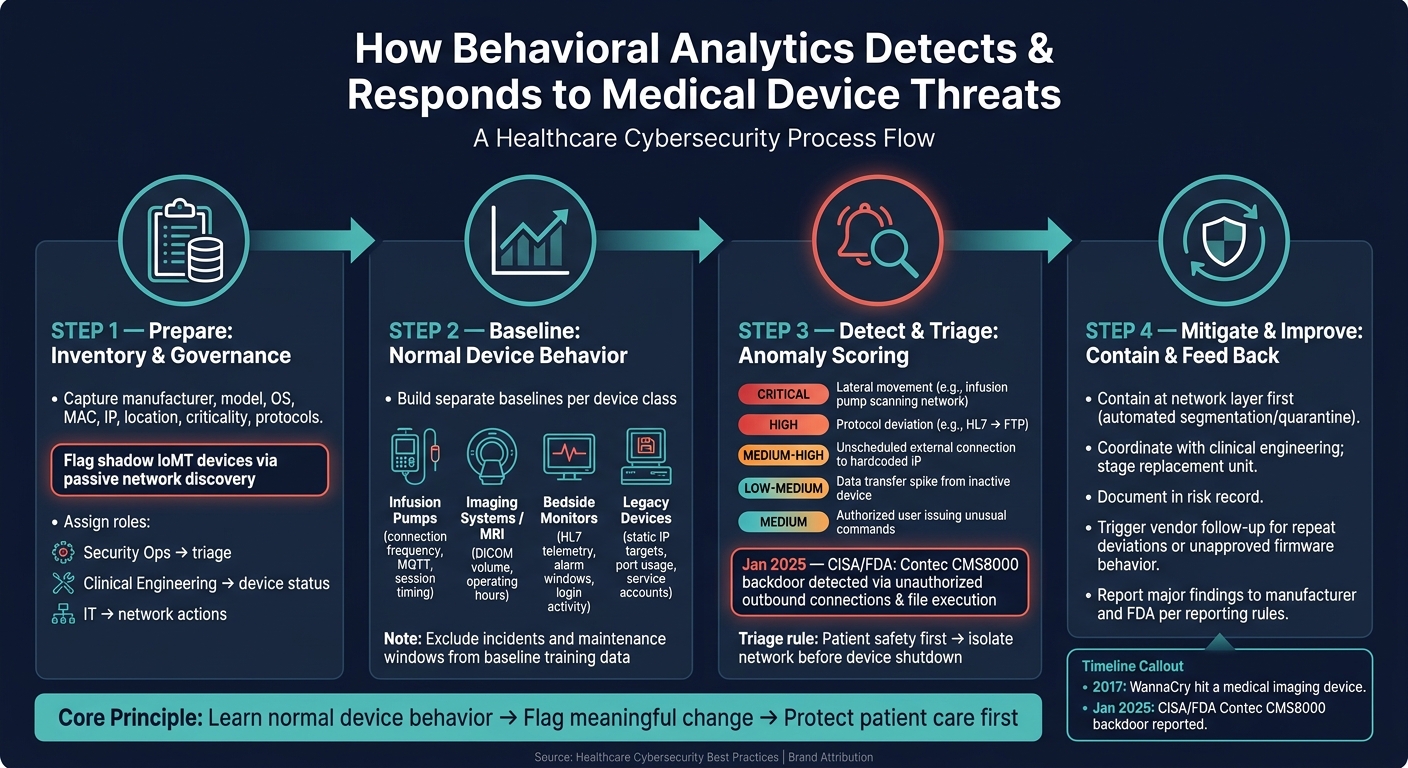
How Behavioral Analytics Detects & Responds to Medical Device Threats
Step 1: Prepare Your Data, Inventory, and Governance
Once you've set the detection scope, the next move is getting the data and decision-making structure in place to support it. Behavioral analytics works best when your device inventory, telemetry, and response owners are already clear.
Build a Current Inventory of Connected Medical Devices
Your inventory is the starting point for every baseline and anomaly check. At a minimum, each device record should include:
- manufacturer
- model
- OS version
- MAC address
- IP address or network segment
- clinical location
- criticality level
- standard protocols such as HL7, DICOM, or MQTT
- a unique identity
Track identical models as separate records when their location, schedule, or lifecycle is different [1][2]. That detail matters. Two of the same infusion pumps can behave very differently if one sits in the ICU and the other is only used in outpatient care.
One issue that often slips by is shadow IoMT - devices bought by departments outside normal IT purchasing paths. These assets can show up on the network without any prior security review, which is why passive network discovery matters for finding them [1].
Identify the Right Telemetry and Log Sources
Most medical devices can't run security agents, and adding one may void the manufacturer's warranty or interfere with clinical function [1][2]. That makes network-level monitoring the safer path.
Use metadata instead of deep packet inspection to avoid the risks tied to agent deployment and to limit PHI exposure. Pull from network metadata, device logs, security alerts, and management reports [2]. Then correlate those sources so you can see the patterns that matter:
- which servers a device talks to
- how much data it transfers
- what protocols it uses
- when it's usually active
That gives the analytics engine cleaner input before training starts [2]. And cleaner input usually means fewer false positives when you begin building device baselines.
Assign Roles for Triage and Escalation
Set ownership before deployment. Security operations should triage alerts, clinical engineering should handle device status, and IT should manage network actions and remediation. If those lines aren't clear, alerts can get stuck in limbo.
Keep findings and remediation status in one shared risk record so security and clinical teams stay on the same page.
That ownership model becomes the handoff point for anomaly triage in the next step.
sbb-itb-535baee
Step 2: Build Baselines for Normal Medical Device Behavior
Once your inventory and telemetry are set, the next job is to build a separate baseline for each device class. The idea is simple: use the telemetry from Step 1 to define what “normal” looks like for each class.
Choose Device-Centered Behavioral Features
Start with the behavior that matters most for each type of device.
For infusion pumps, that usually means connection frequency, small bursts of data, and session timing. For imaging systems, look at DICOM volume and operating hours. For bedside monitors, focus on HL7 telemetry, threshold edits, and login activity.
It also helps to work with clinical teams to map out safe maintenance windows and treat those windows as a normal device state. After that, check those features against clean operational data before you set thresholds.
Train Baselines with Clean Operational Data
Watch each device class for a set period so you can collect normal communication targets, data volumes, and protocol usage. During that period, leave out known incidents, scheduled maintenance windows, and one-off projects so the baseline reflects normal clinical operations [2]. That cuts down on false positives when anomalies get triaged later.
Before you lock in thresholds, review early findings with your biomedical and clinical engineering teams using peer benchmarking [2]. And if a device gets replaced, baseline the new unit on its own using its unique network identity - even if it’s the same model as the old one [1].
Table: Behavioral Features by Device Class
| Device Class | Key Features to Baseline | Typical Communication Targets | Risk Considerations |
|---|---|---|---|
| Infusion Pumps | Connection frequency, small data bursts, MQTT protocol usage, session timestamps | Central pharmacy server, nursing station | Unauthorized basal or bolus changes are direct patient-safety events [4]; never scan during active patient use [1] |
| MRI / Imaging Systems | Large traffic volume, DICOM protocol usage, operating hours | PACS, imaging workstations | High ransomware risk on standard operating systems; WannaCry appeared on an MRI LCD readout in 2017 [1] |
| Bedside Monitors | Constant HL7 telemetry, alarm silence windows, threshold edits, login activity | Central monitoring stations, EHR systems | Firmware backdoors may attempt connections to hardcoded external IPs not listed in FDA filings [3] |
| Legacy Devices | Static IP targets, specific port usage, service account activity | Internal gateway only | Often unpatchable; requires strict network allowlisting and anomaly alerts [2] |
Accurate baselines matter most for devices that patch slowly or can’t run agents. Once those baselines are stable, anomalies can be scored and triaged in the next step. This collaborative approach helps teams respond faster to risks affecting patient safety.
Step 3: Detect and Triage Anomalies That Signal Threats
Once your baselines are stable, the next move is to use them in practice. Detection only matters if your team knows which alerts come first and how to sort a real threat from normal clinical work. The point of these alerts is simple: separate routine activity from signs of compromise.
Map Anomalies to Likely Threat Scenarios
Not every change from baseline means you're under attack. Still, some patterns should move to the front of the line.
Lateral movement is one of the clearest red flags. If an infusion pump starts scanning other devices on the clinical network segment, that can signal ransomware spreading or an attacker doing internal reconnaissance.
Protocol deviations matter too. A patient monitor that shifts from HL7 to FTP may point to data exfiltration or command-and-control traffic.
Unscheduled external connections are another top-tier alert, especially when they go to hardcoded IP addresses during off-hours.
A January 30, 2025 CISA/FDA report on the Contec CMS8000 patient monitor showed unauthorized outbound connections, filesystem mounting, and file execution - exactly the kind of behavior behavioral analytics should surface early [3].
Two other patterns belong in your ruleset as well: sudden data transfer spikes from an inactive device and authorized users issuing unusual commands on a device.
When these patterns show up, classify them by severity before taking the device offline.
Use a Risk-Based Triage Workflow
When an alert fires, first confirm whether the device is in active use. If it is, put patient safety ahead of isolation. The goal is to stop harm without disrupting active care.
Then pull in the surrounding context. Cross-check network, system, and vendor-access logs. Rule out maintenance, software updates, or approved exports before treating the event as malicious. A ventilator or infusion pump should move faster through escalation than a lower-risk asset like digital signage. If compromise looks likely, send it to incident response and notify clinical engineering so a replacement unit can be staged. Higher-criticality devices should have lower escalation thresholds.
Table: Anomaly Types, Triage Steps, and Patient Safety Impact
These examples help standardize first actions across device classes.
| Behavioral Anomaly | Possible Threat | Recommended Triage Steps | Potential Patient Safety Impact |
|---|---|---|---|
| Infusion pump scanning other network segments | Ransomware spread / lateral movement | Isolate the network segment; verify whether the device is currently in rotation; notify clinical engineering for replacement. | Critical: Risk of ransomware disabling multiple life-critical devices. |
| Patient monitor using non-standard protocol (e.g., FTP instead of HL7) | Data exfiltration / backdoor activity | Validate against the manufacturer's approved protocols; check for hardcoded IP address connections; compare against 510(k) documentation. | High: Device takeover could lead to false vitals or missed alarms. |
| External connection to hardcoded IP address during off-hours | Unauthorized remote access / firmware tampering | Check vendor remote access logs; verify whether a maintenance session was scheduled; run firmware behavior analysis. | Medium to High: Potential for unauthorized configuration changes or firmware updates. |
| Sudden data transfer spike from an inactive device | Data exfiltration / ransomware encryption staging | Corroborate with user logs to see if a legitimate clinical export is occurring; check for active maintenance or software update sessions. | Low to Medium: Usually a privacy risk unless it degrades performance. |
| Authorized user executing commands unrelated to care | Credential misuse / insider threat | Check user activity scores and confirm physical presence. | Medium: Unauthorized configuration changes could lead to device malfunction. |
Step 4: Mitigate Threats and Build a Continuous Improvement Program
Contain Device Threats Without Disrupting Care
After Step 3 points to a likely compromise, start containment at the network layer first. That gives teams a way to act fast without shutting down a device that may still be needed for patient care. Device-level shutdown should come only if network isolation can't protect care. In plain terms, isolate first, power down later if you must.
Automated segmentation or quarantine can help move the response along without interrupting clinical work.[2] The goal is simple: limit exposure while keeping the device usable when possible.
Before any physical action happens, coordinate with clinical engineering and biomed teams. If isolation becomes necessary, have a replacement unit staged and ready. Use the baseline to plan patching or maintenance during approved idle windows.[1]
Feed Findings into risk, vendor, and control management
Once the device is contained, document the event in the risk record and send it to the vendor follow-up process. Every confirmed anomaly should update the device risk record.
If you keep seeing the same deviation, or if firmware behaves in an unapproved way, that should trigger vendor follow-up. It should also be logged in automated reports that update device risk profiles. Share major findings with the manufacturer and the FDA based on reporting rules.[3] That keeps the issue tied to the device risk profile for future baselines and reviews.
Conclusion: What a Mature Behavioral Analytics Program Looks Like
A mature program treats each alert as more than a one-time event. Each one should lead to better baselines, faster containment, and cleaner vendor follow-up.
FAQs
How long should a medical device baseline run?
There’s no fixed time frame for how long a medical device baseline should run.
What matters is building a baseline that reflects normal communication patterns and day-to-day device activity.
And because device behavior can shift over time, teams should use continuous monitoring and profiling to keep that baseline up to date and support threat detection.
What data is safest to use for device behavior monitoring?
The safest approach is passive network monitoring. It lets you watch what’s happening on the network without disrupting sensitive medical equipment.
Start with network telemetry and flow logs from firewalls, switches, and network taps or SPAN ports. These sources make it easier to review traffic patterns, communication protocols, and data volumes without getting in the way of device operations. Censinet RiskOps™ can help by centralizing device assessments and making risk management easier to handle.
When should a device be isolated instead of shut down?
A device should be isolated, not shut down, when it is actively delivering clinical services or life-critical patient care. Powering it off can interrupt care, stop key functions, and put patient outcomes at risk.
Isolation contains the risk while allowing the device to keep working. That can mean limiting wireless communication or disconnecting it from non-essential systems.
