
In healthcare, a cyberattack can hit patient care within minutes. One report found that 69% of healthcare providers hit by cyberattacks said patient care was affected. My take is simple: EDR helps stop that damage by finding odd endpoint behavior, isolating infected devices, ending harmful processes, and giving analysts a remote way to respond.
If I had to sum up the article in a few points, it would be this:
- EDR cuts response time from hours or days to seconds or minutes
- Behavior-based detection helps spot fileless attacks and stolen credential use
- Containment must match the device: a billing PC and medical devices like an infusion pump should not get the same response
- Automation fits non-clinical endpoints, while human sign-off fits life-safety and clinical systems
- Containment data should feed risk, compliance, and vendor review after the incident ends
A few details matter most:
- Device isolation helps stop lateral movement
- Process termination can stop active encryption
- Behavior rules can stop harmful activity without taking a device fully offline
- Live response lets teams investigate and clean up from a distance
- Policy setup before an incident is what makes fast containment possible
| Focus area | Main point |
|---|---|
| Detection | Watch behavior, not just known malware patterns |
| Response | Isolate, kill processes, quarantine files, investigate remotely |
| Clinical safety | Use the least disruptive action on care-related devices |
| Automation | Use it more on admin systems, less on life-safety devices |
| Governance | Send incident findings into risk and compliance follow-up |
That’s the core message of the article: stop the threat fast, avoid care disruption, and make sure each incident improves the next response.
Map EDR capabilities to healthcare containment goals
EDR brings together a few different containment actions, and each one fits a different point in an attack. The better the match, the faster a team can act without causing extra trouble. In healthcare, that matters a lot. You want to stop the threat fast, but you also can't knock critical systems offline if they support patient care.
Device isolation, user containment, and behavioral blocking
Device isolation cuts a compromised endpoint off from the network and stops lateral movement. If a nurse-station workstation shows ransomware behavior, isolate it before it reaches the EHR server. This works best when speed matters more than continuity, and when the device is not actively being used for patient care.
User or identity containment works at the account level. If a stolen credential is being used to access sensitive systems from an unusual location, EDR can flag and disable that account before more PHI is exposed.
Behavioral blocking fits cases where the threat looks like normal activity on the surface, like credential misuse or staged exfiltration. That's a big deal on billing workstations, where attackers may use legitimate tools to stage PHI exfiltration. Instead of shutting down the whole device, security teams can interrupt the harmful behavior in progress.
Containment actions by attack type
The key is simple: match the action to the threat. On clinical or life-support devices, the goal is always the least disruptive step that still stops the spread. That gives analysts a way to move fast without overreacting.
The table below matches common attacks to the best EDR containment action:
| Containment Method | Primary Objective | Healthcare Use Case |
|---|---|---|
| Device Isolation | Stop lateral movement | A nurse-station workstation infected with self-spreading ransomware before it reaches the EHR server |
| Process Termination | Stop active encryption | A malicious encryption script running on a medical imaging server |
| Behavioral Blocking | Interrupt suspicious activity in progress | An unauthorized bulk download of patient records from a billing terminal |
| User/Identity Containment | Limit account abuse | A compromised admin account accessing PHI from an unrecognized location |
| File Quarantining | Prevent malware spread | A malicious email attachment on a clinical laptop before it executes |
This kind of precision matters most when clinical devices need to stay up during an incident. On an active infusion pump, full isolation can disrupt care. In that case, behavioral blocking is often the better move. EDR helps teams contain threats by matching response speed to clinical risk.
sbb-itb-535baee
Configure EDR for real-time containment in healthcare environments
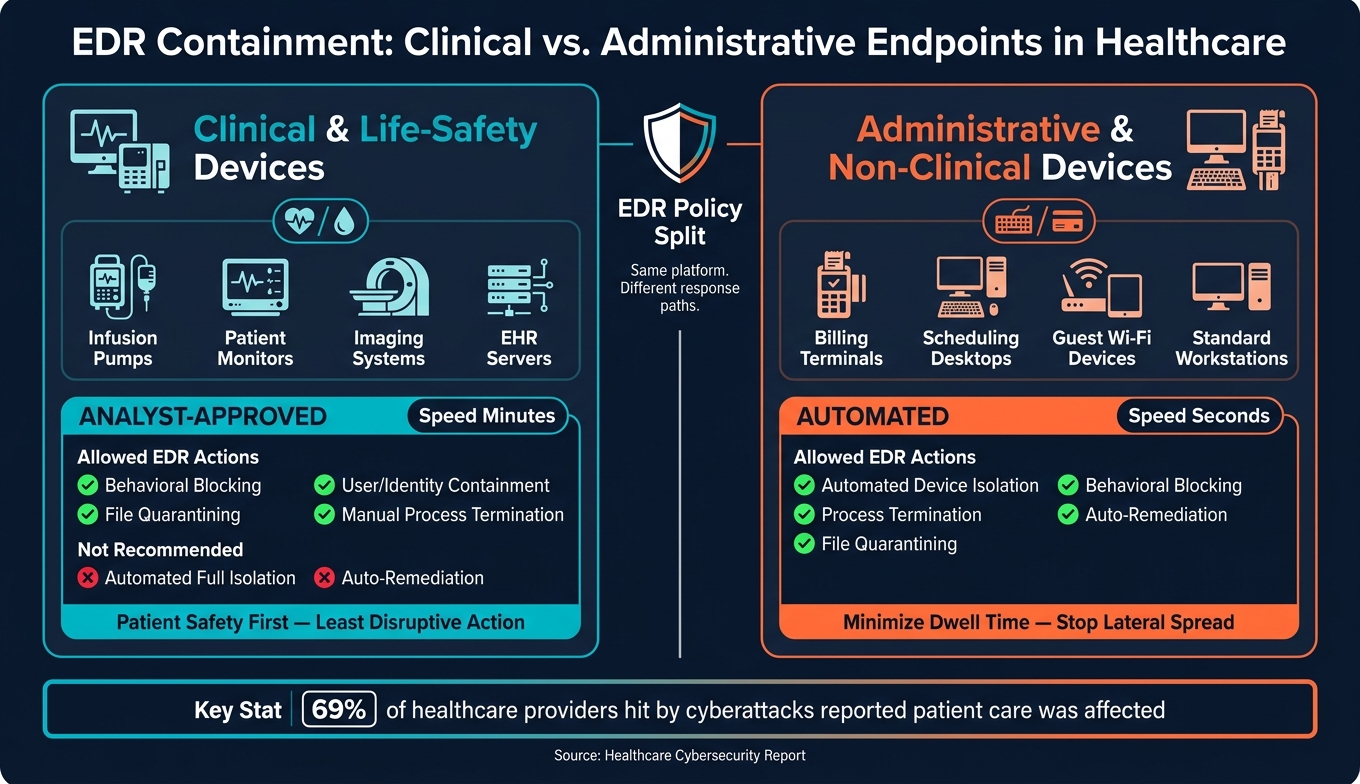
EDR Containment Methods for Healthcare: Clinical vs. Administrative Endpoints
Real-time containment starts with setup. If those controls aren't in place ahead of time, EDR alerts just add drag. The platform may spot the problem, but the response slows down while teams decide what to do. In practice, configuration is what decides whether containment happens in seconds or takes hours.
That shifts the conversation from what EDR could do to what it should be set to do before an incident begins.
Enable the controls that support immediate response
Deploy the EDR agent across Windows, Linux, macOS, and cloud-hosted systems such as Azure. In healthcare, that footprint also includes servers, virtual machines, and IoMT devices like infusion pumps and imaging systems. Even one missed area can turn into a visibility gap when an incident starts moving.
Don't stop at alert-only mode. Turn on block mode or containment mode so the EDR can act at once instead of just writing logs. On non-critical systems, set remediation policies to quarantine suspicious files and kill malicious processes. Also make sure live response is enabled and available to approved responders. That gives the team a way to investigate remotely without waiting for hands-on access.
Keep a close eye on agent health. Inactive sensors create blind spots, and blind spots are where attackers get room to move.
Set healthcare-specific groups, exclusions, and roles
Healthcare systems don't all carry the same third-party risk. A billing terminal and an infusion pump should not follow the same response path. Split clinical and life-safety systems, such as patient monitors, infusion pumps, and imaging equipment, from administrative systems like billing terminals and scheduling desktops.
For life-safety devices, use manual approval or alert-only workflows. That adds a human check before any action that could interrupt care. For administrative systems and standard workstations, automated isolation makes sense when ransomware behavior is confirmed.
Before turning on aggressive blocking, map legacy clinical dependencies. Then set exclusions that protect those workflows. Tie those exclusions to your change control process and review them on a regular basis so they don't pile up quietly over time.
Keep live response limited to least-privilege responder roles that match clinical change control and HIPAA data access policies.
EDR configuration checklist for security and clinical operations teams
Use the checklist below to confirm containment settings are ready for both security and clinical operations.
| EDR Feature | Recommended Setting or Control | Healthcare-Specific Consideration |
|---|---|---|
| Agent Deployment | Deploy across Windows, macOS, Linux, and Azure | Include telemedicine devices and clinical tablets |
| Agent Health Checks | Continuous monitoring enabled | Prioritize high-availability systems like lab equipment |
| Endpoint Isolation | Automated for non-critical workstations; manual approval for IoMT | Prevents spread without disrupting life-safety devices |
| Behavioral Analytics | Enabled in real-time block mode | Detects fileless malware and zero-day exploits |
| Process Termination | Enable for unauthorized PowerShell or credential theft activity | Stops lateral movement |
| Remediation Policies | Block and quarantine on confirmed threats | Protects EHR integrity and patient data |
| Live Response | Restrict to authorized IR leads with least-privilege access | Enables remote forensics |
| Exclusion Lists | Define for legacy medical equipment and high-availability servers | Prevents EDR from interfering with older clinical software |
| Device Groups | Segment by function: Clinical/Life-Safety vs. Administrative | Applies the right containment policy to the right system automatically |
| Manual Approval Workflows | Require manual triggers for life-safety device actions | Prevents accidental disruption of critical devices |
With these settings in place, responders can go from alert to containment without stopping to rework the platform in the middle of the event.
Execute containment actions during an active incident
When containment controls are already in place, responders can go straight from alert to action. Once EDR alerts fire, the shift from validation to containment needs to happen right away.
From alert triage to endpoint isolation
In the first few moments, use EDR telemetry to confirm the alert and rule out benign clinical activity. At the same time, identify the device type. A billing workstation does not follow the same response path as a clinical endpoint or a life-safety device.
Once the threat is confirmed, move fast. For fast-moving threats like ransomware, trigger automated isolation at once. For clinical endpoints and life-safety devices, block malicious behavior to stop specific malicious processes without fully cutting the device off from the network. That can help protect care delivery while limiting an attacker’s ability to move laterally. Escalation should be based on asset criticality, not alert severity alone.
Use live response to investigate and remediate in real time
After containment, use live response to inspect processes, network connections, registry changes, and evidence on the endpoint. From the live response console, responders can kill malicious processes, remove infected files, and capture evidence. Then use stored endpoint telemetry to trace the attack path and confirm that no persistence mechanisms remain before the device is returned to service. Record each containment decision so risk, compliance, and operations teams know what happened and what to do next.
When to automate containment and when to require human approval
Use automated containment for fast-moving threats on non-clinical endpoints. Use analyst approval for clinical or life-safety devices.
| Mode | Trigger | Speed | Healthcare Use Case | Priority |
|---|---|---|---|---|
| Automated | Known ransomware signatures or high-confidence behavioral matches | Near-instant (seconds) | Non-clinical workstations, guest devices on Wi‑Fi, fast-spreading malware | Minimize dwell time and prevent network-wide spread |
| Analyst-Approved | Anomalous behavior on clinical endpoints and life-safety devices | Minutes | Infusion pumps, EHR servers, imaging systems where uptime is critical | Ensure patient safety and continuous clinical availability |
That decision path should already be mapped into policy, risk, and escalation workflows.
Connect EDR containment to healthcare risk governance
Containment stops the immediate threat. What happens next matters just as much.
Every EDR action - device isolation, process termination, and forensic findings - creates data that should feed risk management, compliance, and vendor oversight. If that data just sits in a security console, you miss a big part of its value.
Turn containment events into risk and compliance actions
Once the endpoint is contained, use the incident record to drive follow-up work. EDR shows where the attack began, what it touched, and how it was contained. That gives you a forensic timeline for post-incident reviews, regulatory documentation, and audit trails, including verifiable mitigation records for HIPAA compliance. [1]
This isn't only about checking a compliance box. It should shape day-to-day risk work too. If ransomware keeps hitting a certain device category, update your risk register to reflect that pattern. If an IoMT device triggered a behavioral alert, that finding should feed into the next vendor risk assessment for that equipment supplier.
That’s where EDR telemetry becomes more than a security log. It becomes a risk input tied directly to third-party oversight.
How Censinet RiskOps supports healthcare cyber risk follow-through
Censinet RiskOps™ can help healthcare organizations coordinate these follow-up steps and connect incident findings to enterprise and vendor risk reviews.
Use containment events to trigger the right operational and governance actions. When a containment event closes, the next steps - updating risk registers, triggering vendor risk assessments, and routing findings to the right stakeholders - can move through one central risk workflow. Censinet AI™ can route containment findings to the right stakeholders for review and approval.
| EDR Containment Event | Related Risk Management Action | Key Stakeholders |
|---|---|---|
| Endpoint Isolation | Assess clinical operational impact; update risk register for affected device types (e.g., IoMT) | Security Operations, Clinical Engineering, Risk Management |
| Malicious Process Blocking | Document threat signatures for vendor oversight and third-party risk assessments | IT Security, GRC |
| Forensic Investigation Findings | Conduct post-incident review; strengthen documentation for HIPAA/regulatory audits | Compliance Officers, Legal, Security Analysts |
| User Account Containment | Review access controls and insider threat risk profiles | HR, Identity & Access Management, GRC |
Key takeaways for improving time-to-containment
Real-time containment works best when response and governance stay connected. Speed starts before the incident does: with isolation policies, asset groupings, and automation rules already in place.
Automation can handle fast-moving threats on non-clinical endpoints. Human approval adds a safer layer for clinical and life-safety devices that need a more precise response.
Each containment decision and remediation action should flow into risk governance, so the next incident starts with better data and faster decisions.
FAQs
How is EDR different from antivirus?
Traditional antivirus mostly checks files against known malware signatures.
EDR works differently. It keeps watch on endpoint activity all the time and looks at behavior to spot suspicious actions, not just known threats.
That means it can detect and automatically contain advanced or unknown attacks in real time. In a healthcare setting, that can cut down lateral movement and help limit disruption to critical operations.
Which healthcare devices should not be auto-isolated?
Devices that perform life-critical functions or play a direct role in patient safety - like ventilators, patient monitors, and infusion pumps - usually should not be auto-isolated.
For these clinical and medical devices, containment needs human review and sign-off from clinical or biomedical engineering teams. That step helps avoid putting patient care at risk and confirms that a safe clinical alternative is in place before any action is taken.
What should teams configure before an incident?
Before an incident happens, teams should run EDR in audit or monitor mode first. That gives them time to set behavior baselines and fine-tune settings before switching to block mode.
They should also document containment playbooks and governance. In plain English, that means spelling out who can isolate endpoints, what triggers escalation, and which roles handle each step.
It also helps to preconfigure centralized log collection ahead of time, along with risk-based automated alerts and workflows. For core systems and PHI, though, human oversight should stay in the loop.
