
Bad IoT logs slow down breach response, weaken HIPAA audit evidence, and can leave care teams guessing during a device event. In a 1,000-bed hospital, there may be about 15,000 connected devices, so small logging gaps can turn into a big problem fast.
If I had to boil this article down, I’d say this: your logs need to show who did what, on which device, when, from where, and whether it worked. If they don’t, your team may miss failed logins, role changes, remote sessions, firmware updates, log tampering, or data exposure in plain text.
Here’s the short version:
- Log the right events: failed logins, lockouts, password resets, role changes, remote sessions, config changes, firmware updates, and attempts to change logs
- Keep each record complete: UTC timestamp, user or service account ID, device ID, event type, and outcome
- Send logs to one place: device-only logging makes investigation harder
- Protect logs from changes: use append-only or immutable storage and hash checks
- Keep PHI, tokens, and passwords out of logs: mask, sanitize, hash, or encrypt when needed
- Review logs on a set schedule: tune alerts, assign ownership, and enforce retention rules
One stat stands out: a 2023 SIEM report found that about 12% of SIEM rules never fire because of missing fields, bad parsing, or source setup problems. That means logging problems don’t just hurt audits - they hurt detection too.
If I’m checking an IoT logging setup, I want six things in place right away:
- Event coverage
- Complete fields
- Central collection
- Tamper resistance
- Data minimization
- Regular review and retention
The rest of the article explains where teams slip up and how to fix those gaps before an incident forces the issue.
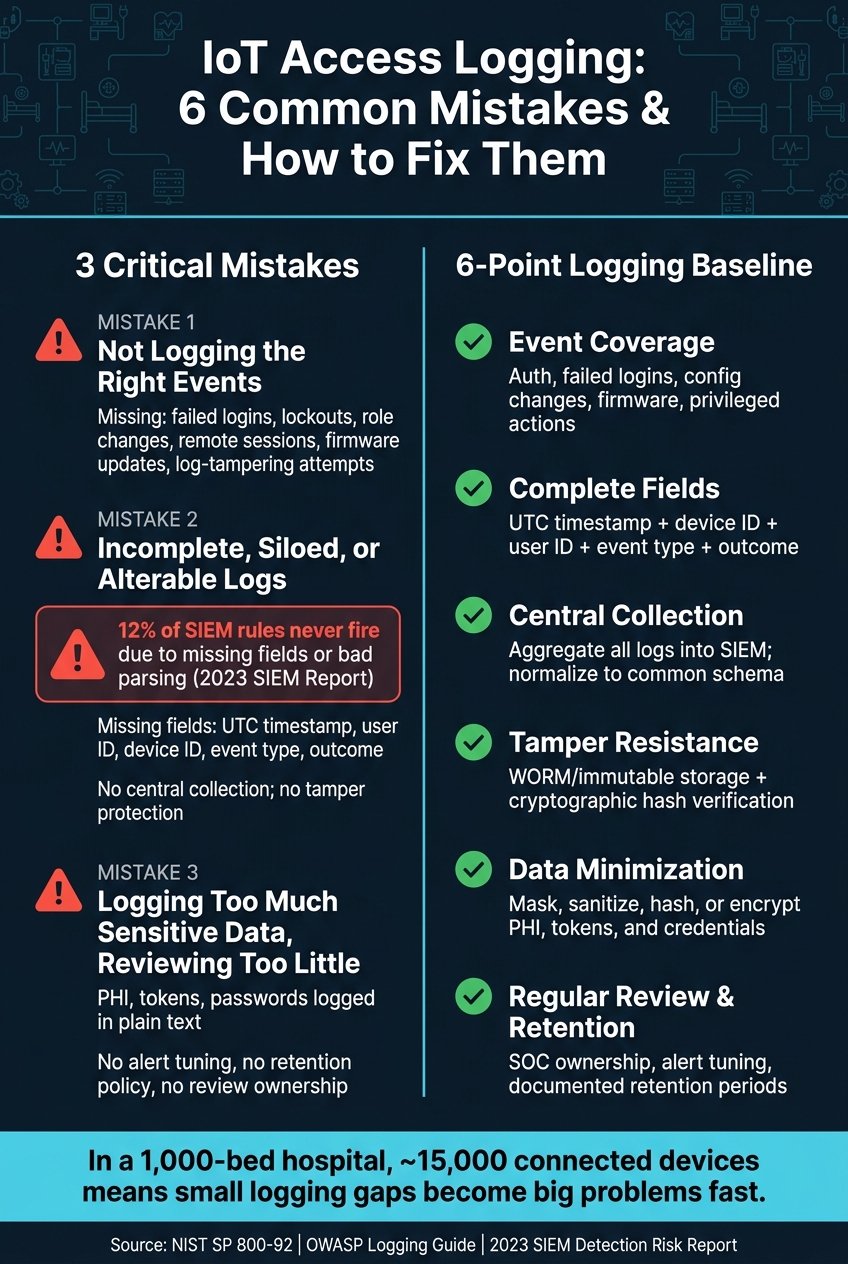
IoT Access Log Mistakes: 6-Point Baseline Checklist for Healthcare
Mistake 1: Not Logging the Events That Matter
A lot of healthcare teams log routine activity but still miss the events that matter most. A device may record normal interactions while skipping failed login attempts, privilege changes, or remote access sessions. The gaps that show up most often are failed logins, lockouts, and privileged actions.
Missing Login Activity, Failed Attempts, and Privileged Actions
Failed login attempts are one of the most important event types to record. Repeated failures on an infusion pump console or imaging system can point to a brute-force attack or a stolen credential being used. If that event never makes it into the log, the pattern stays hidden. The same goes for account lockouts. If a lockout event isn’t logged, you can’t confirm whether the safeguard fired at all.
Authentication is only part of the picture. Privileged actions need the same level of attention. Role changes, device pairing, remote access sessions, firmware updates, and configuration changes all affect how a device works and who can control it. Log privileged actions, not just admin logins, because changes to roles, audit settings, or security policies can be just as serious as access itself. If a ventilator’s alarm threshold is changed or a pump is paired to a new network segment, that event needs a clear owner, a timestamp, and an outcome in the log.
At minimum, log:
- Successful and failed authentication events
- Account lifecycle actions (creation, lockout, reactivation, password resets)
- Privilege escalation and role changes
- Configuration and firmware changes
- Remote access session starts and stops
- Any attempts to disable or modify logging itself
Problem-Solution Table: Missing Event Types, Risk, and Corrective Logging Controls
The table below lays out the baseline event set for healthcare IoT access monitoring - the events most likely to expose misuse, privilege abuse, or unauthorized control changes.
| Missing Event Type | Risk if Not Logged | Corrective Logging Control |
|---|---|---|
| Failed login attempts | Brute-force and credential-stuffing attacks go undetected | Enable authentication failure logging on all devices; forward to SIEM with user ID, source IP, and timestamp |
| Account lockouts | No confirmation that lockout policies are functioning | Log lockout trigger, duration, and any unlock actions; validate during deployment testing |
| Password resets | Insider privilege abuse or account takeover is untraceable | Capture who initiated the reset, method used, and whether it was admin-assisted |
| Role and privilege changes | Unauthorized escalation goes undetected; audit evidence is missing | Log all role assignments and removals with actor ID, target account, and timestamp |
| Device pairing / association | Unintended data flows or remote control paths are established silently | Record new pairings with device IDs, initiating user, and network context |
| Remote access sessions | Third-party or vendor activity is unverifiable during investigations | Log session start/stop, access method, external party identity, and whether it was authorized |
| Firmware and configuration changes | Unexpected device changes become hard to trace | Capture change type, actor, previous and new values, and outcome; tie to change management records |
| Attempts to modify or delete logs | Attackers cover their tracks; tamper evidence is lost | Alert on any attempt to alter audit log attributes or disable logging agents |
When you onboard a new IoT or medical device, test this stuff on purpose. Simulate failed logins, trigger a lockout, start a remote session, apply a firmware update, and then confirm that each event shows up in the central log store with all fields intact. If an event doesn’t appear during testing, it won’t suddenly become dependable during an incident.
And even if you log the right events, the record can still break down if fields are missing, logs sit in silos, or entries can be changed. The next risk is incomplete, siloed, or alterable logs.
sbb-itb-535baee
Mistake 2: Keeping Logs Incomplete, Siloed, or Easy to Alter
Even if you track the right events, the logs still fall short when records are incomplete, scattered across systems, or easy to change.
Missing Timestamps, User IDs, Device IDs, and Structured Fields
A "login failed" entry doesn't tell you much on its own. You also need the timestamp, user ID, device ID, and outcome. Without those fields, teams can't piece together who changed what, on which device, and when. And when entries are dumped into unstructured text, things get even messier. They're hard to parse, hard to search, and hard to match across systems.
A 2023 SIEM detection risk report found that about 12% of SIEM rules will never fire because of issues such as missing fields, misconfigured data sources, and parsing errors.[6][7] That's not a small paperwork problem. It means missing log fields can lead straight to missed detections.
At a minimum, every IoT access log should include:
- a UTC timestamp
- an authenticated user or service account ID
- a device ID or serial number
- the event type
- a success/failure outcome
Store logs in UTC and use a machine-parsable format such as structured JSON or fixed-field syslog.[3][5]
Single-Device Visibility and No Central Collection
When logs stay only on the device that created them, your team sees one slice of the story. That's the problem. Attackers rarely stay in one place. They move from a VPN to a workstation to a device, and one device log won't show that full path.
NIST SP 800-92 recommends a centralized log management infrastructure so teams can aggregate, normalize, and correlate logs across systems.[3] That kind of central collection makes it possible to rebuild the full access trail during an incident. Without it - and without normalization into a common schema - automated detection rules aren't possible in any useful way.
Logs Stored Without Tamper Protection
Complete logs still don't help much if someone can rewrite them.
Logs stored on the same system they describe are easy targets. An attacker with admin access can delete entries, change timestamps, or overwrite records before anyone spots it. Ransomware operators often try to purge audit logs on compromised servers to slow forensic analysis and make attribution harder.
If that happens, clinicians and investigators lose trust in the record during a device-related event. Store logs separately and make them append-only. WORM (write once, read many) storage on-premises or cloud object storage with immutability and retention locks can stop old records from being changed or deleted before the retention period ends.[1][4]
NIST SP 800-92 also recommends calculating cryptographic hashes for log files and storing those digests securely so tampering with archived logs can be detected.[1][2] Access to log repositories should be limited to a small, separate admin group. The people who run systems should not also be able to edit the logs those systems produce.[4]
And don't stop at the logs themselves. Watch the log pipeline too. If a device class or network segment suddenly goes quiet, that silence may be the first clue that something's off.
Mistake 3: Logging Too Much Sensitive Data While Reviewing Too Little
This mistake has two sides: putting too much private data into logs and not looking at those logs often enough. Either one can cause trouble. Together, they create a mess.
Sensitive Data Recorded in Clear Text
Start with the basic rule: don’t log sensitive fields unless there’s a clear security or audit reason to do it.
This is where teams get burned. Debug logs, full request/response captures, and stack traces are often left on in production. Once that happens, logs can end up storing patient names, medical record numbers, authentication tokens, API keys, and session credentials in plain text.[8][14]
That risk grows fast because logs get copied all over the place. They’re also often kept longer than the main system records, so every extra copy of a log that includes PHI or credentials increases exposure.[8][9] Under HIPAA, a breach involving that data - even if it comes from a log repository - can trigger notice duties and regulatory penalties.
OWASP’s logging guidance is plain: session identifiers, access tokens, health data, and authentication passwords should not be recorded directly in logs. They should be removed, masked, sanitized, hashed, or encrypted.[10][11] CWE-532 ("Insertion of Sensitive Information into Log File") warns about the same problem. Logs often have weaker access controls and longer retention than primary systems, which means one bad logging setting can open several paths to risk.[8]
The safer move is to stop sensitive data before it gets written. Classify fields like credentials, tokens, PHI, and patient identifiers, then mark them as either never log or mask only. If you still need a reference for correlation, log a tokenized surrogate kept in a secure vault instead of the raw value.[12]
In production, full request/response logging should usually be cut back to metadata only, such as:
- HTTP method
- Path
- Status code
- Timing
Access to log platforms should also follow RBAC, so only named security, IT, and compliance staff can view detailed records.[11][13]
The fix is pretty simple on paper: limit what enters the log, mask what remains, and review exceptions on a set schedule.
No Routine Review, Alert Tuning, or Retention Policy
Once logging is narrowed and protected, the next step is deciding who reviews it and how often.
Collected logs don’t do much if nobody checks them. That doesn’t mean someone has to read every line by hand. It means setting review tiers based on risk. High-risk devices, like infusion pumps and networked monitoring equipment, should get daily or weekly review of exception logs. That includes failed logins, privilege escalations, configuration changes, and connectivity failures. Lower-risk devices can be checked less often.
Alerts also need tuning. They should bring attention to behavior that falls outside the norm, like access from unapproved accounts or odd access times, while filtering out expected noise such as scheduled maintenance reboots. Without that tuning, analysts get hit with alert fatigue. And once that happens, real threats start blending into the background.
Retention policy should line up with the reason the log exists. Security and audit logs tied to investigations, litigation holds, and eDiscovery need longer retention and tighter integrity controls. Operational logs used only for troubleshooting can have shorter retention windows. Policies should spell out storage locations, protection methods, and deletion timelines. Just as important, those settings need to be enforced in the system itself, not left sitting in a document somewhere.[15][16]
Monitoring ownership should sit with the SOC, with clinical engineering and IT helping handle escalation.
Conclusion: A Stronger Logging Baseline for Healthcare IoT
These mistakes point to one clear lesson: logging has to be planned, not patched together on the fly. The same problems keep showing up - missed events, partial records, and weak review. When that happens, healthcare teams struggle to spot threats, piece together incidents, or show compliance.
A usable baseline has six parts: capture the right events, use structured and complete records, centralize collection, protect log integrity, minimize sensitive data exposure, and review and retain logs consistently.
Use this baseline to check whether your current logs are usable during an incident.
| Control Area | What to Check |
|---|---|
| Event coverage | Authentication, failed logins, configuration changes, firmware updates, and privileged actions are logged for all IoT devices |
| Log fields | Each record includes a synchronized timestamp, device ID, user ID, event type, and outcome |
| Storage protection | Logs are stored off-device with write-once or immutable controls and integrity verification |
| Access controls | Access to logs is restricted to authorized IT, security, and compliance staff |
| Retention | Retention periods are documented, enforced in the system, and aligned with HIPAA and internal policy |
| Review ownership | The SOC reviews alerts on a defined schedule |
Priority Actions for IT, Security, and Compliance Leaders
Start with a written minimum standard for logging. Spell out which events must be captured, which fields each record must include, and which devices are in scope. Then test what’s happening in practice. Pull sample logs from medical device types and check that the required fields are there and filled in.
Next, move logs off the device and protect them. Sending logs to a SIEM or log platform with integrity controls gives you stronger forensic evidence than leaving them on local device storage. That’s a big deal when you need to show what happened under pressure.
It also helps to assign clear review ownership. Your team should know who reviews alerts, how often they do it, and which alerts matter most. Tune alerts so they point to actual anomalies instead of flooding the SOC with noise. Set retention periods that support investigations and compliance needs.
Last, run a tabletop exercise or a simulated incident. Use it to confirm that your logs can show what happened, when it happened, and who was involved. If they can’t, fix logging before you expand monitoring.
FAQs
Which IoT log events should we prioritize first?
Prioritize events based on clinical criticality and patient safety risk, not just severity scores. Start with high-risk devices that handle sensitive patient information or support core clinical operations.
Focus first on events linked to immediate threats, including authentication failures, firmware manipulation, telemetry changes, unusual network activity, configuration changes, ransomware on real-time operating systems, and unauthorized lateral movement.
How can we tell if our IoT logs are audit-ready?
Your IoT logs are audit-ready when they create a tamper-proof, complete record of system activity that lines up with HIPAA and FDA requirements.
Each log entry should include:
- User ID and role
- Action
- Resource ID
- UTC timestamp
- Source IP or device ID
- Attempt status
- Purpose of access
Just as important, those logs need to be stored securely for the required retention period. Access should be limited with role-based access control, and the data should be normalized and centralized so teams can review it without digging through scattered systems.
You’ll also need evidence of continuous monitoring. That means you can show not just that logs exist, but that someone is watching for issues and responding when something looks off.
What sensitive data should never appear in IoT logs?
Healthcare organizations should never log unencrypted PHI or ePHI in IoT access logs. That also means staying away from raw sensitive payloads, like full patient clinical records or authentication credentials.
Stick to the basics instead. Log only the metadata you need, such as user identifiers, event timestamps, source IP addresses, and the actions performed.
