
A malware event on a medical device is a patient-care problem first, and an IT case second. If you need the short answer, here it is: I should prepare before an incident, protect patients before touching the device, save short-life evidence first, trace what changed and where it spread, then restore the device only after testing and sign-off.
From mid-2020 through 2021, 82% of U.S. healthcare systems reported a cyber incident, and 34% of those involved ransomware attacks against healthcare delivery organizations. That matters because a bad response can hurt care twice: once from the attack, and again from taking the wrong device action too fast.
If I’m dealing with medical device malware, I need to focus on five things:
- Keep patients safe
- Maintain care delivery
- Preserve evidence
- Find the scope
- Restore devices safely
I also need to work across teams:
- Security for network review
- IT for system support and tracking
- Clinical engineering for device context
- Legal and compliance for reporting
- Vendors for logs, firmware, and service access
And I need to collect the right evidence in the right order:
- Device ID details like UDI, serial number, and firmware
- Short-life logs and exports before they roll off
- Network traffic like DICOM, HL7, and FHIR
- Config snapshots and service records
- Memory or firmware data when software-based collection is not enough
Here’s the core workflow in plain English:
- Prepare early with asset records, roles, vendor contacts, and case forms
- Stabilize care first before changing device state
- Collect volatile data first because some logs may last only 30–90 days or less
- Build a timeline to see what changed, when, and whether care was affected
- Contain spread carefully with selective isolation, segmentation, or backup workflows
- Rebuild and test from a known-good image before putting the device back into use
- Meet reporting deadlines, including 72 hours for covered CIRCIA incident reporting and 10 working days under FDA 21 CFR Part 806 when risk-to-health corrections or removals apply
What makes this different from a normal malware case is simple: you can’t just pull the plug. In many cases, the better first move is to block write paths, limit network access, and keep the device working while I gather logs and traffic data.
A few signs deserve fast attention:
- Dose or therapy setting changes
- Alarm silence windows
- Threshold edits
- Strange outbound traffic
- Blocked imaging workflows
- Reboots no one can explain
The goal of this guide is simple: help me investigate malware on medical devices without making patient risk worse.
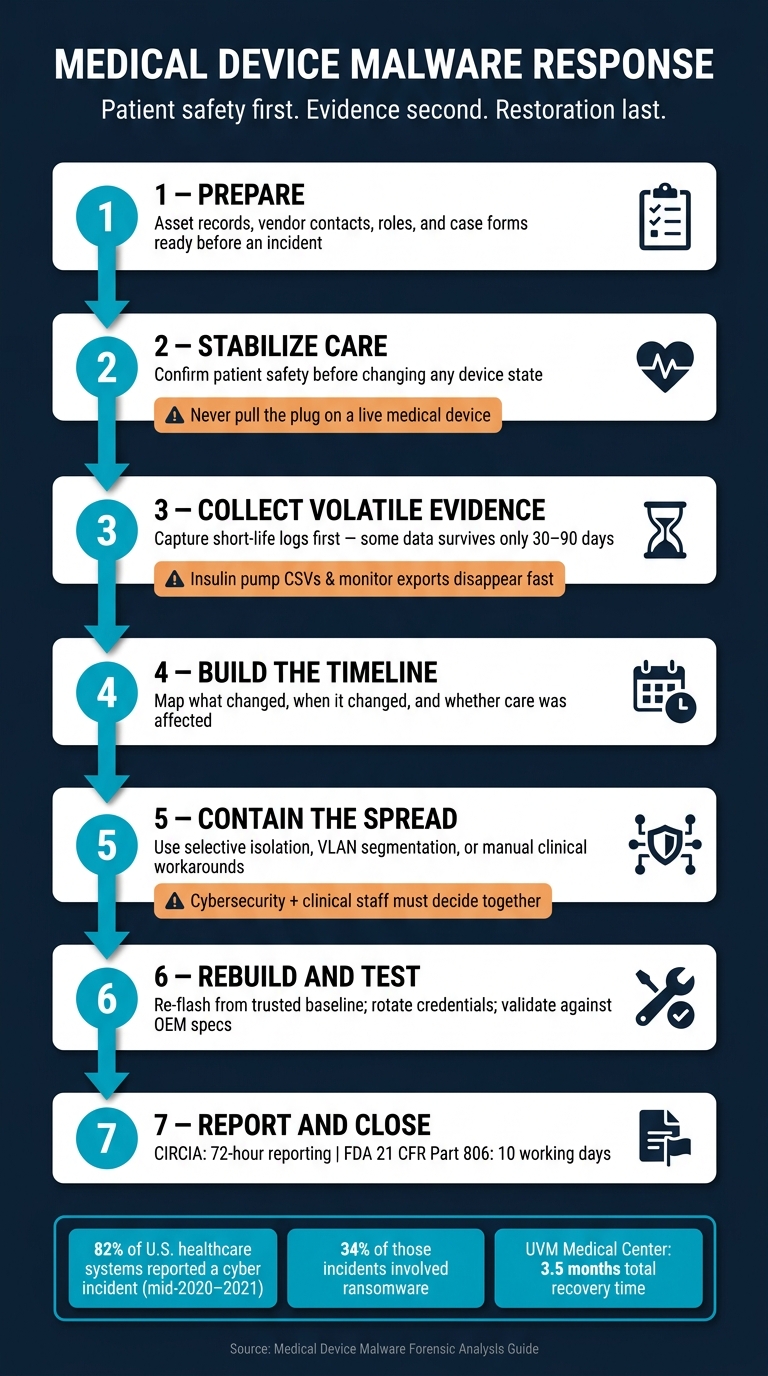
Medical Device Malware Forensics: 7-Step Response Workflow
Top 10 Medical Device Vulnerabilities with Myles Kellerman | Ep. 38
sbb-itb-535baee
Prepare for Device-Level Forensics Before an Incident
Device-level evidence work starts before anything goes wrong. If access approvals, contacts, and device records aren’t set up ahead of time, the team loses time when time matters most. And in healthcare, delays don’t just slow an investigation - they can also interrupt care.
Define Roles for Security, Clinical Engineering, IT, Compliance, and Vendors
Set incident roles in advance. That means:
- IR handles network investigation
- IT supports analysis and device tracking
- Clinical Engineering adds device context that standard security tools can’t see
- Risk, Legal, HR, and physical security support escalation when needed
For physical IoMT devices, HDOs often rely on the manufacturer and its support team. So don’t wait until an incident to hunt down the right contact. Keep vendor escalation details, chain-of-custody forms, spare storage, and acquisition tools ready ahead of time.
Tabletop exercises help here too. They show whether roles are clear, policies hold up, and handoffs work the way people think they do.
Maintain Asset Inventory, Criticality Ratings, and Supporting Records
Fast triage depends on complete records before an incident starts. Every connected medical device record should include the Unique Device Identification (UDI), serial number, firmware version, owner, physical location, network segment, CMMS baseline configuration snapshot, and work order history [1][3].
Criticality should also be assigned in advance. An insulin pump and a patient monitor don’t carry the same level of risk as a standard endpoint. Unauthorized changes to those devices can affect patient safety directly [3].
| Artifact | Volatility | Loss Window |
|---|---|---|
| Insulin pump session CSV | Rolling on device | Overwritten when storage fills or unit is factory-reset [3] |
| Monitor alarm + threshold export | Rolling at central station | 30–90 days [3] |
| UDI scan + inventory chain | Persistent in asset system | Stale after device swap if intake is not updated the same shift [3] |
| CMMS baseline config snapshot | Persistent if saved | Superseded on next preventive maintenance cycle [3] |
Keep CMMS baselines current, then match them against break-glass logs. That makes it easier to tell the difference between an approved change and something suspicious [3].
Use Centralized Risk Operations to Improve Readiness
Censinet RiskOps™ puts medical device, PHI, and vendor risk records in one place, which helps teams pull together evidence and approvals faster during an incident.
When roles, records, and vendor contacts are already in place, investigators can move straight into evidence collection without slowing patient care.
Collect and Preserve Evidence Without Disrupting Care
Once roles, records, and vendor contacts are set, the next job is to gather evidence without getting in the way of care. In healthcare, that line matters. A device may be giving treatment or watching a patient in real time, so evidence collection can't come at the cost of safety.
Prioritize Safety, Clinical Continuity, and Chain of Custody
Start by checking whether the device can be isolated without affecting care. For patient-connected equipment, logical isolation is often the safest first step. That usually means blocking inbound management traffic and configuration pushes instead of cutting power. Pulling the plug might sound simple, but on a live medical device, it can create a much bigger problem. Once the device is stable, move to log collection and traffic capture.
Begin with the physical device label before clinical engineering changes any settings. Capture the UDI, serial number, and firmware version. Then export session logs and hash each export right away. For every export, record:
- The collector
- The timestamp in MM/DD/YYYY, HH:MM AM/PM format
- The SHA-256 hash
That record forms your chain of custody. Each item should also be labeled with the case ID, media label, and access history [3][5].
Use the device inventory and criticality rating to decide what to collect first. That helps the team focus on the artifacts that matter most while mitigating critical medical device security risks.
Capture Logs, Network Traffic, Configurations, and Firmware Artifacts
After the device is stable, collect the most volatile artifacts first. Think of it like grabbing melting ice before it turns to water. Use passive network sensors to capture DICOM, HL7, and FHIR traffic without physically touching the device [1]. Pair that with syslog and gateway logs before rotation wipes them out.
Volatile data disappears fast. Network buffers can roll over in short order. Insulin pump session CSVs may be overwritten when storage fills up or the device is reset. Philips IntelliVue alarm and threshold exports at a central station often keep only 30–90 days of data [3]. Pull those items first. After that, move to more stable artifacts, such as CMMS configuration snapshots and firmware images, once the device has been stabilized or replaced.
Choose Acquisition Methods by Device Type and Risk
The acquisition method should match the device's function and the level of clinical risk. A simple way to think about it: each step down goes deeper, but it also brings more risk to the device and to care delivery.
Software-based collection, such as log exports, API pulls, and network sniffing, is the default for devices still in active use. It's low-risk, non-invasive, and gives you the activity and traffic data that's often most useful in early triage. Hardware-based methods, like JTAG or chip-off extraction, can provide deeper access to firmware, but they come with real danger. In a chip-off case, the device is often left permanently unusable [2].
| Method | Invasiveness | Evidence Depth | Safety Impact | Typical Use Case |
|---|---|---|---|---|
| Software-Based (Logs, API, Network Sniffing) | Low | High (activity, traffic) | Minimal; safe for active care | Initial triage, real-time monitoring, active clinical environments |
| Live Memory Capture (RAM) | Medium | Critical (keys, credentials, in-memory malware) | Low to medium | Running workstations or gateways where volatile artifacts must be preserved |
| Hardware-Based (JTAG/UART) | High | Full (firmware, bootloader, low-level data) | High; requires disassembly, may void warranty | Legacy devices or those with no logical access path |
| Hardware-Based (Chip-off) | Very High | Maximum (raw NAND/flash; bypasses controllers) | Destructive; usually leaves the device unusable | Last resort for physically damaged or severely tampered devices |
Reserve hardware extraction for decommissioned devices or for cases where software methods have already failed. If logs come from a vendor or are exported again later, verify them. Look for out-of-order timestamps or injection markers. Those details shape what comes next: timeline building and malware scoping.
Analyze Malware Behavior and Determine Scope
Use the preserved artifacts to piece together what changed, when it changed, and whether care was affected. This is the part that answers the questions leaders care about most: What happened? What got touched? Was patient care at risk? What needs to be contained first?
Triage Indicators and Build the Incident Timeline
Start with the first signs that something was off: unauthorized dose changes, alarm silence windows, threshold edits, unusual outbound traffic, blocked imaging workflows, or unauthorized reboots. Each one is a clue. Put them together in a single timestamped timeline.
Line up device logs, central station exports, break-glass records, and network monitoring data by time. Pay close attention to HIPAA break-glass emergency access events that overlap with alarm silences or configuration changes on the same patient unit. If a service account shows access outside normal care hours, that's a strong sign someone may have tried to hide activity.
Before you treat any log as trusted evidence, score it for authenticity. Out-of-order timestamps, mixed line endings, and injection markers can point to tampering by malware or during a vendor re-export.
That timeline helps you decide which analysis path to work first.
Apply Log, Network, Memory, and Firmware Analysis
Log review is the first step for therapy devices like insulin pumps and patient monitors such as Philips IntelliVue. These records answer direct patient-safety questions: Were doses changed without approval? Were alarm thresholds edited?
Network analysis comes first for imaging systems and other connected IoMT devices when internal logs don't give you much to work with. Distributed sniffers can capture DICOM and HL7 traffic and show attacker movement across devices [1].
Memory analysis fits mainly with Windows-based workstations and servers that support medical devices, such as DICOM viewers or Cardiology Information Systems. It can expose fileless malware and short-lived artifacts that vanish after a reboot.
Firmware analysis is mainly for implants, legacy controllers, and any device where you think the compromise survives a restart. In November 2024, forensic researchers identified 19 instances of Siemens syngo fastView DICOM viewers infected with the Floxif/Pioneer backdoor, with samples submitted from the US and Canada [6].
| Method | Best For | Key Question Answered | Containment Urgency |
|---|---|---|---|
| Log Review | Pumps, monitors, EHR | Were clinical thresholds or dosages altered? | High - patient safety |
| Network Analysis | Imaging systems, IoMT | Is the malware spreading to other clinical units? | Medium - operational continuity |
| Memory Analysis | Workstations, CIS, gateways | What volatile credentials or keys were exposed? | Low - data privacy |
| Firmware Analysis | Implants, legacy controllers | Is the compromise persistent across reboots? | High - device integrity |
Once the likely technique is in view, connect it to the malware behavior that matters most for patient safety.
Map Malware Behaviors to Investigation Priorities
Ransomware on an imaging system can shut down diagnostic workflows for weeks. In that situation, the first job is getting diagnostic capability back. Data exfiltration from a connected device shifts attention to network flow logs and EHR access records so you can see what PHI was exposed. Integrity tampering on a therapy device is the most urgent case.
On patient monitors, alarm suppression is a major warning sign. Silence windows and threshold edits that happened before a reported adverse event can suggest an attempt to hide clinical deterioration. Those signals need to get to biomed and counsel right away.
| Malware Behavior | Forensic Indicators | Patient Safety Concern | Immediate Investigation Action |
|---|---|---|---|
| Unauthorized Dose Change | Bolus/basal delivery rows in pump logs; remote-config events | Direct harm (e.g., hypoglycemia, overdose) | Compare pump logs with UDI inventory records to confirm device identity and affected sessions |
| Alarm Suppression | Silence windows; arrhythmia alert gaps; threshold limit overrides | Undetected clinical deterioration or death | Parse monitor alarm logs; correlate with nurse-acknowledgment gaps |
| Integrity Tampering | Out-of-order timestamps; mixed line endings; log injection markers | Cover-up of clinical errors or malicious activity | Run log authenticity scoring; compare against CMMS baseline |
| Data Exfiltration | Unusual outbound traffic; unauthorized service account "break-glass" events | HIPAA violation; exposure of sensitive PHI | Analyze network flow logs; review EHR access logs for reason codes |
| Device Disruption (Ransomware) | Encrypted files; blocked imaging workflows; unauthorized reboots | Device unavailability; delayed diagnosis or treatment | Capture network traffic; check for service persistence in event logs |
From there, trace outward from the confirmed device through network links, shared accounts, and adjacent systems until you've mapped every touched asset. That scope becomes the basis for containment and long-term third-party risk management.
Contain, Recover, and Reduce Residual Risk
Select Containment Options Based on Patient and Operational Impact
Once you know the scope of the compromise, the next move is clear: stop it from spreading without creating a new patient safety problem. That means containment can't sit with the security team alone. Cybersecurity and clinical staff need to make this call together.
For life-sustaining devices like ventilators, the safest place to start is usually selective isolation. In plain terms, block the ports, IPs, or services tied to configuration writes instead of taking the whole device offline. For diagnostic systems like MRI machines, a full network disconnect is often workable if a backup workflow is already in place. In other cases, moving the device to an isolated VLAN can keep care moving while cutting down exposure. The table below shows the main options and the tradeoffs [4].
| Option | Patient Impact | Forensic Integrity | Operational Disruption | Regulatory Implications |
|---|---|---|---|---|
| Full Network Disconnection | High (disables remote monitoring/alerts) | High (stops data exfiltration) | High (device may be unusable) | May trigger FDA 806 if clinical function is lost |
| Selective Isolation | Moderate (blocks specific ports/IPs) | Moderate (allows some traffic) | Moderate (maintains core function) | Often preferred for life-supporting devices |
| Network Segmentation | Low (moves device to isolated VLAN) | High (allows monitored traffic) | Low (device remains operational) | Demonstrates risk management |
| Manual Clinical Workarounds | Low (uses manual monitoring) | N/A (non-technical) | Moderate (requires extra staff) | Required for life-sustaining devices during active exploits |
| Full Shutdown | Critical (immediate loss of care) | Highest (preserves volatile memory if imaged) | Highest | Immediate reporting required if patient harm occurs |
If a containment step affects device availability, write down the clinical workaround at the same time. That could mean increased bedside monitoring, manual charting, or switching to a backup workflow. If it's not documented, it can fall apart when people need it most.
There are also reporting clocks to watch. Under CIRCIA, covered entities must report incidents to CISA within 72 hours, and ransomware payments within 24 hours. FDA 21 CFR Part 806 requires reporting corrections or removals within 10 working days if the action reduces a risk to health [4].
Once spread is blocked, the focus shifts to trusted restoration and functional testing.
Restore Devices Securely and Validate Before Reuse
After containment, only return devices to clinical use after they've been validated. That step matters more than people sometimes expect. At the University of Vermont Medical Center, recovery took nearly 1 month for EHRs, 6 weeks for imaging, and 3.5 months overall [4].
Restoration should follow the forensic findings, not guesswork. Re-flash firmware from a trusted offline baseline image. Apply all critical patches found during analysis. Disable ports and services that aren't needed. Rotate every local credential and encryption key. Then require sign-off from both clinical safety and cybersecurity before the device goes back into use, using functional testing against the original manufacturer specifications [4].
Before reuse, add one last check: confirm that remote write channels are blocked and that the device configuration matches the validated known-good state.
At that point, the risk hasn't disappeared. It has just changed shape. The next phase is monitoring, patching, and reassessment.
Conclusion: Key Steps for Repeatable Medical Device Malware Forensics
Medical device malware forensics works best as a repeatable process, not a one-off scramble. After the incident is closed, update the asset inventory to show what changed. Review monitoring coverage for the affected device class. Work with the manufacturer on patches or compensating controls. Then feed those lessons into the next tabletop exercise.
Use Censinet RiskOps™ to track remediation, remaining risk, and reassessment for affected devices and vendors.
FAQs
When should a medical device be isolated instead of shut down?
A medical device should be isolated, not shut down, when it’s actively involved in patient care. The reason is simple: an abrupt shutdown can put patient safety at risk.
Isolation methods like network segmentation or VLAN containment can keep the device working while limiting malware spread and blocking unauthorized access. This gives clinical teams more room to protect the patient without making the situation worse.
This decision should be coordinated with biomedical engineering and clinical stakeholders. They need to assess patient impact, confirm whether backup equipment is available, and review downtime procedures before any action is taken.
What evidence should I collect first from a suspected device?
First, preserve evidence by isolating the device from network write paths so no one can tamper with it further.
Then collect volatile data from active memory before you shut down or disconnect the device. That data may include running processes, encryption keys, and active network connections.
Also document your process, the tools you used, and the chain of custody. Photograph the device label too, including serial numbers and firmware versions, before you change any settings.
How do I confirm whether malware affected patient care?
Review device session exports, audit trails, and log files to check for unauthorized configuration changes, such as incorrect medication dosing or alarms that were turned off.
Then line those records up with other system logs, including break-glass emergency access and ADT events, to see whether unauthorized actions took place during critical care windows. The main point is simple: look for cases where therapy drifted from established policy, because that’s the clearest sign of a patient safety event.
