
I would not approve a device–EHR connection just because data arrives. Before going live, I would test all 9 security checks, set pass/fail limits with clinical teams, and block release if critical risks remain.
Here’s what I would check across the full device-to-EHR path:
- Certificates and encryption: Protect each transmission hop and reject invalid certificates.
- Ports and protocols: Allow only approved connections and services.
- Device identity and access: Verify each device and limit what each account can do.
- Time synchronization: Keep clocks within agreed limits and preserve observation times.
- Data and message integrity: Check patient matching, units, values, and duplicate handling.
- Failover and recovery: Test outages and reconcile queued data before resuming use.
- Logging and alerts: Record failures and confirm that responders receive and act on alerts.
- Updates and configuration controls: Test changes, require approval, and prepare a rollback.
- Patient safety and incident response: Assign owners and practice safe isolation, downtime, and restoration.
I would use synthetic or de-identified patient data, keep test messages out of live charts, and save dated results tied to the tested versions. <u>Passing these checks does not prove regulatory compliance.</u> Release still needs named clinical, technical, and security approvers - and repeat testing after changes that affect the connection.
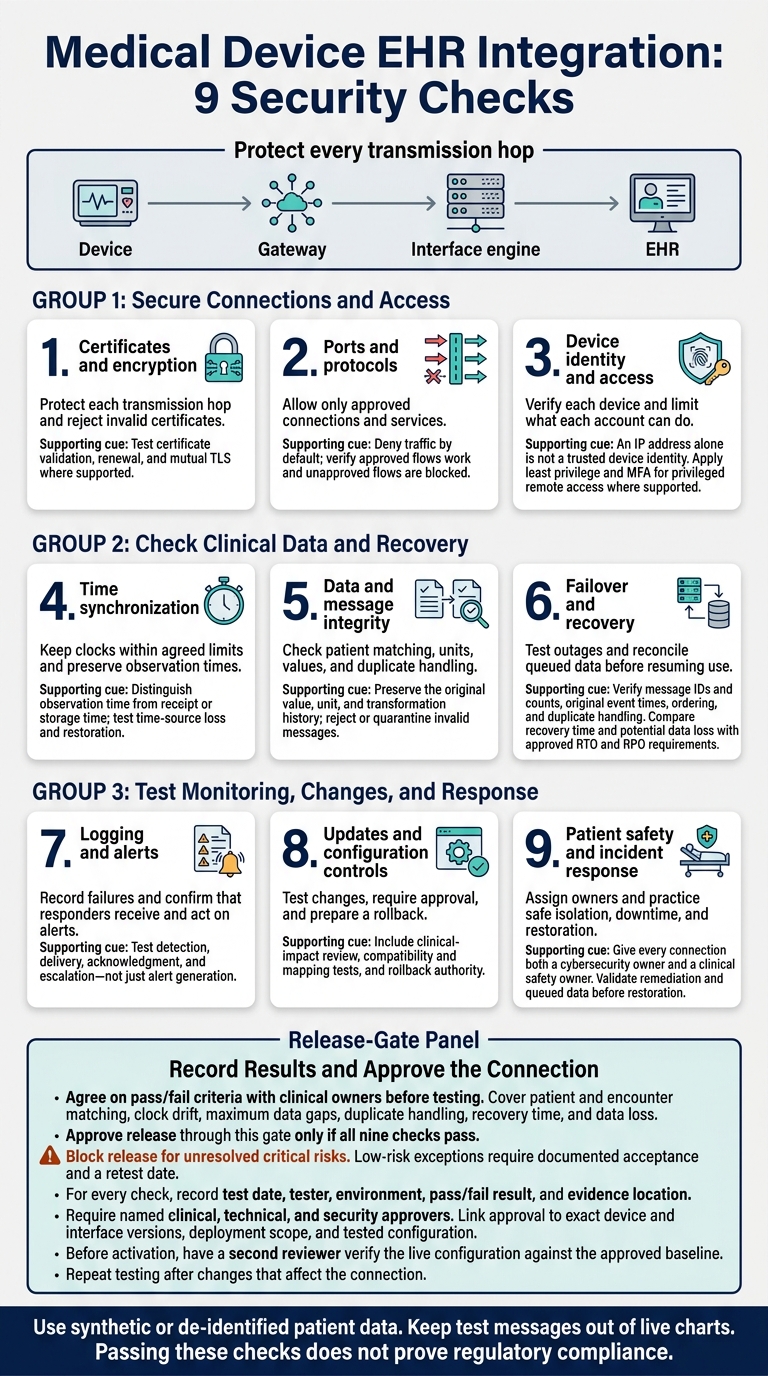
Medical Device EHR Integration: 9 Security Checks
Episode 24- How Medical Device Security Protects Care At Scale. With Phil Englert
sbb-itb-535baee
Checks 1–3: Secure Connections and Access
Coordinate testing with biomedical engineering, network/security, clinical owners, and the vendor. Follow manufacturer instructions before disabling services. Use a maintenance window and rollback plan to keep alarms, devices, and support working. Start with certificate validation to confirm that the device is connecting to the right endpoint.
1. Check Certificates and Encryption
Inventory certificates on devices, gateways, interface engines, and EHR endpoints. Record each certificate’s issuer/CA, subject name, SAN, validity dates, key strength, signature algorithm, intended use, and trust chain. Protect private keys and check encryption on every transmission hop: device to gateway, gateway to interface engine, and interface engine to EHR. Clinical data must stay encrypted throughout its journey.
Confirm that valid certificates allow connections. Test that expired, revoked, untrusted, name-mismatched, missing-intermediate, and wrong-purpose certificates are rejected. Where supported, test mutual TLS so both endpoints authenticate each other. Record the certificate serial number, timestamp, endpoint, result, and corrective action.
Test renewal before certificates expire and assign renewal owners. Document rotation, rollback, revocation handling, and emergency contacts. For legacy-device exceptions, require compensating controls, an approver, and an expiration or review date - not permanent validation bypasses.
2. Limit Ports and Protocols
Build a connection matrix that records each source, destination, port, protocol, traffic direction, clinical purpose, and owner. Include connections for monitoring, updates, and vendor support. Deny traffic by default, allowing only documented flows through firewalls, ACLs, or restricted network segments. Disable unused services where the manufacturer supports it.
Check that approved clinical messages, acknowledgments, and reconnects work. Then confirm that unapproved sources, ports, protocols, destinations, and inbound management access are blocked. Keep the rule ID, test case, observed result, and clinical-impact assessment.
Next, verify device identity. An allowed connection still needs to come from the right device.
3. Check Device Identity and Access
Match each endpoint to its manufacturer, model, serial number, software and firmware versions, location, and owner. An IP address alone is not a trusted device identity.
Replace default credentials where supported, remove unused accounts, and keep device, administrator, vendor, and service identities separate. Before allowing any device to write into the EHR, apply least privilege, restrict management access, and require MFA for privileged remote access where supported.
Use a test endpoint to confirm rejection of incorrect certificates, duplicate device IDs, invalid credentials, and insufficient privileges. Check that each rejection triggers a security alert with enough detail to investigate. Also verify that retired devices and removed accounts cannot reconnect.
Once identity is confirmed, move to time synchronization and data validation to protect clinical accuracy.
Checks 4–6: Check Clinical Data and Recovery
Agree on pass/fail criteria with clinical owners before testing. Cover patient and encounter matching, clock drift, maximum data gaps, duplicate handling, recovery time, and data loss. No observation should disappear silently.
4. Check Time Synchronization
Once identity is confirmed, check time and data flow. Use approved, authenticated time sources. Record the source, polling interval, last successful sync, and permitted clock drift. The time source must be authoritative, with a defined maximum clock drift.[6][7]
Compare timestamps for observations, orders, the interface engine, the EHR, acknowledgments, and audits. Keep observation time separate from receipt or storage time. Verify UTC offsets, time zones, daylight saving changes, and midnight rollover.
Block the time source in a test environment. Check that alerts arrive on time and synchronization resumes after the source is restored. If authentication is unavailable, document compensating controls: network isolation, manual verification, increased monitoring, and a maximum period of operation without synchronization.
5. Validate Data and Message Integrity
Before accepting observations, check patient, encounter, device, and source-system identifiers. Verify required fields, timestamps, units, precision, status, and provenance. Test unknown patients, canceled encounters, mismatched orders, and observations received after discharge.
Check supported signatures, checksums, sequence numbers, or other verification controls. Reject or quarantine malformed, stale, altered, or unauthorized messages, recording a reason and correlation ID. Replay messages to verify duplicate handling.
Test conversions and rounding with normal, boundary, negative, extreme, and missing values. Preserve the original value, unit, and transformation history, and confirm that the EHR does not convert a value twice. Send clinically unusual values for review rather than silently discarding them.
6. Test Failover and Recovery
Test network loss, interface-engine and EHR outages, credential or certificate failure, device reboot, power loss, and time-source loss. Record buffer capacity, outage notifications, retransmission behavior, and whether approved configurations are restored.[5][4]
After recovery, reconcile source records, queued messages, EHR results, and exceptions by message ID and count. Confirm original event times, acknowledgments, correct ordering, and no unreviewed duplicates - even when only part of a batch succeeds.
Compare measured recovery time and potential data loss with approved RTO and RPO requirements.[8] Before normal workflows resume, test downtime documentation, protection, entry, and reconciliation.
Record recovery exceptions for logging review.
Checks 7–9: Test Monitoring, Changes, and Response
7. Check Event Logging and Alerts
After recovery testing, check that logs and alerts reveal failures, replays, and unauthorized changes. Teams need this information to monitor the integration and escalate problems.
Log user and service-account access, administrative actions, configuration changes, connection attempts, data transfers, interface failures, authentication or certificate errors, updates, and security alerts. For each event, record:
- Event type, outcome, timestamp with time zone, and device or system identity.
- Initiating user or service account, source and destination, affected interface or patient or encounter ID where appropriate, and a transaction or message ID for tracing.
Store available logs in a central, access-controlled repository and protect them from tampering. Document retention and review requirements. Use identifiers instead of full clinical payloads when possible. HIPAA requires mechanisms to record and examine activity involving ePHI.[11]
Test the response, not just the alert. In an approved test environment, trigger suspicious connections, certificate errors, failed transmissions, and unexpected configuration changes. Measure detection, delivery, acknowledgment, and escalation times against defined targets. Confirm that both the on-call responder and clinical contact receive notifications. Document which device logs are unavailable and how central monitoring covers those gaps.
8. Review Updates and Configuration Controls
Once monitoring is defined, lock down updates and configuration changes.
Keep an inventory of firmware, software, interface versions, EHR endpoints, approved network rules, certificates, data mappings, and security settings. Each change must have a documented request, security and clinical-impact review, compatibility and mapping test results, approval, and a maintenance window.
Include patient-safety effects in testing. Define what triggers a rollback and who has authority to make that decision. Document unsupported components, patch constraints, vendor limitations, compensating controls, residual risk, and risk acceptance. FDA guidance recommends validating updates and patches before use.[10]
9. Test Patient Safety and Incident Response
When a change introduces risk, teams must know immediately who owns the response.
Assign named owners for each role: security handles triage and containment; IT handles interfaces and recovery; biomedical engineering handles safe device operation; clinical operations handles downtime workflow and data use; privacy handles PHI exposure; and third-party vendors handle product-specific remediation.
Give every connection both a cybersecurity owner and a clinical safety owner. Define who can pause automatic filing, isolate the connection, notify clinicians, and approve restoration.
Practice responses to missing, delayed, duplicated, corrupted, and misassigned data with clinical stakeholders. Set isolation and downtime thresholds based on potential patient harm - not a universal response time. This approach helps in managing threats to patient care during critical system failures. Preserve logs and relevant device state, test notifications and vendor escalation, and record containment time and unresolved risks.
A connection that reconnects is not automatically ready for use. Before reauthorizing it, require documented remediation, post-incident validation, safe handling of queued data, and approval from security, clinical, biomedical, and system owners.[9]
Conclusion: Record Results and Approve the Connection
Approve release through this gate only if all nine checks pass. Keep an evidence packet with inventory records, approved flows, certificate reviews, configuration exports, and test results. For every check, record the test date, tester, environment, pass/fail result, and evidence location.
If a check fails, add the finding to a risk register to track medical device security risks. Include its severity, clinical impact, owner, remediation deadline, compensating controls, and approval status. Block release for unresolved critical risks. Low-risk exceptions require documented acceptance and a retest date.
Require named clinical, technical, and security approvers. Link their approval to the exact device and interface versions, deployment scope, and tested configuration. Before activation, have a second reviewer verify that the live configuration matches the approved baseline. Record the review date and the triggers for reapproval.
Censinet RiskOps™ can help with risk assessment and tracking. It does not replace hands-on testing of certificates, message integrity, failover, or clinical safety. Approval depends on documented testing, not vendor claims.
FAQs
How do we set clinically safe pass/fail limits?
Set measurable pass/fail criteria upfront for specific end-to-end clinical scenarios and fault conditions. Require mutual authentication using valid certificates and approved TLS settings, with no fallback to plaintext. Set firm latency limits for alarms and charting, and allow zero silent loss of high-risk commands, such as infusion pump start/stop.
Define limits for failed-handshake attempts, time synchronization, and event logging. Record security events in U.S. local time and retain those records for at least 1 year. [1]
What if a legacy device cannot pass every check?
Put patient safety first. Use compensating controls to reduce risk without interrupting clinical care. Isolate the device through network micro-segmentation or a restricted VLAN that limits which destinations it can reach.
Other options include firewall-based virtual patching, least-privilege access, and out-of-band authentication gateways or Zero Trust Architecture to verify identity at the infrastructure level.
Record every exception in your risk register, including the clinical justification and a time-bound plan for quarterly reviews.
Which integration changes require retesting?
Retest after changes that could affect security, including firmware updates, interface changes, or shifts in trust boundaries [1]; changes to cloud configuration, identity policies, or network segmentation [2]; and new remote-access paths, firewall changes, network redesigns, newly disclosed vulnerabilities, or device additions or retirements [3].
Document the post-change checks to confirm that logging, encryption, authentication flows, and access controls remain secure and work as intended [2].
