
MFA in healthcare fails when it slows care down. The fix is to put stronger checks on the highest-risk access points first - remote access, admin accounts, EHR access, shared workstations, vendors, and recovery flows - while keeping day-to-day clinical use as light as possible.
Here’s the short version:
- In 2023, 81% of large healthcare breaches came from hacking or IT incidents, affecting 108.7 million people
- Clinicians may open up to 20 apps per shift, so too many prompts can lead to shared passwords, open sessions, and skipped logouts
- A smart rollout starts with:
- VPN and remote access
- Privileged accounts
- EHR and PHI systems
- Vendor access
- Shared devices work better with:
- badge-tap sign-in
- tap-off lock
- short idle timeouts
- session handoff controls
- Older systems often can’t support modern MFA, so teams may need:
- access gateways
- jump hosts
- network segmentation
- extra audit logging
- Recovery and break-glass access need strict rules, because help-desk resets and emergency accounts are common weak points
My takeaway: MFA in healthcare is not just a login setting. It’s a patient care, access control, and audit issue. If I want MFA to stick, I need to cut prompt fatigue, lock down remote and admin access, cover weak legacy systems, and treat recovery and emergency access with the same care as normal sign-in.
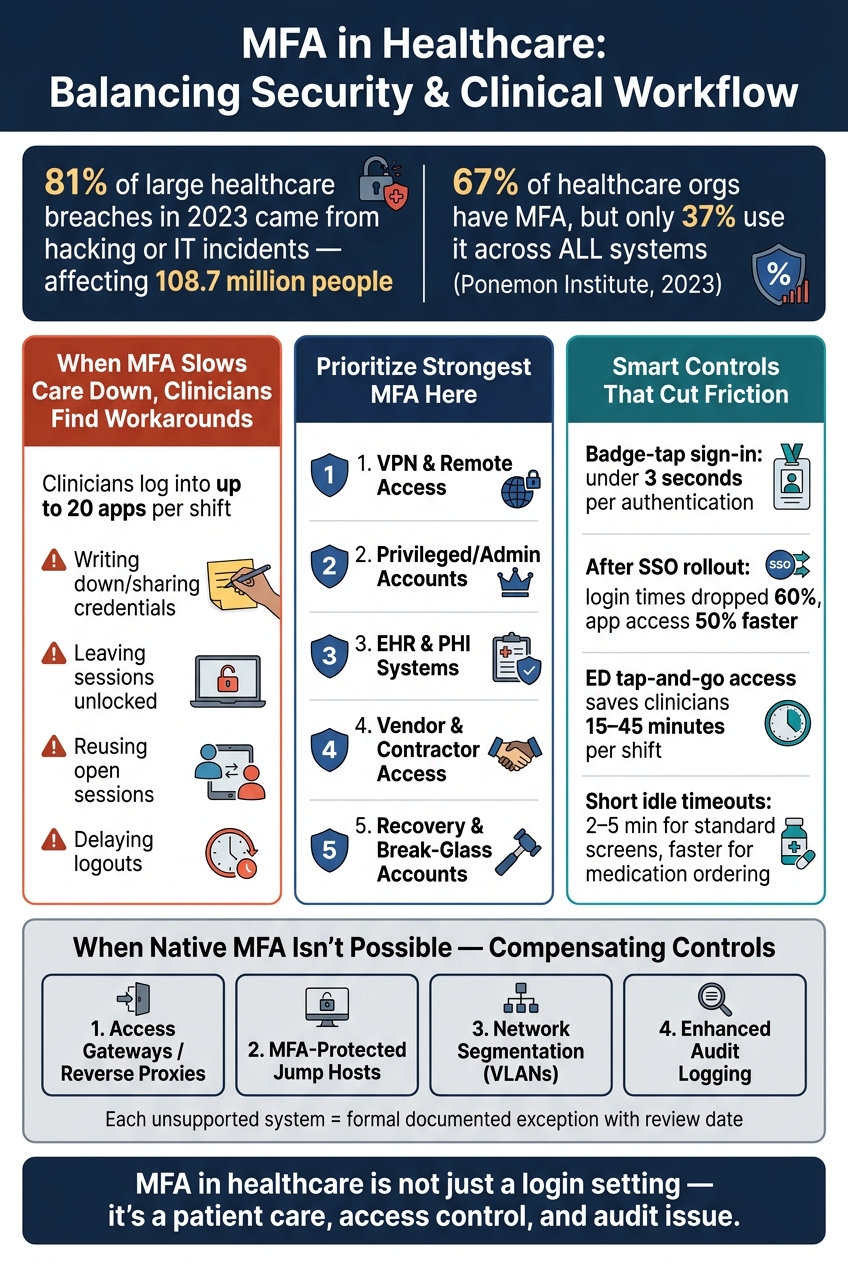
MFA in Healthcare: High-Risk Access Points vs. Low-Friction Clinical Use
Newsday: MFA Isn't Enough and Why Healthcare Can’t Just Hack Back with Preston Duren
sbb-itb-535baee
Clinician Resistance and Workflow Disruption
Clinician resistance usually starts with workflow friction. If MFA slows bedside work, clinicians often try to get around it, and that pushes enterprise risk of account compromise. In care settings where people move between EHRs, apps, and shared workstations all shift, repeated prompts slow care and nudge people toward workarounds. That problem hits hardest on shared devices, where handoffs happen all day and small delays stack up fast.
Why Too Many Prompts Lead to Unsafe Shortcuts
When authentication feels like a roadblock, people go around it. The most common shortcuts include:
- Writing down or sharing credentials
- Leaving sessions unlocked on shared workstations
- Reusing already-open sessions
- Delaying logouts to avoid repeated reauthentication
These responses are predictable when security controls don't fit the way clinical work actually happens. The answer is simple in theory: fit MFA to the workflow, not the other way around.
A study across 55 hospitals found that clinicians logged into up to 20 applications per shift. After SSO and access management controls were put in place, login times dropped 60%, and application access became more than 50% faster.[6][7]
How to Cut Friction with Workflow-Aware MFA
One of the best ways to reduce drag is to use step-up MFA only for higher-risk events. Routine access on trusted devices and hospital networks should stay light. Stronger checks make more sense when the risk goes up, such as when someone accesses a privileged account, e-prescribes controlled substances, or signs in from an unfamiliar device or location.
Badge-tap authentication is a fast, auditable option for shared clinical workstations. This is particularly critical for medical devices used at the point of care. When it's set up well, a tap takes under three seconds while still keeping each clinician's session individually auditable.[3][4][5] In emergency department settings, tap-and-go access has been shown to save clinicians 15 to 45 minutes per shift, with desktop sessions following users as they move between endpoints.[1] There's also a hygiene upside: contactless workflows cut down on keyboard and mouse touchpoints, which matters in busy ED and inpatient settings.[5]
Contextual, risk-based authentication goes a step further. It uses signals like device trust, network location, time of day, and user behavior to decide whether a prompt is needed at all. A clinician on a trusted workstation inside the hospital network can move through routine documentation with little interruption. That same clinician trying to access records from an unrecognized device outside the network gets a stronger challenge. The idea is straightforward: less friction for routine care, tighter control when risk changes. That matters even more on shared workstations, kiosk access, and remote sessions.
Shared Workstations, Kiosk Access, and Remote Use
Shared devices are where MFA friction turns into day-to-day risk. In nursing stations, exam rooms, and workstations-on-wheels, handoffs need to happen fast. If they don’t, people start finding shortcuts. On shared devices, slow MFA can push clinicians toward unsafe account sharing and leaving sessions open.[13][14]
Securing Shared Devices Without Slowing Handoffs
A common setup works well here: one strong login at the start of a shift, then badge taps for fast lock, unlock, and handoff. In practice, badge tap is often the best fit for shared workstations. It’s fast enough for busy handoffs and still gives you the audit trail you need.
Just as important, lock on tap-off, not only tap-on. When a clinician steps away and taps their badge, the workstation should lock right away. That keeps charts and medication records from sitting on screen for anyone nearby to see.[14][15][17]
Short, context-aware timeouts help too. Standard documentation screens can lock after 2 to 5 minutes of inactivity, while medication ordering and other sensitive tasks can require faster re-authentication. That keeps security in place without constantly getting in the way of care.
For kiosk-style devices in public-facing areas, such as patient check-in, imaging, or medication dispensing, the rules need to be tighter. These systems should use tightly scoped identities, automatic logoff, and no saved credentials. The goal is simple: reduce the chance of PHI exposure from an unattended session.[16][18]
Applying Stronger Controls to Remote and Third-Party Access
Remote access needs a different setup because the device is outside the hospital’s direct control. Access to EHRs, clinical applications, and PHI should be treated as high risk by default. That means MFA should be enforced for remote sessions, with phishing-resistant factors like FIDO2 security keys or certificate-based smartcards wherever possible.[8][9]
Conditional access should look at device trust, network context, and privilege level. A telehealth physician signing in from a managed, encrypted device on a known network should have a smoother path than someone logging in from an unrecognized device on public Wi‑Fi. In that second case, step-up verification should happen before any sensitive access is allowed.[10][12]
Managing third-party risk for vendor and contractor access calls for even tighter rules, especially when outside parties can reach medical devices or billing systems. Each vendor should have a unique identity, not a shared account. Access should be limited to the contract term and revoked right away when that term ends.[11] In short, vendor access should map to individual identities, defined contract periods, and immediate removal once access is no longer needed.
Legacy Systems and Integration Gaps
Even when MFA is turned on for EHRs and remote access, older systems can still leave big holes. In many hospitals and clinics, legacy platforms slow down MFA rollout more than teams expect. A 2023 Ponemon Institute survey found that 67% of healthcare organizations have implemented MFA, but only 37% use it across all applications and systems.[24]
That gap often comes from the systems left behind: older EHR modules, laboratory information systems, radiology platforms, and networked medical devices like infusion pumps and imaging modalities. Many of these systems still rely on older sign-in methods that don't work well with modern identity providers.[2][19][23][28]
Where Legacy Systems Break MFA Rollouts
The main problem is separate logins across systems. When apps and devices keep their own user databases - such as local accounts, app-specific directories, or disconnected Active Directory domains - there isn't one central point where IT can apply the same MFA rule everywhere.
So you end up with an uneven setup. A clinician might complete MFA for the main EHR, then open a specialty app and get in with only a username and password. That kind of split leaves weak spots across the care setting.
Some applications also depend on uninterrupted single-factor access. Add an MFA prompt in the middle of that workflow, and the app may stop working as intended. Devices that are hard to reauthenticate make the problem worse.
Integration Patterns and Compensating Controls
When native MFA isn't an option, shift the control point to the access layer. Access gateways and reverse proxies can route authentication through a central identity provider, so the user completes MFA before the session ever reaches the application. For administrative and privileged access, MFA-protected jump hosts do something similar: staff pass MFA to reach the jump host through RDP or SSH, then connect from there to servers or devices.[20][26][27][28]
If that approach doesn't fit, network segmentation becomes the main compensating control. Unsupported systems can be isolated in tightly controlled VLANs, internal traffic can be restricted, and access can be limited to specific endpoints. The goal is simple: if a credential is stolen, the damage stays contained.
A few controls help here:
- Privileged access management tools can rotate credentials automatically, so no single admin keeps a standing password.
- Audit logging should be turned up. If MFA can't be applied natively, every authentication event, configuration change, and ePHI access needs enough detail to support HIPAA audit requirements.[22][21]
Each unsupported system should also be handled as a formal exception. Document the exception, note the compensating controls in place, and record the review date in a central risk register.[21][22][25]
Enrollment, Recovery, Exceptions, and Key Takeaways
Controls around people and process matter just as much as the tech itself. You can roll out MFA the right way on paper and still watch the whole thing come apart if enrollment, account recovery, and emergency access are weak. That’s where a lot of healthcare MFA efforts stumble.
Designing Secure Recovery and Break-Glass Workflows
After MFA goes live, recovery and emergency access usually become the next weak spot.
If a user’s role changes or their access level shifts, update their MFA setup too. Each user should have at least two registered factors so they don’t get locked out in the middle of a shift. When recovery fails, care can slow down, and staff may start using risky shortcuts. That’s why recovery needs the same level of care as day-to-day sign-in. It’s a security workflow, not just an IT task.
Don’t depend on email alone for recovery. Use recovery codes, identity proofing, or another factor the user already registered. Generate recovery codes during enrollment, store them hashed, and make them single-use and time-limited.[29][30][31][32]
Help-desk resets are a favorite attack route, so support staff can’t skip identity checks to get someone back in. Before any reset, verify identity with strong proofing steps such as:
- matched HR records
- manager confirmation for higher-risk roles
- in-person verification
Log every reset and review it as a security event, not just another IT ticket.
Emergency access needs a separate set of rules. Break-glass access is for urgent clinical access when normal sign-in fails. Use it only when immediate patient care needs outweigh normal login controls. Limit it to specific roles, keep it time-limited, and require a documented reason. The moment break-glass credentials are used, alerts should fire automatically. Review who accessed what, when, and why. Then revoke and rotate those credentials right after use.
Key Takeaways for a Healthcare MFA Program That Holds Up
A healthcare MFA program works when enrollment, recovery, exceptions, and emergency access all follow the same risk rules. Put MFA, recovery, exceptions, and emergency access into one risk program. Focus first on remote access, privileged accounts, and PHI systems. Use context-aware controls to cut friction where you can. Keep exceptions time-limited, document compensating controls, and review every recovery or break-glass event.
FAQs
How do we add MFA without slowing clinicians down?
Use single sign-on (SSO) so clinicians can sign in once and access multiple systems. That cuts down on repeated logins and saves time during care.
Use step-up MFA for high-risk actions instead of requiring extra checks for every task. For shared clinical settings, tools like badge-tap proximity authentication or biometrics make re-entry fast and secure.
What should we protect first with MFA in healthcare?
Start with the highest-risk access points: administrative and privileged accounts, cloud consoles, EHR and EMR admin systems, databases that store ePHI, and security tools.
After that, lock down remote access, email, and core clinical systems like EHRs, telehealth platforms, and e-prescribing apps. The goal is simple: make stolen passwords useless on their own, so attackers can't get in with just a username and password.
How do we secure legacy systems that can’t support MFA?
When legacy systems can’t handle native multi-factor authentication, the safest move is to put controls around them.
The best option is usually to place access proxies or gateways at the edge of the system. That lets you enforce authentication before users reach the legacy app, without touching the application code itself. It’s a practical workaround when changing the old system isn’t possible.
It also helps to add a few guardrails around that setup:
- Network segmentation to limit where the system can be reached from
- Enhanced activity logging so teams can watch access and spot odd behavior
- An active exceptions register that records the risk, names an owner, and includes a formal, time-bound plan for retirement or upgrades
That way, the legacy system doesn’t just sit there as a known weak spot with no plan attached.
