
Phishing in healthcare can hit patient care, PHI, and email accounts in minutes. This playbook comes down to four things: set roles before an incident, contain the message fast, check patient safety and PHI, and finish the HIPAA review with clear records.
Here’s the short version:
- Healthcare is a prime target: cyberattacks tied to PHI breaches grew from 15.3% to 79.2% from 2013 to 2023, affecting 461.7 million people, according to recent cybersecurity benchmarks.
- Phishing is still a top entry point: some reports put it at more than 90% of healthcare cyberattacks.
- One bad click can do more than expose data: it can delay orders, block EHR access, and force paper workflows.
- Your team needs set owners in advance: security, privacy, clinical leadership, help desk, legal, and communications.
- Triage should stay short: collect what happened, when it happened, and where the user was working.
- Containment starts with the email and the account: search mailboxes, purge the message, reset passwords, revoke sessions, remove bad inbox rules, and isolate affected devices.
- Before closing the case, check two things: Was patient care affected? and Was PHI accessed, viewed, or sent out?
- Recovery comes after cleanup: remove attacker access first, then restore systems, reset credentials, enforce MFA, and monitor for 30 days.
- HIPAA review is not optional: work through the four-factor breach risk assessment and keep records for six years.
- If the breach is reportable: notify affected people and HHS no later than 60 days after discovery; smaller breaches go to OCR in the annual log.
I’d sum up the article like this: treat phishing in healthcare as a patient safety event first, a privacy event second, and an IT event throughout. The goal is simple - stop the spread, protect care, document every decision, and use each incident to tighten training, email security, identity controls, and vendor checks.
When Attackers Bring AI: 2026 Healthcare Cyber Threats, AI Phishing & Emerging Security Risks
sbb-itb-535baee
Define Roles, Escalation Paths, and Communication Rules Before an Incident
Ownership needs to be set before anything goes wrong. When a phishing report comes in, the team shouldn't pause and ask who owns triage, who needs to escalate, or who can speak for the organization. That part should already be settled.
If ownership is fuzzy, the response slows down. In healthcare, that delay can affect patient safety, expose PHI, and complicate breach handling.
Assign Responsibilities Across Security, Privacy, Clinical, and Legal Teams
Six roles should own phishing response, and each one needs both a named owner and a backup.
| Role | Primary Responsibility |
|---|---|
| Security/IT Operations | Triage suspicious emails; contain accounts and endpoints; revoke tokens; reset passwords; preserve logs. |
| Privacy & Compliance | Run the HIPAA breach assessment; determine PHI exposure; coordinate notifications. |
| Clinical Leadership | Assess patient safety impact; manage downtime workflows; protect care continuity. |
| Help Desk / Service Desk | Capture reports; collect key details; route tickets by escalation rule. |
| Legal | Review notices; advise on regulatory and contractual obligations. |
| Communications / PR | Issue approved internal and external updates. |
In multi-facility health systems, accountability should sit at both the system level and the local facility level. That matters because one site may spot the issue first, while another may feel the impact first. Policies should also spell out on-call coverage and explain how cross-site coordination works when more than one facility is involved.
These teams also need to work from the same escalation thresholds. If one group sees a warning sign as minor and another treats it as a full incident, things can get messy fast.
Set Escalation Criteria for Suspicious Emails vs. Confirmed Compromises
The line between a suspicious email and a confirmed compromise should be plain and easy to verify.
A suspicious email includes spoofing, an urgent lure, or an unexpected login prompt when there is no verified user action. A confirmed compromise means there is proof of action or access, such as a clicked credential-harvest link, an anomalous login, a malicious inbox rule, an unauthorized OAuth grant, or malware execution. If PHI was accessed or exfiltrated, the event should be escalated at once.
Major incident escalation should follow preset thresholds. Common examples include:
- Compromise of a privileged account
- Lateral movement into clinical systems
- Suspected alteration of orders or documentation
- Suspected access to a large PHI dataset
These thresholds should live in the playbook as short checklists or decision trees. They shouldn't be buried in policy language that nobody can find in the moment. Once a threshold is met, the incident management system should automatically notify the right people and reclassify the event.
Use Secure Channels and a Central Tracking System
If email trust is in doubt, the team should switch to approved out-of-band channels. That can include secure messaging, phone trees, encrypted clinical tools, or EHR banners. In other words, don't rely on the same channel that may have been abused.
A central tracking system should log owners, timestamps, affected accounts, decisions, and breach-assessment tasks so the team can move straight into containment and recovery. Each phishing event record should include the reporter's details, email metadata, user actions taken, affected accounts and systems, and a preliminary classification. It should also link directly to HIPAA four-factor breach risk assessment fields and preserve a full audit trail of every decision made.
With roles, thresholds, and channels set in advance, the team is ready to move into detection, containment, and breach triage.
Step-by-Step Phishing Response Playbook
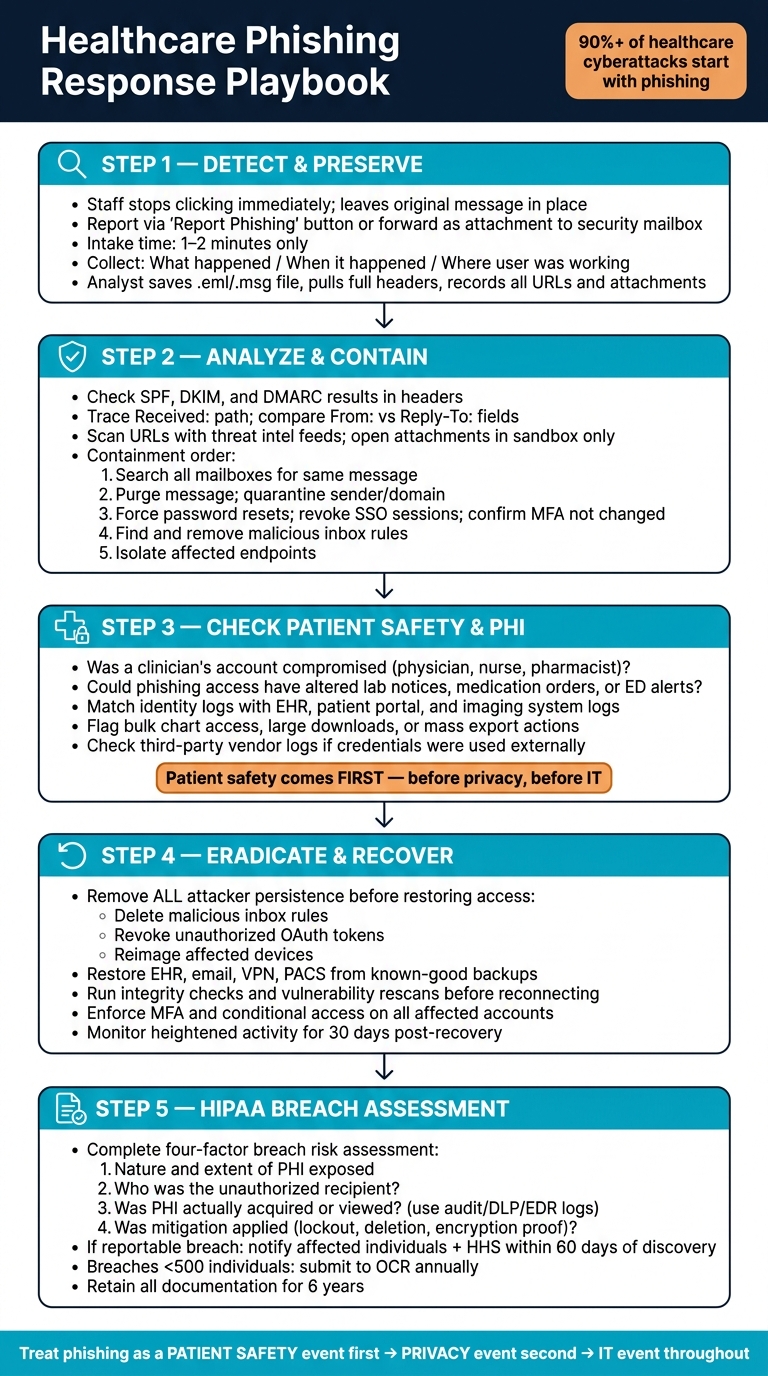
Healthcare Phishing Response Playbook: 5-Step Incident Workflow
With roles and escalation paths set, start intake right away.
Detect, Preserve Evidence, and Triage the Report
The second a staff member thinks an email may be phishing, they should stop clicking, stop replying, and leave the original message where it is.
If your organization uses Microsoft 365 or Google Workspace, the built-in "Report Phishing" button or a security add-in is the best option. It keeps the original headers and message body intact. If that tool isn't available, staff should send the email as an attachment to the security mailbox. In Outlook, that means using "Forward as Attachment."
Keep intake short: 1–2 minutes. Only collect three things:
- what happened
- when it happened
- where the user was working
On the security side, analysts should save the original email as an .eml or .msg file, pull the full headers, and record every embedded URL and attachment before doing anything else. That step helps preserve chain of custody and supports later investigation and regulatory review [7][11][12].
After intake, move straight into header review and campaign containment.
Analyze the Email and Contain the Spread
Once the evidence is safe, analysts can move into technical review. The job here is simple: confirm whether the email is malicious and find out how far it spread, without getting in the way of patient care.
Start with the headers. Trace the Received: path. Compare the sender domain with the display name. Check for mismatches between the From: and Reply-To: fields. SPF, DKIM, and DMARC results should be visible in the headers or in the email security gateway. A DMARC fail on a domain that usually sends urgent clinical messages is a strong warning sign [5][6][8].
URLs should be checked with threat intel feeds and reputation services. Suspicious attachments should only be opened in a sandbox, never on a clinical workstation.
If the message is malicious, contain it in this order:
- Search all mailboxes for the same message using the subject line, sender address, or a URL tied to the campaign.
- Purge the message from affected mailboxes and quarantine future mail from the same sender or domain.
- Force password resets for any user who may have entered credentials, revoke active SSO sessions, and confirm that MFA methods were not changed.
- Search for and remove malicious inbox rules that auto-forward mail outside the organization or hide phishing-related replies.
- Isolate endpoints that opened bad attachments or visited known malware sites, especially devices used for medication ordering or imaging review [1][4][9][10].
Log each containment action with the owner, timestamp, and affected accounts. Coordinate password resets with clinical leadership so you don't interrupt rounds or surgery schedules at the worst possible time.
Once the spread is contained, check whether patient care or PHI was touched.
Check Patient Safety and PHI Exposure Before Closing Containment
Before you close containment, confirm two things: patient care impact and PHI exposure. Patient safety comes first. In healthcare, a phishing event can disrupt care long before it turns into a privacy case.
For patient safety, focus first on whether the compromised account belonged to someone in an active care role, such as a physician, nurse, pharmacist, scheduler, or on-call staff member. Review whether any phishing-related access could have changed lab notices, medication orders, or ED alerts during the incident window. Clinical leaders should be asked directly:
Were any high-risk departments involved (ED, ICU, surgery, oncology)? Were critical alerts routed through a compromised account? Are there any near-miss reports that might connect to this campaign [1][2][3]?
For PHI exposure, the work shifts to matching identity logs with application logs across the EHR, patient portals, and imaging systems. Look for access from unusual IP addresses, unknown devices, or odd-hour activity. If you see signs of data exfiltration, such as bulk chart access, large report downloads, or mass export actions, document them and escalate to privacy right away.
If compromised credentials were used in third-party systems, like a vendor-hosted patient portal, telehealth platform, or cloud analytics tool, those logs matter too. So do the contract terms tied to those systems [1][3].
Log the case in the central risk record and connect it to affected vendors and third-party risks, PHI repositories, and prior risk assessments. Those findings should feed the HIPAA breach assessment in the next step.
Recover Safely and Complete the HIPAA Breach Evaluation
Once containment is done, the next step is eradication, recovery, and the HIPAA breach review.
Remove Persistence and Restore Access
Before you restore access, remove all attacker persistence. That means deleting malicious inbox rules, revoking unauthorized OAuth tokens and app grants, and reimaging any affected device. Treat any device that clicked a link or entered credentials as compromised until security clears it. [1][19] Patch any exploited vulnerabilities and turn off legacy authentication protocols before reconnecting systems to production. [26][27][30]
Recovery should happen only after eradication. If persistence is left behind, the attacker can get back in and undo your work. Restore EHR, email, VPN, PACS, and other critical systems from known-good backups taken before the compromise window. Then run integrity checks and vulnerability rescans before reconnecting those systems to production. [27][28][29][30]
Restore access only after logs and forensic data show no leftover malicious activity, credentials have been reset, and MFA and conditional access protect affected accounts. [1][19] Keep heightened monitoring in place for at least 30 days after recovery. [27][28][29][30]
Once systems are stable, determine whether the incident must be reported under HIPAA.
Complete the HIPAA Four-Factor Breach Risk Assessment
Under HIPAA, an impermissible use or disclosure of unsecured PHI is presumed to be a breach unless a documented four-factor review shows low probability of compromise. [16][18]
Work through each factor and document the evidence:
- Nature and extent of PHI: Identify the data elements exposed and how sensitive they are. [15][16][18]
- Unauthorized recipient: Identify whether the PHI went to an internal user, business associate, covered entity, or an unknown actor. [15][17][20]
- Acquired or viewed: Use audit, email, DLP, and EDR logs. Don't rely on assumptions. [14][16][18]
- Mitigation: Record lockout, secure deletion, written destruction confirmation, or proof of encryption. [15][16][17]
No single factor decides the outcome on its own. Document the decision with evidence, timestamps, and privacy/legal sign-off. [13][14][15]
Document Notifications, Reporting, and Follow-Up Actions
If the incident is a reportable breach, document the timeline, decision date, and basis for notification. Notify affected individuals, HHS, and, for breaches affecting 500 or more residents of a state or jurisdiction, prominent media outlets, promptly and no later than 60 days after discovery. Breaches affecting fewer than 500 individuals must be logged and submitted to OCR annually, no later than 60 days after the end of the calendar year. [21][22][25][16]
Each letter should explain what happened, what PHI was involved, how people can protect themselves, and what the organization is doing to reduce harm. Those steps also help preserve patient trust and support follow-up care coordination. Retain copies of the letters, the four-factor assessment, corrective action plans, and supporting evidence for at least six years. [15][16][23][24]
The table below maps recovery tasks to their regulatory basis and operational impact so incident commanders can prioritize work and keep clinical leadership informed.
| Recovery Task | Regulatory Basis | Operational Impact |
|---|---|---|
| Reset credentials and enforce MFA | HIPAA Security Rule | Prevents further unauthorized access and may require short, planned downtime for affected users. |
| Remove malicious inbox rules and OAuth grants | HIPAA Security Rule | Closes attacker persistence with minimal user disruption. |
| Reimage compromised endpoints | HIPAA Security Rule | Temporarily takes devices out of service while removing lingering malware. |
| Complete the HIPAA four-factor breach risk assessment | Breach Notification Rule | Determines whether notification and reporting are required. |
| Notify affected individuals | Breach Notification Rule | Triggers patient communications and follow-up coordination. |
| Submit the breach report to HHS/OCR | Breach Notification Rule | Required for reportable breaches affecting 500 or more individuals. [21][22] |
| Retain documentation for six years | HIPAA documentation requirements | Supports audit readiness and future investigations. |
Feed these findings into training, control updates, and the next response cycle.
For multi-incident or vendor-heavy environments, Censinet RiskOps™ can serve as the repository for four-factor assessments, mitigation tasks, residual risk ratings, and postmortems.
Build Phishing Resilience Across the Organization
Train Staff by Role Using Realistic Healthcare Phishing Scenarios
Use role-based phishing simulations that match how people in healthcare actually work. In this setting, annual training isn't enough.
Each team gets hit with different scams. Clinicians need to spot fake lab results, urgent referral requests, and EHR password-reset notices. Front-desk staff should practice catching fake appointment confirmations and intake form links. Billing teams are common targets for invoice fraud and fake payer portal messages. Executives often face impersonation attempts, wire-transfer fraud, and credential theft. IT administrators need deeper training on account takeover, token theft, and malicious OAuth consent.
The simulations should look and feel like normal work. That means using real workflow patterns, seasonal hooks, and the channels staff use every day, including email, SMS, and collaboration tools. Run campaigns monthly or on a rolling schedule. Randomize send times, but avoid peak clinic hours and critical on-call periods.
Don't just track who finished the course. Focus on what people actually do:
- Click rate
- Credential-entry rate
- Report rate
- Reporting speed
- Reporting accuracy
Training can cut click rates. Controls help contain the damage when one bad message slips through.
Harden Email, Identity, and Endpoint Controls
Training matters, but it needs backup from technical controls.
Start with email authentication. Set up SPF, DKIM, and DMARC across all domains. Then move DMARC from none to quarantine, and later to reject after alignment checks out. Add a secure email gateway with URL rewriting and time-of-click analysis, attachment sandboxing, macro blocking, QR code inspection, and anti-impersonation controls for executive, provider, and vendor lookalikes. Turn off legacy authentication protocols that let attackers get around MFA.
On the identity and endpoint side, require MFA for all email access, VPNs, and administrative interfaces. Apply conditional access for high-risk roles and systems that handle PHI. Keep EDR agents up to date on clinical workstations and servers. If you need to set priorities, start with MFA and conditional access. They cut account takeover risk the fastest.
Use Centralized Risk Management to Improve Each Response Cycle
Every phishing incident should feed back into training, controls, and vendor oversight.
In healthcare, one phishing attack doesn't stay in one lane. It can touch a vendor portal, a clinical app, a device interface, or a supply chain partner. After any vendor-impersonation or portal-access incident, review that vendor's authentication rules, limit portal privileges, and confirm out-of-band contact procedures. Update vendor risk ratings after each incident so the same weak spot doesn't keep getting used.
| Control Layer | Examples | Primary Benefit |
|---|---|---|
| Behavioral | Role-based simulations, report-rate tracking, escalation path reinforcement | Reduces initial click and credential-entry rates |
| Technical | DMARC at reject, MFA, conditional access, EDR, attachment sandboxing | Lowers compromise rate and shortens containment time |
| Governance | Post-incident reviews, vendor risk reassessments, control gap tracking, playbook updates | Turns isolated incidents into sustained program improvement |
Use incident data to shape the next remediation cycle.
Censinet RiskOps™ supports centralized third-party and enterprise risk assessments, cybersecurity benchmarking, and shared risk tracking. It can track remediation owners, residual risk, and follow-up validation in one place.
FAQs
Who should own phishing response in a healthcare organization?
Phishing response works best as a team effort, led by a dedicated Cybersecurity Incident Response Team (CSIRT).
That team usually brings together people from IT, legal, public relations, and senior leadership. In some cases, HR, operations, and other managers need to step in too. It depends on what happened and how far the incident spread.
Employees matter here as well. They’re often the first to spot something off, so they should report suspicious activity to the security or IT team right away. That early signal can help contain the issue faster and give the team more time to analyze what’s going on.
When is a phishing email a HIPAA-reportable breach?
A phishing email turns into a HIPAA-reportable breach when it results in unauthorized access, disclosure, or compromise of unsecured PHI.
At that point, the organization needs to complete a four-factor risk assessment. That review looks at:
- the nature and extent of the PHI involved
- who accessed or received the information
- whether the PHI was actually viewed or acquired
- how well mitigation efforts reduced the risk
If the breach is confirmed, the organization must send notification without unreasonable delay and no later than 60 calendar days after discovery.
How can healthcare teams reduce phishing risk before an incident?
Healthcare teams can cut phishing risk with a layered approach. That means role-based training, realistic phishing tests, and a workplace culture where people feel comfortable slowing down, checking odd requests through a separate channel, and using one-click reporting when something looks off.
Protection gets stronger with MFA, especially phishing-resistant options when available. Teams can also use tools like Censinet RiskOps to review controls, compare defenses, spot high-risk departments, and support HIPAA-compliant monitoring before small issues turn into bigger ones.
