
I use quarterly vendor reviews to answer one question: Is the risk still acceptable? Every 3 months, I check changes in PHI access, security controls, incidents, and unfinished fixes - not just whether a vendor has a signed agreement.
My review follows four steps:
- Prepare: Confirm services, data access, agreements, and review owners.
- Check: Review dated proof of safeguards, service changes, incidents, and past findings.
- Decide and track: Record the risk decision in a scorecard, then assign each fix an owner, deadline, and closure check. Censinet RiskOps can help track work and approvals.
- Escalate: Reassess suspected breaches, failed controls, or major changes before the next scheduled review. Carry unresolved items into the next quarter.
<u>The schedule is a checkpoint, not a reason to wait.</u> Quarterly reviews support risk management, but they are not a HIPAA requirement or proof of compliance.
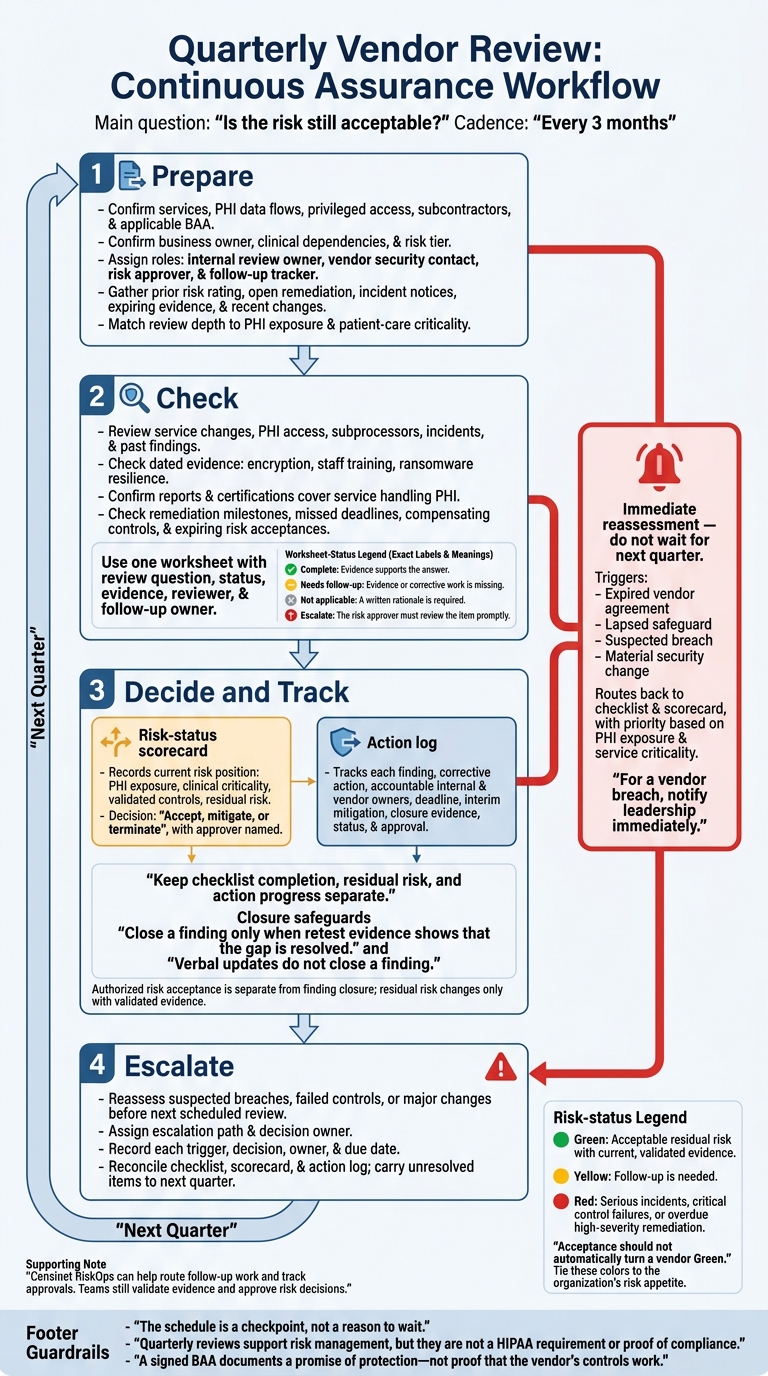
Quarterly Vendor Review: Continuous Assurance Workflow
Healthcare Third-Party Risk Management: Compliance & Cybersecurity
sbb-itb-535baee
Prepare for the Quarterly Review
Assign four roles before the review: internal review owner, vendor security contact, risk approver, and follow-up tracker. The approver accepts risk, while the tracker records remediation in the risk-ranked action list.[6] Then review scope, evidence, and changes.
Confirm Scope, Data Access, and Owners
The review owner should verify the business owner, services, clinical dependencies, and risk tier. Map PHI data flows, confirm privileged access, identify subcontractors, and check the applicable Business Associate Agreement (BAA). This scope determines who reviews what and how much evidence the vendor must provide.[6]
Match review depth to exposure and patient-care criticality. Vendors handling large PHI volumes or providing critical services need closer review and more evidence.[6]
Gather Changes, Evidence, and Past Findings
Collect the prior risk rating, open remediation items, incident notices, and expiring evidence. Ask the vendor security contact what has changed since the last review in services, ownership, hosting, architecture, subcontractors, and access.[6]
Ask for proof of safeguards - not just a signed BAA. That proof should include encryption at rest and staff training records.[6] Give the risk approver a one-page summary of changes, gaps, and residual risk. Record prioritized actions, owners, and due dates in the action list.[6]
Use the Vendor Review Checklist
Each quarterly review should use vendor changes, evidence, and remediation status to make an updated risk decision. Complete the checklist using the scope, evidence, and change log gathered above.
Keep everything in one worksheet with fields for the review question, status, evidence, reviewer, and follow-up owner. Tie each item to dated evidence so the review record supports both the scorecard and action log.
Apply these statuses consistently:
- Complete: Evidence supports the answer.
- Needs follow-up: Evidence or corrective work is missing.
- Not applicable: A written rationale is required.
- Escalate: The risk approver must review the item promptly.
The worksheet supports the risk decision; it does not replace it. [6]
Review Service Changes, PHI Access, and Incidents
Check whether new integrations, data flows, or subprocessors have changed PHI exposure. Confirm that the current BAA still covers every service the vendor provides.
Compare the current review with earlier reviews to spot changes in PHI access, service scope, and subprocessors. Review incident records for breaches, suspected compromises, or ransomware events, and mark whether an event requires immediate reassessment. [6]
Check Security Controls and Evidence
Tie security questions to the relevant HIPAA safeguards. Check encryption at rest and in transit, staff training, and ransomware prevention, using the same evidence standard for every control.
For reports or certifications, confirm that they cover the service handling your PHI. A report that excludes that service does not count for this review. [6]
Verify Remediation and Decide on Risk
Compare open findings with committed milestones. Check for missed deadlines, compensating controls, and risk acceptances nearing expiration.
Close a finding only when retest evidence shows that the gap is resolved. Give every remaining action an accountable owner and a deadline. Record the risk decision separately so the action log can carry it forward. [6]
Document Risk Status and Corrective Actions
Create the Risk-Status Scorecard
Turn checklist results into a scorecard and an action log. Keep checklist completion, residual risk, and action progress separate. The scorecard records the vendor’s current risk position within the broader landscape of healthcare security threats. The action log tracks corrective work. Reassess PHI exposure and clinical criticality each quarter instead of carrying forward old ratings.
| Scorecard field | What to record |
|---|---|
| Vendor and review quarter | Vendor name, service, and quarter. |
| Business owner | Internal stakeholder accountable for the relationship. |
| Risk tier | Classification under your organization’s vendor-tiering rules. |
| PHI access | Whether access exists or has changed, including affected data and access scope. |
| Clinical criticality | Patient-care impact if the service becomes unavailable. |
| Inherent risk | Risk before safeguards are considered. |
| Control status | Implemented, missing, or unvalidated. |
| Finding severity | Highest open severity and why it matters. |
| Incidents | Security and operational incidents during the quarter, including unresolved impact. |
| Evidence currency | Current validity of required evidence, such as audit reports or configuration screenshots. |
| Remediation status | Open, overdue, and pending-validation actions. |
| Residual risk | Risk remaining after validated controls and interim mitigations. |
| Decision | Accept, mitigate, or terminate, with the approver named. |
| Escalation level | Current management escalation level, such as none, department head, or CISO/CIO. |
| Next review | Scheduled review date and any earlier reassessment deadline. |
Example review quarter: Q4 2026.
Tie status colors to your risk appetite. Green means acceptable residual risk with current, validated evidence. Yellow means follow-up is needed. Red flags serious incidents, critical control failures, or overdue high-severity remediation.
Risk acceptance requires authorized approval. Revisit that approval when exposure or controls change. Acceptance should not automatically turn a vendor Green.
Track Actions, Owners, and Deadlines
Give each finding its own ID and link it to the action log. Connect vendor findings to the organization’s broader risk register so they receive attention alongside internal security findings. Keep risk acceptance separate from closure.
| Action-log field | Required entry |
|---|---|
| Finding | Unique ID and a clear description of the gap. |
| Affected service or data | Service, system, or PHI exposure affected. |
| Severity and rationale | Priority and the specific exposure or patient-care impact. |
| Corrective action | Required change and measurable completion criteria. |
| Internal owner | Named person responsible for follow-through. |
| Vendor owner | Named vendor contact responsible for delivery. |
| Due date | Committed deadline in MM/DD/YYYY format. |
| Interim mitigation | Temporary safeguard, its limitations, and who maintains it. |
| Closure evidence | Required artifact and documented validation results. |
| Status | Open, in progress, pending validation, or closed. |
| Escalation date | Date escalated, recipient, response, and revised commitment. |
| Closure approval | Authorized reviewer, approval date, and linked validation record. |
Example due date: 10/15/2026.
Record overdue escalations rather than moving deadlines. Before closing a finding, the assigned validator must confirm that the evidence meets the completion criteria. Verbal updates do not close a finding.
Update residual risk only when the validated change supports it - not just because a task’s status changed. Use these records to determine whether a new issue needs escalation before the next quarterly review.
Manage the Workflow With Censinet RiskOps
Use Censinet RiskOps to route follow-up work, track approvals, and keep scorecard and action-log updates visible. Teams still validate evidence and approve risk decisions.
Update the scorecard whenever access, incidents, or control status changes materially, rather than waiting for the next scheduled review. Use those records to trigger immediate reassessment when conditions change between quarterly reviews.
Escalate Between Reviews and Close the Quarter
Set Immediate Reassessment Triggers
When a trigger appears, shift from routine monitoring to immediate reassessment. Triggers include an expired vendor agreement, a lapsed safeguard, a suspected breach, or a material security change. Reopen the review with the same checklist and scorecard, and set its priority based on PHI exposure and service criticality. [6]
Assign Escalations and Confirm Next Steps
Once you reopen a finding, assign the escalation path and decision owner. Send unresolved findings to the risk owner and executive governance body. For a vendor breach, notify leadership immediately. The covered entity must manage patient and OCR notifications as applicable while maintaining third-party risk oversight.
Decide whether to continue with safeguards, formally accept the risk, or restrict vendor access or services to keep residual risk within tolerance. This alignment is part of a comprehensive third-party risk management strategy. A signed BAA documents a promise of protection - not proof that the vendor’s controls work. [6]
Before closing the quarter, record each trigger, decision, owner, and due date in the action log. Reconcile the log with the checklist and scorecard, then carry unresolved items into the next quarter’s review.
FAQs
Which vendors need reviews more often than quarterly?
Review certain high-risk vendors monthly to check that access remains appropriate and manage risks. This applies to vendors with administrative rights, EHR/EMR access, direct access to protected health information (PHI), or control over clinical devices [1]. For other high-risk or critical vendors, quarterly reviews remain standard practice [2][3][4][5].
Any vendor, regardless of tier, should undergo an out-of-cycle review after major events, such as security incidents, contract changes, or organizational restructuring [1][5].
What if a vendor won’t provide security evidence?
Treat missing security evidence as a serious risk warning. Start by checking the contract’s documentation requirements and the consequences for failing to meet them. If the vendor still won’t cooperate, escalate through your governance process. Bring in legal and procurement teams to enforce deadlines for corrective action or, if needed, begin contract termination.
Check vendor claims against independent sources, such as security ratings services or regulatory databases. These checks can help flag inconsistencies between what the vendor reports and its security posture.
How should we set vendor remediation deadlines?
Give every risk an owner, a remediation plan, and a firm due date in a central system of record. Set response deadlines by severity:
- Critical issues: 24–72 hours
- High-severity findings: 7–14 days
- Lower-priority items: By the next review cycle
Require every risk exception to include an expiration date and approval from the appropriate governance authority. For high-risk vendors, align escalation deadlines with contract renewals. Record alerts, decisions, and closure steps so teams can track corrective actions between quarterly reviews.
