
If your EHR target says 2 hours, but ransomware keeps it down for 2 weeks, your target is just paperwork.
I’d sum up this topic like this: set RTO and RPO from patient harm, not from backup marketing claims or lab restore times. In healthcare, ransomware recovery is slow because teams must isolate infected systems, check backups, rebuild identity and network services, and restore apps in the right order. That is why a fast backup does not mean a fast recovery.
Here’s the short version:
- RTO = how long a system can stay down before care, safety, or enterprise risk gets too high
- RPO = how much data loss, measured in time, a team can accept before risk gets too high
- Tier core services first: identity, DNS, network, EHR, eMAR, LIS, PACS
- Map dependencies before setting targets, because infrastructure often sets the true recovery floor
- Use immutable or offline backups, since attackers often hit backup systems too
- Test with ransomware conditions, not normal outage assumptions
- Track actual restore times, then update targets, runbooks, and risk records
A few numbers make the point fast:
- 389 U.S. healthcare organizations were hit by ransomware in one fiscal year
- Downtime can cost up to $900,000 per day
- Scripps Health reported losses above $113 million after a 2021 attack
- In 2024, only 22% of healthcare groups hit by ransomware fully recovered within 1 week
| Topic | What it means in plain English |
|---|---|
| RTO | Maximum downtime a system can take |
| RPO | Maximum data loss a team can take |
| Main mistake | Setting targets from restore speed instead of patient risk |
| Main fix | Tie targets to clinical workflows, dependencies, and tested recovery results |
| What to test | Backup integrity, restore order, clean-room scans, downtime procedures, staffing gaps |
So when I look at ransomware recovery in healthcare, the takeaway is simple: pick realistic targets, build for them, and prove them in drills.
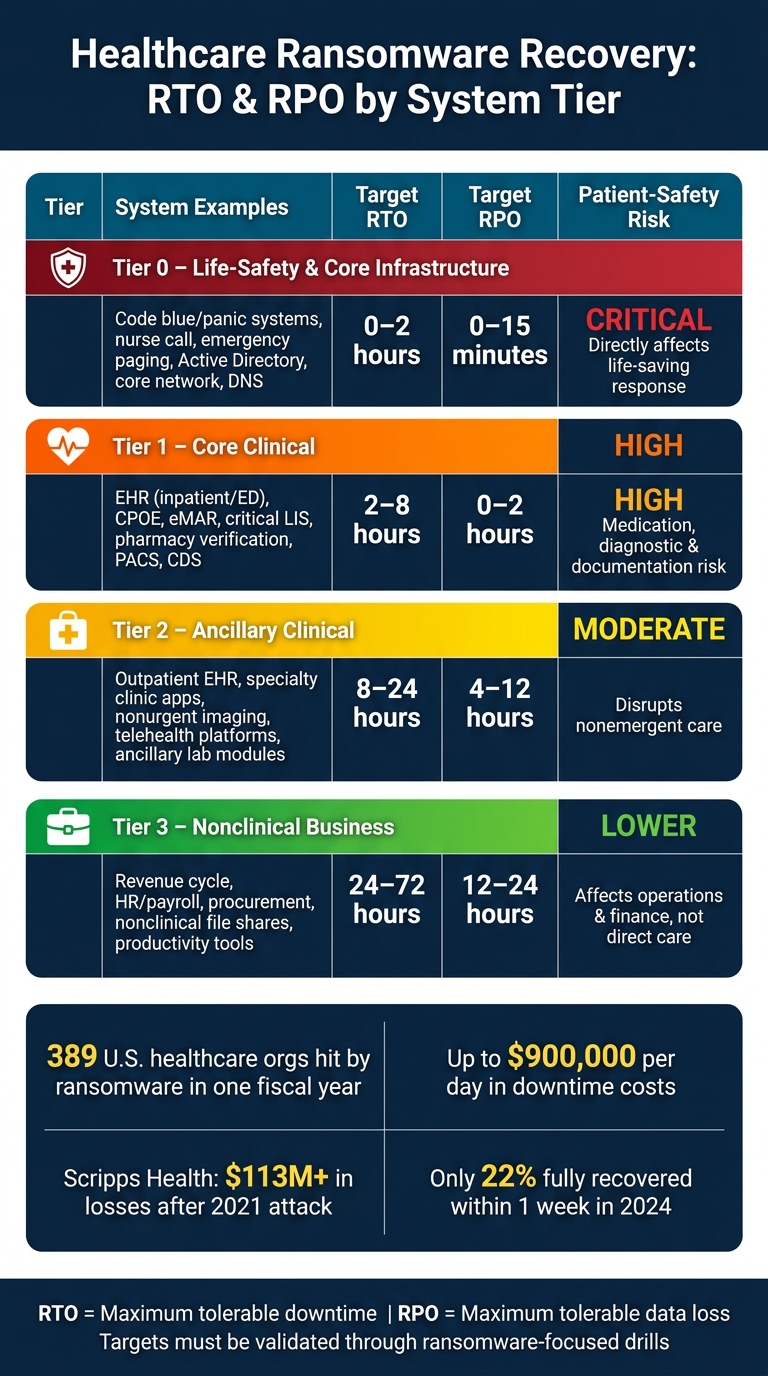
Healthcare Ransomware Recovery: RTO & RPO Tiers at a Glance
RTO vs RPO: Essentials of Business Continuity and Disaster Recovery Planning
sbb-itb-535baee
Map Patient Safety and Business Impact to RTO and RPO Targets
Containment and forensic work slow recovery. So your RTO and RPO can't be based on backup speed alone. They need to reflect the actual time to recover during a ransomware event.
Start with a ransomware-focused business impact analysis (BIA). Tie each clinical workflow to the systems it needs and the amount of downtime patients can safely tolerate. Then check whether your backup setup and restore automation can hit those targets. If they can't, the numbers on paper don't mean much.
Inventory Systems, Data, and Recovery Dependencies
Map each clinical workflow - ED triage, inpatient medication, OR scheduling, telehealth - to every system and data source behind it. That includes your EHR, PACS, LIS, pharmacy systems, revenue cycle platforms, and telehealth tools. For each one, note where it runs: on-premises, hosted, or cloud-based.
In many cases, infrastructure sets the actual RTO floor. Active Directory, DNS, core switching, VPN, storage arrays, backup repositories, and hypervisors must be up before application recovery can even start. If one of those pieces takes longer to restore than the EHR, then the EHR's target doesn't matter much - that dependency becomes the floor.
Third-party links matter too. E-prescribing networks, reference lab partners, radiology reading groups, and health information exchanges can all disrupt continuity of care if they go down during an attack.
Censinet RiskOps™ can help keep this inventory current by linking services, applications, devices, dependencies, and recovery assumptions.
Use this map to set system tiers before you decide backup frequency or restore architecture.
Create Criticality Tiers with Example Recovery Ranges
Once the inventory is done, group systems by how directly they affect patient safety. Set recovery ranges based on patient risk, not what's easiest from a technical side.
| Tier | System Examples | Target RTO | Target RPO | Primary Patient-Safety Rationale |
|---|---|---|---|---|
| Tier 0 – Life-safety & core infrastructure | Code blue/panic systems, nurse call, emergency paging, on-prem identity/Active Directory, core network, DNS | 0–2 hours | 0–15 minutes | Directly affects life-saving response and access to clinical systems. |
| Tier 1 – Core clinical | EHR (inpatient/ED), CPOE, eMAR, critical LIS, pharmacy verification, PACS for ED/inpatient, CDS | 2–8 hours | 0–2 hours | Raises medication, diagnostic, and documentation risk. |
| Tier 2 – Ancillary clinical | Outpatient EHR, specialty clinic apps, nonurgent imaging systems, some telehealth platforms, ancillary lab modules | 8–24 hours | 4–12 hours | Mainly disrupts nonemergent care. |
| Tier 3 – Nonclinical business | Revenue cycle, HR/payroll, procurement, nonclinical file shares, productivity tools | 24–72 hours | 12–24 hours | Mostly affects operations and finance, not direct care. |
These ranges are examples, not fixed rules. They should be refined through local risk review and checked with clinical leadership.
The Scripps Health ransomware attack in May 2021 shows what can happen when recovery assumptions fall apart: EHR and other key systems were down for about 4 weeks, forcing paper workflows and patient diversions, with total losses above $113 million.[3][4]
Align Targets with HIPAA Contingency Planning and Governance
HIPAA's Security Rule requires covered entities to put risk-based contingency plans in place, including data backup, disaster recovery, and emergency mode operations. But it does not give set RTO or RPO numbers.[1][2] So your targets need to be documented, defensible, and tied to your own risk analysis.
That takes shared ownership.
- Clinical operations leaders - CMO, CNO, ED leadership, and ICU leadership - define acceptable clinical risk, confirm system tiers, and set the maximum tolerable downtime and data loss from a patient-safety view.
- IT and cybersecurity leaders spell out what RTO and RPO are possible with the current setup, backup design, staffing, and ransomware-related limits.
- Compliance and privacy leaders make sure the decisions are documented in a way that meets HIPAA contingency planning rules.
- Executive leadership closes the gap, decides where funding is needed, and signs off on final risk tolerances.
If clinical leaders want a 2-hour EHR RTO but IT can only deliver 12 hours with the current setup, that gap can't be waved away. It should be documented, priced, and handled through formal governance. That may mean investing in immutable backups, cloud-based failover, or more recovery automation. Or it may mean formally accepting and tracking the risk.
Write that decision down clearly so backup and recovery design can be built around it.
Design Backup and Recovery Architecture to Meet Your Targets
Once RTO and RPO are approved, the next step is simple to ask and harder to answer: can your architecture actually hit those targets during a ransomware event? That comes down to backup protection, restore design, and a clear map of system dependencies. The tiering and target ranges from the prior section should drive the backup and restore pattern you choose.
Match Backup Frequency and Protection Methods to RPO Goals
Your RPO tells you how often data needs to be protected.
If your EHR has a 15-minute RPO, nightly backups won't cut it. You need continuous database log shipping to a secondary site, plus application-aware snapshots every 15 minutes or less. By contrast, nightly or weekly backups may work for HR or payroll systems that can handle a 24- to 48-hour RPO. That kind of gap does not work for systems where losing even one hour of medication orders or clinical documentation could create patient safety risk.
There’s another problem: ransomware groups often go after backups on purpose. In healthcare, compromised backups can drive up both recovery cost and recovery time. Use the 3-2-1-1-0 rule: three copies, two media types, one offsite, one immutable or air-gapped, and zero errors confirmed by restore tests.[8][9][10]
Immutable backups use object-lock or WORM storage, which means that even if an attacker gets administrative access, they still can't change or delete backup data during the retention window.[6][7][8] Backup infrastructure also needs separate admin accounts and segmented management networks. And when ransomware is confirmed, stop replication right away. Wait too long, and you may overwrite clean backups with encrypted data.[5]
Match Restore Architecture and Automation to RTO Goals
RTO-driven design means your restore setup has to match the speed each tier needs.
For Tier-0 and Tier-1 systems, such as core EHR, Active Directory, and medication administration, sub-hour RTOs usually require high-availability clusters or warm standby environments. That includes automated failover, DNS updates, and network rerouting.
For Tier-2 systems in the 1- to 4-hour range, image-based backups and prebuilt recovery runbooks are often the better fit. They let teams restore full VMs or containers in the right dependency order instead of rebuilding piece by piece.
Tier-3 systems with longer RTOs can usually rely on backup-to-disk or backup-to-cloud restores with more manual work.
Restore order matters just as much as restore speed. Identity and networking services need to come up first. Restored systems should also be scanned in an isolated clean room before they reconnect to production. Those steps shouldn't live in someone's head or in a sticky note on a monitor. Put them in runbooks, then test those runbooks against ransomware scenarios.
The matrix below turns common healthcare tiers into backup and recovery patterns you can actually use:
| System | Backup / Recovery Approach | RTO Band | RPO Band |
|---|---|---|---|
| Core EHR (inpatient/outpatient) | Continuous DB log replication; 15-min snapshots; HA clusters; warm DR site; orchestration for failover | 30–60 minutes | 5–15 minutes |
| Medication administration / eMAR | App-aware replication; frequent snapshots; HA database; automated app stack restore | 1–2 hours | 15–30 minutes |
| Identity (Active Directory) | System state backups; multi-site domain controllers; AD-specific recovery tooling | 1–2 hours | 15–60 minutes |
| PACS / Imaging archive | Storage array snapshots; nightly full + hourly incremental; tiered storage; isolated DR environment | 2–4 hours | 1–4 hours |
| Lab information system (LIS) | Image-based VM backups; nightly full + hourly incremental; scripted dependency restore | 2–6 hours | 1–4 hours |
| Revenue cycle / billing | Nightly database backups; weekly full, daily incremental; cloud backup | 4–24 hours | 4–24 hours |
| HR and payroll | Nightly or weekly backups to disk/cloud; manual restore | 8–48 hours | 24–48 hours |
| Departmental apps (non-clinical) | Daily backups; weekly full, daily incremental; limited orchestration | 8–72 hours | 24–72 hours |
These bands reflect common healthcare ransomware preparedness practices. They still need to be adjusted through your own business impact analysis and pressure-tested in ransomware-focused exercises.
Use Censinet RiskOps™ to Track Dependencies and Recovery Assumptions
Architecture choices only work if they’re based on a current picture of your environment.
Censinet RiskOps™ gives healthcare organizations one place to keep that inventory, linking clinical applications, medical devices, infrastructure components, and third-party services to criticality tiers, documented recovery assumptions, and vendor recovery commitments. If a core system is cloud-hosted, your recovery timeline depends on the vendor too, not just your internal restore process.
RiskOps™ helps teams spot those outside dependencies early, so planners can see where local controls, cached data, or alternate workflows may be needed to fill the gap. By tying this information to cyber risk assessments and mitigation plans, it keeps recovery planning connected to current risk.
Document these recovery choices in runbooks before you test them.
Implement, Test, and Refine RTO and RPO for Ransomware Scenarios
Once your targets and recovery design are in place, the next step is proving they hold up during a ransomware event. A policy target on paper doesn't mean much if it falls apart under pressure. Use the tiers, dependencies, and recovery assumptions you've already mapped to guide everything here.
Document Runbooks and Restoration Order by Tier
Every declared RTO and RPO should have a matching runbook. It needs to spell out exactly what the team does, who owns each step, and the order of restoration.
Assign clear owners across each tier:
- System
- Backup
- Application
- Infrastructure
- Incident response
These runbooks should work as clinical continuity tools, not just IT checklists. In plain terms, they need to tell clinical staff what the minimum acceptable service looks like during downtime. That might mean read-only EHR access, manual charting, or paper-based lab reporting, so care can continue safely while systems are being restored.
Restore identity and core infrastructure first. Then move to clinical systems. Business systems come after that.
Run Ransomware-Focused Exercises and Measure Actual Performance
Testing has to cover both human response and technical recovery. Tabletop exercises help test communications, roles, and decision-making. Technical restore tests do the heavy lifting. Restoring immutable or offline backups in a nonproduction environment is what shows whether backups are clean and whether the restore process can meet its time targets.
Ransomware-focused exercises should reflect real conditions, including encrypted primary systems, unavailable credentials, backups that may be contaminated, and reduced staffing. Track how long it takes to detect the attack, isolate affected systems, restore data, validate the environment, and resume service. Then compare those results with your declared RTO and RPO.
Just as important, check whether clinical operations could keep moving safely during the outage. That includes manual workarounds and any diversion procedures used along the way.
For high-criticality systems like EHR and identity infrastructure, aim for at least quarterly technical restore tests and at least one full-scope exercise each year.[12][14] Less critical systems can be tested less often after their recovery dependencies have been validated.
Use Results to Update Targets, Controls, and Governance Records
The point of these exercises isn't just to file a report and move on. The results should feed back into the program itself. Measured restore times are what show whether your declared RTO and RPO are grounded in reality.
When gaps show up, they should lead to changes in architecture or process. That could mean automated identity recovery, pre-staged virtual infrastructure, or a formally revised RTO paired with updated downtime procedures.
After every exercise or incident, lessons learned should flow straight into backup frequency, immutable backup design, restore tooling, runbook updates, and tier definitions. Governance records should also be updated. That includes disaster recovery plans, business continuity plans, risk registers, backup policies, clinical downtime procedures, and executive reporting artifacts. Each update should record the exercise date, actual results, remediation tasks, owners, due dates, and sign-off showing the lessons were carried into the next version of the recovery plan.[14][13]
Censinet RiskOps™ supports this loop by centralizing risk assessments, third-party dependency tracking, remediation tasks, and recovery-testing evidence in one place.
That gives stakeholders one place to see recovery assumptions and keeps them auditable over time, especially in complex environments where dependency gaps are common.
Conclusion: Set Realistic Targets, Then Prove They Work
Once you’ve set tiers and mapped out recovery, one final test remains: do those targets still hold up during a ransomware event? RTO and RPO only mean something when they match what your clinical teams need and what your recovery setup can deliver. A 2-hour EHR target sounds good on paper. It doesn’t mean much if restores take 10 hours - or if ransomware encrypted the backups too.
That’s why measured recovery matters more than written targets. Put simply, policy targets matter less than actual restore results. In 2024, only 22% of healthcare organizations hit by ransomware fully recovered within a week, showing how often real recovery falls behind declared targets.[11][15][16]
Grounded, tested targets cut downtime, support HIPAA contingency planning, and reduce patient-safety risk.
After testing, the last step is governance. Identify your highest-risk systems, manage third-party vendor risk, set provisional patient-care targets, close recovery gaps, test each year, and document any residual risk with a remediation timeline. Censinet RiskOps™ can centralize inventories, vendor dependencies, and recovery assumptions in one auditable place. If a target still can’t be met, document the residual risk formally and take it to your governance body with a remediation timeline.
RTO and RPO aren’t one-time numbers you file away and ignore. They’re a discipline - built into architecture, exercised under pressure, and refined over time.
FAQs
How do we set realistic ransomware RTO and RPO goals?
Start with a formal business impact analysis to rank systems based on how much they affect patient safety and clinical operations. Don’t force every system into the same standard. It works better to sort them into tiers.
Tier 0 systems, such as EHRs and identity services, usually need the toughest recovery targets: a 1-hour RTO and a 15-minute RPO. Then make sure those targets line up with your backups, replication setup, and vendor SLAs. On paper is not enough. Run regular tabletop exercises or live drills to see if those goals hold up under pressure.
Which healthcare systems should be restored first after ransomware?
Restore the systems tied to patient safety and day-to-day clinical care first.
Tier 0 systems - EHR, IAM/SSO, CPOE, and pharmacy dispensing - need the fastest recovery targets. Set an RTO of 1 hour or less and an RPO of 15 minutes or less for these systems. If clinicians can’t access charts, place orders, or dispense medication, care can slow down fast. That’s why these tools go to the front of the line.
Tier 1 systems, such as PACS and LIS, should come next. They matter a lot for diagnosis and treatment, but they follow Tier 0 in the restore order. Administrative systems like payroll, HR, and revenue cycle should wait until critical clinical operations are back up and running.
How often should we test ransomware recovery plans?
Healthcare organizations should test disaster recovery plans at least once a year. That annual cadence helps meet regulatory requirements and shows whether the plan still works when it counts.
For high-criticality Tier 1 systems, patient care applications, or environments that handle large volumes of PHI, a risk-based schedule often makes more sense. In many cases, that means testing quarterly.
It also makes sense to run extra tests after major infrastructure updates, vendor changes, or major workflow shifts. And after any test - or any actual incident - teams should complete a formal after-action review within one to two weeks.
