
A SOC 2 report is a starting point, not an approval. If I’m reviewing a healthcare vendor, I need to know four things fast: what was in scope, how the controls work in production, who owns which tasks, and how the vendor handles incidents and subcontractors.
Here’s the short version:
- SOC 2 is not HIPAA proof.
- Type II does not mean low PHI risk.
- Scope gaps can hide modules, APIs, cloud regions, and acquired products.
- Exceptions, carve-outs, and CUECs can shift risk back to me.
- I should ask for dated proof of access reviews, logging, patching, backups, and recovery tests.
- Healthcare vendor breach response matters most when care is affected, especially after hours.
- Fourth-party risk is not small: 30.3% of reported PHI breaches from 2013 to 2023 involved business associates.
- Backup claims need restore proof. In one 2024 healthcare ransomware study, 95% of victims said attackers tried to hit backups, and 66% said those attempts worked.
What I’m looking for is simple: not more documents, but proof that the vendor can protect PHI, keep systems available, and tell me what happens when something goes wrong.
That’s the frame for the rest of the piece.
SOC 2 & Third-Party Risk Management: Pros and Cons
sbb-itb-535baee
Validate what the SOC 2 report actually covers
Once you know the report exists, use a SOC 2 audit documentation checklist to verify if it covers what your organization will actually use.
An unqualified SOC 2 opinion is not a free pass. It only means the auditor found that the tested controls met the applicable criteria for a defined system and time period.
Match the report scope to the product, data flows, and environment
Start with the system description. That’s the part of the report that spells out what was assessed. Then compare it to the exact product, PHI flows, and hosting setup your team plans to use.
Check a few items closely:
- Is the exact module or feature your team will use named in the description, or does the report only refer to the vendor’s main platform?
- Does the report cover the cloud region and infrastructure where your data will live?
- Are the APIs, EHR connectors, or SFTP integrations your organization depends on included, or were they left out?
Acquired products often stay out of scope for one or more audit cycles.
Also review the audit period and report end date. A 3-month Type II report covers much less than a 12-month report and may miss annual activities like disaster recovery tests or yearly access reviews [8][9]. A short audit window or an old end date can hide control changes that matter for PHI risk.
If there’s a gap between the report end date and today, ask the vendor for a bridge letter confirming that no material changes have occurred since the audit closed.
Review exceptions, carve-outs, and customer responsibilities
After you confirm scope, look at three areas that buyers often miss: exceptions in the report, carve-outs for subservice organizations, and complementary user entity controls (CUECs).
Exceptions show how controls performed in practice, not just how they were set up on paper.
Carve-outs mean the auditor did not directly test a subservice organization. If that carved-out provider handles PHI, you need separate assurance for it [4][5][6][7].
CUECs are controls your organization is expected to perform for the vendor’s SOC 2 assumptions to hold. If you haven’t put those controls in place, the report’s assurance does not fully carry over to your environment [1][2][3].
| What the report shows | What it does not show | What the buyer should verify separately |
|---|---|---|
| In-scope applications and environments assessed by the auditor | Excluded modules, test environments, or recently acquired products outside the audit boundary | That every PHI-processing feature and integration your team will use is explicitly in scope or separately assessed |
| Trust services criteria included (e.g., Security, Availability) | Risk domains not tested - commonly Privacy and Processing Integrity | Whether unaddressed criteria create PHI or data integrity gaps that require additional attestation or controls |
| Exceptions noted and remediation described | Whether remediation was fully completed and verified before go-live | Documented evidence of remediation, with dates, for any exception affecting PHI or clinical system availability |
| Carve-outs listing subservice organizations and assumed controls | Independent validation of those subservice organizations' actual control performance | The subservice organization's own SOC report, or alternative assurance, for any carved-out provider handling PHI |
| CUECs listing controls the vendor assumes the customer performs | Whether your organization has actually implemented those controls | Internal configuration reviews, access audits, and technical checks confirming each CUEC is operational on your side |
Once scope is clear, test whether the controls work as claimed.
Test the controls that matter most for healthcare risk
Scope tells you what got audited. Evidence tells you whether those controls still work. Once scope is clear, the next step is simple: check if the controls are still doing their job in production.
Ask for evidence of real control performance
In U.S. healthcare, the control areas tied most closely to PHI, clinical uptime, and data integrity are access management, encryption and key management, logging and monitoring, vulnerability management, backup and recovery, and data retention and deletion. For each area, ask for dated production evidence - not policy text.
For access control, ask for a completed access review from the past quarter. It should show user lists, assigned roles, approvers, and documented removals. If a review never leads to any access changes, that deserves a closer look. Also ask for role definitions that separate support, operations, and development access, privileged access logs that show admin account activity, and proof that terminated employees are deprovisioned within a set window, usually 24 hours or less.
For encryption, don’t stop at “data is encrypted at rest and in transit.” Ask which algorithm they use, what key-management service is in place, how access to keys is controlled, and how rotation is handled. Then ask for the receipts: key-rotation logs and certificate-renewal records.
For logging and monitoring, request recent production logs that show PHI access, admin actions, and security events. Ask for SIEM alerts or monitoring dashboards tied to suspicious activity. You’ll also want retention and integrity documentation that shows how long logs are kept and what stops tampering.
For vulnerability management, ask how findings get fixed in practice. Request a recent vulnerability scan report for production PHI systems, plus a remediation tracking report showing time from detection to fix, severity ratings, and any documented risk acceptances. Vendors with stronger programs usually define internal SLAs. For example, they may fix critical findings within 7 to 15 days and high findings within 30 days - and they can prove they hit those targets. Critical vulnerabilities left open for 60+ days in systems processing PHI should be treated as a serious risk flag.
For backup and recovery, ask for documented Recovery Time Objectives (RTOs) and Recovery Point Objectives (RPOs) tied to specific systems, along with results from a recent recovery test and the business continuity or disaster recovery plan behind it. Sophos' 2024 healthcare ransomware study found that 95% of ransomware victims reported attackers attempted to compromise their backups, and 66% of those attempts succeeded. [11][12][13] If a vendor can’t show a tested, successful restore - with data integrity validation and documented time to recovery - you’re exposed in the exact moment that matters most. Restore proof matters most when recovery time affects care.
Use targeted assessment questions that reveal control maturity
Ask questions that show how controls hold up under pressure, not how nice they look on paper. These tend to surface weak spots in healthcare vendor assessments:
- Who in your organization can access production systems that process our PHI, and how is that access approved and logged? Ask for the access approval workflow and monitoring logs.
- Walk me through your last emergency access event - how was it approved, who reviewed it afterward, and what was documented? Ask for the incident or access record from that event.
- How long do your most recent critical vulnerability findings remain open before remediation? Ask for the remediation tracking report with actual resolution times.
- How do you handle data deletion when a contract ends? Show a recent example. Ask for deletion logs, certificates of destruction, or workflow records.
- Are your non-production environments seeded with real PHI or synthetic data? Ask for environment configuration documentation or a data classification inventory.
Match every answer to dated evidence. If a vendor says they do quarterly access reviews, ask to see the last one. If they say they have a 7-day patch SLA for critical findings, ask for the remediation tracking report that shows it. If the evidence is thin, move to the next filter: incident response and downstream dependency exposure.
Assess incident response, subcontractors, and fourth-party exposure
Once you've checked that controls work, the next step is tougher: see what happens when those controls break and who else can break with them.
Confirm incident response readiness and notification paths
SOC 2 can show that a plan exists. It doesn't tell you how a vendor will act when an EHR integration goes down at 2:00 a.m. or PHI gets exposed. That's the part that hits hardest.
Ask the vendor to walk you through how it trains incident response teams and classifies incidents. Then check whether those ratings reflect clinical impact and PHI exposure. A severity 1 (SEV1) should mean an EHR integration outage that affects direct patient care across multiple hospital units, not some small hiccup. If the severity scale ignores clinical workflow disruption or PHI exposure, the response program likely wasn't built for healthcare.
Next, map the notification path. Under HIPAA, business associates must identify, respond to, mitigate, and document security incidents. They also must report breaches of unsecured PHI to covered entities within set timelines. [14][10][16] Get clear answers on who contacts you, how they do it, and when that happens after a suspected PHI incident. Ask for a redacted sample of a past customer notice so you can see whether the message is structured and useful, not vague boilerplate. Also confirm they can join a live incident bridge and give updates on a cadence that fits your escalation process.
Request summaries from the last two or three tabletop exercises. Then look at the scenarios. Did they cover PHI breaches or clinical system outages? Or was the last exercise just a generic infrastructure failure with no patient care angle and no mention of regulatory notice timelines? If so, that program hasn't been pushed in a way that matches your setting. Ask what changed after the exercise.
Map subcontractors and fourth-party exposure
From 2013 to 2023, 30.3% of reported PHI breaches involved business associates - vendors and their subcontractors. [18] That makes vendor-of-vendor mapping a required step, not a nice extra.
Pay close attention to:
- Cloud hosts
- PHI subprocessors
- Managed security and support partners
- Integration layers such as interface engines and API gateways
Each one can become a failure point for confidentiality, availability, or recovery.
Ask for a current subcontractor inventory that lists the legal name, service provided, PHI handled, and business-associate status. Then verify contract flow-down for HIPAA duties, breach timelines, and reporting duties. Under HIPAA, downstream subcontractors that handle PHI have direct HIPAA duties when they handle PHI. [15][16][17] If that flow-down is fuzzy, fourth-party breach risk can spread fast.
You should also ask whether any subcontractor stores or accesses PHI outside the United States, what legal protections apply, and whether the primary cloud provider has a documented failover path. A vendor that depends fully on one hosting provider with no documented failover creates a single point of failure for clinical operations, no matter what the SOC 2 says.
Build an evidence-based approval process and vendor decision
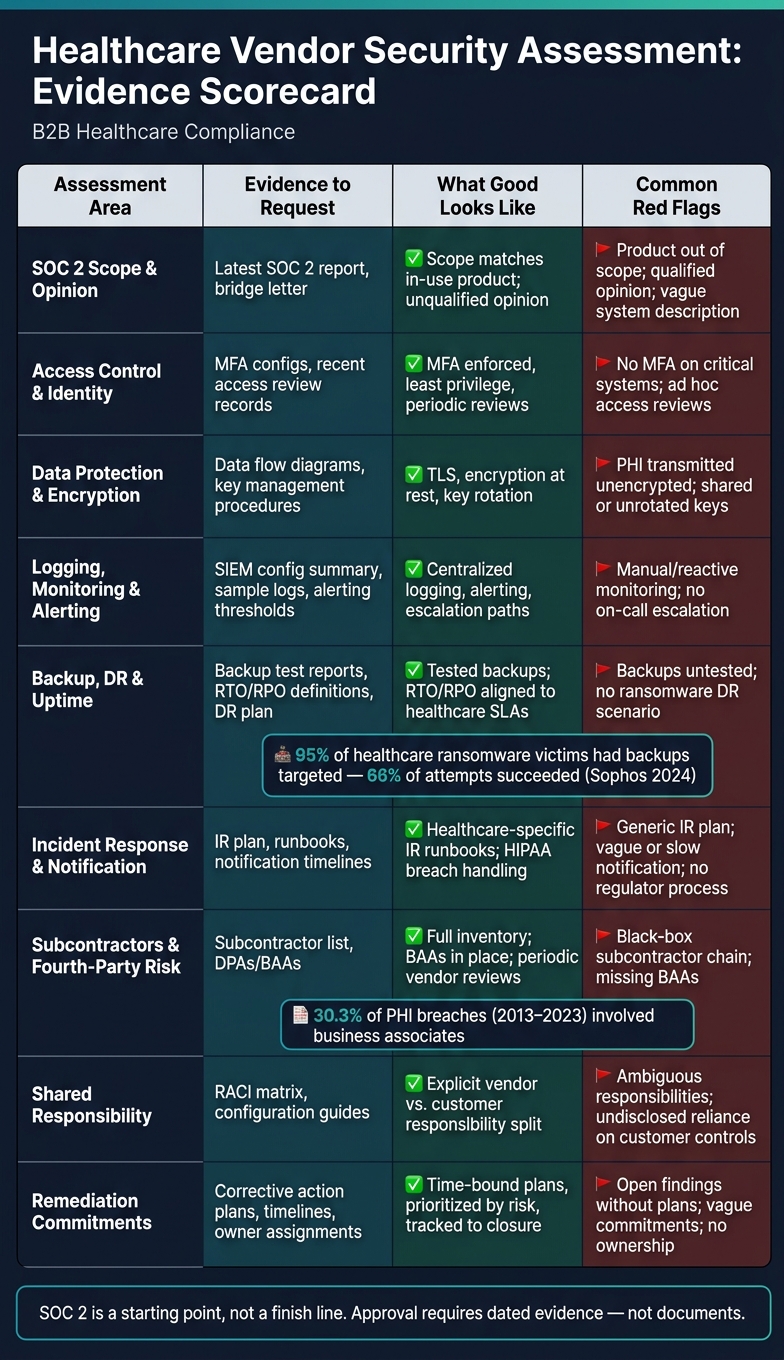
SOC 2 Vendor Assessment: Evidence Checklist for Healthcare PHI Risk
Turn the evidence into a repeatable decision process, not a one-time call.
If your team scores vendors, stick with the same likelihood × impact model for every review so residual risk drives the outcome. That keeps decisions grounded in the same logic each time, instead of shifting based on who is reviewing the file.
Use the matrix to assign one of three outcomes: approve, approve with conditions, or remediate. Then use that evidence to make one documented decision.
| Assessment area | Evidence to request | What good looks like | Common red flags |
|---|---|---|---|
| SOC 2 scope and opinion | Latest SOC 2 report, management assertion, bridge letter | Scope matches in-use product and environment; unqualified opinion; key services and hosting included | Product or environment out of scope; qualified opinion; vague description of systems handling PHI |
| Access control and identity management | Access control policy, MFA configs, recent access review records | MFA, least privilege, periodic access reviews | No MFA for critical systems; ad hoc or undocumented access reviews; excessive privileged accounts |
| Data protection and encryption | Data flow diagrams, encryption policy, key management procedures | TLS, encryption at rest, key rotation, key segregation | PHI transmitted unencrypted; weak or missing encryption at rest; shared keys and poor key management |
| Logging, monitoring, and alerting | SIEM configuration summary, sample logs, alerting thresholds | Centralized logging, alerting, escalation paths | Limited logging; manual or reactive monitoring; no clear on-call or escalation process |
| Backup, disaster recovery, and uptime | Backup test reports, RTO/RPO definitions, DR plan | Tested backups; defined RTO/RPO aligned with healthcare SLAs; documented DR plan | Backups untested; unclear or unrealistic RTO/RPO; no tested DR scenarios for ransomware or outages |
| Incident response and notification | IR plan, incident runbooks, notification procedures and timelines | Healthcare-specific IR runbooks; HIPAA breach handling; contractual notification SLAs | Generic IR plan; no healthcare context; vague or slow notification commitments; unclear regulator process |
| Subcontractors and fourth-party risk | Subcontractor list, DPAs/BAAs, security expectations for vendors | Complete inventory of critical subcontractors; security clauses and BAAs in place; periodic vendor reviews | Black box subcontractor chain; missing BAAs; no security requirements for critical downstream vendors |
| Shared responsibility and customer tasks | Responsibility matrix (e.g., RACI), configuration guides | Explicit vendor vs. customer responsibility matrix; clear secure configuration guidance | Ambiguous responsibilities; undisclosed reliance on customer controls; no guidance for secure setup |
| Remediation commitments | Corrective action plans, timelines, owner assignments | Time-bound plans; prioritized by risk; tracked to closure | Open findings without plans; extended timelines for high-risk gaps; lack of ownership or tracking |
Any remediation commitment you accept should be specific: a named gap, a target state, a deadline, and an owner. If that detail is missing, the promise is too soft to support a conditional approval. Saying a vendor will “improve security posture” sounds nice, but it doesn’t give your team anything clear to track.
Store the matrix, evidence, and sign-off in one review record. Use a single system of record for artifacts, sign-off, and audit trails. That way, if someone asks six months later why a vendor was approved, the answer is in one place instead of scattered across email threads, shared drives, and meeting notes.
Conclusion: Move from document collection to operational proof
A SOC 2 report is a starting point, not a finish line. Strong vendor decisions come from evidence tied to scope, exceptions, shared responsibility, control performance, incident readiness, and subcontractor exposure. When each approval includes artifacts and documented rationale, the process shifts from checkbox assurance to operational proof.
FAQs
How do I know if a SOC 2 report covers the exact product we’ll use?
Don’t stop at the cover page. Check the full report’s scope section.
Vendors choose their own audit boundaries, which means some product modules, parts of the infrastructure, or subservice organizations may be left out. That’s the part people miss.
Then compare the management assertion with the auditor’s report. You want the same systems, services, and timeframes to show up in both places. If they don’t match, that’s a red flag.
Watch for phrases like except for or not including. Also check that the APIs, databases, and cloud environments that touch your data are clearly listed as in scope.
What evidence should I ask for beyond the SOC 2 report?
Ask for proof that the controls work in practice and fit your risk profile, not just proof that they’re on paper.
That usually means asking for things like:
- Penetration test summaries and remediation status
- Restore-test logs, backup validation, and access review reports
- A data residency map, subprocessor list, and BAAs for PHI
- Audit logs, open control exceptions, and incident response evidence like downtime procedures, breach records, and tabletop results
The difference matters. A vendor can say they encrypt data, review access, or run incident drills. Fine. But can they show what happened the last time they tested a restore? Can they show which findings from a pen test are still open? Can they map where PHI lives and which subprocessors touch it? That’s where the paper claims stop and the risk picture gets a lot clearer.
How should I evaluate a vendor’s subcontractors and incident response?
Move past static reports and check actual performance and accountability.
For subcontractors, get a current list of every subprocessor that handles PHI. Make sure each one has a HIPAA-compliant BAA in place. Watch for concentration risk, and require notice when anything changes.
For incident response, ask for proof of tabletop exercises. Review the most recent incident, including dates and outcomes. Set a 24- to 72-hour breach notification SLA, and use a shared responsibility matrix.
