
Most healthcare risk teams should stop treating migration like a data transfer and treat it like a control project. If you move bad spreadsheet data into a platform, you don’t fix the problem - you just move it. And with only 31% of healthcare groups reporting a fully implemented third-party risk program, plus more than 80% of stolen PHI records tied to third parties, the cost of weak process control is hard to ignore.
If I had to boil this playbook down, I’d say this:
- I start by listing every spreadsheet and naming its owner, purpose, and status.
- I clean the data before import, especially vendor names, dates, statuses, risk labels, owners, and PHI fields.
- I move records in order: inventory first, assessments second, remediation third.
- I set workflow rules for approvals, due dates, reassessments, exceptions, and evidence review.
- I test counts, scores, permissions, and reports before I retire any old file.
- I keep legacy spreadsheets read-only until reconciliation and sign-off are done.
This article is not about software setup alone. It is about moving from scattered files to one governed system for vendor inventory, assessments, findings, evidence, and audit reporting - without breaking work that is already in motion.
A few points stand out right away:
- Blank data is not safe data. If PHI exposure is unknown, I would mark it as
Not AssessedorPending Verification, not “No.” - One supplier should not become five records. Legal entities, services, apps, and subsidiaries should be linked as related records.
- Risk acceptance and remediation should stay separate. They need different owners, dates, and approvals.
- Critical records need full testing. Then I would sample the rest by risk tier and business unit.
- Parallel reporting matters. I would compare spreadsheet and platform results for at least one full reporting cycle before cutover.
Here’s the simple path the article lays out:
| Phase | What I’d focus on |
|---|---|
| 1 | Scope, file inventory, owners, success measures, cutoff dates |
| 2 | Data cleanup, classification, field mapping, validation rules |
| 3 | Statuses, scoring, reassessment logic, approvals, workflow setup |
| 4 | Migration sequence for inventory, assessments, and remediation |
| 5 | Validation, access checks, parallel reports, retirement of spreadsheets |
Bottom line: if you want cleaner reporting, fewer missed follow-ups, and a vendor record people can trust, the migration has to be staged, tested, and governed from day one.
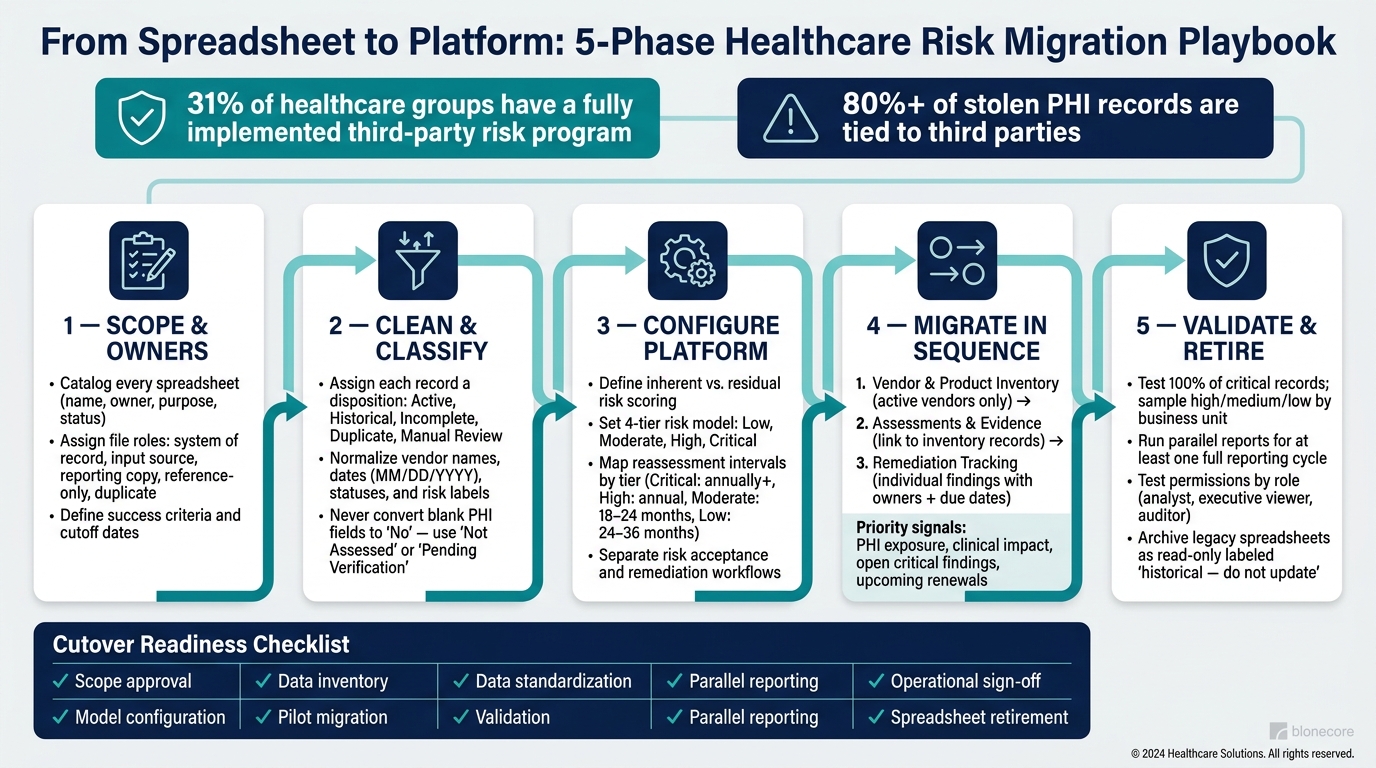
Healthcare Vendor Risk Migration: 5-Phase Playbook
Phase 1: Define scope, owners, and success criteria
Start by listing every spreadsheet that feeds vendor risk management work. That includes files owned by procurement, privacy, legal, clinical operations, internal audit, and individual business units.
Map the current spreadsheet estate
Create a spreadsheet estate register for every file in use. For each one, record its name, location, owner, business purpose, update frequency, who depends on it, approval authority, sensitivity, and whether it is active, archived, or reference-only. Then assign each file a role:
- system of record
- input source
- reporting copy
- reference-only
- duplicate
This register gives you a plain view of what should move first and what should stay read-only.
It also brings hidden issues into the open. A common one is vendor-name mismatch. The same company might show up as "Acme Cloud Services, Inc." in procurement's tracker and "ACME Cloud" in the security team's assessment log. When that happens, document the mismatch and keep both names as aliases.[3]
Talk with each file owner too. Find out what decision the file supports, which fields are typed in by hand versus calculated, who approves the output, and what breaks if that person is unavailable. That usually points straight to the weak spots: broken formulas, expired evidence, scoring scales that don't match, and remediation items with no named owner or due date.
Put numbers on the pain where you can. Track duplicate vendors, expired evidence, and the hours spent each month on audit reporting. If you can't measure the mess, it's hard to clean it up.
Set migration outcomes and cutoff rules
Once the estate is mapped, define success in plain terms and attach dates to it. Good targets might include cutting audit report prep from days to hours, assigning an owner and approval path to 100% of in-scope vendors, and making sure every open remediation item has a due date, a status, and documented evidence of closure. Use measures you can check. "Improve visibility" sounds nice, but it doesn't help much when you're trying to run a project.
Next, set cutoff rules for the move. Pick a go-live date. After that date, all new vendor records, assessments, and remediation actions should be created in the platform. Once reconciliation and sign-off are done, old spreadsheets shift to read-only reference status.
Any exception needs guardrails. If you keep an offline intake form or a temporary contingency workflow, give it a named owner, an expiration date, and a written migration plan. For high-risk workflows, run a short parallel check. Compare the platform's output to the current spreadsheet report, look into any differences, and get sign-off from the process owner before retiring the old file.
Keep the first wave tied to HHS priorities and clinical impact. HHS's enhanced Cybersecurity Performance Goals, released January 24, 2024, include asset inventory, third-party vulnerability disclosure, and third-party incident reporting as target capabilities.[4] That means the best starting point is active assessments for critical vendors, open high-risk remediation items, and evidence needed for the next audit.
Use this register to build the data-mapping table in Phase 2.
sbb-itb-535baee
Phase 2: Clean, classify, and map the data
Now that the spreadsheet estate register is done, the next step is to sort every record before import. That sounds a little tedious, and honestly, it is. But this is where you stop bad data from sneaking into the platform and causing security risks in healthcare vendor relationships later.
If you skip this step, you can end up with false reports, broken assignments, and duplicate vendor records. The estate register should guide every call here: what gets imported, what needs cleanup first, and what should stay out.
Build a migration inventory and classification model
Give each record one clear disposition:
- Active: current oversight, remediation, contracts, renewals, audits
- Historical: retain for reporting or legal use only
- Incomplete: import only through a defined cleanup workflow
- Duplicate: merge into one record
- Manual review: route ambiguous records out of import
Legal entities, services, applications, subsidiaries, and fourth parties should be handled as related records, not as separate vendors. In plain English: don’t create five “vendors” when there’s only one supplier behind them. Build one master supplier record, then link the related parties by relationship type, data-flow role, and ePHI handling status.
For healthcare, the details matter. Capture PHI/ePHI exposure, clinical dependency, patient-safety impact, BAA status, contract dates, integrations, open findings, and evidence expiration dates. These fields tie your vendor inventory straight to HIPAA risk analysis requirements.[2][1]
One rule matters here: never turn a blank PHI exposure field into “No.” A blank doesn’t mean no exposure. It means you don’t know yet. Use clear values like Not Assessed or Pending Verification so the gap stays visible and someone can act on it.
Before import, normalize dates, statuses, and risk labels. Store U.S. dates as MM/DD/YYYY. Map free text into a controlled set of values, such as Not Started, In Progress, Under Review, Remediation Required, Complete, and Expired, instead of carrying over whatever wording each team happened to use.
Do the same with risk labels. Terms like High, Critical, Red, and Tier 1 may point to the same level in practice, but they should land in one documented taxonomy in the platform. Keep the original source value in a separate field so the history stays intact for audit use.
If two risk scores conflict, don’t split the difference and don’t pick the lower one just because it’s easier. Keep both source scores, record the scoring model and date for each, and send the record to the risk-governance owner for a documented decision.
Once every record has a disposition, map the source fields to platform objects and controlled values.
Create the data-mapping table
The table below shows the main field mappings and the validation rules used to block bad data before it enters the platform.
| Spreadsheet Column | Platform Destination | Transformation Rule | Validation Requirement | Accountable Reviewer |
|---|---|---|---|---|
| Vendor Name | Supplier: Legal Name | Normalize against contract; preserve aliases | Match supplier ID or contract evidence | Procurement |
| Vendor ID | Supplier: External ID | Preserve source ID; reject duplicates | Unique within source system | Procurement operations |
| Product or Service | Relationship: Service/Application | Separate offering from supplier record | Confirm service owner and scope | Business owner |
| PHI Exposure | Risk profile: ePHI exposure | Map Yes/No/Unknown to controlled values | Confirm data-flow evidence | Privacy or security |
| Clinical Dependency | Risk profile: Clinical dependency | Map to None, Low, Moderate, High, Critical | Validate affected workflow | Clinical operations |
| Patient-Safety Impact | Risk profile: Safety impact | Map to approved scale | Review by clinical risk owner | Clinical safety |
| BAA Status | Contract: BAA status | Map Executed, Pending, Not Required, Missing, Expired | Verify signed agreement and dates | Privacy counsel |
| Contract Start Date | Contract: Effective date | Convert to MM/DD/YYYY; store as standard date value | Compare with executed contract | Legal or procurement |
| Renewal Date | Contract: Renewal date | Normalize date and renewal terms | Confirm against contract; flag if earlier than start date | Contract owner |
| Assessment Status | Assessment: Status | Map free text to controlled vocabulary | Check required completion fields | Third-party risk |
| Risk Score | Risk score: Inherent or residual | Recalculate if methodology changed; retain source score | Reconcile conflicting values | Risk governance |
| Open Findings | Finding records | Split multi-value cells into individual findings | Require severity, owner, and due date | Security assurance |
| Evidence Link | Evidence record | Convert links or attachments into evidence objects | Verify access, issuer, and date | Assessment reviewer |
| Evidence Expiration | Evidence record: Expiration date | Flag expired or soon-to-expire evidence | Validate against document | Compliance |
| Owner | Responsibility: Accountable owner | Match to approved owner | Reject unresolved free text | Business owner |
A few records will still need human judgment, and that’s fine. If a record has no owner, send it to an unassigned queue with a due date and a clear escalation path. If evidence has expired, keep it linked to the record, mark it Expired, and trigger a renewal task.
Also route these cases to manual review before import:
- conflicting scores
- unclear entity relationships
- near-duplicate names
- missing owners
After the data model is clean, configure platform workflows around these mapped fields.
Phase 3: Configure the platform for healthcare risk workflows
Build the workflow around one shared taxonomy for domain, asset or service, owner, impact, exposure, and treatment.
Standardize scoring, statuses, and reassessment rules
Start by defining risk in plain terms. Inherent risk is exposure before controls. Residual risk is what remains after controls, compensating controls, and remediation are factored in.
For healthcare, a practical impact scale should cover:
- Patient safety
- PHI exposure
- Operational disruption
- Financial loss
- Regulatory consequences
Likelihood should account for exploitability, control maturity, and threat intelligence. From there, map risk into four plain tiers: low, moderate, high, and critical. Then spell out what each tier means in practice: when it must be escalated, who can approve it, how often it must be reassessed, and when it belongs in board-level reporting.
Use one controlled status model with required entry and exit criteria. For assessments, use: Draft → Requested → In Progress → Evidence Review → Risk Review → Approved / Declined / Canceled. For findings, use: Open → Validated → Remediation Accepted / Risk Accepted / Exception Pending Approval → Mitigated → Retested → Closed.
Keep risk acceptance and remediation on separate workflows. They serve different purposes, and mixing them usually creates a mess. Acceptance should require an authorized approver, an expiration date, a business justification, and compensating controls. Remediation should require an owner, a target date, evidence, and validation.
Reassessment should follow risk tier and trigger events, not just a once-a-year schedule. A fixed annual review sounds neat on paper, but it misses what actually changes risk in a healthcare setting.
| Risk tier | Reassessment rule | Approval and monitoring expectation |
|---|---|---|
| Critical | At least annually and after any material change or incident | Executive or designated enterprise-risk approval; active CAP tracking |
| High | Annual or event-driven | Named risk owner; documented remediation and escalation |
| Moderate | Every 18–24 months or after material change | Standard evidence refresh and review |
| Low | Risk-based cycle, such as every 24–36 months | Lightweight monitoring and exception review |
Event-based triggers should include security incidents, major product updates, new integrations, changes in data access, contract renewals, ownership changes, and major control failures.
These rules should become the workflow logic that drives import, review, and escalation.
Translate manual spreadsheet tasks into platform workflows
Every spreadsheet habit should map to one governed workflow. That’s how you stop tribal knowledge from running the process.
| Spreadsheet task | Platform workflow in Censinet RiskOps | Control or outcome |
|---|---|---|
| Email a questionnaire to a vendor | Create an assessment request, assign the vendor contact, set a due date, and send automated reminders | Consistent intake and time-stamped communication |
| Copy vendor answers into a tracking sheet | Use a structured questionnaire with centralized evidence and version history | Reduced transcription errors and preserved provenance |
| Manually calculate a risk score | Apply approved scoring logic to answers, evidence, impact, and control effectiveness | Consistent inherent and residual risk calculations |
| Highlight overdue rows | Trigger notifications and escalations based on due dates, risk tier, and status | Earlier intervention and accountable ownership |
| Email findings to internal owners | Create findings or corrective action plans with owners, milestones, due dates, and evidence requirements | Traceable remediation |
| Maintain a separate exception tab | Route exceptions through documented approval, expiration, compensating controls, and renewal steps | Controlled risk acceptance |
| Rebuild an audit workbook | Generate filtered assessment, evidence, finding, remediation, and approval reports | Faster, repeatable audit preparation |
| Prepare a board slide manually | Use portfolio dashboards showing risk tiers, trends, overdue remediation, concentration, and accepted risk | Board-ready visibility from current records |
Emory Healthcare used standardized questionnaires and automated corrective action plans (CAPs) to make vendor evaluation, scoring, and remediation faster and more consistent.[5] Tower Health found that RiskOps automatically generated corrective actions from questionnaire responses, helping prioritize critical risks.[6]
Set notifications to escalate, not just nag. First alert the task owner. Then alert the vendor manager. Then move it to the risk owner or executive sponsor. Each alert should name the affected vendor or service, the risk level, the required action, the owner, and the due date.
Use Censinet AI with human review controls
Censinet AI can cut assessment admin by speeding up questionnaire completion, summarizing evidence, documenting integration details, identifying fourth-party exposure, and drafting risk summaries. That said, people still need to own every decision that matters.
Set the workflow so any AI-generated content is clearly marked as draft until a named reviewer approves it. The source document or questionnaire response behind each generated summary should stay visible and linked. Human approval must remain required for final risk ratings, clinical-impact determinations, risk acceptance, exception approval, remediation closure, and any board or regulatory report.
Do not allow automated closure of critical findings without independent validation. Keep reviewer identity, decision date, edits, and rationale in the audit trail. In short, automation should recommend, calculate, route, and summarize. Designated personnel should approve.
Once these controls are in place, the first migration wave can move through clear review gates.
With workflows configured, move the highest-value use cases first.
Phase 4: Migrate the highest-value workflows first
Move in dependency order so you don’t interrupt active work. Once your scoring model and status rules are set, migrate the highest-value records first. Use the rules from Phases 1 to 3 and follow this sequence: inventory, assessments, then remediation.
Prioritize by clinical impact, cyber exposure, and audit pressure
Not every vendor or product needs the same level of urgency. Score each one against the factors that matter most to patient safety and cyber risk, then use those scores to decide what moves first.
| Criterion | Priority signal |
|---|---|
| Clinical impact | Could an outage delay diagnosis, treatment, emergency care, or other clinical operations? |
| PHI exposure | Does the third party create, receive, maintain, or transmit ePHI? |
| Patient-care dependency | Is there a viable manual or alternate process? |
| Integration depth | Does the service connect to EHRs, identity systems, medical devices, or internal networks? |
| Open critical findings | Are there overdue critical or high-severity issues? |
| Upcoming renewal or regulatory pressure | Is a contract, business associate agreement, renewal decision, or audit obligation imminent? |
| Data quality and migration effort | Are the records complete enough to import, and how much cleansing is required? |
That means vendors that create, receive, maintain, or transmit ePHI should sit near the front of the line.
Move three core workflows in sequence
The order here is pretty simple. You can’t assign assessments with confidence if your inventory is messy. And you can’t track remediation well if there’s no assessment record behind it.
- Vendor and product inventory: Start with the active vendor and product inventory. This is the live source for assessments, remediation, and reporting. Import only active vendors: those with current contracts, live system access, open findings, or upcoming renewals. This step often surfaces duplicates and old records that no longer belong in day-to-day work. Keep historical records in a read-only archive until legal, retention, and audit requirements are confirmed.
- Vendor assessments and evidence: Once the inventory is stable, move assessments next. Link each assessment to the right vendor record. If an assessment is already in progress, use a controlled cutover: freeze edits to the source spreadsheet row, migrate completed answers, open evidence requests, reviewer comments, and the current reviewed risk score, then continue the review in the platform. Run the spreadsheet and platform in parallel only for a defined transition window, and send new questionnaire requests from one system.
- Remediation tracking: Turn each open finding into a separate record with severity, a named internal owner, a target due date, required evidence, escalation rules, and a documented closure approval step. For example, missing MFA for admin access should become a high-severity action item with a vendor commitment date, required configuration evidence or attestation, and a closure decision by an authorized reviewer. Don’t close an item based on vendor attestation alone. Require evidence and approval. Keep reporting read-only until validation and reconciliation are complete.
Hold compliance and audit reporting until Phase 5 validates and reconciles the migrated records.
Phase 5: Validate, govern, and retire active spreadsheets
After migration, check completeness, accuracy, and access before cutover. At this stage, you’re not just asking, “Did the data load?” You’re confirming that records, permissions, and reports match what the business expects. Use the outputs from Phase 4 as your baseline.
Run validation and parallel reporting
Start by reconciling record counts at several levels, not just the grand total. Compare vendor counts, assessment records, risks, findings, corrective actions, evidence items, owners, and due dates by risk tier and business unit. A clean top-line number can still hide a missing critical vendor or a duplicated low-risk record.
Test 100% of critical records. Then sample high-, medium-, and low-risk records by business unit. For each sampled record, compare the source and migrated values:
- Vendor identity
- Assessment answers
- Inherent and residual scores
- Evidence links
- Assigned owner
- Status
- Due date
- Exception details
If you spot a pattern, stop and dig deeper. Truncated evidence links, shifted due dates, or missing owners usually mean the issue isn’t isolated.
Don’t stop at imported values. Test how the platform behaves. Manually recalculate a set of risk scores and compare them with platform outputs, especially for records near a scoring threshold. Check that due dates follow your organization’s approved format - for example, September 29, 2026, not 09/29/26 - and confirm that time-zone handling is consistent for U.S. users. Then test workflow automations like assignment, escalation, overdue status, reassessment creation, and evidence-expiration alerts. Record expected vs. actual results in a test script, assign each defect to an owner, and retest after fixes.
HIPAA also requires controls that protect ePHI during migration. [2][8] Permissions need to be tested by role and by business need. A third-party risk analyst should be able to edit assessments. An executive viewer should see aggregate dashboards only. An auditor should have read-only access to evidence and history. Also confirm that terminated users cannot access records and that the platform logs who created, changed, approved, exported, or deleted every record.
Run parallel reports for at least one full reporting cycle. If reassessments or quarterly reviews happen during that period, run two cycles instead. Say the spreadsheet shows 18 overdue high-risk corrective actions. The platform should show the same number, or there should be a clear, documented reason for the gap, such as a different as-of date. Keep signed copies of parallel reports and document every reconciliation decision in a variance log. Move to cutover only after reconciliation, sampling, formula testing, user acceptance testing, and governance sign-off are complete.
Once testing is done, the next job is keeping the data clean after cutover.
Set ongoing governance and metrics
Put ownership and controls in place right away. Assign named owners, define a controlled intake process, set evidence-expiration rules by evidence type, document how to fix duplicates, stale records, and mapping errors, and require change control for updates to scoring models, workflow rules, or report definitions. [2][1]
Then track metrics that show whether the migration made day-to-day work better, not just whether data changed systems. Emory Healthcare reported that third-party risk assessment performance completion times exceeded 60 days before implementing Censinet RiskOps. [9][7] That kind of baseline helps you set targets that mean something.
Useful measures include:
- Assessment cycle time
- Assessment completion rate
- Percentage of vendors reassessed on schedule
- Overdue corrective actions
- Median age of critical findings
- Evidence freshness
- Report-production time
Review these metrics monthly or quarterly. If performance slips, act fast. A small dip can turn into a reporting mess if no one owns it.
After governance is assigned, retire legacy files in stages.
When you retire a spreadsheet, do it with control. Archive required reports, approvals, risk acceptances, and evidence in an approved repository with retention and access controls. Mark legacy files read-only and label them "historical - do not update," then record the system-of-record decision and effective date. Keep an eye out for shadow trackers during the first few reporting cycles after cutover. That’s often where old habits show up.
Conclusion: A controlled migration path that improves visibility
A successful migration follows a clear sequence: define scope and success criteria, clean and classify your data, configure the platform for healthcare risk workflows, migrate high-value processes first, and validate before retiring any active spreadsheet. Skip steps, and data-quality gaps and audit findings tend to follow.
Use the checklist below to confirm cutover readiness.
| Step | What to confirm |
|---|---|
| Scope approval | Migration boundaries, owners, and success criteria documented and signed off |
| Data inventory | All source spreadsheets cataloged, classified, and assigned a migration disposition |
| Data standardization | Vendor names, statuses, risk tiers, and field values standardized across sources |
| Model configuration | Scoring rules, workflow statuses, reassessment intervals, and permissions configured |
| Pilot migration | High-priority workflows imported and tested with real records |
| Validation | Record counts reconciled, risk-based sampling complete, formulas and automations tested |
| Parallel reporting | Platform and spreadsheet reports compared for at least one full reporting cycle |
| Operational sign-off | Named owners, intake process, evidence rules, and correction procedures in place |
| Spreadsheet retirement | Legacy files archived as read-only with retention classification and effective date recorded |
FAQs
How do we know which spreadsheets to migrate first?
Start by building a master vendor inventory that includes every third-party relationship. Then apply a scoring model to sort vendors into tiers based on:
- patient-care impact
- data exposure
- integration depth
- outage risk
Use those tiers to set migration priority, with critical, high-risk vendors moving into the platform first.
This phased approach tackles the biggest risks first and keeps oversight focused on patient safety and regulatory compliance.
What data should we clean before moving into the platform?
Clean up and standardize your current vendor and risk data before import.
Start with your master vendor inventory. Make sure vendor names follow one naming format, and confirm each record includes the vendor’s function, contract owner, and review dates. This sounds simple, but messy naming can cause all kinds of headaches later. If one vendor shows up under three slightly different names, your records get split fast.
Next, check your vendor-to-system and PHI access mappings. These links should clearly show data types, data flows, and integrated systems. The goal is simple: when you look at a vendor record, you should be able to tell what the vendor touches, where data moves, and which systems are involved. No guesswork.
Your latest risk register items need the same cleanup. Standardize findings, scoring fields, remediation status, corrective actions, due dates, and evidence references. If one team uses “Open” and another uses “In Progress” for the same stage, reporting gets messy. A shared format keeps things clean and makes follow-up much easier.
You should also normalize compliance artifacts so they link the right way. That includes BAAs, SOC 2 or penetration test summaries, questionnaires and responses, insurance certificates, and matching last review dates. If these files aren’t named and tagged in a steady way, people waste time hunting for documents or linking the wrong version.
A good rule of thumb is to make each record answer a few basic questions fast:
- Who is the vendor?
- What do they do?
- What systems or PHI can they access?
- What risks are open right now?
- Which documents support the current review?
Do that work up front, and your import will be far less painful.
How long should we run spreadsheets and the platform in parallel?
Run the new platform alongside your current spreadsheet-based systems for a short period during the transition.
This parallel phase gives you a simple way to check that risks you tracked before are showing up correctly in the new system. It also lets you confirm that the platform is providing the real-time insights you expect.
