
Most PHI theft tied to healthcare now comes from third parties, not hospitals. If I connect a clinical app to an EHR, portal, or data platform, I need to check four things before go-live: who handles PHI, how data is protected, whether the workflow is safe, and how the integration will be watched over time.
Here’s the short version:
- I confirm the vendor’s HIPAA role, PHI flow, and contract terms before any data is shared.
- I check encryption, OAuth and SMART on FHIR scopes, MFA, API limits, and audit logs.
- I test patient matching, CDS behavior, consent rules, downtime steps, and wrong-patient risks.
- I keep an inventory, set risk tiers, review vendors on a schedule, and offboard access the right way.
One stat stands out: more than 80% of stolen PHI records in a 2025 analysis came from third parties and related entities. That shifts the focus. The main job is not just getting the app connected. It is making sure the connection does not create a privacy, security, or patient-care problem.
If I had to start with only three actions, I’d do these first:
- List every third-party integration
- Verify BAAs are in place
- Map where PHI goes, including downstream services and storage
After that, I’d review access scope, logging, and workflow testing for the highest-risk apps first.
This article turns that work into a simple pre-go-live and lifecycle checklist for U.S. healthcare teams.
Third-Party Integration Compliance: Risk Tier Framework for Healthcare Teams
How to Comply with Third-Party Risk Management Requirements in HIPAA
sbb-itb-535baee
1. Confirm regulatory scope and vendor obligations before integration
Before you integrate anything, lock down the legal and governance scope. Start by confirming which rules apply and what the vendor is on the hook for.
Identify HIPAA roles, PHI flows, and applicable requirements
Classify the vendor and any subcontractors, document the PHI categories involved, and assign who handles safeguards, breaches, and patient notices.[3][6][7]
Map PHI from the source systems through each interface and into every downstream storage or analytics destination, including caches and cloud regions. That map becomes your compliance baseline.[1]
Then build a compliance matrix for this integration that lists each rule in play, including HIPAA, HITECH, Part 2, and state privacy and breach laws. Tie each item to a named owner across compliance, IT, and clinical operations. Bring EHR architects, informaticists, and privacy officers into the design review before anything gets approved.[1][7]
With scope and contracts set, the next step is to lock down encryption, access controls, and API logging.
Execute BAAs and collect vendor compliance evidence
Execute a BAA before any PHI is disclosed. The agreement should require minimum-necessary use, flow-down terms for subcontractors, breach notice terms, and data return or destruction.[1][2][3][4][5]
Before go-live, collect current third-party evidence such as:
- SOC 2 Type II
- HITRUST
- ISO 27001
- Penetration testing results
- Incident response documentation
These frameworks show the vendor's security posture, but they do not equal HIPAA compliance.[8][9][10] Refresh this evidence every year or every two years, and do it sooner if the vendor adds major features, changes hosting providers, or has an incident.
After the security controls are in place, test whether the integration keeps data intact and supports safe clinical use.
Align integration design with EHR and interoperability requirements
Confirm that the app uses supported, certified interfaces, the required FHIR versions, USCDI data classes, and SMART on FHIR authorization. Unsupported or non-standard interfaces can break audit trails, send PHI to the wrong place, and create patient-safety gaps.[1]
Route all app-initiated clinical actions and data changes into the EHR audit trail, or into an equivalent system. Do not let custom APIs slip around logging or access controls.
Once scope and vendor duties are documented, validate the security controls and then test workflow and clinical safety effects.
2. Validate data protection and API security controls
Once scope and vendor duties are set, the next job is simple: lock down every control that touches PHI in transit, at rest, and through APIs.
Require encryption, key management, and secure transport
Require TLS 1.2 or higher for all PHI traffic, with TLS 1.3 preferred. Use AES-256 across databases, object stores, backups, caches, and message queues. Where it applies, use FIPS-validated cryptographic modules too. [22][24][25][26]
Key management should live in a dedicated KMS or HSM, separate from the data it protects. Access should follow least privilege, duties should be split, and key rotation needs a set schedule - at least every 12 months, or sooner for sensitive integrations. [22][24][25]
Just as important, secrets like API keys, OAuth client secrets, and database credentials should never be hard-coded in source code or exposed in logs, config files, or error messages. That’s the sort of mistake that turns a small gap into a bad day.
Require mutual TLS (mTLS) for server-to-server connections. Replication, ETL, admin, and backup traffic should all move through encrypted channels so no plaintext PHI travels across internal networks. [22][23][25]
Enforce scoped access with OAuth, SMART on FHIR, RBAC, and MFA

Use OAuth 2.0 with OpenID Connect and SMART on FHIR where it fits. Scope access down to the exact resource and action needed - something like patient/*.read, not broad access such as user/*.*. The point is to give apps only the minimum data they need to do their job. [13][21][25]
Access tokens should be short-lived, usually 5–15 minutes. Pair that with refresh-token rotation and clear revocation steps for offboarding or incident response. [14][21]
RBAC policies should match how people work in practice, not just how roles look on paper. That includes roles like clinician, billing specialist, and IT admin. Review those policies on a set cadence so stale exceptions and broad permissions don’t pile up over time. [12][16][18][19][20]
MFA should be required for:
- Administrative accounts
- Remote access
- High-risk actions, such as changing integration endpoints, changing OAuth scopes, or exporting large PHI datasets
Logs should record both successful and failed MFA attempts so teams have something to review during an investigation.
After access is scoped, the endpoints enforcing that access need the same level of care.
Harden APIs and maintain audit-ready logging
Validate inputs and outputs against defined schemas. That way, malformed, oversized, or unexpected fields get rejected before they hit clinical systems. [15][17][20][25]
Rate-limit by client and resource, return HTTP 429 with Retry-After, and tune WAF rules for FHIR and HL7 endpoints. [15] Lock down CORS to approved domains only, and do not allow credentialed cross-origin requests unless there’s a clear business reason and written documentation behind it.
Audit logs should show who accessed PHI, what was accessed, when, where, and how. [12][19][25] Make those logs tamper-evident, protect them with RBAC, and retain them for at least six years, subject to state law and internal policy. [25]
Send logs to a centralized SIEM and alert on patterns that deserve a closer look, such as large data exports, repeated failed authentication, or calls coming from unexpected geolocations.
Once these controls are in place, test how the integration affects clinical workflow, data integrity, and fallback procedures.
3. Check clinical safety, data integrity, and workflow impact
Security controls alone don't show that an integration is safe in day-to-day care. You also need to test data accuracy, decision support, and what happens during outages. Start with data mapping and workflow testing. Then move into decision support and fallback planning.
Test data quality and interoperability across the full workflow
Test end-to-end transactions, not just message delivery. Make sure each data element stays tied to the right patient, encounter, and user action - not just that the data showed up. [29][32][34]
Edge cases matter just as much as the happy path. Test canceled orders, corrected lab results, partial updates, duplicate patient records, and abnormal values. A message can pass transport checks and still quietly map a corrected result to the wrong patient or encounter. That's where clinical risk gets very real. [29][34]
For FHIR interfaces, check resource structure, required fields, cardinality, version rules, code systems, and API responses against the required profiles. For HL7 v2, review segment order, required fields, and field mappings. Watch unit conversions, terminology mapping, and patient-matching logic closely, because most interoperability failures come from mapping mistakes, not transport issues. [27][32][34]
Regression testing should be a standing requirement, not a one-and-done task. Re-run your highest-risk clinical workflows after every EHR upgrade, vendor release, or major configuration change. Automate smoke and regression tests for core journeys like:
- orders
- results
- medications
- consent
Use those tests as release gates before any change goes live. [29][34]
Once data flows are correct, check access scope, logging, and clinical decision behavior.
Review CDS behavior, consent handling, and role-based permissions
Confirm that the model's evidence basis, intended use, and limits are visible at the point of use. Test edge cases and missing-data scenarios so you can see whether the tool behaves in a steady, predictable way instead of projecting false certainty. [30][31][33]
Alert volume and specificity should be treated as safety controls. Too many low-value alerts lead to alert fatigue and workarounds. [36] Tier alerts by clinical urgency, and document how clinicians can override a recommendation. That process should also capture the reason for the override for later safety audits.
For consent and authorization, verify that patient consent directives are enforced the same way across the workflow and that the app receives only the SMART on FHIR scopes it needs. Test that access is blocked when consent is missing, expired, or restricted. Also make sure consent status is visible to clinicians when it changes what data they can view or act on. [28][30][31][33]
Grant system-level SMART scopes only with explicit approval and monitoring. [35]
Validate role-based permissions by role and context. Clinicians, administrators, support staff, and other authorized users should see only the data and actions allowed for their role. Test patient-context switching to confirm the app updates right away when a clinician moves between patients. If that fails, you've got a direct route to wrong-patient data entry. [28][30][31][34]
After access and consent checks are done, test how the integration behaves when systems fail.
Plan for downtime, failover, and clinical fallback procedures
Any integration tied to diagnosis, orders, medications, or patient communication needs a documented downtime plan before go-live. AHRQ's PSNet analysis of EHR downtime-related patient safety events found that labs and medications were the most frequently reported problem areas, with patient identification and communication of clinical information as persistent cross-cutting issues - often made worse by missing or poorly followed downtime procedures. [38]
A downtime plan should spell out who declares downtime, how staff record actions, how queued transactions are replayed, and how duplicate orders or missed results are prevented. [29][34] Then test the plan by simulating dependency failures. Don't assume it works until the clinical team has actually practiced it. [37]
4. Maintain compliance through monitoring and lifecycle management
Getting an integration to go-live is just the start. Compliance doesn't stop once the connection works. It means keeping records up to date, watching for changes, and shutting integrations down the right way when they're no longer needed. Think of it as an operating control that stays in place over time. After launch, use a repeatable process to monitor, reassess, and retire each integration safely.[39]
Keep a complete inventory and tier integrations by risk
Every third-party clinical integration should have one master record in your inventory. That record should include the app name and version, vendor, hosting model, connected systems, PHI types, auth method, downstream service providers, BAA status, contract dates, risk tier, and next review date. In practice, this inventory becomes the single source of truth for contracts, controls, testing, and review timing.
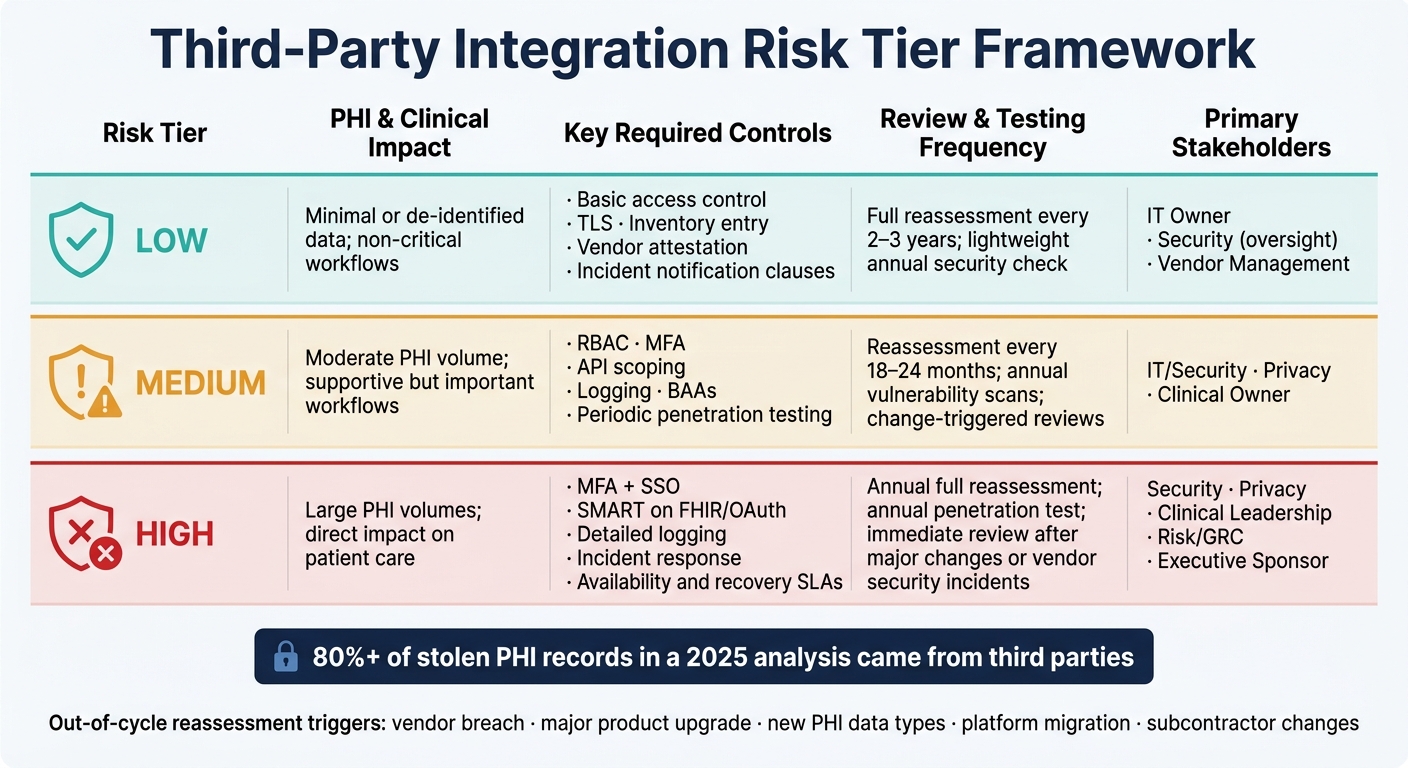
Once that inventory is set, assign each integration a risk tier: low, medium, or high. Base the tier on four things: PHI volume and sensitivity, clinical impact if the integration fails, integration depth and reliance on downstream service providers, and the vendor's security maturity. For example, a medication reconciliation tool with broad FHIR scopes and large amounts of identifiable PHI belongs in the high-risk group. A read-only reference content app with no PHI access belongs in the low-risk group. That tier should drive how much review the integration gets and how often it comes back up for reassessment.
Schedule reassessments, testing, and evidence refreshes
After go-live, keep watch on security posture, access hygiene, uptime, compliance signals, and outside events like breaches or ownership changes.[39][40] A tier-based review schedule helps keep this work predictable. Use the assigned tier to set review depth, testing cadence, and escalation priority.
| Risk Tier | PHI & Clinical Impact | Key Required Controls | Review & Testing Frequency | Primary Stakeholders |
|---|---|---|---|---|
| Low | Minimal or de-identified data; non-critical workflows | Basic access control; TLS; inventory entry; vendor attestation; incident notification clauses | Full reassessment every 2–3 years; lightweight annual security check[40] | IT owner; Security (oversight); Vendor Management |
| Medium | Moderate PHI volume; supportive but important workflows | RBAC; MFA; API scoping; logging; BAAs; periodic penetration testing | Reassessment every 18–24 months; annual vulnerability scans; change-triggered reviews[40] | IT/Security; Privacy; Clinical owner |
| High | Large PHI volumes; direct impact on patient care | MFA + SSO; SMART on FHIR/OAuth; detailed logging; incident response; availability and recovery SLAs | Annual full reassessment; annual penetration test; immediate review after major changes or vendor security incidents[40] | Security; Privacy; Clinical leadership; Risk/GRC; Executive sponsor |
Scheduled reviews aren't enough on their own. You also need triggers for out-of-cycle reassessment, such as a vendor breach, a major product upgrade, new PHI data types, a platform migration, or a change in subcontractors.[40] If the vendor changes, the integration scope shifts, or the threat picture looks different, reassess it.
Store reassessment evidence in one central, version-controlled repository linked to the integration record. That evidence may include SOC 2 Type II reports, HITRUST certifications, penetration test results, updated BAAs, and incident history.
Offboard securely and document data disposition
Retiring an integration takes the same level of discipline as launching one. The goal is simple: end access, keep the evidence you need, and confirm what happened to the PHI. Disconnecting the system is only one piece of the job. A structured offboarding workflow should revoke credentials, disable accounts, remove connectors, rotate shared secrets and certificates, and update diagrams and inventory.[39][40]
After that, document data disposition. Get written confirmation from the vendor that all PHI has been returned or securely destroyed under the terms of the BAA. Record what was confirmed, when it was confirmed, and who confirmed it. That record should also cover any backups or audit logs included in the agreement.[40]
Conclusion: Turn this checklist into a repeatable third-party risk process
A one-time review won't cut it. Treat this checklist like a repeatable process: define scope, validate controls, test workflows, and keep watch all the way through offboarding. Centralized tools can help keep that work organized and steady.
Censinet RiskOps™ can help centralize assessments, evidence, benchmarking, and remediation tracking, but it does not replace clinical, legal, or executive review.
With that process in place, start here:
Key actions to prioritize first
Begin with three priorities: inventory every integration, confirm BAAs, and map PHI flows for the highest-risk systems.
That means looking beyond central IT and logging department-level tools and niche apps too. It also means fixing missing or outdated BAA agreements and tracing where PHI starts, where it moves, where it sits, and whether secondary uses like analytics or AI training are in scope.
From there, review API and access security controls for high-risk integrations first. Focus on authentication, authorization scopes, encryption, and logging before moving to lower-risk tiers.
Use an annual cadence for high-risk vendors and lighter checks for lower-risk ones. Assign both a business owner and a technical owner to each integration so reassessments, contract renewals, and evidence refreshes have clear accountability.
FAQs
Which integrations should we review first?
Prioritize the integrations that carry the most risk to patient safety, regulatory compliance, and day-to-day security.
Start with the ones that handle PHI, connect to critical clinical systems like EHRs, or support core cybersecurity functions. A risk-based approach helps you focus on the vendors most likely to affect patient care or expose sensitive data if something goes wrong.
When is a BAA required?
A Business Associate Agreement (BAA) is required any time a third-party vendor creates, receives, maintains, or transmits PHI or ePHI for a healthcare organization.
Put simply, if a vendor can access PHI, a BAA is part of the deal.
The agreement spells out the vendor’s duty to protect PHI and follow HIPAA privacy and security rules. Not every vendor needs a BAA. But vendors that handle PHI do.
How often should vendors be reassessed?
Reassessment frequency should line up with the vendor’s risk level.
High-risk vendors usually need quarterly reviews.
Moderate-risk vendors should be assessed every six months or every 12–18 months.
Low-risk vendors are often reviewed annually or every two to three years.
That said, risk tiers aren’t the whole story. Even if a vendor is on a slower review cycle, you should reassess them after major incidents, big service updates, or any change in scope or access privileges.
