
Ransomware in healthcare is a patient care problem first and an IT problem second. In U.S. hospitals and clinics, a single attack can lock up EHRs, PACS, lab systems, pharmacy tools, and even device support systems. The article’s main point is simple: if I want to cut ransomware impact, I need to harden access, segment systems, protect backups, move fast in the first hour, restore in the right order, and meet HIPAA breach rules at the same time.
Here’s the short version:
- Start with prevention: use phishing-resistant MFA, least-privilege access, EDR, email filtering, macro blocking, and patching for VPNs and edge systems.
- Limit spread: separate user devices, clinical apps, imaging, identity services, backups, and medical devices into controlled network zones.
- Protect recovery: follow the 3-2-1-1-0 backup approach and test restores for EHR, PACS, lab, pharmacy, and identity systems.
- Act fast during an attack: declare the incident, isolate infected systems, protect backups, switch to downtime care workflows, and preserve forensic evidence.
- Work in parallel: involve IT, clinical leaders, legal, privacy, law enforcement, CISA, and cyber insurance early.
- Restore in order: bring back identity and core services first, then security tools, then high-impact clinical systems.
- Handle HIPAA duties: ransomware on systems with ePHI may be a presumed breach unless a documented risk review shows low risk; notice deadlines can be as short as 60 days from discovery.
- Learn from the event: review gaps, assign owners, fix weak access paths, and tighten vendor and medical device remote access.
A few numbers make the risk plain: ransomware in healthcare has been tied to $21.9 billion in downtime costs, with outages averaging more than 17 days. That kind of downtime can disrupt care far beyond the data center.
If I had to reduce the full article to one checklist, it would be this: keep attackers out, keep them from moving, keep backups out of reach, keep care running on downtime procedures, and keep records for HIPAA and forensic review.
This gives me a clear map of what the full guide covers and what actions matter most first.
Ransomware and the HIPAA Security Rule
sbb-itb-535baee
How to Build a Ransomware-Resilient Healthcare Environment
Ransomware attacks on U.S. healthcare organizations led to an estimated $21.9 billion in downtime costs, and the average outage lasted more than 17 days per incident.[10] That’s not just an IT problem. It hits patient care, scheduling, imaging, pharmacy systems, and day-to-day hospital operations. The controls below deal with the three big issues: how attackers get in, how they move, and how a hospital gets back on its feet without paying a ransom. In plain terms, this is how HICP and CISA guidance shows up in daily security work.
Harden Identity, Endpoint, and Email Defenses
Ransomware often starts with stolen credentials. Once attackers have them, they go after EHRs, backup platforms, and domain controllers. That’s why identity hardening needs to happen first.
Start with phishing-resistant multi-factor authentication (MFA) for domain admins, EHR admins, backup operators, and remote access users. Then back it up with least-privilege access and role-based access control. If a clinician account gets hijacked, it should not be able to touch backup systems or domain controllers. Administrative accounts should be fully separate from standard user accounts. When possible, use just-in-time privileged access so elevated rights exist only for the short window when someone needs them. Conditional access policies also help by flagging high-risk logins and forcing extra verification.
On endpoints, EDR (Endpoint Detection and Response) is a key layer. It can spot behavior like mass file encryption, credential dumping, or misuse of built-in admin tools - the kind of activity old-school antivirus often misses. On higher-risk systems such as servers, shared clinical workstations, and machines used in care areas, add application allowlisting so unauthorized programs can’t run. Remove local admin rights from standard user accounts, and keep hardened configuration baselines in place across Windows and Linux systems.
Email is still one of the easiest ways in. Layered protections help cut that risk down:
- Spam filtering
- Anti-spoofing controls like SPF, DKIM, and DMARC
- Attachment sandboxing
- Macro blocking
It also helps to disable legacy authentication protocols. Attackers often use them as a side door to get around MFA.
Segment Networks and Reduce Attack Surface
Once it’s harder to steal access, the next job is making sure attackers can’t roam freely. Network segmentation is what keeps one bad workstation from turning into a hospital-wide outage. Done well, it can stop a compromise from reaching EHR servers, imaging systems, and backup infrastructure that care teams depend on.
Separate user workstations, clinical applications, PACS/imaging, identity services, backup infrastructure, and medical devices into different network zones. Traffic between those zones should be allowed only when there’s a clear application need. Nothing extra. Lock down SMB and RDP between user segments, since both are common tools for lateral movement. If RDP has to stay in place for operations, push it through managed bastion hosts or privileged access workstations instead of allowing direct cross-segment access.
Medical devices and IoT systems need their own plan. A lot of them run old operating systems, and some can’t be changed without vendor approval. That makes standard hardening tough. The safer move is to place them in tightly controlled segments, keep an accurate inventory with firmware versions recorded, and watch for unusual traffic. Compensating controls like strict segmentation, access logging, and controlled vendor support paths lower risk for devices that can’t be patched.[3]
Internet-facing systems need close attention too. Patch VPNs and remote access tools as fast as possible. Many ransomware groups actively scan for unpatched edge devices because they make an easy first step into the network. A current asset inventory and steady patch cycles across clinical apps and infrastructure help shrink the number of openings attackers can use.
Protect Backups and Test Recovery Before an Attack Occurs
Containment is only half the story. Recovery has to work. Backups are the last line of defense, and ransomware groups know it. Many strains try to delete reachable backups before encryption begins.[6] So backup design has to assume attackers will come after it.
Use a 3-2-1-1-0 backup strategy: at least 3 copies of data, on 2 different media types, with 1 copy offsite, 1 copy offline or immutable, and 0 known backup errors confirmed through regular testing.[5][7][8][9] That offline or immutable copy is the safety net that still stands even if an attacker gets domain admin access. Backup admin credentials should stay separate from primary identity systems like Active Directory. Routine production accounts should never have delete or modify rights on backup repositories. Put MFA on backup consoles, and monitor backup jobs for odd failures or mass deletions.
Recovery testing has to go beyond “the files restored.” You need proof that EHR, PACS, lab, pharmacy, and identity services can come back within RTO and RPO targets - and that care operations can keep moving. Restoration order matters more than many teams expect. Identity services, DNS, and core network services need to return before higher-layer clinical applications will work.
Even with strong prevention in place, some attacks will still get through. The next step is fast detection and containment.
How to Detect, Contain, and Investigate Ransomware
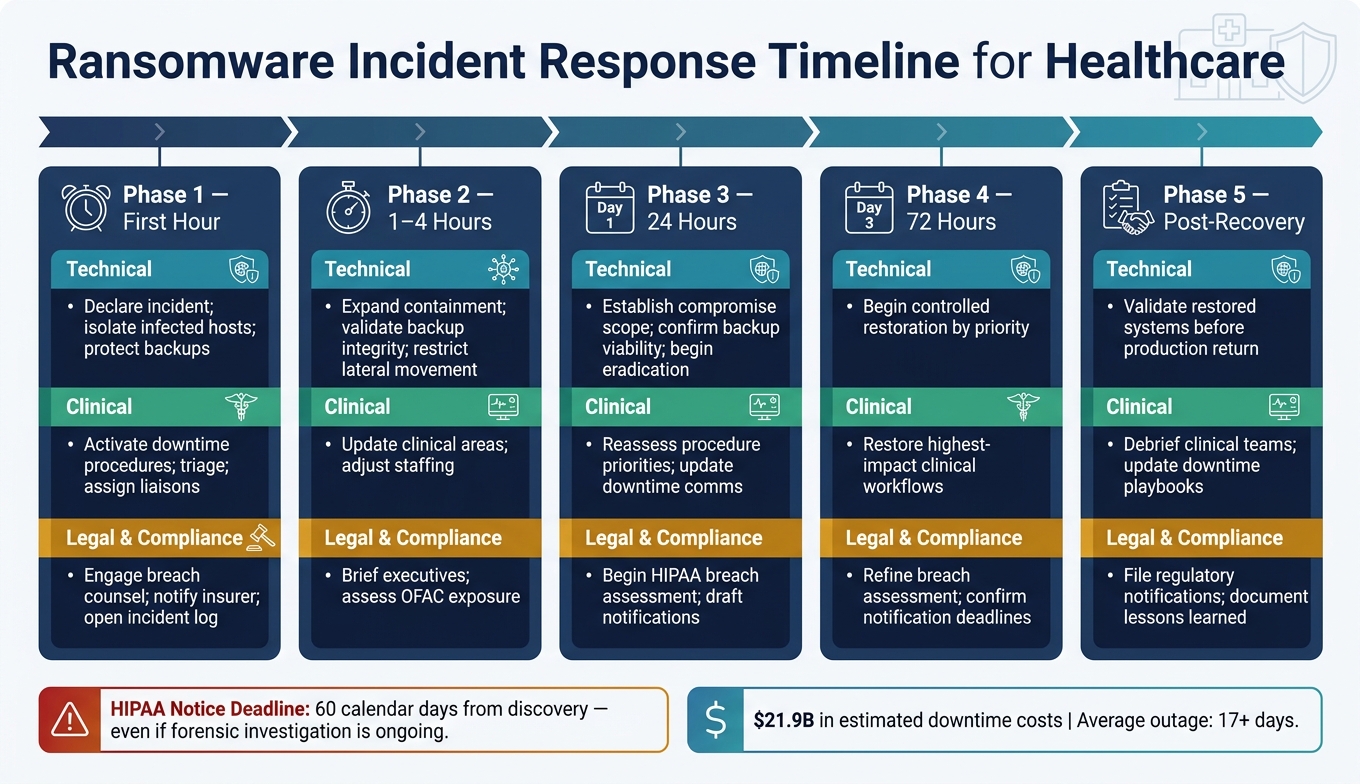
Ransomware Response Timeline for Healthcare Organizations
When ransomware is suspected, move at once into command mode, containment, and care continuity. Even with strong preventive controls, some attacks will still slip through. Those controls buy you time. This section is about how to use that time well. The first hour can shape patient safety, spread, and legal risk.
Activate Incident Command and Protect Patient Care
Once ransomware is suspected, shift from detection to command. Declare the incident and activate the response plan right away.[11][13] Assign leads across security, IT, legal/privacy, communications, and clinical operations. Put one incident commander in charge so major decisions go through a single approval path and frontline teams hear one clear message.
Start a dedicated incident call. Open an incident log with U.S.-formatted date and time stamps, such as 08/20/2026 09:14 AM CT, and record each major action: which systems were isolated, who approved it, and when.[17][19] That log may later matter for regulators, legal review, and forensics.
On the clinical side, move affected workflows to downtime procedures: paper MARs, paper lab orders, manual registration, and paper imaging orders.[17][18] Keep life-sustaining care first. Clinical leaders should triage elective procedures and protect emergency and life-sustaining services. It also helps to assign an IT/security liaison to each major clinical area - nursing units, pharmacy, radiology, and the ED - so downtime instructions are shared fast and in the same way everywhere.[19] Some healthcare advisory guidance recommends planning to sustain safe care for at least 30 days without critical technology.[14][15]
Contain the Spread While Preserving Forensic Evidence
The goal here is simple: stop the attack from moving further without causing extra clinical disruption or wiping out evidence you may need later.
Isolate infected endpoints, disable compromised accounts, pause suspicious shares, and block lateral movement with temporary firewall rules.[2][12] Disconnect backup admin paths and isolate backup servers at once so attackers cannot reach recovery copies before you do.
Before taking systems offline, collect what you can. The most useful artifacts include live memory, endpoint and server logs, domain controller logs, EDR alerts, ransom notes, hashes, scheduled tasks, and IOCs.[2][3] Screenshot ransom instructions and affected file listings. Those details can help classify the ransomware family and support threat intelligence sharing. For every item collected, record chain-of-custody details: who collected it, when, from which host, and under what conditions.
Do not delete ransom notes. Some decryptors depend on them, and they are key forensic artifacts.[2][3][12]
If active encryption is still spreading or backup repositories are at risk, put containment ahead of perfect forensic capture. If you have to isolate a system before full memory capture, document why.
Coordinate with Law Enforcement, Regulators, and Legal Counsel
Early coordination with outside partners is not optional. It helps the response work better. Report to your local FBI field office and FBI IC3 as soon as you have enough initial facts: suspected ransomware family, affected systems, operational impact, whether care is disrupted, and whether data exfiltration is suspected.[20][21][2] Also notify CISA, which may provide threat intelligence, decryption guidance when available, and situational awareness about active campaigns targeting healthcare.[3]
Bring in breach counsel and cyber insurance early. Any talk of ransom payment needs legal review for OFAC sanctions risk. If payment benefits a sanctioned entity, the organization may face enforcement exposure.[20] At the same time, the HIPAA privacy officer should begin a breach risk assessment. HHS OCR treats ransomware on systems containing ePHI as a presumed breach unless the organization can show a low risk of PHI compromise.[20][21][23] That analysis shapes your notification timeline, and covered entities generally have 60 days from discovery to notify HHS and affected individuals.[21][22][23]
These workstreams should run in parallel, not one after another.
| Timeframe | Technical | Clinical | Legal & Compliance | Forensic |
|---|---|---|---|---|
| First hour | Declare incident; isolate infected hosts; protect backups | Activate downtime procedures; triage; assign liaisons | Engage breach counsel; notify insurer; open incident log | Collect ransom notes, screenshots, initial IOCs |
| 1–4 hours | Expand containment; validate backup integrity; restrict lateral movement | Update clinical areas; adjust staffing | Brief executives; assess OFAC exposure | Capture memory images and logs; document chain of custody |
| 24 hours | Establish compromise scope; confirm backup viability; begin eradication | Reassess procedure priorities; update downtime comms | Begin HIPAA breach assessment; draft notifications | Analyze malware; identify ransomware family; share IOCs |
| 72 hours | Begin controlled restoration by priority | Restore highest-impact clinical workflows | Refine breach assessment; confirm notification deadlines | Complete forensic imaging; preserve evidence |
| Post-recovery | Validate restored systems before production return | Debrief clinical teams; update downtime playbooks | File regulatory notifications; document lessons learned | Finalize incident report; share sanitized IOCs with ISACs |
Use the findings to validate cleanup before restoration.
How to Recover Safely and Meet HIPAA and HHS Obligations

Recovery isn't just an IT task. In healthcare, it directly affects patient care and carries legal duties at the same time. The job is to bring systems back online without giving attackers a way back in, while also meeting HIPAA and HHS rules for records and notifications.
Restore Critical Systems in a Controlled Order
After containment, move into verified recovery in a clean environment. Validate backups in an isolated recovery environment, and never restore unverified data to production.[16][25] Scan backup sets with up-to-date malware and EDR tools, run application and database integrity checks, and make sure the restore point comes from before the attacker's first intrusion window.
For compromised hosts, rebuild from known-good gold images instead of trying to scrub them in place. Restore them first into an isolated recovery environment. Then patch systems, rotate passwords, API tokens, service account keys, and VPN certificates, and remove leftover agents and scripts before reconnecting anything to production.[16][25]
Order matters here. Bring back the systems that restore safe care the fastest, not the ones that are simplest for IT to handle. Use the incident timeline to verify what was touched, what was isolated, and what needs a full rebuild. Start with identity and core infrastructure: Active Directory, DNS, DHCP, and certificate authorities. Then bring back security controls such as firewalls, EDR/XDR, SIEM, VPN, and segmentation. After that, restore critical clinical systems, followed by scheduling, registration, billing, analytics, and patient portals.[16][25][26] Clinical leaders should be involved at each stage so they can confirm restored systems support safe workflows and that downtime workarounds can be retired without disrupting care.
Before marking any system as production-ready, verify that attackers no longer have a foothold. Audit remote access paths like VPN, RDP, SSH, and remote support tools. Remove unauthorized accounts and devices. Require MFA for all administrative access. Then watch closely for post-recovery warning signs, including unusual logons, lateral movement, or legacy protocol use, for a defined period after recovery.[25][4]
Then complete the breach assessment and notification timeline.
Complete the Breach Assessment and Notification Process
Once systems are stable, finish HIPAA and HHS duties in parallel. Treat the incident as a potential breach unless the risk assessment shows otherwise. Under HIPAA, ransomware on systems that contain ePHI is presumed to be a breach unless your organization can show a low probability that PHI was compromised through a documented risk assessment.[11][13][24][27] Review what PHI was involved, who accessed it, whether it was viewed or acquired, and how the risk was reduced.[11][13][24][27]
This assessment should not happen in a silo. Bring privacy, security, legal, and clinical leadership into the same room as a cohesive team. Security and forensics should walk through the technical findings. Privacy and compliance should interpret the HIPAA side. Legal should assess regulatory and litigation exposure. Clinical leaders should weigh the impact on patient care.[11][13][24][28]
The notification deadlines are firm. Affected individuals must be notified without unreasonable delay and no later than 60 calendar days from discovery, even if the forensic investigation is still in progress.[16][24][29][30] If the breach affects 500 or more individuals, HHS must also be notified within that same 60-day window through the HHS breach portal, and prominent media outlets serving the affected state or jurisdiction must receive notice too.[16][24] If fewer than 500 individuals are affected, the breach can be logged and reported to HHS annually, no later than 60 days after the end of the calendar year.[24]
Keep the recovery record trail. Retain the incident timeline, notifications, recipient lists, dates, and communications with law enforcement, regulators, and outside forensics firms.[16][25][28] Apply legal holds when needed so routine retention policies don't wipe relevant data. Those records matter for OCR review, audits, and internal lessons learned.
How to Use the Incident to Strengthen Your Risk Program
Once recovery is done, the focus needs to shift. The job is no longer just getting systems back online. It’s fixing the weak points that let the attack happen in the first place.
A ransomware incident puts your controls, teams, and care delivery processes under pressure. It shows what held up, what failed, and where the cracks are. The post-incident period is where you turn that stress test into action.
Identify Gaps and Improve Controls Over Time
Within 30–60 days of stabilization, run an after-action review with IT, security, clinical leadership, compliance, legal, and key vendors. Rebuild the attack timeline from start to finish: the initial access vector, lateral movement, dwell time, and detection gaps. Use logs, EDR data, and forensic reports to do it. Then compare what happened against your target control baseline so you can spot the gaps clearly.
From there, prioritize fixes by risk, not by what feels easiest to tackle first.
Each major finding should become a remediation task with:
- a named owner
- a deadline
- a clear success criterion
That sounds simple, but it matters. If no one owns the fix, it tends to drift.
Update incident response playbooks, segmentation rules, backup testing schedules, and clinical downtime procedures based on what actually happened during the event. If teams had to rely on paper-based medication administration records or other temporary workarounds, don’t leave those steps informal. Write them down, refine them, and add them to training so staff aren’t improvising the next time systems go down.
A few measures can tell you whether the program is getting better. MFA coverage across remote and privileged access is one. The percentage of critical systems with a successful recent restore test is another. Mean time to recover key systems also matters because it shows whether recovery is getting faster in practice, not just on paper. HHS Healthcare Sector Cybersecurity Performance Goals give healthcare-specific targets that help put those numbers in context.[1][31][32] Use Censinet RiskOps™ to capture findings, assign owners, and track remediation.
Then take the review a step further. Don’t stop at your internal environment. Look at the vendors and devices connected to the incident too.
Strengthen Third-Party and Medical Device Risk Management
Ransomware often gets in through vendor access, cloud dependencies, and connected medical devices. After an incident, review every vendor with remote access to your environment. Let the attack guide that review. Follow the access paths, support logs, and external dependencies that came into view during the event.
Look closely at which connections were always on, which relied on shared credentials, and which had no MFA or session logging. Those details matter because they show where outside access created risk. Going forward, require tighter controls such as just-in-time access, session recording, and IP restrictions as part of contract terms.
The review should also reach fourth parties behind critical vendors. If one of your key partners depends on another company for support or hosting, that link can matter just as much.
For medical devices, use the incident to check and improve your IoMT inventory. Tighten segmentation around legacy or unpatchable devices. Make sure manufacturer support connections use time-bound, logged access instead of open-ended remote sessions. Use Censinet RiskOps™ to centralize vendor assessments, track remote access, and record remediation tasks.[33][34][35]
Conclusion: Key Steps to Reduce Ransomware Impact
The post-incident review should lead to three things: stronger controls, better vendor oversight, and faster recovery. In healthcare, ransomware resilience depends on disciplined controls, tested recovery, and steady improvement after every incident.
FAQs
What should we prioritize in the first hour of a ransomware attack?
Prioritize fast containment to stop the threat from spreading. Isolate affected systems or endpoints right away, preserve system logs for forensic analysis, and notify your incident response team and key stakeholders.
Bring in clinical leadership at once to assess the impact on patient care. That way, steps like network segmentation or device isolation don't disrupt life-sustaining functions or other core clinical operations.
How can hospitals protect backups from ransomware?
Hospitals should follow the 3-2-1-1-0 rule: keep three copies of data on two different media types, with one copy off-site and one copy offline or immutable.
Why does that matter? If one system fails - or if ransomware hits the main network - you still have other clean copies to fall back on.
Immutable backups use WORM media or object-lock storage to prevent unauthorized changes or deletion. That means the backup can't be altered after it's written, which helps protect it from tampering.
Backup repositories also need tight security. Put them in isolated network segments, enforce strict role-based access, and keep encryption key management separate from the backup data itself. On top of that, run automated restore tests on a regular basis to confirm recovery readiness.
When does ransomware trigger HIPAA breach notification?
Ransomware triggers HIPAA breach notification when you determine that ePHI was compromised by the incident. That’s the line that matters, because it decides whether HIPAA notification rules apply.
Current guidance puts a lot of weight on early detection and scope assessment. In plain English, you need to figure out what happened, how far it spread, and whether ePHI was compromised. Once that’s clear, you can determine whether patients and regulatory authorities must be notified.
