
If PHI access rules are weak, one bad account, one old permission, or one missed log review can put patient data at risk.
I’d boil this down to a few core policy parts: role-based access, least-access rules, emergency access limits, tight account setup and removal, MFA for remote and admin use, and logs that are reviewed on a set schedule. The article also ties those steps to HIPAA, NIST SP 800-66 Rev. 2, ISO 27799, and HITRUST, with clear rules for session timeout rules, access reviews, and HR-linked account changes.
Here’s the short version:
- Limit PHI by job role, not by guesswork
- Apply the minimum necessary rule to systems, fields, records, and exports
- Use separate user IDs and block shared accounts where PHI is involved
- Set break-glass access for emergencies only, with a reason, time limit, and review
- Tie account changes to joiner-mover-leaver events from HR
- Require MFA for remote access and admin access
- Use automatic logoff, often around 5–15 minutes on inactive sessions
- Review logs and access rights on a fixed schedule, and keep records for at least 6 years
- Give each PHI system a named owner and track exceptions in one workflow
A few facts stand out. The article notes that about 35% of healthcare data breaches from November 2021 to October 2022 were linked to internal actors, versus 19% across all industries. It also points to OCR’s $5.5 million settlement with Memorial Healthcare System over failures tied to user access and log review.
If I were summarizing the article in one line, I’d say this: a PHI access policy should tell you who gets access, how much they get, when it changes, how it’s checked, and what proof is kept.
3 PHI & ePHI Compliance
sbb-itb-535baee
Regulatory and Standards Requirements for PHI Access
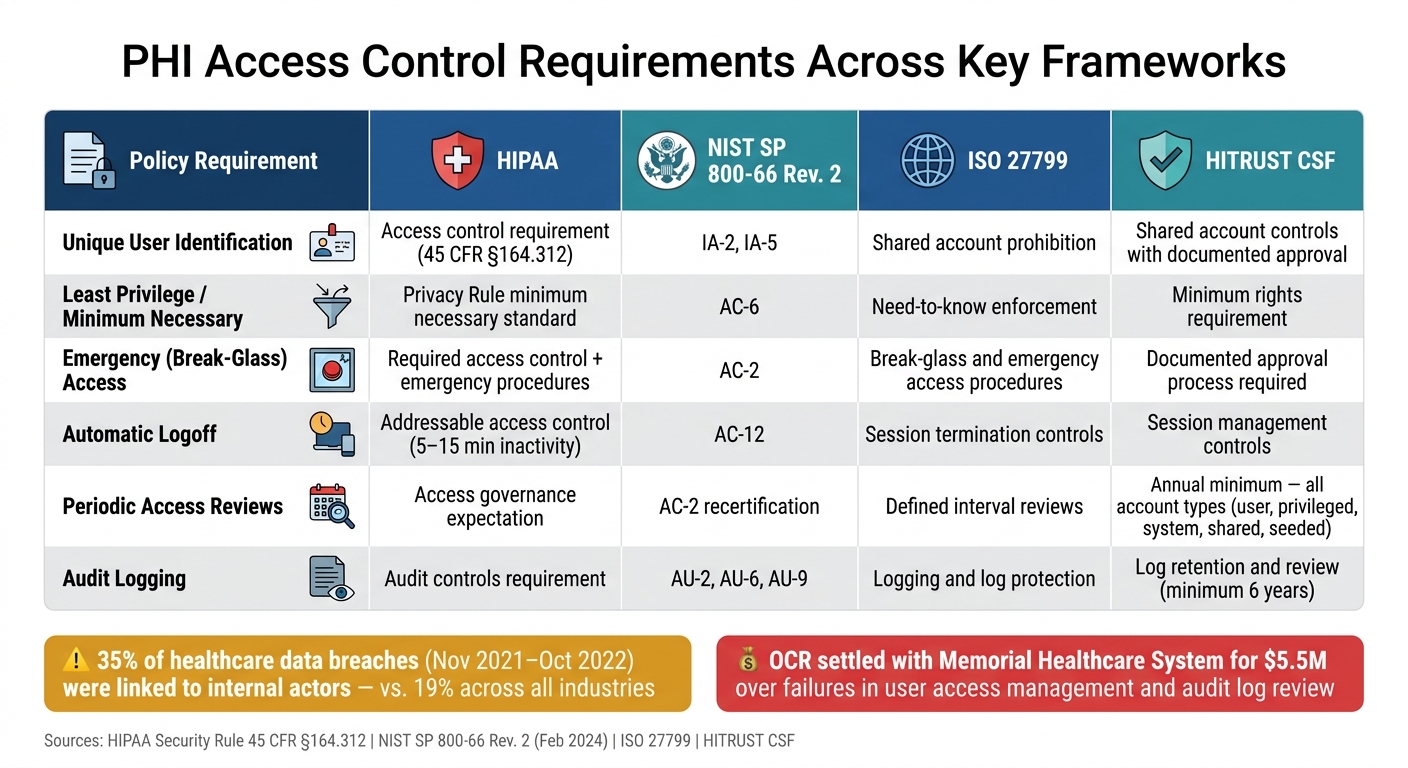
PHI Access Control Requirements: HIPAA, NIST, ISO 27799 & HITRUST Compared
Map PHI access policy rules to HIPAA first. Then turn those rules into NIST SP 800-66, ISO 27799, and HITRUST controls. The next two subsections take that step and turn high-level requirements into policy clauses and control expectations.
HIPAA Technical Safeguards and the Minimum Necessary Standard
The HIPAA Security Rule sets technical safeguards for ePHI in 45 C.F.R. §164.312. It covers five main areas: Access Control, Audit Controls, Integrity, Person or Entity Authentication, and Transmission Security.[2][11] Under the Access Control standard, your policy needs to address four controls: unique user identification, emergency access procedures, automatic logoff, and encryption/decryption.
Two of those controls are required: unique user identification and emergency access procedures. The other two are addressable: automatic logoff and encryption/decryption. In plain English, that means you either put them in place or document a risk-based alternative.[5][2][23]
For unique user identification, require a separate user ID for each workforce member and ban shared accounts for ePHI.[12] For automatic logoff, the policy should set session timeout windows, such as a screen lock after 5–15 minutes of inactivity, with tighter time limits on shared devices.[10][13]
The minimum necessary standard in the HIPAA Privacy Rule adds a second layer.[22] It says covered entities must limit PHI access to the least amount needed for the task at hand. So the policy should spell out, by role, which PHI data elements each workforce function can use. A claims processor, for example, may need encounter dates and procedure codes. The policy should also require export controls, redaction templates, and just-in-time access grants.[14]
Those HIPAA baseline rules become much easier to apply when you line them up with NIST, ISO 27799, and HITRUST.
How NIST, ISO 27799, and HITRUST Shape Policy Requirements
NIST SP 800-66 Rev. 2, updated in February 2024, maps HIPAA Security Rule requirements to NIST control families.[16][21] The key families here are Access Control (AC), Identification and Authentication (IA), and Audit and Accountability (AU). A policy clause built on this model might say that the organization shall run account management processes in line with NIST AC-2, including approval, provisioning, modification, and revocation of accounts that can access ePHI.[6][15]
ISO 27799 applies ISO/IEC 27002 controls to healthcare across 48 control areas. It covers standard EHR access, mobile health, telemedicine, and medical device integration.[17][18] Its guidance backs RBAC, bans shared accounts for PHI systems, and directly calls out break-glass emergency access as a healthcare-specific requirement that must be limited and logged.[20] U.S. organizations do not have a legal duty to follow ISO 27799, but using its clauses can make PHI access policies stronger than HIPAA alone.
HITRUST CSF gets very specific about access reviews. It requires all access rights to be reviewed at least annually, including user accounts, privileged accounts, system accounts, shared accounts, and seeded accounts.[19] It also allows shared accounts only when there is documented approval.[19]
| Policy Requirement | HIPAA | NIST SP 800-66 | ISO 27799 | HITRUST CSF |
|---|---|---|---|---|
| Unique user identification | Access control requirement | IA-2, IA-5 | Shared account prohibition | Shared account controls |
| Least privilege / minimum necessary | Privacy Rule | AC-6 | Need-to-know enforcement | Minimum rights requirement |
| Emergency (break-glass) access | Access control and emergency procedures | AC-2 | Break-glass and emergency access procedures | Documented approval process |
| Automatic logoff | Addressable access control | AC-12 | Session termination controls | Session management |
| Periodic access reviews | Access governance expectation | AC-2 recertification | Defined interval reviews | Annual minimum, all account types |
| Audit logging | Audit controls | AU-2, AU-6, AU-9 | Logging and log protection | Log retention and review |
Core Policy Elements: RBAC, Least Privilege, and Contextual Controls
Once the regulatory baseline is set, the next job is to turn those rules into day-to-day policy choices. Three pieces carry most of that load: role-based access control, least privilege with separation of duties, and context-aware rules for higher-risk cases. These controls shape routine access. The next section looks at how identities are created, updated, authenticated, and reviewed.
Role-Based Access Control by Workforce Function
RBAC assigns permissions to roles, not individual people. Start by cataloging PHI systems, then map each workforce function to the data and actions it needs.[27][9] A clinician needs charting access. A revenue-cycle user needs claim fields. An IT administrator needs technical privileges, but not routine clinical content.[9][7]
Put simply, RBAC handles routine access. ABAC narrows access based on context. Break-glass is reserved for emergencies.
Least Privilege and Separation of Duties
Least privilege means each role gets only the minimum access needed for its assigned work.[7][25] In practice, that usually means field-level restrictions, record-level scoping, and function-level limits. A role might be blocked from viewing behavioral health notes or HIV status, limited to its assigned patient panel, or allowed to see billing-related data without exporting raw PHI.[7][9]
Separation of duties keeps one person from holding privilege combinations that create fraud or disclosure risk. Policy should plainly block cases like a user who can both approve and pay claims, assign themselves elevated privileges, or both generate and suppress audit records.[7][24] In revenue cycle workflows, one user should never be able to both create and approve financial adjustments or write-offs.
For least privilege to work in the real world, three habits matter:
- Review roles on a regular basis when job duties change
- Use automated provisioning rules that default to deny
- Maintain a documented exception process so users don't ask for broad access "just in case"
That setup makes access rules enforceable before account provisioning and audit review even start.
Break-Glass and Other Context-Aware Access Exceptions
Your policy should spell out the trigger conditions for break-glass access, require a documented justification, and log the event automatically.[29][28] Emergency access should also be time-limited for a defined period, then revert to prior settings.[26] After the event ends, a compliance or security reviewer should confirm that the access was legitimate and proportionate to the situation.
Context-aware controls take the same idea beyond emergencies. Block access from unmanaged devices. Require stronger authentication for off-network logins. Limit vendor and contractor access to specific systems, time windows, and supervised remote sessions.[30][31] These controls matter a lot in telehealth, remote administration, and third-party support workflows, where risk looks very different from in-facility care. The aim is simple: give the minimum access needed to do the job, and make every exception auditable. Those exception rules depend on identity lifecycle controls and audit logs that capture who accessed PHI, when, and why.
Identity Lifecycle, Authentication, and Audit Trails
RBAC, least privilege, and break-glass access only work when identities are correct, account changes happen on time, authentication is strong, and logs can stand up to review. So the next step is simple: set clear rules for accounts, sign-ins, sessions, and logging, then make sure people follow them.
Provisioning and Deprovisioning Across the Joiner-Mover-Leaver Lifecycle
A lot of PHI overexposure comes from plain old process failure. Someone moves to a new job, but their old EHR access stays in place. Someone leaves the company, but their VPN account is still active later that day. That kind of gap shows up all the time when identity lifecycle management isn't tied straight to HR events.
HR should be the source of truth for account changes. When HR enters a new hire, that should kick off provisioning. When HR records a transfer, access should shift to the new role, old permissions should come off, and new ones should go on. When HR records a termination, all logical access should be disabled at once, active sessions should be revoked, and shared credentials should be rotated.
| Lifecycle Event | Trigger Source | Required Actions | Target Completion | Control Evidence |
|---|---|---|---|---|
| New hire (joiner) | HR hire record | Create unique ID, assign RBAC role, activate on or before start date | On or before start date | HR ticket, signed access request, IAM provisioning log |
| Internal transfer (mover) | HR role/dept. change | Remove old role, assign new role, document delta | Within 1 business day of effective date | Transfer ticket, updated IAM role report |
| Promotion to privileged role | Manager request + HR update | Assign separate admin account, enable enhanced MFA, update logging | Promptly after approval | Approved access request, IAM log, MFA enrollment confirmation |
| Termination (leaver) | HR termination event | Disable all accounts, revoke tokens, collect devices, rotate shared credentials | Immediately upon termination notice | Termination ticket, IAM disable timestamp, device return receipt |
For system administrators and database administrators with ePHI access, the termination window should be even tighter. In some cases, it should be measured in minutes, not hours. Auditors usually want to see timestamped IAM logs matched with closed HR tickets to prove the action happened on time.[4][8][1]
Once access changes are linked to HR events, the next issue is whether that access can actually be used - and by the right person.
Authentication, Session Controls, and Privileged Access
HIPAA's authentication requirement (45 CFR §164.312(d)) says organizations must verify that a person seeking access to ePHI is who they say they are. In plain terms, that starts with unique user IDs. No shared logins. No group accounts. Every action in a PHI system should point back to one person.
MFA should be required for remote and privileged access.[4][35] For system administrators working in production databases or identity platforms, MFA is mandatory. Many organizations also use just-in-time elevation so admin rights are temporary instead of left on all day.[4][33]
Session controls matter just as much as sign-in controls. HIPAA's automatic logoff specification requires systems to terminate or lock sessions after a set period of inactivity.[10][34][5] A practical setup is 5 to 15 minutes in clinical areas, with longer timeouts in lower-risk administrative settings. Sensitive actions - like exporting large PHI datasets or changing user permissions - should require reauthentication before the action goes through.[13][32] Privileged sessions should time out faster and should never sit open as persistent remote connections.
Audit Logging, Monitoring, and Periodic Access Reviews
HIPAA's audit control requirement is direct: organizations must have mechanisms to record and examine activity in systems that contain ePHI.[5][3] That means logs need to do more than show who signed in. They need to support monitoring, investigation, and follow-up when something looks off.
Insider snooping is a common PHI access risk. An employee may look up a co-worker, a family member, or a celebrity without a treatment or business reason. Those cases are often found through audit logs that flag unusual access patterns.[3][35][36] But that only works when logs are detailed, gathered in one place, and reviewed on a regular basis.
| Log Event Type | Examples | Retention | Review Frequency | Responsible Owner |
|---|---|---|---|---|
| Authentication events | Successful/failed logins, MFA challenges, session start/end | At least 6 years | Daily | IT Security / SOC |
| PHI access | Record views, creates, updates, deletes; patient ID and user ID included | At least 6 years | Weekly aggregate; real-time alerts for VIP or sensitive records | System Owner / Privacy Officer |
| Data exports and transmissions | Report generation, file exports, print jobs, large downloads | At least 6 years | Daily for large or unusual exports | IT Security / Compliance |
| Permission and role changes | Access grants/revocations, role assignments, account creation/deletion | At least 6 years | Weekly | IT Security / IAM Team |
| Privileged and admin actions | Config changes, security setting updates, break-glass use, database queries | At least 6 years | Daily | IT Security / SOC |
| Security anomalies | Repeated failed logins, access outside assigned role, use of disabled accounts | At least 6 years | Real time or near real time | IT Security / SOC |
Logs should be kept for at least 6 years to support investigations and compliance reviews.[5][3][36]
Review should match risk. High-priority events - like privileged actions, repeated failed logins, and large exports - need daily monitoring from security operations. System owners and data custodians should review access fit weekly or monthly. Compliance and privacy officers should run quarterly or risk-based access recertifications, where managers confirm that each user's PHI access still matches the person's current role.[4][8][1]
Each completed review needs to be documented. That recertification record is audit evidence that least privilege is being applied in practice, not just sitting in a policy binder. Logs show whether people followed the rules, not just whether a system was turned on.
From here, the policy has to move out of design mode and into daily operations. These controls depend on ownership, written procedures, and regular review if they're going to hold up under pressure.
Putting PHI Access Control Policies Into Practice
PHI access controls don't mean much if they live only on paper. They need clear owners, routine steps, and regular reviews built into day-to-day work.
A governance committee should own PHI access standards, approve exceptions, and keep an eye on overdue reviews, orphaned accounts, and open findings. Each system that stores or processes PHI should also have a named owner responsible for access recertifications and log review. When those tasks run through centralized workflows, it's much easier to show who did what, when, and why. OCR's $5.5 million settlement with Memorial Healthcare System cited failures to review audit logs and manage user access across provisioning, changes, and termination.[37]
Using Censinet to Support PHI Access Control Governance
That proof needs to live in one place. Censinet RiskOps™ can centralize access review evidence, exception tracking, and third-party follow-up in a single workflow.
Conclusion: Key Elements Every PHI Access Policy Should Include
Strong PHI access control starts with clear policy, then carries through to day-to-day enforcement. That includes role-based access, least privilege, governed exceptions, strong authentication, session limits, and audit logs. Governance, access recertifications, and named system owners are what make the policy stick.
FAQs
How is PHI access defined by role?
PHI access by role starts with a simple idea: each job should get only the data it needs to do the work. To make that happen, organizations map every job function to the minimum PHI needed for its duties.
Instead of setting permissions one person at a time, they usually group users by job family, such as clinical staff or billing staff, and assign access to those roles.
That setup also needs clear records. Organizations document:
- which systems each role needs
- what actions are allowed
- what limits apply, such as location or department
Regular reviews of role memberships help catch unauthorized access and role creep. They also keep permissions in line with HIPAA’s minimum necessary standard.
When should break-glass access be allowed?
Only use this in a true emergency that calls for access to ePHI beyond a user’s normal permissions. That includes situations like life-threatening events, system outages, natural disasters, or mass casualty incidents.
It should be time-limited. It should also require strong authentication and a documented reason for access. On top of that, it needs to trigger alerts, centralized audit logging, and a review after the event.
How often should PHI access and logs be reviewed?
Review audit logs at least once a year to support compliance and security.
For access permissions, use a risk-based schedule:
- Review privileged accounts every month
- Review standard roles every quarter
- Review RBAC policies every 3 to 6 months
Each access review should include dual attestation. That means both the user’s manager and the application owner confirm that the person still needs that access for their current job.
