
If you operate in more than one state, HIPAA alone is not enough. I’d treat audit prep as a year-round job: map the laws that apply, list every system and vendor that touches PHI, gather proof that policies and training are current, test access and breach steps, and review BAAs, subcontractors, and AI tools before an auditor asks.
Here’s the short version:
- Set scope first: match each facility, service, and patient group to the right federal, state, and, if needed, EU privacy rules
- Build an evidence file: policies, notices, training logs, risk analysis, incident records, and retention records
- Test controls: user access, MFA, encryption, logging, device settings, and breach reporting steps
- Check third parties: vendor risk solutions, BAAs, downstream providers, and AI data use rules
- Assign owners and review dates: every task needs a name, due date, and proof of closure
A few numbers make the risk plain:
- OCR has resolved 152 enforcement cases
- Total settlements and penalties reached $144,878,972
- OCR received 30,256 new HIPAA complaints in 2024
- In 04/2025, OCR announced a $600,000 settlement tied to risk analysis and safeguard gaps
This article is about one simple idea: I need to know what data I have, what rules apply, who owns each control, and whether I can prove it with records. If I can do that, I’m in a much better place when the audit notice shows up.
Master HIPAA Compliance: The Ultimate 2025 Checklist for Healthcare Organizations
sbb-itb-535baee
1. Define Audit Scope by Region, Data Type, and System
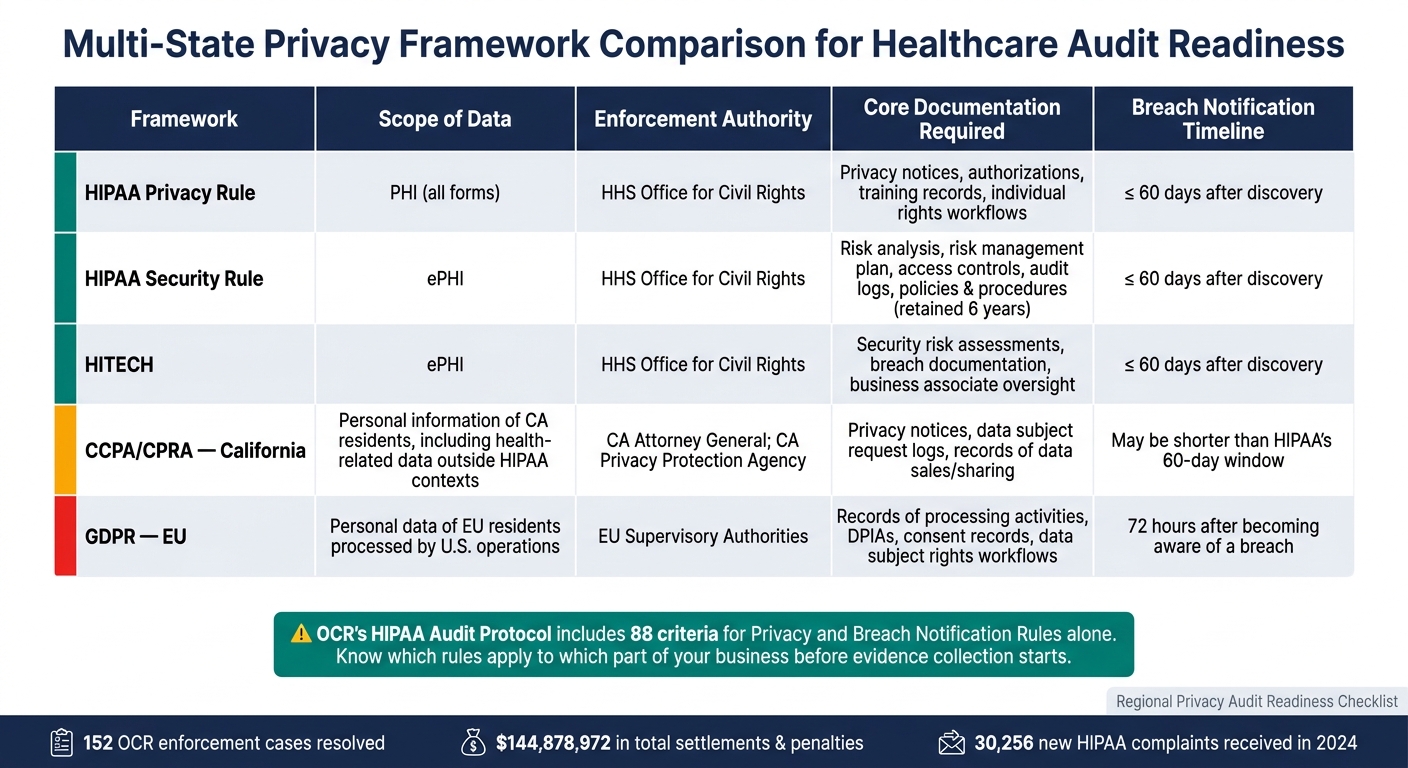
HIPAA & Multi-State Privacy Framework Comparison: Key Requirements at a Glance
Scoping sets the tone for the whole audit. If you miss the mark here, you end up chasing the wrong proof or overlooking a legal duty. Start by mapping the laws, systems, and internal owners before you ask anyone for records.
Map applicable laws and timelines
Create a jurisdiction map for each facility, clinic, and virtual care service. For each one, note the law, the agency that enforces it, and the breach reporting clock that applies. This step matters because the OCR HIPAA Audit Protocol includes 88 criteria for the Privacy and Breach Notification Rules alone. You need to know which rules apply to which part of the business before evidence collection starts.[4][5]
Here’s a side-by-side view of the main frameworks many U.S. healthcare groups deal with:
| Framework | Scope of Data | Enforcement Authority | Core Documentation | Breach Notification Timeline |
|---|---|---|---|---|
| HIPAA Privacy Rule | PHI (all forms) | HHS Office for Civil Rights | Privacy notices, authorizations, training records, individual rights workflows | No later than 60 days after discovery [4][5] |
| HIPAA Security Rule | ePHI | HHS Office for Civil Rights | Risk analysis, risk management plan, access controls, audit logs, policies and procedures (retained 6 years; see our SOC 2 audit documentation checklist) [2] | No later than 60 days after discovery [4][5] |
| HITECH | ePHI | HHS Office for Civil Rights | Security risk assessments, breach documentation, business associate oversight | No later than 60 days after discovery [4][5] |
| CCPA/CPRA (California) | Personal information of CA residents, including health-related data outside HIPAA contexts | CA Attorney General; CA Privacy Protection Agency | Privacy notices, data subject request logs, records of data sales/sharing | May be shorter than HIPAA's 60-day window |
| GDPR | Personal data of EU residents processed by U.S. operations | EU supervisory authorities | Records of processing activities, DPIAs, consent records, data subject rights workflows | 72 hours after becoming aware of a breach (when required) [3] |
Use this map to decide which systems, records, and teams are in scope. Think of it as the master reference for your system inventory and evidence requests.
Inventory in-scope data flows and systems
After that, map every system that creates, receives, maintains, or transmits PHI, ePHI, or other personal data. That includes clinical platforms, admin systems, mobile tools, cloud services, backups, and connected devices. It also includes data exchanges with business associates such as clearinghouses, transcription services, analytics vendors, and cloud hosting providers.
For each system, record the data type, the patient group served, and the rule set that applies. This is where gaps usually show up. A backup platform, a mobile intake app, or a vendor feed can sit quietly in the background until audit time.
Confirm in-scope teams and owners
Set one owner and one backup for every system and data flow before evidence requests go out. Your audit team should cover these functions:
- Privacy Officer: privacy policies, notices of privacy practices, patient rights workflows, and breach notification processes
- Security Officer: risk analysis, technical safeguards records, and security incident response documentation
- Compliance: audit coordination, finding tracking, and corrective action plans across regions
- IT/Security Operations: system diagrams, access logs, and configuration records for systems handling PHI/ePHI
- Clinical Operations: how minimum necessary rules and role-based access work in practice
- Legal Counsel: BAAs and data processing agreements
- Procurement/Vendor Management: vendor inventory, BAAs, and third-party risk assessments
Lock in these owners and backups early. That way, when requests start coming in, you know exactly who is on the hook for each policy, log, training record, and system file tied to the audit scope.
2. Gather Governance Records and Audit Evidence
Once the scope is set, the next step is simple: collect the records that prove your controls are current and clearly owned. This evidence package should show that regional requirements are mapped, assigned, and actively maintained. In plain terms, you’re pulling together the paper trail that shows your program isn’t sitting on a shelf.
Core policies, notices, and retention records
Start with the records auditors usually ask for first. Your Notice of Privacy Practices should include:
- a version history
- an effective date in MM/DD/YYYY format
- proof that it was posted or distributed, such as a waiting-room photo, portal screenshot, or dated PDF
Each policy should also show the current version, effective date, owner, approval history, and review cycle. That’s how you show the document is still being maintained, not forgotten.
Beyond the NPP, your evidence package should include minimum necessary and role-based access policies, data retention and disposal schedules, breach response procedures, and sanctions policies for privacy violations. For retention schedules, connect each record type to a system owner and a disposal method. For example, Radiology PACS records: 7-year retention, assigned owner, and defined disposal method. HIPAA requires most policies, procedures, and related documentation to be kept for at least 6 years from the date of creation or the date last in effect, whichever is later. [7][9]
After policies, move to the records that show staff actually followed them.
Training, risk, and incident documentation
Next, gather workforce records. Training and access records should show the employee’s role, completion date, and that access started only after the required training was done. Training logs should capture each employee's name, role, department, training title, completion date, delivery method, assessment result, and completion attestation. Offboarding records should confirm that access was revoked promptly when someone left or changed roles.
OCR does not require a specific format for the risk analysis, but it must be documented and cover assets, threats, vulnerabilities, likelihood and impact ratings, and planned safeguards. [6][10] Pair that with a current risk register that tracks each identified risk with an owner, target completion date, mitigation status, and closure evidence. Risk and incident records show how findings move from issue to closure. Incident logs should capture every privacy and security event, including non-reportable incidents: the date and time, affected systems, number of individuals impacted, classification, investigation outcome, and corrective actions taken. [8]
Linking incident records to risk register entries makes the lifecycle easy to follow. Auditors can then see the full chain from identification through resolution instead of piecing it together by hand.
Centralize evidence for version control and review
Scattered files make audits drag on. A centralized repository keeps the audit trail complete, current, and easier to review. Use a role-controlled repository organized by domain, with metadata for owner, effective date, review frequency, and region. Version control with check-in/check-out workflows helps ensure auditors see only the current approved version, while prior versions stay available if needed.
Censinet RiskOps™ can centralize third-party and enterprise risk assessments, vendor documentation, BAAs, and remediation workflows with time-stamped audit trails.
3. Verify Technical and Operational Privacy Controls
Use the scope map and evidence repository from Sections 1 and 2 to test controls by region and system. Once you've gathered the records, check that the controls actually work in day-to-day use. In plain English, don't stop at policy language. Use the evidence package from Section 2 to confirm that each control runs as written, tied to the in-scope systems and timelines for each region.
Access, authentication, and device safeguards
The HIPAA Security Rule requires unique user identification for every workforce member who accesses ePHI, along with technical measures that limit access to authorized persons only.[11][2] That means each user should have a unique ID, access should follow role-based rules, permissions should stay limited to least privilege, and deprovisioning should happen fast when someone changes roles or leaves.
For authentication, MFA is required for remote access and privileged accounts.[2][12] Keep configuration exports as proof. For clinical workstations, confirm auto-lock settings, screen privacy, and secure disposal of printed PHI.[2][13]
Once access controls are checked, auditors usually move to data protection at rest, in transit, and on portable devices.
Encryption, logging, and monitoring evidence
Document encryption at rest and in transit. Pair configuration proof with operating evidence, including key management records and backup encryption settings, for databases, file shares, portable devices, and vendor data exchanges.[6]
Document logging and review too. The Security Rule requires measures to record and examine activity in systems that contain ePHI.[16] Audit logs show who accessed a record, when they accessed it, and what they did.[14][15] The table below maps each control area to the related regulation class and the evidence auditors usually ask for:
| Control area | Relevant regulation class | Evidence auditors usually request |
|---|---|---|
| Unique user identification | HIPAA Security Rule access control | User directory, account inventory, deprovisioning records |
| Authentication / MFA | HIPAA authentication standard | MFA settings, login screenshots, policy references |
| Encryption at rest / in transit | HIPAA access control and transmission security | Configurations, encryption reports, key management docs |
| Audit logging and review | HIPAA audit controls | Log exports, SIEM alerts, review logs, retention policy |
| Workstation and device safeguards | HIPAA physical and technical safeguards | Auto-lock settings, device handling policies, device-encryption status reports |
Show the review cadence, escalation path, and follow-up. A SIEM dashboard alone isn't enough. Auditors want proof that alerts led to action.
Monitoring should feed incident reporting, not sit in a separate lane.
Breach response and workforce reporting procedures
Breach response works only if staff use the reporting path the right way. Check that the escalation path reaches privacy, security, legal, and leadership in the right sequence. Also confirm that after-hours reporting channels, such as a dedicated hotline or ticketing system, are clearly shared for each region in scope.
HIPAA breach notification requires notice to affected individuals no later than 60 days after discovery.[17] For breaches affecting 500 or more individuals, notice to HHS is also due within 60 days of discovery. For smaller breaches, HHS notice is due within 60 days after the end of the calendar year in which the breach was discovered.[17][18] If your organization handles data from EU residents, GDPR adds a 72-hour supervisory authority notification rule for certain personal data breaches. Set internal deadlines shorter than the legal limit. A current decision tree should separate incidents from reportable breaches and assign each notification step.
Next, verify vendor, fourth-party, and AI data risks against these same regional requirements.
4. Review Third-Party, Fourth-Party, and AI Data Risks
After internal controls, auditors turn to vendors, subcontractors, and AI oversight.
Validate BAAs, data processing terms, and vendor inventory
Start by matching your vendor inventory to your current BAAs. Any vendor that creates, receives, maintains, or transmits PHI on your behalf is a business associate under HIPAA and should be included in scope.[21][25][26] Vendors with only incidental or conduit access usually don't need BAAs, but you should document why they were left out.[19][20][21]
For each in-scope vendor, make sure a signed BAA is in place before any PHI is shared. Then review the agreement itself. Auditors usually look for required terms around permitted uses, safeguards, breach notice, subcontractor flow-down duties, and return or destruction at termination.[22][23][24]
You should also ask vendors to name any downstream service providers that store or process PHI. Then verify that the same duties carry through to subcontractors and other fourth parties.[19][20][23][25] This is where teams often get tripped up: the direct vendor paperwork looks fine, but the trail stops one layer down.
The table below shows what auditors usually check at each layer:
| Layer | What auditors look for | Common gap |
|---|---|---|
| Direct vendors (business associates) | Signed BAA with required clauses, effective risk assessments | Missing subcontractor flow-down clause |
| Subcontractors (fourth parties) | Vendor-to-subcontractor BAAs, disclosed downstream processors | No documentation of downstream processors |
| Cloud/SaaS providers | Risk analysis completed before PHI is stored, BAA in place before use[28] | BAA signed after data is already in the environment |
Document AI data use and governance controls
Once contract coverage is confirmed, review how AI tools handle PHI and whether data can be reused. Put it in writing. Your policy should spell out what data staff may enter into AI tools, which use cases need approval, and how vendor AI systems are monitored.[27][29]
Be specific about what's allowed and what's off-limits. Approved use cases might include:
- Drafting non-patient-specific materials
- Summarizing internal policies without PHI
Restricted use cases can include clinical decision support tied to identifiable records.
If an AI vendor processes PHI, treat that vendor as a business associate. Then confirm the contract limits patient data use to the agreed purpose and does not permit reuse for unrelated model training or sharing with other customers.[27][29]
For audit evidence, keep:
- Training materials
- Policy acknowledgment records
- Documented AI privacy issues and their resolutions
Use structured risk workflows to speed audit preparation
Censinet RiskOps™ can centralize vendor evidence, fourth-party risk, and approval workflows. Once vendor and AI risks are documented, the audit package is ready for repeat review.
Conclusion: A Step-by-Step Checklist for Continuous Audit Preparation
Privacy audit readiness is not a one-and-done task. It takes steady review, clear records, and proof that your safeguards do what they’re supposed to do. That matters even more when weak risk analysis keeps showing up in enforcement. OCR received 30,256 new HIPAA complaints in 2024 alone[1][30], and many recent enforcement actions point back to failures in risk analysis.
At its core, this checklist is about three simple moves: know what you have, document what you do, and prove that controls actually work. The table below helps turn that idea into repeatable work for the next audit cycle.
Censinet RiskOps™ can manage third-party risk, enterprise risk, and AI governance evidence across audit cycles.
Key actions to complete before the next audit cycle
Use the table below to assign owners and set a review cadence:
| Action | Owner | Cadence |
|---|---|---|
| Confirm regulatory scope by state, region, and data type | Privacy Officer | Annually or when laws change |
| Update system and data inventories, including cloud and mobile | IT / Security | Quarterly |
| Validate signed BAAs for all in-scope vendors and subcontractors | Privacy / Legal | Quarterly |
| Refresh workforce training records and confirm new-hire completion | HR / Compliance | Ongoing; review quarterly |
| Test breach escalation and notification workflows | Security / Privacy | Semi-annually |
| Review open remediation items with named owners and target dates | Risk Manager | Monthly |
| Centralize governance evidence with version control | Compliance | Ongoing |
For each open remediation item, log the owner, due date, risk rating, and closure evidence. If you're using a stopgap measure, mark it as temporary and assign a date for the permanent fix. That way, nothing slips through the cracks.
FAQs
How do I know which privacy laws apply in each state?
Maintain a living regulatory tracker for every state where your organization operates or targets residents. HIPAA is only the floor, so you need to map state laws like California’s CPRA, Washington’s My Health My Data Act, Virginia’s VCDPA, and Colorado’s CPA to your internal data sets.
Use one central governance framework to track each application, device, and vendor by data type, subject, and location. Then review that framework at least quarterly.
What audit evidence should I collect first?
Start with a centralized evidence index for policies, risk assessments, and training records. That gives you one place to track what exists, what’s missing, and what needs an update.
From there, document and map every system involved in data transfers or processing. This sets a clear operational baseline and makes it much easier to see how data moves across your organization.
Early priorities include:
- completed risk analyses
- current HIPAA policies and procedures
- incident response plans
- executed Business Associate Agreements (BAAs)
Censinet RiskOps™ can help centralize these documents and streamline evidence collection.
How often should I test vendor and breach controls?
Use a mix of annual and year-round testing.
Carry out documented risk assessments and penetration testing at least once a year, or any time major system, vendor, or workflow changes take place. To meet the 2026 HIPAA updates, run vulnerability scans at least twice a year.
For business associates, check technical safeguards each year. Test incident response plans yearly with key personnel, and run component tests during the year as well, including restoring critical systems within 72 hours of an incident.
