
Patch testing in healthcare IT is critical to ensure patient safety and maintain system functionality. However, it comes with unique challenges due to the complexity of healthcare environments, strict regulatory requirements, and the high stakes of system failures. Here's a quick overview of the main issues:
- Compatibility Problems: Updates can disrupt interconnected systems like EHRs and medical device security risks, especially with legacy hardware or vendor-specific configurations.
- Limited Testing Environments: Testing often fails to replicate live setups, missing subtle issues that impact clinical workflows.
- Team Coordination Challenges: Misaligned priorities between IT, clinical staff, and vendors lead to delays and risks during patch deployment.
To address these, healthcare organizations need to prioritize patches based on risk, automate testing processes, and improve coordination across teams. Tools like Censinet RiskOps™ can help centralize risk management and streamline patching efforts, reducing the likelihood of costly disruptions.
Centralized Patch Management | EVP, Olin Dillard and Sr Director, HTM, Pete Larose, THR - Part 1
sbb-itb-535baee
Challenge 1: Compatibility Issues Across Healthcare IT Systems
Healthcare IT systems are a web of interconnected components - EHRs, imaging tools, infusion pumps, monitoring devices, and administrative software. The challenge? A patch applied to one system can unintentionally disrupt another. Apu Pavithran, CEO of Hexnode, explains:
"Admins know they should patch but the risk of compatibility issues with tightly integrated workflows makes them think twice." [1]
For instance, a patch that interferes with an EHR's connection to a medication dispensing system could create serious patient safety concerns. These interdependencies often become even more problematic when dealing with older systems and vendor-specific configurations.
How Legacy Systems Complicate Compatibility
Medical hardware is built to last 15–20 years, but modern software updates can quickly outpace these older devices. Many legacy systems struggle to handle current security patches, which can lead to unexpected breakdowns.
Take this real-world example: In March 2024, a Nordic healthcare provider patched its patient monitoring system. The IT management tool initially indicated a "green light" for successful installation. Yet, by the next morning, about 50% of the monitoring centers displayed a "red" status. This forced unplanned system reboots and left clinical staff scrambling to manually monitor patients [5]. The incident highlights the danger of relying solely on automated success indicators without thorough system validation.
While legacy systems face these struggles, vendor-specific configurations add another layer of complexity.
Managing Vendor-Specific System Configurations
Vendor-customized systems are often certified for particular operating system versions or patch levels. Applying updates outside these parameters can void support agreements and disrupt integrations. IT teams must wait for vendor-approved updates, which are usually released during scheduled maintenance windows [3].
To navigate this challenge, it's crucial to align patch deployments with vendor guidelines. Kevin Henry, a HIPAA specialist at Accountable, advises:
"Align with manufacturer instructions and request validation evidence for critical updates. Where local validation is necessary, standardize test scripts and acceptance criteria to ensure consistent results." [7]
In cases where vendor patches are unavailable or too risky to implement, alternative strategies like network segmentation and zero-trust access controls can help. These measures limit the exposure of unpatched devices without requiring them to be taken offline [1][7].
Challenge 2: Limited Access to Realistic Testing Environments
Even when IT teams are ready to test a patch, they often face a major hurdle: their test environment doesn’t accurately reflect the complexity of the production setup. Healthcare IT systems aren’t just a collection of desktops and servers - they’re an intricate web of EHR clients, middleware connectors, legacy devices, barcode scanners, and VDI components. Testing patches on isolated virtual machines (VMs) often misses the intricate dynamics of live environments, leaving potential issues undetected.
"Healthcare networks are very messy... because patients require a wide variety of different healthcare solutions, tools and techniques. What this does from a cybersecurity perspective is it creates a very diverse attack surface." - Brendan Saltaformaggio, Associate Professor, Georgia Tech [10]
This creates a ripple effect. A single patch rollout could affect hundreds of interconnected endpoints at once, introducing numerous failure points that a simplified test setup might never reveal.
Gaps in Workflow and Integration Simulation
The most dangerous patch testing issues aren’t always glaring system crashes. They can be subtle workflow disruptions - like an HL7 interface that stops processing orders or a workstation that fails to shut down properly during shift changes. These issues often surface only when complete clinical workflows, rather than just basic system checks, are tested.
A real-world example highlights the risks. In January 2026, Microsoft released a security update that caused systems to fail during shutdown or hibernation. IT teams without automated validation tools discovered that these failures could disrupt critical operations during transitional periods [8][9]. As one analysis noted:
"A system that 'fails to shut down' is not just an inconvenience - it interferes with maintenance, interrupts patch sequencing, and can block failover or backup operations." - Allscripts.cloud [9]
To prevent such vulnerabilities, creating a thorough and realistic staging environment is essential.
Building a Staging Environment That Reflects Production
A staging environment is only effective if it closely mirrors the production setup. This means replicating not just core systems like application servers, interface engines, and databases, but also including physical clinical peripherals like barcode scanners and label printers. These devices often introduce driver conflicts that can lead to post-patch issues.
Using synthetic or masked patient data allows teams to simulate realistic clinical workflows - like patient lookups, order entries, and chart sign-offs - without compromising Protected Health Information (PHI). This keeps the process compliant with HIPAA regulations. For instance, in May 2026, Georgia Tech researchers collaborated with several healthcare systems on the H-VIPER project. This initiative created a "whole-hospital simulation" sandbox, enabling teams to test patches and cyber defenses without disrupting live clinical operations, such as MRI machine availability [10].
Another effective strategy is canary deployment. This involves rolling out patches to a small subset of non-critical machines - typically 1–5% - and closely monitoring the results before expanding deployment. In late 2025, a regional health system implemented this approach. Within 20 minutes, their automated test harness detected a driver conflict on 3% of canary machines, allowing them to halt the rollout and initiate a rollback before patient care was affected [8][9]. Such early detection is only possible when the staging environment is a true reflection of production.
Realistic staging environments play a vital role in addressing these challenges and ensuring smoother patch testing processes.
Challenge 3: Coordinating IT, Clinical, and Vendor Teams During Patch Testing
Even with well-prepared staging environments, patch testing can hit roadblocks when the involved teams aren't aligned. In healthcare, patch testing typically involves a mix of IT staff, clinical leaders, biomedical engineers, and third-party vendors. When their priorities, schedules, or communication styles clash, delays are almost guaranteed. A longitudinal study highlights this issue, revealing that 56.9% of patch management tasks faced delays [6].
Defining Roles and Responsibilities
The challenge becomes even more pronounced when stakeholders work in silos. Without clearly defined responsibilities, patch testing often turns into a cycle of assumptions. IT teams might think clinical staff will catch workflow issues. Clinical staff might assume IT has already tested the systems they rely on. Vendors might believe someone else is monitoring patch timelines. These gaps often come to light only after deployment - sometimes during critical patient care.
A practical way to address this is by creating a RACI matrix (Responsible, Accountable, Consulted, Informed). This tool assigns ownership for every phase of patch testing, ensuring that all key players - security teams, IT operations, biomedical engineers, clinical leaders, and vendors - are on the same page. Additionally, involving clinical "super-users" - staff who have an in-depth understanding of workflows - can provide valuable real-world validation during functional checks and user acceptance testing. These insights go beyond what technical testing alone can achieve.
"Successful patching in hospitals hinges on coordination with clinical operations. Plan around patient care schedules to minimize disruption and maintain safety." - Kevin Henry, Cybersecurity Expert [4]
Another helpful approach is using shared "patching trackers." These centralized documents log task statuses, owners, and deadlines, making the process transparent and reducing confusion. Regular bi-weekly coordination meetings can further ensure accountability and keep everyone informed. The goal is simple: make patch status visible across all teams, not just IT.
But even with internal coordination, vendor dependencies often complicate patch timelines further.
Managing Vendor Dependencies in Patch Testing
Third-party vendors introduce another level of complexity. Systems like EHRs and medical devices often require vendor approval before patches can be implemented, limiting IT's ability to act independently. These dependencies can extend timelines, but there are ways to mitigate the risk. Embedding patch SLAs (service-level agreements) and agreeing on interim controls in advance can help keep things on track.
The Change Healthcare breach in February 2024 serves as a cautionary tale. The BlackCat ransomware group exploited an unpatched ConnectWise ScreenConnect vulnerability (CVE-2024-1708 and CVE-2024-1709), causing massive disruptions. This included the processing of 15 billion healthcare claims annually and pharmacy eligibility checks at CVS, Walgreens, and the Military Health System [11]. During this crisis, hospital executives reported receiving vague and delayed updates from vendors.
"And his answer to me was, 'We'll have an update in two days.' This uncertainty delays effective resolution." - John Couris, CEO, Tampa General Hospital [11]
The takeaway? Vendor communication must be structured, not left to chance. Healthcare organizations should include patch SLAs, reporting requirements, and clear exception-handling protocols in vendor contracts. If a vendor can't meet a patching deadline, interim compensating controls - like network segmentation or updated firewall rules - should already be agreed upon and ready to deploy. As one implementation guide wisely states:
"Keep governance in-house even if execution is outsourced." - HICP Practice 2.3 [12]
Finally, tracking vendor-managed systems as a separate category in compliance reports ensures they remain visible on healthcare risk dashboards. This approach helps organizations monitor these systems effectively, even when their patch timelines differ from internally managed endpoints.
Practical Solutions: Reducing Risk While Keeping Patch Timelines on Track
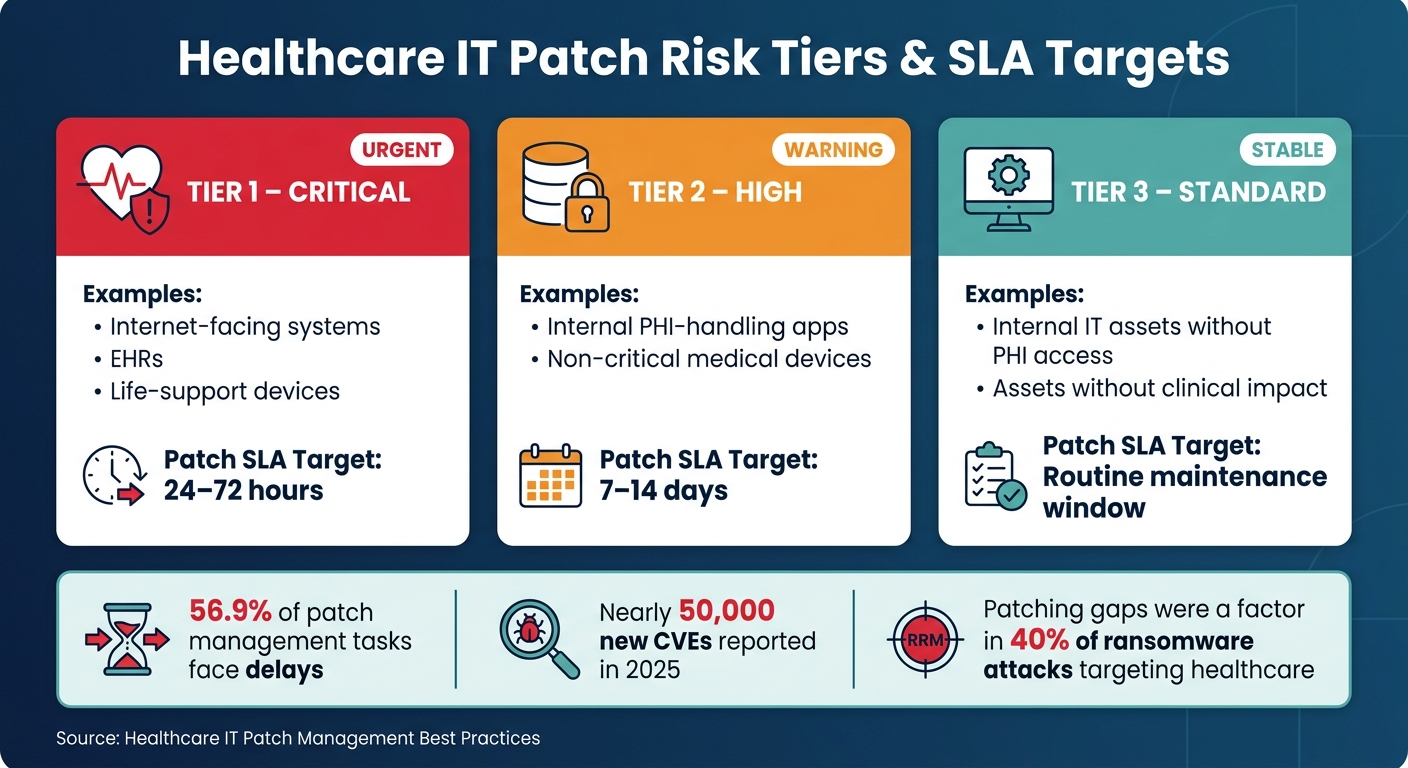
Healthcare IT Patch Management: Asset Tiers & SLA Targets
Tackling the challenges of compatibility, limited testing, and coordination requires a clear strategy. As we've seen, unstructured patch testing is often reactive and inefficient. Fortunately, targeted approaches can help minimize risks and delays.
Prioritizing Patches Based on Risk Level
Not all patches carry the same level of urgency. For healthcare IT teams juggling extensive backlogs and tight maintenance windows, prioritizing based on risk - rather than release dates - makes all the difference.
Start by categorizing assets into tiers based on their clinical and security importance:
| Asset Tier | Examples | Patch SLA Target |
|---|---|---|
| Tier 1 – Critical | Internet-facing systems, EHRs, life-support devices | 24–72 hours |
| Tier 2 – High | Internal PHI-handling apps, non-critical medical devices | 7–14 days |
| Tier 3 – Standard | Internal IT assets without PHI access or clinical impact | Routine maintenance window |
Once assets are tiered, score patches by considering factors like CVSS severity, active exploits, asset criticality, and the risk of clinical downtime. This approach ensures that limited testing resources focus on the most critical updates. For systems where immediate patching isn’t feasible, compensating controls can help mitigate risk temporarily.
Using Automation to Speed Up Patch Testing and Validation
Risk-based prioritization works even better when paired with automation. Manual patch validation slows deployment and increases the chance of errors - especially in healthcare environments, where a misstep could disrupt EHR systems or delay urgent care.
Automation can significantly streamline this process. Key areas for automation in healthcare IT include:
- Smoke tests
- Interface and API checks
- Service restart verification
- HL7/FHIR integration validation
- Baseline comparisons of system behavior before and after patching
Running automated checks in a staging environment overnight allows teams to catch potential failures without impacting live systems. By automating workflows - from patch intake and risk scoring to dependency checks and scripted execution - deployment timelines shrink from weeks to days, all while improving patch coverage in complex environments.
How Censinet RiskOps™ Supports Patch Testing in Healthcare IT
Coordination is one of the toughest hurdles in healthcare patch management. Identifying at-risk systems, managing vendor involvement, and obtaining approval can feel overwhelming when relying on spreadsheets or disconnected ticketing tools.
This is where platforms like Censinet RiskOps™ come in. Designed specifically for healthcare IT, RiskOps™ centralizes risk assessments, making it easier to identify clinical applications, medical devices, and vendor-managed systems that carry high patch-related risks. When new vulnerabilities arise, RiskOps™ helps teams assess their impact, track remediation efforts, and maintain an audit trail - all within one platform. For organizations managing numerous vendors and hundreds of connected systems, this kind of structured visibility enables faster, more confident patching decisions.
Conclusion: Addressing Patch Testing Challenges in Healthcare IT
Patch testing in healthcare IT comes with its share of hurdles. The intricate nature of healthcare systems and coordination bottlenecks often lead to delays in addressing vulnerabilities. With the National Vulnerability Database reporting nearly 50,000 new CVEs in 2025 alone [2], the pressure to streamline patch testing processes is more intense than ever.
A smarter approach involves risk-based prioritization to focus on critical systems, automation to cut down on validation time and reduce human error, and structured coordination to ensure patches move forward without unnecessary delays. However, all these efforts depend on one key factor: complete visibility into vulnerabilities and the status of remediation efforts.
To manage patches effectively, healthcare organizations need a clear, centralized view of their systems. Visibility ties everything together - knowing which systems are vulnerable, which vendors are responsible, and where the remediation process stands. Without this, even the best processes can falter. Tools like Censinet RiskOps™ provide that centralized perspective by combining risk assessments, vendor management, and remediation tracking into one platform. This integration allows teams to make quicker, more informed decisions about patching.
"A bad patch in healthcare could disable patient monitoring systems or lock clinicians out of critical records." - Apu Pavithran, Founder and CEO, Hexnode [1]
The stakes are high. Last year alone, patching gaps were a factor in 40% of ransomware attacks targeting healthcare [1]. To protect patient safety, healthcare organizations must tackle patch testing challenges head-on with efficient tools and streamlined processes.
FAQs
How can we test patches without disrupting patient care?
To ensure patient care isn't interrupted, it's essential to use a controlled test environment that mirrors production settings. This should include all relevant devices and clinical interfaces. Begin with a phased rollout, starting with pilot groups or non-critical systems. Monitor these carefully for 24–72 hours before expanding further. Automating post-patch validation with synthetic transactions can help confirm that workflows are functioning as expected. Additionally, have automated rollback plans in place to address any issues quickly. Tools like Censinet RiskOps™ can streamline workflows and help maintain compliance throughout the deployment process.
What should we do when a vendor won’t approve a needed patch?
When a vendor refuses to approve a critical patch, you can still reduce risks by implementing compensating controls. For example:
- Isolate the system: Use VLANs or set up firewall rules to restrict unnecessary traffic to and from the vulnerable system.
- Monitor for threats: Deploy intrusion detection systems to keep an eye out for potential exploits targeting the vulnerability.
- Strengthen access: Enforce multi-factor authentication to add an extra layer of security for users accessing the system.
Make sure to document these actions as part of a formal risk acceptance process to ensure compliance with relevant regulations.
How can we ensure a patch doesn’t disrupt workflows or device integrations?
To ensure patches work as intended, test them in a controlled environment that closely resembles your production systems. Run functional, integration, and operational tests to catch any potential issues early. Automated tools can help streamline processes like opening patient records or scanning barcodes during testing.
Keep an eye on important metrics, including boot times and authentication performance, to ensure the patch doesn't negatively impact system performance. When deploying, use a phased rollout approach. Incorporate telemetry-based checks during the process, allowing you to pause the deployment if any performance problems are detected.
