
FHIR API security comes down to 10 controls: TLS 1.2+, mTLS for system links, OAuth 2.0 with SMART on FHIR, OpenID Connect, least-privilege scopes, encryption at rest, audit logging, input validation and rate limits, consent and security labels, and continuous testing.
If you handle PHI through FHIR, you need more than one lock. In 2024, 81% of U.S. healthcare breaches were tied to hacking or IT issues, and 170 million records were exposed. On top of that, CMS set January 1, 2027 as the deadline for affected payers to meet key FHIR API requirements.
Here’s the short version of what I’d focus on:
- Protect data in transit with TLS 1.2+ on every endpoint
- Verify both systems with mTLS for service-to-service traffic
- Control app access with OAuth 2.0 and SMART on FHIR
- Verify user identity with OpenID Connect
- Limit access tightly with narrow scopes and object-level checks
- Encrypt stored PHI and lock down key access
- Log access and changes with AuditEvent and Provenance
- Block abuse with schema validation, request limits, and search caps
- Enforce consent rules and apply FHIR security labels
- Test for drift and track fixes in a risk program
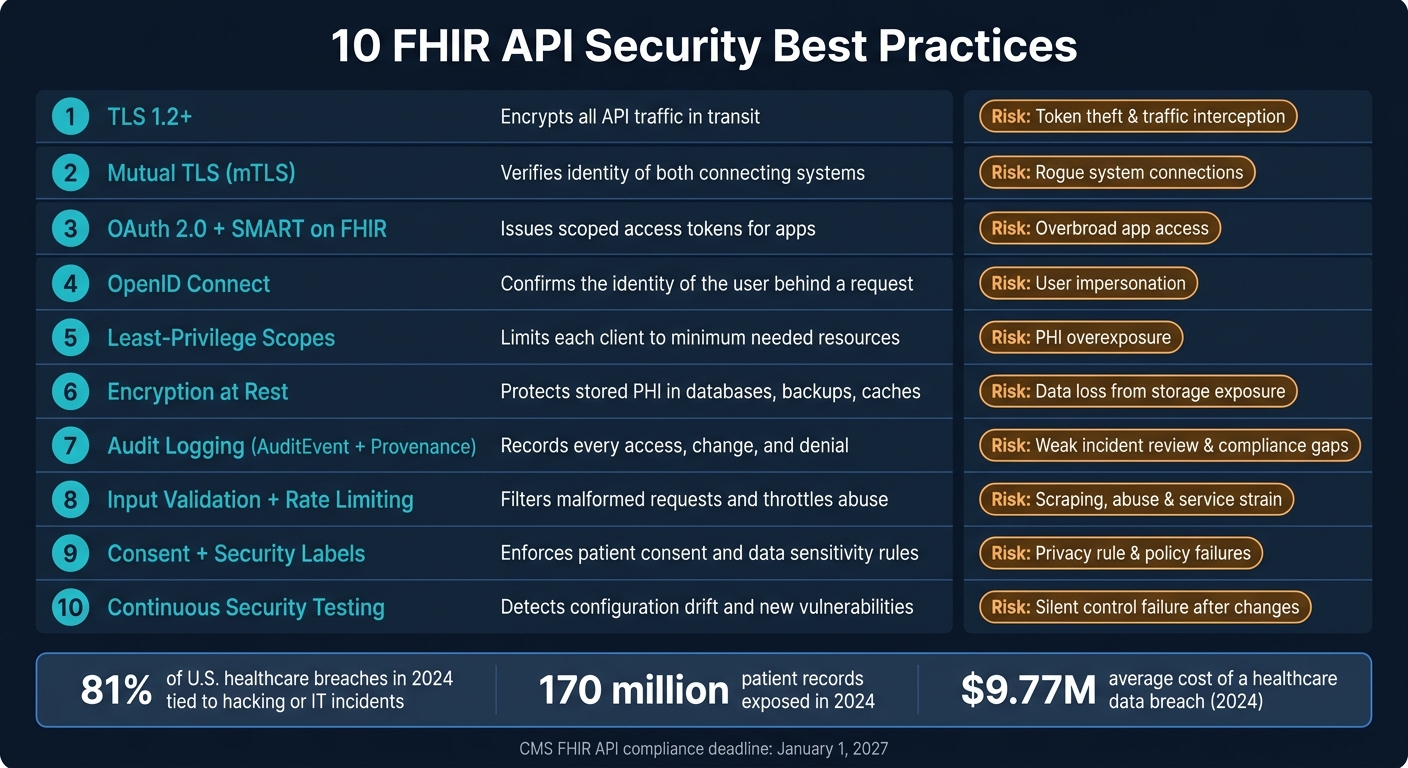
10 FHIR API Security Controls: What Each Does & What Risk It Reduces
Security on FHIR - API Security in the Digital Healthcare Ecosystem, WSO2 Webinar

sbb-itb-535baee
Quick Comparison
| Control | What it does | Main risk it helps reduce |
|---|---|---|
| TLS 1.2+ | Encrypts traffic | Token theft and traffic interception |
| mTLS | Verifies both systems | Rogue system connections |
| OAuth 2.0 + SMART | Issues scoped access tokens | Overbroad app access |
| OpenID Connect | Verifies user identity | User impersonation |
| Fine-grained scopes | Limits resource access | PHI overexposure |
| Encryption at rest | Protects stored data | Data loss from storage exposure |
| Audit logging | Records access and actions | Weak incident review and compliance gaps |
| Input validation + rate limits | Filters bad or costly requests | Abuse, scraping, and service strain |
| Consent + security labels | Limits what approved users can see | Policy and privacy rule failures |
| Continuous testing | Finds drift and weak spots | Silent control failure after changes |
In other words: if your FHIR API only has one or two of these controls in place, that’s not enough. I’d treat this list as the baseline for keeping PHI safer while meeting HIPAA and U.S. interoperability rules.
Why FHIR API Security Needs Multiple Layers
FHIR API security needs more than one line of defense because each layer covers a different weak spot. FHIR tells systems how to exchange data. It does not handle security by itself, and its own documentation points teams to added standards such as OAuth, TLS, and OpenID Connect for that job.[2][5] So the burden falls on implementers to put those protections in place.
This isn't a theoretical problem. In 2024, 81% of U.S. healthcare breaches were tied to hacking or IT incidents, exposing 170 million patient records. Healthcare was also the most targeted critical infrastructure sector.[8][9]
HIPAA's technical safeguards under 45 CFR 164.312 line up with this layered approach. They map to five control areas: access control, audit controls, integrity, authentication, and transmission security.[7] That split matters because one safeguard can't cover every attack path.
Think of it this way: TLS protects data while it's moving, but not after a token has been issued or when data sits in backend storage. OAuth manages delegated access, but broad scopes and sessions that no one watches can still expose PHI. One control helps. Several controls work together.
The risk also changes by setup. SMART on FHIR apps can run into token leakage. Payer APIs can face abuse at scale. HIE workflows can break down around consent mismatches. Internal systems have to deal with insider threats.[6] That's why the first layer is secure transport.
Layered controls limit the damage when one control fails.
1. Use TLS 1.2+ for All FHIR API Traffic
Transport security comes first. Every control that follows depends on it.
Use TLS 1.2 or higher on every FHIR API connection. TLS encrypts data moving between clients, servers, and intermediaries, which helps keep PHI, auth tokens, and session data from being exposed if traffic gets intercepted. HL7’s SMART on FHIR backend services specification requires TLS 1.2 or higher to authenticate the authorization server and protect token endpoint exchanges, so TLS is baked into the way FHIR authorization is supposed to work.[11]
Authentication strength
TLS protects more than API payloads. It also protects login and token exchanges, including bearer tokens, authorization codes, session cookies, and OpenID Connect messages.
That matters because weak transport leaves the door open. An attacker on a compromised network segment, proxy, or Wi‑Fi connection could capture credentials or replay sensitive requests if those exchanges aren’t encrypted end to end.
Data protection coverage
Apply TLS to every endpoint, not just the public API.
That includes:
- token endpoints
- metadata endpoints
- mobile app traffic
- webhooks
- internal service-to-service calls
- partner integrations
- batch interfaces
A lot of teams lock down internet-facing paths and assume the inside is safe. That’s where gaps tend to show up. Internal routes are often the ones left unencrypted.
HIPAA alignment
HIPAA’s transmission security standard under 45 CFR 164.312 treats encryption as a required safeguard for ePHI in transit.
In practice, TLS 1.2+ should be the default control for ePHI moving across networks. It also helps to keep proof on hand, not just the setting itself. Store items like configuration baselines, scan results, and certificate inventory reports so you can show enforcement during audits or vendor risk reviews.
Operational enforcement
The safest move is to treat TLS configuration as a platform policy, not an app-by-app decision.
Enforce it through API gateways, load balancers, reverse proxies, and server configuration baselines. Disable TLS 1.0 and TLS 1.1 outright. RFC 8996 formally deprecated both.[10] For new implementations, prefer TLS 1.3. Keep TLS 1.2 available only where you need it for vetted legacy systems.
It also pays to automate certificate renewal and watch expiration dates closely. If you don’t, small lapses can turn into outages - or push teams toward weak fallback transport when they’re under pressure.
Once transport is locked down, the next layer is delegated access control.
2. Enforce Mutual TLS for System-to-System Connections
Standard TLS verifies the server to the client, but it stops there. Mutual TLS (mTLS) adds one more check: both sides must present valid X.509 certificates during the handshake. TLS secures the channel. mTLS confirms that both systems are allowed to be on that channel in the first place.
That matters a lot for system-to-system FHIR traffic. Before any data moves, each side checks the other. It’s a simple idea, but it shuts down a big class of unwanted connections. Once system identity is locked down, you can move to user-level authorization.
Authentication strength
With standard TLS, a system only needs your endpoint address to try a connection. mTLS closes that hole by tying trust to a named system identity.
Give each system or workload its own client certificate. Don’t share certificates across services. If one service is mixed up with another, your audit trail gets messy fast, and your trust model starts to fall apart. This setup works especially well for service accounts, integration engines, and background jobs that run without a person clicking a button behind the scenes.
On every handshake, verify:
- The full certificate chain
- Hostname
- Key usage
- Revocation status
Data protection coverage
Use mTLS on internal service paths where system identity matters most. That includes shared network paths and external segments where ePHI moves between systems. A lot of teams assume internal traffic is safe by default. That’s a risky bet.
Start with the connections carrying the most sensitive FHIR resources, such as:
- Patient demographics
- Medications
- Lab results
- Clinical notes
- Claims data
HIPAA alignment
mTLS strengthens HIPAA access control and transmission security for ePHI in transit, especially when it’s paired with certificate logs, access policies, and periodic review. The key here is proof. You want audit records that connect each mTLS session to a specific system identity.
That paper trail helps during risk assessments and vendor reviews, when someone asks, “Which system connected, and how do you know it was allowed?”
Operational enforcement
mTLS only works well when the certificate process is tightly managed. That usually means a managed PKI with centralized certificate issuance, short certificate lifetimes, automated renewal, and revocation handling through CRL or OCSP.
Enforce mTLS at the API gateway or service mesh. And don’t just log non-mTLS traffic and let it slide. Reject it outright.
Manual certificate handling is where things often go sideways. Automate issuance, renewal, and revocation so the process doesn’t depend on someone remembering a calendar reminder. Track certificate expirations, revocation time, and rejected non-mTLS requests so you can show that enforcement is in place. That steady enforcement helps cut impersonation risk across EHR, payer, lab, and vendor integrations. This proactive approach is a core component of real-time portfolio risk management for healthcare organizations.
With machine identity verified, the next layer is delegated access.
3. Implement OAuth 2.0 and SMART on FHIR
Once an app is authorized, the next step is deciding what that app, and the user behind it, can do. SMART on FHIR turns a basic authenticated connection into scoped access.
SMART on FHIR sets a common way for apps to get scoped tokens. It builds on OAuth 2.0 and issues access tokens without exposing user credentials. ONC requires SMART App Launch under the Cures Act certification criterion (170.315(g)(10)) for standardized FHIR APIs.[14][15]
Authentication strength
For browser and mobile apps, use the Authorization Code flow with PKCE. Skip the implicit grant. Also require the state parameter to help block CSRF attacks.
For system-to-system integrations, SMART Backend Services uses JWT-based client authentication with asymmetric keys to get system-level access tokens. No user interaction is needed.
Data protection coverage
Ask for the narrowest scope possible. For example, request patient/Observation.read instead of patient/*.read.[13][1] That small change matters. It keeps access tight instead of handing over the keys to the whole house.
Validate every token on each request. Check:
- signature
- issuer (
iss) - audience (
aud) - expiry (
exp) - not-before (
nbf) - scopes
Reject the request if any value doesn't match.
Don't store tokens in browser localStorage or in unprotected mobile storage. Use secure keychains or HTTP-only cookies with a backend-for-frontend pattern instead.
HIPAA alignment
HIPAA's minimum necessary standard fits neatly with SMART scopes. Request only the resource-level scopes an app needs for its clinical purpose. If an app only needs observations, give it observations. Nothing more.
Use SMART context parameters like launch/patient and fhirUser to enforce user identification and access control. Log every authorization event, including token issuance, refresh, revocation, and FHIR resource access, with timestamps and user context.
Operational enforcement
Control also has to hold up in day-to-day operations. Keep a central app registry. Enforce exact redirect URI matching. Keep token lifetimes short, and refresh only when needed.
Revoke access at once when a user withdraws consent or when an app is decommissioned. Rotate signing and encryption keys on a set schedule. Then feed token usage logs into your SIEM so your team can spot odd behavior before it turns into data breaches and ransomware.
When app authorization is in place, verify the user's identity with OpenID Connect.
4. Use OpenID Connect for Identity Verification
OAuth 2.0 controls what an app can access. OpenID Connect (OIDC) checks who is making the request.
That difference matters a lot when PHI is involved.
OIDC adds an identity layer on top of OAuth 2.0 by issuing an ID token that your app must validate before it shows protected data. In plain terms, OAuth decides what the app can do, while OIDC helps confirm the person behind it. That makes OIDC the natural next step after OAuth-based access control.
Authentication strength
OIDC lets your identity provider (IdP) enforce stronger sign-in rules before it issues an ID token. That can include multifactor authentication, passwordless login, device trust checks, or conditional access policies.
The safest approach is to let the IdP handle MFA, passwordless login, and conditional access. For example, a health system might require MFA when a clinician opens patient charts from outside the organization’s network. It might also trigger reauthentication for higher-risk actions, like medication changes or access to behavioral health data.
When your app receives an ID token, don’t trust it at face value. Validate the token claims before using it:
- signature
issaudexpiatnonce
Use the IdP's JWKS endpoint to fetch the right signing keys. Reject any token that is unsigned, expired, or issued for a different client. [18][19]
Data protection coverage
OIDC lowers impersonation risk by tying requests to a verified user.
In SMART on FHIR, request the openid and fhirUser scopes so your app receives an ID token along with the access token. [16][20] Then map the fhirUser claim to the matching FHIR resource - Practitioner, Patient, or RelatedPerson - and enforce role-based access based on that verified identity. [17]
OIDC verifies identity; OAuth 2.0 and SMART scopes limit actions.
HIPAA alignment
OIDC supports HIPAA’s unique user identification and user authentication requirements. Its logs, used alongside FHIR AuditEvent records, also give you a usable audit trail: a record of who signed in, when they signed in, and which client or session they used. [21][22]
Operational enforcement
Require OIDC for every user-facing FHIR app launch.
Keep token lifetimes short. Enforce session timeouts. Require reauthentication for sensitive actions. Centralize identity management so when a user’s role changes, or they leave the organization, their FHIR access is removed fast across connected apps.
Use OIDC for user-facing flows. For system-to-system integrations, use machine authentication.
After identity is verified, restrict each user to the minimum resources needed.
5. Apply Least-Privilege Scopes and Fine-Grained Authorization
Once identity is checked, scope limits decide what a client can touch. OIDC answers who. Scopes answer what.
Least privilege means each client gets only the access it needs. No more. No less. That applies to everything from a patient app to an analytics service to an e-prescribing system.
Token validation
Validate iss, aud, exp, nbf, and scope on every request. Reject tokens that are expired, aimed at the wrong audience, or missing the needed scope.
Data protection coverage
Stay away from broad wildcard scopes like user/*.* and system/*.*. They cast far too wide a net.
For example, an e-prescribing system should get user/MedicationRequest.read and user/MedicationRequest.write. It should not get blanket access to observations. SMART on FHIR v2 also supports granular scopes that use query parameters to narrow access even more, such as limiting Observation access to one category like vital signs.
| Use Case | Recommended Scope | What It Blocks |
|---|---|---|
| Patient app (read only) | Read-only vital-signs observations | All other observation categories and write access |
| Analytics ETL (back-end workload) | Read-only scopes in a dedicated, de-identified analytics environment | Write and delete operations |
| E-prescribing system | user/MedicationRequest.read, user/MedicationRequest.write |
Broad observation access and other unrelated resources |
| Registry integration (back-end workload) | system/Patient.read with facility-based filters |
Cross-facility access and $export |
Treat bulk operations like $export and $everything as high risk. Lock them down to tightly vetted back-end service accounts, then add compensating controls like network restrictions, mTLS, and active monitoring.
HIPAA alignment
HIPAA's minimum necessary standard requires PHI to be shared only to the extent needed for a specific purpose. The practical way to do that is to map SMART scopes to exact clinical tasks.
That also makes audit logs far more useful. When each access event is tied to a specific scope and resource type, odd behavior is easier to spot and check.
Operational enforcement
Governance matters just as much as code. Before granting user/* or system/* scopes to any vendor or internal integration, require a documented business reason and a risk review.
If access needs to grow - say a client now needs write access to a new FHIR resource - put that through a formal change process. It should not slip in through a quiet config edit.
At runtime, use your API gateway or your FHIR server's policy engine to enforce object-level access checks on every request. Use Censinet RiskOps™ to standardize third-party risk reviews for vendor apps requesting broad scopes.
Even narrow scopes still leave data sitting in storage, so the next control is encryption at rest.
6. Encrypt FHIR Data at Rest with Strong Key Management
Authorization controls who gets in while data is moving. Encryption at rest covers what happens after the data lands. For PHI, that matters in every place it can sit, not just on the wire.
Data protection coverage
Encrypt every storage location that can hold PHI. That includes production databases, object storage, queues, caches, logs, backups, replicas, archives, and any test or staging system that contains PHI. AES-256 is a common option for PHI at rest, and HHS guidance points to NIST SP 800-111 for data-at-rest encryption.[28][29]
Key management
Encryption only works if key control is tight. The keys are the choke point.
Store keys in an HSM or cloud KMS, and keep them out of source code, config files, and shared drives. Require MFA for key admins. Lock down RBAC so app identities can only use keys, not manage them. For high-risk actions like key creation, rotation, or destruction, require two-person approval.[30][33][34][35]
HIPAA alignment
Under the HIPAA Security Rule, encryption is an addressable implementation specification. In FHIR setups, though, encryption at rest is standard practice. If encrypted PHI is lost or stolen and the keys stay uncompromised, the event may not be a reportable breach.[27][31]
That’s why documentation matters. Keep a clear record of your encryption choices, key rotation rules, and risk analysis decisions so they’re ready for audit review.
Operational enforcement
Set encryption as the default in infrastructure-as-code templates for every new FHIR-related storage resource. Then back that up with cloud guardrails that block unencrypted storage. For high-risk workloads, such as primary FHIR repositories and data lakes, customer-managed keys give you more control over rotation schedules and key lifecycle management.[32]
A few controls make this stick:
- Automate key rotation
- Alert on stale keys
- Alert on disabled encryption
- Flag suspicious key access
- Include encryption and key management in vendor risk reviews for hosted FHIR data
Pair encryption with access logs so key use and data access stay auditable.
7. Enable Audit Logging with FHIR AuditEvent and Provenance
Once transport, authentication, and authorization are in place, audit logs show what actually happened. Encryption protects data at rest. But if there’s no audit trail, incident response turns into guesswork, and compliance reviews get messy fast.
FHIR gives you two built-in resources for this: AuditEvent and Provenance.
AuditEvent tracks access. Provenance tracks data lineage.
Authentication strength
Every AuditEvent should record the user or service identity, authentication method, client ID, scopes, and patient context. Log both successful access and failed or denied requests. That matters because a denied request can tell you just as much as an approved one, especially when someone keeps trying the same thing over and over.
Data protection coverage
Log every read, write, search, export, and denied request. For each event, capture:
- resource type and ID
- action taken
- outcome
- source IP
- timestamp
For any operation that changes content, create a Provenance resource alongside the AuditEvent. That gives you a clean chain of custody for the clinical data itself.
Do not put full PHI into audit records. Keep the logs focused on identifiers and metadata, such as resource type, record ID, and action. The clinical content should stay in the main data stores. Send AuditEvent resources to a central log store or SIEM so teams can search them and set alerts without digging through app servers by hand.
HIPAA alignment
HIPAA 164.312(b) requires activity recording and review in ePHI systems.[37] AuditEvent lines up directly with that rule. Here’s how the main fields map to what HIPAA expects:
| HIPAA Requirement | AuditEvent Field |
|---|---|
| User identification | AuditEvent.agent |
| Date and time of event | AuditEvent.recorded |
| Action type | AuditEvent.action, type, subtype |
| Resource accessed | AuditEvent.entity |
| Access location | Source IP / network context |
| Outcome | AuditEvent.outcome, outcomeDesc |
Keep both log types for at least 6 years, and longer if state law says you must.[4][37]
Operational enforcement
Logging helps only if the logs are protected, watched, and reviewed on a regular basis. Store them in an append-only system. Use SHA-256 hash chaining so tampering is easier to spot.[36]
Set alerts for high-priority events like:
- mass record reads
- repeated failed access attempts
- bulk exports
- consent changes
- administrative configuration changes
Those patterns can point to data scraping, insider misuse, or a compromised account before the situation gets out of hand. This is especially critical when monitoring medical device cyber risk within the clinical network.
Set a minimum schema, require key event coverage, and test the logs during incident response drills. The logs should also show whether consent rules and security labels were enforced.
8. Harden FHIR Servers with Input Validation and Rate Limiting
FHIR APIs can be hit with malformed input and expensive search requests, so every request needs to be checked and abusive traffic needs to be slowed before it gets into application logic. This sits after authentication and authorization, and it fills a specific gap: even a trusted, signed-in client can still send damaging requests. Put simply, valid credentials don't guarantee safe behavior.
Authentication strength
Use the authenticated client and user identity to set limits by client, user, and endpoint. Base quotas on validated client and user identity, not on IP address alone.
For higher-risk actions, like bulk exports or broad-scope searches, require stronger authentication and tighter concurrency limits. That helps cut the damage from stolen credentials and automated scraping.
Data protection coverage
Validate every incoming request, not just the fields that look risky. Check types, length, formats, enums, and value ranges. Put caps on _count, pagination depth, and unsupported chained queries. Also make sure numeric values fall within clinically plausible ranges before persistence.[12][38][39]
HIPAA alignment
Input validation helps protect integrity. Rate limiting helps protect availability. Both support 45 CFR § 164.312 controls.
Operational enforcement
Push these controls as close to the edge as you can. An API gateway or WAF is a good place to enforce rate limits, payload size caps, and checks for malformed or suspicious payloads before requests hit your FHIR application logic.[40][3]
That said, edge controls alone aren't enough. Back them up with application-layer schema validation against your FHIR profiles, including US Core or local implementation guides, so a gateway bypass doesn't leave the server exposed. Track spikes in 429 Too Many Requests responses, rejected payload counts, and unusual search latency so you can see whether the controls are doing their job or need tuning.[38][41]
Once requests are validated and throttled, apply consent and security labels to decide what approved access can see.
9. Manage Patient Consent and Security Labels
Once a request clears rate limits and input checks, the next issue is simple: what data can this user actually see? That decision happens at the data layer, after authentication and authorization, through patient consent directives and FHIR security labels.
The FHIR Consent resource records who may access data, for what purpose, and for how long. Security labels in meta.security mark resources with handling rules.
Authentication strength
Use step-up authentication for data with sensitive labels, such as behavioral health or HIV records. The FHIR server can inspect OpenID Connect acr or amr claims to confirm the authentication context before releasing that data. That way, patient consent directives are enforced in practice, not just documented.
Data protection coverage
Keep your label set small and consistent across confidentiality, sensitivity, and handling rules. Then automate label assignment from clinical codes and department tags.
There’s a catch here: security labels can be sensitive too. If a label shows that a record is governed by 42 CFR Part 2, that label may expose protected information before anyone even opens the record. So label metadata needs restricted handling as well.
HIPAA alignment
Labels only help if they line up with legal rules. Map Consent and security labels to HIPAA Privacy Rule and 42 CFR Part 2 requirements, and review those mappings as policies change.
Part 2 substance use disorder records need specific patient consent and place limits on redisclosure. In FHIR, encode those differences directly by creating Consent policies that reflect authorization requirements, treatment exceptions, or prohibited redisclosure for the data types involved. Use security labels to mark Part 2 data as highly restricted.
Operational enforcement
Enforce consent at runtime with an OAuth 2.0 authorization server and an ABAC policy engine. If consent changes, revoke access right away. Log every break-the-glass event in AuditEvent with the user, patient, and justification.
The next control is testing whether these rules hold under normal and adversarial traffic.
10. Run Continuous Security Testing and Risk Management
FHIR endpoints, scopes, and integrations don’t stay still. They change, teams ship updates, and controls can slip without anyone noticing. That’s why once-a-year security reviews aren’t enough for FHIR risk, as building a culture of cybersecurity is required for long-term resilience.
The numbers make that pretty clear. According to Akamai's 2024 API Security Impact Study, 84.7% of healthcare professionals experienced an API security incident in the past year, and organizations spent an average of $510,600 to address each one.[44] A continuous program helps catch issues earlier, before they turn into expensive incidents.
Keep a live inventory of every FHIR endpoint, integration, and downstream system. Hidden legacy routes are often the blind spot that causes trouble later. Scan all endpoints monthly and before each major release. Those checks should look for OWASP API Top 10 issues, weak cipher suites, missing authentication, and misconfigured OAuth 2.0 settings.
Authentication strength
Check that every FHIR endpoint rejects anonymous requests. Make sure authorization code flows enforce PKCE. Then track a small set of metrics that shows whether access controls are holding up in practice:
- MFA adoption
- Token-revocation time
- Failed-to-successful authentication ratio
It also helps to test like an attacker. Simulate password spraying and token forgery to see whether anomaly detection and conditional access respond the way they should.
Data protection coverage
Testing should confirm that the controls already in place still block unsafe behavior after changes. A setting that worked last quarter can quietly break after a release.
Verify that TLS 1.2+, mTLS, and encryption at rest still hold after each change. Test cross-patient and cross-tenant access. Scan for PHI in caches and exports too. A useful metric here is the number of misconfigured access controls found and remediated each quarter.
HIPAA alignment
HHS requires risk analysis, documented safeguards, and updates as conditions change.[43][23] For FHIR APIs, that means putting specific risks on the record. Unauthorized scope access, bulk export abuse, and consent misconfiguration should appear as explicit items in your risk register, not buried inside broad EHR risk records.
External assessments such as HITRUST or SOC 2 with HIPAA mapping can give an outside check that controls are operating as documented.
Operational enforcement
Test findings don’t matter if they sit in a report and go nowhere. Each vulnerability should go into a central risk register with a severity rating, an assigned owner, and a remediation deadline.
Leadership should track metrics that show whether teams are actually closing risk, especially mean time to remediate critical FHIR vulnerabilities and the percentage of open high-risk findings at any given time.
For third-party FHIR apps and vendors, Censinet RiskOps™ supports ongoing risk reviews of controls, HIPAA alignment, incident response, and PHI protection.[45] The goal is simple: detect drift before it becomes exposure.
Transport and Authorization Controls at a Glance
Not every FHIR connection carries the same level of risk. A patient checking lab results in a mobile app is nothing like two hospital systems moving large batches of clinical records. Security controls should match the way data moves and how much access a client gets. Think of the tables below as a good production starting point, not a replacement for policy.
TLS-Only vs. mTLS by Healthcare Use Case
Start by matching the transport layer to the client type.
| Use Case | Recommended Approach | Why |
|---|---|---|
| Patient-facing apps (portals, mobile) | TLS 1.2+ only | Client certificates are hard to use in browsers and mobile apps. Identity usually comes from OAuth 2.0, OpenID Connect, and SMART on FHIR |
| Internal service-to-service traffic (EHR-to-FHIR gateway, microservices) | mTLS strongly recommended | Certificate-based proof of the calling service’s identity helps block rogue internal services from reaching PHI |
| Partner integrations (telehealth, revenue cycle, HIE) | mTLS preferred | Stronger than IP allowlists or shared secrets. Many organizations now require it in vendor contracts when PHI is involved |
| High-volume provider or payer exchanges (bulk data export, claims) | mTLS + signed JWT client authentication | Large data volume and sensitive records make any breach more damaging, so layered controls make sense |
Use TLS-only when client certificates aren’t practical. Use mTLS anywhere a workload can store and rotate a certificate.
Coarse Scopes vs. Fine-Grained Scopes for FHIR Resource Access
Transport protects the connection. Scopes limit what a valid token can touch. After transport is set, the next job is simple: cut token access down to the smallest useful set.
| Scenario | Coarse Scope Example | Fine-Grained Alternative | Impact |
|---|---|---|---|
| Patient medication app | patient/*.read |
patient/MedicationRequest.read patient/AllergyIntolerance.read |
Limits exposure to the medication and allergy data the app actually needs |
| Backend claims processing | system/*.read |
system/ExplanationOfBenefit.read |
Limits access to claims data only; no clinical detail exposed |
| Scheduling analytics service | system/*.read |
system/Encounter.read |
Restricts access to encounter records; no labs, meds, or conditions accessible |
| Patient demographics lookup | patient/*.read |
patient/Patient.read |
Avoids exposing labs, imaging, or sensitive behavioral health data when it isn’t needed |
| Vital signs monitoring | patient/Observation.read |
patient/Observation.rs?category=vital-signs |
Search constraints narrow access to a single data category, such as vital signs |
Use fine-grained scopes by default. Coarse scopes fit best in isolated back-end systems that already have mTLS, network isolation, and audit logging in place.
Treat these defaults as baseline controls. If a team needs an exception, document it in the risk and compliance process. This is a critical step in third-party risk management to ensure all external integrations meet security standards.
Compliance and Risk Management Considerations
Technical controls matter only if they line up with HIPAA and stay tied to day-to-day risk management. For FHIR APIs, that means linking each control to the HIPAA Security Rule and keeping records that stand up to review.
OAuth 2.0, SMART on FHIR, TLS 1.2+/mTLS, AuditEvent/Provenance, OpenID Connect, and encryption at rest map to HIPAA requirements for access control, transmission security, audit controls, authentication, and data integrity.
The stakes are high. Healthcare still has the highest breach costs of any industry, which puts extra weight on fast token revocation, strong audit logging, and incident response that has been tested in advance. According to IBM and Ponemon's Cost of a Data Breach Report 2024, the average healthcare breach cost was $9.77 million, compared with $4.88 million across industries, and healthcare breaches took an average of 213 days to identify and contain [24][47][25][26].
That timeline creates a hard problem. The HIPAA Breach Notification Rule requires notifying affected individuals within 60 calendar days of discovery [48]. So if a FHIR API incident happens, teams can't afford confusion, delays, or handoffs that drag on. The process needs to be fast, clear, and practiced.
Third-party vendors, medical devices, and cloud services connected to FHIR APIs are business associates. They need the same Security Rule controls too. Censinet RiskOps™ can support structured vendor reviews, control benchmarking, and remediation tracking. In plain terms, that governance layer helps turn a set of security controls into a repeatable compliance process.
NIST SP 800-66 Rev. 2 (2024) puts added focus on risk assessment, risk management, and continuous monitoring for ePHI systems, including cloud and API architectures [42][46]. Document your control decisions, review them on a regular basis, and make sure leadership can see the state of your FHIR API security posture, not just the security team.
Conclusion
Securing FHIR APIs isn't one setting you flip on and call it a day. It takes a layered security program built on 10 best practices that cover transport security, authorization, identity checks, encryption, audit logging, consent management, and continuous testing. Each control handles a different kind of failure. Put them together, and they help cut PHI exposure, contain blast radius, and improve incident response while supporting secure interoperability across U.S. healthcare.
That matters even more in the United States. In 2023, roughly one-third of Americans were affected by health data breaches, with two reportable breaches per day on average [50][49]. That's not a small warning sign. It's a signal that continuous governance has to be the starting point, not a one-time setup.
Treat these best practices as a standing security program, not a checklist. And if third-party apps and vendors connect to your FHIR APIs, Censinet RiskOps™ can support structured risk reviews and remediation tracking so third-party risk stays aligned with your HIPAA controls.
FAQs
Which FHIR API security controls should we implement first?
Start with strong authentication and authorization. Use OAuth 2.0/SMART on FHIR, enforce minimum-necessary scope-based permissions on the FHIR server, and protect tokens with PKCE/S256, short-lived access tokens, and proper aud/state validation.
At the same time, lock down transport and access basics. Require HTTPS with TLS 1.2 or higher, disable weak ciphers, and route FHIR traffic through a centralized API gateway for auth enforcement, rate limiting, and centralized logging.
When should we use mTLS instead of TLS alone?
Use mTLS when both the client and server need to verify each other’s identity with certificates. This matters most for internal service-to-service traffic and higher-risk PHI flows. In those cases, it helps to treat the internal network as untrusted so you can enforce least-privilege access.
For standard web, app, or FHIR API traffic, use strong one-way HTTPS with TLS 1.2 or higher. TLS 1.3 is the better choice when you can use it.
How do SMART on FHIR scopes support HIPAA minimum necessary?
SMART on FHIR scopes help support HIPAA’s minimum necessary standard by keeping each access token limited to the exact FHIR resource types and actions an app needs.
For example, an app can ask for patient/Observation.read instead of a broad scope like patient/*.read.
The FHIR server enforces those scopes, and apps have to request them on purpose. That least-privilege setup cuts down exposure if a token is compromised and helps make sure APIs share only the PHI needed for the intended task.
