
If your health system is using AI to draft notes, summarize visits, or transcribe conversations, you need rules before scale. The article’s main point is simple: don’t approve a clinical documentation tool until you know its use case, risk level, review steps, PHI limits, EHR controls, audit logs, and stop-use triggers.
Right now, that gap is large. Only 16% of health systems have an enterprise AI governance plan, while 86% of healthcare IT leaders report unapproved AI use, and 20% of healthcare organizations had a related breach in 2025. That means many CMIOs are being asked to approve tools before the guardrails are set.
If I boil the article down, here’s what you need to do:
- Define the exact use case and block anything outside that scope
- Classify risk before any pilot starts
- Test the tool in your own clinical workflow for omissions, hallucinations, medication issues, and attribution mistakes
- Keep a licensed clinician in control before anything reaches the legal record
- Lock down PHI use through the BAA, retention rules, and vendor review
- Check the full EHR path so unreviewed AI text cannot be signed
- Track drift, edits, overrides, and incidents after go-live
- Set a clear pause-and-escalation process when safety, privacy, or cyber issues show up
A few points stand out. Most of these tools are not FDA-cleared, so the health system has to set the approval rules. Human review is not optional. And post-launch monitoring matters just as much as pre-launch testing, especially when models, prompts, or workflows change.
In short, I’d read this article as a step-by-step approval filter for CMIOs: approve only narrow use cases, require clinician review, verify PHI and vendor controls, and keep audit records that show what the AI wrote, what the clinician changed, and when to stop use.
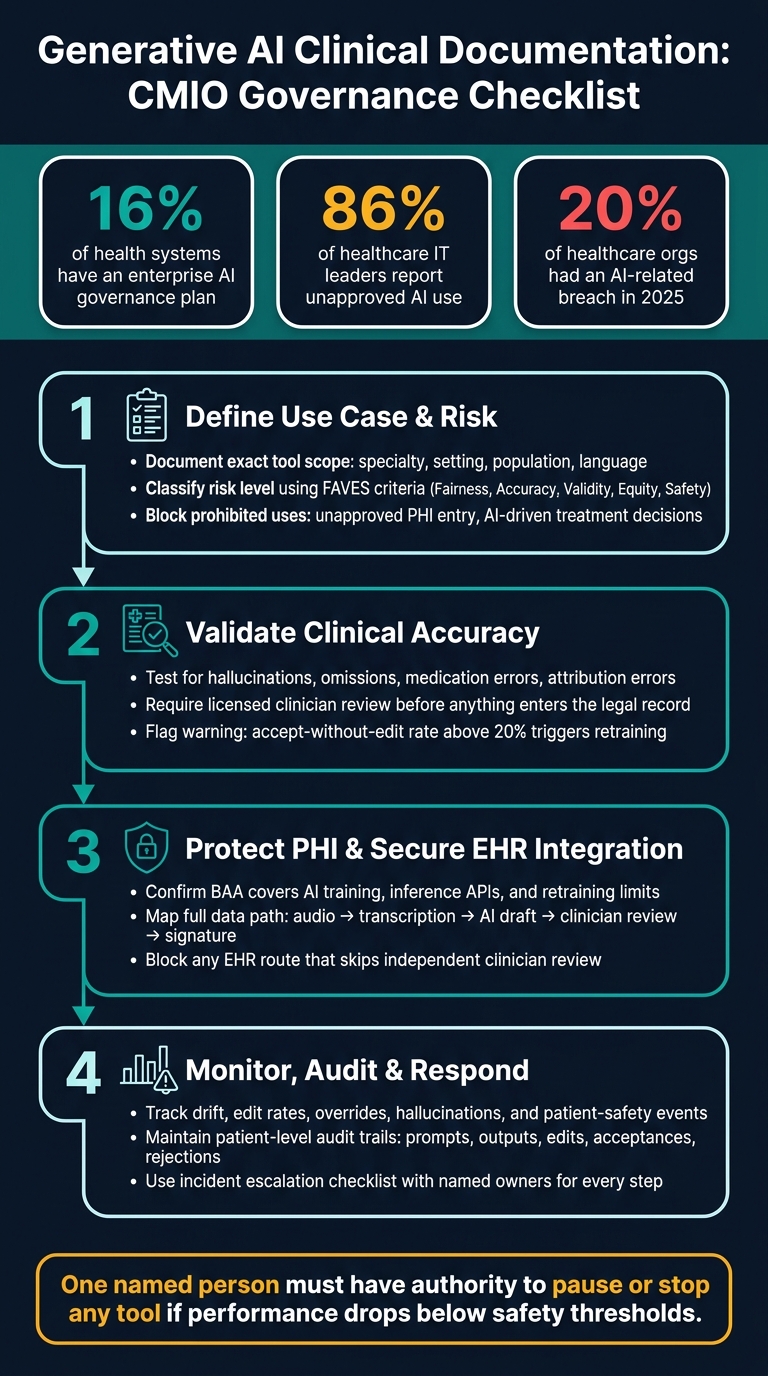
AI Clinical Documentation Governance: CMIO Approval Checklist
Clinical Documentation AI in the Real World: What Works, What Breaks, and Why
sbb-itb-535baee
1. Define the use case, risk level, and approval gates
Before a pilot starts, write down exactly what the tool can do, who owns it, and what has to be in place before deployment gets approved. This section goes step by step through use-case definition, risk classification, prohibited uses, and formal approval gates.
Document intended use and assign ownership
Start with the basics. Spell out exactly what the tool is allowed to do: draft progress notes, generate encounter summaries, or produce referral correspondence.
Then narrow the scope. Define the approved specialty, care setting, patient population, and language. Record the vendor, PHI exposure, and named owner in a central inventory so there’s no confusion later.
Classify risk and define prohibited uses
Not every documentation tool creates the same level of risk. A tool that drafts a referral letter is one thing. A tool that can shape clinical decisions or affect patient-facing messages is another.
Record fairness, accuracy, validity, equity, and safety findings in the risk file.
Your prohibited uses should be explicit, not implied. At a minimum, policy should bar clinicians from:
- Entering PHI into any unapproved tool
- Relying on AI-generated text without independent review
- Letting AI output directly drive treatment decisions or patient-facing messages
For tools that do not yet have FDA clearance, use the FDA's AI/ML-based SaMD framework as a governance benchmark for non-cleared tools [1]. Before any pilot, run the CDS exemption test. Ask whether the tool produces patient-facing output or executes actions without independent physician review. If either answer is yes, classify the tool outside the CDS exemption and send it for higher scrutiny [1].
Set approval criteria and reassessment dates
Each tool should move through formal gates - evaluation, pilot, production, and reassessment. And each gate needs its own evidence. No guesswork, no hand-waving.
| Approval Gate | Evidence Required | Success Criteria |
|---|---|---|
| Evaluation | Business case, CDS exemption test, vendor BAA review | Alignment with clinical strategy; risk tier assigned |
| Pilot | Risk-review records, source-attribution logs | Acceptance thresholds met; no material drift; clinician satisfaction |
| Production | Formal committee sign-off, incident response playbook | Documented human-in-the-loop protocol; audit trail active |
| Reassessment | Post-market monitoring logs, PCCP updates | Performance remains within safe parameters; no bias detected |
Set a formal reassessment date at the time of approval. Also trigger an unscheduled review anytime the model updates, the workflow changes, or the tool’s scope expands.
These gates should line up with current compliance timelines. ONC HTI-1 transparency enforcement took effect in early 2026, and the EU AI Act reached full applicability in August 2026 [2].
Only after approval should the tool move into clinician validation and human-review testing.
2. Validate clinical accuracy and keep a clinician in control
Once a tool clears approval gates, the next step is live validation inside your own clinical workflow. That's where problems often show up.
A tool can look fine in testing and still hallucinate, leave out key findings, or assign content to the wrong person during actual use.
Test for omissions, hallucinations, and workflow-specific failure modes
Validation needs to match how care is delivered in the real world, not how a vendor demo looks on a slide. That means testing across specialties, care settings, interpreters, multiple speakers, and incomplete documentation. You also need to check for hallucinated findings, critical omissions, incorrect negations, attribution errors, note bloat, medication errors, and specialty-specific workflow failures.
| Risk Category | Test Method | Acceptable Threshold | Owner | Remediation Path |
|---|---|---|---|---|
| Hallucinated findings | Blind chart review vs. AI output | Any fabricated clinical content | CMO / Clinical Informatics | Immediate suspension; root cause analysis |
| Critical omissions | Structured comparison against source encounter | Safety-relevant omissions or a validation performance drop greater than 5% from baseline | Quality & Patient Safety | Model rollback; vendor escalation |
| Medication errors | Review of drug names, doses, and routes | Any uncorrected medication error at sign-off | Pharmacy Informatics | Rule-based verification; revalidation |
| Incorrect negations / attribution errors | NLP audit of negated findings and multi-speaker encounter testing | Wrong-patient attribution or repeated negation errors | Clinical Informatics / Privacy Officer | Workflow redesign; revalidation |
| Specialty-specific workflow failures | Pilot testing per approved specialty | Performance within baseline ±5% | Specialty Lead + Informatics | Scope restriction until revalidation |
Use the FAVES criteria - Fairness, Accuracy, Validity, Equity, and Safety - to record results in the risk file. This gives you a clear way to reassess the tool at each approval gate.
Validation should end in a hard stop unless clinician review is part of the workflow.
Require licensed clinician review before anything enters the legal record
AI-generated text should stay pending until a licensed clinician edits, accepts, rejects, or regenerates it. No auto-signing. No auto-filing.
At this point, human review isn't just good practice. It's a legal control. Current state, federal, and EU rules require formal human oversight for high-risk healthcare AI.
Your EHR setup needs to enforce that rule. If the interface lets a clinician finalize AI-generated text without meaningful review, that's an unsafe design issue - not a user problem.
Train users and define escalation for unsafe output
That review step only works if users know what to reject, what to edit, and when to escalate. Training should cover allowed use, known failure modes, and banned shortcuts. Clinicians need to know that a note can look complete and still include a hallucinated finding or a missing allergy.
Set clear escalation rules for suspected patient harm, repeated hallucinations, systematic omissions, or unsafe acceptance of output. This matters even more when time pressure or a weak interface pushes clinicians to accept text without proper review. A high "accept without edit" rate is a warning sign, not a win. If it goes above 20%, or if edit rates look oddly low, trigger user retraining and interface review before the tool stays in production.
Document who was trained, when, and on which version of the tool. If an incident happens later, that audit record helps with review and response.
3. Protect PHI, assess the vendor, and integrate safely with the EHR
Passing clinical validation does not mean a tool is ready for production. Before any AI documentation tool touches live patient data, make sure PHI is handled the right way, the vendor can stand up to close review, and the EHR workflow has no weak spots. If there's a gap in any of those areas, treat it as a go-live blocker.
Confirm HIPAA, PHI handling, retention, and vendor obligations
Start with the BAA. It should spell out how the vendor handles AI training, inference APIs, model update rights, retraining limits, liability for AI-generated output, retention, and breach notice. Get hosting locations and retention periods in writing.
The HHS Office for Civil Rights enforces HIPAA rules for PHI used in AI training. It also treats algorithmic bias as a health equity issue under Section 1557. [3]
Once the contract language is set, move to the vendor's security posture and the model-specific ways things can go wrong.
Assess cybersecurity and model-related attack paths
The attack surface goes past the app itself. You need to protect the documentation workflow, the vendor environment, and the audit trail.
A July 2026 Medtronic breach started in corporate IT systems, not a clinical device. That's a good reminder that vendor review has to cover the vendor's broader IT environment, not just the tool being deployed. [1]
Standard cybersecurity review isn't enough here. AI adds its own risks. Agentjacking is a documented threat: in June 2026, Tenet Security identified 2,388 organizations with configurations where poisoned inputs can drive AI agents to execute attacker-controlled actions with legitimate credentials. [1] In a clinical documentation setting, that could mean unauthorized actions or bad clinical recommendations making their way into the workflow.
Require runtime inspection and immutable session logs that record prompts, inputs, outputs, and policy triggers.
Then follow the path from AI output into the EHR, because that's where documentation mistakes can end up in the legal record.
Map the full EHR workflow and prevent charting errors
Map the full data path: audio capture → transcription → AI generation → clinician review → chart insertion → signature → storage. Every handoff is a place where a charting error can enter the legal record, so each control needs to be explicit and system-enforced. The aim is simple: unreviewed AI text should never reach a signed note.
Keep AI drafting separate from deterministic, physician-controlled actions, and block any route that skips independent review. [1]
Use the table below as the vendor due-diligence checklist before production integration:
| Control Area | Key Questions | Evidence to Request | Reviewer |
|---|---|---|---|
| BAA and PHI limits | Does the BAA cover AI training, inference APIs, and limits on PHI use for model improvement? | Updated BAA with AI-specific provisions | Privacy Officer / Legal |
| Data residency | Is all data, including AI-generated clinical content, stored in the U.S.? | Hosting locations and subprocessor information | Privacy Officer / CISO |
| Retention and breach response | What are the retention periods for transcripts and outputs, and what is the vendor's breach notification process? | Data retention policy; incident response plan | Privacy Officer / Compliance |
| Vendor infrastructure | Does the security review extend to the vendor's broader corporate IT environment where patient data may reside? | Infrastructure overview; security assessment summary | CISO |
| AI-specific attack paths | Does the vendor use runtime inspection to detect prompt injection or agentjacking? | Runtime monitoring documentation; session-level audit log sample | CISO / Clinical Informatics |
| EHR workflow controls | Are pending states and human review checkpoints enforced before note insertion or signature? | Workflow diagram; integration controls | CMIO / Clinical Informatics |
| Audit trail completeness | Does the system log every edit, acceptance, rejection, regeneration, and policy trigger at the session level? | Audit log specification; sample log output | Compliance / Legal |
4. Monitor performance, maintain auditability, and respond to incidents
After production go-live, governance moves from upfront approval to constant monitoring and incident response. In plain terms, post-go-live governance never stops. You need to watch how the system performs, keep records that stand up to review, and know exactly when to pause or stop use.
Track accuracy, drift, overrides, and material changes
Track rejected drafts, edit rates, repeated omissions, hallucinations, clinician overrides, and patient-safety events. Those signals show whether the tool is helping, slipping, or creating risk.
Any material change should trigger revalidation. That includes changes to the model, prompt, workflow, or EHR integration. If one part shifts, the output can shift too.
For adaptive AI that retrains after deployment, define a Predetermined Change Control Plan (PCCP). The PCCP should spell out how the algorithm may update without requiring a new regulatory submission every time. It should also set clear revalidation triggers before any autonomous update takes effect.
Maintain complete audit records for internal and external review
Maintain patient-level audit trails for every AI-generated note, including prompts, outputs, edits, acceptances, rejections, and signature. Section 4 audit review should center on those logs to spot drift, errors, and unexplained changes, rather than logging again what Section 3 controls already capture.
Under ONC HTI-1, clinical users must have access to source attributes for predictive interventions, including training data demographics, exclusion criteria, and known limitations [3]. Your audit library should keep those source attributes together with policy records, evidence, findings, and vendor risk information.
A good audit record should make it easy to answer simple but high-stakes questions:
- What did the system produce?
- What did the clinician change?
- What was accepted or rejected?
- What changed over time, and why?
Use an incident escalation checklist with clear ownership
Treat hallucinations, PHI exposure, and documentation-workflow cyber events as incident triggers. When something fails, the response can't be vague or improvised. The team needs a set sequence and named owners.
Escalate in this order: detect and triage, preserve logs, notify named owners, assess patient impact and PHI exposure, route corrections through the documentation workflow, determine reporting duties under HIPAA and applicable state law, pause unsafe workflows, document root cause, and revalidate before restart. Each step needs a named owner and a documented completion date.
That ownership matters. If everyone is in charge, no one is in charge.
California AB 316, effective 2026, removes the "AI acted autonomously" defense, shifting full liability for AI-caused harm directly to the healthcare organization that deployed the tool [3].
Conclusion: A go-live and governance checklist for CMIOs
Governing generative AI in clinical documentation isn't a one-and-done signoff. It's a process that keeps going long after launch.
Governance holds up when the evidence is written down, owners are clearly named, and approval gates don't move just because there's pressure to ship. It also means one named person must have the authority to pause or reject any tool if performance drops below safety thresholds.
Regulatory pressure is climbing. That means documentation matters just as much as deployment. Post-deployment records and impact assessments need to stay complete and up to date.
These records turn policy into evidence.
| Documentation | What It Proves | Regulatory Driver |
|---|---|---|
| Source attribute logs | Transparency on training data and biases | ONC HTI-1 |
| Predetermined Change Control Plan (PCCP) | Protocol for autonomous algorithm updates | FDA SaMD Guidance |
| Incident playbooks | Response protocols for hallucinations and failures | HIPAA / State Laws |
| Risk review records | Risk analysis for validity, fairness, and safety | NIST AI RMF / HAIGS |
| Software bill of materials (SBOM) | Cybersecurity component inventory | NIST / HITRUST |
FAQs
How do we decide which AI documentation tools are high risk?
Use a tiered risk framework based on clinical impact, data sensitivity, and EHR integration depth.
Tools are high risk if they directly affect diagnosis, treatment, or triage. The same goes for tools with read-write EHR integration, since they can create patient safety or regulatory risk.
Document every tool in a central inventory. Track its intended use and data provenance. Then require multidisciplinary review, including:
- bias testing
- clinical validation
- strict contract controls
Who should own approval and stop-use decisions for these tools?
Approval and stop-use decisions for clinical AI tools should sit with a multidisciplinary AI Governance Committee. That committee should bring together leaders from clinical care, security, privacy, legal, compliance, informatics, and operations.
In plain terms, no single team should make the call alone. Clinical leaders can judge patient care impact. Security and privacy teams can flag data risks. Legal and compliance can check policy and regulatory issues. Informatics and operations can weigh how the tool fits into daily work.
Each AI tool should also have a named owner. That person is accountable for ongoing performance, safety monitoring, incident response, and day-to-day safe use.
Think of this role as the tool’s point person. If something drifts, breaks, or causes concern, everyone knows who owns the follow-up.
What should trigger revalidation after go-live?
Trigger revalidation after go-live whenever a material change affects the AI tool. That includes updates to the model, prompts, data sources, or clinical workflows.
Revalidate the tool if monitoring shows performance drift, bias, or safety metric breaches.
Any incident should also trigger a formal review and corrective action, including:
- near-misses
- patient complaints
- misclassifications
It also helps to reassess tools on a fixed schedule. A common approach is:
- annually for low-risk tools
- quarterly for higher-risk systems
