
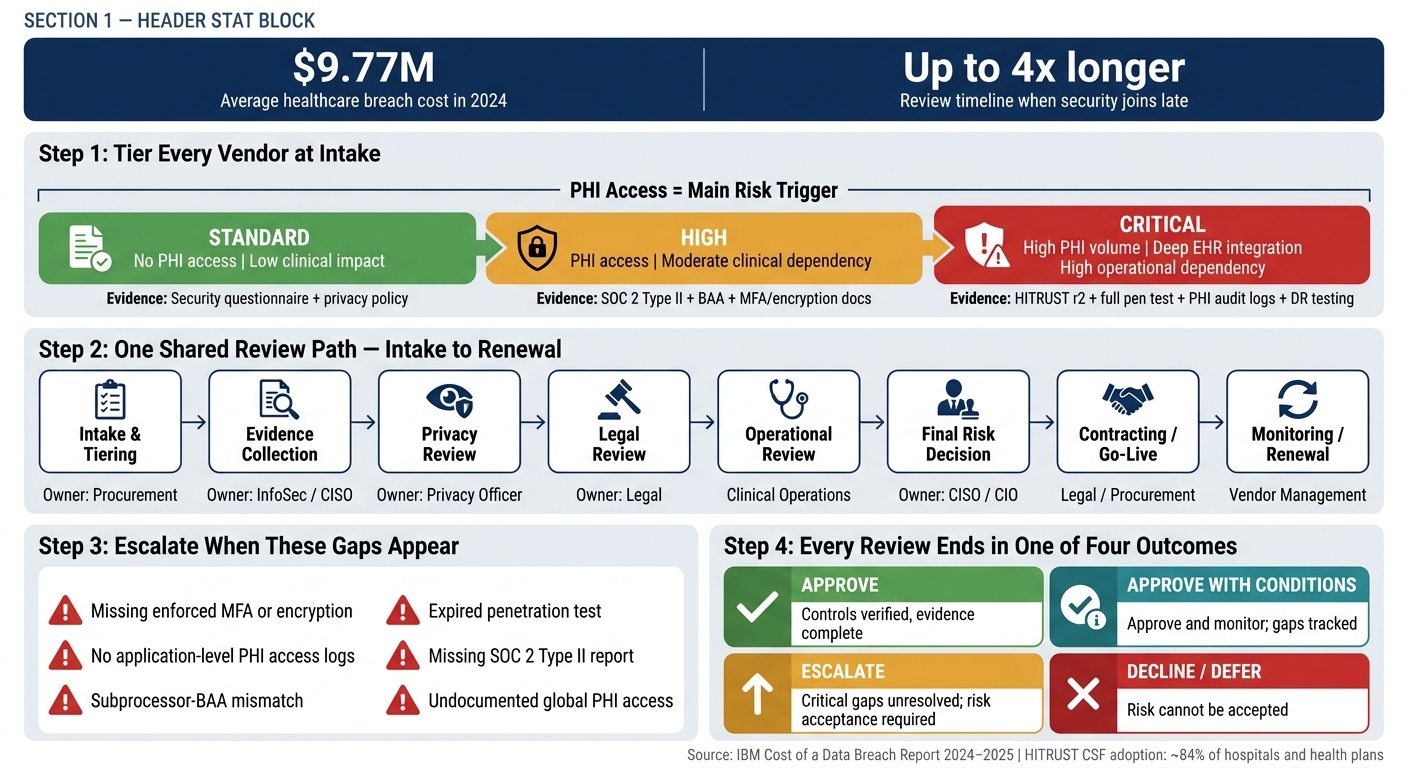
If procurement and security review vendors together at intake, hospitals can cut delays, spot PHI risk early, and avoid late-stage contract problems. That’s the core idea here.
I’d sum up the model like this:
- Start with one intake record so procurement, security, privacy, legal, and clinical teams work from the same facts.
- Tier vendors by risk at intake, with PHI access as the main sorting rule.
- Match review depth to the vendor’s risk level, not the contract value.
- Require proof, such as SOC 2 Type II, HITRUST r2, penetration test results, and BAA checks, instead of relying on self-attestation.
- Keep decision rights separate: procurement handles the deal flow, while security, privacy, legal, and clinical teams each make their own risk calls.
- End each review with one of four outcomes: approve, approve with conditions, escalate for risk acceptance, or decline/defer.
The article also makes the business case clear. Healthcare had the highest average breach cost of any industry: $9.77 million in 2024 and $7.42 million in 2025. And when security joins too late, a vendor review that should take one month can stretch to four months or more.
Here’s the model in one view:
| Area | Main point |
|---|---|
| Intake | One record, one owner set, one timeline |
| Risk trigger | PHI access is the main trigger |
| Tiering | Standard, High, Critical |
| Evidence | Questionnaire, SOC 2 Type II, HITRUST, pen test, logs, BAA |
| Workflow | One shared path from intake to renewal |
| Escalation | Triggered by missing controls, missing evidence, or PHI-related gaps |
| Final outcomes | Approve / Approve with conditions / Escalate / Decline or defer |
In short, I see this as a simple working model for making third-party risk management more consistent, less messy, and easier to track from intake through renewal.
Healthcare Vendor Review: Joint Procurement-Security Workflow
Creating Cyber Resilience: Your Guide to Healthcare Vendor Risk Management [On-Demand Webinar]
sbb-itb-535baee
1. Build a shared intake and ownership model
Start every vendor review in one place, before the questionnaire or contract work begins. In plain terms, that means one intake record, one set of owners, and one agreed timeline. If you skip that setup, teams end up running parallel reviews, sending duplicate requests, and dealing with rework at the worst possible moment.
Build one intake record with the fields that matter
Use a single intake record to turn the four rules into one review path. It should capture PHI access, what data the vendor will handle, all subprocessors, MFA-gated and logged offshore access, application-level audit logs for PHI access, and current SOC 2 Type II, HITRUST, and penetration test evidence, plus a bridge letter for SOC 2 reports older than three months.[1]
PHI access should drive the review path.[1] If the vendor uses offshore teams, list them as subprocessors and confirm that any PHI access is limited to MFA-gated, logged paths.[1]
Subprocessor transparency matters just as much. Procurement should check the subprocessor list against BAA coverage before the review starts. If that doesn’t happen, a mismatch can stall the process for two to three months.[1]
Assign ownership with a simple RACI
Procurement owns intake and initial risk tiering. InfoSec owns the security assessment and evidence review. Privacy owns HIPAA compliance and BAA validation. Legal owns BAA redlines and liability terms. Clinical Operations owns workflow impact and system-dependency risk.
| Stage | Procurement | CISO / InfoSec | Privacy Officer | Legal | Clinical Operations |
|---|---|---|---|---|---|
| Intake | R/A | C | C | I | C |
| Risk Tiering | R/A | C | C | I | C |
| Evidence Review | I | R/A | C | I | I |
| Contracting | R | C | C | A | I |
| Onboarding | R | C | C | I | A |
This split keeps procurement, security, privacy, legal, and operations in one shared workflow.
Set handoffs and service-level targets
Set clear service-level targets for each handoff so requests don’t bounce from team to team. If fields are missing, send the request back to the requester instead of having security or procurement fill in gaps on the fly. Keep completed SIG or CAIQ questionnaires and the bridge letter ready so the next review step can begin right away.[1]
Complete intake once so procurement, privacy, and security can make one decision.
With intake and ownership in place, apply the risk-tiered review rules next.
2. Apply risk-tiered review rules
Once intake is locked down, the next move is simple: decide how much review each vendor needs. The depth should track the risk the vendor brings. Set the tier once in the shared intake record, then carry that same tier through the rest of the review.
Define critical, high, and standard vendor tiers
The clearest dividing line is PHI access.
Standard vendors don’t access PHI and have low clinical impact. High vendors handle PHI or connect to internal systems with moderate clinical impact. Critical vendors sit at the top of the risk stack: high PHI volume, deep EHR integration, and direct operational dependence, where downtime can affect patient care.
Set the initial tier based on:
- PHI access
- Connectivity
- Clinical impact
- Subprocessor exposure
Match each tier to the right level of evidence
Review depth should fit the tier. You don’t want to overdo it for a low-risk vendor, and you definitely can’t cut corners for a critical one.
| Risk Tier | Primary Criteria | Required Evidence |
|---|---|---|
| Standard | No PHI access; low clinical impact | Security questionnaire (SIG or CAIQ); privacy policy review |
| High | PHI access; moderate clinical dependency; system connectivity | SOC 2 Type II documentation; BAA; MFA and encryption documentation |
| Critical | High PHI volume; deep EHR integration; high operational dependency | HITRUST r2; full penetration test report; application-level PHI access audit logs; disaster recovery testing evidence |
For critical vendors, application-level PHI access logs are required. Server logs aren’t enough.
Also check that any SOC 2 Type II or HITRUST scope covers the exact app or API being purchased. A report may look fine on paper, but if the scope misses the product under review, it doesn’t answer the main risk question.
Approximately 84% of hospitals and health plans use the HITRUST CSF in their risk management processes [1]. That said, the scope still needs to match the specific app or API being reviewed.
These thresholds feed into the same joint workflow and escalation rules in the next step.
Use documented rules to keep decisions consistent
The aim is simple: one threshold, one tier, one review path. Written thresholds help procurement and security make the same call every time. Document them once, then use them at intake, during review, and again at renewal.
3. Run one joint workflow from intake to renewal
Once risk tiers are in place, send every vendor through one shared workflow from intake to renewal. Don’t split teams into side processes that lead to duplicate work.
Follow one review path, not parallel side processes
The review should move through one shared sequence, with each team owning a clear part of the process:
| Stage | Primary Owner | Key Focus |
|---|---|---|
| Intake & Tiering | Procurement / Vendor Management | PHI access classification, risk tier, contract status |
| Evidence Collection | InfoSec / CISO | SOC 2 Type II, HITRUST, penetration tests, MFA, encryption |
| Privacy Review | Privacy Officer | HIPAA compliance, BAA, minimum-necessary access |
| Legal Review | Legal | BAA redlines, subcontractor obligations |
| Operational Review | Clinical Operations | Workflow and downtime impact |
| Final Risk Decision | CISO / CIO | Risk scoring and final approval |
| Contracting / Go-Live Readiness | Legal / Procurement | Final signatures and required conditions |
| Monitoring / Renewal | Vendor Management | Recurring assessments and bridge letters |
A single path cuts down on parallel reviews and makes the next step much easier: setting escalation rules.
Separate missing evidence from residual risk
Don’t lump everything together. Missing evidence is a document gap. Control gaps are remediation items that need an owner and a due date.
That distinction matters. If a vendor forgot to send a report, that’s one issue. If the vendor lacks a control you need, that’s a different problem and should be tracked that way.
Keep one system of record for decisions and deadlines
Use one shared system of record for the full workflow, including questionnaire responses, evidence, findings, decisions, and renewal dates. Standardizing third-party risk assessment questions across these reviews ensures data consistency.
If those details live in email threads, spreadsheets, and separate team folders, things slip. One place for deadlines and review notes keeps the process moving.
Next, define escalation triggers and decision rights so exceptions do not stall the review.
4. Define escalation paths, decision rights, and success measures
With one workflow and one system of record in place, escalation should help resolve exceptions fast.
Set clear triggers for mandatory escalation
PHI access is the main trigger. If PHI is in scope, route the vendor to security, privacy, and legal review.
Escalate when required controls or evidence are missing. That includes enforced MFA or encryption, application-level access logs, subprocessor-BAA mismatches, expired penetration tests, missing SOC 2 Type II reports, or undocumented global PHI access.
Document who makes which decision
After you set escalation triggers, assign one decision owner to each risk type.
Unclear approval rights are one of the most common reasons vendor reviews get stuck. Cybersecurity approves technical controls. Privacy approves HIPAA and BAA sufficiency. Legal approves BAA redlines and liability terms. Clinical Ops approves operational necessity and dependency risk. Procurement owns intake, tiering, and contracting, but not risk acceptance.
That split keeps the review moving without blurring risk ownership.
Conclusion: Four decision outcomes and how to measure the model
When the review ends, record one of four outcomes and track cycle time and exception aging.
Every completed review should end in one of these four outcomes:
- Approve
- Approve with conditions
- Escalate for residual risk acceptance
- Decline or defer
Approve with conditions means approve and monitor. Escalation makes sense when critical gaps are still unresolved. Decline or defer fits cases where the risk cannot be accepted.
Track cycle time and exception aging to see if the model is reducing friction.
FAQs
How do we launch this model with limited staff?
Focus on standardization and automation to cut manual work.
Start with a centralized intake process that uses conditional logic to sort vendors by risk level. That way, your team spends time on high-risk assessments, not low-risk reviews that don't need much attention.
Use a RACI matrix to make ownership clear and stop duplicate effort. Then automate repeat tasks like evidence collection, questionnaire processing, and routing.
This frees up staff to spend more time on the work that calls for judgment, like compensating controls, escalations, and final risk-acceptance decisions.
What if a vendor lacks current security evidence?
Block go-live until the vendor provides current, verifiable security evidence.
Don’t rely on self-reported claims alone. Ask for proof, such as:
- a recent SOC 2 Type II report
- a penetration test summary
- a HITRUST certification
If that evidence is missing or expired, the vendor needs to fix the gap or submit a formal written exception. That exception should spell out the compensating controls, the residual risk, and an expiration date.
Without one of those two paths, do not allow production access to sensitive systems or data.
How often should vendor tiers and reviews be updated?
Update vendor tiers and reviews on a set schedule, and also any time major changes happen. That keeps risk profiles current instead of letting them go stale.
High-risk or critical vendors may need reviews every month or every quarter. Lower-risk vendors are often reviewed once a year, though some organizations reassess them every two to three years based on internal policy.
A vendor’s tier should also be reassessed right away after major changes, such as:
- Security incidents
- Leadership changes
- New AI features
- Scope changes
- Major vulnerability disclosures
That way, the vendor’s risk level reflects what’s happening now, not what was true six months ago.
Related Blog Posts
- How to Conduct Effective Third-Party Risk Assessments
- Best Practices for Supplier Risk Management in Healthcare
- The CIO and the CISO. Closing the Operational Divide on Vendor Risk.
- The Next Crisis Is Already in Your Vendor List. How Censinet Helps You Find It First.The Five-Minute Vendor Review. Inside the Assessor Agent Workflow.
