
Here’s the short answer: HIPAA does not set one fixed retention period for every backup that contains ePHI. The six-year rule applies to HIPAA compliance records, while backup retention for patient and business data should match state record laws, CMS or Medicare rules, contracts, legal holds, and restore needs.
If I were boiling this down for a reader in a hurry, I’d say this:
- Keep backup copies restorable
- Keep HIPAA documentation for at least 6 years
- Do not confuse backup retention with medical record retention
- Use the longest rule that applies when a backup is the last usable copy
- Test restores often, because a backup that won’t restore does not solve much
- Use offline or immutable copies, since 95% of healthcare ransomware attackers tried to hit backups and 66% of those attempts worked
- Track vendor duties in BAAs, especially for cloud and SaaS systems
A few numbers make the risk plain:
- In one 2022 study of 374 ransomware attacks on U.S. healthcare delivery groups, only 20.6% reportedly restored from backups
- Sophos reported in 2024 that 95% of healthcare ransomware attackers targeted backups
- Of those backup attacks, 66% succeeded
That leads to one simple rule: backup retention is about recovery, legal record retention is about how long records must exist, and HIPAA documentation retention is its own six-year track. If you keep those three buckets separate, the policy gets much easier to write and defend.
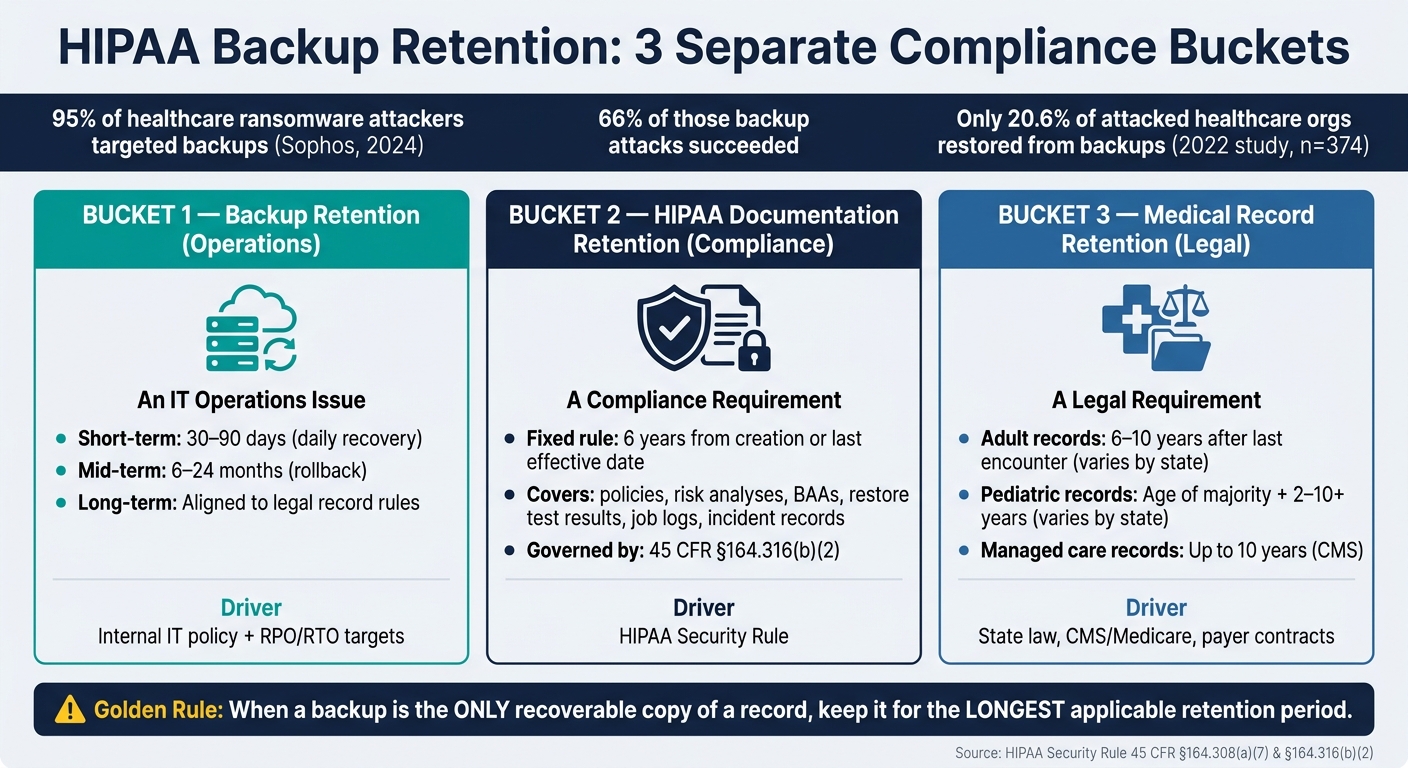
HIPAA Backup Retention: 3 Separate Compliance Buckets Explained
HIPAA Compliant Contingency Plans for Disaster Recovery
sbb-itb-535baee
What HIPAA actually requires for backups and retention
Once you separate backup copies from record retention, HIPAA’s baseline gets a lot easier to understand.
HIPAA’s main backup rule sits in 45 CFR §164.308(a)(7), under the Security Rule’s Contingency Plan standard. It requires covered entities and business associates to put three separate plans in place: a Data Backup Plan, a Disaster Recovery Plan, and an Emergency Mode Operation Plan.[2][1]
Each plan has its own job. The Data Backup Plan keeps retrievable copies of ePHI. The Disaster Recovery Plan focuses on restoring systems after a loss. And the Emergency Mode Operation Plan is about keeping critical work moving when normal operations are disrupted.
The Data Backup Plan under the HIPAA Security Rule
The Data Backup Plan requires organizations to create and maintain retrievable copies of ePHI.[2][3][1] Put simply, the data has to be restorable when you need it.
HHS/OCR and NIST SP 800-66 Rev. 2 connect backup design to risk analysis, recovery targets, system criticality, and the threat environment.[14][1][15] In plain English, a backup plan shouldn’t be built on guesswork. It should match the systems you run, the risks you face, and how fast you need to recover.
OCR enforcement shows why restore testing matters so much. In one settlement, Plastic Surgery Associates of South Dakota paid a $500,000 penalty after a ransomware incident affected about 10,229 individuals and the organization could not restore servers from backup, forcing it to pay the ransom.[9][10] The corrective action plan required robust backup procedures and regular restore testing.[9][10]
That’s the part many teams miss. A backup that looks fine on paper but fails during a crisis isn’t much help.
The six-year rule for HIPAA documentation
Under 45 CFR §164.316(b)(2), HIPAA requires Security Rule documentation to be retained for at least six years from the date of creation or the date last in effect, whichever is later.[11][12][13][8] That six-year rule applies to the documentation behind the backup program, not to the backup copies themselves.
For backup programs, that means keeping the records that show how your contingency plan works and how you support it in practice. This includes:
- written policies
- risk analyses
- BAAs
- restore test results
- job logs
- incident records[3][4][1][5][7][8]
Backup job logs, disaster recovery test results, and policy documents should stay retrievable for six years, even after those policies are updated or retired.[4][6][7][8] If HHS/OCR reviews your contingency planning, those records help show what you had in place and when.
That documentation floor is separate from any longer retention periods required under state or federal record laws.
How to align backup retention with U.S. healthcare record laws
HIPAA's six-year rule applies to compliance documentation. It does not set the retention period for clinical records or the backup copies that contain them. In plain English: backup retention should track the records inside the backup, not just the HIPAA documentation floor.
HIPAA documentation retention vs. medical record retention
The six-year HIPAA rule covers required compliance records such as policies, procedures, risk analyses, BAAs, training logs, and breach documentation. Clinical records sit in a separate bucket, and their retention timelines are often much longer.
In most cases, state law controls medical-record retention. CMS and Medicare can also extend retention for some records. For certain provider types, federal rules may call for six years for Medicare fee-for-service documentation, five years after a cost report closes, or 10 years for some managed care records.[16][19] Pediatric records often stay even longer, since many states require retention until the patient reaches the age of majority, plus extra years.[21]
The table below breaks out the main retention categories:
| Retention Category | Typical Requirement | Governing Source |
|---|---|---|
| HIPAA compliance documentation | 6 years from creation or last effective date | 45 CFR §164.316(b)(2) |
| Adult medical records | 6–10 years after last encounter (varies by state) | State law; CMS/Medicare may also affect certain records |
| Pediatric medical records | Age of majority plus 2–10+ years (varies by state) | State law; professional guidance (e.g., AHIMA) |
| Operational backup retention | Short-term recovery copies | Internal IT policy |
| Long-term backup archives | 6–10+ years | Aligned to legal record retention requirements and HIPAA documentation rules |
Operational backup windows exist for recovery. They are not the same thing as legal retention. Once you split short-term recovery copies from archive records, the next move is simple: line up backup retention with the longest rule that applies.
When backups must follow the longest retention requirement
Use the longest applicable retention period for each backup tier or data class when a backup is the only recoverable copy of a record. If that backup is the last usable copy, keep it for the longest period required under state law, CMS or Medicare rules, payer contracts, or legal hold.[16][18][20] Payer contracts, especially for Medicare Advantage and other managed-care arrangements, can set retention periods that go beyond both state law and HIPAA's six-year documentation rule.[18]
Legal holds change the picture fast. If litigation or a regulatory investigation is pending, normal deletion schedules must stop at once, and the backup sets tied to that matter have to be kept until the hold is formally lifted.[20]
The day-to-day takeaway is to document the retention reason for each data class. Your policy should spell out:
- which rule applies
- whether the backup is the only recoverable copy
- whether retention is driven by state law, CMS, a contract, or a legal hold[16][17][18]
That kind of mapping helps turn a messy backup estate into something your compliance, legal, and IT teams can all follow without guesswork.
How to build a HIPAA-compliant backup retention policy
Once you’ve mapped retention by data class and legal trigger, the next step is to turn that work into a policy. The main idea is simple: separate recovery from archival retention and tie both to enterprise risk.
Use tiered retention for daily recovery, monthly rollback, and long-term archives
A tiered model works because it separates three different jobs.
The short-term operational tier handles day-to-day recovery. Think nightly full backups and hourly incrementals kept for about 30–90 days. This is the tier you use for routine restores.
The midterm rollback tier covers problems that don’t show up right away. Weekly or monthly backup sets are often kept for 6–24 months. Sometimes the only clean restore point is one from three months ago.
The long-term archival tier is driven by legal retention rules. Annual or semiannual archives should line up with the longest rule that applies to each data class, such as state medical-record retention laws, CMS conditions of participation, payer contracts, or legal holds. Your Compliance and Legal teams should confirm the exact rule for each system and jurisdiction.
From there, assign each workload its retention window, backup cadence, and archive rule.
Map retention to RPO, RTO, and system criticality
Not every system needs the same backup frequency or the same depth of retention. Recovery Point Objective (RPO) means how much data loss is acceptable. Recovery Time Objective (RTO) means how fast the system must be back online. Those two targets should shape the backup design for each workload.
For example, one healthcare best-practice pattern sets patient care systems like EHR, imaging, and scheduling at about a 15-minute RPO and 4-hour RTO, while administrative systems like billing and HR can live with a 1-hour RPO and 24-hour RTO.[25] The table below turns that into a workload-based policy using the same data classes and legal drivers already identified.
| Workload | Criticality | Target RPO / RTO | Backup Frequency | Retention (Short / Medium / Long) | Key Legal Drivers |
|---|---|---|---|---|---|
| EHR (inpatient/outpatient) | Tier 1 | RPO ≤ 1 hr / RTO ≤ 4 hr | Hourly incrementals; daily full | 60 days / 24 months / state medical record laws | HIPAA Security Rule; state medical record laws |
| PACS / Imaging | Tier 1–2 | RPO 4 hr / RTO 8–24 hr | Daily full + block-level replication | 30 days / 12–24 months / radiology record policy | HIPAA; CMS; state imaging retention requirements |
| Lab Information System | Tier 1 | RPO ≤ 1 hr / RTO ≤ 4 hr | Hourly incrementals; daily full | 60 days / 24 months / lab record laws | CLIA; HIPAA; state lab test retention |
| Billing / RCM | Tier 2 | RPO 4–24 hr / RTO 24 hr | Daily backups | 90 days / 36 months / financial policy | IRS; payer contracts; state financial laws |
| Identity / Directory | Tier 1 | RPO 1–4 hr / RTO ≤ 4 hr | Config snapshots every 4 hr; daily backups | 30 days / 12 months / config retention policy | HIPAA availability; security policy requirements |
| Email / Collaboration | Tier 2–3 | RPO 24 hr / RTO 24–48 hr | Daily backups; journaling as needed | 30 days / 12–36 months / litigation hold | litigation discovery; legal hold; organizational policy |
| Vendor SaaS (PHI) | Tier 1–2 | Per BAA; often ≤ 4 hr | Per vendor capabilities (documented in BAA) | Per org policy; documented in BAA | HIPAA BA requirements; state laws; contract terms |
This table should be owned jointly by IT and Compliance and attached to the formal backup retention policy. If retention changes, document the ticket, the reason, and the approval. That paper trail matters. It shows the policy wasn’t changed on a whim.
Once the tiers are set, the next step is enforcement through deletion, access, and evidence controls.
Define controls for deletion, access, and evidence retention
A schedule on paper isn’t enough. It has to turn into rules the organization can enforce. Three areas need clear policy language.
Lifecycle and deletion rules should be automated whenever possible. Configure backup software and object storage to delete data at the end of each tier’s retention window. Secure destruction should line up with NIST SP 800-88: cryptographic erasure for encrypted backups, verified overwriting, or physical destruction or degaussing for tapes.[23][24] Log every deletion job, and make sure legal holds pause automated deletion until the hold is released.
Restrict backup repository access with RBAC. Limit administrative rights to approved backup administrators and security staff. Service accounts used by backup software should have only the permissions they need. Segment backup systems, require MFA for privileged access, and review access every quarter.
Audit evidence shows the policy is recoverable, lawful, and defensible. Keep restore tests, backup logs, deletion records, and change tickets for six years or longer if another rule requires it.[22] For Tier 1 restore tests, record the scope, the achieved RTO, and any remediation work. If an audit or investigation happens later, that record shows your due diligence.
How to govern backup retention across vendors and cyber risk programs
Backup retention governance doesn't stop with IT. Vendor, cloud, and business associate retention rules need to line up with the organization's HIPAA duties and record-retention rules. And that same framework has to cover every vendor and cloud service that stores or backs up ePHI.
That usually means several teams have to work together: IT, security, compliance, legal, HIM, and vendor management.
Business Associate Agreements and vendor retention obligations
Any vendor that creates, receives, maintains, or transmits ePHI is a Business Associate under HIPAA. That relationship needs a signed BAA. Put simply, the BAA is what makes backup and retention duties enforceable.
A BAA must spell out who backs up ePHI, how long those backups stay in place, and how ePHI is returned or destroyed when the contract ends. That can include cryptographic erasure, certified destruction, or documented anonymization. Those same duties also need to flow down to subcontractors that handle ePHI or backup media.[28][30]
It's not enough to trust the paper. You need to check the BAA against what the vendor is actually doing. That means using third-party risk assessment questions, SOC 2 or ISO 27001 reports, and periodic configuration checks.[35][36]
For BAAs, the six-year clock starts when the agreement ends.[27][29][30]
Once those vendor duties are clear, the next step is simple: can the backup model hold up during an attack?
Ransomware-resilient retention models for healthcare
Ransomware-ready retention needs offline or immutable copies. Network-connected storage alone isn't enough. Policy has to require these controls, and vendor contracts have to support them.
Offline or logically isolated copies stored on tape, removable drives, or in a separate cloud account with different credentials are much harder for ransomware to reach during an attack. Immutable or WORM (Write Once, Read Many) storage blocks changes or deletion for a set retention period, even for administrators.[31][32][33]
A practical model is 3-2-1-1-0:
- Three copies
- Two media types
- One offsite copy
- One offline or immutable copy
- Zero restore errors, checked through integrity testing[31][34]
Retention only does its job if the backup setup can withstand deletion, encryption, and credential theft. Short-retention operational backups and long-retention immutable archives do different jobs, but they work best together.
| Backup Model | Threat Coverage | Cost Profile | Legal/Compliance Alignment | Recovery Value |
|---|---|---|---|---|
| Fast, short-retention operational backups | Hardware failure, config errors, and recent data loss | Higher per-GB cost; optimized for rapid access | Supports HIPAA availability and contingency planning | High for day-to-day restores of clinical and billing systems |
| Long-retention immutable/WORM archives | Ransomware and malicious deletion; enables rollback before compromise | Lower per-GB using archival tiers; managed through lifecycle policies | Supports long-term legal retention and recovery after compromise | Critical for forensic investigations, regulatory inquiries, and large-scale attacks |
Periodic restore testing is what connects both models. An immutable copy that has never been tested is just an assumption, not a recovery plan.
Those controls also need one place where teams can track contracts, assessments, and remediation work without hunting through email threads and spreadsheets.
Using Censinet to document and oversee backup retention risk
Censinet RiskOps™ puts backup policies, vendor assessments, BAAs, and remediation tasks into one system of record. Versioned records help show what was approved, when, and by whom.[26][4]
When an assessment finds a gap, like a vendor missing immutable storage or using a shorter retention window than the BAA requires, that issue can be tracked as a remediation task and routed to the right stakeholders in compliance, legal, IT, and security through guided workflows. The result is a defensible system of record for backup retention oversight.
Conclusion: Build retention schedules that are recoverable, lawful, and defensible
HIPAA requires a documented backup capability, but it does not set one retention period for all ePHI backups. The real question is simpler: can you restore those backups, justify how long you keep them, and show why that decision makes sense?
In practice, backup retention, HIPAA documentation retention, and medical record retention are three separate duties. Backup retention is an operations issue. HIPAA documentation retention follows HIPAA’s six-year documentation rule. Medical record retention is driven mostly by state law and CMS. Once you separate those buckets, it becomes much easier to build a policy around the longest rule that applies to each type of data.
A strong retention schedule pulls from four inputs:
- Legal requirements such as state law, CMS, and HIPAA documentation rules
- RPO and RTO targets based on how critical each system is
- Ransomware resilience through immutable or isolated copies
- Vendor governance backed by enforceable BAAs
That setup only holds up if the policy is reviewed and tested on a set schedule.
Retention policies need regular review. Compliance, legal, IT, and security should confirm what the retention rules are. IT should verify that restores from each backup tier still work. Security should check that ransomware safeguards are still in place. Test results, policy approvals, and exception records should be documented and kept as proof that the program is working. Test it, approve it, review it, and keep the evidence.
FAQs
How long should we keep ePHI backups?
HIPAA does not set a single retention period for all ePHI backups. Instead, your retention policy should match the longest rule that applies under federal regulations, state laws, and payer contracts.
HIPAA does require compliance documentation to be kept for at least 6 years. Medical records, however, often need to be retained for 7 to 10 years or even longer for pediatric records, depending on state and federal rules.
So in practice, backup retention should line up with those record-retention schedules. You should also document destruction when backups reach the end of their retention period.
When is a backup subject to the longest retention rule?
When more than one rule applies to the same backup - like HIPAA, state law, payer contract terms, or malpractice insurance guidance - you go with the longest retention period.
Put simply: if one rule says keep it for 6 years and another says 10, you keep it for 10.
That means organizations need to review all retention rules tied to that record type and follow the strictest one.
If there's an active legal hold, government investigation, or audit, destruction has to stop. That pause applies to all records, including backups, and stays in place until the hold is formally released.
What backup evidence must be kept for six years?
Under HIPAA, organizations must keep compliance documentation for at least six years from the date it was created or the date it was last in effect, whichever is later.
That rule applies to backup-related evidence like test records, runbooks, disaster recovery exercise documentation, and system audit logs. It also applies to policies and procedures, risk analyses, BAAs, security incident reports, and training records.
