
I don’t count a completed backup as proof that recovery will work. I test whether ePHI can be restored safely, within approved recovery time and data-loss limits - and whether staff can use the restored systems for patient care.
My approach covers 3 steps:
- Plan: Identify systems and dependencies, set recovery targets, and define pass/fail checks.
- Test: Restore in an isolated setting, check data and security controls, and exercise clinical downtime workflows.
- Fix: Record results, assign owners to gaps, retest repairs, and update plans as risks or systems change.
HIPAA does not set one testing schedule for everyone. I base test frequency on risk and patient-care needs, review vendor recovery results, and retain required Security Rule documentation for 6 years from creation or its last effective date, whichever is later.
The goal is <u>tested recovery readiness</u> - not a claim that one restore test proves HIPAA compliance.
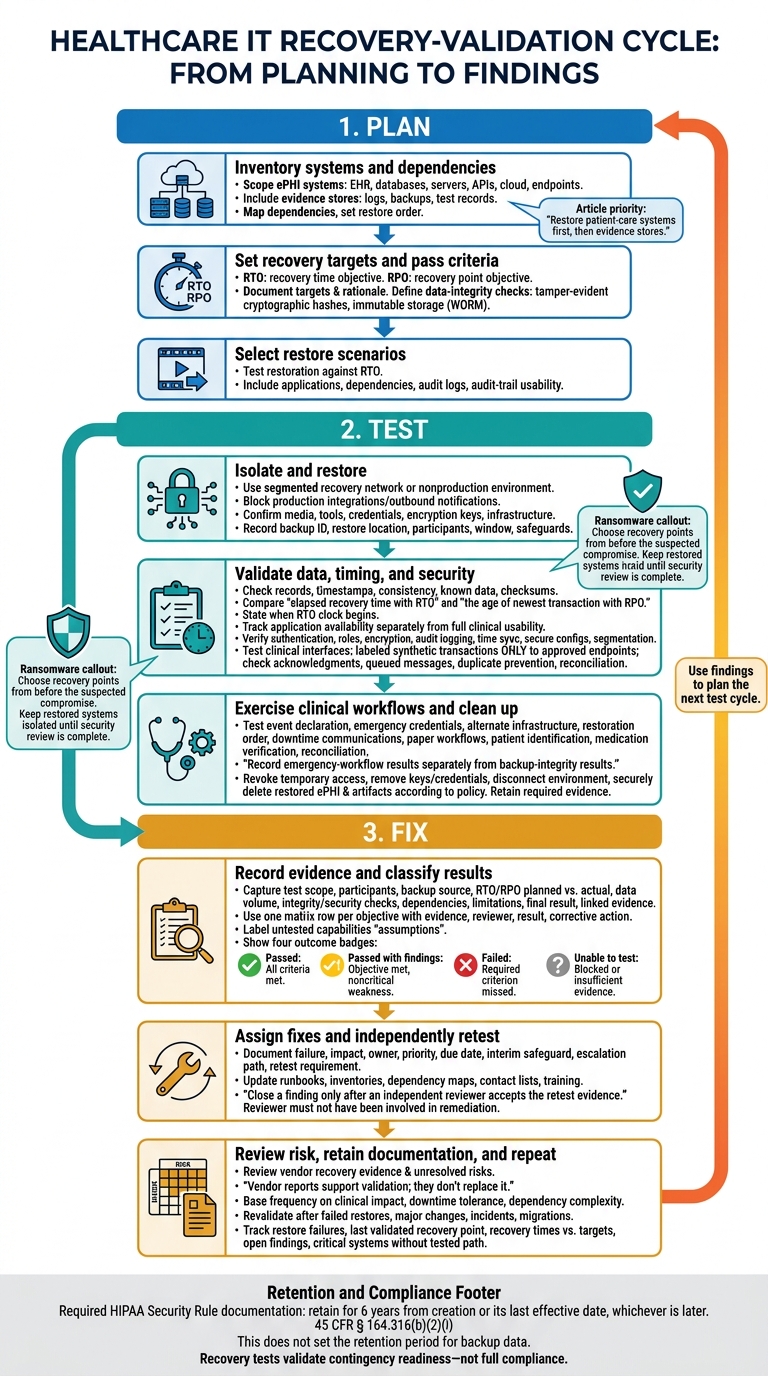
HIPAA Backup Testing: Recovery Validation Cycle
Recovery Testing - CompTIA Security+ SY0-701 - 3.4
sbb-itb-535baee
Step 1: Plan the Recovery Test
Before testing, define what’s in scope, which dependencies matter, and what evidence will prove recovery. This plan guides the restore tests in Step 2.
List ePHI Systems and Recovery Dependencies
Inventory your ePHI environment, including EHR systems, databases, file servers, APIs, cloud services, and endpoints. Include evidence stores, too: logs, backup sets, and test records.
Map dependencies so logs and audit trails stay accessible during and after recovery. Restore patient-care systems first, then evidence stores. Use the dependency map to set the restore test order in Step 2.
Define Recovery Targets and Pass Criteria
Record each system’s recovery time objective (RTO) and recovery point objective (RPO). Match RPOs to how quickly data changes and how often it’s updated. Document why you chose each target.
Set data-integrity pass criteria using tamper-evident cryptographic hashes and immutable storage (WORM). Verify data integrity against those criteria during both backup and restore. These targets become the pass/fail criteria in Step 2.
Select Restore Tests
Test whether restores meet the RTO. Include integrated scenarios that test applications and audit logs together, and verify that recovered logs and audit trails are usable.
Step 2: Test Restores and Contingency Plans
Use the scoped plan from Step 1 to run the test in a segmented recovery network or another nonproduction environment. Block production integrations and turn off outbound test notifications. Record the backup ID, restore location, participants, test window, and safeguards.[4][5]
Check Data Integrity and Recovery Times
Before restoring, confirm that backup media, recovery tools, credentials, encryption keys, and required infrastructure are available. Restore representative applications and databases. Check record counts, timestamps, database consistency, known patient or test records, and checksums where appropriate.[1][7]
Record errors, operator actions, and start and finish times. Compare elapsed recovery time with the RTO and the age of the newest transaction with the RPO. State when the RTO clock starts: at outage declaration or restore initiation. Track application availability separately from full clinical usability.[6][2][4]
Verify Security Controls and Clinical Connections
Test authentication, role-based permissions, emergency access, encryption, audit logging, time synchronization, secure configurations, and network segmentation. Send labeled synthetic transactions ONLY to approved test endpoints.
Check clinical interfaces for acknowledgments, queued messages, duplicate prevention, and reconciliation after reconnection. Limit vendor remote access to authorized users during the approved test window, and log their activity. Keep production connections blocked until security and clinical owners approve release.
For ransomware exercises, choose recovery points from before the suspected compromise, not simply the latest backup. Check their source history and accessibility. Scan restored content for known malicious files, review indicators of compromise, and inspect administrative accounts, startup tasks, and configurations. Keep restored systems isolated until security review is complete. HHS guidance recommends periodically testing restorations, checking backup integrity, and considering offline backups.[6][3]
Once the restore and control checks pass, test how people and processes support recovery.
Test Disaster Recovery and Emergency Mode Workflows
Include clinical, IT, security, privacy, compliance, facilities, communications, leadership, and relevant business associates. Exercise who declares the event, how emergency credentials work, which alternate infrastructure is used, and the restoration order.
Test downtime communications, paper workflows or read-only access, patient identification, medication verification, and reconciliation after service resumes. Record emergency-workflow results separately from backup-integrity results.
After collecting evidence, revoke temporary access, remove temporary keys and credentials, and disconnect the test environment. Securely delete restored ePHI, snapshots, replicas, and temporary logs according to retention and media-disposal policy. Retain only the required evidence.
Use scenario-based exercises only to validate the recovery paths, owners, dependencies, and acceptance criteria in your test plan.
Step 3: Record Results and Fix Recovery Gaps
When the test ends, bring the results together in one validation record with a short list of corrective actions. Classify each result against the Step 1 pass criteria, using the Step 2 evidence to support it.
Create the Test Record and Evidence Matrix
Include these details in the test record:
- Test details: Test ID; date, time, and time zone; scope; systems and ePHI covered; scenario; participants and approvers.
- Recovery details: Backup source, location, date, and recovery point; planned and actual RTO/RPO; recovered data volume.
- Validation details: Integrity and security checks; dependencies tested; limitations; final result; linked evidence.
The record should make clear whether the test met the recovery targets and security checks set earlier. Separate successful production recovery from limited nonproduction validation. Label untested capabilities as assumptions, not verified results.
Use one matrix row per objective or pass criterion. Link retained evidence, keep original logs, and record reviewer sign-off. Include the time zone with timestamps, and store ePHI artifacts in approved, access-controlled, encrypted storage.[8]
| Objective | Evidence to link | Reviewer | Result to record | Corrective-action reference |
|---|---|---|---|---|
| Restore the approved recovery point | Backup catalog and restore log | Database administrator | Actual recovery point; passed, passed with findings, failed, or unable to test | Linked finding, if needed |
| Meet the approved RTO | Incident timeline and system-availability log | Business continuity lead | Target versus measured duration; passed, passed with findings, failed, or unable to test | Linked finding, if needed |
| Confirm data integrity | Record counts and reconciliation report | Health information management reviewer | Variances; passed, passed with findings, failed, or unable to test | Linked finding, if needed |
| Preserve role-based access during recovery | Identity-provider log and access-test screenshots | Security officer | Controls verified; passed, passed with findings, failed, or unable to test | Linked finding, if needed |
| Resume critical workflows | Interface logs and workflow validation report | Clinical process owner | Workflows verified; passed, passed with findings, failed, or unable to test | Linked finding, if needed |
Assign Fixes and Confirm Retest Results
Give each objective one of four results:
- Passed: All criteria are met.
- Passed with findings: The objective is met, but a noncritical weakness remains.
- Failed: A required criterion is missed.
- Unable to test: Evaluation is blocked or the evidence is insufficient.
For each deficiency, document the failure, patient-care impact, owner, priority, due date, interim safeguard, escalation path, and retest requirement. Update any affected runbooks, inventories, dependency maps, contact lists, and training.
Close a finding only after an independent reviewer accepts the retest evidence. That reviewer must not have been involved in the remediation.
Review Recovery Risks and Retain Documentation
Once fixes are assigned, review residual risk and retention duties. Check vendor recovery evidence against contracts, business associate agreements, recovery commitments, backup responsibilities, and notification requirements.
Request restore-test summaries, measured recovery times, dependency lists, and corrective-action updates. Vendor reports support your validation; they don't replace it. Record unresolved gaps in the risk register. Censinet, through Censinet RiskOps™, supports third-party and enterprise risk assessments and collaborative risk management informed by these findings.[9]
Under 45 CFR § 164.316(b)(2)(i), retain required HIPAA Security Rule documentation for six years from creation or from the date it was last in effect, whichever is later.[10][8] This requirement does not set the retention period for backup data.
For supporting test artifacts, apply organizational retention policies and applicable legal, contractual, and hold requirements. Keep approvals and version history in an approved repository, and document final disposition when retention ends.
Conclusion: Keep Recovery Plans Tested and Current
Keep recovery plans current with documented test results, fixes, and retest outcomes. Prioritize critical ePHI systems, set measurable recovery targets, and check restored data, security, and clinical dependencies. Test emergency workflows alongside technical recovery. Recovery tests validate contingency readiness - not full compliance.[2][8]
Use findings from the last test to plan the next test cycle.
Schedule Tests and Retests Based on Risk
Base the testing calendar on clinical impact, downtime tolerance, and dependency complexity. EHR, medication administration, laboratory, imaging, identity, and core network services need closer attention than lower-impact systems. Include restore tests as well as exercises that cover downtime operations and return-to-service workflows.
Revalidate after failed restores, major application or infrastructure changes, security incidents, migrations, vendor changes, or changes to keys, authentication, interfaces, or routes.[2]
Track restore failures, the last validated recovery point, and recovery times against targets, along with open findings and critical systems without a tested recovery path. Use these measures to adjust test frequency, prioritize fixes, and update contingency plans.
FAQs
How can we test recovery without exposing patient data?
Use isolated recovery environments or sandboxes that are separate from live production systems. Mount virtual machine images or application backups there to check data integrity, confirm applications start, and test basic functions - without exposing or corrupting production electronic protected health information (ePHI).
Tabletop exercises let teams discuss recovery scenarios, such as ransomware attacks or system failures. They test decision-making and team roles without touching actual patient data or production infrastructure.
What if our recovery targets conflict with patient-care needs?
Put patient safety ahead of technical metrics. Set Recovery Time Objectives (RTO) and Recovery Point Objectives (RPO) around care delivery needs and clinical impact - not what your current technology can do.
If testing shows that a recovery target puts patients at risk, flag the gap, assign someone to address it, and put temporary safeguards in place. Work with clinical leaders to align recovery priorities with patient care. Keep downtime procedures, including paper-based workflows, ready to use until systems are safely restored.
How can we make recovery-test evidence audit-ready?
Keep a centralized, organized repository that shows recovery controls are tested, maintained, and working. After each exercise, record the date and time, systems tested, participants, recovery results against RTO/RPO targets, errors, and corrective actions.
Attach logs, screenshots, tickets, and after-action reports. Include recovery plans, revision logs, backup configuration evidence, schedules, hashes, and runbooks so auditors can review both the test results and the supporting evidence.
