
Healthcare organizations must implement multi-factor authentication (MFA) by 2026 to comply with updated HIPAA rules. MFA, which requires two or more verification factors, is now mandatory for accessing electronic protected health information (ePHI). This change addresses vulnerabilities exploited in past breaches, such as the 2024 Change Healthcare incident, which exposed health data for over 190 million individuals.
Key Points:
- What is MFA? A security method requiring two or more factors: something you know (password), something you have (hardware key), or something you are (biometric).
- Why MFA? Credential theft is a leading cause of healthcare breaches. MFA significantly reduces this risk.
- HIPAA Updates: Starting in 2026, MFA is required for all systems handling ePHI, including email, EHR platforms, and remote access tools.
- Implementation Costs: Small practices can implement MFA for under $500, using tools like authenticator apps or hardware keys.
- Compliance Steps: Identify access points, choose appropriate MFA methods, document policies, and monitor compliance.
Failing to meet these requirements risks hefty fines and potential breaches. Start securing your systems now to avoid future penalties and protect patient data.
HIPAA Standards That Drive MFA Adoption
Person or Entity Authentication Requirements
The basis for using multi-factor authentication (MFA) in HIPAA compliance lies in §164.312(d), often referred to as the "Person or Entity Authentication" standard. This regulation mandates that entities handling electronic protected health information (ePHI) implement procedures to verify that anyone seeking access is who they claim to be [3]. In other words, every access point to patient data must confirm the user's identity.
Historically, MFA was considered a flexible implementation option, allowing organizations some discretion in how they met the standard. However, Atlantic Computer Systems clarified:
"Addressable does not mean optional. Under §164.306(d), an addressable specification must be implemented if reasonable and appropriate." [3]
Today, MFA is seen as a necessary safeguard, largely due to the affordability and effectiveness of tools like authenticator apps and hardware keys, which can cost as little as $25–$50 per device [1].
Beyond compliance, a thorough risk analysis further underscores the importance of MFA in securing ePHI.
Risk Analysis and Management Framework
Under §164.308(a), covered entities are required to perform a risk analysis to identify threats to ePHI and implement measures to mitigate those risks to a "reasonable and appropriate" level [5][7]. MFA has emerged as one of the most effective tools to address these risks.
Credential-based attacks consistently rank as a top concern when evaluating ePHI access vulnerabilities. As a result, integrating MFA into a risk management plan becomes a logical and well-documented control.
Recent regulatory developments further emphasize the need for MFA as part of an organization's security strategy.
Proposed Updates to the HIPAA Security Rule
On January 6, 2025, the Notice of Proposed Rulemaking (RIN 0945-AA22) introduced changes to the HIPAA Security Rule, eliminating the flexible implementation option for MFA. These updates make MFA a mandatory requirement for all workforce members accessing systems that create, receive, maintain, or transmit ePHI [6][7]. This shift directly addresses vulnerabilities exploited during prominent data breaches.
The rationale from the Department of Health and Human Services (HHS) is clear: MFA is now an integral feature of most modern software and is affordable, even for smaller organizations. As such, there is no longer a valid argument for treating it as optional [6]. Once the final rule is published, entities are expected to comply within 180 to 240 days [6][9].
Here’s a breakdown of key rule changes:
| HIPAA Provision | Pre-2026 Status | 2026 Status | MFA Application |
|---|---|---|---|
| §164.312(d) Authentication | Addressable | Mandatory | Verifying identity through multiple factors |
| §164.308(a) Risk Analysis | Standard | Mandatory | Identifying and securing systems with MFA as a risk control |
| §164.312(a)(i) Unique User ID | Implementation Spec | Mandatory | Preventing credential sharing, enforced via MFA |
These 2026 updates are described as targeted rulemaking, with each new requirement addressing a specific failure observed in major breaches from 2024 [2]. For instance, the Change Healthcare breach, where a portal lacked MFA, is cited as a key example justifying the removal of the "addressable" provision [6][8].
sbb-itb-535baee
New HIPAA Requirements in 2026: Are You Ready for What’s Coming?
Where MFA Applies in HIPAA Compliance
MFA (Multi-Factor Authentication) is essential for securing every access point to electronic protected health information (ePHI).
Workforce Access to ePHI Systems
Anyone accessing systems with patient data - whether clinicians, billing staff, or administrative personnel - must comply with HIPAA's MFA requirements. This includes platforms like Epic, Cerner, and athenahealth; email services such as Microsoft 365 and Google Workspace; cloud storage; and practice management tools.
Email platforms, in particular, are critical to protect with MFA due to the high risk of phishing attacks. In busy clinical environments with shared workstations, like nurses' stations, traditional MFA methods can disrupt workflows. To address this, many organizations are opting for faster alternatives like tap-to-authenticate badges or proximity-based authentication, which allow staff to verify their identities quickly without relying on phones.
Elevated privilege accounts, however, call for even more advanced authentication methods.
Privileged and Administrative Accounts
Accounts belonging to IT administrators, compliance officers, and EHR "superusers" are among the most vulnerable in any healthcare setting. A single compromised admin credential can jeopardize an entire system, not just individual patient records.
"Compromised admin credentials are involved in a disproportionate share of healthcare breaches." - Medcurity [1]
For these high-risk accounts, standard app-based MFA may not be enough. Hardware security keys, like YubiKeys, provide phishing-resistant, FIDO2-grade authentication and are far more secure than push notifications or SMS codes. These keys, priced between $25 and $50 each, significantly reduce the risk of credential theft.
External partners and vendors also require strong MFA measures to protect ePHI.
Third-Party and Vendor Access
Business associates and external vendors often present overlooked risks. Tools like VPN and Remote Desktop Protocol (RDP) are common targets for credential-stuffing and brute-force attacks.
HIPAA requires MFA for any cloud service or vendor system handling ePHI. These requirements must also be clearly outlined in Business Associate Agreements (BAAs). Securing external access is a critical part of maintaining HIPAA compliance. The table below highlights where MFA is most crucial across various system categories:
| System Category | Specific Examples | MFA Priority |
|---|---|---|
| Communication | Microsoft 365, Google Workspace, Slack | High - primary phishing target |
| Clinical Systems | Epic, Cerner, eClinicalWorks, athenahealth | High - core ePHI repository |
| Network Access | VPN, Remote Desktop (RDP), Citrix | High - external entry point |
| Storage/Admin | Box, Dropbox Business, IT admin consoles | High - privileged access |
| Operations | Billing software, patient portals | Medium/High |
For older systems without native MFA capabilities, organizations should implement compensating controls. This might include placing the application behind an identity-aware proxy or a Privileged Access Management (PAM) jump host. These measures should be thoroughly documented, along with a clear timeline for system upgrades.
How to Build an MFA Strategy That Meets HIPAA Requirements
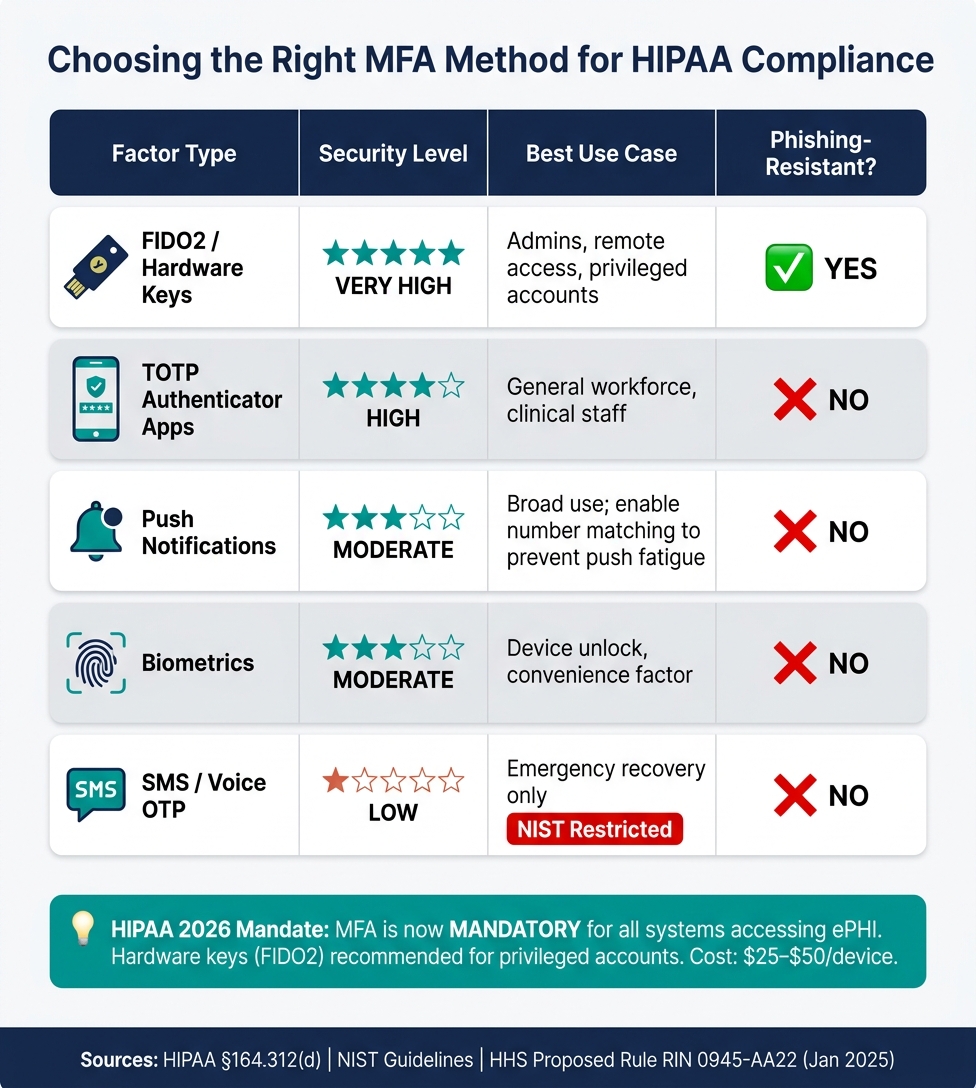
HIPAA MFA Requirements 2026: Authentication Methods Compared
Once you've identified the critical access points for implementing Multi-Factor Authentication (MFA), the next step is to develop a strategy that aligns with HIPAA requirements. This involves mapping your systems, selecting authentication tools based on roles, and maintaining thorough documentation throughout the process. By doing so, you not only strengthen your technical safeguards but also ensure compliance with HIPAA's stringent standards.
Choosing the Right Authentication Factors
The choice of authentication factors should depend on the user's role, the sensitivity of the data they handle, and their work environment.
| Factor Type | Security Level | Best Use Case | Phishing-Resistant? |
|---|---|---|---|
| FIDO2 / Hardware Keys | Very High | Admins, remote access, privileged accounts | Yes |
| TOTP Apps | High | General workforce, clinical staff | No |
| Push Notifications | Moderate | Broad use; use number matching to prevent push fatigue | No |
| Biometrics | Moderate | Device unlock, convenience factor | No |
| SMS / Voice OTP | Low | Emergency recovery only | No |
NIST categorizes SMS-based OTP as a "restricted" method due to its weaknesses, prompting many healthcare organizations to move away from it. For most general workforce needs, free tools like Microsoft Authenticator and Google Authenticator are sufficient. However, investing in hardware keys is a smart move for securing high-risk accounts, especially when planning budgets across departments.
Technical Approaches to Enforcing MFA
To ensure consistency, enforce MFA through your Identity Provider (IdP) or Single Sign-On (SSO) layer using SAML or OIDC protocols. This way, all connected applications - whether it's an EHR system, email client, or cloud storage - adhere to the same authentication policies without requiring separate configurations.
For high-risk activities, such as accessing systems from unfamiliar devices, connecting off-network, or performing bulk exports of ePHI, additional authentication checks should be required. This approach minimizes disruptions for routine tasks while providing extra security where it's needed most. Popular solutions like Duo, Okta, and Microsoft Entra ID are often used to secure VPN and RDP access at the network layer.
"MFA is a high-impact control that materially reduces account compromise risk for systems handling ePHI." - Kevin Henry, Accountable [10]
Additionally, it's wise to maintain a limited number of "break-glass" emergency accounts secured with offline TOTP or hardware tokens, which should be stored securely and monitored closely. These accounts act as a safety net in critical situations.
With these technical measures in place, the next step is to focus on policy creation, documentation, and preparing for audits.
Policy, Documentation, and Audit Readiness
The proposed 2026 HIPAA Security Rule updates make MFA mandatory - not optional - for all systems that access, store, or transmit ePHI [1]. This means your organization must demonstrate full compliance in its documentation, not just an intent to comply.
Your MFA policy should clearly outline:
- Enrollment procedures
- Approved authentication factors for each role
- Session timeouts (typically set at 10–15 minutes of inactivity)
- Access revocation protocols
Automating joiner-mover-leaver workflows can ensure these records stay current without relying solely on manual updates.
HIPAA also requires that authentication events - such as login successes, failures, MFA verifications, and changes to authentication methods - be logged and retained for six years [10]. For legacy systems that cannot support MFA, maintain an active exceptions register. This document should detail the associated risks, compensating controls, account ownership, and a timeline for system retirement or upgrades [11]. Both auditors and OCR reviewers will expect this level of detail as part of your compliance efforts.
Using Platforms to Manage MFA Compliance
Ensuring MFA compliance across a large healthcare system can be a daunting task. Manually tracking which systems enforce MFA, verifying vendor controls, and maintaining audit-ready documentation is time-intensive and prone to errors. That’s why automated, centralized solutions have become essential.
Using Censinet RiskOps™ for Risk Management
Specialized cybersecurity platforms, like Censinet RiskOps™, are designed to simplify these challenges. This platform gives healthcare organizations a centralized view of all systems requiring MFA - such as EHRs, cloud portals, VPNs, and billing systems - and tracks their implementation as part of an ongoing risk management strategy [1]. Instead of juggling multiple tools, teams can work from a single risk register where MFA gaps are clearly identified, prioritized, and assigned specific timelines for remediation [12].
This centralized approach is especially helpful for managing third-party compliance. The proposed 2026 HIPAA Security Rule updates will require organizations to ensure that business associates and their subcontractors meet the same MFA standards. This won’t just involve signed attestations but will demand proof of compliance through technical testing [7]. Censinet RiskOps™ simplifies this process with vendor risk assessment workflows, allowing organizations to manage MFA compliance across a complex network of vendors while maintaining full visibility.
Automating MFA Assessments with Censinet AI
AI integration takes this centralized approach a step further by automating many of the repetitive tasks involved in MFA compliance. The Censinet Risk Assessor Agent, an AI-powered tool within Censinet RiskOps™, handles tasks like document analysis, generating action plans, and drafting assessment reports. By leveraging network intelligence and automated document review, this feature can cut assessment time by up to 66% [12]. This means your risk team can focus on resolving issues rather than compiling evidence. MFA-related gaps are automatically prioritized, assigned owners, and given clear deadlines, making it easier to stay prepared for OCR audits or internal reviews.
Conclusion: Strengthening HIPAA Compliance with MFA
Healthcare organizations need to act now to implement multi-factor authentication (MFA). The proposed updates to the HIPAA Security Rule for 2026 will make MFA a mandatory requirement for all covered entities and business associates, removing the previous option to delay its implementation [1][4].
Failing to comply comes with serious consequences, including hefty fines and potential data breaches. A stark reminder is the 2024 Change Healthcare breach, which exposed sensitive information for over 190 million individuals and resulted in costs exceeding $2.4 billion [2]. On top of that, HIPAA penalties for willful neglect can go as high as $1.9 million per violation category annually.
For smaller healthcare practices, the cost of fully implementing MFA is under $500 [1]. Start by securing high-risk access points like remote VPNs, email systems, electronic health record (EHR) platforms, and administrative accounts. To maximize security, consider phishing-resistant options like FIDO2/WebAuthn hardware keys, which are far more secure than SMS-based codes.
"MFA is the fastest, most reliable upgrade you can make to protect patient data today." - Kevin Henry, HIPAA Expert, Accountable [13]
Technology alone isn’t enough, though. Comprehensive documentation plays a critical role in staying compliant. This includes maintaining detailed audit trails, creating migration plans for older systems, and updating Business Associate Agreements (BAAs) to include right-to-audit clauses. Tools like Censinet RiskOps™ can streamline this process by helping healthcare organizations track MFA implementation, automate risk assessments, and compile the evidence needed to demonstrate compliance during audits. Implementing MFA not only ensures adherence to HIPAA requirements but also strengthens the overall security of patient data.
FAQs
Does HIPAA require MFA for every user and every ePHI system?
Starting in 2026, the HIPAA Security Rule will mandate multi-factor authentication (MFA) for all workforce members accessing systems that handle electronic protected health information (ePHI). This applies to a wide range of systems, including:
- Electronic Health Record (EHR) platforms
- Email services
- Cloud storage solutions
- VPNs
- Administrative consoles
To enhance security, organizations are encouraged to adopt phishing-resistant MFA methods. Options like FIDO2 hardware keys or authenticator apps offer stronger protection compared to less secure methods, such as SMS-based authentication, especially for high-risk access points.
What should we do if a legacy system can’t support MFA?
If a legacy system cannot support multi-factor authentication, it's essential to document the exception. This documentation should include the reason for the exception, the associated risks, and a time-bound plan for migrating ePHI (electronic protected health information) to a compliant system.
While transitioning, you should implement compensating controls to mitigate risks. These controls might include:
- Network segmentation to isolate the legacy system.
- Enhanced logging to monitor activity and detect anomalies.
- Restricted access hours to limit when the system can be accessed.
- Gateways that can add an additional layer of authentication without modifying the legacy system itself.
These controls should be reviewed annually to ensure they remain effective. Ignoring this process could lead to penalties for willful neglect, so proactive measures are critical.
What are the best MFA methods for privileged and remote access?
Phishing-resistant methods play a critical role in meeting HIPAA compliance standards. Hardware security keys that use FIDO2 or WebAuthn protocols provide top-tier protection, especially for administrative accounts, EHR superusers, and crucial remote access points. For broader remote access needs, push notifications with number matching are a safer choice compared to SMS codes, which can be intercepted. Additionally, adaptive authentication strengthens security for sensitive actions, such as bulk data exports or accessing systems from outside the network.
