
One stolen admin account can put mail, files, devices, and patient data at risk at the same time. That’s the core lesson here.
I see four patterns show up again and again:
- Privileged admin takeover can let an attacker wipe or control huge numbers of devices
- Conditional Access gaps can let the wrong device or session into PHI and admin systems
- Rogue enrollment and token abuse can make an attacker-controlled device look trusted
- Weak vendor access controls can open a side door into Microsoft 365 and Intune
A few numbers stand out: reports tied the Stryker case to more than 80,000 systems across 79 countries, with some estimates as high as 200,000 wiped devices. The article also points to 59% of organizations missing key admin restrictions, 66% lacking recommended MFA setups, and a nearly 80% jump in configuration tampering since 2023.
If I had to boil the article down to a short action list, it would be this:
- cut standing admin rights
- use PIM for time-limited access
- require phishing-resistant MFA for admin roles
- lock access to managed, compliant devices
- review vendor accounts and CA exceptions
- monitor role changes, policy edits, token misuse, and remote wipes
Bottom line: in healthcare, identity is now the control point that matters most, and if Entra ID or Intune is weak, HIPAA risk and patient care risk can show up fast.
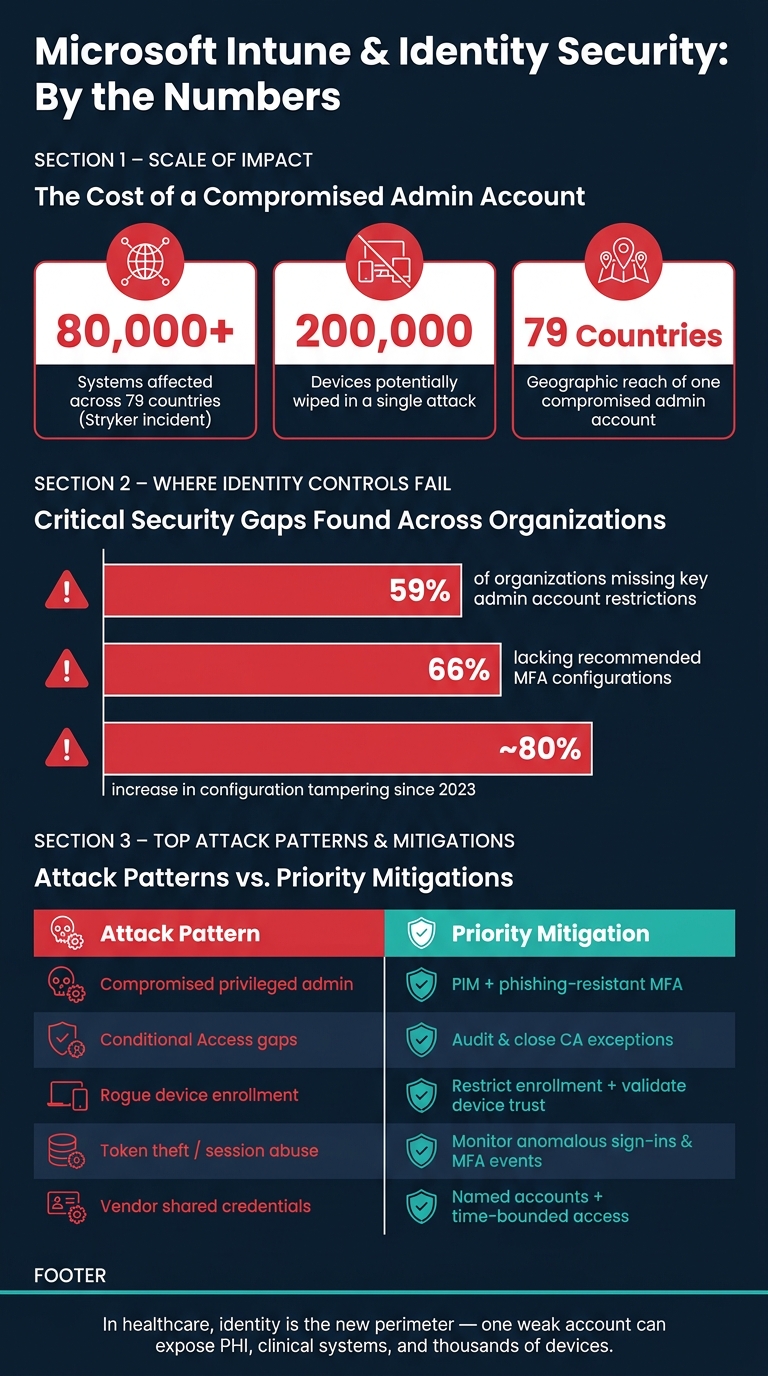
Microsoft Intune Security Gaps: Key Stats & Attack Patterns in Healthcare
Case studies: How Microsoft Intune compromises unfolded
The Stryker Intune attack: abusing privileged admin access
The Stryker incident is a clear example of what can happen when an attacker gets control of a high-level Intune identity. Public reporting points to a Global Administrator compromise, likely tied to phishing, stolen credentials, or password reuse.[2][5][9] Once an attacker has Global Administrator or Intune Service Administrator access, they can add new admin accounts and hang onto control.[2][11][12]
From there, the damage can move fast. In this case, attackers used Intune’s built-in remote wipe and factory reset features to send destructive commands at scale. There was no exploit chain and no malware involved. Reports cite more than 80,000 systems across 79 countries, with estimates as high as 200,000 devices wiped.[5][10][8] In a healthcare setting, that kind of access is brutal: one compromised Intune admin can wipe every enrolled device, including clinical workstations and staff laptops.[5][6][10]
And wipe commands are only part of the problem. The same admin control can also be used to push code to every managed endpoint.
Using Intune to push malicious payloads and destructive actions
Intune isn’t limited to erasing devices. The same management plane can also deliver code. Analysts have reported cases where attackers with Intune admin access used Win32 app deployment and PowerShell script distribution to push information-stealing malware or malicious scripts to managed endpoints.[4][3]
In regulated settings, that opens the door to a lot more than nuisance activity. Attackers can use these features to disable BitLocker, loosen compliance rules, remove endpoint protection, or run scripts that steal tokens.[1][13]
Because those actions run through a trusted management context, some local controls may not stop them. That’s what makes this so dangerous: the command looks like it came from the tool that’s supposed to be in charge. Multi-Admin Approval for scripts and high-impact policy changes adds friction by requiring a second admin to approve destructive actions.[7][9][13]
Research-backed attack paths: rogue enrollment, token abuse, and compliance bypass
Privileged admin takeover is only one route in. Research also shows that attackers can abuse enrollment and token flows without ever touching an existing endpoint. One path is to enroll rogue cloud VMs or mobile devices with stolen or badly managed enrollment tokens, then inherit trusted status and pass Conditional Access checks.[2][1]
Another weak spot sits in the enrollment process itself. The Company Portal app is excluded from some compliance checks so enrollment can work, but attackers can abuse that gap to obtain tokens from unmanaged devices.[15][17][18] Device Registration Service research shows Entra ID validates the token, not the device.[14]
There’s also a path through Intune managed app, or MAM, flows. After stealing credentials, an attacker can register a new device and app, then exfiltrate SharePoint, Outlook, and Teams data.[16][19]
That means a rogue enrolled device can reach patient messaging, EHR portals, or remote monitoring dashboards while still looking trusted.[1][2]
These attack paths show the weak spots in the identity control plane.
sbb-itb-535baee
How Attackers wiped 80,000 Devices in Microsoft 365
Where the identity control plane breaks down
The pattern is pretty consistent: too much access, weak MFA, shaky device trust, and thin monitoring. That’s where identity controls tend to fail. In practice, the control plane usually breaks in three places.
Over-privileged admins, weak MFA, and token exposure
A lot of organizations still have too many Global Administrators. A 2026 analysis found that 59% of organizations were missing key restrictions on administrator accounts, and 66% lacked recommended MFA configurations.[23]
MFA falls short when it isn’t phishing-resistant. If an attacker steals a token, weak MFA won’t stop them. A stolen PRT can let someone keep using the tenant without getting prompted again and again.[20][21][22]
Privileged identities need to be handled like critical infrastructure, not like standard user accounts. That means:
- keeping role scope tight
- using Privileged Identity Management (PIM) for time-bound elevation
- requiring phishing-resistant MFA for anyone managing Intune or Entra ID
That last part matters a lot. The better options here are FIDO2 security keys, Windows Hello for Business, and certificate-based authentication.[25][28]
The same weak-control pattern shows up again with device trust and Conditional Access.
Conditional Access gaps and weak device trust signals
Conditional Access starts to crack when exceptions pile up around executives, service accounts, legacy apps, and break-glass access. Microsoft Incident Response has said that Conditional Access gaps for privileged accounts are a common finding in investigations. It also noted that attackers can spot CA policy gaps using ordinary user credentials.[26]
Device trust breaks when systems accept a claimed join state without hardware attestation or backend validation. In one red-team exercise, researchers registered a Linux system as a fake Windows device, got a PRT, and bypassed Conditional Access altogether. From there, they escalated to Global Administrator with just one set of valid user credentials.[27]
In a healthcare setting, that kind of access could open the door to EHR portals, patient messaging, and admin systems. Once device trust is weak, even a normal sign-in can turn into a trusted foothold.
Enrollment abuse, configuration drift, and poor monitoring
Loose device-registration rules can let a compromised workforce account create trusted device objects. BYOD programs with lots of exceptions make the problem worse, especially when personal devices with weaker controls can still reach PHI systems. That’s how PHI workflows end up carrying risk from unmanaged devices and old exceptions that never got cleaned up.
Configuration drift adds another layer of trouble. A 2025 report cited a nearly 80% increase in configuration tampering since 2023, including Conditional Access edits and permissions changes.[24] In healthcare, teams are often under pressure to keep clinical work moving. So a policy gets loosened “just for now,” and then nobody circles back. Bit by bit, temporary workarounds become lasting control gaps around clinical workstations, EHR access, and vendor-admin pathways.
Without near-real-time monitoring for role changes, CA edits, compliance changes, and device wipes, those shifts can sit there quietly until an incident drags them into view.
A risk-management playbook for Microsoft 365 and Intune in healthcare
Fix the control plane without getting in the way of clinical work. The controls below focus on the points that tend to fail first.
Tighten privileged access and require phishing-resistant admin access
Start by cutting standing privileged admin accounts down to the smallest set possible. Use least-privilege RBAC so each admin gets only the access needed for that job.
Use Privileged Identity Management (PIM) so elevation is time-bound and auditable. For high-impact changes, require PIM elevation and full logging. Anyone with Intune or identity administrator access should use MFA, and shared admin accounts should not be allowed.
That said, admin control only goes so far if Conditional Access still allows weak sessions.
Roll out Conditional Access and device trust in phases
Turning on strict Conditional Access all at once can throw clinical workflows off balance. A phased rollout lowers that risk.
- Inventory and classify: Map every access path to PHI, admin consoles, and clinical applications. Split managed devices from unmanaged ones. Also list every vendor and third-party access path.
- Define minimum device standards: Decide which workflows must use a managed device that is encrypted, patched, and compliant with validated trust signals. For BYOD or unmanaged devices that can’t be removed right away, use managed virtual sessions that block downloads, clipboard use, and local printing.
- Pilot, then enforce at scale: Test policies against actual clinical scenarios before broad rollout. Fix what breaks, then remove exceptions in a deliberate way.
Every exception should be documented, time-limited, and reviewed on a set schedule.
Once those access rules are live, the next job is watching for drift as it happens.
Build continuous monitoring and vendor identity review into daily operations
Send identity and device events into active SOC review. Feed role changes, Conditional Access edits, MFA bypasses, compliance shifts, and remote wipes into SOC workflows. Keep audit logs and access reports ready so you can show who connected, from which device, and what PHI was reachable. Put the highest priority on alerts tied to PHI access, EHR admin actions, and vendor sessions.
Vendor identity review should cover EHR support, device maintenance, and remote monitoring access. Shared vendor credentials should be banned. Named accounts, explicit approval workflows, and time-bounded access scoped to specific systems are the baseline. Access should be removed when the engagement ends.
Use the matrix below to match each attack pattern to the right response.
| Compromise Pattern | Likely Healthcare Impact | Priority Mitigation |
|---|---|---|
| Compromised privileged admin account | Unauthorized policy changes and PHI exposure | PIM + phishing-resistant MFA |
| Conditional Access exception abuse | Unmanaged or attacker-controlled device reaches EHR or admin portal | Audit and close CA exceptions; enforce device compliance |
| Rogue device enrollment | Attacker-controlled device gains trusted status in tenant | Restrict enrollment to approved users; require validated device trust signals |
| Token theft / session abuse | Persistent access without re-authentication prompts | Monitor for anomalous sign-ins, MFA events, and privileged activity |
| Vendor shared credential use | Lateral movement through third-party access path | Named accounts, MFA, time-bounded and scoped vendor sessions |
| Configuration drift (CA edits, permission changes) | Silent erosion of controls around clinical and PHI systems | SOC alerts for policy changes |
Conclusion: How healthcare leaders should assess exposure and act
In healthcare settings, Entra ID and Intune sit on the security line. They’re not just productivity tools. The case studies make that plain: compromised admin accounts, weak Conditional Access, rogue enrollment, and token abuse can turn Intune into the route an attacker uses.
Across these examples, the same weak spots keep showing up. That’s why the next move should be a focused exposure assessment. Look closely at where identity, device trust, and vendor access start to fail. Then work in phases: inventory the environment, cut standing privilege, require MFA for remote access and admin access, limit access to managed and compliant devices, and time-box named vendor sessions.
An assessment checklist for PHI, clinical operations, and regulated systems
Use this checklist to test whether identity gaps expose PHI, clinical operations, or regulated systems.
| Assessment Area | Key Questions |
|---|---|
| Authentication | Does the workflow use MFA and separate privileged accounts? |
| Device Posture | Is access limited to managed, encrypted, and compliant devices? |
| Vendor Access | Are support sessions named, approved, and time-bounded? |
| Audit Trail | Can the team review user, device, location, and privileged-session activity in one audit trail? |
| Mobile Controls | Does the app support remote wipe, app protection, and app version enforcement? |
| Data Protection | Are downloads, screenshots, and local printing restricted for remote sessions? |
These questions tend to surface the highest-risk gaps fast and make it clear where a team should start.
FAQs
Why is identity now the main security perimeter in healthcare IT?
In modern healthcare IT, identity is now the main security boundary. Care delivery runs across cloud platforms, mobile devices, and third-party vendor environments, so the old network edge doesn’t hold the same weight it once did.
If an attacker gets into an admin account or takes advantage of weak identity settings, they can slip past network defenses and get to patient data. They may also disrupt clinical systems or trigger large-scale operational failures. That’s why identity governance sits at the center of protecting care, meeting HIPAA requirements, and supporting recovery.
How can a stolen Intune admin account affect patient data and devices?
A stolen Intune admin account gives an attacker a direct path into the endpoint management plane. And once they're in, they can use legitimate admin actions to disrupt clinical operations without needing anything flashy.
At scale, the damage can spread fast. An attacker could remotely wipe large groups of devices, take medical devices offline, lock staff out of EHR and communication apps, and stall critical workflows like surgery scheduling and supply chain distribution.
What should healthcare teams fix first in Microsoft 365 and Intune?
Start with the management plane: treat Microsoft Intune and Entra as high-risk control points. Require phishing-resistant MFA for all administrators. Use just-in-time privilege elevation instead of standing access. And require two-person approval for destructive mass actions like device wipes.
From there, automate the identity lifecycle through HR-linked deprovisioning so access is removed when people leave or change roles. Enforce least-privilege access, keep monitoring in place at all times, and verify offline, air-gapped backups for critical device fleets.
