
Monitoring user access in healthcare IT systems is critical to safeguarding sensitive patient information and ensuring compliance with HIPAA regulations. Here's what you need to know:
- Why It Matters: Insider threats account for 46% of healthcare breaches, with risks ranging from accidental disclosures to intentional misuse of credentials.
- HIPAA Requirements: Regulations mandate audit controls, unique user IDs, emergency access protocols, automatic logoffs, and encryption to protect electronic Protected Health Information (ePHI).
- Key Tools: Identity and Access Management (IAM), Multi-Factor Authentication (MFA), and Security Information and Event Management (SIEM) systems help track, log, and analyze user activities.
- Best Practices: Implement role-based access control, monitor high-risk behaviors (e.g., access to VIP records or unusual login patterns), and perform regular audits to maintain security.
- Real-Time Alerts: Use systems that flag suspicious activities like mass record exports or off-hours logins, enabling immediate responses.
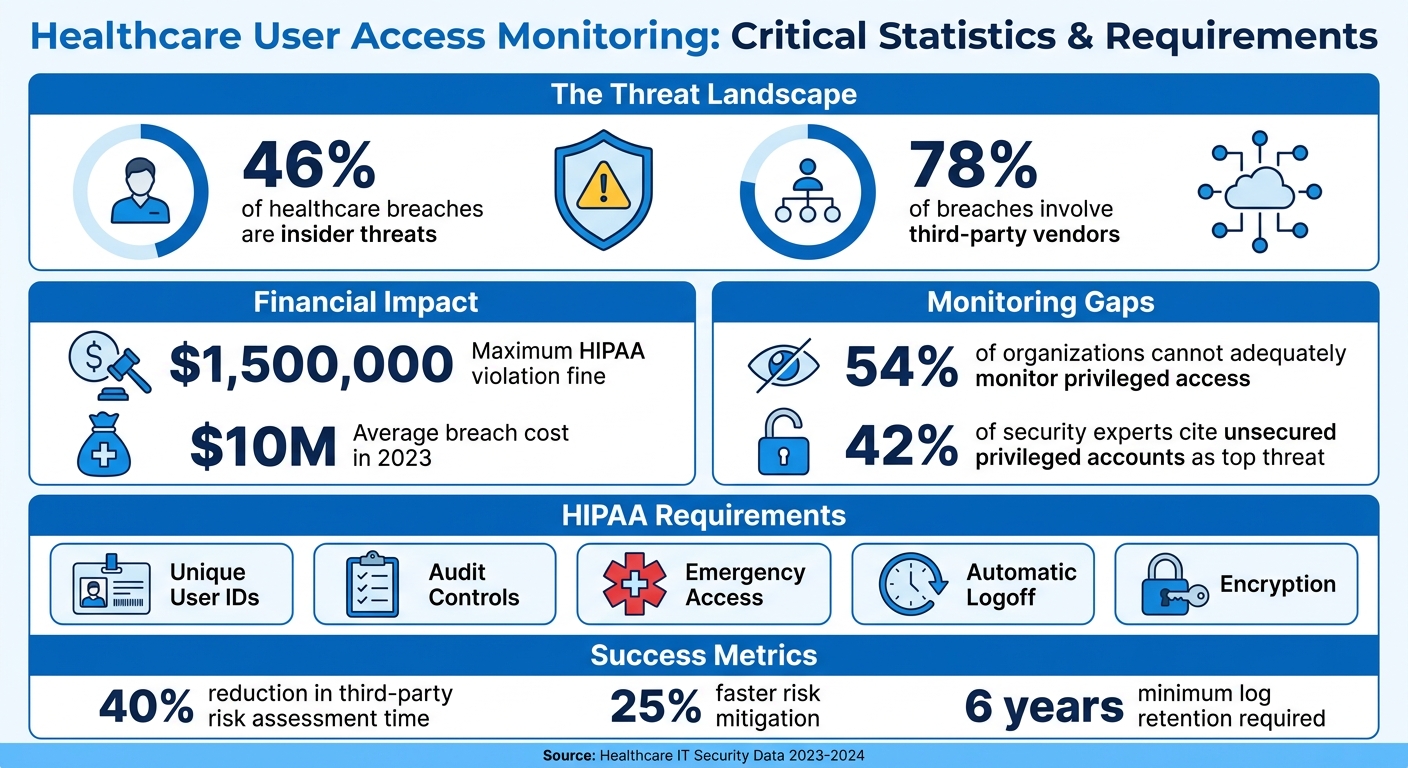
Healthcare User Access Monitoring: Key Statistics and Requirements
User Access Monitoring Requirements in Healthcare
HIPAA Access Control Requirements
The HIPAA Security Rule requires healthcare organizations to implement technical safeguards for monitoring user access. A key component is the Audit Controls standard (§164.312(b)), which focuses on recording and reviewing activity in systems containing electronic protected health information (ePHI) [5].
HIPAA takes a two-pronged approach: access controls regulate who can perform specific actions, while audit controls track and analyze what actions were actually taken [5]. Kevin Henry, a HIPAA expert, explains:
Access controls prevent or permit actions; audit controls record and examine what actually occurred. [5]
Together, these measures ensure proper enforcement of user permissions and help prevent misuse of privileges.
The Security Rule outlines several specific access control requirements. For instance:
- Unique User Identification: Each staff member must use individual login credentials, eliminating shared passwords [4][6].
- Emergency Access Procedures: Also known as break-glass protocols, these allow access to critical ePHI during emergencies [4][6].
- Automatic Logoff: Sessions are terminated after a period of inactivity to prevent unauthorized access [4].
- Encryption and Decryption: These protocols protect data during transmission and storage [4].
Additionally, the Person or Entity Authentication specification (§164.312(d)) ensures that users are verified before accessing systems [4].
Another key principle is the Minimum Necessary Standard, which limits access to only the information required for a specific task. As Kevin Henry explains:
The minimum necessary standard requires you to limit PHI access to the smallest amount needed to perform a task. [6]
For example, a billing specialist should not have access to clinical notes unless absolutely necessary.
Organizations must also safeguard the integrity of audit logs. Best practices include:
- Using write-once media to prevent alterations.
- Applying cryptographic hashing to detect tampering.
- Segregating duties to ensure administrators cannot delete their own activity logs [3][5].
While HIPAA does not specify how long audit logs must be retained, it mandates that documentation be kept for at least six years [5]. Effective audit logs should capture details such as user ID, patient identifier, actions performed, source IP address, and outcomes [3][5].
These safeguards not only ensure HIPAA compliance but also establish a strong foundation for monitoring user access.
Why User Access Monitoring Is Necessary
Monitoring user access is critical for both regulatory compliance and protecting system security and patient care. While access controls can block unauthorized users, they cannot identify when authorized users misuse their privileges. Monitoring fills this gap by creating a detailed audit trail that records who accessed which records, when, and what actions were taken [5]. These logs are invaluable for investigations, audits, and deterring inappropriate behavior [3]. This proactive approach is a cornerstone of modern cyber risk management in healthcare.
Healthcare organizations are also required to notify regulators and affected individuals within 60 days of confirming a breach [3]. Without effective monitoring, breaches may go unnoticed, increasing the risk of severe consequences. Robust monitoring can detect suspicious activities - such as mass record exports, unusual geographic access, repeated failed logins, or unauthorized use of emergency access protocols - before they escalate [3][5].
Beyond compliance, monitoring plays a vital role in maintaining patient trust. Patients rely on healthcare providers to protect their sensitive health information. Continuous monitoring ensures that access is restricted to those with a legitimate need, reinforcing this trust.
sbb-itb-535baee
Patient Privacy Intelligence in Healthcare | Imprivata
Core Components of User Access Monitoring
Setting up effective user access monitoring in healthcare involves three key elements: tools that track user activities, systems to securely store this data, and mechanisms to alert security teams about suspicious behavior as it happens.
User Activity Tracking Tools
Healthcare organizations rely on specialized tools to log detailed records of user activities across their IT systems. Identity and Access Management (IAM) platforms play a crucial role here, enforcing Role-Based Access Control (RBAC) and automating workflows for onboarding, role changes, and offboarding. These platforms ensure that only authorized personnel can access Protected Health Information (PHI) based on their roles.
To strengthen security, Multi-Factor Authentication (MFA) adds an extra layer of verification using phishing-resistant methods like FIDO2 keys or authenticator apps. This approach helps meet HIPAA's Person or Entity Authentication requirements while reducing the risk of unauthorized access, even if passwords are compromised. Additionally, Security Information and Event Management (SIEM) systems centralize logs from multiple sources, using behavioral analytics to detect risky activities such as unusual login times or mass access to records. For highly sensitive administrative tasks, Privileged Access Management (PAM) tools come into play by removing local admin rights and automatically rotating service account credentials to minimize exposure.
Every user action must generate an audit trail, capturing details like user ID, role, patient identifier, action taken, result, device used, and source IP. These logs are essential for effective centralized data collection.
Centralized Log Collection and Retention
Scattered logs make it harder to detect critical events. A centralized SIEM system brings together logs from all healthcare applications, normalizing the data and tagging it with relevant context such as patient, user, and device information. This consolidation helps security teams identify patterns that might otherwise go unnoticed.
Maintaining the integrity of these logs is critical. Logs should be stored on write-once or tamper-evident media and secured with cryptographic hashing to detect unauthorized changes. Additionally, systems must be configured so that administrators cannot delete their own activity logs - this separation of duties ensures no one can cover their tracks. Encrypt logs during transmission using TLS 1.2 and at rest with AES-256. Synchronizing system clocks is also vital, as even small discrepancies can complicate investigations by misaligning event timelines. Centralized and secure logs not only preserve detailed records but also fuel systems that can trigger immediate alerts.
Real-Time Alerts and Notifications
Timely detection is critical - delayed log reviews can allow threats to escalate. Real-time alerts enable security teams to respond immediately to suspicious activities. Configure your SIEM system to flag high-risk events like mass record exports, access to VIP records, off-hours activity, or logins from improbable locations.
Monitoring emergency "break-glass" access is equally important. These elevated privileges, used during emergencies, must trigger alerts to security and compliance teams. As Kevin Henry points out, "Every use [of emergency access] must be logged, justified, and reviewed promptly" [4]. Track unusual MFA failures as potential signs of account compromise, and add step-up verification for high-risk actions like exporting PHI or changing access control settings.
Establish a daily triage process to review alerts, document investigations, and implement corrective actions. When combined with robust tracking and centralized logging, real-time alerts form a critical defense layer in protecting healthcare systems from cyber threats.
Advanced Monitoring and Analysis Techniques
Basic logging captures events, but behavioral analytics digs deeper to uncover patterns behind those events. By understanding these patterns, healthcare organizations can distinguish genuine security threats from routine activities, adding a layer of context to their monitoring efforts.
Behavioral Analytics for Anomaly Detection
Behavioral analytics takes audit data from clinical systems like Epic, Cerner, or Meditech and combines it with employee management tools such as Kronos. This integration links access events to specific user identities and work schedules, creating a comprehensive view of user activity [8].
Using historical data, the system establishes a baseline for "normal" behavior. When deviations - like sudden spikes in application usage or unusual trends in record access - occur, the system flags them as potential anomalies [7]. Peer group analysis further refines this process by comparing an individual's activity to that of their colleagues. For example, if one employee's access patterns stand out significantly, the system raises an alert [8].
Context plays a key role. Analytics tools evaluate whether a user is part of a patient's designated care team. Andrew Mahler, Vice President of Privacy and Compliance Services at Clearwater, highlights this importance:
Use user activity monitoring and associated data logs to better understand user patterns. This will allow you to quickly identify anomalies and swiftly respond to potential incidents in real time [7].
Given that nearly 70% of breaches involve human error and the average cost of a breach hit nearly $10 million in 2023, such contextual insights are critical [7].
These advanced techniques complement centralized logs and real-time alerts, enabling healthcare organizations to pinpoint high-risk access patterns more effectively.
High-Risk Access Patterns to Monitor
Certain access behaviors serve as red flags for potential security incidents. For instance, VIP patient records - those of celebrities, politicians, or hospital staff - are frequent targets for unauthorized access and require heightened monitoring [8].
Watch for unusual spikes in the number of unique Medical Record Numbers (MRNs) accessed by a single user. This is especially concerning when paired with actions like data exports or deletions [8]. Inactive employee accounts also demand attention, as they are prime targets for unauthorized credential use [8].
Time-based anomalies are another key focus. Accessing Electronic Health Records during non-working hours or outside active care times for specific patients should trigger alerts [8]. Additionally, authentication patterns that suggest potential credential misuse - like logins from improbable locations - may indicate social engineering attempts [7]. Monitoring endpoint activities, such as keystroke logging, internet usage, or data transfers, can also reveal early signs of device-level compromise [7].
Access Monitoring Policies and Audit Procedures
Advanced monitoring tools are only as effective as the policies and audits that support them. Without clear procedures, even the most advanced analytics can fall short in preventing unauthorized access or proving compliance during regulatory checks.
Creating Access Monitoring Policies
For access monitoring to work effectively, policies need to align with daily workflows. This ensures that security measures enhance operations rather than disrupt them [4]. One key strategy is implementing Role-Based Access Control (RBAC), where permissions are assigned to roles - such as clinicians, billing staff, or IT support - rather than to individuals. This simplifies audits and enforces the principle of least privilege [4][9].
Set clear guidelines for the lifecycle of user accounts, including how accounts are created, modified, and deactivated [4][9]. For example:
- Disable high-risk accounts within 30 minutes of notification.
- Remove or deactivate standard accounts within 30 days of termination or transfer [9].
- Automatically lock accounts after 30 to 60 days of inactivity, depending on the system's risk profile [9].
Emergency access, often referred to as "break-glass" access, requires strict oversight. Policies should specify who can use emergency access, the duration it’s allowed, and mandate a review of its use within 24–72 hours [4]. Additionally, set automatic logoff times: 10–15 minutes for workstations and 2–5 minutes for kiosks [4]. Automating deprovisioning through HR triggers ensures access is revoked the same day an employee leaves, reducing the risk of "orphan" accounts lingering in the system [4].
Performing Regular Access Audits
Regular audits are essential to ensure access controls remain effective and operationally relevant. These audits validate that systems are adequately protecting Protected Health Information (PHI).
Audit logs should include detailed records of access: who accessed what PHI, the action taken (view, edit, export, or delete), the time, the device used, and the source IP address [4][3]. Consolidate these logs into a Security Information and Event Management (SIEM) system. This allows for advanced analytics to detect risks, such as unusual travel patterns or bulk data exports [4][3].
Adopt a tiered review schedule based on risk levels:
- Daily triage: Address high-risk alerts immediately.
- Monthly sampling: Randomly review user activity to catch unauthorized access or policy violations.
- Quarterly recertifications: Verify that permissions still align with job roles [4].
As Kevin Henry, a HIPAA Specialist, advises:
Review privileged and role assignments at least quarterly, and immediately after job changes [4].
Conduct annual security assessments, which should include vulnerability scans and penetration tests, to evaluate the overall effectiveness of safeguards [4][3].
| Audit Activity | Frequency | Purpose |
|---|---|---|
| Critical Alert Triage | Daily | Respond to immediate threats or breaches [4] |
| User Activity Sampling | Monthly | Identify unauthorized access or violations [4] |
| Access Recertification | Quarterly | Ensure permissions match current job responsibilities [4][3] |
| Security Assessments | Annual | Test the overall security framework [3] |
Finally, protect audit log integrity by maintaining segregation of duties. This ensures that personnel responsible for administering access controls cannot manipulate their own activity logs, preserving accountability [3][9].
Using Censinet for Risk Management
Censinet provides a tailored solution to simplify and strengthen user access monitoring, specifically designed for the unique demands of healthcare organizations. With the growing complexity of IT systems and the need to safeguard sensitive patient data, Censinet RiskOps™ offers a platform that addresses these challenges head-on. It focuses on managing user access across clinical applications, medical devices, and third-party vendor systems.
Censinet RiskOps™ Features
The platform automates risk assessments for both internal systems and third-party access controls. By centralizing user access logs from multiple systems into a single dashboard, healthcare IT teams can easily monitor activity while meeting HIPAA retention standards. This centralized approach enables searchable analysis, making it easier to identify patterns of unauthorized access.
Censinet RiskOps™ also includes configurable alerts to detect anomalies, such as unusual login attempts or access during non-standard hours. Its behavioral analytics feature establishes typical user behavior - like common login times or data access volumes - and flags deviations, such as large data downloads or logins from unexpected locations.
Additionally, Censinet AITM™ automates vendor risk assessments. With customizable rules, the platform ensures automation serves as a support tool, leaving critical decision-making in the hands of healthcare teams.
How Censinet Benefits Healthcare Organizations
Healthcare organizations using Censinet see measurable improvements in both security and operational efficiency. For example, the platform reduces third-party risk assessment time by 40% and speeds up risk mitigation efforts by 25% [10]. This is especially crucial given that 78% of healthcare breaches involve third-party vendors [11].
Recent success stories highlight the platform's impact:
- Mayo Clinic: In Q1 2024, Mayo Clinic cut third-party cybersecurity risks by 35% within six months using Censinet RiskOps™. By assessing over 150 vendors’ access to patient data systems, the clinic reported zero vendor-related incidents and saved $1.2 million in audit costs. This initiative, led by CISO Dr. Jane Ellis, showcased the platform’s ability to streamline processes and enhance security [12].
- Cleveland Clinic: In 2023, Cleveland Clinic improved its risk assessment cycle for medical device vendors by 50%. Monitoring access to EHR systems across 20 hospitals, the organization identified and revoked 15% of over-privileged accounts, preventing potential exposure of 500,000 patient records. This effort, spearheaded by VP of Cybersecurity Mark Thompson, demonstrated the platform’s effectiveness in reducing risks tied to excessive permissions [13].
Censinet RiskOps™ also facilitates collaboration between healthcare organizations and vendors. By securely sharing risk data, it supports joint efforts to mitigate access-related threats. The platform’s ability to detect high-risk behaviors - such as excessive PHI downloads or unauthorized device logins - directly contributes to protecting patient safety through precise risk scoring mechanisms.
Conclusion
Monitoring user access is a key strategy in defending against both external attacks and insider threats. In the healthcare industry, insider breaches make up 46% of all incidents, and HIPAA violations can result in fines as high as $1,500,000 [1][2]. Beyond financial penalties, a single breach can severely damage patient trust and harm an organization’s reputation [1].
One effective step is applying the principle of least privilege, which limits access to Protected Health Information (PHI) to only those who need it [2]. For instance, this could have prevented the Oklahoma hospital case where a food service worker accessed a deceased patient’s PHI without a valid reason. The incident led to a $150,000 lawsuit and harassment allegations [2]. Additionally, behavioral alerts can help by flagging insider threat indicators such as unexpected login times, unfamiliar IP addresses, or excessive access to records [2].
The need for robust monitoring is clear. Alarmingly, 54% of organizations cannot adequately monitor privileged access, and 42% of security experts identify unsecured privileged accounts as a leading cyber threat [2]. However, organizations that can detect, investigate, and respond to unauthorized access are in a stronger position to avoid breaches and maintain patient trust [1].
A proactive approach - incorporating centralized log collection, real-time alerts, and behavioral analytics - can transform security practices. When paired with regular access audits and strong policies, these measures not only ensure regulatory compliance but also protect the PHI of countless patients [1]. By implementing these strategies, healthcare organizations can build a resilient system that safeguards sensitive data and reinforces trust.
FAQs
What should a HIPAA-compliant access log include?
To meet HIPAA standards, an access log must provide detailed tracking of several critical elements:
- Who accessed the data: Identify the individual or system that accessed the information.
- What data was accessed: Specify the exact records or information involved.
- When it happened: Include precise timestamps for each event, aiding in event correlation.
- Actions taken: Document what was done during the access and whether the actions succeeded or failed.
To safeguard the integrity of these logs, they should be secured using encryption, role-based access controls, and immutable storage. These measures help prevent unauthorized changes or breaches. Additionally, HIPAA mandates that access logs be retained for at least six years, ensuring they are available for compliance checks and audits.
How do I tell normal clinical access from suspicious behavior?
Distinguishing everyday clinical access from potentially suspicious activity requires closely monitoring user behaviors and access logs. Routine access typically matches tasks relevant to a user’s role and occurs during standard working hours. On the other hand, red flags might include logging in after hours, viewing an unusually high number of records, or accessing information outside the user’s designated scope.
Real-time monitoring tools, like Censinet RiskOps™, are invaluable for spotting these irregularities. They can identify unusual data access patterns, misuse of administrative privileges, or large-scale data downloads that don’t align with normal workflows.
What alerts should we prioritize to catch insider misuse fast?
Healthcare organizations aiming to identify insider misuse swiftly should prioritize monitoring privileged user activity, unusual access behaviors, and unauthorized data access. Here are some key warning signs:
- Logins at odd hours, from unfamiliar locations, or using unexpected IP addresses.
- Privileged accounts performing tasks outside their typical scope.
- Users with excessive permissions or sudden, unexplained privilege increases.
- Repeated failed login attempts or attempts to access restricted data.
Keeping a close eye on these behaviors in real time can help uncover potential threats and stop breaches before they escalate.
