
One phishing click can disrupt care, lock staff out of EHRs, and expose PHI. In healthcare, phishing training needs to do four things: map risk by role, teach staff with job-based examples, run monthly simulations that fit clinical work, and track who clicks, who reports, and how fast teams respond.
Here’s the short version:
- Phishing is a patient care issue, not just an IT issue
- Healthcare breaches averaged $10.9 million in 2025
- 44% of breaches involved ransomware
- 88% of incidents were linked to human error
- A large health-system study found a median phishing click rate of 16.7%
- Only about 32% of workers who should report suspicious emails actually do
If I were building a healthcare phishing program, I’d focus on this:
- Find the riskiest workflows: EHR access, billing, telehealth, help desk, and executive approvals
- Train by role: clinicians, schedulers, billing teams, IT staff, and leaders should not get the same examples
- Keep training short: use 5–10 minute lessons and a 20-minute pre-access module for new hires
- Run monthly simulations: use lures tied to healthcare work, like fake lab alerts, payer notices, and MFA prompts
- Make reporting one click: staff need an easy way to flag suspicious messages in the email client
- Track behavior, not just completion: clicks, credential entry, report rate, and time to report matter more than course completion alone
- Document retraining: keep records for HIPAA review and internal follow-up
A simple way to think about it is: pause, verify, report, repeat.
| Focus area | What to do |
|---|---|
| Risk review | Map threats by role, message type, and system |
| Training | Use healthcare-based scenarios staff see at work |
| Simulations | Run monthly tests without interfering with patient care |
| Reporting | Add a one-click report button and reply to reports fast |
| Measurement | Track click rate, credential submissions, report rate, and response time |
This article shows how I’d turn phishing training into a clear staff habit instead of a once-a-year compliance task.
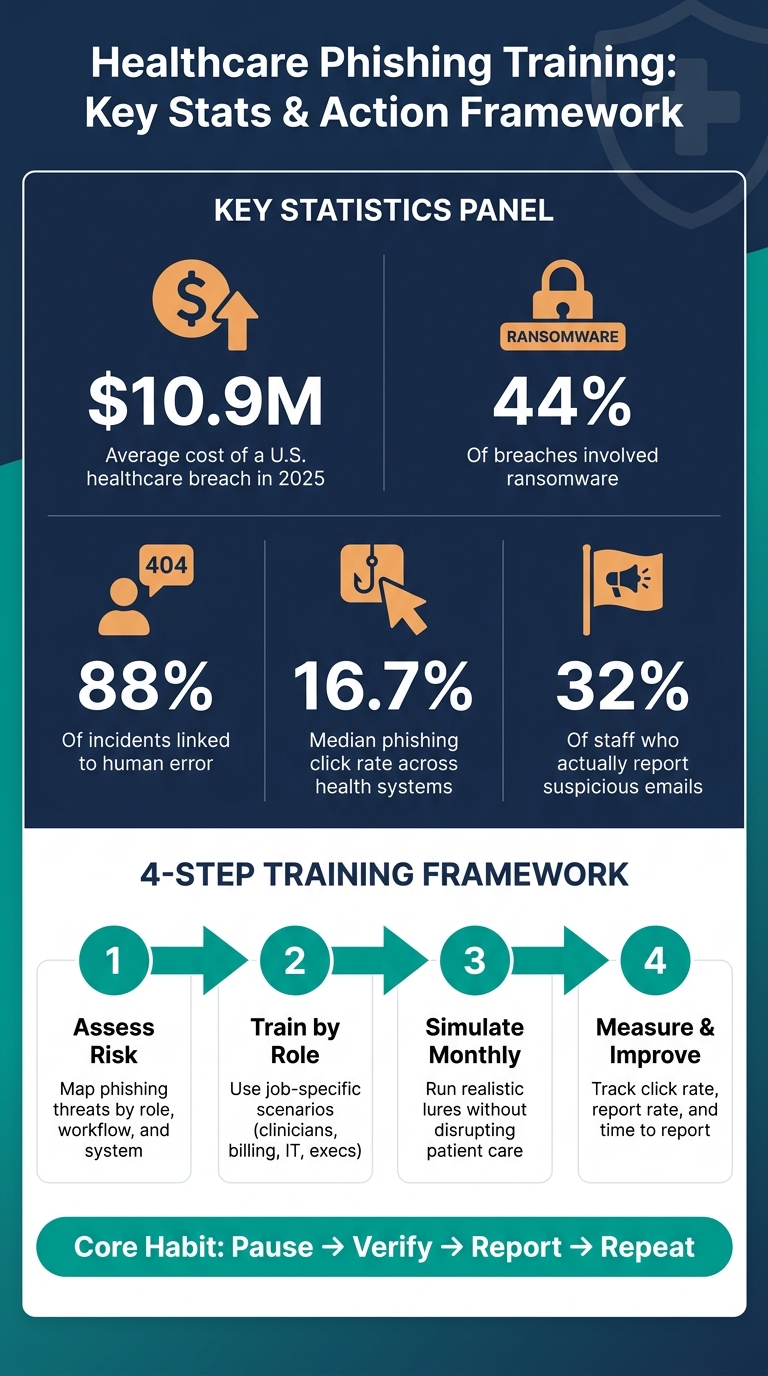
Healthcare Phishing Risk: Key Stats & Training Framework
Phishing Training for Healthcare Workers - HIPAA Certify
sbb-itb-535baee
1. Assess phishing risks across clinical workflows and systems
Before you build a single training module, you need to know where phishing risk shows up in your organization. That means looking closely at clinical workflows and the systems staff use every day, not just the general IT stack. A phishing risk review gives you a clear starting point and helps keep training tied to actual day-to-day risk.
Identify high-risk roles, messages, and failure points
Map risk by role, lure, and system.
Nurses and physicians are common targets for credential phishing through fake EHR login pages and text-message phishing, or smishing, dressed up as scheduling or pharmacy alerts. Why them? They often deal with urgent requests under time pressure and heavy workloads. Billing and revenue cycle staff face a different mix of lures, including invoice fraud, payer notices, and business email compromise (BEC) requests that copy vendor account change emails. IT admins are often targeted through voice phishing, or vishing, for admin credentials. Executives are now seeing more AI-generated voice and video impersonation attempts.
Use the table below to map the highest-risk combinations.
| Workflow/System | Common Phishing Lures | High-Risk Roles |
|---|---|---|
| EHR / e-prescribing | Credential resets, fake lab results, pharmacy alerts | Physicians, Nurses, Pharmacists |
| Billing / Revenue Cycle | Invoice changes, payer notices, BEC wire requests | Billing staff, Finance, Schedulers |
| Telehealth / Remote Access | Telehealth invites, VPN/MFA prompts, help desk vishing | Remote clinicians, IT Admins |
| PACS / Medical Devices | Fake maintenance or update notices | Clinical staff |
| Executive / Admin | Deepfake voice/video, urgent wire transfer requests | Executives, Department Heads |
Review incident history and document training needs
Once you've mapped the risk areas, pull your incident data. Prior phishing simulations, reported suspicious emails, near misses, and confirmed incidents like ransomware or BEC events show where the gaps are. A median click rate of 16.7% was found across nearly 3 million simulated phishing emails across six U.S. health systems [3]. That's a solid baseline to compare with your own results.
Look for patterns by role and department, not just the total click rate. If a billing team keeps failing invoice-lure tests, they need different training than a nursing unit that keeps clicking fake EHR alerts. That's the difference between a generic compliance task and a program that speaks to how people work.
HIPAA Security Rule 45 CFR 164.308(a) requires security awareness training, and OCR expects proof that staff can recognize and report phishing, not just that policies exist [1][3]. The HHS 405(d) Health Industry Cybersecurity Practices (HICP), specifically Practice 1.4, calls for regular phishing simulations and follow-up training for staff who fail [4]. Document everything:
- Campaign configurations
- Failure events by user ID
- Proof of targeted remedial training completion [4]
Use these findings to shape the scenarios, delivery formats, and reporting steps in the next phase.
2. Design role-specific phishing training content staff can apply right away
Use the risk map from the last step to build scenarios people will spot on sight. Staff should learn the same core moves across the board: notice red flags, check odd requests through a second channel, protect credentials and MFA codes, and report suspicious messages fast. The main thing that shifts by role is the scenario, the lure, and how the training shows up.
Build scenarios around real healthcare communication patterns
Generic examples don't change much. Training works better when it looks and feels like the messages people already deal with during clinical and admin work.
- Clinicians (physicians, nurses, pharmacists): Simulate patient result notices, EHR login prompts, pharmacy system alerts, and telehealth vendor updates. Practice: pause before entering credentials on any login prompt received by message.
- Front-desk and scheduling staff: Simulate appointment change requests, insurance portal alerts, and scheduling updates. Practice: verify account change requests through a second channel before acting.
- Billing and revenue cycle teams: Simulate vendor impersonation, vendor account change notices, invoice fraud, and payroll redirect scams. Practice: confirm wire transfer or payment requests by phone before processing.
- Executives and department heads: Simulate approval requests, urgent wire transfers, and AI voice/video impersonation of hospital leaders. Practice: verify any urgent financial or access request out-of-band before responding.
Every role should also see the threats showing up right now: vendor impersonation, fake software update notices, and malicious QR codes (quishing) placed in physical clinical areas like waiting rooms and nurses' stations.
Choose delivery formats that work in clinical settings
Long annual modules squeezed in between patient rounds usually create completion records, not behavior change [3]. Passive learning like slides, lectures, and e-learning tends to lead to only a 10% to 20% retention rate, while simulation-based learning can hit 75% or higher [2].
That's why short, timed training works better in healthcare settings. Use 5–10 minute microlearning modules between patient encounters or at shift change. If someone fails a simulation, assign the module right away while the lesson is still top of mind. Unit leaders can also reinforce the same points during daily shift huddles, which keeps the message in front of staff without adding another meeting or pulling people off the floor.
| Format | Advantages | Disadvantages | Best Healthcare Use Case |
|---|---|---|---|
| In-Person Sessions | High engagement; immediate Q&A | High friction; hard to schedule around shifts | Annual deep-dives for high-risk leadership or IT teams |
| E-Learning | Scalable; easy to track for HIPAA compliance | Often passive; leads to "checkbox" fatigue and low retention (10–20%) [2] | Foundational onboarding for new hires |
| Microlearning | Low friction; high retention (75%+) [2]; fits between patient tasks | Limited depth for complex technical topics | Just-in-time reinforcement after simulation failures |
| Posters/Signage | Constant visual reinforcement in physical clinical areas | Passive; staff may become "blind" to them over time | Reminders for physical security (e.g., clean-desk policies) |
| Intranet/Newsletters | Centralized resource for policies and updates | Requires employees to actively seek out the information | Storing "how-to" guides for reporting incidents |
The target is simple: build a pause-verify-report habit that still works when the floor is busy and attention is split.
3. Run training, simulations, and reporting as part of daily operations
Take the scenarios from Section 2 and turn them into day-to-day habits through onboarding, simulations, and a simple way to report issues.
Require a 20-minute phishing module before anyone gets access to clinical systems. After that, reinforce the lesson with monthly simulations and extra touchpoints for finance and IT help desk staff [5].
| Training Component | Frequency | Target Audience | Delivery Method |
|---|---|---|---|
| New-Hire Onboarding | Once (Pre-access) | All new staff | 20-minute LMS module |
| Phishing Simulations | Monthly | All staff | Email-based with just-in-time splash pages |
| Refresher Training | Twice-yearly | All staff | Video modules or department-specific sessions |
| High-Risk Touchpoints | Frequent/Ad hoc | Help desk, finance, emergency department staff | In-person or video-call tailored sessions |
Run phishing simulations without disrupting patient care
Use realistic lures tied to pharmacy, EHR, scheduling, and finance workflows.
AI-generated phishing can push click-through rates as high as 54%, compared with 12% for standard spam [5]. That gap is huge, and it’s why realism matters.
Timing matters too. Coordinate simulations with clinical leadership, and avoid high-acuity periods in sensitive areas like the ICU or emergency department. If someone clicks, show a splash page right away with short, just-in-time feedback. A fast correction in the moment tends to stick better than a long lesson later.
Make reporting fast and consistent
Make reporting a one-click action in the email client and send alerts straight to security. Security teams should reply with a verdict and positive reinforcement so employees feel comfortable speaking up.
For repeat failures, escalate in a clear way: notify supervisors after three and require remedial training after five [5]. For suspected ransomware or an active compromise, spell out who staff should contact in the first five minutes. Also make it clear that they should not reboot the device. Rebooting can destroy evidence.
Use Censinet RiskOps™ to track remediation and document corrective actions for HIPAA compliance. Keep simulation, result, and retraining records for at least six years [1].
Track clicks, reports, and repeat failures so the next update focuses on the roles with the most risk.
4. Measure results and improve the program over time
Track the numbers that show whether training changes what people do, not just whether they finished a module. The simulation and reporting data from the last section should guide what you change next.
Break down results by clinical impact and role
The key measures here are click rate, credential submissions, reporting rate, and mean time to report. These aren't just dashboard stats. Each one ties to clinical risk: delayed chart access, missed reporting, stolen credentials, or slower containment. If a phishing attack lands in the ED, ICU, or pharmacy, care can get disrupted fast. And clinical teams don't face the same risks as administrative staff.
That's why a single click rate for the whole organization doesn't tell you much. You need to look at results by unit and by role.
Use department-level data to shift time and effort where they matter most. If one unit clicks more than another, run simulations there more often and shape those scenarios around the workflows that team uses every day. Then use those trends to fine-tune both scenario type and simulation frequency.
Update content, cadence, and governance based on findings
If results get worse, start with the basics. Has the training gone stale? Do the lures still match how people work? Are simulations happening often enough for habits to stick?
Refresh scenarios with examples that feel familiar on the job, such as fake EHR alerts, prescription authorization requests, and medical device vendor impersonations.
The table below links each metric to what it signals and what to do when results get worse or stop improving.
| Metric | What It Indicates | Action When Results Worsen or Plateau |
|---|---|---|
| Click Rate | Baseline susceptibility to deception | Increase simulation frequency; simplify recognition cues in training |
| Credential Submission Rate | High-risk behavior with a direct path to a data breach | Trigger mandatory just-in-time microlearning; enforce stricter MFA |
| Reporting Rate | Strength of the human firewall and active vigilance | Ensure the one-click "Report Phish" button is visible in clinical workflows |
| Mean Time to Report (MTTR) | Speed of organizational response and containment | Streamline reporting workflows; provide fast feedback to staff who report quickly |
| Completion Rate | Engagement with cybersecurity awareness for clinicians vs. clinical workload | Move training to mobile-friendly or microlearning formats under 10 minutes |
| Department Performance | Localized risk hotspots | Tailor lures to specific workflows and reallocate coaching to the most vulnerable units |
One number that often gets missed is the reporting rate. Research shows that only about 32% of staff required to report suspicious emails actually flag them to IT staff [6]. Moving that number up can improve containment fast. When people report sooner, security teams can respond sooner, before the attack spreads.
Censinet RiskOps™ can support risk tracking and corrective-action documentation. Keep the program centered on the full behavior loop - pause, verify, report, measure, adjust - and use each training cycle's results to sharpen the next one.
Conclusion: Build a phishing training program that supports care delivery
Phishing training in U.S. healthcare is not a one-time HIPAA compliance checkbox. It is day-to-day work that touches patient safety, PHI protection, and compliance. The programs that cut risk are tied to job roles, shaped by simulations, and built around how care teams actually work.
Risk drops when training matches the messages staff see in their normal routines.
That’s the approach this guide uses. Map phishing risk to the roles and workflows where a bad click could cause the most harm. Use real message types, like EHR alerts, patient portal notices, and fake prescription requests, so people can spot threats in context. Work with clinical leadership so simulations land during windows that don’t get in the way of high-acuity care. Then watch the signals that matter most: reporting speed, follow-up remediation, and role-based failure patterns.
Recognition gets better when staff make the same call again and again.
Repeated practice turns awareness into action. A 2019 multicenter study found that repeated phishing campaigns reduced later click risk [3]. Regular simulation and targeted follow-up are what turn awareness into behavior.
Use those results to keep the program current and accountable. Censinet RiskOps™ supports the governance side of this work by helping healthcare organizations manage risk assessments and corrective-action documentation. The program works when staff pause, verify, report, and improve.
FAQs
How often should healthcare staff get phishing training?
Healthcare staff should get phishing training all year long. To keep it working and help good habits stick, run phishing simulations every 4 to 6 months.
Which healthcare roles need the most targeted phishing training?
The roles that need the most targeted phishing training are:
- Clinical staff
- Administrative and billing personnel
- IT personnel
- Executives
Each group deals with a different attack surface. That’s why role-specific scenarios work so well. They help people spot the kinds of phishing attempts they’re most likely to face and cut down the risk before it turns into a bigger problem.
What metrics best show if phishing training is working?
The best metrics are:
- Phishing susceptibility rate
- Reporting rate
- Time to report suspicious emails
These metrics show what matters most: how employee behavior and awareness change over time.
