
If you can’t show dated proof, OCR may treat the work as if it never happened.
I’d sum up HIPAA audit documentation this way: you need records that show controls exist, staff follow them, and someone checks them over time. In most cases, I’d keep these records for at least six years from creation or when they were last in effect, whichever is later. That usually includes policies, risk analysis files, training logs, BAAs, incident records, and breach files.
Here’s the short version of what matters most:
- Start with the OCR Audit Protocol and map each file to the right HIPAA citation.
- Group evidence into a few main buckets: risk and governance, training and vendors, and system/security proof.
- Keep day-to-day records, not just policy PDFs: access reviews, logs, tickets, scans, approvals, and rosters.
- Build one evidence repository with file naming rules, version history, review dates, and retention deadlines.
- Package records by audit type because a desk audit, onsite review, and third-party review do not ask for the same depth.
A few records tend to matter more than others in audits and breach reviews:
- Written risk analysis and risk management plan
- Current policies and procedures with version history
- Training records with dates and attestations
- Business associate agreements and vendor inventory
- Incident and breach documentation
- System access, logging, encryption, and configuration proof
One point stands out: HHS has said poor or missing risk analysis was a repeat factor in breach cases. So if I were building an audit file from scratch, that’s where I’d start.
The rest of this guide shows how I’d organize, store, track, and package that evidence so it’s ready when OCR asks for it.
HIPAA Compliance Checklist: Essential Guide for Covered Entities & Business Associates
sbb-itb-535baee
HIPAA Documentation Requirements Explained
Once owners are assigned, the next job is simple in theory and messy in practice: match each document to the rule, retention period, and audit request it supports. HIPAA documentation requirements come from the Privacy, Security, and Breach Notification Rules. These rules spell out what you need to document and how long you need to keep it. In most cases, keep HIPAA compliance records for at least six years from the date they were created or the date they were last in effect, whichever is later.[16][15][14] That covers policies, procedures, risk analyses, training records, breach logs, and business associate agreements. Clinical records may be subject to longer retention rules.
Under the Privacy Rule (45 C.F.R. § 164.530), keep policies and procedures, Notices of Privacy Practices, authorization forms, complaint records, and role designations. Under the Security Rule (45 C.F.R. § 164.316), keep risk analyses, risk management plans, security incident logs, workforce security records, and written safeguard decisions, including encryption determinations. The Breach Notification Rule adds breach assessments, notices, and investigation records. If a required document is missing, write that down too, along with the reason.[11] After that, map those records to the OCR Audit Protocol.
How the OCR Audit Protocol Maps to Evidence Requests
OCR's Audit Protocol is organized by rule, standard, and implementation specification.[1][9] For each Security Rule standard, the protocol links a control to the records auditors expect to review. Under Security Management Process (164.308(a)(1)), for instance, auditors expect a written risk analysis and proof that identified risks are being managed.[1][8]
Tag each file with its CFR citation, such as Security Rule 164.312(a)(1), so an auditor can locate the right evidence without digging through folders.[1][7]
What Auditors Typically Ask to See
These are the document types auditors ask for most often.
| Evidence Category | Regulatory Anchor |
|---|---|
| Risk analysis and risk management plan | Security Rule 164.308(a)(1) |
| Written policies and procedures (with version history) | Privacy Rule 164.530; Security Rule 164.316 |
| Workforce training records (dates, content, attestations) | Security Rule 164.308(a)(5) |
| Business associate agreements and vendor inventory | Security Rule 164.314 |
| Incident and breach logs, investigation notes, notifications | Security Rule 164.308(a)(6); Breach Notification Rule 164.400–414 |
| Technical safeguard evidence (access logs, audit controls, encryption decisions) | Security Rule 164.312 |
| Notices of Privacy Practices | Privacy Rule 164.520 |
| Current privacy and security role designations | Administrative safeguards, including assigned security responsibility and designated privacy officials |
| System inventories and data flow diagrams | Security Rule 164.308(a)(1) |
HHS's 2020 Annual Report to Congress on Breaches noted that deficient or non-existent risk analyses were a recurring contributing factor to breaches and clinical disruptions.[12] Auditors also want proof that the work happened in day-to-day operations, not just on paper. That usually means dated logs, access review sign-offs, incident tickets, and training rosters.[5][11]
Core HIPAA Audit Document Categories
Organize your evidence into three core groups. In most HIPAA audits, reviewers focus on three documentation areas that show compliance is happening in day-to-day work, not just sitting in a policy binder.[1][19][10] These groups give you a clean way to sort the records auditors are most likely to request.
Risk Analysis, Risk Management, and Governance Records
This is the base of the audit package. Your Security Risk Analysis (SRA) should cover every environment where ePHI is handled. It needs to spell out the method used, the threats and vulnerabilities found, and the related likelihood and impact ratings. Update the SRA at least once a year and after major changes.[13][17][20][22][2][4]
Next to the SRA, keep a risk register and remediation plan that show which risks were found, who owns each one, the timeline for fixing them, and the current status. If a risk is accepted, document the reason and the approver.[17][18][20] Your technical controls should tie back to the risks listed in the SRA. Make that connection plain in both places.
Governance records pull the program together. Each policy should show a version number, effective date, review date, and approver. Keep sanction records for workforce HIPAA violations while protecting proper confidentiality.[1][6][19][20] Think of these records as the control layer that shows the program was approved, reviewed, and kept current.
Training, Vendor, and Business Associate Documentation
Auditors will want proof that training happened, not just a statement that training exists. Keep a written training policy, the course materials or curriculum, and completion logs that show who was trained, on what date, and in which course. LMS completion logs or signed attestations both work. Role-based training also matters, especially for IT, clinical, and billing staff.[19][10][20]
Vendor records need close attention because many breaches involve third parties. You should keep a current inventory of every business associate and subcontractor that handles PHI or ePHI. That includes EHR hosts, billing companies, cloud storage providers, IT support firms, and medical device manufacturers. For each one, maintain a signed, current Business Associate Agreement (BAA) with terms that match current HIPAA requirements. Track the review date and renewal status for each BAA. Pre-contract security assessments and oversight records - such as SOC 2 reports or periodic reassessments - help round out this group.[19][10][20][6] Put together, these records show that both staff and outside partners were trained, reviewed, and governed.
Technical Safeguards, Incidents, and Operational Evidence
This category is all about operational proof. Policy language alone won't do the job. The table below shows the main artifact types and what each one needs to prove:[1][2][20]
| Artifact | What It Must Show |
|---|---|
| User role matrix | Permissions assigned to each role across PHI systems |
| Access review reports | Periodic manager attestations that user access remains appropriate |
| Provisioning/de-provisioning records | Timely removal of access for terminated or transferred staff |
| MFA and password configuration evidence | Settings for remote access, VPNs, email, and key clinical systems |
| Audit log review records | Scheduled reviews of system activity logs, with escalation tickets for anomalies |
| Vulnerability scan results | Risk ratings, remediation timelines, and patch deployment records |
| Incident and breach case files | Investigation notes, risk-of-harm assessments, final breach determination, and notification dates |
| Contingency and disaster recovery plans | Tested plans with evidence of at least annual tabletop exercises |
| Device and media control records | Encryption settings for laptops, mobile devices, backup tapes, and portable media |
Each control should link back to the risk that led to it. If an incident turns up a gap, that finding should feed into policy updates and staff training. Auditors use this set of records to check whether controls are operating over time.[1][17][2][20] Use these three categories as the backbone of your evidence repository structure.
How to Build an Audit-Ready Evidence Repository
Document categories only help if an auditor can find the right file fast. That means your evidence repository should line up with HIPAA requirements and controls, not your org chart or yearly archive folders. The goal is simple: for each citation, there should be one clear evidence trail.
Create a Master Evidence Index and Folder Structure
Set up the repository so each HIPAA citation maps to clear, easy-to-find proof. A top-level folder like HIPAA Audit Evidence works well. Under that, use subfolders that match what auditors usually look for:
- Risk Analysis & Risk Management
- Policies & Procedures
- Workforce Training
- Business Associates & Vendors
- Technical Safeguards
- Incidents & Breaches
- Audit/Review Logs
Use one file naming format across the whole repository. The section calls for MM-DD-YYYY, so stick with that every time. For example: 08-12-2026_Risk-Analysis_Final.pdf. That may sound small, but mixed date formats can turn a simple file search into a mess.
You’ll also want a master evidence index in a spreadsheet or database table. Think of it as the map to the whole repository. Each row should represent one artifact and include the evidence ID, document name, document owner, source system, HIPAA citation covered, related control or policy reference, effective date, scheduled review date, and retention deadline. A good index makes missing items stand out before an auditor finds them. It also lets auditors filter by HIPAA citation and jump straight to the supporting file.
Apply Version Control, Retention, and Change Tracking
Once the folder structure is in place, handle version history and retention the same way for every document type. Each controlled document should include a version number, effective date, approval date, and a short changelog that says what changed and why. If a policy gets updated, mark the old copy Superseded and keep it in the same folder instead of deleting it. That older copy may be the exact record an auditor needs to review for a past period.
Use the same retention rule across training logs, risk analyses, and incident files, and log each retention deadline in the master index.[23][25] For technical proof, don’t lean on a policy summary alone. Store the actual export file or screenshot as a dated artifact. For example: 08-12-2026_Access-Control-Config_EHR_Baseline.pdf. That gives the auditor direct proof of what was in place on that date.
Some platforms make this easier. Censinet RiskOps™, for example, keeps audit trails by default and logs each change to risk records, assessments, and attached evidence. That cuts down on the manual work needed to show version history during an audit.[24] In practice, an auditor should be able to go from a HIPAA citation to the related control and then to dated proof without asking your team to fill in the gaps.
Templates, Platforms, and Audit Packaging by Scenario
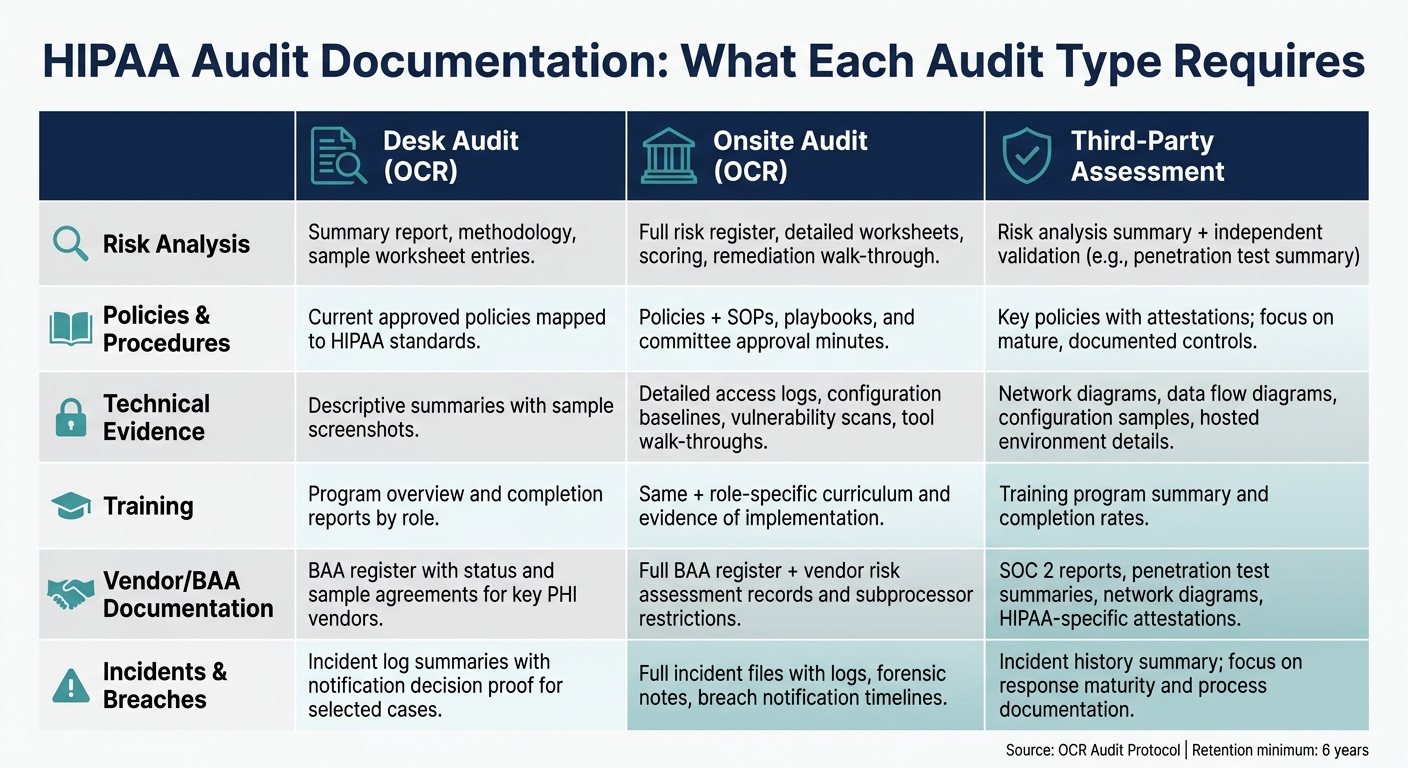
HIPAA Audit Documentation: What Each Audit Type Requires
Templates and Worksheets That Speed Up Documentation
Once your repository structure is set up, templates make the whole process easier to manage. They help keep evidence complete, current, and ready to share. More importantly, they cut down on the last-minute scramble that tends to happen before an audit. They also give IT, compliance, HR, and legal a common format, so people aren't rebuilding the same file five different ways.
The most useful templates are the ones that line up with what OCR auditors actually request. A risk assessment worksheet should record each information asset, its threats and vulnerabilities, likelihood and impact scores on a 1–5 scale, current controls, and a named owner with a remediation due date. An evidence matrix should tie each HIPAA citation - like §164.308(a)(1)(ii)(A) for risk analysis or §164.312(a)(2)(i) for unique user identification - to the exact evidence file and its last validation date.[27][26] If a row in that matrix is blank, that's a gap you can fix before an auditor spots it.
A few other templates do a lot of heavy lifting too:
- A BAA register should track vendor name, services involved, PHI types, hosting environment, BAA status, last risk assessment date, and next review date.
- A training tracker should list each employee or contractor, their role, required courses, completion dates, and attestation records.
- An incident and breach log should include detection date/time, affected systems, amount of PHI involved, a breach assessment, notification decisions, and closure date.[21][3][4]
Each template should also have a clear owner and a recurring trigger, such as vendor onboarding or an annual review. That's what keeps documentation from going stale.
Using Censinet to Support HIPAA Audit Documentation
When evidence is spread across a lot of systems, one shared platform can save a lot of pain. Spreadsheets tend to break down once risk data starts stretching across vendors, applications, and devices.
Censinet RiskOps™ brings completed vendor and internal risk assessments, linked evidence, BAA status, and mitigation tasks into one audit view. Censinet AI™ can draft HIPAA-aligned policy language, map uploaded evidence to controls, flag stale documentation, and send high-risk findings for human review before approval.
Conclusion: Package the Right Evidence for Every Audit Type
An audit package only works if the level of detail matches the type of audit. Desk audits, onsite reviews, and third-party assessments may pull from the same source records, but they do not ask for the same depth of documentation.[6][28][29]
Use the same records in different ways based on audit depth.
| Evidence Category | Desk Audit (OCR) | Onsite Audit (OCR) | Third-Party Assessment |
|---|---|---|---|
| Risk Analysis | Summary report, methodology, sample worksheet entries | Full risk register, detailed worksheets, scoring, remediation walk-through | Risk analysis summary plus independent validation, such as a penetration test summary |
| Policies & Procedures | Current approved policies mapped to HIPAA standards | Policies plus SOPs, playbooks, and committee approval minutes | Key policies with attestations; focus on mature, documented controls |
| Technical Evidence | Descriptive summaries with a few sample screenshots | Detailed access logs, configuration baselines, vulnerability scans, tool walk-throughs | Network diagrams, data flow diagrams, configuration samples, and hosted environment details |
| Training | Program overview and completion reports by role | Same, plus role-specific curriculum and evidence of implementation | Training program summary and completion rates |
| Vendor/BAA Documentation | BAA register with status and sample agreements for key PHI vendors | Full BAA register plus vendor risk assessment records and subprocessor restrictions | SOC 2 reports, penetration test summaries, network diagrams, data flow diagrams, and HIPAA-specific attestations |
| Incidents & Breaches | Incident log summaries with notification decision proof for selected cases | Full incident files with logs, forensic notes, and breach notification timelines | Incident history summary; focus on response maturity and process documentation |
Use the OCR Audit Protocol as the framework, keep evidence current and version-controlled, and pull each package from the same repository.[1][4][3]
FAQs
What should I document first for a HIPAA audit?
Start with a thorough, organization-wide risk analysis. HIPAA requires it, and it should cover every system that handles ePHI. The goal is simple: find threats, spot weak points, and estimate the impact if something goes wrong.
Then build a compliance inventory for assets and documentation. That way, if auditors ask for proof, you can find the right records fast instead of scrambling to piece them together at the last minute.
How often should HIPAA audit documents be reviewed or updated?
Use a tiered review schedule based on document type and risk.
Review internal audits and risk analyses at least once a year. Also review them after major system upgrades, security incidents, or regulatory changes. Those events can shift risk fast, so waiting for the next annual check may leave gaps.
More fast-moving records need a tighter cadence. Access control matrices and risk assessments should be reviewed quarterly. Personnel access records should be updated right away when staffing changes happen, with routine audits layered in as well.
What’s the best way to organize HIPAA audit evidence?
Use a centralized, searchable evidence library as your single source of truth. Keep policies, risk analyses, training logs, incident reports, and system inventories in one organized, version-controlled repository.
A simple setup goes a long way. Group files by HIPAA control area, use the same naming format across the repository, and set role-based access controls so the right people can view or update the right records. Add change logging too, so you can see who changed what and when.
For long-term recordkeeping, follow HIPAA’s six-year retention minimum. For audit logs, use immutable or WORM storage so those records can’t be altered after the fact.
