
An ISO 27001 certificate alone is not enough for healthcare vendors that touch PHI. I’d verify five things right away: the certificate, the scope, the audit cycle, the issuing body, and whether the listed controls match the PHI workflows I use.
Here’s the short version:
- Step 1: Get the certificate, scope statement, SoA, and recent audit details.
- Step 2: Check the certificate in the issuer registry and confirm accreditation.
- Step 3: Match the scope to the exact cloud services, regions, and integrations used for PHI.
- Step 4: Review control coverage, exclusions, and HIPAA safeguard fit.
- Step 5: Track renewals, scope changes, and contract notice terms each year.
That matters because vendor-related issues drive a large share of healthcare breaches, and OCR has already fined cloud business associates for weak risk analysis. A vendor can have a valid ISO 27001 certificate while the actual PHI environment sits outside scope.
What I’d remember most: valid certificate does not equal HIPAA compliance, and it does not mean every product, region, or subprocessor is covered.
| Step | What I check | Why it matters |
|---|---|---|
| 1 | Vendor evidence package | Shows what was audited |
| 2 | Registry and accreditation status | Confirms the certificate is valid |
| 3 | Scope vs. PHI use case | Shows if the covered setup matches my use |
| 4 | SoA and control gaps | Shows where risk may still sit |
| 5 | Renewal and change tracking | Keeps the review current over time |
If I’m trusting a cloud vendor with ePHI, this is the baseline review I’d want on file before contract signing and again during each annual vendor review.
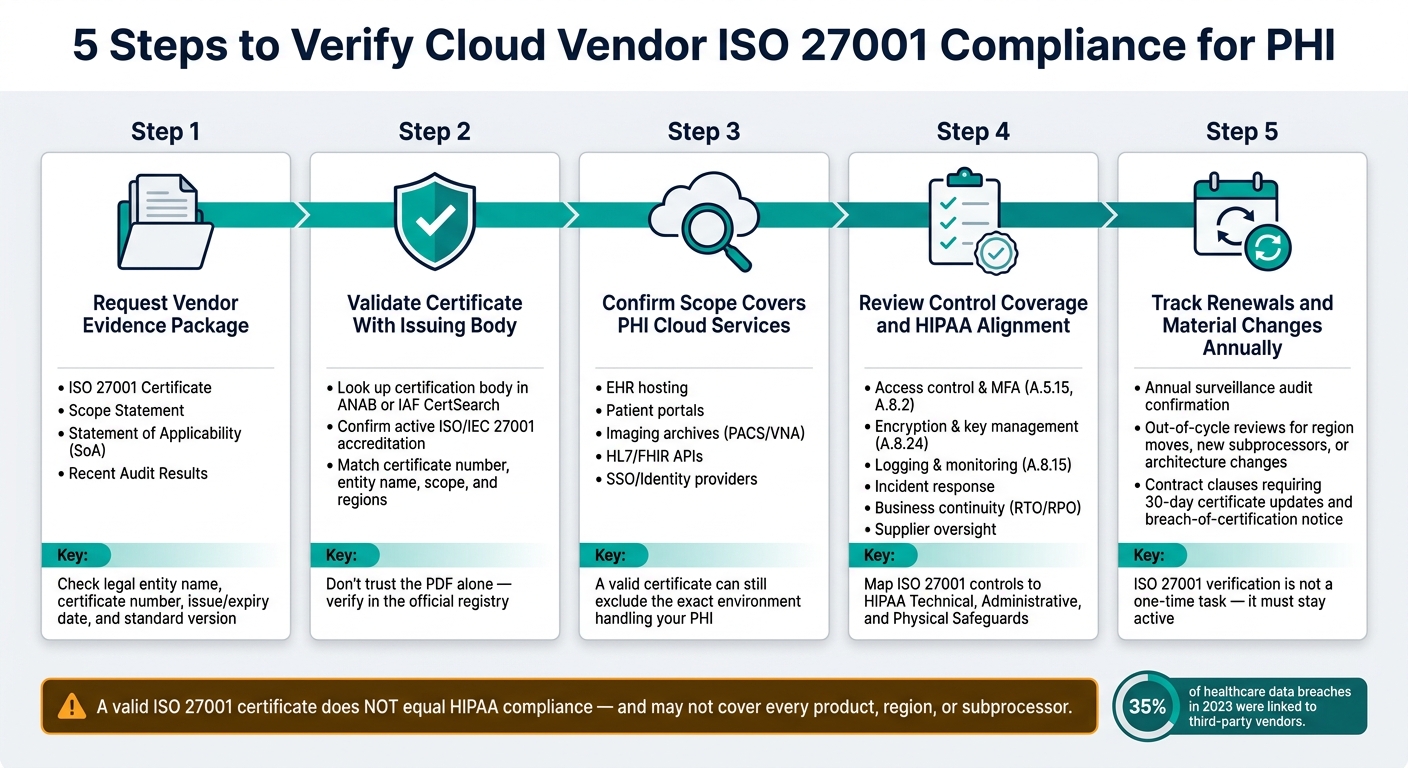
5 Steps to Verify Cloud Vendor ISO 27001 Compliance for PHI
How to implement ISO 27001 Information Security Of Cloud Services (Annex A 5.23) & Pass Your Audit
sbb-itb-535baee
Step 1: Request and Review the Vendor's ISO 27001 Certification Evidence
If the scope still isn't clear, start with the vendor's evidence package. Ask for it before procurement, during onboarding, and again at each annual review. In healthcare, the big issue is simple: does the certified environment actually cover the systems that handle PHI?
Collect the Certificate, Scope Details, SoA, and Recent Audit Information
Ask every cloud vendor for four core documents:
- the ISO/IEC 27001 certificate
- the scope statement or annexes
- the Statement of Applicability (SoA)
- recent audit results, including nonconformities and remediation status
Each one tells you something different. The certificate shows the audit happened. The scope statement shows what's covered. The SoA lists which controls apply and explains any exclusions. The audit results help you see whether those controls are working in day-to-day practice.
Pay close attention to exclusions tied to access control, cryptography, logging, or monitoring. In a PHI setting, those gaps can point to risk. Audit findings can also reveal weak spots, such as incomplete risk assessments, access control lapses, and SoA mismatches where controls are marked as implemented but don't show up in practice.[5][9]
Check the certificate details closely:
- legal entity name, which must match the contracting party and operating entity
- certificate number
- issue date
- expiration date
- standard version
The legal entity and the standard version should line up with the cloud service you're buying. That part matters more than it seems. ISO/IEC 27001:2022 changed key control areas, including cloud services and threat intelligence. If the vendor is still certified under the 2013 version, ask for the transition plan.[1][3][4]
If the paperwork is incomplete, mismatched, or hard to reconcile, stop there before moving on to external validation. Organizations can streamline this evidence collection by using Censinet Connect™ Copilot to automatically process source documentation.
Check the Certification Timeline and Surveillance Cadence
ISO 27001 certificates run on a three-year cycle. In years one and two, the vendor should complete annual surveillance audits. In year three, they go through recertification. If a surveillance audit is overdue, a certificate that looks current on paper can turn into stale evidence.[6][7][8]
Ask for the last surveillance audit date and the next due date. Track both internally in MM/DD/YYYY format. Also flag any certificate that expires within 6 to 12 months so you can confirm renewal before a gap opens up.
Once the evidence set is current, move to independent verification in Step 2.
Step 2: Validate the Certificate With the Issuing and Accreditation Bodies
After you review the vendor’s documents, check the certificate in the issuer’s registry. Don’t trust the PDF by itself. ISO 27001 should be verified in the official registry, because fake “instant” certificates and certification mills are out there. This is a required vendor risk control, not just a box-ticking exercise.[11][14][15]
Confirm the Certification Body and Accreditation Status
Look up the certification body listed on the certificate in an accreditation directory, such as ANAB, and confirm that it has active ISO/IEC 27001 accreditation.[20][18]
If the body doesn’t appear in the directory, or it isn’t accredited for ISO/IEC 27001, treat the certificate as unverified.[10][12][13][22]
Match the Certificate Record to the Vendor's Actual Cloud Operations
Use the certification body directory or IAF CertSearch to review the registry entry. Match the certificate number, legal entity name, status, standard version, scope description, cloud regions and data-center sites, and issue and expiry dates.[2][19][16] Use IAF CertSearch to confirm validity and accredited issuance.[16][17]
This part matters more than it may seem. A certificate can be valid on paper and still miss the systems you care about. Scope is everything. A scope that covers only administrative office operations is not the same as one that clearly covers cloud infrastructure services. If the cloud regions and data-center sites used for PHI aren’t listed, the certification may not apply to the environment that matters most.
For each vendor, save timestamped screenshots or PDF exports from the registry and attach them to the vendor risk file. Also record:
- The registry you checked
- The search terms or certificate details used
- The result of the verification
That gives you an auditable trail for internal audit, OCR inquiries, or risk committee review.[2][21]
Platforms like Censinet RiskOps™ can help healthcare delivery organizations store these files with the vendor profile, connect them to risk assessments, and produce reports on demand. Use this verified record as the baseline for Step 3’s scope check. Use the verified scope and locations to test whether the certified environment covers PHI workloads in Step 3.
Step 3: Confirm the Certificate Scope Covers the Cloud Services Used for PHI
Once you've verified the registry, the next job is to line up the certificate scope with each PHI workflow. This matters because an ISO 27001 certificate can be valid and still leave out the platform, region, or integration your team depends on.
Compare the Scope Statement to Healthcare Use Cases and Integrations
Get the full scope statement, not just the certificate cover page, and compare it with your live setup. Read it against the way your team actually stores, transmits, and processes PHI. The key question is simple: does the scope name the systems and regions involved?
For each healthcare use case your organization depends on, identify the cloud services underneath it and check whether the scope clearly includes them:
- EHR hosting: The scope should name the production cloud platform, databases, and U.S. regions used for PHI.
- Patient portals: The scope should include the SaaS app, CDN, and identity provider.
- Imaging archives (PACS/VNA): The scope should include object storage, backup, and replication.
- HL7/FHIR: The scope should include the integration engine, API gateway, and messaging services.
- SSO: The scope should clearly include federation and directory services.
If the scope statement feels vague or leaves out any of these parts, ask the vendor for a plain-language clarification. Don't leave it to guesswork. Contracts and third-party vendor risk management protocols, including business associate agreements (BAAs), should spell out which environments and services are covered by ISO 27001, so it's clear where the certified controls apply.
Scope-to-Use-Case Comparison Table
A structured table makes this much easier to track. It gives you a clear, auditable record of where ISO 27001 coverage is in place, where it's uncertain, and where vendor follow-up is still needed.
| Healthcare Use Case | Cloud Service Used | In Scope? | Follow-Up |
|---|---|---|---|
| EHR hosting | Vendor SaaS EHR platform (U.S. data centers) | ✅ Yes – explicitly listed in scope | Confirm production region matches BAA. |
| Patient portal | Web front end + CDN + SSO via identity provider | ⚠️ Unclear – CDN not mentioned; SSO hosted by separate provider | Request scope clarification. |
| Imaging archive (PACS) | Object storage in us-east-1 + managed backup | ✅ Yes – cloud storage and backup in named U.S. regions covered | Confirm backup replication region. |
| HL7 interface / FHIR API | API gateway + integration engine | ❌ No – integration engine runs on customer-managed infrastructure | Define compensating controls; document shared-responsibility boundary. |
| Single sign-on (SSO) | Identity provider + federation service | ⚠️ Unclear – federation service not named in scope | Escalate to vendor; may require separate assurance. |
Any row marked Unclear or No should be logged as a gap and carried into Step 4's control review. Censinet RiskOps™ can store the comparison table in the vendor profile and link it to risk ratings.
Step 4: Review Control Coverage, SoA Exclusions, and Healthcare Risk Alignment
With Step 3 done, use the SoA to check whether the certified controls line up with your PHI workflows. Then use the scope gaps you logged to see whether excluded or unclear services are still covered by compensating controls.
Assess High-Impact Controls for Healthcare Cloud Risk
The SoA lists Annex A controls, marks them as applicable or not, and gives the reason for any exclusion. Start with the controls that matter most for healthcare risk. Then ask for proof that those controls are working in practice, not just written down.
For cloud vendors handling PHI, these are the main areas to review:
| Control Area | What to Request |
|---|---|
| Access control and MFA (A.5.15, A.8.2) | RBAC configuration, MFA enrollment stats, access review records |
| Encryption and key management (A.8.24) | Key rotation schedule, HSM or cloud KMS usage, separation of duties evidence |
| Logging and monitoring (A.8.15) | SIEM diagrams, log retention policy, alerting rules for PHI access anomalies |
| Vulnerability management | Scan cadence, remediation timelines by severity, sample closure reports |
| Incident response | IR plan, escalation matrix, tabletop exercise records, ideally at least annually |
| Business continuity | RTO/RPO values for healthcare workloads, DR test results |
| Supplier oversight | Third-party risk procedures, subcontractor due diligence templates |
A control marked “not applicable” should be treated like a gap unless the exclusion matches the vendor’s actual environment and ISMS scope. If a vendor leaves out encryption, logging, or access control controls, flag it and ask for a written explanation.
ISO 27001:2022 also added controls that matter a lot in cloud settings, including A.5.23 (information security for use of cloud services), A.8.9 (configuration management), A.8.12 (data leakage prevention), and A.8.28 (secure coding). [26] Check whether those controls show up in the SoA and whether any exclusions make sense for your use case.
Map ISO Controls to HIPAA Safeguards and Document Gaps
After reviewing the SoA, map what you found to HIPAA’s three safeguard categories. If you want a more detailed crosswalk, NIST has published formal mappings between ISO/IEC 27001:2022 and NIST SP 800-53 Rev. 5, which lines up well with HIPAA Security Rule guidance. [24][25][23]
This step turns control review into HIPAA risk decisions your team can actually use.
| ISO 27001 Control Area | HIPAA Safeguard Category | Vendor Implementation Summary | Healthcare-Specific Risk Impact |
|---|---|---|---|
| A.5.15 / A.8.2 – Access Control | Technical – §164.312(a) | SSO with MFA enforced for privileged accounts and remote access; RBAC aligned to clinical roles; access reviews | Cuts the risk of unauthorized PHI access affecting EHR data and imaging systems |
| A.8.24 – Cryptography | Technical – §164.312(e) Transmission Security | AES-256 at rest; TLS 1.2+ in transit; annual key rotation; HSM-backed key storage | Supports HIPAA breach safe harbor; protects HL7/FHIR interfaces and PHI-related traffic |
| A.8.15 – Logging and Monitoring | Technical – §164.312(b) Audit Controls | Centralized SIEM; 7-year log retention; alerting on anomalous PHI access | Helps detect insider threats and unauthorized API access to clinical data |
| A.17 – Business Continuity | Administrative – §164.308(a)(7) Contingency Plan | Documented DR plan; RTO of 4 hours for EHR workloads; recent failover test results on file | Protects clinical uptime; untested DR increases the risk of long outages affecting medication ordering or lab results |
| A.5.19 – Supplier Relationships | Administrative – §164.308(a)(1) Risk Management | Third-party risk program with vendor reviews; ISO 27001 flow-down required for PHI subprocessors | Limits fourth-party PHI exposure; gaps here can create hidden breach paths through subcontractors |
| A.11 – Physical & Environmental Security | Physical – §164.310 | Vendor relies on hyperscaler data centers; physical controls are covered by the hyperscaler’s own certifications | Acceptable only if those certifications are explicitly referenced in the vendor’s ISMS scope |
If any implementation summary is incomplete, log it as a gap in your risk register. Be specific about the clinical impact. For example, if MFA is not enforced for admin access to PHI-hosting systems, that increases the risk of a large-scale PHI breach and possible OCR enforcement action. Track unresolved items now so Step 5 can turn them into repeat review tasks.
Step 5 and Conclusion: Build ISO 27001 Verification Into Ongoing Vendor Risk Management
Use the gaps and follow-up items from Step 4 to shape your renewal process and your change-trigger reviews. ISO 27001 verification needs to stay active. It isn't a one-time procurement task.
A certificate can expire. Its scope can get narrower. A vendor can also miss a surveillance audit. When that happens, your PHI exposure can change too.
Track Renewals, Contract Obligations, and Material Changes
Ask for updated evidence every year as part of your third-party risk schedule. You should also trigger an out-of-cycle review when a material change happens, such as:
- region moves
- new PHI-touching modules
- new subprocessors
- major architecture changes
Any of these can change the ISO scope or the risk posture you checked before.
Your vendor contracts should carry part of this load. Add clear clauses that require the vendor to keep ISO 27001 certification in place for the full term of the agreement. The contract should also require updated certificates and SoA summaries within 30 days of issuance.
It should also require notice if certification is suspended, narrowed, or withdrawn, with a direct link to PHI exposure. On top of that, include corrective action rights and termination for cause if the vendor does not restore current certified status.
After those terms are in the contract, track them in one vendor record.
Use a Central System of Record for Evidence and Monitoring
Managing ISO 27001 verification across many vendors takes centralized tracking, not ad hoc spreadsheets. Certificate expiration dates, SoA changes, and surveillance audit evidence should sit inside each vendor record and be reviewed the same way each time.
A centralized system like Censinet RiskOps™ can store evidence, track renewal dates, and record remediation.
Built into the vendor lifecycle, these five steps help teams catch gaps before they turn into breaches. Healthcare organizations that put this process into day-to-day practice are in a stronger position to manage PHI risk as vendor status changes, especially since third-party vendors were directly associated with 35% of healthcare data breaches in 2023. [27] Ongoing tracking keeps PHI risk tied to the vendor's current status, not just the snapshot taken during procurement.
FAQs
Does ISO 27001 certification mean a vendor is HIPAA compliant?
No. ISO 27001 shows that a vendor has an information security management system, but that alone does not make the vendor HIPAA compliant.
In healthcare, HIPAA compliance also depends on HIPAA-specific requirements and contracts. That includes a signed Business Associate Agreement (BAA) and meeting the Security Rule safeguards for ePHI. Think of ISO 27001 as a strong starting point, not the whole finish line. It can help set the groundwork, but you still need HIPAA-specific due diligence and documentation.
What if the vendor’s PHI environment is outside the ISO 27001 scope?
If a vendor’s PHI environment sits outside its ISO 27001 certification scope, that certification should not be your main proof that PHI is protected.
Check that the certification covers the systems, cloud regions, and services used to process, store, or transmit PHI. Review the Statement of Applicability closely. If the scope is narrow, you’ll need extra due diligence, including a HIPAA risk assessment, a signed Business Associate Agreement, and a review of other security controls.
How often should we re-verify a cloud vendor’s ISO 27001 status?
Healthcare organizations should reassess cloud vendors at least once a year. A one-time review can miss things, so continuous monitoring and delta-based reassessments help teams spot changes when they happen, not months later.
It also makes sense to review a vendor right away after major events, like material architecture changes, security incidents, ownership changes, or service updates.
