
Cloud backups are essential for healthcare organizations, but they come with risks that can compromise patient data and disrupt operations. Here's what you need to know:
Key Solutions:
To protect sensitive data and maintain compliance, healthcare organizations must address these risks proactively with secure configurations, regular testing, and strong vendor oversight.
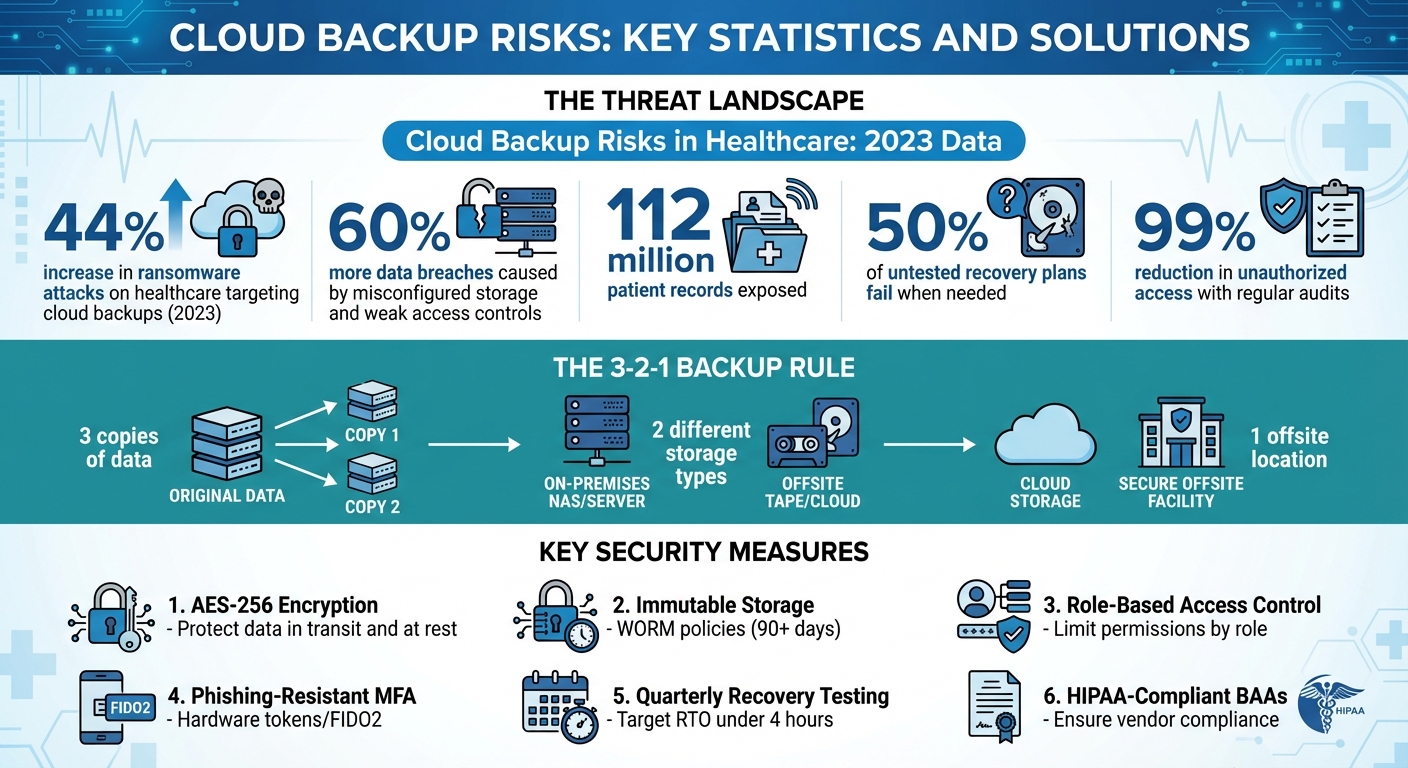
Cloud Backup Risks and Security Statistics for Healthcare Organizations
Common Cloud Backup Risks
Healthcare organizations face several risks when storing PHI (Protected Health Information) in cloud backups. Recognizing these challenges is essential for building a secure backup strategy that protects sensitive data and ensures clinical operations run smoothly.
Data Breaches and Ransomware
Backups that are not encrypted or lack proper protection are a prime target for cybercriminals. The NSA has highlighted that cloud-stored data is especially vulnerable to theft and ransom attacks[4]. Ransomware groups often focus on backup repositories first, either deleting or encrypting them before targeting production systems. This "double-extortion" strategy involves stealing PHI from backups, encrypting critical systems, and then threatening to release the stolen data unless a ransom is paid.
Even if a hospital manages to restore its systems using unaffected backups, the exposure of PHI can lead to serious legal and regulatory issues. This underscores the importance of strong encryption, secure storage practices, and proactive security measures to safeguard backup data.
Service Outages and Data Loss
Cloud provider reliability is another critical concern. Downtime can prevent clinicians from accessing or restoring essential backups, such as EHRs, imaging files, or lab results. This often forces healthcare providers to revert to manual processes, increasing the risk of errors.
Regional issues, like cloud outages or network disruptions, can also impact backup availability - especially if all copies are stored in one geographic location. In such cases, outdated records may need to be reconstructed, which can delay care and lead to errors. In the U.S., these incidents may need to be reported to accrediting bodies or state agencies if they disrupt patient care.
Misconfigurations and Access Control Failures
Poorly configured storage settings, such as publicly exposed buckets, can grant unauthorized access to sensitive PHI. These vulnerabilities allow attackers to target backup data directly, even if production systems remain secure. Over-privileged accounts, weak or missing multi-factor authentication (MFA), and poor key management practices further increase the risk of unauthorized access to backup repositories. Such lapses can have devastating consequences for data security.
Compliance Violations
Cloud backups must meet HIPAA Security Rule requirements, which include strict access controls, encryption, audit logging, and secure data transmission. Common compliance failures include using a cloud backup provider without a HIPAA-compliant Business Associate Agreement (BAA), which leaves PHI handling unprotected by necessary contractual safeguards.
Other issues include retaining backups longer than legally allowed or failing to maintain adequate logs to prove compliance. These missteps can lead to OCR enforcement actions, civil penalties, and costly remediation efforts. Beyond financial costs, such violations can disrupt healthcare operations and damage patient trust.
Third-Party Vendor Risks
Relying on third-party providers for cloud backup services comes with its own set of challenges. Vendors may have security gaps, limited transparency in backup configurations, or unclear responsibilities for encryption. Operational risks, such as vendor outages, data center closures, or even bankruptcy, can delay access to backups and slow recovery efforts.
Under HIPAA, healthcare organizations remain fully accountable for protecting PHI, even when using external vendors. Any vulnerabilities in the vendor's systems can lead to regulatory and legal consequences, jeopardizing both compliance and patient care.
How to Reduce Cloud Backup Risks
Healthcare organizations face a critical responsibility: securing cloud backups to protect sensitive data. This requires robust technical safeguards, strict access controls, and consistent testing.
Use Encryption and Immutable Storage
Encrypting backup data is non-negotiable. Use AES-256 encryption or higher standards to protect files during both transfer and storage. To maintain full control, opt for customer-managed keys (CMKs) instead of relying solely on provider-managed encryption. This ensures that only authorized personnel can decrypt sensitive protected health information (PHI).
Adding immutable storage provides an extra layer of defense. Features like write-once-read-many (WORM) policies or object versioning can lock backups for a set period - often 90 days or more - making it impossible for ransomware to alter or delete them. A real-world example: in 2023, a U.S. hospital successfully recovered from a ransomware attack by leveraging AWS S3’s Object Lock feature. Within 48 hours, they restored patient records without paying a ransom, a process that typically takes weeks[2]. Other cloud platforms have reported similar outcomes when using immutable storage solutions.
Improve Access Controls
Restricting access is key to minimizing risks. Implement role-based access control (RBAC) to ensure users only have permissions aligned with their roles. For example, auditors might receive read-only access, while backup administrators are granted limited write permissions. Cloud-native tools like AWS IAM or Azure AD can help enforce these policies effectively.
Strengthen security further by requiring phishing-resistant multi-factor authentication (MFA), such as hardware tokens or FIDO2 standards, which are far more secure than SMS codes. To add another layer of protection, use just-in-time temporary credentials that expire after a short period and monitor access patterns with automated logging and SIEM systems. These tools can flag unusual behavior, like failed login attempts or access from unfamiliar IP addresses. Regular audits, which experts say can reduce unauthorized access by up to 99%, are essential for maintaining security[3].
Store Backups Across Multiple Locations
The 3-2-1 backup rule is a trusted strategy: keep three copies of your data, use two different storage types, and ensure at least one copy is offsite. For healthcare organizations, this might mean storing primary backups with one cloud provider and secondary copies with another, or combining cloud storage with on-premises solutions. When using cloud providers, choose HIPAA-compliant regions like U.S. East and U.S. West to ensure availability during outages and avoid reliance on a single provider[2].
Test Backups and Recovery Plans
Testing is crucial to ensure backups work when needed. Perform quarterly disaster recovery drills that simulate scenarios like ransomware attacks or complete system outages. Aim for a recovery time objective (RTO) of under four hours, and verify data integrity in isolated environments before restoring to production systems. Automated verification steps can confirm that data remains intact post-restoration. Industry data shows that untested recovery plans fail 50% of the time, highlighting the importance of regular drills for both HIPAA compliance and reliable recovery[2].
Manage Vendor Relationships
Vendors play a significant role in securing cloud backups. Conduct annual third-party risk assessments using frameworks like NIST or the Standardized Information Gathering (SIG) questionnaire. Review vendors' SOC 2 Type II reports and confirm their HIPAA compliance before signing contracts. Establish clear Business Associate Agreements (BAAs) that outline data handling protocols, breach notification timelines (typically within 60 days), and audit rights.
For ongoing oversight, use automated tools to continuously monitor vendors’ security postures. This approach aligns with the shared responsibility model, where vendors manage infrastructure security, while healthcare organizations handle access controls and configurations[2]. Platforms like Censinet RiskOps™ can simplify collaboration, ensuring both parties maintain a strong security stance over time.
sbb-itb-535baee
How Censinet Helps Manage Cloud Backup Risks
With the growing threats to cloud backup systems, healthcare organizations need more than just manual processes to manage risks effectively. A centralized platform becomes essential to safeguard sensitive data. Censinet RiskOps™ steps in by offering healthcare-focused tools that help assess, monitor, and manage cloud backup vendors' security, all while ensuring compliance with HIPAA regulations.
Simplifying Risk Assessments with Censinet RiskOps™
Censinet RiskOps™ takes the headache out of initial risk evaluations. By automating third-party risk assessments, the platform uses standardized questionnaires aligned with HIPAA, HITRUST, and NIST CSF standards. It automatically gathers critical evidence like SOC 2 reports, penetration test results, and encryption documentation, while flagging potential gaps such as missing Business Associate Agreements (BAAs) or incomplete incident response plans.
This efficiency was evident for Tower Health. Terry Grogan, CISO at Tower Health, shared:
Additionally, the platform's extensive network of over 50,000 healthcare vendors allows organizations to use shared assessment data. This eliminates the need to start from scratch with every vendor evaluation, saving both time and resources.
Supporting Backup Security and Compliance
Censinet ensures that critical technical safeguards for backup security are in place. It verifies controls like AES-256 encryption, key management, immutable storage configurations, and robust multi-factor authentication. The platform also documents essential details such as data center locations, backup replication across regions, and vendors' Recovery Point Objectives (RPO) and Recovery Time Objectives (RTO) - key metrics for disaster recovery planning.
For continuous oversight, Censinet monitors compliance parameters tied to cloud backups. It tracks vendor incidents, records root causes and corrective actions, and adjusts risk ratings as needed. This proactive approach allows organizations to detect and address issues early, ensuring that a vendor's security posture doesn’t degrade unnoticed. These features enable coordinated risk management across teams and help maintain a strong backup security framework.
Enabling Team Collaboration on Risk Management
Censinet centralizes all cloud backup risk data - such as assessments, evidence, BAAs, incident logs, and remediation plans - into one accessible platform for authorized stakeholders. IT teams can document technical controls and testing results, compliance teams can review HIPAA-aligned coverage, and clinical leaders can see how backup risks impact patient care workflows. This collaborative setup ensures that improvements in backup security meet both technical and operational needs.
James Case, VP & CISO at Baptist Health, highlighted the value of this approach:
The platform also includes shared dashboards, task assignments with deadlines, and real-time status updates. This allows cross-functional teams to work together seamlessly, avoiding the inefficiencies of scattered email threads and disconnected workflows. By bringing everyone onto the same page, Censinet simplifies and strengthens cloud backup risk management.
Conclusion: Building a Secure Cloud Backup Strategy
A well-thought-out backup strategy is non-negotiable for healthcare organizations, especially given the risks tied to cloud backups. While these backups are critical for ensuring resilience, they also come with significant challenges. The 2023 Change Healthcare breach serves as a stark reminder: a vendor's misconfiguration left sensitive PHI exposed through unsecured backups, leading to a $2.3 billion loss and nationwide service disruptions. This underscores the importance of prioritizing security in backup strategies.
To safeguard patient data and maintain operational continuity, organizations must adopt key measures such as robust encryption, immutable storage to prevent ransomware tampering, least-privilege access controls paired with phishing-resistant MFA, multi-region backup storage, and regular recovery testing. The NSA emphasizes the importance of clearly defining which security controls are managed internally versus those handled by cloud providers - a crucial step in avoiding gaps in oversight.
Healthcare leaders can enhance their approach by leveraging platforms like Censinet RiskOps™. These tools automate third-party risk assessments, ensure that backup vendors adhere to HIPAA requirements, and provide continuous monitoring of encryption, access controls, and incident response protocols. This shifts backup security from a reactive task list to an integrated, proactive program that brings IT, compliance, and clinical teams together.
Developing a strong backup strategy is not a one-time effort - it requires ongoing commitment. Document your risk mitigation strategies, assign clear ownership, and conduct regular audits and recovery drills. By combining robust technical safeguards with dedicated risk management tools like Censinet RiskOps™, healthcare organizations can transform potential vulnerabilities into strengths that protect patient care and ensure smooth operations throughout the year.
FAQs
What is the 3-2-1 backup rule, and why does it matter for healthcare organizations?
The 3-2-1 backup rule is a trusted method for keeping your data safe. Here’s how it works: you maintain three copies of your data - one original and two backups. These backups should be stored on two different types of media (like an external hard drive and cloud storage), and at least one of them should be located offsite.
For healthcare organizations, this strategy is especially important. It ensures uninterrupted access to critical data, shields against risks like ransomware attacks and service outages, and supports compliance with regulations designed to protect patient information. By following this rule, healthcare providers can better safeguard sensitive data and reduce potential vulnerabilities.
What steps can healthcare organizations take to ensure their cloud backup providers comply with HIPAA regulations?
Healthcare organizations need to verify that their cloud backup providers adhere to HIPAA Security and Privacy Rules. This includes implementing safeguards to protect electronic protected health information (ePHI). A key step is reviewing the provider’s Business Associate Agreement (BAA) to confirm they are legally bound to meet HIPAA compliance standards.
Regular risk assessments are equally important. Using tools like Censinet RiskOps™ can simplify this process by evaluating the provider’s security protocols, incident response plans, and compliance status. Taking these steps helps reduce potential risks and reinforces strategies to keep data secure.
What are the advantages of using immutable storage for cloud backups?
Immutable storage offers a robust solution to protect your cloud backups by making sure your data remains unchangeable and secure. This means your information is shielded from risks like ransomware attacks, accidental deletions, or unauthorized tampering.
By preserving data integrity, immutable storage not only secures your backups but also helps meet regulatory requirements. With an unalterable record of your data, you can confidently recover it quickly and reliably in case of a breach or system failure, ensuring minimal disruption.
