
HIPAA audit logs are critical for tracking access to electronic protected health information (ePHI). They help healthcare organizations identify security risks, investigate breaches, and demonstrate compliance. Without proper logs, organizations face steep fines, legal challenges, and undetected security incidents. Here's what you need to know:
- Audit Controls are Mandatory: HIPAA requires hardware, software, and procedural mechanisms to log ePHI activity.
- Track User Actions: Logs must record who accessed what, when, and the specific actions taken.
- Precise Timestamps: Ensure logs include accurate and synchronized timestamps for event correlation.
- Log Outcomes: Record whether actions succeeded or failed, including error details.
- Protect Logs from Tampering: Use encryption, role-based access, and immutable storage to secure logs.
- Retain Logs for 6 Years: HIPAA mandates a minimum retention period for audit logs.
Failing to meet these requirements can result in fines ranging from $100 to $50,000 per violation. Implementing centralized log management and regular reviews ensures compliance and strengthens ePHI security.
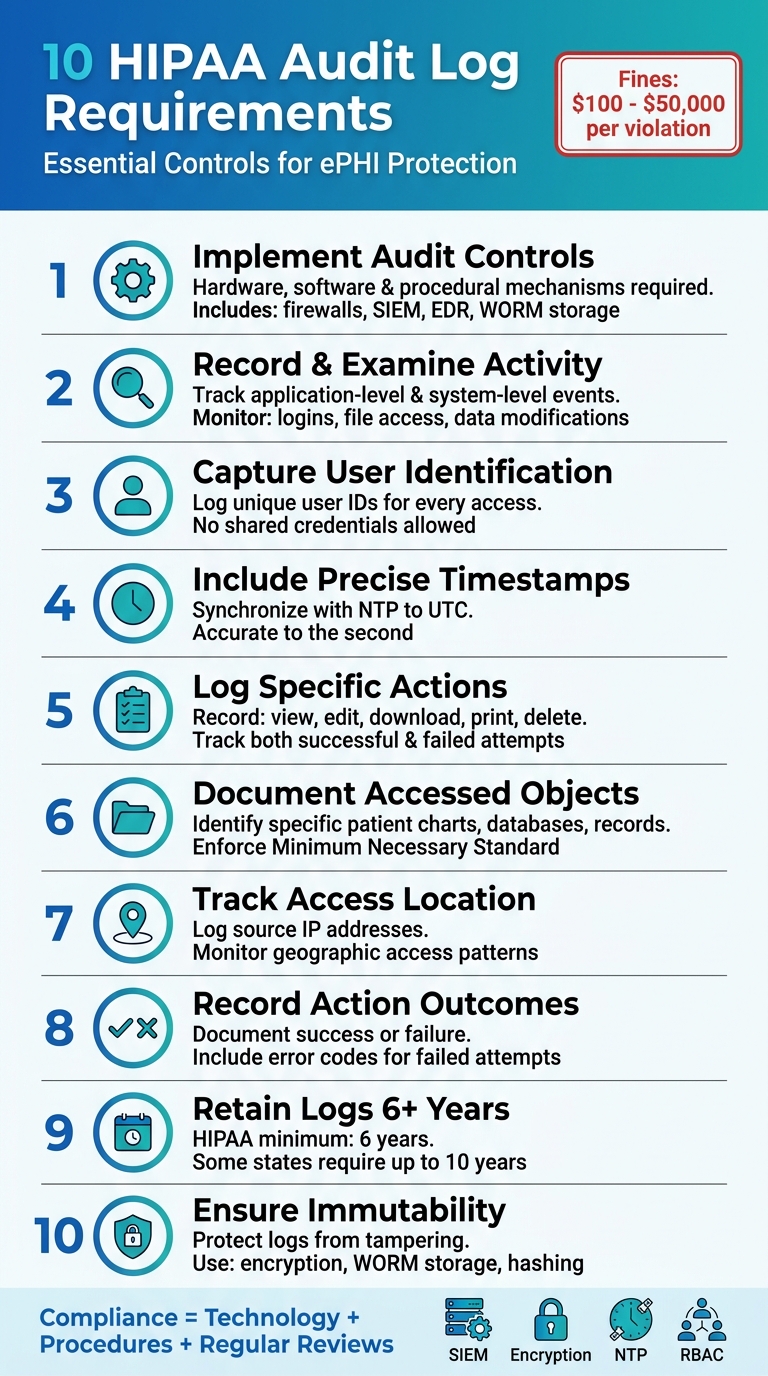
10 HIPAA Audit Log Requirements for Healthcare Compliance
What is an Audit Trail in Healthcare? (Explained - 2026)
sbb-itb-535baee
1. Implement Hardware, Software, and Procedural Mechanisms for Audit Controls
The HIPAA Security Rule (§164.312(b)) mandates audit controls as a non-negotiable requirement. This means organizations must implement a mix of technical systems and well-documented procedures to track every interaction with electronic protected health information (ePHI) [3].
Hardware mechanisms play a key role here. These include tools like firewalls, intrusion detection systems, endpoints with EDR (Endpoint Detection and Response) capabilities, and WORM (Write Once, Read Many) media to protect patient care and ensure secure, long-term data storage [3]. On the software side, mechanisms encompass application-level logging in electronic health records (EHRs) and patient portals, database auditing tools, operating system logs, and centralized Security Information and Event Management (SIEM) platforms. These tools help standardize and analyze events across diverse environments [3].
However, technology alone isn’t enough. Procedural controls are equally important. Organizations must create formal policies that clearly outline who is responsible for reviewing logs, how often reviews should occur, and what actions should follow. For instance, "break-the-glass" workflows should trigger immediate alerts and require documented justifications for access. Additionally, enforcing separation of duties ensures that administrators cannot alter their own logs, adding an extra layer of accountability [3].
Kevin Henry, a recognized HIPAA expert, explains this balance between technology and procedure:
"Audit controls are the technical and procedural mechanisms you use to record and examine activity in systems that create, receive, maintain, or transmit electronic protected health information (ePHI)." - Kevin Henry [4]
As technology evolves, so do the requirements for audit controls. Starting in January 2025, HIPAA will demand that AI tools interacting with ePHI be integrated into healthcare risk management analyses. These tools must log critical details such as prompt content, model versions, and automated workflows [3]. To ensure the integrity of these logs, organizations should adopt cryptographic hashing (e.g., SHA-256) and digital signatures. Additionally, synchronizing timestamps using NTP (Network Time Protocol) within a 30-second margin is essential for accuracy [3].
2. Record and Examine Activity in Systems Containing or Using ePHI
HIPAA mandates healthcare organizations to track two key types of system activity: application-level actions and system-level access events. Application audit trails must log every interaction involving ePHI, such as viewing patient records, adding new entries, updating billing data, printing lab results, downloading insurance details, or deleting files. Meanwhile, system-level trails focus on authentication events, capturing both successful and failed login attempts, along with associated device details and access locations.
But capturing logs isn't enough - actively reviewing them is equally important to detect potential breaches. Logs should be collected and analyzed for unauthorized access or data disclosures. As Robert Dougherty from Kiteworks puts it:
"Audit logs are the data points, and an audit trail is the story they tell when connected." [6]
To effectively review logs, collaboration between Security Officials, SOC analysts, and Privacy Officers is crucial, often facilitated by integrated risk operations. The review frequency should align with risk levels:
- Real-time monitoring for high-risk events.
- Daily reviews to catch unusual activity.
- Weekly assessments to fine-tune detection rules.
- Quarterly recertification of privileged access.
Without consistent log reviews, organizations may fail to establish baseline access patterns, which are critical for spotting credential theft or misuse of access rights [1]. Neglecting this process can lead to severe financial and legal repercussions and may result in the loss of vital forensic evidence needed to investigate breaches.
Centralizing logs from systems like EHRs, databases, and firewalls into a SIEM system can make the process more efficient. These systems automate correlation and analysis, and configuring alerts for "break-the-glass" emergency access situations - where users must immediately justify their actions - adds another layer of security [4].
Equally important is protecting the logs themselves. Restrict access to logs strictly on a need-to-know basis and use hashing algorithms to detect any tampering. As Vanessa Villa from Pangea warns:
"Attackers often will delete any logs of actions they took so as to not be detected. Being able to change the logs and worse, not being able to detect any changes made, defeats the purpose of the audit log." [7]
3. Capture User Identification in Every Log Entry
Every audit log entry must include a unique user identifier to ensure accountability for accessing electronic protected health information (ePHI). This means logging the specific account tied to the individual accessing patient data, rather than relying on shared or generic accounts. Without this level of detail, healthcare organizations lose the ability to track who viewed, altered, or deleted sensitive information. This lack of traceability can complicate breach investigations and make it harder to demonstrate compliance during OCR audits. Including user identifiers is a key step in ensuring both accountability and traceability for every access event.
Under the HIPAA Security Rule (45 CFR § 164.312(b)), organizations are required to:
"Implement hardware, software, and/or procedural mechanisms that record and examine activity in information systems that contain or use electronic protected health information (ePHI)." [9]
User identification should be captured at both the system level (e.g., login attempts with device and location details) and the application level (e.g., actions taken after login, such as viewing patient charts, updating billing information, or accessing lab reports).
A cautionary example: In 2010, Cignet Health faced a $4.3 million fine from the Office for Civil Rights (OCR) for failing to provide patients with access to their medical records. As Security Ideals explains:
"No logging = No compliance. If your healthcare or billing system doesn't track who accessed PHI, when, and why, you're at serious risk for HIPAA violations." [9]
To maintain accountability, shared credentials must be eliminated. Systems should be configured to log individual user IDs for every access event. Integrating logging with Role-Based Access Controls (RBAC) ensures staff can only access information relevant to their roles. Additionally, automated alerts should flag unusual behavior - such as accessing PHI outside regular hours or performing large-scale data exports. These measures can help detect insider threats or compromised accounts, strengthening the overall security framework required for HIPAA compliance.
4. Include Precise Date and Time Stamps
Every audit log entry needs to have an accurate timestamp to help reconstruct event sequences and meet OCR compliance requirements [6]. This documentation is often part of a broader SOC 2 audit documentation checklist used to verify security controls. These timestamps are the glue that holds an audit trail together. Without them, healthcare organizations can't effectively demonstrate compliance to the Office for Civil Rights (OCR). The entire story falls apart if timestamps are missing, incorrect, or inconsistent across systems.
In environments with multiple systems, maintaining precise timing becomes even more critical. Distributed setups should rely on Network Time Protocol (NTP) to synchronize all systems to UTC. This ensures that timestamps from various sources align correctly, making event correlation straightforward [7][6]. When systems use unsynchronized local times, it creates chaos. For instance, a login at 2:15 PM on one server might appear as 2:17 PM on another, making it nearly impossible to determine if a suspicious data export happened before or after access was revoked. Datadog highlights this issue:
"A tool that captures user activity but not location and time is incomplete" [8].
To maintain compliance and support forensic investigations, organizations must implement NTP across all systems handling ePHI. This includes servers, databases, firewalls, VPNs, and even endpoints. Using UTC for timestamps eliminates time zone discrepancies, and timestamps should be accurate down to the second for meaningful security insights [6][7].
Timestamps also need to be protected from tampering. Attackers often try to alter or delete logs to cover their tracks. To counter this, organizations can use cryptographic signing or WORM (Write Once, Read Many) storage for logs. Regularly testing time synchronization is another critical step to ensure forensic integrity [6][7].
Failing to maintain adequate audit logs can lead to HIPAA violations, with penalties ranging from $100 to $50,000 per violation [6]. The OCR's 2024–2025 audit program specifically focuses on how covered entities comply with Security Rule provisions, especially in light of increasing ransomware and hacking incidents [10]. Accurate and synchronized timestamps aren't just technical details - they're proof that your organization prioritizes protecting ePHI.
5. Log Specific Actions Performed on ePHI
Under HIPAA, healthcare organizations are required to maintain detailed records of every action taken on electronic protected health information (ePHI). This means systems must be configured to log all significant interactions with patient data - whether it's accessing, modifying, or deleting files. As Kevin Henry from AccountableHQ explains:
"Effective audit controls let you see who accessed ePHI, what they did, when, from where, and whether the action was authorized" [4].
Every interaction with ePHI must be tracked, including seemingly minor actions like viewing or reading files. Even "read-only" access constitutes interaction and must be logged. These detailed records are essential for ensuring compliance with HIPAA's Minimum Necessary Standard, which mandates that users only access the information required for their specific roles. This level of monitoring also helps detect unauthorized changes and ensures appropriate usage.
Particular attention should be paid to high-risk actions such as downloading, printing, exporting, or running large-scale queries on ePHI. These actions could signal potential breaches and must be closely monitored. Database systems should log direct queries and any changes made to repositories containing ePHI. Additionally, administrative activities - like assigning user roles, updating permissions, or provisioning accounts through third-party risk management - must be recorded to track privileged access.
Each log entry should include key details: the identity of the user, the action performed, the object affected, and the result of the action. It’s also important to log both successful and failed attempts, as failed attempts can indicate compromised credentials. For emergency situations, "break-the-glass" protocols should require immediate justification and generate alerts to flag these access events.
Failure to comply with these audit requirements can result in steep penalties, with fines reaching up to $50,000 per violation [2]. Moreover, HIPAA mandates that these logs be retained for a minimum of six years, making comprehensive and accurate logging not only a technical responsibility but also a legal one [2].
6. Document Accessed Objects or Resources
Audit logs need to show not just who accessed electronic protected health information (ePHI), but also what specific resources - like patient charts, database tables, or medical records - were accessed. While tracking user access is essential, documenting the exact resources accessed completes the picture. This level of detail provides a more comprehensive audit trail by identifying the precise data involved in each interaction.
ChartRequest emphasizes the importance of this approach:
"At a minimum, organizations should be able to trace user identity, access time, affected records or systems, and relevant actions such as viewing, editing, exporting, or sharing data" [5].
This detailed logging ensures compliance with regulations and supports incident investigations. For example, it helps enforce the Minimum Necessary Standard, which requires that employees only access the records they need for their specific job duties. If a breach occurs, these logs provide critical evidence to identify which patient files were involved. Andrew Zellers from ChartRequest underscores the risks of insufficient logging:
"Without an audit trail, these issues may go unnoticed until a breach occurs" [5].
To strengthen your patient data protection systems, configure them to capture all relevant details of each interaction. This includes whether a record was merely viewed or if more sensitive actions - like editing, exporting, or sharing - were performed. Regularly review these logs to spot unusual activity, such as an employee accessing the same patient file repeatedly without a clear reason or conducting large-scale data exports outside their normal duties. Such patterns can signal internal threats or compromised accounts.
Additionally, make sure your logs capture access locations and source IP addresses. This extra layer of detail further bolsters your audit trail and enhances security monitoring.
7. Track Access Location or Source IP
Beyond tracking accessed objects in detail, it's just as important to log where each access originates. Every audit log should include the source IP or network location tied to ePHI access. This is not just a good practice - it’s a requirement under the HIPAA Security Rule (45 C.F.R. § 164.312(b)). These logs provide critical forensic evidence, helping to piece together security incidents and pinpoint any unauthorized access.
For example, access from unexpected locations - like a home network or an unusual geographic IP - can be a major warning sign. These details can reveal compromised accounts, insider threats, or external attackers infiltrating your systems. If malware spreads through your network, source IP logs can help trace the infection path and identify affected systems. During investigations, these logs are invaluable for linking specific actions to workstations or entry points, ensuring accountability.
To stay ahead, configure your systems to log IP addresses for both successful and failed access attempts. Use a centralized SIEM (Security Information and Event Management) system to consolidate these logs and automate alerts for access from high-risk regions or unusual IP ranges. Keep in mind, failing to maintain proper audit logs can lead to steep financial penalties, ranging from $100 to $50,000 per violation [6].
Finally, secure your location data by using AES-256 encryption and storing logs in tamper-proof, immutable storage to ensure they remain intact and trustworthy.
8. Record Action Outcomes and Results
It's not enough to just log what actions were taken - you also need to document whether they succeeded or failed. Every audit log entry should clearly state the outcome of each action, with details like error codes or failure indicators when applicable. This level of detail is crucial under HIPAA's Security Rule because it helps differentiate between regular authorized activity and potential security threats.
Failed events, in particular, can be red flags. They often signal attackers probing your defenses. For example, unsuccessful login attempts, failed attempts to access privileged accounts, network connection issues, and application-level errors can all point to vulnerabilities being tested. Spotting these patterns early allows you to take action before an actual breach occurs.
"Without appropriate audit logging, an attacker's activities can go unnoticed, and evidence of whether or not the attack led to a breach can be inconclusive." - UC Berkeley Information Security Office [11]
To stay ahead, configure your systems to send real-time alerts for suspicious patterns, like multiple failed login attempts or unauthorized access tries on privileged accounts. Make sure all system clocks are synchronized via NTP (Network Time Protocol) so you can accurately match failure events across servers during investigations. Also, keep at least 30 days of logs easily accessible to ensure a quick response when incidents arise.
9. Retain Audit Logs for at Least 6 Years
HIPAA's Documentation Standard (45 C.F.R. § 164.316(b)(i)) requires organizations to hold on to policies, procedures, and records for six years from either their creation date or the date they were last active [12]. While the Security Rule’s Audit Controls standard doesn’t specifically outline how long audit logs must be retained, many compliance professionals interpret these logs as part of the broader documentation requirements.
"The HIPAA Security Rule requires you to implement audit controls for systems that handle ePHI and to retain required documentation - policies, procedures, and records of actions, activities, and assessments - for at least six years from the date of creation or last effective date." - Kevin Henry, HIPAA Expert, Accountable [12]
This six-year timeline isn’t arbitrary. It ensures that investigators can piece together events, identify unauthorized access over time, and maintain a reliable audit trail. Retention is a crucial aspect of HIPAA compliance, and failing to meet these requirements could lead to severe penalties. The Office for Civil Rights (OCR) often scrutinizes this area during audits, making it a key compliance focus.
A recommended strategy is to use a tiered storage approach:
- Keep 60–90 days of logs on high-performance systems for quick access.
- Store 12–24 months of logs in indexed storage for regular analysis.
- Archive the remaining logs for the full six years.
To protect the integrity of these logs, consider Write-Once-Read-Many (WORM) storage or cryptographic hashing to prevent tampering. Regularly verify checksums to ensure archived logs remain intact and readable throughout the retention period.
Be aware that some state laws may require longer retention times - up to 10 years in certain cases [2]. To stay compliant, review your state-specific regulations and establish a formal data preservation policy. This policy should detail your retention practices and address any exceptions for specific systems. Such proactive measures strengthen the protection of ePHI and reinforce your organization’s compliance efforts.
10. Ensure Logs Are Immutable and Protected from Tampering
To maintain trust in your logging system, it's essential to ensure that logs remain untouched and secure. If logs can be altered or deleted - whether by attackers or insiders - the entire audit trail loses its credibility. HIPAA's Technical Safeguards under §164.312(b) emphasize the need for audit controls that track and assess system activity involving ePHI, which means logs must be safeguarded from unauthorized changes [13].
"If your audit trail can be changed, it is worthless." - Andrios Robert [14]
Immutability ensures that once a log entry is created, it cannot be edited or removed. Unlike traditional logging, where files might be cleared or overwritten, an immutable system uses measures like append-only architecture, cryptographic hashing, and synchronized timestamps to lock entries in place [13]. For long-term storage, WORM (Write Once, Read Many) solutions are a reliable option to prevent any modifications [2].
To bolster log integrity, consider these additional steps:
- Centralize logs within a SIEM system to protect them from tampering at the local level.
- Encrypt logs with AES-256 while stored and use TLS 1.2+ for secure transmission [6].
- Implement role-based access controls to limit who can view or interact with log data.
Real-time monitoring is also critical. Set up alerts for suspicious activities, such as disabled logging, log truncation, or attempts to clear audit trails. These alerts can help you identify tampering attempts as they happen. During investigations, legal hold procedures can ensure logs remain preserved.
"Protect archives with encryption, access controls, hashing, and WORM capabilities." - Kevin Henry, HIPAA Expert, Accountable [4]
How Censinet RiskOps Supports HIPAA Audit Log Compliance
Healthcare organizations leveraging Censinet RiskOps™ benefit from a centralized platform that simplifies the process of meeting HIPAA audit log requirements. By automating both third-party and enterprise risk assessments, the platform allows healthcare delivery organizations to evaluate and manage audit log mechanisms across all systems handling ePHI. This approach integrates seamlessly with existing HIPAA audit log controls.
The platform’s continuous monitoring capabilities track user activities, ePHI access, and system events in real time. It captures all necessary HIPAA audit log details while automatically documenting compliance requirements, reducing the burden of manual processes.
Organizations using Censinet RiskOps™ report impressive results: 40% faster risk assessments, a 75% reduction in manual logging efforts, and a 95% compliance rate. Additionally, the platform enforces retention policies that default to six or more years, using encryption and strict access controls to protect data from tampering.
HIPAA-compliant vendor risk management is another critical component. For organizations juggling multiple vendors and medical devices, Censinet RiskOps™ simplifies vendor risk assessments through automated workflows. Its command center offers a clear visualization of risks across the entire ecosystem, helping organizations identify and address gaps in audit logging practices before they lead to compliance issues. With Censinet AI™, assessments are completed more quickly, while human oversight ensures critical decisions are handled thoughtfully.
Beyond compliance, Censinet RiskOps™ strengthens cybersecurity. Its collaborative risk network feature allows healthcare organizations to share best practices and compare their audit log controls with industry standards. This not only keeps organizations aligned with HIPAA’s evolving expectations but also transforms audit log compliance into an efficient, scalable process that protects patient data effectively.
Conclusion
The ten HIPAA audit log requirements work together to protect against unauthorized access and data breaches. These logs play a critical role in safeguarding patient information while boosting your organization's overall security. By addressing key elements like capturing user identification, recording accurate timestamps, maintaining tamper-proof logs, and retaining them for at least six years, each requirement helps shield healthcare data from potential threats.
The consequences of non-compliance are steep. Beyond financial penalties, healthcare organizations risk undetected breaches, damage to their reputation, and serious legal challenges.
However, meeting these requirements goes beyond just implementing technology. Regular risk assessments and well-documented procedures are essential for staying prepared - whether during audits or in the aftermath of a breach. Pair automated monitoring tools with routine policy reviews, ongoing staff training, and periodic self-audits to catch vulnerabilities before they escalate into compliance problems.
Since audit logs themselves hold sensitive information, limit access to authorized personnel, use hashing to ensure they remain unaltered, and store them in readable formats for the required retention period. Keep in mind that some states may mandate retention for up to 10 years, so always double-check your specific legal obligations [2].
FAQs
What counts as ePHI access that must be logged?
ePHI access logging needs to capture several critical details to meet HIPAA requirements. These include user identities, timestamps, the actions performed (such as reading, writing, deleting, or transferring), and specifics about the data accessed or modified. Additionally, logs should document the source and destination of transfers to maintain a complete compliance record.
How can we centralize logs across EHRs, devices, and cloud systems?
To centralize logs effectively, you'll need a unified logging system, such as a SIEM (Security Information and Event Management) solution. This system gathers activity details from various sources, including EHRs (Electronic Health Records), devices, and cloud platforms, ensuring all data flows into one place.
Each system should be configured to produce detailed logs that include key information like user identities, timestamps, and specific actions taken. This level of detail is crucial for tracking activity and identifying potential issues.
To meet compliance requirements, it's important to store logs for at least six years in tamper-proof formats. This ensures the data remains secure and unaltered over time. Additionally, log integrity should be reviewed regularly to detect any signs of tampering. Access to these logs must also be tightly controlled, with only authorized personnel allowed to view or manage them. These steps are essential for maintaining both security and compliance.
How can we prove audit logs haven’t been altered?
To keep audit logs secure and unchanged, rely on tamper-proof storage techniques such as cryptographic hashing and immutable storage systems like WORM (Write Once Read Many). Pair these methods with encryption and strict access controls to safeguard data integrity and block unauthorized modifications.
