
HIPAA Audit Logs for Cloud PHI
Post Summary
HIPAA audit logs are mandatory for tracking access to electronic protected health information (ePHI) in cloud environments. They help identify who accessed data, when, and what actions were taken - critical for compliance and breach investigations. The 2026 HIPAA updates now require organizations to prove their logging systems work through automated, testable controls, not just written policies.
Key takeaways:
- Core Log Details: Must include user ID, timestamp, action, resource, success/failure, and origin.
- Cloud-Specific Needs: Log API calls, MFA attempts, configuration changes, and ensure synchronized timestamps.
- Retention: Logs must be stored for at least 6 years (10 years recommended for stricter state laws).
- Integrity: Logs should be tamper-proof, encrypted, and stored in centralized, immutable systems.
- Shared Responsibility: Organizations and cloud providers must define and manage compliance tasks through a Business Associate Agreement (BAA).
Failing to meet these requirements could lead to penalties up to $1.9 million per violation category annually. This guide outlines how to meet compliance standards, avoid common logging gaps, and ensure audit readiness in cloud setups.
Lecture 3.0.4: HIPAA & Safe Harbor privacy constraints, Cloud deployment AWS LAMBDA
sbb-itb-535baee
What HIPAA Audit Logs Must Capture
HIPAA doesn't dictate a strict format for audit logs, but the Security Rule emphasizes that logs must provide enough detail to reconstruct actions involving ePHI. This means your logs should clearly show who accessed the data, when they did it, what they did, and how they did it. Meeting this requirement is more complex in cloud environments due to the way data moves across various services, APIs, and third-party systems - something on-premises setups don't typically face. Below is a breakdown of the essential fields these logs must include.
Core Audit Log Fields
Every HIPAA-compliant audit log entry should address six key questions:
- Who performed the action?
- When did it happen?
- What action was taken?
- What data or system was involved?
- Was the action successful or not?
- Where did the request originate?
| Required Field | What to Capture | Regulatory Basis |
|---|---|---|
| User Identification | Unique ID for each individual accessing or modifying ePHI | 45 CFR §164.312(a)(2)(i) |
| Timestamp | Exact date and time, synchronized via NTP | 45 CFR §170.210(g) |
| Action Taken | Specific activity - read, create, edit, delete, login | 45 CFR §170.210(d) |
| Resource Accessed | The particular ePHI record or system component involved | 45 CFR §164.312(b) |
| Audit Status | When logging was enabled, disabled, or altered | 45 CFR §170.210(e) |
| Encryption Status | Changes to encryption settings for ePHI at rest or in transit | 45 CFR §170.210(e) |
One critical point: synchronized timestamps are non-negotiable. If your cloud systems aren't using a synchronized Network Time Protocol (NTP) source, timestamps across different services can drift. This makes it nearly impossible to piece together an accurate timeline during a breach investigation.
By ensuring precise timestamps and capturing these fundamental fields, you create a solid foundation for tracking more complex events in cloud environments.
Cloud-Specific Logging Events
In addition to the core fields, cloud environments introduce unique events that must also be logged.
API calls and external transmissions are particularly important. Anytime ePHI is sent between your application and a third-party cloud service - whether for storage, processing, or analytics - these outbound transmissions need to be logged. This is especially critical as healthcare organizations increasingly use AI tools that may involve sending data to external servers for tasks like model training or inference [5].
MFA events are another key area. Following the 2025 HIPAA updates, multi-factor authentication is now required at all access points involving ePHI, not just for remote logins. Logs must capture both successful and failed MFA attempts for every user [6].
Configuration changes also demand close monitoring. This includes logging any adjustments to IAM roles, storage permissions, database policies, encryption settings, or user privileges. Similarly, any changes to audit logging itself - such as enabling or disabling it - must be recorded. If audit logging can be turned off without leaving a trace, the system is not compliant.
HIPAA Audit Control Requirements in Cloud Environments
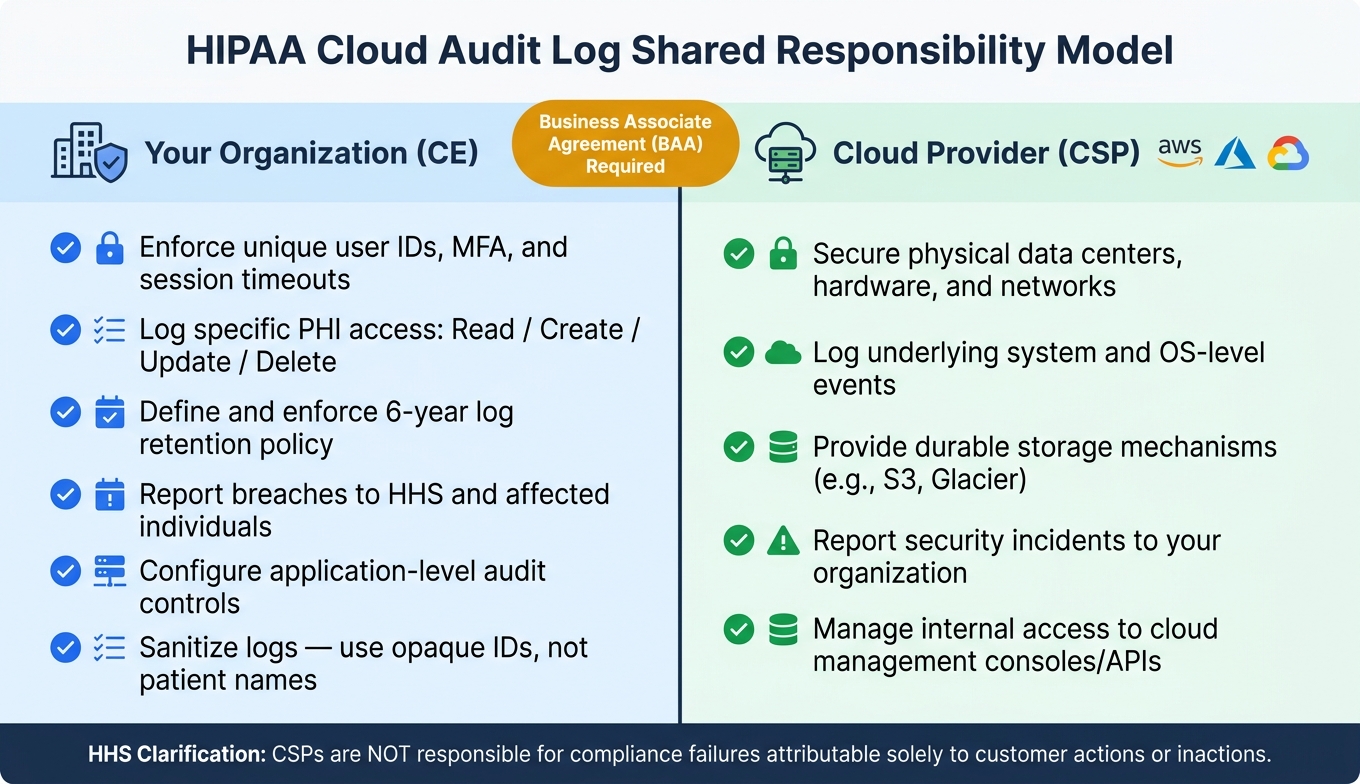
HIPAA Audit Log Shared Responsibility: Cloud Provider vs. Your Organization
HIPAA imposes strict requirements on audit controls, particularly when it comes to cloud environments. According to 45 CFR § 164.312(b), any covered entity using cloud infrastructure to store or process ePHI must have mechanisms in place to record and examine system activity [7].
How the Shared-Responsibility Model Works
Ensuring compliance in the cloud is a team effort. Your Cloud Service Provider (CSP) - whether it’s AWS, Azure, or Google Cloud - handles the security of the underlying infrastructure, including physical data centers, hardware, and networks. Meanwhile, your organization manages everything built on top, such as configuring access controls, managing user identities, and setting up application-level logging.
This division of responsibilities also comes with legal obligations. Under HIPAA, when a covered entity uses a CSP to store ePHI, the CSP becomes a Business Associate. This is true even in "no-view" setups where the CSP only holds encrypted data without access to decryption keys [1]. Before any ePHI is stored in the cloud, a signed Business Associate Agreement (BAA) is required. The BAA must clearly define which party is responsible for specific security tasks.
Here’s a breakdown of responsibilities:
| Control Area | Your Organization (CE) | Cloud Provider (CSP) |
|---|---|---|
| User Authentication | Unique user IDs, MFA enforcement, session timeouts | Internal access to cloud management consoles/APIs |
| Application Activity Logging | Logging specific PHI access (Read/Create/Update/Delete) | Logging underlying system/OS-level events |
| Log Retention | Defining and enforcing the 6-year retention policy | Providing durable storage mechanisms (e.g., S3) |
| Incident Reporting | Reporting breaches to HHS and affected individuals | Reporting security incidents to your organization [1] |
It’s important to note that the Department of Health and Human Services (HHS) has clarified that "a CSP is not responsible for the compliance failures that are attributable solely to the actions or inactions of the customer." [1] This means application-level logging gaps are the responsibility of your organization - not the cloud vendor.
Given these responsibilities, robust audit controls are a must for all ePHI systems.
Audit Controls for ePHI Systems
Any system that creates, receives, maintains, or transmits ePHI must fall under your audit controls. In cloud environments, this includes far more than just your main application servers. Managed databases, serverless functions, API gateways, and even third-party integrations are all part of the scope.
One specific risk comes from containerized infrastructure. When a container shuts down, any logs stored within it are lost unless they’ve been sent to a centralized, persistent storage system beforehand. To avoid this, ensure logs are routed to tools like AWS CloudWatch Logs or a centralized SIEM platform in real time. This setup requires deliberate configuration and ongoing verification [7].
HIPAA standards are also evolving. The 2026 updates to the HIPAA Security Rule have raised the bar for compliance. Auditors now demand automated, testable controls that demonstrate your logging systems are functioning as intended. A simple written policy is no longer enough.
"The 2026 HIPAA Security Rule update reframes the Audit Controls standard from 'document your intent' to 'prove technical enforcement.'" - Garvita Amin, VertiComply [4]
The next section will explore design practices to ensure your cloud logging remains HIPAA-compliant.
How to Design HIPAA-Compliant Cloud Logging
Key Implementation Practices
Designing a HIPAA-compliant cloud logging system requires careful planning and attention to detail. At a minimum, each log entry should include the following details: User ID/Role, Action (e.g., Read/Write/Delete/Export), Resource ID, UTC Timestamp (with millisecond precision), Source IP/User Agent, Outcome (Success/Failure), and Purpose of Access (e.g., treatment, payment, or "break-glass"). However, it’s critical to avoid logging actual PHI (Protected Health Information) like names or Social Security numbers. Instead, use opaque identifiers, such as patient:1274, and only link them to patient records during investigations [4].
Two critical structural choices determine whether your logging system can pass an audit:
- Centralized Logging: All logs must be funneled into a central system - whether that’s a SIEM tool like Splunk or Datadog, or even a dedicated S3 bucket. This ensures logs remain intact even if transient containers lose local logs during shutdown.
- Separation of Duties: Developers and engineers working on the production environment should have no ability to modify or delete audit logs. This is non-negotiable.
"During our last compliance audit, the auditor specifically tested whether our development team could access or modify audit logs. They couldn't - our logs flow through a one-way pipeline to an AWS account that only our compliance team controls." - Marcus Rodriguez, CISO, TeleMed Solutions [8]
Logs must also be encrypted for security. Use AES-256 encryption at rest and TLS 1.2 or higher in transit [7]. For tamper-evidence, consider options like AWS S3 Object Lock in WORM mode, append-only database roles, or cryptographic hash chaining. With hash chaining, each log entry includes the hash of the previous entry, making tampering mathematically detectable [4][8].
Your system must also account for resilience. In case of a logging pipeline failure, it’s essential to design your system to "fail open." This means the application should continue running to avoid disrupting patient care. Any logging failures should be recorded separately, and your operations team should be alerted, but clinical workflows must remain uninterrupted [4].
Cloud-Native Logging Controls
To strengthen your HIPAA-compliant logging setup, take advantage of the built-in logging tools provided by major cloud platforms. These tools often require manual configuration to meet compliance standards.
| Cloud Provider | Service | What It Captures |
|---|---|---|
| AWS | CloudTrail | Tracks all API calls and account-level activity |
| GCP | Cloud Audit Logs | Logs Admin Activity and Data Access events |
| Azure | Activity Log | Captures subscription-level events and management operations |
| All Providers | VPC Flow Logs | Records network traffic metadata for monitoring transmission security |
For example, on Google Cloud, Data Access logs are disabled by default for most services (BigQuery being an exception). To ensure compliance, you must explicitly enable DATA_READ, DATA_WRITE, and ADMIN_READ permissions for every service that interacts with PHI [9]. Overlooking this step is a common compliance gap in GCP setups. These gaps often extend to external vendors, making robust third-party risk management essential for maintaining a secure cloud ecosystem.
For high-assurance audit trails, tools like Amazon QLDB offer tamper-evidence through hash chaining [8]. Pair these tools with automated lifecycle policies to reduce costs. For instance, logs stored in S3 Standard (~$0.023/GB-month) can be transitioned to Infrequent Access (~$0.0125/GB-month) after 90 days and then to Glacier Deep Archive (~$0.00099/GB-month) after two years. This approach is cost-effective for meeting a 6-year retention requirement.
"When HHS requested audit logs from 2021 during our breach investigation, we needed to restore 400GB from Glacier. Having partitioned our logs by month and user department meant we could retrieve just the relevant 12GB subset in 6 hours instead of waiting days." - Jennifer Park, VP of Compliance, HealthConnect [8]
Looking ahead, the 2026 HIPAA Security Rule will require testable controls. This means you’ll need automated checks in your CI/CD pipeline to verify that logging middleware is active and capturing all required fields. Simply having a written policy won’t be enough - auditors will expect proof that your system works as intended [4].
Retaining, Protecting, and Reviewing Audit Logs
Retention Policies for HIPAA Compliance
HIPAA § 164.316(b)(1)(i) requires organizations to retain records for at least six years from the date of creation or the last effective date of a policy, whichever is later [4][10]. However, this six-year standard often falls short. For example, California law requires medical records to be kept for seven years, while pediatric records in many states must be retained for up to ten years - usually seven years past the patient's 18th birthday [4][10].
To simplify compliance across jurisdictions, aim for a 10-year retention period to cover the most stringent state requirements.
Managing costs while adhering to these retention guidelines can be achieved with a tiered storage approach:
| Retention Tier | Duration | Storage Type | Primary Use |
|---|---|---|---|
| Immediate Recall | 60–90 days | SIEM / Analytics Platform | Rapid triage and incident containment [10] |
| Hot Searchable | 12–24 months | Indexed Database | Trend analysis and workforce access reviews [10] |
| Cold Archive | 6–10 years | WORM / S3 Object Lock | Compliance, litigation holds, and state laws [4][10] |
The 90-day immediate recall window is especially important for identifying credential misuse and investigating incidents within a reasonable timeframe.
Once retention tiers are established, the next step is ensuring these logs remain secure and unaltered.
How to Protect Log Integrity
It's not enough to store logs - they must also be protected against unauthorized changes.
"If your audit log is a normal SQL table that your application can UPDATE or DELETE from, OCR does not trust it." - Garvita Amin, VertiComply [4]
To safeguard log integrity:
- Use a dedicated database user with INSERT-only permissions to prevent unauthorized alterations.
- Implement hash-chain snapshots to detect tampering [4].
- Store logs in immutable storage, such as AWS S3 Object Lock in WORM mode, to enforce unchangeable records [4][7].
Additionally, legal holds require special attention. When your organization faces litigation or an OCR investigation, logs related to the matter must be preserved beyond standard retention timelines. Ensure your legal and compliance teams have a clear process for placing holds on specific logs. This prevents automated policies from deleting critical data, keeping it accessible for legal review.
Routine Log Review and Monitoring
Retaining and securing logs is just the first step. Regular reviews are crucial for identifying unusual activity and maintaining compliance. Unreviewed logs can leave gaps in your compliance efforts. Under 45 CFR 164.312(b), organizations are required to not only record but also examine activity in systems that store electronic protected health information (ePHI) [3][2].
Audit protocols and system access controls should be reviewed and updated at least once a year [2]. In addition, automated alerts can help flag high-risk activities, such as:
- Repeated failed login attempts
- Access during off-hours
- Bulk exports of records
- "Break-glass" access to sensitive information
These alerts are critical for catching insider threats or compromised credentials early.
The 2026 HIPAA Security Rule update emphasizes "testable enforcement", meaning regulators now expect proof that your review processes are active and effective - not just documented on paper [4][2]. To meet this expectation, maintain detailed, audit-ready records showing when logs were reviewed, who conducted the review, and what actions were taken. This level of documentation demonstrates that your compliance program is not just theoretical but actively functioning as intended.
Common Audit Log Gaps and How to Fix Them
This section focuses on practical solutions to common weaknesses in audit logging, aligning with HIPAA requirements for cloud environments.
Common Weaknesses in Audit Logging
Audit logging often contains critical flaws that compromise its effectiveness. One of the most problematic issues is the use of shared login accounts. According to HHS investigations, over 60% of entities had systems where multiple users shared credentials [11]. This practice makes it impossible to trace specific actions back to individual users, rendering the audit trail useless during investigations.
Another frequent issue is logging endpoints without including specific record identifiers. For example, logging a URL like /api/patients/1274 might seem sufficient, but it fails to meet HIPAA standards.
"'Someone accessed /api/patients/1274' is not an audit trail - it is noise." - Garvita Amin, VertiComply [4]
HIPAA requires detailed logs that specify which patient record was accessed, not just which API endpoint was used. Compounding this, some developers inadvertently log sensitive data such as request bodies or error responses containing patient names or Social Security numbers. This practice can turn the audit log itself into a repository of unprotected PHI, creating additional compliance risks.
Lastly, many organizations misunderstand the term "addressable safeguards" in HIPAA regulations.
"'Addressable' does not mean 'optional.' You must either implement the safeguard, implement an equivalent alternative, or document why neither is needed." - Security Compliance Guide Editorial Team [11]
Organizations that treat addressable safeguards as optional often face enforcement actions from OCR. These gaps highlight the need for precise, actionable remedies, as outlined below.
How to Address These Risks
Fixing these vulnerabilities requires replacing weak practices with secure, traceable solutions. The table below outlines common gaps, their causes, and practical fixes:
| Common Gap | Why It Happens | Practical Fix |
|---|---|---|
| Shared Accounts | Clinical speed and convenience | Enforce SSO or badge-tap authentication |
| Missing Record IDs | Defaulting to URL logging | Capture specific resource IDs in request logs |
| Tamperable Logs | Using mutable SQL tables | Use INSERT-only roles or hash chains |
| PHI in Logs | Logging full request bodies | Sanitize logs; log opaque internal record IDs |
| No Log Review | Assuming logging equals compliance | Automate daily anomaly detection alerts |
| Outdated Protocols | Legacy system support | Disable TLS 1.0/1.1; enforce TLS 1.2+ |
For example, replacing shared accounts with badge-tap or SSO authentication ensures every action is tied to a specific individual, without slowing down clinical workflows. Similarly, to avoid exposing PHI in logs, use opaque internal database IDs instead of patient names or Social Security numbers. These IDs can be cross-referenced with patient records by authorized personnel when necessary, keeping logs clean and reducing their value as a target for breaches.
Additionally, the 2026 HIPAA Security Rule update emphasizes testable controls over written policies. To align with this shift, organizations should implement automated checks - such as a runtime /api/compliance-status endpoint - during deployment smoke tests to verify that audit middleware is active. Regulators now expect technical evidence, not just documentation of intent. This shift requires measuring what matters for cybersecurity to ensure patient safety and operational resilience.
Conclusion: Maintaining HIPAA Compliance with Cloud Audit Logs
Key Takeaways
Audit logging serves as the backbone for maintaining HIPAA compliance when handling PHI in the cloud. Without proper logs, you won’t be able to answer the critical questions that OCR will demand during an investigation: Who accessed a record? Which record was accessed? What action was taken?
Several principles are crucial to keep in mind. Each log must include all the essential fields outlined earlier in this guide. Logs must also remain unalterable, and retention policies must align with federal requirements - 6 years at a minimum. For organizations dealing with pediatric data, aiming for a 10-year retention period is advisable due to stricter state laws [4][7].
Equally important is the regulatory shift in how HIPAA audits are conducted. As Garvita Amin explained:
"'Testable controls' is the phrase that will define 2026 HIPAA audits. Your policy PDF used to be the audit artifact. Now a failing test in CI is the audit artifact." [4]
This marks a significant change. Written policies alone are no longer enough. Auditors now expect automated, verifiable proof that your logging system is functioning correctly and capturing the necessary data. These insights pave the way for immediate action.
Next Steps for Healthcare Organizations
To act on these principles, start by addressing the most critical risks. Mat Steinlin, Head of Information Security at Aptible, emphasizes:
"If you don't have a written log retention policy yet, that is the first gap to close. The documentation requirement is as binding as the technical one." [7]
Begin by reviewing your logging coverage across the five key event categories. Ensure that logs from ephemeral containers are centralized before they are terminated [7]. Also, set explicit 6-year lifecycle policies on your cloud storage buckets to prevent accidental deletion during log rotation.
For organizations juggling third-party security risks alongside HIPAA compliance, tools like Censinet RiskOps™ can help streamline the process. This platform enables healthcare providers to assess and monitor cybersecurity risks across vendors, clinical applications, and PHI systems. By integrating audit log compliance into broader enterprise risk management, teams can avoid the pitfalls of manual tracking and spreadsheets. This approach supports the shared-responsibility model discussed earlier, offering a more structured and efficient way to manage compliance.
FAQs
How do I prove our cloud audit logging works for the 2026 HIPAA “testable controls” requirement?
To align with the 2026 HIPAA testable controls, your system must retain detailed logs for at least six years. These logs should capture essential information, including:
- User identity: Who performed the action.
- Action type: Whether it was a read, write, or delete operation.
- UTC timestamp: When the action occurred.
- Resource accessed: What was interacted with.
- Source IP: The originating IP address.
Verifying and Protecting Log Data
To ensure compliance, simulate potential incidents to verify that your logging system functions as required. It's equally important to maintain the integrity of these logs. This can be achieved through:
- WORM (Write Once, Read Many) storage: Prevents alteration of stored logs.
- Hashing: Ensures logs remain tamper-proof by detecting unauthorized changes.
Routine Reviews and Reporting
Regularly reviewing logs is critical. Use structured playbooks and generate reports to demonstrate ongoing compliance. These reviews not only meet regulatory demands but also enhance your incident response readiness.
Simplifying Compliance with Censinet RiskOps
Platforms like Censinet RiskOps streamline this process by centralizing compliance documentation and automating assessments. This reduces administrative burdens while ensuring you stay on track with HIPAA requirements.
What’s the safest way to log PHI access without putting PHI inside the logs?
When dealing with sensitive information, the best practice is to rely on opaque identifiers. Rather than logging personal details like patient names, Social Security numbers, or health information, use non-identifying keys - such as internal database IDs - that are tied to the records.
This approach keeps logs secure and ensures they don’t inadvertently become unprotected copies of Protected Health Information (PHI). If further investigation is required, you can safely connect the log identifier with your database to access the necessary details.
How can we keep logs immutable for 6–10 years without huge cloud storage costs?
To balance cost efficiency with data integrity, consider a tiered storage strategy for your logs. Here's how you can structure it:
- Active Logs: Keep your most recent logs searchable for a period of 60–90 days. This allows quick access to data that's frequently needed for troubleshooting or analysis.
- Indexed Logs: Store logs that are 12–24 months old in indexed storage. These remain accessible for compliance or less frequent queries without the higher costs of active storage.
- Archived Logs: Move older logs to cold storage, like AWS S3 Object Lock, applying Write Once, Read Many (WORM) policies to ensure immutability.
To further optimize storage, use techniques like compression, deduplication, and cryptographic hashing. These not only save space but also enhance data security.
Make sure your retention periods align with legal and regulatory requirements. Once the mandatory retention period expires, automate secure deletion processes to maintain compliance and reduce unnecessary storage costs.

