
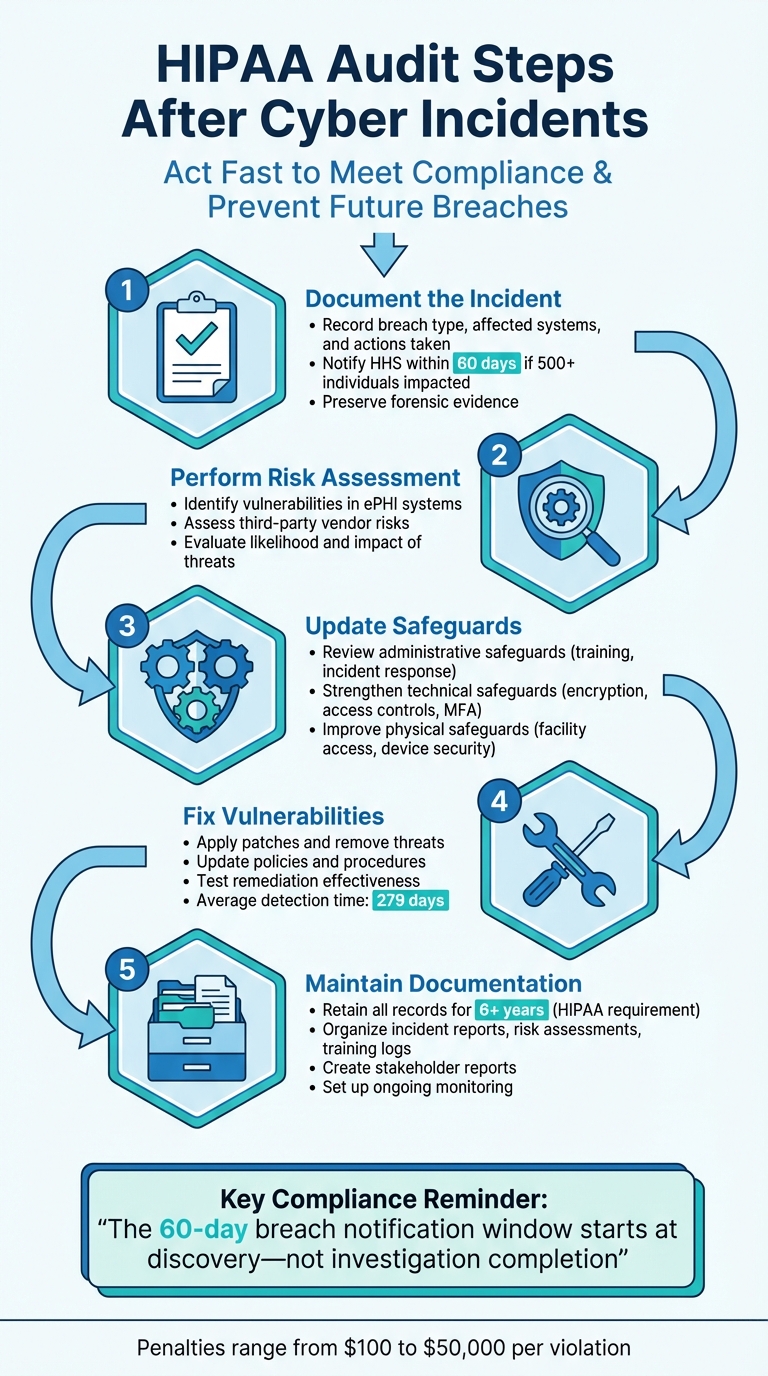
When a cyber incident occurs, healthcare organizations must act fast to meet HIPAA compliance requirements. A post-incident HIPAA audit ensures your organization has the right safeguards in place and identifies weaknesses to prevent future breaches. Here’s what you need to know:
- Document the Incident: Record details like breach type, affected systems, and actions taken. Notify the Department of Health and Human Services (HHS) within 60 days if 500+ individuals are impacted.
- Perform a Risk Assessment: Identify vulnerabilities in systems handling electronic Protected Health Information (ePHI) and assess risks tied to third-party vendors.
- Update Safeguards: Review and improve administrative, technical, and physical safeguards, such as access controls, encryption, and workforce training.
- Fix Vulnerabilities: Address gaps, apply patches, and refine policies to strengthen your security posture.
- Maintain Audit Records: Retain documentation for at least six years, including incident reports, risk assessments, and training logs.
These steps not only help meet compliance but also bolster your cybersecurity defenses. Tools like Censinet RiskOps™ can streamline the process by automating workflows and organizing audit-ready documentation. Staying proactive reduces risks and demonstrates your commitment to safeguarding patient data.
5 Essential HIPAA Audit Steps After Cyber Incidents
HIPAA Audits: New Law Changes & HHS Power Explained #shorts
sbb-itb-535baee
Step 1: Document the Cybersecurity Incident
When a cybersecurity incident occurs, it's crucial to start documenting immediately. The 60-day HIPAA breach notification window begins as soon as the incident is discovered - not when the investigation wraps up [2].
Record Incident Details
Begin by noting the essentials: the exact date and time the incident was discovered, how it was identified, and the type of breach - whether it involved ransomware, phishing, or unauthorized access. Include details about the compromised systems, such as IP addresses, server names, and affected hardware. Additionally, document the scope of the breach, including the type of Protected Health Information (PHI) involved (e.g., names, Social Security numbers, or treatment details) and the number of individuals impacted [2][7].
It's also critical to preserve forensic evidence to help reconstruct the event. For example, during the OCR investigation into Oklahoma State University – Center for Health Sciences, forensic evidence revealed a breach initially reported as occurring in November 2017 had actually started in March 2016. This discrepancy played a role in the $875,000 settlement [2].
Finally, make sure to log the immediate actions taken to address the incident.
Document Immediate Response Actions
Once you've captured the incident details, shift focus to recording how the breach was contained and mitigated. Maintain a security incident log to document every step taken, such as isolating affected systems, removing malicious code, applying patches, and recovering compromised systems [8]. Include specifics like who performed each action and when, creating a clear timeline of your response [9]. If any disciplinary actions were taken, document those as part of your compliance records [6][11].
Additionally, track all notifications sent internally and externally. This includes reports to management, legal teams, and law enforcement. Establishing a multidisciplinary Security Incident Response Team (SIRT) - comprising IT, legal, HR, and privacy officers - ensures all regulatory requirements are addressed [8][2].
Prepare Breach Notification Documentation
If the breach impacts 500 or more individuals, you must notify the HHS Secretary and the affected parties within 60 days of discovery [6][2]. Record evidence of meeting this deadline, including the required notification elements: a summary of what happened, the types of PHI involved, recommended protective measures for individuals, and details of your investigation and mitigation efforts [6][10]. Save copies of all notification letters, media releases, and HHS portal submissions.
If notification isn't required, conduct a thorough risk assessment to demonstrate that there's a low probability the PHI was compromised. This assessment should evaluate factors like the nature of the PHI, who accessed it, whether the data was acquired or viewed, and how the risk was mitigated [6][11]. Keep in mind, HIPAA assumes a breach occurred unless your organization can prove otherwise, so the burden of proof lies with you [6].
Using integrated cybersecurity platforms like Censinet RiskOps™ can simplify the process of collecting and organizing incident details, helping you maintain compliant audit trails that meet HIPAA standards.
Step 2: Perform a Post-Incident Risk Assessment
After documenting the incident in detail, the next step is conducting a post-incident risk assessment. This process helps uncover vulnerabilities within your systems. HIPAA mandates organizations to "Conduct an accurate and thorough assessment of the potential risks and vulnerabilities to the confidentiality, integrity, and availability of electronic protected health information held by the [organization]", ensuring compliance with its guidelines [13]. This assessment highlights the control weaknesses that contributed to the breach.
Review Risks to ePHI
Start by identifying and cataloging every system that interacts with electronic protected health information (ePHI). This includes electronic health records, cloud platforms, mobile devices, backup systems, and even "shadow IT" systems that may have been overlooked. Map out the entire lifecycle of ePHI - from its collection to its eventual disposal.
For each system, assess the specific threats and vulnerabilities it faces. According to HHS guidance, risk is determined by the combination of likelihood and impact [13]. Pay special attention to the threat vector used in the incident - be it phishing, ransomware, or unauthorized access - and identify the precise gap that allowed it, such as outdated software or the absence of multi-factor authentication.
Evaluate the effectiveness of your current administrative, physical, and technical safeguards. Tools like vulnerability scans, configuration reviews, and audit log analysis can help verify whether controls like encryption and patching are functioning as expected.
Don’t stop at internal systems - extend this review to third-party systems to ensure all potential vulnerabilities are addressed.
Evaluate Third-Party and Vendor Risks
Vendors and business associates with access to ePHI must be included in your risk assessment. If a vendor-related issue or supply-chain compromise played a role in the breach, review your Business Associate Agreements to determine whether audit rights were exercised and if the contractual controls in place were adequate. Examine all integration points and data exchanges for potential weaknesses.
Assess the technical safeguards and data-handling practices of each vendor. Determine their ability and motivation to misuse data, and confirm that they’ve implemented the necessary protections. Use the insights from the incident to refine how you onboard and offboard vendors, ensuring tighter controls in the future.
Rank Risks by Priority
Once system and vendor risks have been analyzed, prioritize the threats you’ve identified. Assign risk levels by evaluating both the likelihood of occurrence and the potential impact. High risks - those that could lead to major disruptions, legal issues, or financial losses - must be addressed immediately. Moderate risks may cause minor operational issues, while low risks have minimal effects.
Document all findings in a centralized risk register. This should include details about the asset, existing controls, likelihood, impact, and suggested mitigation actions. Use qualitative scales (e.g., "Rare" to "Almost Certain" for likelihood and "Low" to "Severe" for impact) to ensure consistent scoring. This prioritized list will serve as a roadmap for your remediation efforts in the following steps.
To simplify this process, platforms like Censinet RiskOps™ can help. They offer automated workflows for assessing third-party risks and provide a centralized hub for visualizing and prioritizing risks across your healthcare organization.
Step 3: Review and Update HIPAA Safeguards
With vulnerabilities prioritized, it's time to update your HIPAA safeguards to address identified risks. A breach often reveals weaknesses, so take this opportunity to carefully review all three safeguard categories and make the necessary updates to prevent similar incidents in the future.
Review Administrative Safeguards
Using insights from your post-incident analysis, adjust practices to close security gaps. For example, revise workforce training to better address phishing and ransomware threats. Incorporate realistic tabletop exercises into training sessions to ensure staff can effectively follow escalation procedures under pressure [9][16].
Take a close look at your incident response plan. Does it clearly outline the difference between a "security incident" and a "reportable breach"? HIPAA mandates notifying affected individuals and the Department of Health and Human Services (HHS) within 60 days of a breach. Missing this deadline has led to settlements costing hundreds of thousands of dollars in the past [9]. Your plan should include clear legal triggers to help the team meet deadlines and avoid penalties for "willful neglect."
Additionally, update Business Associate Agreements (BAAs) to include specific requirements for prompt breach notifications [5][15].
Ensure your HIPAA Security and Privacy Officer has the authority and resources necessary to oversee compliance effectively. This role is crucial for ensuring internal policies align with current regulations and incorporate lessons learned from the incident [5][15].
Review Technical Safeguards
Technical safeguards are often a weak point in breaches, so this review requires extra care. Start with access controls: implement Role-Based Access Control (RBAC) with the principle of least privilege, establish emergency access protocols ("break-glass" procedures), and automate the deactivation of accounts when employees leave [17].
Make sure encryption is properly implemented. Use AES-256 encryption for data at rest and Full Disk Encryption for portable devices. For data in transit, secure it using TLS 1.2 or higher and VPNs for remote access. Syracuse ASC’s $250,000 settlement in 2018 highlights the risks of failing to encrypt devices and configure access controls adequately [18].
Centralized audit logs are another critical area. Use a Security Information and Event Management (SIEM) system to centralize logs and establish regular reviews to catch anomalies. The OCR expects organizations to demonstrate continuous monitoring rather than leaving logs unchecked.
Test your integrity measures by performing regular backup restore tests. Use techniques like checksums, hashing (e.g., SHA-256), or digital signatures to detect unauthorized changes to electronic Protected Health Information (ePHI). Finally, ensure authentication mechanisms - whether multi-factor authentication (MFA), security keys, or biometrics - are consistently applied across all systems handling patient data [17][18].
Review Physical Safeguards
Physical security is just as important as digital measures. Despite this, physical vulnerabilities account for 17% of data breaches, although only 7% of security decision-makers express concern about lost or stolen equipment [4]. From 2020 to 2023, the OCR received over 50 large breach reports involving stolen equipment, impacting more than 1 million individuals [4].
"Implementing Facility Access Controls is analogous to securing your home. Prior to locking your home's entrances, you have not effectively secured your home; similarly, absent appropriate Facility Access Controls, you have not fully secured your ePHI."
– Office for Civil Rights (OCR) [4]
Strengthen facility access by using badge or biometric systems, maintaining visitor logs, locking server room doors, and equipping workstation screens with privacy filters [19][22]. Configure devices to log off automatically after 5–10 minutes of inactivity.
Keep a detailed inventory of devices and media. Secure laptops and tablets in shared spaces with cable locks. When disposing of old equipment, work with HIPAA-compliant vendors for certified data wiping or destruction of hard drives, and always obtain certificates of destruction as proof [19][20][21].
Using advanced cybersecurity and risk management tools like Censinet RiskOps™ (https://censinet.com) can simplify this review process, helping you maintain strong and up-to-date HIPAA safeguards.
Step 4: Fix Identified Vulnerabilities
After identifying weaknesses in your safeguards, the next step is action. Addressing vulnerabilities goes beyond just fixing software - it requires a coordinated effort across technical, administrative, and physical security measures. The aim is not only to resolve the current gaps but also to establish systems that reduce the chances of similar issues in the future.
Resolve Security Gaps
Start by applying emergency patches, removing malicious files, and disabling any unauthorized accounts. Reset compromised credentials and revoke tokens where necessary. If there’s evidence of tampering, restore systems from clean backups to ensure integrity [9][3].
Take this opportunity to revisit your policies and procedures. For instance, if a breach exposed delays in deactivating access for former employees, update your termination procedures to require immediate access revocation and device recovery. Similarly, if data was exfiltrated through an unmonitored channel, adjust your policies to better control data movement both internally and externally [9][3].
Embedding lessons learned into your organization is key. Incorporate scenario-based drills and update annual training programs to reinforce these lessons [9].
Once you’ve addressed technical and procedural vulnerabilities, focus on refining and strengthening your overall risk management program.
Improve Risk Management Processes
Effective remediation relies on treating risk management as a continuous process rather than a one-time fix. Regularly reassess risks, especially after significant changes, to stay ahead of potential threats [13][14][12]. Integrating security risk assessments into your change management process ensures that new systems and vendor updates are vetted before they’re implemented.
Adopting a continuous improvement cycle helps you identify vulnerabilities early, reducing the chances of future breaches. This approach also supports long-term security planning. Divide your remediation efforts into two categories:
- Immediate actions: These include enabling multi-factor authentication, removing unused accounts, and standardizing system configurations. These steps can be executed quickly and have an immediate impact on reducing risk [14][12].
- Long-term projects: Initiatives like network segmentation or modernizing identity systems require more time but deliver lasting security benefits.
Tools like Censinet RiskOps™ (https://censinet.com) can make this process more efficient by automating risk assessments and providing centralized visibility into your security posture. Organizations with active incident response programs often achieve compliance certification in 4–5 months, compared to 9–12 months for those managing the process manually [9]. This speed is critical when dealing with HIPAA’s 60-day breach notification deadline while simultaneously addressing vulnerabilities.
To track your progress, monitor performance metrics such as time to patch critical vulnerabilities, phishing simulation results, backup recovery times, and audit log coverage. These metrics not only help you measure effectiveness but also demonstrate to the OCR that you’re actively managing risk rather than just completing a checklist [14][12].
Test Remediation Effectiveness
After implementing fixes, it’s essential to confirm their effectiveness. Conduct follow-up vulnerability scans to ensure technical issues have been resolved [12]. Test backup systems to confirm they can be restored successfully [12].
Review termination records to verify that access was promptly removed for former employees. Check user access logs to ensure that "least privilege" policies are being followed [3][12].
For contingency planning, run tabletop exercises that simulate incident response scenarios. These drills help identify whether your updated procedures are practical and whether your team can execute them under pressure. If gaps or confusion arise during these exercises, refine your procedures and provide additional training.
Documentation is critical. Regulators like the OCR require "audit-ready" evidence, including screenshots of configurations, access control lists, and system logs, to verify that your controls are active and functioning as intended [12]. HIPAA mandates retaining all risk analysis documentation, policy updates, and rationale for implemented measures for at least six years [14][12][23].
"Verify effectiveness via control testing and adjust until residual risk falls within your acceptance threshold."
– Accountable HQ [12]
Healthcare organizations take an average of 279 days to detect and contain a breach [9]. By thoroughly testing your remediation efforts, you can reduce the risk of attackers exploiting the same vulnerabilities again. Additionally, documenting test results ensures you’re prepared for audits and demonstrates your commitment to HIPAA compliance.
Step 5: Maintain Audit Documentation
Once remediation and testing are complete, it's time to focus on keeping thorough records, as required by HIPAA. These records are critical - not just to prove compliance but also to assist with regulatory investigations and show your organization's dedication to safeguarding patient data. Proper documentation ties everything together, completing the HIPAA audit process. Here's how you can organize, report, and monitor your audit records effectively.
Organize Audit Records
HIPAA Section 164.316 requires you to retain all security policies, procedures, and related records for at least six years from their creation or last effective date - whichever is later [24]. This isn't just a guideline; it's mandatory. Failing to produce documentation during an OCR audit can result in non-compliance penalties.
"If it's not written down, it doesn't count, even if you did everything right." – Complydome [24]
Take the example of a dermatology clinic hit by a ransomware attack in January 2026. Despite having security measures in place, they lacked written risk assessments, incident response plans, and training logs. The OCR demanded immediate documentation of all activities, monthly reports, and third-party oversight for a year [24].
To avoid such scenarios, assign someone - like your compliance officer or office manager - to oversee HIPAA-related records. A master index can help keep things organized, listing document types, creation dates, storage locations, and who is responsible for them.
Your retention strategy should cover a range of document categories:
- Incident and breach records: Include investigation notes, risk assessments, mitigation steps, notification letters, proof of mailing, and HHS submission confirmations [25].
- Security management records: Maintain your most recent risk analysis, risk management plans, and periodic evaluation documentation [24][25].
- Audit logs: These should capture system activities, such as login attempts, PHI access, and system-level events like password changes or firewall alerts. Use standardized formats like Syslog or CEF for consistency [26][27].
- Administrative safeguards: Keep signed Business Associate Agreements, workforce training logs with test scores, and documentation of policy violations [24][25].
- Technical and physical safeguards: Retain encryption settings, MFA configurations, patch management reports, facility access logs, and certificates of destruction for hardware containing ePHI [25].
Version control is equally important. For example, if an incident occurred in 2022, you must produce the version of your access control policy that was active at that time - not the updated one [24]. A smart storage strategy involves keeping 12–24 months of logs in easily accessible storage for active monitoring, while archiving older records in secure, cost-effective storage for the rest of the six-year retention period [31].
| Document Type | Retention Start Date | Example Scenario |
|---|---|---|
| Active Policy | Date last in effect | A policy created in 2020 but replaced in 2022 must be kept until 2028 [24]. |
| Training Log | Date of creation | A log for an employee who left in 2021 must be retained until 2027 [24]. |
| Risk Analysis | Date of creation | A 2020 analysis remains active until updated; the 6-year clock restarts on update [24]. |
Create Reports for Stakeholders
Once your records are organized, tailor them into reports for different audiences. Internal teams benefit from summaries that highlight findings, actions taken, and current risk status. These reports help leadership allocate resources wisely.
For regulatory agencies like the OCR, ensure your documentation clearly demonstrates HIPAA compliance. For example, the 2024–2025 HIPAA Audit Program is reviewing 50 entities for compliance with Security Rule provisions related to hacking and ransomware [1]. Provide only the requested documents; auditors won't sift through excessive files to find what they need [30].
For breaches affecting 500 or more individuals, notify HHS within 60 days of discovery [25]. Your breach notification records should include proof of timely notifications and documentation of a thorough four-factor risk assessment [29].
Set Up Ongoing Monitoring
Documentation isn't a one-and-done task. Regular monitoring ensures you stay compliant and can identify risks early. Conduct annual self-audits to catch and address documentation gaps before regulatory audits [24].
Audit logs should record details like user IDs, timestamps, actions, accessed data, IP addresses, and outcomes [26]. Keep raw logs in their original format for 6–12 months before moving them to long-term storage [27].
Tools like Censinet RiskOps™ (https://censinet.com) can simplify monitoring by offering centralized visibility into your security posture and automating risk assessments. This proactive approach helps you spot vulnerabilities before they escalate and ensures your documentation is always audit-ready.
Failing to maintain proper records or safeguards can lead to penalties ranging from $100 to $50,000 per violation [26]. The six-year retention period also helps in resolving complaints or investigations into potential HIPAA violations - even years after an incident. For instance, historical audit logs can clarify what happened if a patient later claims a privacy breach [28].
When the retention period ends, dispose of records securely. Use cross-cut shredding for paper files and cryptographic erasure or degaussing for digital media. This ensures PHI is irretrievable, protecting your organization from liability even after records are no longer required [31].
Conclusion
Conducting a HIPAA audit after a cybersecurity incident is a critical step in safeguarding patient data and staying aligned with regulatory requirements. The five steps outlined - documenting the incident, assessing risks, updating safeguards, addressing vulnerabilities, and maintaining thorough documentation - provide a clear roadmap for navigating this process. By following these steps, your organization not only strengthens its compliance efforts but also builds a stronger foundation for future cybersecurity measures.
With audits increasingly focusing on hacking and ransomware, taking swift and structured action is more important than ever. A formal audit process helps uncover vulnerabilities before they lead to severe breaches. It ensures that your administrative, physical, and technical safeguards align with the Security Rule's requirement to minimize risks to a "reasonable and appropriate level" [3]. Beyond compliance, it shows regulators, patients, and stakeholders that your organization prioritizes data protection.
Tools like Censinet RiskOps™ (https://censinet.com) simplify this process with centralized risk assessments, real-time dashboards, and audit-ready documentation. These automated workflows allow you to manage compliance effectively, freeing you to focus on delivering uninterrupted patient care.
The challenges are growing. As the OCR has warned:
"Ransomware, destructive malware, and other forms of malicious hacking present a growing and ongoing threat to the U.S. health care and public health sector and the privacy and security of electronic protected health information" [1].
FAQs
What is considered a HIPAA reportable breach after a cyber incident?
A HIPAA reportable breach occurs when there’s unauthorized access, use, or disclosure of protected health information (PHI) that jeopardizes its security or privacy. These incidents often require notifying both the affected individuals and relevant authorities. However, for a breach to be considered reportable, it must meet the specific guidelines set by HIPAA regulations.
What evidence should we keep to prove our incident response was timely?
To ensure a prompt and effective incident response, it's crucial to keep detailed logs and records that capture when the issue was identified, how it was handled, and when it was resolved. Important evidence includes timelines, specific actions taken, and communication records. Under HIPAA, maintaining such logs is essential as they serve as proof of your efforts to address the incident. Thorough documentation of the investigation process not only supports compliance but also demonstrates that your response adhered to the required timelines.
How do we include vendors and business associates in a post-incident audit?
To bring vendors and business associates into the fold, start by identifying and documenting all third parties that handle Protected Health Information (PHI). Build a vendor inventory that maps out how PHI flows between parties. Next, review your Business Associate Agreements (BAAs) to ensure they clearly outline each party's responsibilities.
Take the time to evaluate vendors' safeguards - this includes their administrative, technical, and physical protections. Keep an eye on their compliance by monitoring for any security incidents. Lastly, maintain well-organized records of risk assessments, BAAs, and compliance activities. These records are key to showing that you're meeting HIPAA requirements.
