
If your cloud IAM is weak, your HIPAA position is weak too. In healthcare, access control is not just an IT setup. It decides who can reach ePHI, how that access is checked, how long it stays active, and whether you can prove all of it later.
Here’s the short version: if I were setting IAM for a healthcare cloud setup on June 24, 2026, I’d focus on least-privilege access, MFA, HR-linked provisioning and offboarding, centralized audit logs, time-limited admin access, and tight control of vendor and machine accounts. That matters even more when 72% of organizations have experienced or suspect an NHI-related breach.
At a glance, the article comes down to this:
- HIPAA maps straight to IAM controls like user IDs, emergency access, logoff, audit logs, identity checks, and secure data transit.
- The cloud provider does not own your workforce access decisions. You still own roles, reviews, deprovisioning, and log review.
- Human and non-human identities both matter. That includes staff, contractors, service accounts, API keys, bots, and devices.
- RBAC works for stable job-based access. ABAC adds context like time, device health, location, and patient relationship.
- Clinical speed matters. Badge taps, biometrics, and step-up MFA can cut login friction without giving up control.
- Vendor access should be federated and time-bound. No standing access without a reason.
- Audit trails need to cover login events, access decisions, admin changes, and ePHI activity.
- Break-glass access needs limits, alerts, and review after use.
- Medical devices and old systems need isolation and close monitoring when modern identity controls are not supported.
A simple way to think about it: IAM in healthcare cloud is about who gets in, what they can do, how long they can do it, and whether I can prove it after the fact.
The rest of the article explains how to turn those rules into day-to-day cloud access controls for staff, systems, devices, and vendors.
Regulatory Requirements That Drive IAM Decisions in Healthcare Cloud
HIPAA Security Rule Standards Directly Tied to IAM
The HIPAA Security Rule’s technical safeguards under 45 CFR §164.312 have a direct effect on IAM choices in healthcare cloud setups.
| HIPAA Standard (45 CFR §164.312) | What It Requires in Practice |
|---|---|
| Unique User Identification | Unique IDs mapped to individual users and roles |
| Emergency Access Procedure | Break-glass accounts with alerting and post-incident review |
| Automatic Logoff | Enforced session timeouts and automatic workstation locking |
| Audit Controls | Centralized logging of identity, access, and export events |
| Person or Entity Authentication | MFA for remote access, privileged tasks, and patient portals |
| Transmission Security | TLS encryption, API security, and certificate validation for medical devices |
This is the core idea: HIPAA expects access to be limited, traceable, and defensible.
NIST helps turn those safeguards into day-to-day controls.
How NIST SP 800-66 and NIST CSF 2.0 Support HIPAA Implementation
NIST SP 800-66 and NIST CSF 2.0 translate HIPAA into working controls. That includes phishing-resistant MFA, role-based access tied to job codes and specialties, and automated access changes triggered by HR events. It also means centralizing IdP, EHR, and VPN logs so teams can correlate access activity with ePHI access.
Shared Responsibility for IAM in HIPAA-Eligible Cloud Services
Cloud compliance depends on more than the rulebook. It also depends on who owns each control.
Cloud providers like AWS, Microsoft Azure, and Google Cloud offer HIPAA-eligible services, but that label does not shift compliance duties to the provider. The cloud service provider secures the underlying platform and infrastructure. The healthcare organization still owns workforce access governance, role definition, identity lifecycle management, and review of logs tied to ePHI access.
| Responsibility Category | Healthcare Organization | Cloud Service Provider |
|---|---|---|
| Access Control | Defining roles, assigning unique IDs, enforcing MFA, and managing break-glass access | Providing the IAM platform and underlying authentication infrastructure |
| Identity Lifecycle | Managing joiner-mover-leaver workflows and access reviews | Maintaining directory service availability and security |
| Audit & Logging | Reviewing logs, detecting anomalies, and retaining compliance records | Generating infrastructure-level logs and providing logging APIs |
Service accounts, API keys, and secrets also stay under the healthcare organization’s control. Each one needs a named owner, a documented purpose, and a clear revocation path.
Those ownership lines shape how IAM needs to be designed and monitored in day-to-day use.
Those control responsibilities set up the IAM architecture in the next section.
sbb-itb-535baee
Core IAM Architecture and Controls for Healthcare Cloud
Least Privilege, Minimum Necessary Access, and Identity Lifecycle Management
Every user, system, and service account should get only the access needed for the task at hand.
Build permissions around clinical tasks, not broad job labels. A bedside nurse, pharmacist, and registrar don’t need the same level of access. If you lump them into one generic "clinical staff" role, you create extra exposure to ePHI. Even when the cloud platform is managed by a provider, the healthcare organization still owns each role definition and every access assignment.
HR should be the source of truth. Use SCIM to trigger provisioning, role updates, and deprovisioning. Set traveler, resident, and contractor access to expire automatically. Give every service account a named owner, and rotate secrets on a set schedule.
Once access is tightly scoped and automated, the next step is making authentication fit the pace of clinical work.
Authentication and Authorization Models for Clinical Workflows
Clinical authentication needs to protect access without slowing care. A physician moving from room to room on a shared workstation can’t get stuck in a clunky login flow every few minutes. Badge tap or biometric reauthentication helps clinicians get back in fast without interrupting patient care.
Use phishing-resistant MFA, especially FIDO2/WebAuthn keys or platform biometrics, for clinical and privileged access. For higher-risk actions like e-prescribing or bulk ePHI exports, step-up MFA adds another prompt only when the action carries more risk. That keeps day-to-day workflows smoother.
RBAC fits stable roles. ABAC fits context-driven clinical access.
| Model | Granularity | Suitability for HIPAA "Minimum Necessary" | Operational Complexity | Fit for Dynamic Clinical Workflows |
|---|---|---|---|---|
| RBAC | Medium | Good (standardizes access by job function) | Low | High (best for stable, predictable roles) |
| ABAC | High | Excellent (filters by context like location and time) | High | High (best for dynamic or mobile care) |
RBAC works well when roles are stable and predictable. ABAC adds context, such as shift time, facility location, device posture, and patient relationship. That makes it a better fit for care settings where access needs can change from one moment to the next.
These controls mean little if access isn’t logged in full and reviewed on a steady basis.
Auditing, Monitoring, and Zero Trust Access Enforcement
Compliance also means being able to show that access was appropriate. That calls for immutable, centralized audit trails that cover authentication events, authorization decisions, ePHI access, and admin changes. Cloud audit logs provide the accountability records required for compliance [4].
Those logs should feed into a SIEM so teams can spot unusual patterns. User and Entity Behavior Analytics (UEBA) is especially useful here. It can flag behavior like "VIP snooping", mass record lookups, or spikes in off-hours access that may point to internal misuse or stolen credentials [3].
Privileged access needs its own checks. Admin and service accounts should use just-in-time (JIT) elevation instead of standing privileges, with session recording and command-level auditing in place. That cuts down the exposure window if credentials are compromised.
Zero Trust adds one more layer: continuous verification. Each access request should be checked against identity, device health, and live context before access is allowed. Unmanaged or risky endpoints should be blocked from ePHI altogether. Device posture checks, like registration status and device health, should be required for any session that touches sensitive clinical data.
The same control model must also apply to cloud workloads, integrations, and outside vendors.
Extending IAM Across Cloud Platforms, Clinical Systems, and Vendor Access
IAM for Cloud Workloads, EHR Integrations, and Connected Medical Devices
Those controls now need to reach every application, device, and vendor identity that can touch ePHI.
That means IAM can't stop at user logins for a few internal systems. It has to cover EHRs, imaging platforms, telehealth apps, APIs, and connected medical devices on clinical networks.
For application access, federate EHR, imaging, and telehealth platforms through a central IdP with SAML 2.0 or OpenID Connect. That gets rid of local credentials inside each app and turns deprovisioning into a single action instead of a messy, manual cleanup across several systems [4].
APIs that connect those systems need the same level of control. Enforce TLS, standardize authentication, rate-limit queries, and log every access event that touches ePHI [1].
Connected devices are tougher. A lot of medical devices still run on legacy protocols that don't support modern authentication. When devices can't enforce modern IAM on their own, isolate them and monitor the access paths that can reach ePHI [1].
Each machine identity should have:
- a named owner
- a documented purpose
- vaulted credentials [2]
Once internal access is federated and logged, vendor identities need the same level of control.
Third-Party Access Governance for Vendors Handling ePHI
Vendors extend your access risk, plain and simple. Start with federated, time-bound access instead of standing credentials. Use your IdP to issue vendor identities through federation, then set automatic expiration based on contract terms [1].
If a vendor needs elevated permissions, route that access through PAM and record every session [1].
Periodic access recertification isn't optional. Run attestation campaigns to confirm that each vendor account still needs its current access and that deprovisioning happened on time when a contract ended [1].
When it's time to collect compliance evidence, pull joiner–mover–leaver records, access review results, and timestamped access logs for each vendor account [1].
At this point, spreadsheets and manual tracking start to crack.
Using Censinet RiskOps to Strengthen IAM-Related Compliance Oversight
Censinet RiskOps™ helps healthcare teams organize third-party and enterprise risk assessments, compare IAM controls, and track remediation across cloud workloads, clinical systems, devices, and vendors.
| Environment | IAM Capabilities | Risk Posture | Remediation Priorities |
|---|---|---|---|
| Internal Cloud Workloads | Federated identity, ABAC, JIT elevation | High - orphaned accounts and secrets sprawl | Remove standing credentials; disable inactive accounts automatically |
| EHR Platforms | RBAC tied to job codes, MFA, session roaming | Moderate - role sprawl and MFA workarounds | Consolidate roles; implement fast MFA (badge taps) |
| Connected Medical Devices | Mutual authentication, network segmentation | High - hard-coded or unmanaged credentials, legacy protocols | Segment networks; manage device credentials; monitor for anomalous traffic |
| Third-Party Services | Federated access, time-bound permissions | Moderate - unauthorized PHI access via vendor-managed accounts | Periodic recertification; retained access logs |
AWS IAM Hardening for HIPAA Compliance - Step by Step (2026)
Putting IAM Compliance into Practice in Healthcare Cloud
Healthcare Cloud IAM Implementation Roadmap: 5 Phases to HIPAA Compliance
Once the core controls are set, the next step is turning them into a rollout plan, day-to-day clinical workflow, and incident response process.
A Phased IAM Implementation Roadmap
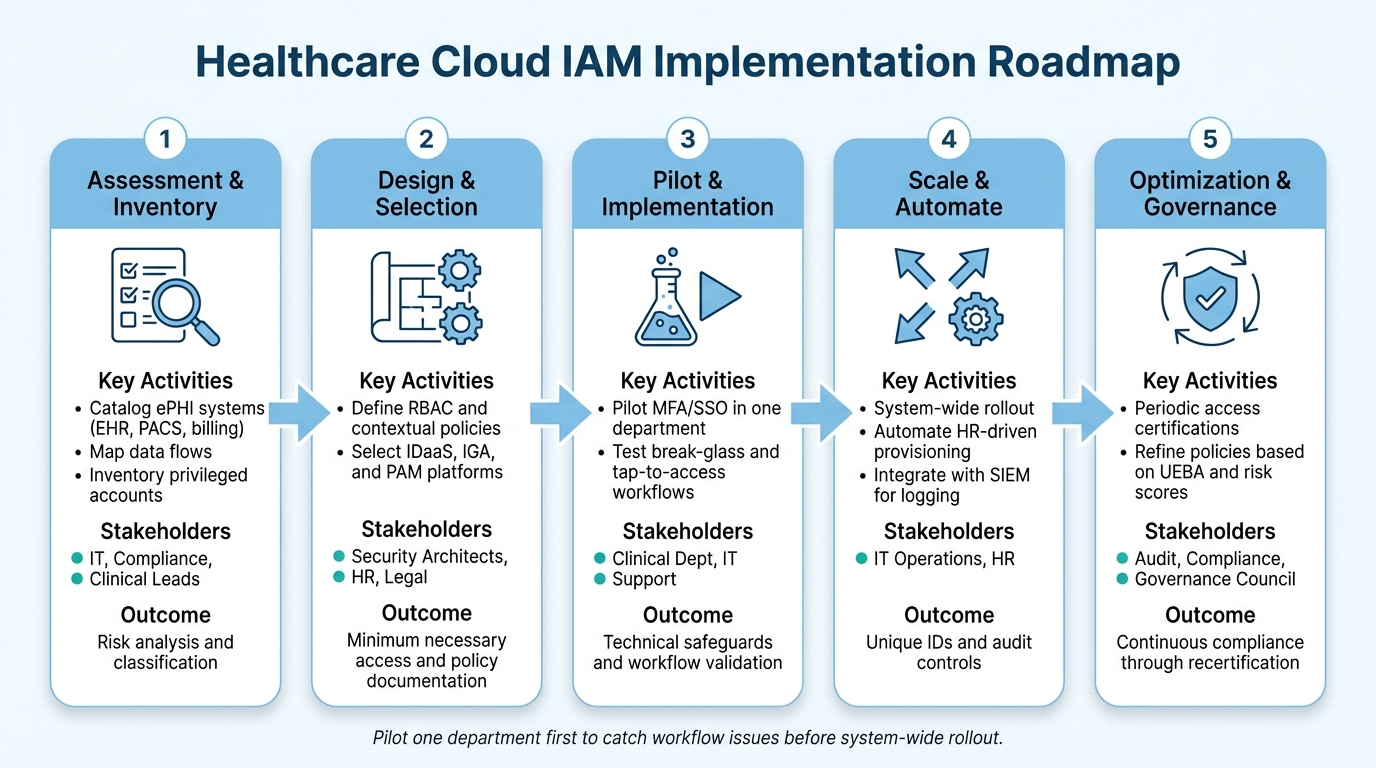
IAM works in healthcare cloud when teams move in phases: assessment, design, pilot, automation, and governance.
Start with executive sponsorship and a cross-functional governance council that includes IT, compliance, clinical leads, HR, and legal. Without that support early on, IAM projects often stall when they run into workflow friction or budget questions. From there, the work should follow a clear sequence:
| Phase | Key Activities | Primary Stakeholders | Compliance Outcomes |
|---|---|---|---|
| 1. Assessment & Inventory | Catalog ePHI systems (EHR, PACS, billing); map data flows; inventory privileged accounts | IT, Compliance, Clinical Leads | Risk analysis and classification |
| 2. Design & Selection | Define RBAC and contextual policies; select IDaaS, IGA, and PAM platforms | Security Architects, HR, Legal | Minimum necessary access and policy documentation |
| 3. Pilot & Implementation | Pilot MFA/SSO in one department and test break-glass and tap-to-access workflows | Clinical Dept, IT Support | Technical safeguards and workflow validation |
| 4. Scale & Automate | System-wide rollout; automate HR-driven provisioning; integrate with SIEM for logging | IT Operations, HR | Unique IDs and audit controls |
| 5. Optimization & Governance | Conduct periodic access certifications; refine policies based on UEBA/risk scores | Audit, Compliance, Governance Council | Continuous compliance through recertification |
It helps to pilot one department first. That gives teams a chance to spot workflow issues early, before the rollout spreads across the system.
After rollout planning, the hard part begins: making IAM usable at the bedside.
Clinical Workflow, Emergency Access, and Incident Response Coordination
When authentication slows down shared-workstation use, staff tend to find shortcuts. That’s just human nature in a busy care setting.
Use badge-tap reauthentication and session handoff so clinicians can move between shared workstations and clinical carts without typing credentials over and over. The goal is simple: keep chart access fast while still holding the line on strong authentication.
Emergency elevation needs guardrails. Require documented justification, a strict time limit, and an automatic post-event audit for every break-glass event. Without that setup, temporary emergency access can quietly turn into standing elevated access.
Zero trust helps cut lateral movement and shrink blast radius without getting in the way of care.
IAM also needs to spell out what happens the moment access may be compromised. Disable affected accounts and tokens, revoke sessions, and rotate shared secrets or service credentials right away. After that, post-incident review of access logs from the SIEM supports breach analysis.
Conclusion: Key IAM Priorities for U.S. Healthcare Organizations
IAM is not a HIPAA checkbox. It is the control layer that makes HIPAA enforceable in cloud environments.
Focus on least privilege, strong authentication, continuous logging, and periodic access certification. A phased program - from assessment to optimization - helps healthcare organizations build HIPAA-aligned cloud security without disrupting care.
"IAM cannot guarantee compliance alone, but it is central to enforcing access controls, monitoring, and documentation." - Kevin Henry [3]
FAQs
What IAM controls matter most for HIPAA in the cloud?
Key IAM controls for HIPAA in the cloud include unique user IDs, MFA, and RBAC. These controls help support accountability, confirm identity, and limit access so each person can only view the PHI tied to their job.
Teams also need centralized audit trails and identity governance to manage access across the business. That means reviewing privileges on a regular basis, stopping privilege creep before it gets out of hand, and deactivating accounts as soon as someone leaves or changes roles. Censinet RiskOps can help track identity control maturity and streamline risk assessments.
How should healthcare teams handle vendor and service account access?
Healthcare organizations should enforce least privilege so vendors and service accounts get only the access they need for a specific job. That means cutting out broad permissions and keeping access tight and task-based.
Use separate credentials for service accounts and APIs. Shared logins are asking for trouble. Keys should also be rotated on a regular schedule so old credentials don’t stay active longer than they should.
Administrative and privileged accounts need extra control. Use PAM practices such as just-in-time elevation, time-bound access, and session monitoring. In plain terms, give higher access only when it’s needed, limit how long it lasts, and keep an eye on what happens during those sessions.
Vendor access shouldn’t be set once and ignored. Periodically recertify it to make sure each vendor still needs the access they have. And when contracts end or someone’s role changes, automate deprovisioning so access is removed without delay.
What is the best way to add MFA without slowing clinical workflows?
Use contextual MFA so the level of verification fits the risk of the task. Routine actions, like checking patient vitals, may need only a badge tap. Higher-risk activities, such as prescribing controlled substances, should require stronger verification.
Passwordless methods and SSO with step-up authentication can also speed access at the point of care while keeping security in place.
