
Audit trails are a must for healthcare organizations using cloud systems. They log every action in a secure, time-stamped format, ensuring accountability and compliance with regulations like HIPAA. Without proper audit trails, organizations risk fines, data breaches, and loss of trust.
Key Takeaways:
- HIPAA Requirements: Logs must track who accessed data, when, what actions were taken, and why. Retain logs for at least six years.
- Challenges: Incomplete logging, PHI exposure in logs, and tamper risks are common in cloud setups.
- Solutions: Use centralized, tamper-proof logging systems with encryption and automated alerts for suspicious activities.
- Best Practices:
- Avoid storing sensitive data in logs.
- Conduct regular log reviews (daily, weekly, monthly).
- Implement access controls and retention policies.
- Document processes and maintain detailed records for audits.
Audit trails not only help meet compliance requirements but also improve threat detection and incident response. A structured approach to logging and monitoring is key to staying secure and audit-ready.
AWS CloudTrail Tutorial: API Activity Logging for Security & Compliance
sbb-itb-535baee
Regulatory Requirements for Audit Trails in Healthcare
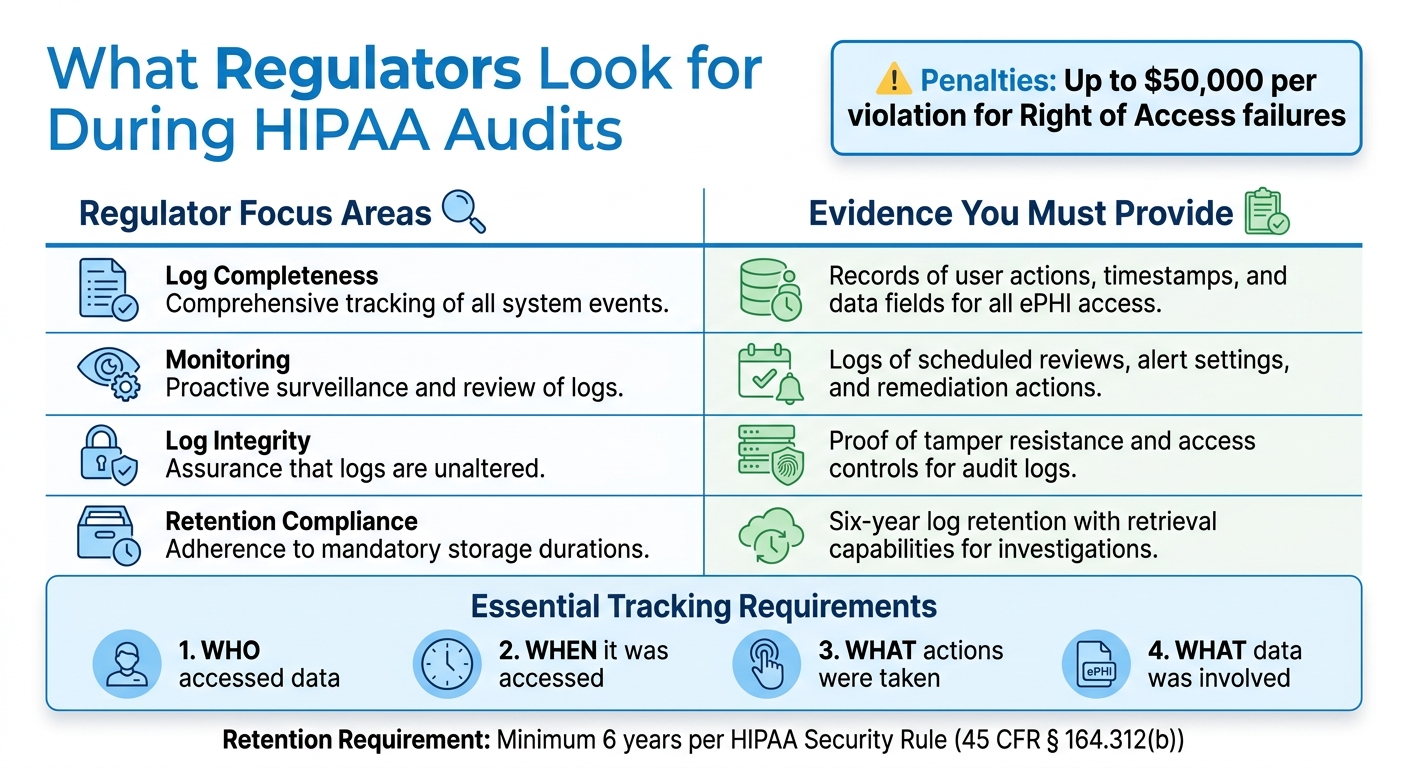
HIPAA Audit Trail Requirements: What Regulators Expect vs What You Must Provide
Healthcare organizations must comply with strict federal regulations when setting up audit trails. Knowing these requirements is crucial to avoid penalties and keep patient data secure. Here's a closer look at how HIPAA outlines these obligations.
HIPAA Audit Trail Requirements
The HIPAA Security Rule outlines two main requirements for audit trails. Under 45 CFR § 164.312(b), covered entities and business associates must use systems that log and review activities within information systems containing electronic protected health information (ePHI). This means audit trails must track who accessed the data, when it was accessed, what actions were taken (e.g., creating, editing, or deleting), and what specific data was involved.
Additionally, 45 CFR § 164.308(a)(1)(ii)(D) requires periodic or triggered reviews of these logs. The HHS Office for Civil Rights (OCR) stresses that audit logs should always be enabled and retained for at least six years to prove compliance during audits.
Past OCR investigations have revealed serious compliance lapses, highlighting the importance of following these rules. For organizations using cloud services, it’s essential to also meet standards like HITRUST CSF and NIST SP 800-53, which focus on features like tamper-proof logs, tamper detection, and integration with Security Information and Event Management (SIEM) tools.
Documentation and Risk Assessment Requirements
Under 45 CFR § 164.316, healthcare entities must maintain detailed documentation of their audit trail processes. This includes written policies that explain how logs are created, stored, and reviewed, alongside evidence of regular risk assessments as required by § 164.308(a)(1)(ii)(A).
Your documentation should cover every aspect of audit trail management: which events are logged, who is responsible for managing them, how logs are reviewed, storage methods, version control, and performance tracking. Keeping this information up to date ensures that both new team members and auditors can easily understand your system. Quarterly risk assessments should also be conducted, detailing log review procedures and alert thresholds (e.g., flagging more than 10 failed login attempts). This level of detail aligns with regulatory expectations during audits.
What Regulators Look for During Audits
Regulators focus on whether audit trails capture all necessary access events, including successful and failed login attempts, data edits, and deletions. They also check whether roles and responsibilities for log management are clearly defined, with documented timelines and sign-off procedures.
OCR places a high priority on audit trails during Right of Access enforcement, where failing to log access events can lead to penalties of up to $50,000 per violation. Regulators will expect to see evidence of consistent log reviews, clear processes for resolving issues flagged in the logs, and strong access controls and encryption to protect the logs themselves. Be ready to provide dashboards showing log queries, anomaly detection, and actions taken to address security incidents.
| Regulator Focus Areas | Evidence You Must Provide |
|---|---|
| Log completeness | Records of user actions, timestamps, and data fields for all ePHI access |
| Monitoring | Logs of scheduled reviews, alert settings, and remediation actions |
| Log integrity | Proof of tamper resistance and access controls for audit logs |
| Retention compliance | Six-year log retention with retrieval capabilities for investigations |
How to Design and Implement Audit Trails
Creating an effective audit trail system involves more than just enabling logging features. It requires a structured strategy to capture the right data, store it securely, and make it accessible for reviews by regulators or security teams. As Robert Dougherty puts it, "Audit logs serve as discrete data points that, when linked, form a comprehensive audit trail" [2]. Your system must connect these data points to provide a complete and accurate picture.
Creating Logging Policies That Meet Compliance Standards
A well-defined logging policy is essential. It should clearly outline what events are logged, how long logs are retained, and who is responsible for reviewing them. Start by identifying all systems interacting with ePHI, such as cloud storage, databases, applications, and APIs. Each system should log details like a unique user ID, UTC timestamp, action performed, accessed resource, access location, and the outcome [2].
HIPAA requires logs to be retained for six years [2][4]. To meet this, consider keeping the most recent 30 days of logs in "hot storage" for quick access, while older logs can be moved to "cold storage" to save costs [4]. Document the tools used, set a review schedule (e.g., daily for high-risk events and weekly for routine access), and establish clear escalation procedures for suspicious activity.
Your technical setup must support these policies through a standardized, centralized, and tamper-proof log management system.
Technical Requirements for Audit Trail Architecture
A solid audit trail system relies on three main pillars: standardization, centralization, and immutability. Use standardized formats like Syslog, Common Event Format (CEF), or Log Event Extended Format (LEEF) to ensure consistency across systems, making analysis easier [2]. This is especially important when correlating events from different platforms.
Logs should be captured in real time and sent to a secure, centralized repository or a Security Information and Event Management (SIEM) system [2][4]. This centralized approach eliminates gaps caused by scattered logs. For containerized or serverless environments, where resources might terminate quickly, use tools like AWS Lambda triggers or Azure Logic Apps to capture logs before the infrastructure is decommissioned [3].
To maintain log integrity, implement tamper-proof measures like hashing and digital signatures [2][4]. Al Bochi, a Cloud Security Compliance Officer, notes that "90% of 'continuous compliance monitoring' solutions are compliance theater because they fundamentally misunderstand the nature of cloud infrastructure" [3]. Go beyond enabling encryption - validate your Key Management Service (KMS) policies to restrict access appropriately by checking kms:Decrypt permissions with context keys [3].
Encrypt logs using AES-256 for data at rest and TLS 1.2 or higher for transmission [2]. Configure real-time alerts for high-risk events, such as multiple failed login attempts, access to VIP patient records, or large-scale PHI exports [2]. These alerts can help detect breaches early. For instance, in 2024, a major healthcare provider suffered a breach that went unnoticed for 47 days because compliance tools failed to validate custom RBAC assignments, despite showing "100% compliant" status [3].
Reducing the exposure of sensitive data in logs is another critical step.
Minimizing PHI Exposure in Logs
While audit trails need to track access to patient data, they should avoid storing sensitive information. Instead of logging actual PHI, record unique user IDs and resource identifiers [2][4].
This approach significantly reduces risk. If the logs are compromised, attackers would only access metadata about system activity, not the sensitive data itself. This also simplifies compliance since logs without PHI don’t require the same stringent protections as patient records. Configure your logging systems to automatically redact or exclude fields containing PHI, and regularly audit logs to ensure sensitive data isn’t inadvertently captured. Failure to minimize PHI in logs could lead to harsh regulatory penalties.
For healthcare organizations looking to strengthen their audit trail processes, combining these practices with a dedicated cybersecurity platform can make compliance monitoring easier. For instance, tools like Censinet RiskOps™ centralize log management, support thorough risk assessments, including effective third-party risk assessments, and help maintain adherence to healthcare regulations.
Monitoring, Reviewing, and Maintaining Audit Trails
Turning basic audit trails into powerful compliance tools requires active monitoring. When paired with a well-structured audit trail framework, continuous monitoring not only helps identify potential problems early but also demonstrates consistent regulatory compliance. Together, these elements create a solid foundation for a reliable compliance strategy.
Automated Alerts for High-Risk Events
Automated alerts act as an early warning system for potential security breaches and compliance issues. For example, you can configure SIEM systems to flag activities like unauthorized access, bulk data exports, repeated failed login attempts, or unusual after-hours activity.
Healthcare organizations using automated alerts have significantly shortened breach detection times - from an average of 197 days to less than 24 hours [5]. But there’s a catch: poorly calibrated alerts can lead to "alert fatigue", where too many false positives cause critical warnings to be ignored. To avoid this, start with conservative thresholds and fine-tune them based on normal activity patterns in your environment. Track baseline behaviors for different roles, such as typical access hours and the usual volume of records accessed. This way, deviations - like an employee accessing far more records than usual - can be flagged for review [1][5]. Once these alerts are in place, regular review schedules provide an additional layer of defense.
Setting Up Regular Review Schedules
A tiered review schedule ensures thorough oversight without overwhelming your team. For example:
- Daily reviews: Focus on high-priority events to quickly address urgent issues.
- Weekly reviews: Look at broader patterns in user activity and access to spot trends that may not be obvious in daily scans.
- Monthly audits: Conduct a deep dive into privileged user activities, system changes, and compare trends against historical data.
- Quarterly access re-certifications: Require managers to confirm that user access permissions align with current roles and ensure that former employees are no longer in the system [1][6].
Organizations that consistently review audit logs see 50% fewer compliance issues during audits. This structured approach is particularly valuable for maintaining HIPAA compliance.
Documenting and Addressing Issues
When issues are discovered during reviews, proper documentation is key. A centralized tracking system can help log details like the date of discovery, description of the issue, severity, steps taken to resolve it, the responsible party, and verification of resolution [1]. This creates a clear record of your organization's proactive efforts to address and prevent compliance problems.
Metrics like mean time to detection (MTTD) and mean time to resolution (MTTR) can be tracked to measure improvement over time [5]. If gaps in the audit trail are identified, a forensic investigation using alternative data sources may be needed, followed by a remediation report [1]. Considering that 85% of HIPAA violations are linked to insufficient monitoring and review of audit trails, thorough documentation is a critical way to show regulators that your organization is serious about compliance.
Tools like Censinet RiskOps™ can simplify this process by centralizing issue tracking, automating review workflows, and maintaining detailed records. This not only streamlines compliance management but also helps demonstrate your organization's commitment during regulatory audits.
Protecting Log Security and Integrity
An audit trail is only as reliable as its security. If logs are tampered with, their value diminishes entirely. Protecting log security and integrity involves using technical controls to prevent tampering, limit access, and maintain a transparent chain of custody from the moment logs are created until they are archived.
Maintaining Immutability and Chain of Custody
Ensuring logs remain unaltered is crucial for proving their authenticity. Technologies like WORM (Write Once, Read Many) storage make it impossible to modify log entries after they’ve been written, giving regulators confidence in the records' integrity [7]. Another effective method is cryptographic hash chaining, which links each log entry to the one before it using a hash. This creates a digital seal - any tampering with a single entry disrupts the chain, causing validation failures and alerting your security team immediately [7]. These practices lay the groundwork for a secure and trustworthy audit trail.
Using Encryption and Access Controls
Immutability is just the start. Logs often include sensitive details about user activity and data access, so encryption is essential. Encrypting logs both at rest and in transit ensures that unauthorized parties can’t read or misuse this information. For instance, using encryption solutions like Amazon S3 or Azure Blob Storage adds a layer of protection, especially since human error accounts for over 88% of breaches [7].
Access control is equally important. By applying the principle of least privilege, organizations can restrict log access to only those who need it. Implementing role-based access control (RBAC) and row-level security (RLS) ensures that every logged action is tied to a specific, authenticated identity (e.g., a user_id) and source (e.g., a src_ip). This not only protects the data but also ensures clear accountability [7].
Log Retention and Retrieval Policies
Retention policies must align with the most stringent regulations your organization faces. For example, PCI DSS requires logs to be retained for 12 months, while SOX mandates a 6-year retention period. Healthcare organizations under HIPAA often follow a 6-year retention standard to meet documentation requirements [7].
Beyond retention, efficient log retrieval is key. Regulators expect quick access to specific entries during audits. Using centralized log management platforms can streamline this process by consolidating logs from multiple systems into a unified interface. These platforms also simplify access control and can trigger real-time alerts for suspicious activities, such as logins from unfamiliar locations or attempts to export large volumes of data [7]. Regularly reviewing user permissions and access controls as part of an SOC 2 audit documentation checklist ensures you're prepared for regulatory scrutiny [8].
Conclusion
Strong audit trails are essential for ensuring regulatory compliance and maintaining security in healthcare organizations using cloud environments. To safeguard patient data and meet regulatory standards, it's crucial to implement thorough logging policies and technical safeguards that demonstrate due diligence during inspections.
By focusing on three key areas - comprehensive logging, effective technical controls, and ongoing monitoring - organizations can build systems capable of handling regulatory scrutiny while detecting threats in real time. Key practices include minimizing PHI exposure in logs, encrypting data both at rest and in transit, and maintaining a clear chain of custody. These measures not only simplify audits but also enhance incident response capabilities.
Documentation plays a critical role in tying these efforts together. Centralized, accessible records prevent operational silos and ensure processes can scale effectively, even during staff transitions. Clearly defined roles for log reviews, alert responses, and issue documentation help close compliance gaps and ensure accountability across the board.
As cloud environments grow more intricate with multi-cloud setups and API-driven architectures, audit trail systems must keep pace. Regular evaluations using metrics like mean time to detection and alert accuracy can highlight the value of these systems to leadership while helping to avoid costly HIPAA penalties - fines that can exceed $1.5 million per violation category annually [1].
FAQs
What should we log to meet HIPAA?
To meet HIPAA requirements, it's important to log critical details like user actions (e.g., read, write, delete), timestamps, IP addresses, security configuration changes, and information about transfer sources and destinations. Additionally, tracking access to Protected Health Information (PHI) is essential. These logs play a key role in maintaining accountability and ensuring compliance with HIPAA regulations.
How do we keep cloud audit logs tamper-proof?
To keep cloud audit logs secure and unalterable, rely on immutable storage solutions such as Write Once Read Many (WORM) technology. Complement this with encryption (like AES-256) and cryptographic hashing to ensure the integrity of the data and block any unauthorized changes. These steps are crucial for protecting audit logs from tampering or unauthorized access.
How can we avoid PHI showing up in logs?
To keep PHI (Protected Health Information) out of logs, start by enforcing strict access controls to limit who can view and manage logs. Before logging any data, de-identify or mask sensitive information to ensure no identifiable PHI is included. Focus on logging only essential activity details - leave out anything that could compromise privacy. Finally, make sure logs are stored securely in tamper-proof systems to safeguard them and stay compliant with regulations.
