
If a cloud vendor touches PHI, I treat the BAA as the starting point, not the finish line. A signed agreement is required before PHI moves, but it does not show that the vendor can meet HIPAA duties in practice. And that matters when vendor-side breaches have been tied to more than 93 million records as security threats in healthcare vendor relationships continue to escalate and HIPAA penalties can reach $50,000 per violation with annual caps up to $1.9 million per violation category.
Here’s the short version:
- I first map where ePHI goes, including backups, APIs, logs, and subprocessors
- I check whether the vendor is ready to sign a HIPAA-compliant BAA
- I review contract terms, security proof, and incident handling
- I turn gaps into contract edits, risk decisions, and yearly reviews
- I do not rely on encryption claims alone, and I do not accept weak conduit arguments for cloud services
A few points matter most:
- Encrypted data still counts if the vendor stores or processes PHI
- Subprocessors matter because BAA duties flow down the chain
- Breach notice timing matters because the HIPAA outer limit of 60 days may be too slow for your team
- SOC 2 Type II gives more than a point-in-time snapshot
- Executed BAAs must be kept for 6 years
If I had to boil the article down to one checklist, it would be this:
- Scope the use case
- Tier third-party vendor risk
- Pre-screen for BAA readiness
- Review the BAA and control proof
- Log gaps and owners
- Update contract terms
- Review the vendor each year and after major changes
This is the core idea: I don’t ask only, “Will the vendor sign?” I ask, “Can this vendor handle PHI in a way that matches our legal, security, and response needs?”
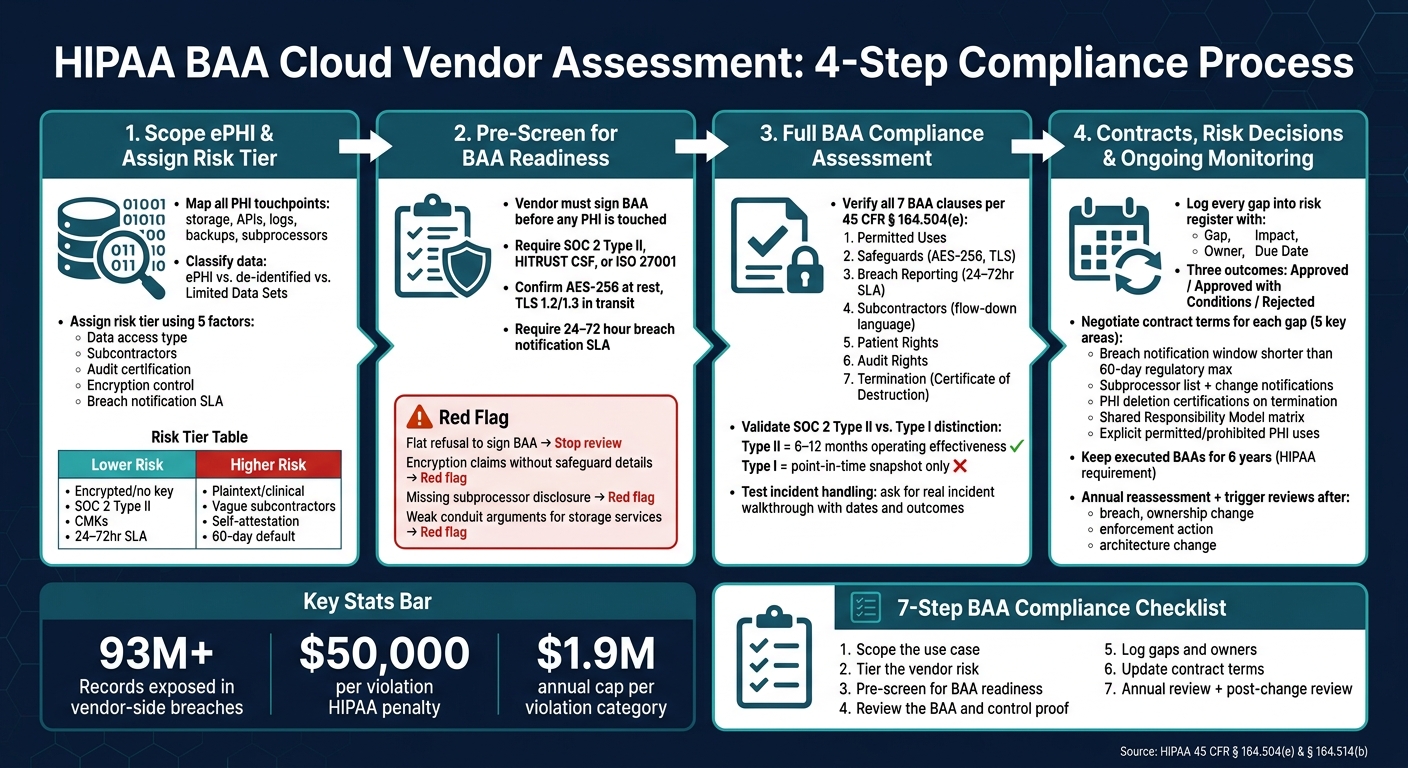
HIPAA BAA Cloud Vendor Assessment: 4-Step Compliance Process
Step 1: Scope ePHI, Data Flows, and Vendor Risk Tier
Before you send a questionnaire, map exactly how the vendor touches PHI. Vendor summaries are often vague, and BAA review needs to follow the actual data flow. Start with scope first. The pre-screen comes after that.
Map How the Cloud Service Handles PHI
Begin by finding every place where the cloud service touches ePHI.[1][4] That includes storage buckets, database services, backup systems, API integrations, and audit logs. Audit logs can trigger BAA status if they contain patient identifiers.[1]
Then trace the subcontractor chain. If the SaaS vendor relies on an infrastructure provider, confirm that a BAA is in place between the vendor and that provider.[1][2] Ask for a full subprocessor list, plus confirmation that BAAs are signed for each one, before you move any further.
Data classification matters here too. Separate ePHI from de-identified data and Limited Data Sets.[1][4] If a vendor says no BAA is needed, ask for written proof that the data meets Safe Harbor or Expert Determination standards under 45 CFR § 164.514(b).[1]
If you can't map how PHI moves, stop the review and ask for more detail.
Define the Shared Responsibility Model
A BAA creates legal duties, but it does not hand every security task to the vendor.[4]
Spell out who owns what. In many cases, the vendor handles physical and hardware controls, while your team owns identity, encryption keys, logging, and incident response.
That split matters. A signed BAA can give teams a false sense of comfort, but paper doesn't secure a cloud stack by itself.
Assign a Risk Tier Based on Impact and Exposure
Not every cloud vendor that handles ePHI brings the same level of third-party risk. A vendor with direct access to unencrypted clinical records in a production EHR setting is plainly a different case from a vendor that stores encrypted billing archives and holds no decryption key.
Use the factors below to assign a risk tier that sets the depth of review.[2]
| Factor | Lower Risk | Higher Risk |
|---|---|---|
| Data access type | Encrypted, no provider key | Plaintext or clinical processing |
| Subcontractors | None or fully disclosed with BAAs | Vague or undisclosed chain |
| Audit certification | SOC 2 Type II or HITRUST CSF | SOC 2 Type I or self-attestation |
| Encryption control | Customer-managed keys (CMKs) | Provider-managed keys only |
| Breach notification SLA | 24–72 hours contractual | 60-day HIPAA default |
sbb-itb-535baee
Step 2: Pre-Screen the Vendor for BAA Readiness
Once you've set the scope and risk tier, do a fast pre-screen. The goal is simple: filter out vendors that can't meet baseline HIPAA terms before you spend time on a full review.
Set Non-Negotiable Pre-Screen Criteria
Start with hard gates. If a vendor will handle PHI, they need to sign a HIPAA-compliant BAA before any PHI is touched. You should also get written confirmation that they accept Business Associate status under HIPAA.
From there, check whether the vendor's proof lines up with the risk-tier assumptions you already made. That means confirming downstream subprocessor disclosure and BAAs across the full chain. It also means asking for current independent evidence, such as SOC 2 Type II documentation, HITRUST CSF, or ISO 27001. Type II matters here because it shows operating effectiveness over time. On the security side, look for AES-256 at rest, TLS 1.2 or 1.3 in transit, and a 24–72 hour breach-notification SLA. [1][2]
Identify Early Red Flags in Vendor Responses
Think of vendor replies as a triage step. Some answers should stop the process on the spot.
A flat refusal to sign a BAA ends the review right away. The same goes for vendors that talk about encryption as if it replaces HIPAA compliance, but can't explain their administrative, physical, and incident-response safeguards. That's a red flag, plain and simple.
Watch for weak or unclear BAA terms too. Vague language, missing breach timelines, missing audit rights, or missing indemnification all point to trouble. Missing subprocessor disclosure is even more serious. A signed BAA doesn't fix a broken compliance chain.
Be careful with conduit claims as well. If the service isn't only transient and does store or routinely access PHI, that claim shouldn't pass. [1][2]
Only vendors that clear these gates should move on to the full BAA and controls review.
Centralize the Pre-Screen Workflow with Censinet
If you want this process to stay consistent from one vendor to the next, keep intake and evidence review in one place. Censinet RiskOps™ can centralize questionnaires, evidence collection, and issue routing for vendor pre-screens.
Step 3: Perform the BAA Compliance Assessment
Pre-screening weeds out the obvious nonstarters. This step checks whether the vendor can, in practice, meet BAA duties. Use the pre-screen result to review contract terms, control evidence, and incident response. Then use the risk tier from Step 1 to decide how far you need to go.
Review the BAA Against HIPAA Requirements
A signed BAA is a legal requirement, but it does not prove the vendor is compliant. Under 45 CFR § 164.504(e), every BAA must include specific terms. If even one is missing, you have a problem. The table below shows what each clause should cover and what to check in the vendor’s agreement.
| BAA Clause | What to Verify |
|---|---|
| Permitted Uses | Confirm the vendor cannot use PHI beyond the contracted purpose, including for marketing or secondary data mining. |
| Safeguards | Verify the agreement clearly states encryption at rest and in transit, along with access controls. |
| Breach Reporting | Set a 24–72 hour notification SLA. |
| Subcontractors | Look for flow-down language and a requirement to disclose the subprocessor list. |
| Patient Rights | Confirm the vendor has a process to provide data for patient requests. |
| Audit Rights | Ensure the vendor agrees to allow HHS access to relevant books and records and to provide third-party audit summaries. |
| Termination | Require a Certificate of Destruction or specific data portability terms. |
Your contract terms should line up with your own notification and remediation timelines. In plain English: if your team needs time to respond before downstream deadlines hit, the contract should give you that room. That’s why a 24–72 hour notice window matters.
Validate Security Controls and Assessment Artifacts
Now move past the contract and check whether those safeguards are live.
For higher-risk vendors, ask for current reports, certificates, and configuration evidence that show the controls are active. A SOC 2 Type II report is a good starting point. If the vendor says it has HITRUST, verify the certificate directly.
On the technical side, confirm:
- AES-256 encryption at rest
- TLS 1.2 or 1.3 in transit
- Support for customer-managed encryption keys (CMK), if that matters for your setup
Also review logging. Audit logs should record PHI access events with timestamps and user IDs. They should be tamper-evident, kept according to policy, and available when needed. If a vendor can’t show that, the paper controls don’t mean much.
Test Operational Maturity and Incident Handling
Controls always look neat on paper. The real test is what happens when something goes wrong.
Ask the vendor to walk through its most recent security incident. Get specific details: what happened, when it was detected, how long notification took, and what changed after the event. Vendors with solid operational discipline can answer with dates, actions, and outcomes. Vendors that stay vague, dodge details, or can’t name clear follow-up steps are a risk.
A vendor without named security and compliance owners is a red flag.
Document every gap before you move into ongoing monitoring. Each one should land in one of three buckets: a contract change, a remediation item, or a risk acceptance. Do it now, while the review is fresh, so contract updates, remediation deadlines, and monitoring can start right away.
Step 4: Turn Assessment Findings Into Contracts, Risk Decisions, and Ongoing Monitoring
Use what you found in the assessment to decide three things: contract changes, approval status, and monitoring. Bring the Step 1 risk tier and Step 3 findings into the risk register so every gap leads to a clear action.
Document Gaps, Remediation Steps, and Ownership
Use a risk register to track each gap, its impact, the owner, and the due date. Every entry should answer four plain questions:
- What is the gap?
- What happens if it stays open?
- Who is fixing it?
- When does it need to be closed?
Be specific with ownership. Legal should own contract language. Security should own control gaps. IT and application teams should own data handling and deletion issues. Procurement should own subprocessor requirements. If ownership is fuzzy, fixes tend to stall.
The register should drive one of three outcomes: approved, approved with conditions, or rejected. For example, a vendor with a missing subprocessor disclosure clause may still be approved with conditions if they agree to fix it before contract execution. But a vendor that can't show proof of required controls may need to be rejected until that issue is fixed.
Negotiate Contract Terms That Address Identified Risks
Treat the provider's standard BAA as a starting point, not the final draft. Each open gap should map to a contract term. That way, the paper matches the risk.
The table below ties common findings to the contract terms worth pushing for and the team that should lead that work:
| Identified Gap | Contract Safeguard / Updated Term | Responsible Owner |
|---|---|---|
| Notification window too long for internal response | Negotiate breach notification window shorter than the 60-day regulatory maximum | Legal / Privacy |
| Lack of visibility into subprocessors | Require subprocessor lists and notification of any subprocessor changes | Procurement / Security |
| Unclear data disposal procedures | Add requirement for formal PHI deletion certifications upon termination | IT / Compliance |
| Ambiguous security responsibilities | Define a Shared Responsibility Model matrix within the contract | Security / Cloud Ops |
| Unapproved PHI uses | Explicitly list permitted and required uses based on the specific cloud service scope | Legal / Business Owner |
Push for the shortest breach-notification window your response process needs.
Also make sure executed BAAs are kept for 6 years from their creation or last effective date[1]. That's a HIPAA rule, not a nice-to-have.
After the contract language is updated, turn any open items into monitoring triggers.
Set Up Continuous Monitoring for Cloud Vendors Handling PHI
A signed BAA and a clean assessment can age out fast. Reassess each PHI vendor every year[2][3]. You should also trigger a review after any breach, ownership change, enforcement action, or material architecture change.
When you ask for updated evidence, request a SOC 2 Type II report, not Type I. Here's why that matters:
- Type II looks at 6–12 months of control performance
- Type I only shows a point-in-time snapshot[2]
Censinet RiskOps™ gives healthcare teams one record for evidence requests, subprocessor changes, and BAA update triggers, all inside a platform built for healthcare risk management. If a new PHI use case appears or a vendor changes its architecture, that should trigger the BAA review right then, not weeks or months later.
Conclusion: A Practical BAA Compliance Governance Checklist
BAA compliance isn't a one-and-done onboarding task. It takes shared ownership across legal, security, IT, procurement, and compliance teams. The four steps in this guide - scoping ePHI flows, pre-screening vendors, performing the full assessment, and turning findings into contracts and monitoring - only work if the program stays active in day-to-day practice.
That means using repeatable templates, clear risk tiers, and one central place for records. If those pieces drift, the process usually drifts with them.
Program Elements to Keep in Place
The checklist below turns the process into an ongoing governance routine. Treat these controls as active program items, not one-time review outputs. Use this checklist to confirm the program stays in motion.
| Program Element | Status | Owner |
|---|---|---|
| BA Status Identification | ☐ Not Started / ☐ Active | Procurement / Legal |
| ePHI Data Flow Mapping | ☐ Not Started / ☐ Active | Data Privacy Officer |
| Vendor Risk Tiering | ☐ Not Started / ☐ Active | IT Security |
| Standardized BAA Execution | ☐ Not Started / ☐ Active | Legal |
| Technical Control Validation | ☐ Not Started / ☐ Active | IT Audit |
| Gap Remediation Tracking | ☐ Not Started / ☐ Active | Vendor Management |
| Subprocessor Compliance Verification | ☐ Not Started / ☐ Active | Procurement |
| Continuous Monitoring / Alerts | ☐ Not Started / ☐ Active | SOC / IT Ops |
| Annual Governance Review | ☐ Not Started / ☐ Active | Vendor Management |
Put extra focus on subprocessor compliance and gap ownership. Those two areas often break down first. When no one owns a finding, closure slows down fast.
Censinet RiskOps™ helps healthcare organizations manage ongoing vendor risk work by keeping assessment artifacts, BAA status, and monitoring triggers in one place between vendor changes, renewals, and annual reviews. When records are current, the next vendor review is faster and cleaner.
FAQs
When is a cloud vendor a business associate?
A cloud vendor is a business associate under HIPAA when it creates, receives, maintains, or transmits ePHI for a covered entity.
That rule applies even if the vendor never looks at the data or doesn't hold the decryption key.
What evidence should I ask for beyond a signed BAA?
Beyond a signed BAA, ask for proof of HIPAA compliance and the security controls behind it. That can include SOC 2 Type II or HITRUST CSF reports, breach notification procedures, incident response plans, and records showing how past issues were fixed.
It also helps to review the basics that matter most in day-to-day security:
- Encryption
- Access controls
- Audit logs
- Multi-factor authentication
- Security policies
- Recent penetration testing
- How subcontractors that handle PHI are managed, including downstream BAAs
A signed agreement is one piece of the puzzle. The bigger issue is whether the vendor can show, in plain terms, how it protects PHI and how it responds when something goes wrong.
How often should I reassess a cloud vendor that handles PHI?
Reassess a cloud vendor that handles PHI at least once a year and any time major changes happen.
That includes updates to the vendor’s services, architecture changes, security incidents, or shifts in your organization’s workflows. Ongoing monitoring and documentation also support HIPAA compliance by helping you spot configuration drift, unauthorized access, and security weaknesses.
