
Remote access to IoMT devices can affect patient care, not just IT. If I had to boil this article down to the main point, it’s this: I should treat every remote connection to a medical device as a patient-safety and security risk, then control it with governance, inventory, MFA, segmentation, encryption, vendor rules, patching, logging, and staff training.
Here’s the short version:
- Start with risk and ownership. I need to know who approves access, who reviews it, and which connections carry the most risk.
- Build a full access inventory. That includes VPNs, vendor tools, cloud portals, Wi-Fi, Bluetooth, USB, serial ports, and old remote paths that may still be active.
- Use tight identity controls. MFA, least-privilege access, named accounts, and time-limited sessions should come before any device connection.
- Limit network reach. Segmentation, jump hosts, and Zero Trust-style access help keep one compromised session from spreading across clinical systems.
- Protect sessions and software. Encryption, signed firmware, secure boot, and certificate-based access help reduce tampering and data exposure.
- Control vendor security risks closely. Vendor sessions should be approved, logged, tied to one person, and shut off when the work ends.
- Patch by exploit risk and patient impact. The article notes that 83% of medical devices had known flaws as of 2025, and remote code execution activity climbed hard in recent years.
- Watch everything and train people. Logs, anomaly checks, incident plans, and role-based training help stop access drift and missed warning signs.
A few numbers stand out right away:
- Remote code execution exploits aimed at medical devices jumped 437% in 2023
- Healthcare led critical infrastructure in ransomware attacks in 2024
- 83% of medical devices had known vulnerabilities as of 2025
If I’m reading this as a healthcare, security, HTM, or vendor-risk team member, the message is simple: remote access should be treated as a controlled program, not a set of one-off exceptions.
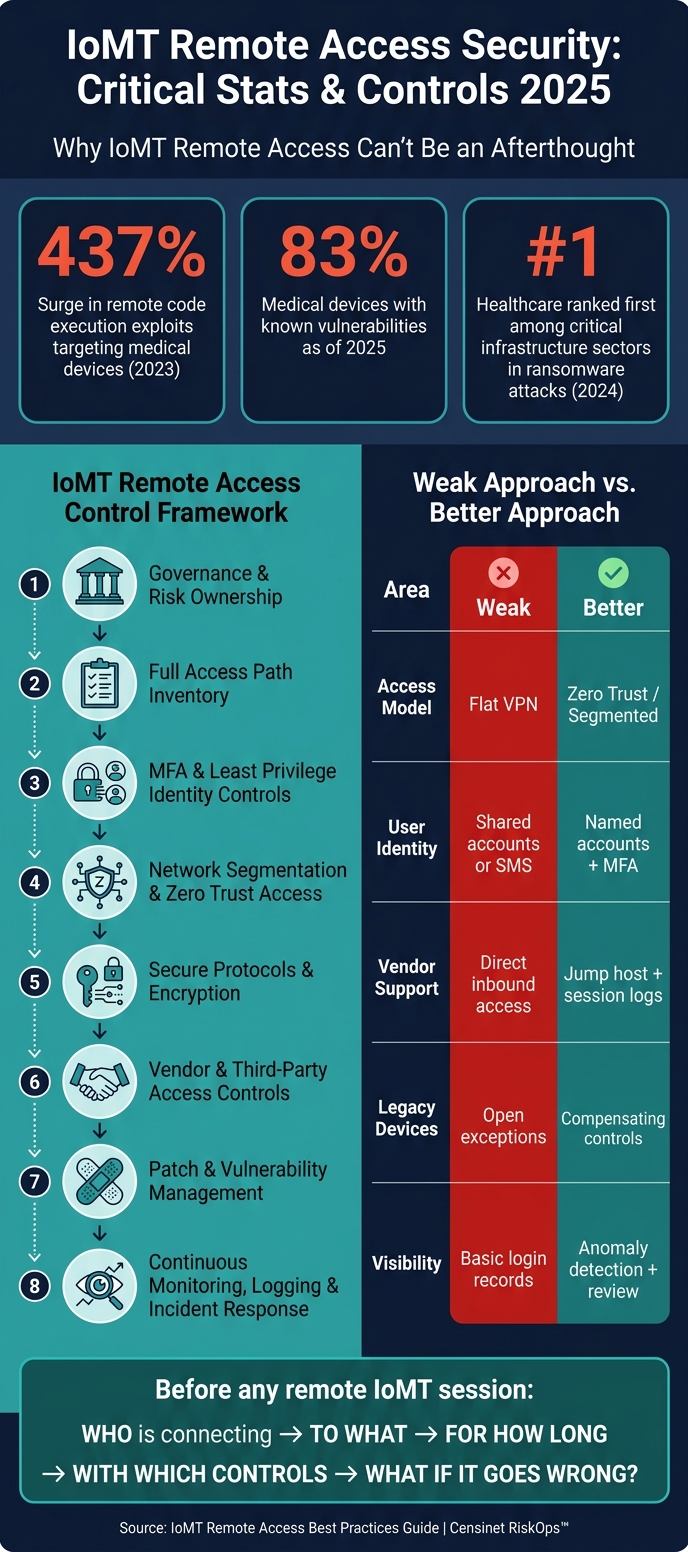
IoMT Remote Access Security: Key Stats & Best Practices 2025
Webinar: Strengthening Remote Access in Healthcare with Zero Trust
sbb-itb-535baee
Quick Comparison
| Area | Weak approach | Better approach |
|---|---|---|
| Access model | Flat VPN with broad reach | Segmented or Zero Trust access |
| User identity | Shared accounts or SMS codes | Named accounts with MFA and time limits |
| Vendor support | Direct inbound access | Jump host or portal with session logs |
| Medical device security risks in legacy equipment | Open exceptions | Compensating controls and tight network rules |
| Visibility | Basic login records | Session logs, anomaly checks, and review workflows |
| Lifecycle | Access left in place | Access reviewed and removed as roles or contracts change using automated third-party risk management workflows |
So before I let anyone touch an IoMT device remotely, I should ask: who is connecting, to what, for how long, with which controls, and what happens if that session goes wrong?
Why Remote Access to IoMT Devices Needs a Risk-Based Approach
Remote access to IoMT devices is a clinical risk, not just an IT job. When teams handle access in an informal way, problems pile up fast: unmonitored VPN accounts, undocumented vendor support sessions, and remote desktop exceptions can all expand the attack surface.[1]
The FDA treats connected devices with software or wireless features as cyber devices and expects cybersecurity across the full lifecycle.[2] That matters because these devices can affect therapy and diagnosis. So the rules for remote access can't be based on network risk alone. They also need to reflect patient risk.
Each access path should be reviewed against the same set of risk factors: device criticality, PHI exposure, exploitability, and the safeguards already in place. Put simply, not every remote connection carries the same level of danger, and the controls should match the risk.[1][2]
| Remote Access Path | Key Risk Factors | Recommended Controls |
|---|---|---|
| Vendor Support | Shared credentials, broad network reach | MFA, session logging, time-bounded access |
| Remote Clinical Staff | Unmanaged devices, ePHI exposure | Managed device requirement, virtual desktop (VDI) |
| IoMT Maintenance | Exploitability of protocols (Bluetooth/Serial) | Network segmentation |
| Admin Tools | High privilege, lateral movement risk | Jump-hosts, "impossible travel" monitoring, MFA |
This is the core reason remote access needs formal governance and repeatable assessments. A loose, one-off process might work for a basic office app. It does not fit systems tied to patient care.
1. Censinet RiskOps™ for Remote Access Risk Governance
Censinet RiskOps™ brings remote access risk governance into one place for IoMT teams. Instead of juggling spreadsheets, teams get a repeatable workflow for assessments that’s much easier to run and track.
The platform maps controls and assessment results to HIPAA, NIST CSF 2.0, FDA Section 524B, and HHS/OCR guidance. It also supports the cybersecurity plan, SBOM, and post-market vulnerability process for connected medical devices.
It helps simplify vendor risk assessments too, while giving teams a clearer view of third-party access to clinical systems and patient data. That matters because remote code execution exploits are on the rise [3]. With continuous monitoring, teams can keep risk data current and fix gaps earlier instead of finding them late.
Censinet AI™ helps move the work along by speeding up questionnaire completion, summarizing evidence, and generating risk reports, with human review still part of the process.
Use these outputs to feed the governance and formal assessment process in the next step.
2. Set Up Governance and Formal Risk Assessments
Start by deciding who owns, who reviews, and who approves each remote-access path. Then spell out access roles, approval steps, and how often each path gets reviewed. Without a formal governance model, remote access to IoMT devices turns into a pile of one-off exceptions, and no one is clearly on the hook.
Document access profiles for each role and vendor, tied to the principle of least privilege, with clear accountability for approval and review [1].
The assessment process should line up with FDA Section 524B, HIPAA, and NIST CSF 2.0 Govern. Under the FDA QMSR, cybersecurity work must trace back to controlled design and development processes [3].
Threat modeling is a required part of this process. Use STRIDE or attack trees to map assets, attack surfaces such as Wi-Fi, Bluetooth Low Energy (BLE), and cloud APIs, and mitigations [3]. If a legacy device can't be patched, document compensating controls such as network restrictions or restricted protocols so the residual risk is recorded. That governance model then becomes the reference point for every remote-access path.
Use the control areas below to structure assessments.
| Governance Component | Focus Area | Regulatory Alignment |
|---|---|---|
| Identity Governance | MFA, RBAC, Least Privilege | HIPAA, NIST CSF 2.0, FDA Premarket Guidance |
| Threat Modeling | STRIDE, Attack Trees, SBOM Analysis | FDA Section 524B, ISO 13485, IEC 81001-5-1 |
| Vendor Management | Time-bounded access, Named Accounts, Session Logging | HIPAA |
| Monitoring | Activity Logging, Anomaly Detection | NIST CSF 2.0 |
3. Build a Full Inventory of IoMT Remote Access Paths
Once governance roles are set, the next move is simple: know exactly what you’re protecting.
That means listing every path that can reach an IoMT device, including intended access, old access that never got removed, and the hidden stuff nobody thinks about until there’s a problem. During a formal inventory process, many organizations find legacy access they forgot was still there, like old VPN accounts, Remote Desktop exceptions, and unmanaged third-party support paths [1]. That inventory then becomes the control map for every remote access choice that comes next.
To avoid gaps, group the inventory by access channel. You want to account for network, server, and cloud connections used for remote monitoring or device updates, plus wireless and RF paths, physical hardware connectors, and third-party or open-source software components inside device software [2].
| Remote Access Path Category | Specific Technologies to Inventory |
|---|---|
| Network & Cloud | Server connections, cloud service provider portals, APIs, VPNs |
| Wireless/RF | Wi-Fi, cellular, Bluetooth, Bluetooth Low Energy (BLE), magnetic inductive |
| Physical/Hardware | USB ports, Ethernet ports, serial ports |
| Software/Access Tools | Remote-support agents, update utilities, vendor portals, and device management software |
When mapping these paths, look beyond the device itself. The surrounding environment matters too, including Wi-Fi routers, computer systems, and phones that could be used to compromise the device [2]. A device may look locked down on paper, but if the laptop next to it is weak, that path can still be abused.
After the list is done, document how each path is used and who can use it. For all user and vendor groups, record the systems each path reaches, whether it touches ePHI or privileged tools, and whether the endpoint is managed or BYOD [1]. For each vendor path, record the named account, the systems it reaches, and the access expiration date [1].
It also helps to log the plain details people often skip: who accessed what, from where, under which controls, and what the response was when activity looked suspicious. That kind of record makes reviews far less messy and gives security teams something solid to work from when an alert comes in.
The inventory shouldn’t sit still. Update it when contracts end, roles change, or devices are lost [1]. Periodic scenario testing and cybersecurity benchmarks can catch weak spots early, such as checking whether a terminated employee’s access was fully revoked [1].
4. Require Multifactor Authentication and Least Privilege Access
Use your inventory to set the right MFA strength and privilege level for each access path. In practice, two controls do most of the heavy lifting here: multifactor authentication (MFA) and least privilege access.
For high-risk access, use phishing-resistant MFA. For general staff, app-based push on managed devices is usually a good fit. SMS and voice codes should stay off the table.
| MFA Method | Security Level | Suitability for IoMT Remote Access |
|---|---|---|
| FIDO2 / Hardware Keys | Very High | Best for high-risk clinical systems like infusion pumps or imaging suites |
| App-based Push (Managed) | High | Fits general staff on managed devices |
| TOTP (Authenticator App) | Medium | Acceptable fallback only |
| SMS / Voice Codes | Low | Not recommended |
FIDO2/WebAuthn hardware keys and PKI-based certificates are the strongest choices because they cut down credential replay and interception risk.
Least privilege works side by side with MFA. Getting a user authenticated is only part of the job. You also need to limit what that user can touch. Give access only to the exact device or system needed, and only for the time needed. During maintenance windows, just-in-time access beats standing access. All of this should happen before any remote session reaches the device network.
Machine identities often outnumber human users, and they’re often over-privileged or unmanaged [4]. That’s a bad mix. Using PKI certificates and automated identity management, instead of shared passwords, helps keep device and service identities used in remote sessions tight without adding friction for clinicians. In a Zero Trust setup, each device should have its own verified identity so the network can quarantine one compromised device without knocking out the rest of the facility [4].
Some inventory items won’t support native MFA. When that happens, put access behind a ZTNA gateway or a secure jump host that authenticates the user before the session gets anywhere near the device [1]. Also, send MFA events, privileged sessions, and bypasses to the SIEM. That gives your team a way to spot odd login patterns and MFA-fatigue attempts early [1].
If a device still needs broader reach, network segmentation has to box in the risk.
5. Segment Medical Device Networks and Apply Zero Trust Access
After MFA and least privilege, the next move is network segmentation. The goal is simple: if one device gets hit, it shouldn't be able to move across the network and infect everything around it.
Use the inventory from the prior step to place each device in the right segment and allow only approved traffic. Put medical devices on dedicated VLANs or VRFs behind default-deny firewalls, so only approved source, destination, port, and protocol combinations can pass [5][6]. This matters most for legacy devices that can't be patched fast or can't run endpoint agents. In plain terms, segmentation adds the network boundary that MFA and least privilege can't give you on their own.
"Isolate medical devices on dedicated network segments with controlled access to and from clinical and administrative networks." - HICP Practice 9.3 [5]
Zero Trust adds identity-based access on top of segmentation. Instead of opening up a broad subnet, Zero Trust Network Access (ZTNA) exposes only the specific application a user needs through a secure connector [7]. Every session is authenticated and authorized at every session [3]. That means access decisions should be based on user identity, device state, and context before the application is made available.
The same model should apply to third-party support, with one big guardrail: keep vendors off patient-care networks. Block direct inbound access to patient-care VLANs. Route all remote support sessions into a dedicated isolation zone behind a hospital-managed jump host, and keep session logging turned on [5][6]. For vendor sessions, use a PAM-backed jump host and limit access to approved time windows [8].
These controls map to the HIPAA Security Rule, HICP, NIST CSF 2.0, and FDA Section 524B "Cyber Device" requirements [5][6][8][3].
| Segmentation Strategy | Implementation Method | Risk Reduction Benefit |
|---|---|---|
| Network Isolation (HICP 9.3) | Dedicated VLANs/VRFs | Limits lateral movement and protects unpatchable legacy devices [5] |
| Microsegmentation | Host-based firewalls or service mesh sidecars | Restricts east-west traffic between individual workloads and devices [6][7] |
| Zero Trust Access (ZTNA) | Identity-based brokers and application connectors | Limits access to one app at a time [7] |
| Controlled Vendor Access | MFA-protected jump hosts and session logging | Prevents uncontrolled third-party entry into clinical subnets [5][6] |
Segmentation cuts down exposure. Secure protocols and encryption protect the traffic that still needs to move.
6. Use Secure Protocols and Strong Encryption
Segmentation limits reach. Encryption limits exposure if someone intercepts traffic. You need both. One does not stand in for the other.
The aim is simple: make every remote session confidential, authenticated, and resistant to tampering.
For IoMT remote access, encryption should protect data in transit and at rest. That means requiring encryption in transit and at rest, secure key management, and certificate-based authentication for users, devices, and software. These controls protect the session itself, not just the network path. They help meet confidentiality expectations under HIPAA, FDA Section 524B, and NIST CSF 2.0 [3].
This matters because a compromised session can do more than expose PHI. It can change how a device behaves. In a medical setting, that can affect therapy and diagnosis [3]. Strong session controls and checks that confirm software, devices, and users are legitimate help guard those functions [3]. Remote code execution exploits aimed at medical devices surged by 437% in 2023 [3].
Firmware integrity needs the same level of care as session security. Require signed firmware updates and secure boot so only verified software runs on connected devices [3].
Legacy devices are often the hardest part. Some simply can't meet current cryptography requirements. When that happens, don't make an exception and move on. Use compensating controls. Legacy IoMT devices that can't support modern encryption need those added layers of defense. Network Detection and Response (NDR) tools can reduce risk when the device itself can't be hardened directly [3].
Every third-party session should run through encrypted, authenticated channels. Use named accounts so each session ties back to a specific person. Then apply the same protections to vendor and other third-party risk assessment processes.
| Security Objective | Implementation Requirement | Regulatory/Safety Impact |
|---|---|---|
| Confidentiality | Encryption at rest and in transit; secure key management | Reduces PHI exposure |
| Authenticity | Digital signatures, certificate management, MFA | Helps confirm legitimate users, devices, and software |
| Integrity | Secure boot, signed firmware updates | Helps ensure device software hasn't been tampered with |
| Availability | Traffic rate-limiting, failover mechanisms | Supports resilience against denial-of-service disruptions |
7. Control Vendor and Third-Party Remote Access
Once identity, segmentation, and encryption are in place, vendor access needs its own set of rules.
Vendors often need remote access to maintain, update, and troubleshoot IoMT devices. That part is normal. The problem is how that access is granted, watched, and shut off. If controls are loose, a vendor session can turn into an open door into your clinical network, especially since many healthcare vendor risk assessments fail to identify critical security gaps.
Start by replacing shared credentials with unique named accounts. Each vendor technician should have an identity tied to the exact systems they’re hired to support. Limit each account to an approved maintenance window, then disable it automatically when the work ends. Apply these controls only to vendor paths that are already approved in the access inventory.
Route vendor sessions through approved application portals or jump hosts that connect only to the required device segment. Don’t give access to the full clinical network when the vendor only needs one segment. It’s the digital version of handing someone a room key instead of the master key.
Before a session starts, require vendor devices to meet baseline security standards, including:
- Full-disk encryption
- A patched operating system
- Active endpoint detection and response (EDR)
Your internal team should also explicitly approve each vendor access request before the session opens. Then log the details that matter: sign-ins, failed attempts, MFA events, and geolocation anomalies.
Vendor access policy should line up with FDA Section 524B, SPDF, SBOM, and NIST CSF 2.0 Govern and Protect requirements. If patch and vulnerability status isn’t current, block vendor access until it is.
8. Manage Patches, Firmware, and Vulnerabilities
Once access is locked down, patch status becomes the next big risk gate. As of 2025, 83% of medical devices carry known vulnerabilities[9]. That makes unpatched firmware and software one of the most common ways healthcare ransomware gets in. And once a device goes unpatched, every remote session that touches it carries more risk.
IoMT patching isn't a simple "push the update and move on" job. Device makers often need to validate patches before deployment. So patch management has to run as a shared process across Information Security, Clinical Engineering/HTM, and Clinical Leadership.
HHS/OCR expects timely patching as part of HIPAA safeguards.
When deciding what to fix first, don't rely on CVSS alone. Focus on exploitability and patient impact. A flaw with a modest score can still be a serious problem if it affects a device tied to care delivery. Keeping a Software Bill of Materials (SBOM) for each device makes this much easier, because it shows whether a newly disclosed vulnerability touches the current device setup.
Some devices can't be patched right away. That may be because the maker hasn't approved the fix yet, the device is in active clinical use, or it's already at end-of-life. In those cases, compensating controls aren't optional. Use:
- Microsegmentation
- DPI
- IPS virtual patching
- Disabled remote-access ports until a permanent fix is available
For end-of-life devices, put them behind strict firewall rules. Then track those compensating controls through continuous monitoring and incident response, so temporary fixes don't fade into the background.
Feed unresolved vulnerabilities and temporary compensating controls into the monitoring program that follows.
9. Monitor Continuously, Log Activity, and Plan for Incidents
Continuous monitoring catches what access controls miss. In 2023, remote code execution attacks on medical devices jumped 437%, and in 2024, healthcare led critical infrastructure in ransomware attacks [3]. So monitoring can't stop at logins. It needs to cover identity, device health, and network behavior too.
Watch authentication events, device compliance, unusual activity, and privileged vendor sessions [1][3]. For authentication, track successful and failed sign-ins, plus MFA bypass attempts. For device compliance, confirm endpoints are enrolled, encrypted, patched, and under monitoring. Flag behavior that looks off, like impossible travel, unexpected outbound connections, and unusual data volume. For third-party risk and access, link every vendor log to a named account and support dedicated session logging with explicit approval workflows [1]. Alerts should map to each remote access path so teams can see who touched what, from where, and why.
"The issue is not only whether a user can log in. The issue is whether the organization can explain who had access, from what device, to which system, under what controls, and what happened when something looked suspicious." - Dan J Sturdivant, Vice President, Datapath [1]
Unreviewed logs are just records, not controls. Use Network Detection and Response (NDR) tools to flag communication with known malicious endpoints and lateral movement across the device network [3]. Then review those alerts in active workflows, not as a box-checking exercise. This lines up with NIST CSF 2.0 Detect and Respond functions, HHS/OCR guidance on audit logging and access limits for ePHI, and FDA Section 524B's post-market plan for monitoring and addressing vulnerabilities [3].
When monitoring flags a device, the response needs to move fast and account for clinical impact. IoMT incident response should start there. A compromised infusion pump or patient monitor carries a different risk profile because clinical function is part of the asset you're protecting. Segmentation helps teams isolate the device fast; if it can't reach the EHR or the internet, the blast radius gets smaller [3]. Vendor sessions and unpatched legacy devices should sit at the top of the alert queue. And the same compensating controls used for unpatchable devices should carry into incident response [3]. The point isn't just to detect compromise. It's to limit clinical disruption.
10. Build Training, Change Control, and Lifecycle Governance Into the Program
Once your controls are live, the next job is making sure people don't quietly work around them. That's where training and change control come in. Every group that touches IoMT remote access - clinicians, IT, clinical engineering, billing, and vendors - needs training that fits the work they actually do.
The main goal is simple: stop the habits that break controls. That includes sharing credentials, storing ePHI on personal devices, and bypassing MFA. Role-based training helps each group understand what they can access, what they can't touch, and how to report something that looks off [1].
| Role | Training Focus |
|---|---|
| Clinicians | EHR access, MFA usage, no local ePHI storage, session timeouts |
| IT / Clinical Engineering | Admin tools, logs, patching, PAM, jump hosts |
| Vendors / Third Parties | Named account usage, session scope, time-bounded access, approval workflows |
| Administrative / Billing | App portals, RBAC, geo-blocking |
Training helps, but it doesn't fix access drift on its own. Change control does that. And in many cases, this is where programs slip. A vendor engagement ends, yet the account is still active. A clinician moves into a new role, but their access stays the same [1]. That's how extra access piles up over time.
FDA Section 524B requires a post-market vulnerability plan, coordinated disclosure, and justified patch timelines [3]. Under QMSR, cybersecurity and change control must align with ISO 13485 [3]. In plain terms, remote access can't sit off to the side as a one-off IT task. It has to match the way device and quality processes already work.
Treat remote access as part of the full device and contract lifecycle. Classify access during onboarding. Review vendor accounts at contract renewal. Disable credentials and access paths during decommissioning [1][2]. It's also smart to test for stale access on a set schedule, especially for terminated employees and vendor projects that have already wrapped up [1].
Comparison Tables for Remote Access Design Options
Use these comparisons to line up remote access design with medical device risk, user role, and device criticality.
The table below shows how these controls change the access design itself.
Flat VPN vs. Segmented / Zero Trust Remote Access
| Feature | Flat VPN Access | Segmented / Zero Trust Access |
|---|---|---|
| Trust Model | Implicit trust; users enter the perimeter once connected | "Never trust, always verify"; continuous identity and device verification |
| Lateral Movement Risk | High; broad subnet access increases lateral movement | Low; micro-segmentation blocks unauthorized east-west traffic |
| Access Scope | Broad network-level tunnels to subnets | Application-level access to specific services or APIs only |
| Auditing | Broader telemetry vs. granular identity-level logs | Granular logs: identity, device posture, and specific resource requests |
| Security Posture | Static; ignores live device health | Adaptive; evaluates device health and risk score before granting access |
| Compliance Fit | Poor; often fails the HIPAA "Minimum Necessary" standard | High; supports HIPAA, SOC 2, and FDA Section 524B requirements |
A flat VPN gives users broad entry into the network after they connect. That may seem simple on paper, but it also gives attackers more room to move if an account or endpoint gets compromised.
Segmented or Zero Trust access takes a tighter approach. Instead of dropping a user onto a subnet, it limits access to the exact app, service, or API they need. That cuts east-west movement, improves logging, and lines up better with rules like HIPAA’s Minimum Necessary standard.
Access architecture is only part of the decision; the session tool also shapes control, visibility, and vendor support.
VPN, Remote Desktop Gateway, and Vendor Portal Options
Match the design to the access path.
| Criteria | VPN-Based Access | Remote Desktop Gateway | Cloud-Based Vendor Portal |
|---|---|---|---|
| Security | Lower; broad network reach increases attack surface | Moderate; restricts access to specific hosts | Higher; no direct inbound path to the device |
| Operational Overhead | High overhead for clients, IP pools, and firewall rules | Requires ongoing gateway server maintenance and patching | Lower; managed by the vendor or service provider |
| Session Logging | Limited to network session data | Good; session logs and duration data, integrates with SIEM | Comprehensive; vendor-managed portal with centralized logs |
| IoMT Compatibility | Risky for legacy or unpatchable devices due to broad exposure | Limited to devices supporting RDP or similar protocols | High; best for modern IoMT with vendor telemetry |
| Best Use Case | General internal staff access | Internal biomed and IT support | Vendor maintenance |
Each option comes with a different tradeoff.
- VPN-based access fits broad internal staff access, but it carries more exposure and more admin work.
- Remote Desktop Gateway gives tighter host-level control and better session records, which can work well for internal biomed and IT support.
- Cloud-based vendor portals are often the best fit for vendor maintenance because they avoid direct inbound paths to the device and usually provide centralized logs.
These design choices should then show up in policies, contracts, and assessment criteria.
What to Include in Policies, Contracts, and Assessments
Once you’ve defined your controls, the next step is simple: put them into the policies, contracts, and assessments that make them enforceable.
This is where a lot of teams slip. They build a remote-access model, then write documents that sit off to the side and don’t quite match how access works in practice. That gap creates confusion fast. Your documentation should reflect the access model directly.
Here’s what each document needs to cover:
| Document | Required Content |
|---|---|
| Remote Access Policy | Approved access methods, MFA requirements, device encryption standards, role-based access controls, and explicit prohibition of local ePHI storage on personal or unmanaged devices |
| Vendor Contracts and BAAs | Named accounts only, documented system scope, time-bounded access windows, mandatory session logging, and automatic removal at engagement end |
| Asset & Path Inventory | Each approved remote-access path, the systems it reaches, and whether it touches ePHI or privileged clinical systems |
| Security Assessments | Proof of EDR, patch status, screen lock, full-disk encryption, and remote-wipe capability for any device used to access IoMT |
| Incident Response Playbooks | Escalation steps for lost devices, unauthorized access alerts, terminated employees with lingering credentials, and vendor accounts left active after engagement end |
For high-risk maintenance work, add a tighter check. Require manual approval and time-boxed vendor activation by an internal admin.
Censinet RiskOps™ can standardize healthcare-specific risk assessments, collect vendor evidence, and track CAPs. [1]
"A remote access program is only as strong as the visibility around it. If leadership cannot tell which users accessed which systems remotely... the organization is operating on trust instead of evidence." - Datapath [1]
Use these document requirements to evaluate the remote-access design options below.
Conclusion
Secure IoMT remote access isn't a one-time setup. It's a discipline that helps protect patient safety, compliance, and uptime. Because remote access to IoMT devices touches all three, it needs steady oversight and tight control.
Taken together, these controls form one risk management program, not a set of isolated fixes. Every layer in this guide plays a part: governance, inventory, identity, segmentation, encryption, vendor control, monitoring, and lifecycle management.
IoMT environments don't stand still. That means access controls can't be reviewed only during deployment and then left alone. Reassess access whenever vendors, roles, or devices change. FDA requirements keep shifting, and controls that worked yesterday may not cover today's risks.
Censinet RiskOps™ supports ongoing risk assessments for medical devices and connected systems. Secure remote access works only when risk review, access control, and lifecycle governance stay aligned.
FAQs
How do I prioritize which IoMT remote access paths to secure first?
Start by finding every remote access point in your setup. That includes internet-facing vendor portals, RDP, VPNs, and SSH. Go after the most exposed paths first, especially anything reachable from the public internet without strong authentication or network segmentation.
Then shift to the paths that could do the most harm to patient safety and data privacy. Shut down open internet RDP. Tighten VPN and SSH access with MFA, key rotation, and current protections against known vulnerabilities.
What should I do if a medical device cannot support modern MFA or encryption?
Use compensating controls to cut risk when you can’t change the device itself. As Censinet points out, that means tightening network segmentation, allowing only the protocols and servers a device must talk to, and using hardware security modules to enforce encryption and access rules without touching the device software.
You can also put proxy servers in front of older devices so they can work with newer security protocols. And it helps to place legacy devices in dedicated VLANs, which can limit lateral movement if something goes wrong.
How often should remote access for vendors and staff be reviewed?
Remote access for vendors and staff should be reviewed at least once a year.
That said, once a year is just the baseline. Review access sooner after security incidents, major updates, or changes in personnel or device risk profiles.
