
Biometric systems are transforming healthcare by improving patient identification, securing access to sensitive data, and reducing misidentification errors. However, implementing them requires careful planning to ensure compliance with HIPAA and state laws like Illinois’ BIPA. Here's a quick summary of what you need to know:
This checklist ensures biometric systems are secure, compliant, and seamlessly integrated into healthcare workflows.
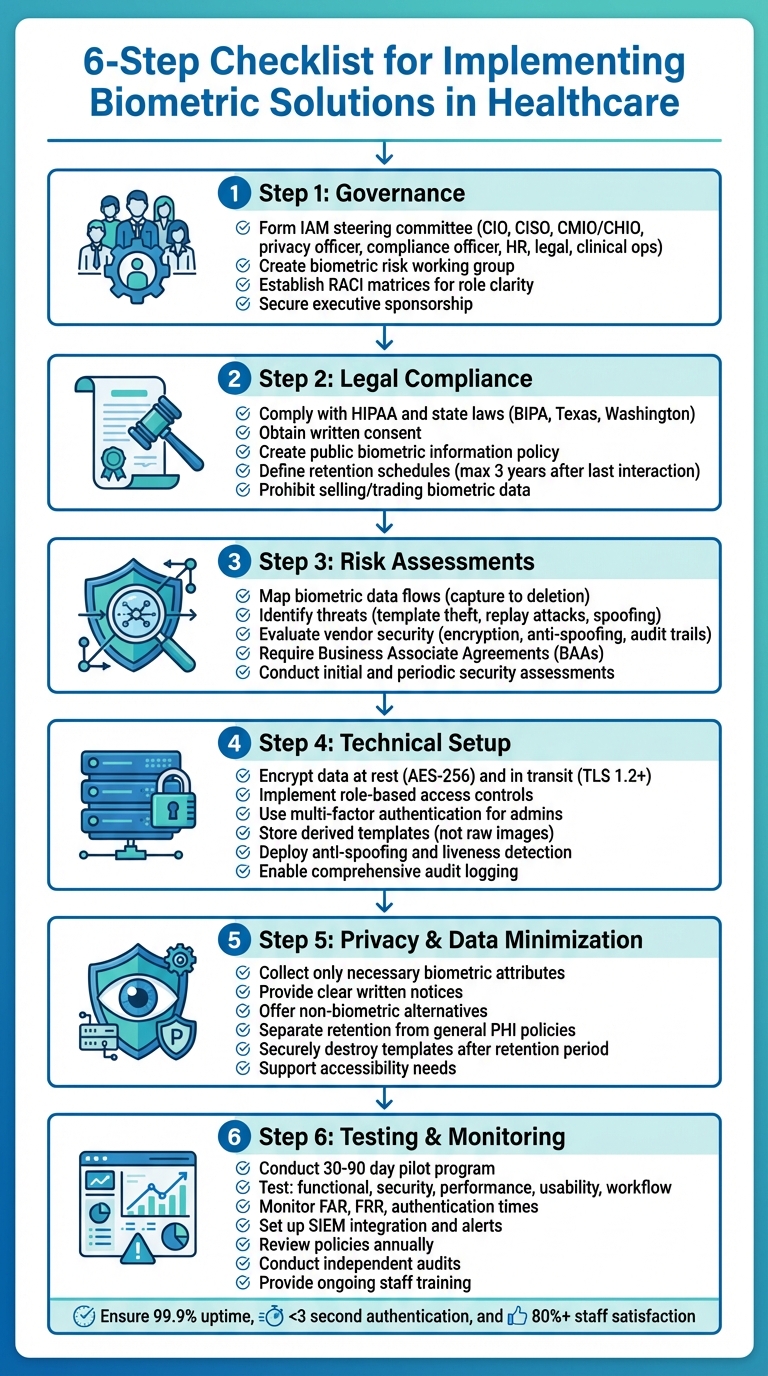
6-Step Checklist for Implementing Biometric Solutions in Healthcare
Governance and Legal Compliance
Setting Up Governance Frameworks
Before diving into the selection process, it's crucial to establish a governance structure that brings together key decision-makers and technical experts. One effective approach is forming an Identity and Access Management (IAM) steering committee. This group should include representatives like the CIO, CISO, CMIO/CHIO, privacy officer, compliance officer, HR, legal advisors, and clinical operations leaders. Their role is to ensure that any use of biometric technology aligns with the organization’s identity strategy, clinical workflows, and HIPAA security standards.
Additionally, a dedicated biometric risk working group can focus on the technical side - data flows, security controls, and vendor evaluations. Members might include security architects, data protection officers, clinical engineering teams, and procurement staff. For this framework to succeed, it’s essential to have executive sponsorship (typically from the CIO or CISO) and documented charters that outline decision-making authority, escalation processes, and a regular meeting cadence.
As Matt Christensen, Sr. Director GRC at Intermountain Health, explains, "Healthcare is the most complex industry... You can't just take a tool and apply it to healthcare if it wasn't built specifically for healthcare."
To avoid confusion during audits or incidents, organizations should use RACI matrices (Responsible–Accountable–Consulted–Informed) to clarify roles and responsibilities. For example, the CISO typically oversees security architecture, risk assessments, and controls for biometric systems. The privacy officer focuses on privacy-by-design principles, data minimization, and consent protocols. Compliance officers handle policy development, training, and legal negotiations, while clinical leaders ensure that implementations support patient care and safety without disrupting workflows. Procurement teams ensure vendors meet security and compliance standards, including proper business associate agreements when Protected Health Information (PHI) is involved. This governance foundation is critical for addressing legal compliance and risk management effectively.
Meeting Legal and Regulatory Requirements
Once governance is in place, the next step is ensuring that biometric solutions meet stringent legal and regulatory standards. U.S. healthcare organizations must comply with federal laws like HIPAA and various state laws, including Illinois’ Biometric Information Privacy Act (BIPA), Texas, and Washington statutes. These laws mandate administrative, physical, and technical safeguards for biometric data. BIPA, in particular, requires written notice, purpose disclosure, retention limits, consent, and strong security measures. It also allows individuals to sue for violations, with damages ranging from $1,000 for negligence to $5,000 for intentional breaches, plus attorney fees [4].
Legal and compliance teams should conduct a jurisdictional review that covers headquarters, facility locations, and data collection sites to ensure compliance with all applicable laws.
Organizations should also create a publicly available biometric information policy. This policy should detail what biometric identifiers (e.g., fingerprints, facial templates) are collected, why they’re being used, and how long they’ll be retained. For individuals covered by biometric laws, written notice must explain the purpose and duration of data collection, and written or electronic consent must be obtained beforehand. For patients, biometric data collection should align with existing HIPAA Notice of Privacy Practices and informed consent processes, clearly distinguishing between essential uses for treatment or operations and optional uses. Policies should also explicitly prohibit selling or trading biometric data and limit sharing to compliant purposes.
It's equally important to document a biometric retention schedule. This schedule should specify how long data will be stored and when it will be deleted. Under BIPA-like standards, biometric data should not be kept longer than necessary to fulfill its purpose or beyond a set period after the individual’s last interaction - typically no more than three years.
Conducting Risk Assessments and Vendor Evaluations
After addressing compliance, organizations must rigorously evaluate risks and vendor security to protect PHI. Start by performing a biometric-specific risk assessment that builds on the HIPAA risk analysis. Key steps include mapping out biometric data flows - from capture devices to storage systems - identifying threats like template theft, replay attacks, spoofing (e.g., fake fingerprints or masks), and insider misuse. Assess existing controls such as encryption, multi-factor authentication, network segmentation, logging, anti-spoofing measures, and template protection. Conclude with a risk treatment plan that prioritizes remediation steps and schedules regular reviews.
Vendor evaluations are equally critical. Carefully examine the security architecture of potential biometric solution providers. Ask about their encryption protocols, storage methods for templates (ensuring they are non-reversible), and anti-spoofing technologies. Look into their software development practices, vulnerability management, and support for logging and audit trails that meet HIPAA standards.
For healthcare-specific risk management, platforms like Censinet RiskOps™ can simplify vendor evaluations by streamlining the collection of security questionnaires, evidence, and risk scoring across PHI, clinical applications, and medical devices. Contracts and business associate agreements (BAAs) should explicitly classify biometric data as protected, require compliance with HIPAA and state privacy laws, and mandate strict safeguards for data use, retention, and breach notifications. Vendors handling biometric data should be categorized as high risk, requiring initial and periodic security assessments, penetration testing, and thorough policy reviews.
Technical Architecture and Security Controls
Documenting Biometric Data Flows
Before rolling out your system, map out the entire lifecycle of biometric data - from the moment it's captured (via devices like fingerprint readers, facial recognition kiosks, or iris scanners) to its eventual deletion. This includes documenting how raw images are converted into secure templates and tracing their path through your network. Identify where these templates are stored, whether that's on on-premises servers, smart cards, mobile device secure enclaves, or cloud platforms.
Create a detailed inventory of all systems interacting with biometric data. This might include EHR/EMR platforms, IAM systems, access control solutions, or patient portals. For each connection, document what type of data is being transmitted (raw images or templates), whether it includes PHI, the communication protocols used (e.g., TLS 1.2 or higher), and the vendors involved. Maintain a centralized data flow inventory as part of your HIPAA technical safeguard documentation. Break this down by use case - for example, clinician logins to EHRs, patient self-check-ins, or staff access to medication storage - and label each node with the specific security controls in place, such as encryption standards, access restrictions, and retention policies.
This exercise isn't just about organization; it helps pinpoint vulnerabilities. You might uncover redundant copies of biometric data in backup systems, outdated applications unable to support secure integrations, or opportunities to isolate biometric templates from broader clinical data. Additionally, mapping shows where matching happens - whether on the device, a smart card, a central server, or through a hybrid approach. This insight is crucial because the location of matching impacts privacy risks, system performance, and exposure in the event of a breach. A thorough understanding of these flows lays the groundwork for applying robust security measures.
Applying Security Controls
To protect biometric templates, encrypt them at rest using AES-256 (or a FIPS-approved equivalent) and store encryption keys securely in HSMs or dedicated key vaults. When transmitting biometric data across your network, always use TLS 1.2 or higher with modern cipher suites - never send templates or raw images in plaintext.
Access controls should align with HIPAA's technical safeguards. Assign unique user IDs to everyone accessing biometric systems or logs, implement role-based access controls to limit permissions to what's strictly necessary, and require multi-factor authentication for administrators and any interfaces exposing templates or configurations. Shared credentials should be eliminated entirely. Comprehensive audit logging is essential - track every enrollment, verification attempt, failed login, administrative change, and bulk data export. These logs should feed into a SIEM platform for real-time monitoring and anomaly detection.
Protecting biometric templates is just as important as securing their transmission. Always store derived templates instead of raw images, and use methods like cancellable biometrics or biometric cryptosystems to prevent stolen templates from being reverse-engineered into usable fingerprints or facial images. If a breach occurs, ensure templates can be revoked through transformation or replacement.
Defend against spoofing attempts with anti-spoofing and liveness detection technologies. These might include pulse or blood-flow detection for fingerprints, micro-movement or depth sensing for facial recognition, or challenge-response prompts like blinking or head movements. For high-risk scenarios - like access to operating rooms, medication cabinets, or quarantine wards - layer biometrics with additional factors like smart cards, PINs, or proximity badges. This multi-layered approach ensures that spoofing a single factor isn't enough. Adjust protection levels based on risk: a kiosk for patient check-ins might rely on robust liveness detection alone, while high-stakes access requires multi-factor authentication.
Once you've secured data in transit and at rest, align your practices with privacy principles and minimize the data you collect.
Ensuring Privacy and Data Minimization
Effective data minimization starts during system design. Collect only the biometric attributes necessary for your purpose. For example, if a single fingerprint or iris template suffices for identification, don't gather additional data just because the technology allows it. Store only derived templates and avoid capturing unnecessary modalities.
Establish a biometric retention schedule that clearly outlines how long templates will be retained and when they will be deleted. Laws like Illinois BIPA dictate that biometric data should not be kept longer than necessary - typically no more than three years after an individual's last interaction. Once the retention period ends (e.g., after a patient’s treatment concludes or an employee leaves), securely destroy templates and all backups using cryptographic erasure or secure deletion methods. Log these destruction events to ensure they are auditable.
Keep biometric retention policies separate from those for general PHI. Medical records might need to be retained for decades, but biometric templates should follow a much shorter lifecycle tied to active use. Ensure templates aren’t inadvertently stored in long-term archives alongside clinical documentation. Additionally, HIPAA-compliant policies should prohibit repurposing biometric data for secondary uses like marketing or analytics unless explicit, separate consent is obtained.
Before collecting any biometric data, provide clear written notice outlining what identifiers are being collected, the specific purposes (e.g., patient identification, staff login, physical access), how long the data will be retained, how it will be shared, and the security measures in place. Many state laws also require documented consent, which can be obtained electronically during registration or onboarding. Services should not be conditional on biometric consent if reasonable alternatives exist. Make privacy notices easily accessible through patient portals or your intranet, explain opt-out options and non-biometric alternatives, and address the needs of individuals for whom biometrics may not work, such as those with disabilities, children, or people with injuries affecting their fingerprints or facial features.
Operations and User Adoption
Identifying Use Cases and Requirements
Start by pinpointing the primary applications for biometrics, such as clinician access to EHRs, physical access control, patient identity verification, and workforce tracking. Prioritize these based on current challenges like misidentification, credential sharing, or frequent badge loss. High-risk areas, such as medication rooms or ICUs, often demand immediate attention due to their direct impact on patient safety and PHI security.
For each use case, document key requirements thoroughly. This includes the number of users or patients to enroll, daily transaction volumes, and enrollment throughput targets. Determine whether enrollment will be centralized or spread across multiple locations. Pay attention to environmental factors, such as the use of gloves or masks, and set clear performance goals - like ensuring authentication takes no longer than five seconds. Additionally, outline integration needs with existing systems such as EHRs, PACS, access control, and identity management platforms, ensuring compliance with HIPAA technical safeguards.
A phased implementation approach is often effective. Start with clinician EHR logins and access to high-risk areas, then gradually expand to workflows like patient identification as staff become more comfortable with the technology. These defined requirements lay the groundwork for rethinking and improving clinical workflows.
Managing Workflows and Change
Streamlining workflows begins with mapping out existing processes - like triage, medication administration, or operating room access - to identify where logins or ID checks create delays or errors. Introduce biometrics only where they can genuinely reduce these issues. Validate time goals in real-world clinical settings, and where possible, consolidate actions. For instance, a single biometric scan could serve both for room entry and EHR access. Place devices in ergonomic, high-traffic areas, such as nurse stations or check-in desks, to minimize unnecessary detours for staff.
Plan for fallback methods in a tiered structure: primary biometric authentication, followed by secondary options like smart cards or badges, and finally, strong passwords or PINs. Create workflows for exceptions, addressing cases where users cannot enroll due to injuries, disabilities, or cultural concerns, as well as scenarios like equipment downtime, network failures, or false rejections. In emergencies, allow for controlled bypasses to prevent care delays, with automated logging for later review. Tools like Censinet RiskOps™ can help manage and review these fallback events efficiently.
Change management plays a crucial role in successful adoption. Secure visible support from leadership, linking biometric implementation to improvements in patient safety, security, and clinician productivity. Engage a broad range of stakeholders - clinicians, nursing leaders, registration teams, and employee councils - during the planning stages. Their input on enrollment processes, device placement, and backup protocols ensures smoother adoption. Use clear, straightforward communication to explain what data is collected, how it’s protected under HIPAA, and the rights of staff and patients. Consider rolling out the system in phases, supported by unit champions and rapid-response teams to address initial challenges. Align these updated workflows with existing governance frameworks to maintain compliance.
Training Staff and Supporting Accessibility
Once workflows are optimized, thorough training ensures the system is adopted smoothly. Staff should learn how to handle enrollment, perform daily authentication (for EHRs, room access, or patient ID), and troubleshoot common issues. Training should also emphasize security and privacy responsibilities, explaining the importance of protecting credentials and complying with data protection policies. Cover acceptable use policies, emergency overrides, and procedures for reporting lost badges or suspected misuse. Sharing practical tips for streamlining workflows can further enhance efficiency and compliance.
Patient communication is equally important. Use clear, nontechnical language to explain why biometrics are being used - for example, to prevent misidentification and safeguard medical records. Be transparent about what biometric data is collected, how it is stored and protected, and when it will be deleted. Materials should be accessible, available in multiple languages, and designed for various literacy levels. Include information on whether participation is mandatory or optional, what alternatives are available, and how consent is obtained when needed.
Accessibility considerations are essential. Some users may be unable or unwilling to enroll due to physical limitations, temporary injuries, or cultural or religious objections. Support multiple biometric options, such as combining fingerprint with facial or iris recognition, and offer non-biometric alternatives that maintain the same level of security for PHI and restricted areas. Ensure all signage, consent forms, and educational materials are easy to understand and culturally appropriate for a diverse U.S. audience.
sbb-itb-535baee
Testing, Monitoring, and Maintenance
Once governance, technical controls, and operational practices are in place, the next step is ensuring the biometric system remains reliable and compliant over time. This requires thorough testing, ongoing monitoring, and regular maintenance.
Completing Pre-Launch Testing
Before rolling out the system, conduct a 30- to 90-day pilot in a single unit. This pilot helps gather both quantitative data, like login times and failure rates, and qualitative feedback from staff [2][7].
Testing should focus on five main areas: functional, security, performance, usability, and workflow integration. For example, confirm that enrollment, matching, and de-duplication processes work as expected in scenarios like patient registration or clinician access to electronic health records (EHR) [2][3]. Security testing should ensure that biometric templates and any linked protected health information (PHI) are encrypted during transmission and storage. It should also verify that access controls are functioning and that audit logs capture every action - enrollments, deletions, overrides, and failed attempts - complete with timestamps (e.g., 03/15/2025 2:32 PM), user IDs, device locations, and the specific action taken [2][6][7].
Key metrics like false acceptance rates (FAR), false rejection rates (FRR), and authentication times should be measured. The goal is to maintain high security with a low FRR, ensuring that clinician logins take no more than two to three seconds and that fallback methods are needed in less than 3% of attempts [2][5][7].
Usability testing should involve staff from various departments, such as emergency, inpatient, and outpatient settings, to confirm that biometric systems do not disrupt workflows. For instance, test login times during critical moments like emergency department triage or medication administration [2][5]. Accessibility testing is equally important, especially in healthcare environments where factors like gloved hands, masks, or worn fingerprints can increase rejection rates [8].
Document all test plans, criteria for acceptance, identified defects, and their resolutions. Retain these records to meet regulatory requirements [4][7]. Clearly define go/no-go criteria before launching the system, such as:
After a successful pilot, the focus shifts to continuous monitoring to maintain efficiency and security.
Monitoring System Performance
Once the system goes live, implement centralized logging and SIEM (Security Information and Event Management) integration. This setup tracks key actions like authentication attempts (successes, failures, and reasons), administrative activities (e.g., enrollments and template updates), and physical access events for secure areas [2][6][7]. Regularly monitor metrics such as FAR and FRR by device type and location, average authentication times, system uptime, and patterns of failed attempts - sudden spikes in failures could signal potential attacks [2][3][8].
Set up alerts for unusual activity, like multiple failed attempts in a short period or unauthorized bypasses of biometric authentication for high-risk applications. For example, trigger an alert if a user fails biometric authentication more than five times within 10 minutes [6][7]. Adjust thresholds and matching settings based on live data to balance security needs with clinician efficiency [3].
Logs containing PHI or other sensitive data must be secured with proper access controls, encryption, and retention policies [2][4][6]. Tools like Censinet RiskOps™ can integrate monitoring data into broader risk management systems, enabling continuous oversight [6].
This ongoing monitoring naturally leads to periodic reviews and updates to ensure the system stays effective and secure.
Conducting Regular Reviews and Updates
Biometric policies should be reviewed annually or after significant incidents. This includes policies on consent, enrollment, exception handling, and incident response [2][4][6]. Update risk assessments regularly to account for emerging threats, such as deepfakes or new spoofing techniques [2][4][6][8]. Evaluate vendor performance through assessments of SOC reports, penetration testing results, and patching schedules. Platforms like Censinet RiskOps™ can simplify these recurring evaluations [6].
Ensure that retention and deletion schedules for biometric templates and logs comply with state laws, like Illinois BIPA. Test deletion procedures to confirm they are both functional and auditable [4]. Security patches should be tested in a controlled environment before deployment, with clear communication to clinical teams about updates and fallback plans in case of issues [6][7].
Regular training refreshers are essential to keep staff informed about proper system use, privacy expectations, and fallback procedures for system outages [2][8]. Finally, conduct independent audits, whether internal or external, to review access controls, baseline configurations, and compliance with HIPAA and state laws. Document findings thoroughly and address any issues promptly [4][6][7].
Conclusion: Key Steps for Biometric Implementation
Rolling out biometric solutions in U.S. healthcare demands a careful strategy that prioritizes security, compliance, and ease of use in clinical settings. Start by forming a cross-functional governance team that includes representatives from IT, compliance, legal, clinical leadership, and privacy officers. This group will guide the overall strategy and establish clear policies [2]. It's also crucial to define specific use cases - whether it's for patient identification, EHR access, or physical security [2].
Legal and risk assessments are a must before deploying biometrics. Evaluate HIPAA requirements alongside state-specific laws like Illinois' BIPA, which requires written consent, retention schedules, and secure deletion processes [2]. Tools like Censinet RiskOps™ can help healthcare organizations manage cybersecurity and third-party risks involving PHI through streamlined vendor assessments, Business Associate Agreements (BAAs), and security reviews [6].
When designing your technical setup, prioritize security from the start. Encrypt biometric templates both at rest and during transmission, implement role-based access controls alongside multi-factor authentication, and protect against reverse engineering of templates [2]. Document the entire data flow, and ensure privacy is built into the process by minimizing data collection, providing clear notices, and offering alternatives for patients. This strong technical foundation is essential before moving to field testing.
Once governance, legal, and technical structures are in place, pilot the biometric solution in a controlled environment to test its performance, usability, and security in real-world clinical scenarios [2]. Evaluate the system across varied patient groups and workflows - such as emergency rooms, outpatient services, and inpatient units - to identify and address any issues early on [2]. After full implementation, maintain ongoing monitoring to evaluate performance and security, regularly update policies, and reassess vendor risks [2].
Biometric systems should be seen as dynamic and evolving. Continuous training, performance optimization, and independent audits are essential to maintaining a solution that is secure, compliant, and trusted by both healthcare staff and patients over time [2].
FAQs
What legal requirements should healthcare organizations consider when adopting biometric solutions?
Healthcare organizations have a responsibility to comply with HIPAA to safeguard patient health information. This includes securely managing and transmitting biometric data, as well as ensuring that explicit patient consent is obtained before any collection or usage of such data. Beyond federal regulations, organizations must also pay attention to state-specific laws like the Illinois Biometric Information Privacy Act (BIPA). BIPA sets strict rules for handling biometric data, emphasizing transparency and accountability. Keeping up with these evolving regulations is not just about compliance - it's about protecting patient trust and privacy.
What steps can healthcare organizations take to protect biometric data?
Healthcare organizations can keep biometric data safe by using strong encryption, setting up tight access controls, and performing frequent risk assessments. These steps play a key role in protecting sensitive information while meeting privacy standards.
Leveraging tools like AI-driven risk management platforms can add an extra layer of security by spotting weaknesses, keeping an eye on potential threats, and simplifying compliance processes. Focusing on these strategies helps lower the chances of breaches and keeps patient data protected.
How can healthcare organizations effectively integrate biometric systems into their workflows?
To bring biometric systems into healthcare workflows effectively, start by performing a detailed risk assessment. This step ensures that the implementation aligns smoothly with existing processes while prioritizing the protection of sensitive data. It's critical to meet all healthcare regulations and data security standards right from the start.
Involve key stakeholders - like clinical staff, IT teams, and security experts - early in the process. Their input is invaluable for identifying integration points and tackling potential obstacles. Before rolling out the system across the board, test it in a controlled setting. This pilot phase helps uncover and address any issues that could disrupt operations.
Equally important is providing staff with comprehensive training. This ensures they know how to use the system correctly and follow security protocols. Once the system is live, keep a close eye on its performance. Regular monitoring allows for fine-tuning workflows and adapting to any emerging needs.
For added efficiency, consider using a dedicated risk management platform. These tools can simplify cybersecurity assessments and support ongoing risk management tailored specifically for healthcare environments.
