
If you transmit ePHI, you need encryption in transit, and that usually means TLS 1.2 or TLS 1.3. As of the January 2025 Security Rule update, HIPAA now treats in-transit encryption as required. And with the average healthcare breach cost at $9.8 million in 2024, weak transport security can get expensive fast.
Here’s the short version:
- TLS meets HIPAA transit-security needs when it is set up the right way
- TLS 1.2 and TLS 1.3 are the current acceptable versions
- TLS 1.3 is the better pick for new systems
- SSL 2.0/3.0 and TLS 1.0/1.1 should be turned off
- Version alone is not enough; cipher suites, certificates, logging, and scans matter too
- Encryption at rest does not protect data in motion
- Vendors and business associates need review too, because a BAA by itself does not prove their TLS setup is safe
A few points stand out. HIPAA does not name TLS by name, but it points teams toward NIST guidance, which lines up with modern TLS use. That means you should use AES-GCM, ECDHE, strong certificates, and regular scans for old protocols or weak cipher fallback.
I’d boil the article down to this: modern TLS, strict configuration, and proof that controls stay in place are what matter. If you rely on portals, APIs, email transport, VPNs, cloud apps, or internal service traffic that carry ePHI, this is not just an IT setting. It is a compliance issue. Organizations can streamline this process by using automated security questionnaires to verify technical controls across their ecosystem.
| Topic | What you need to know |
|---|---|
| HIPAA rule | In-transit encryption for ePHI is required after the January 2025 update |
| Acceptable TLS versions | TLS 1.2 and TLS 1.3 |
| Best choice | TLS 1.3 for new deployments |
| Versions to disable | SSL 2.0, SSL 3.0, TLS 1.0, TLS 1.1 |
| Config items to review | Ciphers, key exchange, certificates, revocation, logs, scans |
| Common risk areas | APIs, portals, email, VPNs, cloud links, internal traffic |
| Vendor checks | TLS versions, cipher settings, certificate handling |
If you want the plain answer: yes, TLS can satisfy HIPAA transmission security, but only if you use current versions and lock down the configuration.
Is my email HIPAA Compliant and Encrypted by TLS?
sbb-itb-535baee
What HIPAA actually requires for encryption and transmission security
Two parts of the HIPAA Security Rule deal with encryption. 45 CFR §164.312(a)(2)(iv) covers the encryption and decryption of ePHI. 45 CFR §164.312(e)(2)(ii) covers protection for ePHI while it moves from one place to another. As of the January 2025 Security Rule update, both are required for covered entities and business associates [1].
That sets the baseline TLS needs to meet. And it matters more than it may seem at first glance. HIPAA’s older use of the word “addressable” led a lot of teams to think encryption was optional when it wasn’t.
What 'addressable' means and why it is not optional
Before January 2025, both specifications were labeled “addressable.” In plain English, that did not mean “skip it if you want.”
It meant an organization had to do a risk analysis, decide whether encryption was reasonable and appropriate, and document that decision. If the organization chose not to use encryption, it had to document an equivalent safeguard instead. That documentation also had to be reviewed and updated at least once a year.
So the bar was never “do nothing.” The bar was: assess the risk, measure what matters for cybersecurity, and make a defensible choice.
The next step is looking at where transmission security shows up in everyday healthcare work.
Where HIPAA expects ePHI to be protected in transit
ePHI moves through a lot of common channels, including:
- HTTPS portals
- API calls
- VPN tunnels
- SaaS and cloud connections
Those are the paths TLS is meant to protect.
A 2024 OCR settlement showed what can go wrong when those paths are missed. TDE protected data at rest, but plaintext API traffic between system tiers exposed patient session data for more than 40,000 patients [3]. That’s the key point: encryption at rest by itself doesn’t cover data in motion. Teams need to map transmission paths and secure them, and TLS is the standard control used for that job.
How TLS maps to HIPAA transmission security requirements
For the transmission paths above, TLS is the standard control. It lines up with HIPAA § 164.312(e) and NIST SP 800-52 Rev. 2, which is the main benchmark for TLS configuration in healthcare settings.[1]
Here’s the simple version: confidentiality comes from session encryption, integrity comes from authenticated encryption and handshake checks, and authentication comes from X.509 certificates.
At the same time, TLS handles transmission security only. HIPAA still calls for access, audit, and integrity controls beyond TLS.
Healthcare use cases that rely on TLS
Use TLS for:
- Patient portals
- FHIR APIs
- Secure email transport
- Service-to-service traffic
- Internal links that carry ePHI
How NIST guidance supports the case for modern TLS
Following NIST SP 800-52 Rev. 2 matters because configuration matters just as much as turning TLS on. If a TLS setup still allows weak ciphers or old protocol versions, protection starts to slip.
That’s why protocol version and cipher selection are the next controls to check.
Which TLS versions and configurations meet current HIPAA expectations
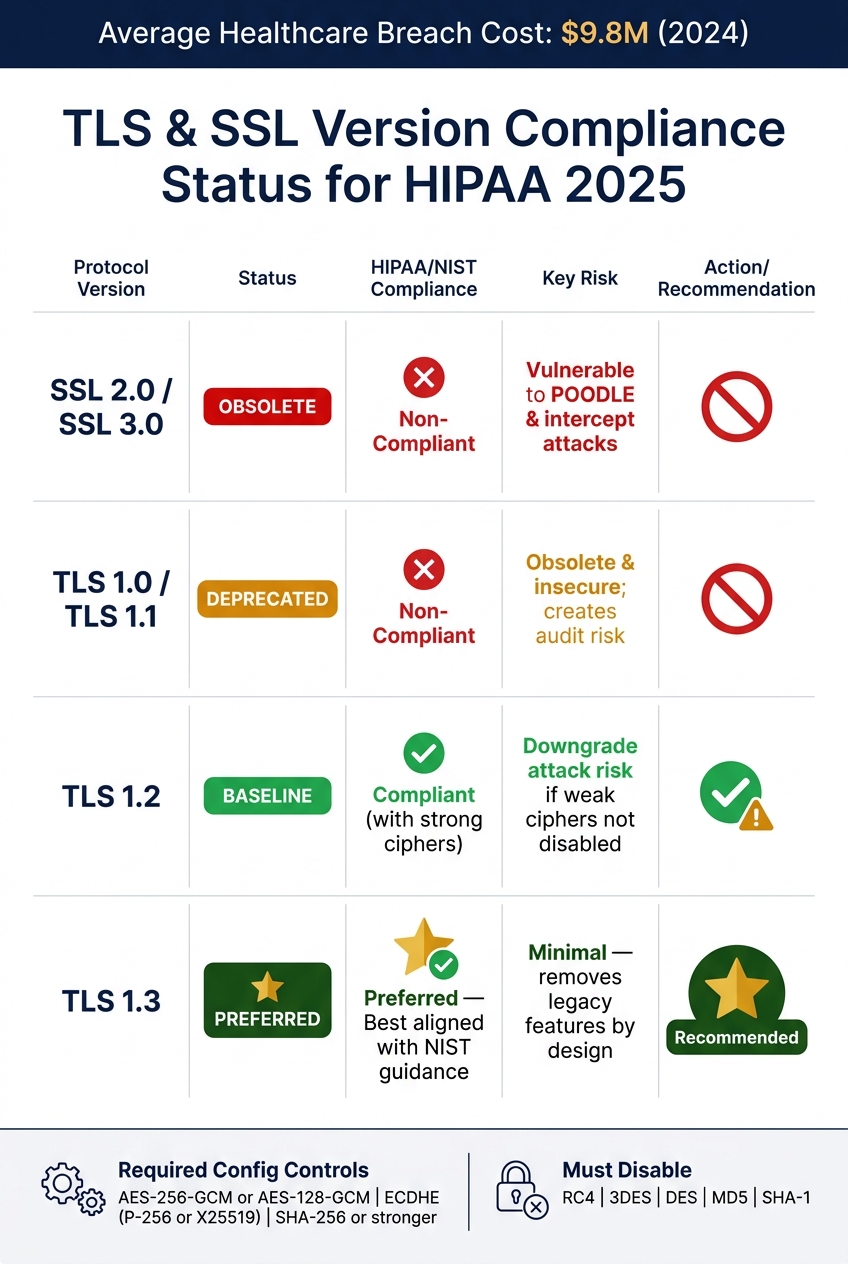
TLS & SSL Version Compliance Status for HIPAA 2025
Once you've settled on TLS as the right control, the next step is simple: is the version and setup still good enough for HIPAA today?
HIPAA now requires encryption for ePHI in transit, so your TLS choice isn't just an IT setting. It's a compliance call.
TLS and SSL version status for healthcare environments
The baseline is pretty clear: TLS 1.2 and TLS 1.3 are the only acceptable choices for systems that transmit ePHI. Anything older is obsolete and insecure [1][4].
| Protocol | Status | HIPAA/NIST Alignment | Key Risks |
|---|---|---|---|
| SSL 2.0 / 3.0 | Obsolete | Non-compliant | Vulnerable to POODLE and intercept attacks |
| TLS 1.0 / 1.1 | Deprecated | Non-compliant | Obsolete and insecure; creates audit risk |
| TLS 1.2 | Baseline | Compliant (with strong ciphers) | Downgrade attack risk if weak ciphers aren't explicitly disabled |
| TLS 1.3 | Preferred | Preferred; best aligned with NIST guidance | Minimal; removes legacy features by design |
That means you should disable SSL 2.0, SSL 3.0, TLS 1.0, and TLS 1.1 at the gateway or load balancer. One place teams often get tripped up is old EHR-to-billing integrations. Those connections are easy to miss, and many still depend on TLS 1.0 or 1.1 [4].
Configuration controls that matter beyond protocol version
The protocol version is only part of the story. Cipher suites, key exchange, and certificate handling decide whether TLS is secure in practice.
Running TLS 1.2 or 1.3 is required, but the setup itself is what shows whether a deployment can hold up during an OCR audit or an actual attack. In plain terms, both auditors and attackers care about the same few controls:
- AES-256-GCM or AES-128-GCM for symmetric encryption
- ECDHE (P-256 or X25519) for key exchange
ECDHE provides forward secrecy. So if a server's private key is ever exposed, previously recorded sessions still can't be decrypted [1].
You should also block weak and outdated options like RC4, 3DES, DES, MD5, and SHA-1. Use AES-GCM with SHA-256 or stronger [1][4].
Certificates matter too. Automated lifecycle management is now the standard. Manual tracking sounds harmless until a certificate expires, knocks out a service, and leaves you with both downtime and an audit problem [4].
Of course, these settings only help if they stay enforced across systems, vendors, and audits. That's where monitoring, scanning, and vendor oversight come in.
Technical and third-party controls to put around TLS
TLS only works if the rules stay in place across your systems and every vendor you connect to. Setting it up is just the start. After that, you need governance that keeps transport encryption in place across your own stack and every third party that handles ePHI.
How to manage TLS through logging, scanning, and certificate governance
Log TLS events, certificate changes, and key-use events tied to ePHI, and keep those logs for six years for audit review. Sending that data to a SIEM makes review and investigation much easier because everything lives in one place.
Scanning matters too. Tools like testssl.sh and SSL Labs can show whether load balancers and gateways are quietly falling back to weak ciphers or old protocols. Run those checks on a regular schedule, not only after someone changes a setting. And be careful with error handling: it should never push unencrypted PHI into logging systems.
| Control | Related HIPAA Safeguard | Primary Risk Mitigated | Verification Method |
|---|---|---|---|
| Protocol Policy | Transmission Security § 164.312(e)(1) | Interception via deprecated protocols (TLS 1.0/1.1) | Load balancer configuration audit / testssl.sh |
| Cipher Policy | Transmission Security § 164.312(e)(1) | Use of weak or deprecated encryption | Configuration audit of gateways |
| Certificate Inventory | Audit Controls § 164.312(b) | Service downtime or MITM from expired certs | Automated expiry alerts / KMS console review |
| mTLS | Person or Entity Authentication § 164.312(d) | Unauthorized API access from unverified clients | API Gateway connection log analysis |
| Handshake Logging | Audit Controls § 164.312(b) | Forensic gaps after a breach | SIEM integration with 6-year retention |
| Vulnerability Scanning | Evaluation § 164.308(a)(1)(ii)(A) | Misconfiguration of cloud or SaaS resources | Bi-annual scan reports and remediation tracking |
| Revocation Checking | Integrity § 164.312(c)(1) | Use of compromised or revoked certificates | OCSP stapling or CRL verification |
Automate certificate rotation through KMS or HSM, and track expiration dates in one central place. That cuts down on missed renewals and helps avoid the kind of outage that shows up at the worst possible time.
How to assess TLS risk across vendors and business associates
Your internal controls can be solid, but that doesn't help much if a vendor still exposes ePHI over weak transport. Any business associate or third-party vendor that touches ePHI should be checked for encryption practices instead of being trusted by default, as part of a strategy to effectively manage third-party risk.
At a minimum, vendor reviews should look at:
- Supported TLS versions
- Cipher suite settings
- Certificate management practices
A signed BAA is required, but it does not tell you whether the vendor runs current TLS versions on every endpoint [2].
Conclusion: A practical standard for HIPAA-aligned TLS
The takeaway is simple: HIPAA-aligned TLS comes down to version, configuration, and verification. HIPAA now treats encryption for ePHI in transit as required, not addressable. So the question is no longer whether to encrypt. It’s how well you put that encryption in place.
Use TLS 1.2 or higher. If you can, go with TLS 1.3. Turn off TLS 1.0 and 1.1. And if older systems are still in the mix, use temporary encrypted tunnels or VPNs until those systems are fixed.
But the protocol version by itself doesn’t do the job. Weak ciphers, unmanaged certificates, and logging gaps can still leave you exposed. The day-to-day standard covers all three: disable weak ciphers, automate certificate lifecycle management, and keep logs long enough to support audits and investigations [1][5].
Vendor TLS should sit under that same set of controls. A BAA does not prove a vendor’s TLS setup meets the mark. You have to verify those controls through active assessment and steady monitoring [5]. Compliance is an operational job: document decisions, lock down configurations, and keep checking that the controls still work.
That’s the standard: modern TLS, hardened settings, and ongoing proof that the controls still work.
FAQs
Does HIPAA require TLS 1.3?
HIPAA recommends TLS 1.2 or 1.3 for data in transit. In most cases, TLS 1.3 is the better choice because it includes stronger security features.
What if a legacy system only supports TLS 1.0 or 1.1?
If a legacy system only supports TLS 1.0 or TLS 1.1, it doesn't meet current HIPAA encryption requirements.
That means organizations should turn off those older protocols and move to TLS 1.2 or higher. If possible, TLS 1.3 is the better choice for compliance and security.
How do I verify a vendor’s TLS security?
Assess the vendor’s TLS setup and day-to-day practices with a clear baseline: they should use TLS 1.2 or higher, with TLS 1.3 preferred. TLS 1.0 and 1.1 should be turned off. Their certificates should come from a trusted certificate authority, and they should avoid weak cipher suites such as RC4, DES, and 3DES.
You should also confirm that forward secrecy is in place. Then test the vendor’s public-facing endpoints with tools like SSL Labs or OpenSSL to check protocol support, certificate status, and cipher strength.
This shouldn’t be a one-time check. Keep monitoring and re-test after any configuration change so you can catch issues before they turn into a bigger problem.
