
Managing Protected Health Information (PHI) retention is essential for healthcare organizations to comply with HIPAA, state laws, and federal guidelines. Here's what you need to know:
- Retention Requirements: HIPAA requires certain documents to be kept for at least six years, but state laws often mandate longer retention periods for medical records (7–10+ years, especially for minors).
- Key Goals: Ensure regulatory compliance, protect sensitive data, and streamline record management.
- Covered PHI Types: Includes EHRs, billing data, emails, backups, and physical files.
- Steps to Create a Policy:
- Review legal requirements and map PHI sources.
- Set clear retention and disposal timelines.
- Assign governance roles (Privacy Officer, IT Lead, etc.).
- Implement secure storage, access controls, and destruction methods.
- Actionable Tips:
- Use tools like automated retention systems to enforce policies.
- Train staff on proper procedures and monitor compliance.
- Regularly review and update policies to reflect changes in regulations and operations.
A well-structured PHI retention policy reduces risks, cuts costs, and ensures sensitive information is handled securely throughout its lifecycle.
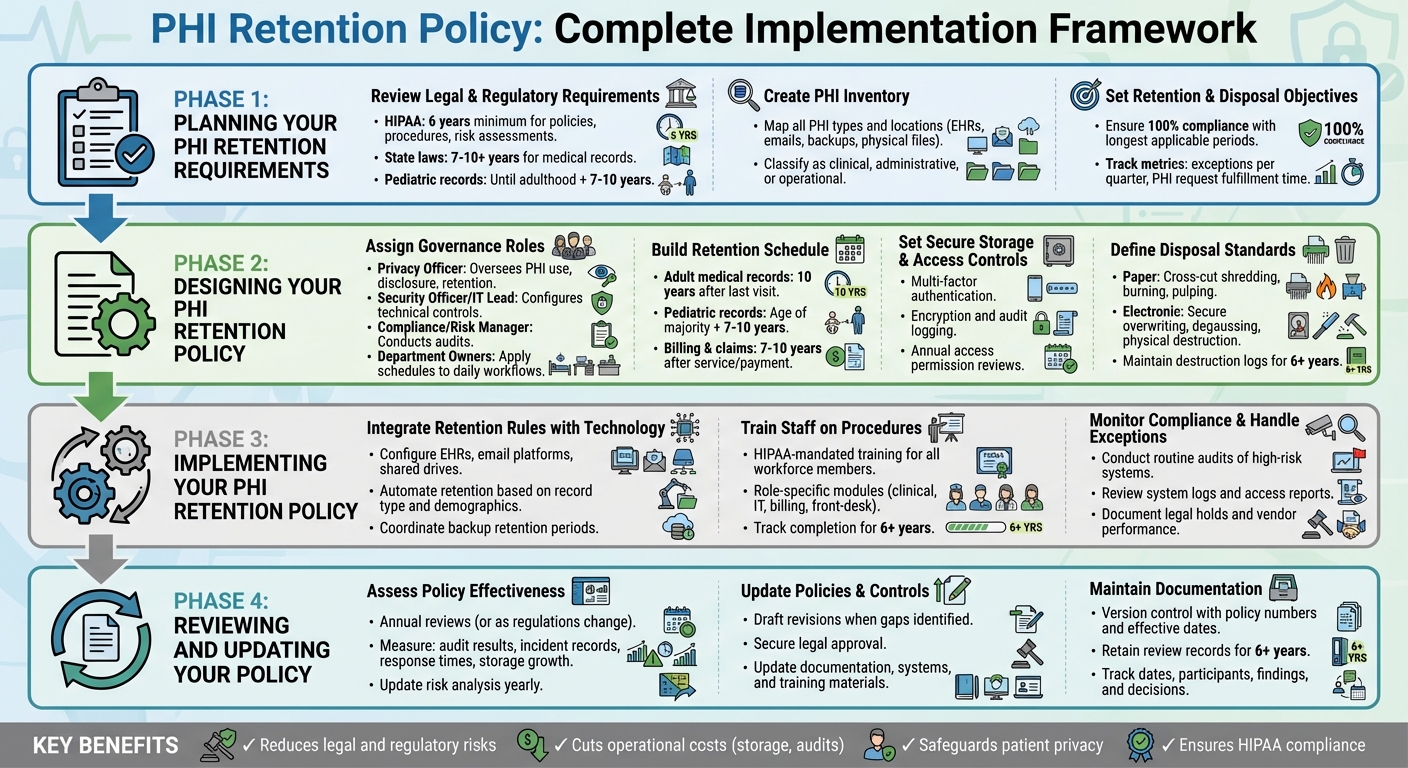
PHI Retention Policy Implementation: 4-Phase Framework for HIPAA Compliance
Planning Your PHI Retention Requirements
Start by understanding the legal landscape, cataloging all protected health information (PHI), and setting clear goals for retention and disposal. This initial planning phase is crucial for building a solid framework for compliance and risk management.
Review Legal and Regulatory Requirements
Begin by creating a detailed regulatory matrix that outlines all applicable rules. For example, HIPAA requires you to retain documentation like policies, procedures, risk assessments, authorizations, privacy notices, complaint records, and audit logs for at least six years [1]. At the same time, state laws often govern medical record retention, with adult records typically kept for 7–10 years and pediatric records maintained until several years after the patient reaches adulthood. Additionally, federal programs may impose their own minimum standards [6][10].
Your matrix should include every type of record - such as adult and pediatric medical records, billing documents, emails containing PHI, and audit logs - alongside the governing authority and the required retention period. To avoid legal risks, adopt the longest retention period applicable to each record type. If payer contracts or malpractice insurers recommend longer retention periods, incorporate those into your plan as well.
Once legal requirements are clear, map your PHI sources to better understand how data flows through your organization.
Create an Inventory of PHI Types and Locations
Map out workflows - such as clinical, billing, and quality improvement processes - to identify all PHI types and storage locations. These may include electronic health record (EHR) systems, email servers, mobile devices, and external drives [11]. For each workflow, list the key PHI types, such as progress notes, lab results, imaging, consent forms, and billing records. Classify these as clinical, administrative, or operational PHI, and document the data owner, such as Health Information Management, IT, or Revenue Cycle [11].
If your organization works with multiple vendors, tools like Censinet RiskOps™ can help you track and assess PHI stored by third parties, cloud systems, and connected medical devices across clinical and supply chain applications.
With your PHI inventory complete, you can set clear objectives for retention and disposal.
Set Retention and Disposal Objectives
Using the regulatory requirements and PHI inventory as a guide, establish specific retention and disposal goals. These could include ensuring 100% compliance with the longest applicable retention periods, reducing outdated PHI by a set percentage, and securely destroying all PHI scheduled for disposal [11].
A well-thought-out plan can help eliminate redundant or outdated copies of PHI, consolidate long-term archives into secure repositories with strict access controls, and ensure that PHI slated for destruction is securely erased, shredded, or otherwise rendered unreadable [11]. Align these objectives with your overarching information governance and cybersecurity strategies, and track progress with measurable metrics. Examples include the number of exceptions per quarter, the time taken to fulfill PHI requests, and the percentage of systems with automated retention rules. These metrics provide leadership with a clear view of progress and highlight areas needing improvement.
Designing Your PHI Retention Policy
Once you've completed the planning phase, it’s time to shape your PHI retention policy with well-defined roles, schedules, controls, and disposal methods. Use insights from your legal assessments, inventory reviews, and organizational goals to guide this process.
Assign Governance Roles and Responsibilities
Assigning clear roles is essential for managing and enforcing your retention policy. Consider the following key positions:
- Privacy Officer: Responsible for overseeing the use, disclosure, and retention of PHI in compliance with HIPAA and state laws. This role also approves exceptions and special authorizations.
- Security Officer or IT Lead: Handles the technical side, configuring retention rules across systems like EHRs, archives, backups, and emails. They ensure encryption, access controls, audit logging, and secure deletion are in place [3].
- Compliance or Risk Manager: Conducts audits to confirm adherence to retention and destruction protocols. This role also maintains documentation for at least six years, as required by HIPAA [1].
- Department Owners: Managers in areas like Health Information Management or Revenue Cycle apply retention schedules to daily workflows, manage chart archiving, and train staff on proper procedures.
An executive sponsor, such as a CIO or Chief Compliance Officer, can step in to resolve conflicts (e.g., when a legal hold delays scheduled destruction) and secure funding for necessary infrastructure. If third-party vendors manage PHI, tools like Censinet RiskOps™ can centralize oversight, offering your team a unified view of retention-related risks.
Once roles are assigned, the next step is creating a comprehensive retention schedule.
Build a PHI Retention Schedule
Your retention schedule should outline record types, legal requirements, retention timelines, and disposal methods. Organize it by categories such as record type, governing laws, retention period, and actions for disposal. For example, state laws often require clinical records to be kept for 7–10 years for adults and longer for minors. Always follow the strictest applicable regulation [10].
For clarity, present this schedule in a table format that allows filtering by state, business units, or storage systems. If your PHI is stored in unconventional places - like texts, collaboration tools, or cloud platforms - be sure to include these in your schedule to avoid overlooking them.
| PHI Category | Example Source System(s) | Legal/Regulatory Basis | Retention Period (U.S. example) | Trigger for Start of Retention | Disposition Action at End of Period |
|---|---|---|---|---|---|
| Adult medical records | EHR, scanning system | State medical record law; CMS rules | 10 years after last visit | Date of last patient encounter | Destroy securely per HHS guidance |
| Pediatric medical records | EHR | State law for minors | Age of majority + 7–10 years | Patient's 18th birthday | Destroy securely |
| Billing & claims with PHI | PM system, clearinghouse | State law; IRS documentation | 7–10 years after service/payment | Date of service or final payment | Destroy securely |
For organizations operating in multiple states, either adopt the most restrictive rules or specify distinct requirements by jurisdiction.
Set Secure Storage and Access Controls
Protecting PHI throughout its lifecycle is non-negotiable. Whether the data is in active use, archived, or backed up, implement robust security measures:
- Active PHI: Limit access to individuals whose roles require it. Use multi-factor authentication, encryption, and audit logging to monitor unusual activity [3].
- Archived PHI: Store older records in cost-effective systems with access restricted to designated personnel, such as HIM staff. Require additional approvals for retrieval and log all access events.
- Backups: Control access to backups, log all interactions, and ensure regular testing. Backup restoration should align with existing retention and deletion policies [3].
HIPAA requires administrative, physical, and technical safeguards for all PHI, including archived and backup copies. Document these measures in your policy and review access permissions annually [3].
Define Disposal and Destruction Standards
When PHI reaches the end of its retention period, it must be securely destroyed. The Department of Health and Human Services (HHS) mandates that disposal methods render PHI unreadable and workforce members are properly trained in these procedures [8].
- For paper PHI: Acceptable methods include cross-cut shredding, burning, pulping, or pulverizing.
- For electronic PHI: Use secure overwriting (multiple passes), degaussing magnetic media, or physically destroying devices like hard drives and SSDs.
If third-party vendors handle PHI disposal - such as shredding services or e-waste recyclers - ensure they use HIPAA-compliant methods and provide certificates of destruction [8].
| Media Type | Disposal Method | Security Level | Example Tools/Vendors |
|---|---|---|---|
| Paper records | Cross-cut shredding, burning | High | On-site shredders, shredding service |
| Hard drives (magnetic) | Degaussing, physical destruction | High | Degausser, e-waste recycler |
| Solid-state drives (SSD) | Physical destruction | High | Certified e-waste recycler |
| Optical media (CD/DVD) | Shredding, incineration | High | Optical media shredder |
| Electronic files | Secure overwrite, cryptographic erasure | Medium to High | NIST-approved wiping software |
For remote or off-site staff, provide options for secure disposal, such as self-shredding or returning documents for centralized destruction. Maintain detailed destruction logs, recording the date, type of records, volume, method, and responsible party. These logs must be kept for at least six years to meet HIPAA requirements [8].
Implementing Your PHI Retention Policy
Designing a policy is just the first step. The real challenge lies in turning that policy into everyday practice - embedding retention rules into your operations, educating your team, and keeping a close eye on compliance. This is where written guidelines evolve into actionable safeguards that protect patient data and ensure HIPAA compliance.
Integrate Retention Rules with Technology Systems
Leverage your technology to enforce retention policies automatically. Configure systems like EHRs, email platforms, shared drives, and backups to apply retention rules based on record type, patient demographics, and jurisdiction. For example, in your EHR, set parameters to flag adult records for deletion 10 years after the last visit, while pediatric records remain until the patient reaches adulthood plus an additional 7–10 years. On email and messaging platforms, use retention labels for PHI-related communications, such as "clinical care" or "billing", and enable automated expiration policies that align with HIPAA's six-year minimum for essential documents[1].
For shared drives and collaboration tools, assign retention tags at the folder or document level and limit local storage to prevent uncontrolled PHI accumulation. Coordinate backup retention periods to ensure that destroyed PHI isn’t preserved indefinitely on backup media. Establish clear timelines and secure destruction methods for backups[3].
If you rely on third-party vendors like cloud storage providers, scanning companies, or shredding services, tools like Censinet RiskOps™ can centralize oversight. This platform helps you track systems and vendors handling PHI and identify gaps where vendors may fall short of your retention schedules or destruction standards.
Terry Grogan, CISO at Tower Health, shared: "Censinet RiskOps allowed 3 FTEs to go back to their real jobs! Now we do a lot more risk assessments with only 2 FTEs required"[9].
Once your systems are configured, ensure your team is well-versed in these automated processes to maintain consistent execution.
Train Staff on Retention Procedures
HIPAA mandates that all workforce members - whether employees, contractors, or temporary staff - receive training on security policies, including proper disposal methods, with clear consequences for non-compliance[7]. Initial and ongoing training should cover the basics of HIPAA and state retention rules, your organization’s specific retention schedule, and where PHI might appear in daily tasks (e.g., EHRs, emails, or scanned documents). Training should also emphasize secure storage and disposal practices.
Customize training based on roles so that front-desk staff, clinicians, IT teams, and billing departments understand the records they handle, the retention timelines, and the correct disposal methods. Use practical examples, like when to use secure shred bins, how to destroy electronic media, or how to handle PHI in emails. Scenario-based modules - such as "What should you do with an old external hard drive containing PHI backups?" - can make the training more relatable and actionable.
Keep detailed records of training completion for at least six years[1]. Use tools like a learning management system (LMS) or HR compliance software to assign modules by role, track progress, and log assessments. Regularly review these records to identify staff who may need follow-up training, and reinforce expectations through updated policies, job descriptions, or performance reviews.
Monitor Compliance and Handle Exceptions
Training is just one piece of the puzzle. Regular monitoring ensures that both your systems and staff are adhering to the retention policy, bolstering overall data security. Conduct routine audits of high-risk systems and workflows - like EHRs, billing platforms, email, cloud storage, and physical records - to confirm that records are being destroyed or archived on schedule[1]. Review system logs and access reports to verify that PHI isn’t retained longer than necessary and that destruction events occur as planned[3].
When legal holds arise, pause scheduled destruction and document the exceptions, including the reasons, approvals, and timelines. Regularly evaluate vendor performance - whether it’s shredding services, cloud providers, or EHR vendors - to ensure they’re meeting contractual retention and destruction obligations. Support these efforts with business associate agreements (BAAs) and, when applicable, certificates of destruction[7].
James Case, VP & CISO at Baptist Health, highlighted the benefits of streamlined processes: "Not only did we get rid of spreadsheets, but we have that larger community [of hospitals] to partner and work with"[9].
Use insights from audits to refine training, improve workflows, and adjust technical controls. Addressing gaps proactively can prevent them from escalating into reportable breaches.
sbb-itb-535baee
Reviewing and Updating Your PHI Retention Policy
Your retention policy needs to keep pace with changes in your organization, technology, and regulations. According to HIPAA guidelines, covered entities are required to periodically review and update policies and procedures to address environmental and operational changes, as well as findings from risk analyses[5]. While HIPAA doesn’t specify how long medical records must be kept, it does require that documentation of policies, procedures, and risk analyses be retained for at least six years from their creation or last effective date[1][5]. Regular reviews ensure your policy aligns with operational needs and regulatory requirements.
Assess Policy Effectiveness and Risks
Set a schedule for annual reviews, or conduct reviews as needed when significant regulatory or operational changes occur[1][5][12]. Update your risk analysis yearly to assess how your PHI retention and destruction practices impact confidentiality, integrity, and availability[4][5].
To measure your policy’s effectiveness, rely on tangible evidence such as:
- Results from internal and external HIPAA audits
- Risk analysis and management reports
- Logs of policy exceptions and waivers
- Incident and breach records related to retention or improper disposal
- Response times for patient access requests
- System reports comparing actual PHI retention periods to your schedule
- Trends in storage growth over time[11][4]
Tools like Censinet RiskOps™ can simplify this process by centralizing risk assessments, policy documentation, and third-party risk data. This platform helps identify gaps in vendor systems or clinical applications that might affect retention or destruction practices. It also tracks remediation actions, maintains an audit-ready repository of evidence (policies, approvals, risk analyses, training records), and benchmarks cybersecurity and risk standards across your organization or vendors handling PHI.
Brian Sterud, CIO at Faith Regional Health, emphasized: "Benchmarking against industry standards helps us advocate for the right resources and ensures we are leading where it matters"[9].
The insights gained from these assessments will guide the updates described in the next section.
Update Policies and Controls as Needed
Updating your policy is a critical step in maintaining effective PHI management. When gaps are identified or regulations change, take the following actions: review and update risk and compliance assessments, draft policy revisions, secure legal approval, and update documentation, system settings, and training materials[1][11][5][12].
Clearly define responsibilities to ensure smooth execution:
- The Privacy Officer manages policy content and HIPAA Privacy Rule compliance.
- The Security Officer or CISO oversees technical controls for ePHI retention and destruction.
- Legal/Compliance teams monitor updates to federal and state laws, as well as payer or contractual requirements.
- Health Information Management (HIM) staff enforce the retention schedule operationally.
- IT teams handle system configurations, storage, and backup behaviors.
- A governance committee approves changes and prioritizes remediation efforts[11][2][4].
Using written charters and RACI matrices can help avoid confusion about roles and responsibilities.
Tailor communication to specific roles - clinical teams, HIM, IT, revenue cycle staff, and vendors - by providing concise summaries of changes, explaining their significance, and updating standard operating procedures and job aids. For staff directly impacted, implement targeted training or micro-learning sessions. Track completion of training, include retention requirements in onboarding and annual refreshers, and reinforce compliance through periodic reminders, internal audits, and manager checklists. Embedding retention and destruction steps into workflow tools, like EHR prompts or decommissioning checklists, ensures policy updates translate into consistent actions[11][3].
Platforms like Censinet RiskOps™ can streamline these updates by centralizing risk assessments and policy documentation. Use version control to track updates, including policy numbers, effective dates, and revision histories[4][5]. Maintain written records of each review - covering the date, participants, scope, methodology, findings, decisions, and rationale - for at least six years[1][4][5]. This level of documentation ensures you’re audit-ready and compliant with HIPAA requirements.
Conclusion
Establishing a solid PHI retention policy is crucial for maintaining compliance and protecting sensitive information. Start by reviewing relevant federal and state retention requirements [1][10]. Conduct a thorough inventory of all PHI - whether stored in EHRs, emails, imaging systems, cloud platforms, or paper files - and map each category to its appropriate retention period and legal basis [11]. Once this foundation is in place, implement clear governance practices to enforce the policy, secure storage and access, and ensure compliant disposal methods [2].
A well-executed retention policy offers multiple benefits. It reduces legal and regulatory risks by minimizing the volume of discoverable data and preventing improper retention or disposal [10]. It can also cut operational costs by freeing up storage space, streamlining audits, and standardizing workflows. Most importantly, it safeguards patient privacy by ensuring PHI is managed securely throughout its lifecycle and properly destroyed when no longer needed [3].
Leveraging technology like Censinet RiskOps™ can simplify this process. Tools like these help centralize risk assessments, enforce retention schedules, and maintain audit-ready documentation. As Terry Grogan, CISO at Tower Health, shared:
"Censinet RiskOps allowed 3 FTEs to go back to their real jobs! Now we do a lot more risk assessments with only 2 FTEs required" [9].
To keep your policy effective over time, conduct regular reviews - ideally annually or as needed [4]. Monitor key metrics such as system adherence to the retention schedule, exceptions granted, and records securely destroyed. Document each review with details like dates, participants, findings, and decisions, and retain these records for at least six years [1][4]. This ongoing oversight ensures your policy stays current and demonstrates diligence to regulators, auditors, and leadership.
If your organization hasn't formalized a PHI retention policy yet, now is the time to act. Assign an executive sponsor, perform a legal review and PHI inventory, and create a written retention schedule [10]. Incorporate these rules into your systems and vendor contracts, train your team, and use specialized tools to centralize oversight. Proactively addressing this need strengthens compliance, reduces risks and costs, and supports smoother, more consistent operations.
FAQs
Who is responsible for managing PHI retention policies, and what do their roles involve?
Managing PHI retention policies requires a coordinated effort across several key roles, each contributing unique expertise. Data governance teams and compliance officers focus on aligning retention policies with legal regulations while ensuring they are applied consistently. Meanwhile, IT security personnel handle the technical side, overseeing the secure storage of data, managing retention schedules, and ensuring proper disposal practices. On the operational front, clinical leadership ensures these policies are seamlessly integrated into everyday healthcare workflows.
To keep everything running smoothly, regular audits, timely policy updates, and clear communication between all teams are critical. When these groups collaborate effectively, they create a system where PHI is managed responsibly and securely at every stage of its lifecycle.
What steps can healthcare organizations take to comply with federal and state PHI retention laws?
To meet federal and state PHI retention laws, healthcare organizations need to establish a well-defined retention policy that adheres to all applicable regulations. It's essential to periodically review and update this policy to account for any legal changes or shifts in operational requirements.
Leveraging tools such as Censinet RiskOps™ can be a game-changer. These advanced risk management solutions assist organizations in monitoring compliance, spotting potential vulnerabilities, and protecting patient data more efficiently. Alongside these measures, it's crucial to provide thorough training for all staff, ensuring they fully understand the policy and their responsibilities in maintaining compliance.
What are the best practices for securely disposing of PHI once the retention period is over?
Properly disposing of Protected Health Information (PHI) after its retention period is essential for safeguarding patient privacy and staying compliant with regulations. Here are some key practices to ensure secure disposal:
- Use certified destruction methods such as shredding, degaussing, or secure data erasure tools that align with industry standards. These methods help ensure that data cannot be recovered.
- Eliminate all copies of PHI, including backups and archived files, to prevent any remaining data from being accessed.
- Keep detailed records of the destruction process for compliance purposes and audits. If using a third-party service, always obtain a certificate of destruction.
- Follow HIPAA regulations and your organization's specific policies to guarantee all disposal measures meet legal and procedural requirements.
By following these practices, healthcare organizations can confidently handle PHI disposal, minimizing risks while maintaining compliance.
