
Managing healthcare audit documentation is no small task. It involves organizing, securing, and maintaining records to meet strict regulatory standards like HIPAA, HITECH, and CMS. Penalties for non-compliance can reach $1.5 million annually per violation category, and data breaches in healthcare often cost over $10 million per incident. The stakes are high, but the right tools can simplify the process, boost efficiency, and ensure readiness for audits.
Key features to prioritize in audit management tools include:
- Compliance Support: Tools should align with HIPAA, HITECH, and other healthcare standards, offering encryption, role-based access, and audit trails.
- Centralized Storage: A single repository for policies, risk assessments, logs, and more, with search, tagging, and version control.
- Automation: Streamlined workflows for evidence collection, task assignments, and notifications.
- Collaboration: Secure sharing, role-based workspaces, and built-in communication features.
Censinet RiskOps™ stands out as a healthcare-specific solution, offering tailored workflows, AI-powered automation, and centralized evidence management. It connects compliance teams, IT, and vendors, making audits less stressful and more efficient.
What to Look for in Audit Documentation Tools
Selecting the right audit documentation tool for healthcare involves more than just basic file storage. You need a platform that can navigate the intricate world of healthcare regulations while supporting the daily needs of multiple departments.
Healthcare Compliance Standards Support
An effective audit documentation tool must align with healthcare compliance frameworks. Prioritize platforms that meet HIPAA and HITECH requirements, offer Business Associate Agreements (BAAs), and map to standards like HITRUST CSF and SOC 2 Type II. Security is non-negotiable - ensure the tool uses AES-256 encryption for both data at rest and in transit, supports multi-factor authentication (MFA), and provides granular role-based access controls that align with HIPAA’s "minimum necessary" standard. To confirm these capabilities, review the platform’s security documentation, third-party attestations, and healthcare-specific experience.
Centralized Storage and Evidence Management
Audit readiness depends on strong evidence management. Look for a platform that acts as a centralized repository for all evidence - policies, risk assessments, incident tickets, screenshots, access logs, and training records - while offering features like search, tagging, and metadata tools. Cryptographic hashing or integrity checks ensure document authenticity, while detailed audit trails track every action taken on a document. Version control is another must-have, as it provides a complete history of changes to demonstrate accountability. Granular permissions at both document and folder levels protect sensitive information like PHI while enabling collaboration. For added security, tools should include read-only legal holds to preserve evidence for investigations or audits.
Automated Workflows and Team Collaboration
Manual audit preparation can drain resources, but tools with automation make life easier. Automated workflows streamline processes by enabling task assignments, approval chains, and notifications to speed up evidence collection.
"Censinet RiskOps allowed 3 FTEs to go back to their real jobs! Now we do a lot more risk assessments with only 2 FTEs required." [1]
- Terry Grogan, CISO at Tower Health
Collaboration features are equally important. Role-based workspaces ensure each department sees only what’s relevant to them, while built-in commenting and @mentions resolve issues without relying on unsecured email. Configurable approval chains create clear accountability across teams.
"Not only did we get rid of spreadsheets, but we have that larger community [of hospitals] to partner and work with." [1]
- James Case, VP & CISO at Baptist Health
To further enhance security, the platform should support field-level redaction and allow the sharing of evidence with external auditors through secure, time-limited links, minimizing the risk of overexposing sensitive information.
Censinet RiskOps™: Healthcare-Focused Audit Documentation Platform
Censinet RiskOps™ is purpose-built for healthcare organizations, offering data models, workflows, and questionnaires that cater specifically to PHI, clinical applications, medical devices, and supply chains. Unlike generic platforms, it aligns directly with healthcare regulations such as HIPAA, HITECH, CMS, and Joint Commission standards. This tailored approach ensures that audit documentation is organized and reported in the exact structure regulators expect, making it easier for compliance, privacy, security, and internal audit teams to collaborate. The platform functions as a cloud-based risk exchange, connecting healthcare delivery organizations with a network of over 50,000 vendors and products. By enabling shared insights and standardized security assessments, it bridges the gap between compliance requirements and operational efficiency.
Central Evidence Repository
The Central Evidence Repository acts as a secure, centralized system for storing critical documentation, including policies, procedures, third-party risk assessments, SOC reports, BAAs, security certifications, screenshots, and test results. A key feature is the ability to link a single evidence item - like a penetration test report - to multiple controls and frameworks, eliminating the need to re-upload or re-validate files for each new audit or questionnaire. Implementation often starts with a bulk import of existing documents from shared drives or email, using CSV templates and API connectors to systems like EHRs, contract repositories, and ticketing platforms. To keep the repository up-to-date, periodic review workflows notify evidence owners before documents expire, ensuring readiness for unannounced or last-minute audits.
AI-Powered Automation Features
Censinet RiskOps™ leverages AI to simplify and speed up complex tasks. For example, it can auto-summarize lengthy documents into concise, control-aligned summaries for subject-matter experts to review and approve. Policy assistants use predefined templates and healthcare-specific controls to update policies related to HIPAA, incident response, and access management, while preserving redlines and version histories. When conducting risk assessments, the AI pre-scores inherent and residual risks by analyzing vendor attributes, control responses, and known threat patterns. Analysts can then validate or adjust these scores, with every automated suggestion and decision clearly documented for audit purposes. For vendor assessments, AI maps questionnaire responses to specific controls and frameworks, flagging high-risk answers or gaps for further review. These features streamline processes, reduce manual effort, and ensure consistency across evaluations.
Ongoing Audit Readiness and Performance Tracking
The platform doesn’t just manage evidence - it helps organizations maintain continuous audit readiness. Dashboards provide real-time insights into evidence coverage by framework and control (e.g., the percentage of HIPAA safeguards with current, validated evidence), vendor risk profiles by category (like EHR or telehealth), and the status of open remediation actions. Time-based metrics highlight process bottlenecks and resource gaps, while visual heat maps and trend lines give executives a clear view of risk and compliance across business units, facilities, and systems. This information supports board-level reporting in formats aligned with U.S. healthcare governance standards.
The benchmarking feature uses anonymized data to compare metrics like control maturity, incident rates, and assessment times with similar organizations. This helps identify areas for improvement with the highest potential for reducing risk and enhancing audit preparedness.
"Benchmarking against industry standards helps us advocate for the right resources and ensures we are leading where it matters." [1]
- Brian Sterud, CIO at Faith Regional Health
Censinet RiskOps™ also fosters collaboration among diverse stakeholder groups, including compliance, IT security, privacy, supply chain, and clinical leadership. All teams work from a shared evidence library and unified set of assessments, while role-based access ensures PHI and sensitive information remain secure. Task and workflow features automatically route questionnaires, evidence requests, and remediation actions to the right individuals, with reminders and escalation paths for missed deadlines. This reduces reliance on email and provides auditors with a complete history of how issues were identified, discussed, and resolved over time.
Types of Audit Documentation Management Tools
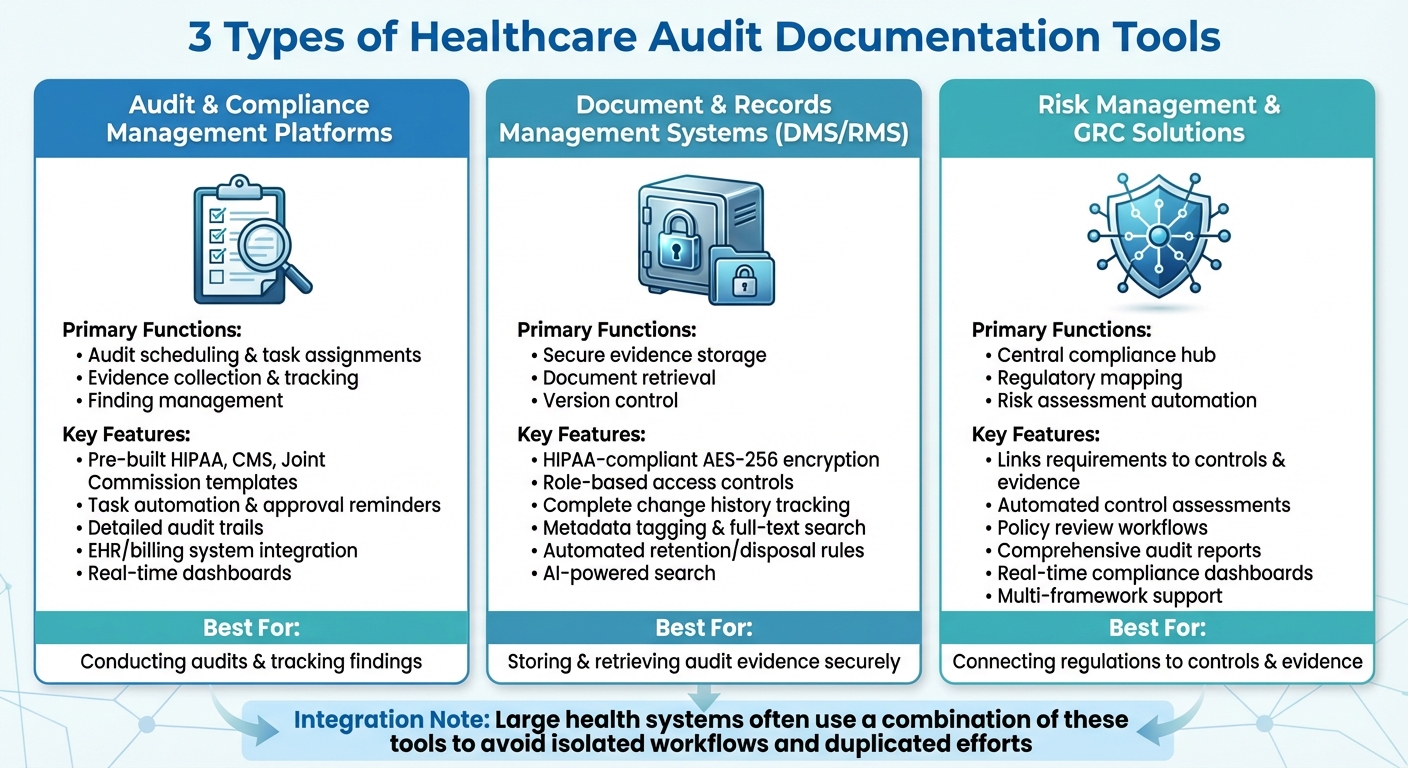
Comparison of Healthcare Audit Documentation Tool Types and Key Features
Healthcare organizations tend to rely on three main types of tools to handle audit documentation, each serving a specific purpose. These include audit and compliance management platforms, document and records management systems (DMS/RMS), and risk management and GRC (governance, risk, and compliance) solutions. Together, these tools streamline processes like audit planning, evidence tracking, secure document storage, and risk assessment.
In larger health systems, it’s common to use a combination of these tools to avoid isolated workflows and duplicated efforts. For instance, a hospital might use a DMS for securely storing policies, an audit platform to manage findings and corrective actions, and a GRC tool for high-level reporting to the board. Each tool plays a distinct role in ensuring efficient audit compliance, as outlined below.
Audit and Compliance Management Platforms
These platforms handle the nuts and bolts of conducting audits. They cover everything from scheduling and task assignments to evidence collection and tracking findings. Many platforms come with pre-built templates and checklists aligned with regulatory standards like HIPAA, CMS, and Joint Commission, making it easier for auditors to gather consistent evidence and link it to specific controls.
Task automation is a key feature - evidence requests and approval reminders are sent to the right team members, ensuring nothing falls through the cracks. Detailed audit trails document who uploaded, reviewed, or approved each piece of evidence, which is essential for demonstrating accountability to regulators and external auditors. Integration with systems like electronic health records (EHR), billing, and quality management further reduces manual data entry and the risk of errors.
Real-time dashboards replace outdated spreadsheet tracking by giving a clear view of audit progress, recurring issues, and control effectiveness, all in one place.
Document and Records Management Systems
Once audit planning is underway, document systems ensure that all evidence is securely stored and easy to retrieve. Healthcare-specific DMS platforms go beyond generic cloud storage by offering features like HIPAA-compliant encryption (AES-256), role-based access controls, and detailed audit logs that track who accessed, edited, or deleted files.
Version control is another critical component. These systems maintain a complete history of document changes, which is crucial when auditors need to see what a policy looked like at a specific time. Metadata tagging and full-text search capabilities allow compliance teams to locate specific documents - such as firewall logs or training records - in minutes rather than days.
Retention and disposition rules help organizations meet legal record-keeping requirements by automating the archiving or disposal of documents based on predefined schedules. Some systems even incorporate AI-powered search tools, allowing staff to ask questions and quickly find relevant policies without sifting through folders manually.
Risk Management and GRC Solutions
Risk management and GRC tools act as a central hub, connecting regulatory requirements to specific controls and evidence. For example, a requirement under the HIPAA Security Rule might be linked to specific policies, logs, and other evidence sources. This mapping helps compliance teams quickly identify gaps in documentation or outdated evidence.
These tools also automate tasks like control assessments, policy reviews, and user attestations. All evidence - whether it’s a questionnaire, screenshot, or report - is stored and tagged to the appropriate controls and risks. When auditors request proof of compliance, GRC tools can generate comprehensive reports that consolidate all relevant data, saving time and effort.
A standout example in this category is Censinet RiskOps™, a platform tailored to healthcare. It consolidates vendor and enterprise risk evidence into one system, using workflows designed specifically for healthcare settings. By linking vendors to clinical systems, it simplifies third-party risk documentation.
Many GRC platforms also feature real-time dashboards or compliance scoring across various frameworks, helping healthcare leaders prioritize risks and prepare for audits involving multiple regulations. As James Case, VP & CISO at Baptist Health, explained:
"Not only did we get rid of spreadsheets, but we have that larger community [of hospitals] to partner and work with." [1]
sbb-itb-535baee
How to Select and Implement Audit Documentation Tools
Matching Tools to Your Regulatory and Operational Requirements
Start by aligning your organization's regulatory obligations with the features of potential audit tools. Make a comprehensive list of all applicable frameworks, such as HIPAA, HITECH, CMS Conditions of Participation, Joint Commission standards, state privacy laws, and, if relevant, 21 CFR Part 11 for research sites or PCI DSS for payment processing. Ensure that any tool you consider can handle the necessary controls, templates, reporting formats, and security measures required by these regulations.
Your organization's size and care setting will also influence your choice. For smaller clinics or ambulatory practices, look for lightweight, HIPAA-compliant tools that integrate with a limited number of systems and offer basic workflow automation and permissions at a lower cost. On the other hand, large hospital systems or integrated delivery networks often require enterprise-grade platforms that can handle thousands of users, complex cross-departmental workflows, and high volumes of clinical and non-clinical evidence. If your organization conducts clinical trials or FDA-regulated activities, prioritize tools with features like version control, change history, and validation documentation to meet compliance standards for research.
As Matt Christensen, Sr. Director GRC at Intermountain Health, explains:
"Healthcare is the most complex industry... You can't just take a tool and apply it to healthcare if it wasn't built specifically for healthcare." [1]
Another key factor is estimating your documentation volume. Consider how many audits you conduct annually, the average number of artifacts per audit, and how long you need to retain documentation. This will help you assess the storage, performance, and archiving capabilities required to keep costs manageable as your organization scales.
Finally, evaluate how well the tools integrate with your existing healthcare systems.
Connecting with Existing Healthcare Systems
Seamless integration with EHRs and other clinical systems is essential to reducing manual work and enabling more advanced analysis. Start by defining the minimum dataset auditors need, such as metadata, specific fields, or de-identified data, and configure the integration to restrict access accordingly. This avoids unnecessary and broad EHR data pulls. Use secure APIs with features like strong authentication, TLS encryption, and detailed access logging. Also, ensure role-based access controls are consistent between the EHR and the audit platform, so only authorized staff can view protected health information (PHI).
Regularly review security and access settings and maintain Business Associate Agreements where needed to ensure compliance with HIPAA and your organization's privacy policies as workflows and staff roles change.
Look for tools with native connectors or APIs for your billing, HR, and ticketing systems to streamline the process of pulling records, access logs, and change histories for audits. Integration with identity and access management (IAM) systems and single sign-on (SSO) can enforce least-privilege access, simplify the user experience, and provide clean audit trails. For organizations managing third-party vendor risks, platforms like Censinet RiskOps™ centralize vendor risk assessments, security documentation, and PHI-related risk reporting, reducing the need to collect the same data repeatedly across different audits.
Training and Adoption Planning
Once you've selected and integrated the right tool, proper training is critical to ensure compliance and efficiency.
Training should be tailored to specific roles. Clinicians and front-line staff need concise instructions on how their daily tasks - such as charting, coding, and incident reporting - contribute to audit readiness. Compliance teams, however, require more in-depth training on configuring workflows, collecting evidence, and generating reports. IT and security teams should focus on managing integrations, provisioning users, and monitoring audit trails to prevent errors that could compromise audit integrity.
Practical, scenario-based training works best. For example, simulate a HIPAA or CMS audit, or rehearse responding to an OCR request, so staff can see how the tool functions under real-world conditions. Provide short, on-demand resources like videos, quick reference guides, and in-tool walkthroughs for ongoing support. After major updates, offer refresher sessions to ensure continued adoption and minimize reliance on one-time training.
Begin with a pilot program in one department or service line. This allows you to test integrations, workflows, and training materials in a controlled environment. Use feedback from the pilot to refine templates, evidence categories, and role definitions before rolling the tool out organization-wide. Configure dashboards and analytics to give clinicians and managers insights into documentation performance and error trends, promoting continuous improvement. Finally, make proper documentation easier by integrating templates, smart phrases, and real-time alerts into the EHR, helping to prevent gaps that could lead to audit findings.
Conclusion
For U.S. healthcare organizations, keeping up with strict regulatory demands means having airtight audit documentation. Platforms designed specifically for healthcare simplify this process by centralizing evidence, automating workflows, and syncing with EHR and clinical systems. Unlike generic file storage, these tools offer HIPAA-compliant controls, audit trails, and healthcare-specific workflows - essentials for safeguarding PHI and meeting regulatory expectations. This is why more organizations are turning to healthcare-focused platforms that combine precision and efficiency.
Healthcare’s unique challenges call for solutions tailored to its needs. Generic tools often fall short when it comes to navigating the complex regulatory landscape and operational demands of the industry. Purpose-built platforms step in to fill this gap, offering features that align with the realities of healthcare settings.
For example, Censinet RiskOps™ integrates vendor risk assessments and PHI protection into a single, streamlined system. By consolidating risk data and documentation in one place, it allows organizations to handle audits and regulatory requests with ease, eliminating the scramble to gather information from scattered sources.
Shifting from a reactive, audit-by-audit approach to continuous audit readiness is key. Embedding documentation and risk management into daily operations ensures that compliance leaders can address gaps proactively. Features like real-time dashboards, automated reminders, and performance tracking make it easier to stay ahead of audits. This proactive stance not only strengthens compliance but also protects revenue and frees up clinical and administrative staff to focus on patient care. The results are clear: fewer negative audit findings, faster response times, lower compliance costs, and improved operational stability.
Success in today’s heavily regulated healthcare environment comes down to choosing the right tools and implementing them effectively. With proper integration, training, and governance, these platforms can make a lasting impact, helping organizations stay compliant while supporting their broader mission of delivering quality care.
FAQs
Why is Censinet RiskOps™ a great choice for managing healthcare audit documentation?
Censinet RiskOps™ is purpose-built for healthcare organizations, offering a streamlined way to manage audit documentation. Leveraging its AI-driven platform, it simplifies risk assessments, automates tedious manual tasks, and aligns with industry compliance standards. This allows healthcare teams to handle audits more efficiently while maintaining high security and conserving valuable resources.
By prioritizing ongoing risk management, Censinet RiskOps™ protects critical assets like patient data and clinical systems. This ensures a secure and efficient audit process, specifically tailored to the unique challenges of the healthcare sector.
How does AI automation help healthcare organizations stay audit-ready?
AI automation makes it easier for healthcare organizations to stay prepared for audits by simplifying complicated documentation tasks, cutting down on manual work, and aligning processes with industry regulations. By analyzing data in real time, it can spot potential risks, address them proactively, and ensure records are always accurate and up to date.
This efficient system not only saves valuable time but also boosts productivity, allowing healthcare teams to focus more on providing excellent patient care rather than getting bogged down in paperwork.
Why is centralized storage important for managing healthcare audit documentation?
Centralized storage plays a key role in managing healthcare audit documentation by keeping records organized, secure, and easy to access. This approach not only simplifies the audit process but also minimizes errors and ensures compliance with strict regulatory requirements.
With centralized documentation, healthcare organizations can save valuable time, enhance team collaboration, and maintain stronger oversight of crucial data like patient records and operational files. It also ensures a smoother, more efficient audit process - something that's increasingly important in today’s highly regulated healthcare landscape.
