
Privileged Access Management (PAM) is crucial for healthcare organizations to meet HIPAA's strict security standards. PAM focuses on protecting sensitive accounts that can access or modify electronic Protected Health Information (ePHI). It enforces least privilege access, requires multi-factor authentication (MFA), monitors user sessions, and keeps detailed audit trails. These controls align with HIPAA's requirements for access control, authentication, and activity logging.
Key benefits of PAM for HIPAA compliance include:
- Access Control: Restricts access based on roles, ensuring users only have permissions necessary for their job.
- Audit Trails: Logs all privileged actions, aiding in monitoring and forensic investigations.
- Emergency Access: Provides secure, temporary access during crises with full oversight.
- Vendor Management: Limits third-party access with time-bound permissions and session monitoring.
How PAM Meets HIPAA Security Requirements
HIPAA requires both administrative and technical safeguards to protect electronic Protected Health Information (ePHI). Privileged Access Management (PAM) helps meet these requirements by centralizing control over privileged accounts and enforcing principles like least privilege through credential vaulting, role-based access, and just-in-time access. These features align with HIPAA's information access management (§164.308(a)(4)) and access control (§164.312(a)) standards.
PAM also supports compliance with audit controls (§164.312(b)) by providing detailed logging, session recording, and reporting for all privileged actions involving ePHI systems. Multi-factor authentication and centralized identity verification ensure compliance with §164.312(d). Additionally, PAM-driven policies for access approval, role assignments, and periodic reviews reinforce HIPAA's security management and workforce security mandates (§§164.308(a)(1) and 164.308(a)(3)).
Censinet RiskOps™ takes this a step further by integrating PAM with risk management, enhancing an organization's overall HIPAA compliance strategy. These capabilities serve as the foundation for PAM's specific controls, outlined below.
Access Control and Least Privilege
HIPAA's access control standard ensures that only authorized individuals or systems can access ePHI. PAM enforces this by assigning user privileges based on job roles and adhering to the principle of granting only the minimum necessary access.
For example, PAM systems create role-based access profiles tailored to specific roles like nurses, physicians, biomedical engineers, revenue cycle staff, and third-party vendors. Permissions are assigned at a granular level - such as viewing, modifying, or executing actions on ePHI systems. Features like just-in-time elevation allow temporary, task-specific privileges, reducing the risk of unauthorized access. PAM also supports segregation of duties. For instance, a HIPAA security officer can approve policies without needing direct access to sensitive data.
Audit Trails and Activity Logging
HIPAA's audit control standard requires organizations to track and review activity within systems containing ePHI. PAM solutions offer centralized, tamper-proof logging of privileged account activities, capturing critical details like user identity, system accessed, timestamps, and specific actions performed. Many PAM tools go further by recording full session details, including keystrokes, commands, and screen video, enabling thorough forensic investigations if a breach occurs.
These logs help compliance teams maintain complete audit trails. For example, they can verify whether vendors used multi-factor authentication for a specific, time-limited session. Additionally, exporting these logs to SIEM or GRC tools supports HIPAA-required security assessments, risk analyses, and regulatory investigations.
Emergency Access Procedures
HIPAA mandates emergency access procedures to ensure that authorized personnel can access ePHI during crises without compromising security. PAM addresses this by implementing controlled, auditable break-glass workflows. These workflows include predefined emergency roles, such as "ER physician emergency EHR access" or "on-call infrastructure engineer", with permissions limited to the scope of the emergency.
During an emergency, users request access through a PAM portal, providing justification and completing multi-factor authentication. The system then issues temporary credentials via a secure vault and launches a fully monitored session. Once the emergency is resolved, privileges are automatically revoked, and detailed reports are generated for review.
Next, we’ll explore actionable steps for implementing PAM in healthcare environments.
Step-by-Step PAM Implementation for Healthcare
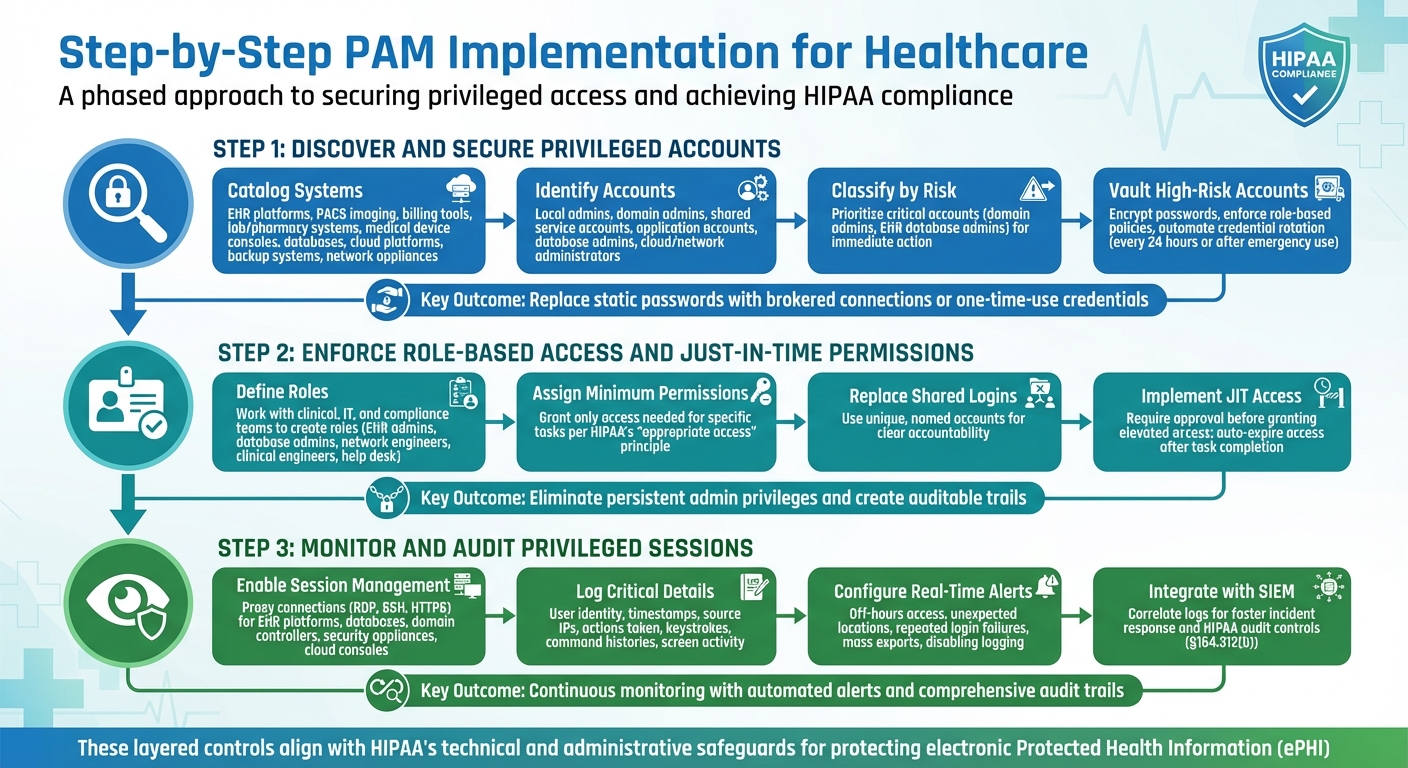
3-Step PAM Implementation Process for HIPAA Compliance in Healthcare
Introducing Privileged Access Management (PAM) into a healthcare setting demands a careful, phased approach. This ensures both security and smooth operations. The process begins with identifying privileged accounts tied to systems managing electronic protected health information (ePHI). From there, it progresses to securing credentials, enforcing least privilege access, and implementing continuous monitoring. Each step builds upon the last, creating strong, layered controls that align with HIPAA's technical and administrative safeguards. These steps also integrate seamlessly with HIPAA compliance requirements, reinforcing the foundational PAM controls previously outlined.
Discover and Secure Privileged Accounts
Start by cataloging all systems that handle ePHI. These may include EHR platforms, PACS imaging systems, billing tools, lab and pharmacy systems, medical device consoles, databases, hypervisors, cloud platforms, backup systems, and network appliances. Map these systems to your HIPAA-covered entities and business associate agreements to track the flow of protected health information.
Automated scans can help identify all privileged accounts, such as local administrator accounts, domain admins, shared service accounts, application-specific accounts, database administrators, and cloud or network device administrators. Cross-check these findings with HR records and configuration databases to pinpoint orphaned or unused credentials. Classify accounts by their risk level, prioritizing critical ones - like domain admins and EHR database administrators - for immediate action.
High-risk accounts should then be moved to a PAM vault, where passwords are encrypted, role-based policies are enforced, and credentials are rotated automatically (e.g., every 24 hours or after emergency use). To prevent attacks like credential stuffing, replace static passwords with brokered connections or one-time-use credentials so administrators never directly handle sensitive passwords. For service and application accounts that can’t accommodate frequent password changes without disrupting workflows, use your PAM platform’s API or connectors to manage rotation seamlessly.
Enforce Role-Based Access and Just-in-Time Permissions
Work with clinical, IT, and compliance teams to define clear roles for different operational groups - such as EHR administrators, database admins, network engineers, clinical engineers, and help desk teams. Assign each role only the permissions needed to perform their specific tasks, adhering to HIPAA’s principle of granting "appropriate access" to ePHI. Replace shared, generic admin logins with unique, named accounts to ensure clear attribution and accountability.
Eliminate persistent admin privileges by implementing approval-based Just-in-Time (JIT) access. For example, require supervisor approval or change-control sign-off before granting elevated access, and ensure access automatically expires once the task is completed. This approach reduces standing privileges, limits the attack surface, and creates an auditable trail that satisfies HIPAA requirements. With these safeguards in place, the next step is to monitor these activities continuously to detect and address any irregularities.
Monitor and Audit Privileged Sessions
Once access controls are secured and role-based permissions are enforced, continuous monitoring becomes essential for compliance and security. Enable privileged session management for high-risk systems like EHR platforms, databases, domain controllers, security appliances, and cloud consoles. Use your PAM gateway to proxy connections (e.g., RDP, SSH, HTTPS), allowing it to capture keystrokes, command histories, and screen activity without needing agents installed on every server.
Session monitoring should log critical details such as user identity, timestamps, source IPs, and actions taken. Configure real-time alerts for unusual behavior, like access during off-hours, attempts from unexpected locations, repeated login failures, or risky actions like mass exports or disabling logging on clinical systems. Alerts should immediately notify your security team and prioritize sessions involving production EHRs or PHI databases. PAM controls can also be configured to terminate or lock sessions if certain conditions are met - such as attempts to disable antivirus, access restricted records, or exceed session time limits.
Integrate these session logs with your SIEM for streamlined correlation and faster incident response. This supports HIPAA’s requirement to log and review access to ePHI systems (§164.312(b)). Regularly review and adjust alert settings to reduce false positives, ensuring clinical and IT teams can trust the system during investigations and audits.
Maintaining PAM for Continuous HIPAA Compliance
Getting started with Privileged Access Management (PAM) is just the first step. To stay compliant with HIPAA, organizations must keep policies updated, review access regularly, manage vendor access carefully, and ensure systematic reporting. PAM isn’t a one-and-done solution - it’s an ongoing effort that adapts to changes in clinical workflows, technology, and regulatory demands.
Policy Development and Access Reviews
Start by creating formal, written PAM policies that align directly with HIPAA’s Security Rule. These policies should address key areas like managing privileged account lifecycles, enforcing least privilege, requiring multi-factor authentication (MFA) for administrative access, monitoring sessions, and implementing emergency access procedures. Each policy should explicitly reference relevant HIPAA standards, such as:
- 45 C.F.R. §164.308(a)(3): Workforce security
- 45 C.F.R. §164.308(a)(4): Information access management
- 45 C.F.R. §164.312(a–d): Technical safeguards for access control, audit controls, integrity, and authentication
Make sure your policies are role-based and follow the principle of least privilege. Review these policies every quarter to ensure they remain effective and compliant.
Quarterly privileged access reviews are equally important. During these reviews, confirm that each role still requires the access it has, revoke unnecessary privileges, and disable unused or orphaned accounts. Document every action and outcome to prepare for audits. To avoid conflicts of interest, the HIPAA security official responsible for overseeing PAM policies should not have direct privileged access to systems containing electronic protected health information (ePHI). This separation of duties helps meet HIPAA’s requirement for a designated security official while minimizing risks.
Once internal policies are solid, extend these controls to include third-party access.
Vendor and Third-Party Access Management
Vendors should only connect through your PAM system, using MFA, credential vaulting, and session recording. Implement just-in-time or scheduled access windows, automatically revoking access once the work is done.
To streamline vendor risk management, platforms like Censinet RiskOps™ can be a game-changer. Censinet operates as a cloud-based risk exchange, making it easier for healthcare organizations to securely share cybersecurity and risk data with over 50,000 vendors and products. By replacing manual, spreadsheet-heavy processes, it improves efficiency in managing vendor access. As Terry Grogan, CISO at Tower Health, shared:
"Censinet RiskOps allowed 3 FTEs to go back to their real jobs! Now we do a lot more risk assessments with only 2 FTEs required."
By integrating PAM with tools like Censinet RiskOps™, you can continuously monitor vendor access, ensure compliance with business associate agreements, and minimize the risk of third-party breaches - all while maintaining HIPAA-aligned traceability.
The next critical piece is ongoing reporting and incident response.
Reporting and Incident Response
PAM-generated reports are essential for demonstrating HIPAA compliance to auditors and regulators. Set up regular reports covering privileged access approvals, account changes, policy violations, and session activities. Key reports for HIPAA audits include:
- Privileged access inventories
- Entitlement change histories
- Privileged session logs
- Emergency access or exception reports
These reports should clearly show who accessed which system, when, and with what permissions. For instance, a quarterly summary might include the total number of privileged accounts by system, the percentage using MFA, admin roles added or removed, instances of emergency access with justification, and any anomalies like off-hours access to electronic health record (EHR) systems. Retain PAM logs and session recordings according to your organization’s policies and legal requirements, ensuring their integrity and confidentiality.
If a HIPAA breach or security incident occurs, PAM data becomes a critical forensic tool. Investigators can use it to reconstruct privileged activity and determine if ePHI was accessed, modified, or exfiltrated. Start by reviewing timelines of privileged logins and access elevations during the suspected breach period. Then, analyze session recordings or keystroke logs for affected systems, such as EHR databases or PHI file servers. Cross-check PAM logs with security alerts from your SIEM and endpoint tools to confirm which account was used, whether MFA was bypassed, and which patient records or systems were accessed. This process supports decisions on breach notifications.
PAM also plays a vital role in containment. It allows you to quickly rotate credentials, lock accounts, and revoke administrative rights for compromised accounts. These actions, along with all investigative steps, should be thoroughly documented as part of your incident response records.
sbb-itb-535baee
Measuring PAM Performance for HIPAA Compliance
Once your Privileged Access Management (PAM) system is in place, it’s crucial to measure its performance to ensure ongoing HIPAA compliance. These measurements validate how well your organization is meeting HIPAA’s security standards. Under 45 C.F.R. §164.308(a)(1), HIPAA mandates continuous risk analysis and management of security measures. PAM performance plays a key role here, demonstrating how effectively your organization enforces access controls, maintains audit trails, and implements authentication safeguards as outlined in 45 C.F.R. §164.312.
Defining Metrics and KPIs
To assess PAM performance, start by linking HIPAA standards to specific PAM controls and defining measurable indicators. Here are a few key areas to focus on:
- Privileged Account Coverage: Monitor the percentage of privileged accounts discovered and onboarded into your PAM system, those using multi-factor authentication (MFA), and those assigned least-privilege roles.
- Activity and Risk Monitoring: Track metrics like the number of high-risk privileged sessions (e.g., direct database access), the rate of denied access attempts, and the number of security incidents involving privileged accounts.
- Lifecycle Management: Measure how quickly privileged access is revoked when employees leave or change roles, and count the number of orphaned accounts identified during periodic reviews.
The table below provides examples of key performance indicators (KPIs) that align with HIPAA requirements:
| Measurement Area | Example KPI | HIPAA Link |
|---|---|---|
| Privileged account coverage | % of privileged accounts onboarded into PAM | Ensures proper access procedures (164.308(a)(4)) |
| Access control strength | % of privileged accounts using MFA | Supports authentication safeguards (164.312(d)) |
| Least privilege enforcement | % of accounts with minimal role-based permissions | Adheres to the minimum necessary standard |
| Monitoring and auditing | % of privileged sessions recorded | Meets audit control requirements (164.312(b)) |
| Lifecycle management | Average time to revoke access after role change | Reduces risk of unauthorized access |
Before implementing PAM, establish baseline metrics - such as the total number of privileged accounts, unmanaged accounts, and shared accounts. Then, track improvements over time. As Brian Sterud, CIO at Faith Regional Health, explains:
“Benchmarking against industry standards helps us advocate for the right resources and ensures we are leading where it matters.”
Using Audit Findings and Risk Assessments
Incorporate privileged access tests into your annual HIPAA risk assessments. Review administrative accounts across electronic health record (EHR) systems, databases, and network devices to identify gaps. PAM audit data can also support incident investigations and help demonstrate due diligence to regulators. For example, if an audit uncovers excessive privileges or missing MFA, take actionable steps such as refining role definitions, implementing stricter approval workflows, or expanding session recording.
Healthcare organizations can also use benchmarking tools, like Censinet RiskOps™, to compare their PAM performance with industry standards. This can highlight areas for improvement and justify investments in training or technology. Regular audits and risk assessments create a feedback loop that strengthens PAM controls, reduces cybersecurity risks, and ensures HIPAA compliance.
Training and Awareness Programs
Performance metrics and audit insights should feed into continuous staff training. HIPAA’s administrative safeguards require ongoing education on security measures. Focus training programs on system administrators, database administrators, and security engineers, covering PAM workflows, least-privilege principles, emergency access procedures, and HIPAA’s minimum necessary standard.
Training should include real-world examples of how misusing privileged access can lead to HIPAA violations. Measure the effectiveness of these programs through:
- Completion rates and quiz scores
- Reductions in policy violations (e.g., direct logins without PAM, password sharing)
- Results from phishing simulations targeting privileged users
Privileged accounts are high-value targets for attackers, as highlighted in HHS guidance. Phishing simulations and tracking staff-reported access issues can provide insights into awareness levels. An increase in reported issues often signals improved vigilance. By correlating these training metrics with a decline in privileged-access-related incidents, you can demonstrate that education is bolstering your HIPAA-aligned PAM practices.
Conclusion
Privileged Access Management (PAM) is a key control for healthcare organizations striving to meet HIPAA requirements and safeguard patient data. By enforcing the principle of least privilege, using multi-factor authentication, recording privileged sessions, and maintaining comprehensive audit trails, PAM addresses the Security Rule's technical safeguards for access control, authentication, and auditability under 45 C.F.R. §164.312. Beyond compliance, PAM supports efficient clinical operations - features like just-in-time access and secure break-glass procedures ensure clinicians and IT teams can quickly access critical systems during emergencies without compromising security, balancing patient safety with regulatory obligations.
PAM isn’t a one-and-done task. Healthcare organizations must embrace ongoing refinement: updating policies, conducting regular access reviews, monitoring privileged sessions, and improving controls based on audits and incident reports. A mature PAM program blends technology with governance and culture, requiring clear roles, well-documented procedures, workforce training, and strong executive backing to maintain HIPAA-compliant practices over the long haul.
PAM also plays a vital role in managing risks tied to third-party vendors. With healthcare organizations relying on numerous vendors who need privileged access to systems containing electronic Protected Health Information (ePHI), extending PAM controls to these external parties is critical. Role-based access, session monitoring, and time-limited permissions help mitigate vendor-related risks and ensure compliance with HIPAA’s business associate requirements.
To strengthen their PAM efforts, healthcare organizations can leverage specialized risk management platforms like Censinet RiskOps™. This platform helps manage risks across vendors, patient data, medical devices, and supply chains while offering cybersecurity benchmarks to evaluate PAM performance against industry standards. Such tools foster continuous risk reduction and provide a solid foundation for justifying investments in PAM technology and training.
With evolving cyber threats and increasing regulatory scrutiny on privileged user controls, healthcare leaders - such as CIOs, CISOs, and compliance officers - should view PAM as a strategic priority that protects both compliance and patient safety. By implementing strong PAM controls, tracking their effectiveness, and adopting tools that promote ongoing improvement, healthcare organizations can minimize unauthorized access, avoid costly HIPAA violations, and maintain the trust patients place in them to safeguard their most sensitive information.
FAQs
How does Privileged Access Management (PAM) help maintain HIPAA compliance during emergencies?
Privileged Access Management (PAM) plays a key role in ensuring HIPAA compliance during emergencies by controlling who can access sensitive patient data. With PAM, healthcare professionals can securely and efficiently access critical Protected Health Information (PHI) when every second counts, without compromising security.
Another important feature of PAM is its ability to generate detailed audit trails. These logs record who accessed specific data and when, helping healthcare organizations meet HIPAA’s accountability and data protection standards. This system not only keeps patient information safe during high-pressure moments but also minimizes the chances of unauthorized access or data breaches.
How does PAM help manage third-party vendor access to meet HIPAA requirements?
Privileged Access Management (PAM) plays a crucial role in helping healthcare organizations oversee third-party vendor access. It does so by implementing strong authentication protocols, real-time activity tracking, and fine-tuned access controls. These tools ensure vendors can only interact with the specific systems and data necessary for their tasks, minimizing the chances of unauthorized or excessive access.
By restricting access to sensitive patient information and Protected Health Information (PHI), PAM not only helps maintain HIPAA compliance but also protects vital healthcare systems from potential breaches or misuse.
How can healthcare organizations evaluate the performance of their PAM systems for HIPAA compliance?
Healthcare organizations can gauge how well their Privileged Access Management (PAM) systems align with HIPAA requirements by paying close attention to specific performance indicators. These include risk assessment results, monitoring of access activities, and response times to incidents. Regularly reviewing audit reports and measuring them against industry standards is another effective way to confirm that the system is reducing risks and staying compliant.
Tools like Censinet RiskOps™ can simplify these tasks by offering continuous monitoring and proactive risk management. This ensures that sensitive patient information, clinical applications, and other essential resources are safeguarded while meeting HIPAA standards.
