
Healthcare organizations are increasingly moving sensitive patient data and clinical systems to the cloud to improve security, scalability, and resilience. But this shift comes with significant challenges, especially around protecting Protected Health Information (PHI) and maintaining compliance with strict regulations like HIPAA and the HITECH Act. Here's what you need to know:
This guide explains how to securely migrate healthcare systems to the cloud while safeguarding patient data and ensuring compliance.
Regulatory Requirements and Risk Assessment
Before moving healthcare workloads to the cloud, it’s crucial to understand the regulatory landscape and evaluate your organization's risks. This preparation helps ensure that your migration doesn’t create compliance gaps or expose sensitive protected health information (PHI) to unnecessary risks. Let’s dive into the key U.S. regulations that will guide your cloud migration.
U.S. Healthcare Regulations You Need to Know
The Health Insurance Portability and Accountability Act (HIPAA) and the HITECH Act are the cornerstones of healthcare data protection in the U.S. When you migrate to the cloud, your cloud provider assumes the role of a Business Associate under HIPAA. This means they must sign a Business Associate Agreement (BAA) with your organization [1][4].
A BAA outlines responsibilities such as encryption, access controls, logging, incident response, breach notifications, subcontractor management, and the proper return or destruction of data [1][4]. It’s essential to ensure these responsibilities are clearly defined and aligned with your internal policies for data retention, backups, and disaster recovery. Additionally, your cloud provider should demonstrate their security capabilities by holding certifications like SOC 2, HITRUST, or ISO 27001.
Regulators, including the HHS Office for Civil Rights, closely monitor cloud usage and any potential misconfigurations. To avoid penalties, a well-documented risk analysis and risk management plan are non-negotiable [5][6].
Pre-Migration Risk Assessment
A detailed risk assessment is your first line of defense when preparing for migration. Start by inventorying all assets and PHI repositories. This step ensures you know exactly what data will be moved, where it resides, and who has access to it [1][4]. Next, evaluate your current security controls and identify any gaps that could result in vulnerabilities during or after the migration.
Consider modeling threats that are particularly relevant to healthcare, such as ransomware attacks, cloud misconfigurations, account takeovers, and third-party failures. For each identified threat, assess the likelihood of it occurring and its potential impact on patient care and PHI. This approach aligns with HIPAA’s risk analysis requirements.
While healthcare-specific Cloud Security Posture Management (CSPM) tools can help detect misconfigurations and compliance issues, human judgment remains critical. A manual review ensures risks are prioritized based on your organization's unique workflows and patient needs. These insights will guide the development of secure cloud architectures in later stages.
Managing Third-Party and Supply Chain Risks
It’s not just your cloud provider that needs scrutiny - other third parties involved in the migration process, such as consultants, SaaS vendors, or partners handling PHI, must also meet your security standards. Evaluate each vendor’s security posture, compliance coverage, and operational maturity through standardized questionnaires, independent audits, and technical reviews.
Key considerations include their willingness to sign HIPAA-compliant BAAs, documented security measures (like encryption, identity and access management, logging, and disaster recovery), and clear policies regarding data residency and backups. Additionally, review their incident response and breach notification processes to ensure they can alert you promptly if an issue arises.
Platforms like Censinet RiskOps™ simplify third-party risk assessments by automating evidence collection and enabling collaborative remediation. This tool provides a continuous view of vendor risks across your ecosystem, spanning patient data, clinical applications, medical devices, and supply chain partners [3][5]. For instance, Tower Health’s CISO Terry Grogan noted that adopting Censinet RiskOps™ significantly reduced the full-time employees required for risk assessments.
Continuous monitoring becomes even more critical post-migration, as your cloud environment evolves, new services are introduced, and regulatory requirements grow stricter. With regulatory and third-party risks thoroughly assessed, the next step is to focus on designing secure cloud architectures.
Secure Cloud Architecture and Security Controls
Once you've assessed the risks, the next step is creating a cloud environment that keeps PHI secure from the start. A secure healthcare cloud landing zone acts as the backbone of this setup. This is a pre-configured environment equipped with essential security features like network segmentation, encryption, identity management, and logging - all ready before you migrate any workloads [2][6]. This ensures PHI never touches unmanaged or public services. These foundational steps set the stage for implementing more detailed security measures, which we'll dive into below.
Building a Secure Healthcare Cloud Landing Zone
A well-designed landing zone should have separate environments for production, testing, and development. These environments need clear guardrails to keep PHI-handling workloads isolated from non-PHI systems [2][6]. To enhance security, use network segmentation with tools like VPCs, subnets, and security groups to separate clinical apps from public-facing or less secure components. For PHI traffic moving between on-premises data centers and the cloud, rely on private connectivity options such as site-to-site VPNs, AWS Direct Connect, or Azure ExpressRoute. This minimizes exposure to the public Internet [2][6].
Centralized logging and monitoring are non-negotiable. Tools like AWS CloudTrail, GuardDuty, and Security Hub - or their Azure and GCP counterparts - should track every access event, configuration change, and security alert [2][4][5]. Logs must be immutable and retained per your policies, ensuring they don't inadvertently expose PHI [5]. Many healthcare organizations aim to not only meet but also improve their HITRUST and HIPAA readiness scores during cloud migration, ensuring compliance isn't just a one-time achievement [2][5].
Identity, Access, and Zero-Trust Security
Strong identity and access management (IAM) is key to protecting clinical workloads. Follow least privilege principles by assigning roles with fine-tuned permissions, using time-limited access, and enabling just-in-time elevation for administrative tasks [1][4][8]. Implement Single Sign-On (SSO) and Multi-Factor Authentication (MFA) to secure user accounts without disrupting care operations. Regularly audit permissions and remove inactive accounts to reduce potential vulnerabilities.
A zero-trust model is particularly effective for healthcare environments, where implicit trust based on network location is no longer sufficient [7][8]. This model requires constant verification of users, devices, and workloads before granting access. Start with strict identity controls like SSO, MFA, and least privilege IAM. Then, add micro-segmentation to isolate clinical apps and enforce service-to-service authentication using mutual TLS or service meshes for cloud workloads. Finally, integrate behavior analytics and policy engines to adjust access dynamically based on factors like location, time, and device security [2][7]. Adopting zero-trust in phases minimizes disruptions to clinical workflows. Detailed audit logs tracking PHI access - including user identity, timestamps, and source - are essential for compliance and incident response [4][5]. These identity controls complement encryption efforts, ensuring only authorized users can access sensitive, encrypted data.
Encryption and Key Management
Protecting PHI requires encryption at rest and in transit. Use AES-256 encryption for stored data and TLS 1.2 or higher for data in transit [1][4][6]. Properly configure built-in encryption services and manage keys securely. For organizations with higher security or regulatory needs, Hardware Security Modules (HSMs) or cloud-based HSMs can store master keys and support customer-managed encryption keys [6]. Define clear key lifecycle policies, including regular rotation, revocation, and secure destruction [6]. With effective key management, even if data is compromised, it remains unreadable without access to the encryption keys.
Healthcare Cloud Migration Process
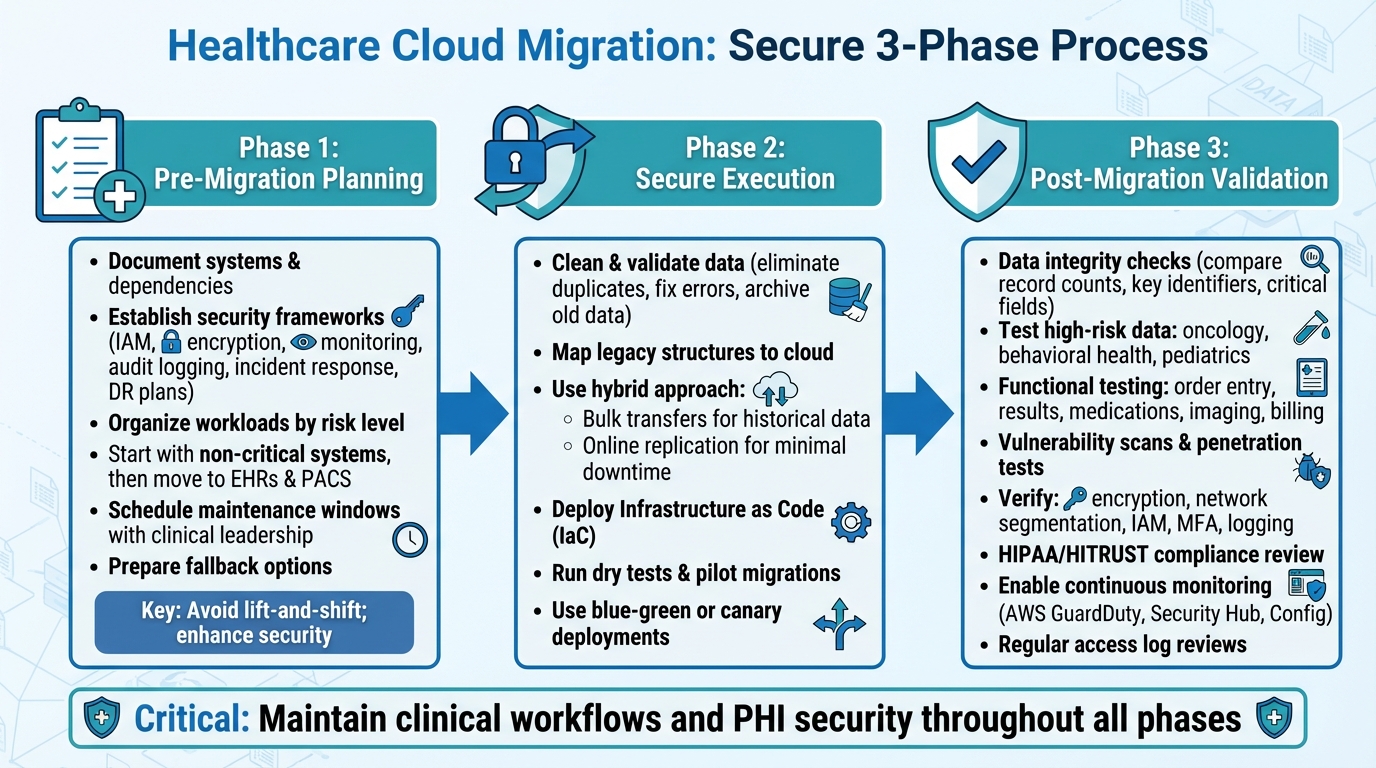
Healthcare Cloud Migration Security: 3-Phase Process for
Migrating healthcare systems to the cloud involves more than just moving data; it demands meticulous planning, secure execution, and thorough validation. These steps are critical for safeguarding Protected Health Information (PHI) and ensuring clinical operations remain uninterrupted. The process unfolds in three key stages: planning, secure execution, and validation.
Pre-Migration Planning and Strategy
Start by documenting all systems and their dependencies, keeping a sharp focus on maintaining clinical workflows. Before migrating anything, establish clear security and compliance frameworks that outline IAM policies, encryption standards, monitoring requirements, audit logging, incident response, and disaster recovery plans [1][2][4].
Organize workloads based on their risk level, complexity, and impact on clinical operations. Begin with non-critical systems to test migration processes before tackling essential systems like Electronic Health Records (EHRs) and Picture Archiving and Communication Systems (PACS). For these critical systems, schedule maintenance windows in collaboration with clinical leadership and ensure fallback options, such as on-premises or read-only modes, are ready. Rehearse runbooks to prepare for any issues [1][4]. Avoid simple lift-and-shift migrations, as they can carry over vulnerabilities and compliance issues. Instead, use this as an opportunity to enhance security measures and adopt best practices [2][7].
Data Preparation and Secure Migration Execution
Before migrating, clean and validate your data. Eliminate duplicates, fix errors, and archive older data that doesn’t need to be active in the new environment. This reduces both the volume of data to be migrated and potential risks [1][4][8]. Map legacy data structures to their cloud counterparts and conduct pilot tests to ensure accuracy.
For the migration itself, combine online replication for minimal downtime with bulk transfers for historical data, like years of imaging archives [1][2][4][7]. A hybrid approach often works best: pre-load historical data using bulk transfers, then use incremental replication for recent records to ensure a smooth transition [2][4]. Leverage Infrastructure as Code (IaC) to create secure, consistent environments and avoid misconfigurations [1][2][8]. Before migrating critical systems, run dry tests and pilot migrations on non-production workloads to validate everything - from data throughput to access controls and logging [2][7]. Techniques like blue-green or canary deployments allow you to keep the original environment active until the new cloud setup is fully functional and secure.
Once the migration is complete, immediately verify data integrity and security to maintain seamless clinical operations.
Post-Migration Validation and Hardening
After the migration, conduct data integrity checks. Compare record counts, key identifiers, and critical fields - such as allergies, medications, and problem lists - between the old and new systems [1][4][7]. Pay special attention to high-risk data subsets like oncology, behavioral health, and pediatric records to ensure consistency. Functional testing should confirm that clinical workflows, such as order entry, results reporting, medication reconciliation, imaging access, and billing, perform as expected or better than before [2][4].
Next, perform vulnerability scans, configuration reviews, and penetration tests to ensure the new cloud environment meets security standards. Verify that encryption, network segmentation, IAM, MFA, and logging are set up correctly [1][2][7]. Ensure that audit logs capture all PHI access details, including user identity, source, and timestamps. A formal HIPAA/HITRUST compliance review should follow, with documentation prepared for regulators and business partners [1][2][5].
Finally, enable continuous monitoring and alerting to detect suspicious activity, misconfigurations, and policy violations. Use tools like AWS GuardDuty, Security Hub, and Config for real-time oversight [2][5][7]. Regularly review access logs, update permissions, and test incident response and disaster recovery plans to keep your cloud environment secure over time [4][5][7]. This commitment to ongoing monitoring and refinement ensures your cloud infrastructure remains resilient and secure.
sbb-itb-535baee
Continuous Compliance and Risk Management
Moving to the cloud is just the beginning. Maintaining compliance is an ongoing effort that involves constant monitoring, regular audits, and proactive risk management to stay aligned with HIPAA, HITRUST, and evolving regulations. Once you've secured your migration and hardened your systems, continuous oversight becomes essential for ensuring long-term compliance and risk mitigation. Here's how to keep things on track in a fast-changing cloud landscape.
Maintaining Compliance in Cloud Environments
Staying compliant in the cloud requires a structured approach. Start by scheduling quarterly audits to check access controls, encryption protocols, configuration baselines, and business associate agreements (BAAs). These audits should include vulnerability assessments, penetration testing, and routine checks to confirm encryption is active for data both at rest and in transit. Regularly review IAM (Identity and Access Management) roles to enforce least-privilege access and promptly remove unused accounts. Audit logs should capture key details such as user identity, source, and timestamps for any PHI-related activity.
It's also important to keep policies up to date - review them annually or after major changes. Test your incident response and disaster recovery plans at least once a year using tabletop exercises and technical drills to ensure your team is ready for potential disruptions.
Using Censinet RiskOps™ for Continuous Risk Management
Censinet RiskOps™ offers healthcare organizations a streamlined way to manage compliance and risk. This cloud-based platform automates ongoing risk management processes, reducing the need for manual spreadsheets and repetitive questionnaires. Designed specifically for healthcare, RiskOps™ keeps third-party assessments up to date and simplifies collaboration by connecting users to a network of over 50,000 vendors and products. This network enables secure sharing of cybersecurity and risk data, while its benchmarking tools help organizations compare their security posture to industry standards.
Brian Sterud, CIO of Faith Regional Health, emphasized its value: "Benchmarking against industry standards helps us advocate for the right resources and ensures we are leading where it matters."
Metrics for Measuring Success
To evaluate the effectiveness of your compliance and risk management efforts, focus on key performance indicators (KPIs). Track the mean time to remediate (MTTR) critical vulnerabilities and the percentage of those resolved within designated timeframes. Assess compliance coverage by measuring how many assets meet HIPAA and HITRUST standards. Other useful metrics include the percentage of PHI-related systems with full audit log coverage, the rate of vendors with current risk assessments, and the number of unresolved high-risk findings tied to third parties.
Additionally, monitor the success of backup and disaster recovery tests and keep tabs on incident response metrics. Metrics like mean time to detect (MTTD) and mean time to contain (MTTC) cloud security events can provide leadership with actionable insights to refine and improve processes over time.
Conclusion
Migrating to the cloud in the healthcare sector isn't just a technical shift - it's a continuous responsibility centered on security, compliance, and protecting patient data. The strategies outlined earlier emphasize that success depends on thorough planning, secure implementation, and maintaining compliance over time. With healthcare being the top target for cyberattacks and 61% of healthcare data breaches in 2022 tied to cloud infrastructure [3], these efforts are absolutely critical.
The dynamic nature of cloud environments - where configurations and integrations evolve constantly - can lead to compliance gaps if not managed properly. Automated monitoring and routine audits are essential to stay ahead. As Matt Christensen, Sr. Director GRC at Intermountain Health, aptly put it:
"Healthcare is the most complex industry... You can't just take a tool and apply it to healthcare if it wasn't built specifically for healthcare."
Tools like Censinet RiskOps™ address this complexity by simplifying risk management, automating third-party assessments, and connecting healthcare organizations with a network of over 50,000 vendors and products. This approach showcases how leveraging the right technology can enhance both security and operational efficiency.
FAQs
What steps should healthcare organizations take to stay HIPAA-compliant when migrating to the cloud?
To ensure HIPAA compliance during a cloud migration, healthcare organizations need to prioritize several critical safeguards:
Beyond these technical measures, it’s essential to train staff on secure data handling practices. Using platforms like Censinet RiskOps™ can also simplify compliance management and help reduce risks during the migration process.
What are the best practices for managing third-party risks in healthcare cloud environments?
Healthcare organizations can tackle third-party risks in cloud environments by leveraging platforms like Censinet RiskOps™. These platforms offer features like continuous monitoring, simplified risk assessments, and real-time cybersecurity insights specifically designed for healthcare. By using such tools, organizations can spot vulnerabilities early and stay compliant with regulations such as HIPAA and HITECH.
To boost security, it’s important to perform detailed vendor risk assessments, maintain ongoing monitoring systems, and work closely with third-party vendors. Focusing on high-priority risks, guided by benchmarking data, allows organizations to allocate resources effectively, safeguard sensitive patient information, and strengthen their overall security framework.
What are the best practices for ensuring compliance after migrating to the cloud?
To stay compliant after migrating to the cloud, consider using automated risk management tools such as Censinet RiskOps™. These tools can help you monitor risks in real time and conduct continuous assessments, ensuring your organization stays ahead of potential issues. It's equally important to keep your policies up to date with the latest regulations and industry standards. Providing your staff with regular training is another crucial step to ensure they remain informed about compliance requirements.
You can also implement automated compliance checks to quickly spot and resolve any vulnerabilities in your system. By combining proactive monitoring with consistent updates, you can protect sensitive healthcare data while meeting regulatory expectations.
Related Blog Posts
- Ultimate Guide to Zero Trust in Healthcare Cloud
- Ultimate Guide to Data Residency in Healthcare Cloud
- Ultimate Guide to FedRAMP for Healthcare Cloud Systems
- HIPAA Compliance for Cloud Services: Checklist
{"@context":"https://schema.org","@type":"FAQPage","mainEntity":[{"@type":"Question","name":"What steps should healthcare organizations take to stay HIPAA-compliant when migrating to the cloud?","acceptedAnswer":{"@type":"Answer","text":"<p>To ensure HIPAA compliance during a cloud migration, healthcare organizations need to prioritize several critical safeguards:</p> <ul> <li><strong>Perform a comprehensive risk assessment</strong> to pinpoint vulnerabilities and address potential risks to sensitive patient data.</li> <li><strong>Use encryption</strong> for data both at rest and in transit to safeguard protected health information (PHI).</li> <li><strong>Enforce strict access controls</strong> with robust authentication methods to ensure that only authorized individuals can access PHI.</li> <li><strong>Confirm the cloud provider's compliance with HIPAA</strong>, ensuring they meet all Security Rule requirements and sign a detailed Business Associate Agreement (BAA).</li> <li><strong>Regularly monitor and audit cloud activities</strong> to identify and address any non-compliance or suspicious behavior promptly.</li> </ul> <p>Beyond these technical measures, it’s essential to train staff on <a href=\"https://censinet.com/perspectives/8-best-practices-for-patient-data-protection\">secure data handling practices</a>. Using platforms like <em>Censinet RiskOps™</em> can also simplify compliance management and help reduce risks during the migration process.</p>"}},{"@type":"Question","name":"What are the best practices for managing third-party risks in healthcare cloud environments?","acceptedAnswer":{"@type":"Answer","text":"<p>Healthcare organizations can tackle third-party risks in cloud environments by leveraging platforms like <strong>Censinet RiskOps™</strong>. These platforms offer features like <strong>continuous monitoring</strong>, <strong>simplified risk assessments</strong>, and <strong>real-time cybersecurity insights</strong> specifically designed for healthcare. By using such tools, organizations can spot vulnerabilities early and stay compliant with regulations such as HIPAA and HITECH.</p> <p>To boost security, it’s important to perform detailed <a href=\"https://www.censinet.com/vendor-solutions\">vendor risk assessments</a>, maintain ongoing monitoring systems, and work closely with third-party vendors. Focusing on high-priority risks, guided by benchmarking data, allows organizations to allocate resources effectively, safeguard sensitive patient information, and strengthen their overall security framework.</p>"}},{"@type":"Question","name":"What are the best practices for ensuring compliance after migrating to the cloud?","acceptedAnswer":{"@type":"Answer","text":"<p>To stay compliant after migrating to the cloud, consider using <strong>automated risk management tools</strong> such as Censinet RiskOps™. These tools can help you monitor risks in real time and conduct continuous assessments, ensuring your organization stays ahead of potential issues. It's equally important to keep your policies up to date with the latest regulations and industry standards. Providing your staff with regular training is another crucial step to ensure they remain informed about compliance requirements.</p> <p>You can also implement <strong>automated compliance checks</strong> to quickly spot and resolve any vulnerabilities in your system. By combining proactive monitoring with consistent updates, you can protect sensitive healthcare data while meeting regulatory expectations.</p>"}}]}
